Loading summary
Transcript295 lines
- [00:00]
A
It's time for Security now. Steve Gibson is here. Lots to talk about. Allianz Life. Stolen data now leaked, including, yes, Social Security numbers. Oh, boy. Some new features in Chrome, some good, maybe some not so good. And NIST rolls out encryption for IoT devices. That's a good thing. That and a whole lot more. Coming up next, Security now podcasts you.
- [00:27]
B
Love from people you Trust.
- [00:31]
A
This is TW. This is Security now with Steve Gibson. Episode 1039, recorded Tuesday, August 19, 2025. The sad case of Scriptcase. It's time for Security Now. Yes, indeed. You wait all week. I wait all week for Tuesday because it's a chance to talk to this brilliant man right here, Mr. Stephen Tiberius Gibson, the head of the chief. The. The man in charge of Security now. You know, now that I've been playing the piano, I think I can do. I could do live long and prosper. Oh, that's good. Oh, I got to work hard on it.
- [01:12]
B
Now that you're playing the piano, you may live long and prosper so well.
- [01:16]
A
One of the things you learn with the piano is to be able to kind of independently move the, the pinky and the ring finger, because there are ligaments to tying them together. And I could do it with one hand, but not the other. Anyway. Hello, Steve.
- [01:30]
B
Yo, my friend. So this is actually, I was wrong about it being a day near our birthday. It was August 19th, 2005. Oh, man.
- [01:45]
A
Happy birthday.
- [01:47]
B
That we recorded episode number one. And I. Our listeners who are paying attention on, are very, you know, focused on facts, which is, I think why they like this podcast is I made some comment about, oh, we'd be 21. And he said, he said, no, Steve, on your 20th birthday, you are now 20.
- [02:06]
A
But we begin our 21st year.
- [02:08]
B
Yes, that is true, but we're so. We are now 20.
- [02:11]
A
Happy birthday, Steve.
- [02:13]
B
As of today.
- [02:18]
A
So, yeah, congratulations. Wow. 20 years. It doesn't feel like that, does it? Or does.
- [02:26]
B
That's the problem, Leo, is that it would be better if it felt like 20 years because time accelerates as you age. I don't understand. Understand why. It's. It's like you're circling the drain or something. So you're faster, your velocity is increasing.
- [02:41]
A
Faster, and so there's a time.
- [02:43]
B
There's a relativistic time dilation effect, I think. So Happy birthday. That just suggests that the next 10 are just gonna fly by. Yeah. Something weird happened as I was musing over today's topic. Yes, some, Some. Some concepts that we've been toying with Some, some things we've been talking about the last couple years gelled into an. A stronger awareness and statement of what it means to that we're never going to get rid of bugs and we're never going to arrest all the bad guys. It. It like it shifts the responsibility to where I think it should be. Anyway, I think I've got today a really interesting topic which starts out being kind of strange. Today's title is the Sad Case of Script Case which is as we'll see, just another application this happens to be. They call themselves a low code website generator. The PHP code gets spit out and you use a ui, a drag and drop UI through the browser to build websites. As I began looking into it I got this sinking feeling about what it means and anyway we're going to have a great time looking at that, but we're going to. I want to briefly touch on something we, we talked about last week that, that, that I've continued to feel. It's just one last thing I wanted to talk about about, about how website summaries affect Internet economics because as I, as I work to educate myself further. After we talked about this last week I, I saw that this whole cloudflare perplexity conflict actually was a catalyst for a lot of discussion about sort of the not. Not user agents and, and robots. Txt files. But what does it mean? Like how is the Internet being changed? And exactly as you have said, Leo.
- [05:15]
A
That'S the thing, that's the conversation.
- [05:17]
B
Yes, yes. So I want to touch on that because I found a really interesting article online also it's time to urgently update Plex servers again. Alliance Life's stolen data unfortunately Leo, yours might be there too.
- [05:34]
A
Oh it is. It's in there, yeah.
- [05:35]
B
Has been leaked now onto the Internet as they threatened. Chrome is testing an incognito mode only unfortunately fingerprint script blocking which is interesting and Chrome 140 where that will appear in two weeks also has some other things we're going to talk about. Data brokers, not surprisingly are hiding their opt out pages from search engines. Secure messaging changes are coming to Russia. NIST has rolled out their lightweight IoT crypto and we're going to take a look at that. That's big news too because of course, Leo, you are encumbered. Not encumbered, you're encrusted with AI things that are monitoring everything that's explained.
- [06:27]
A
I have to say, you know another thing that's listening to everything we say.
- [06:32]
B
You don't wear them to bed, do you?
- [06:34]
A
Well, they're in the bedroom because that's where they charge. But I. I've stopped wearing them because. Oh, she makes an excellent point. There's no I really probably. I mean, it's one thing to record everything I, but to record everything everybody around me says is a little. Maybe a bridge too far.
- [06:51]
B
Maybe rude is.
- [06:52]
A
Rude would be the word.
- [06:53]
B
Four letter word you are looking for.
- [06:55]
A
My interest in these as ultimately as a tool, as an agentic tool, is genuine. I would someday love to have, you know, a little agent that knows everything that's going on well. And we haven't resolved the privacy issues.
- [07:09]
B
Are running a podcast that, you know, focuses on issues of AI.
- [07:13]
A
This is my job.
- [07:14]
B
And so you want to bring feedback. It lets you write off the cost of these. Although they're not that expensive.
- [07:19]
A
No, they're not that expensive. Yeah.
- [07:21]
B
No. Anyway, Anyway. Anyway. So the point is that if we get lighter weight crypto, then that means all of those little things that are communicating with other things can do. So saving battery power and having much stronger encryption as they're communicating. So that's good. Also, syncthing has moved to version 2.0 and actually beyond pretty quickly. We'll talk about that. I have a first take about Alien Earth, the first two episodes of which aired last Tuesday and the third one tonight.
- [07:58]
A
And I watched so that we could talk about it.
- [08:01]
B
Good. No spoilers here, but it'll be fun to talk with you about that. And then what can we learn from maybe finally from yet another critical vulnerability. And of course, we've got a fan favorite picture of the week that I think everyone will enjoy. So with any luck, we've got the hang of this. Leo after a full 20 years as we move into year 21.
- [08:28]
A
I should have baked a cake or something. I just. It's so exciting that we've done this for so long and just so grateful to you, Steve, because, I mean, folks, those of you who listen to the show and if maybe some of you listen to all 10, 39 episodes, just think of the wealth of learning you've got for free from this guy who works so hard to bring.
- [08:50]
B
I got an interesting bit of feedback from someone who joined us not that long ago and he'd heard me referring to other people's feedback about going back and listening from the beginning. So. And he got caught up and he didn't have anything else going on, so he started doing that and he. I think he's at like episode 400 and he said, oh, my God, there is so much back here.
- [09:15]
A
It's so rich.
- [09:16]
B
That's like, you know, and there were like all a lot of deep dives, a lot of multi episode tutorials about how what packets are and the notion of, of deterministic routing and dropping packets and how CPU architecture is, is created. I mean, and you know, everyone sort of thinks, oh, but that was 20 years ago. What could possibly be, you know, germane? Well, it's like a lot of that hasn't changed.
- [09:43]
A
A word of warning though, if you do want to listen to the entirety, Patrick tells me there are 76 days, 18 hours, 44 minutes and 7 seconds worth of shows. So put a few months aside to do that. You want to know the average length of each show. They're getting longer. It was or it is the average an hour, 46 minutes and 6 seconds per show. But the first one was only 18 minutes, so that brought the average down.
- [10:13]
B
It's funny too because that's where the 18 came from. The reason I thought our birthday was yesterday was 18 minutes. It was 18 minutes, not 18th of August. So when I checked, when I was talking to Bonito, when we were setting up here, I went back to make sure it was the 18th and I found out, oops, the 19th today is our.
- [10:35]
A
You can go to the website, they're all there. TWiT TV SN1. You'll find the very first episode. So congratulations. Worm turns I think as we begin, or I'm going to say it properly as we begin our 21st year in doing this show. What a great, What a great 20 year. I again, I don't understand how 20 years went by. That's a huge amount of time. I don't get it.
- [11:05]
B
But you know, one day at a time. One foot, one foot in front of the other.
- [11:11]
A
That's right. Unbelievable. Thank you, Steve. I really, I cannot thank you enough.
- [11:16]
B
Really been really. And I know, I know from the feedback how much this podcast, what a.
- [11:21]
A
Difference to our listeners.
- [11:22]
B
I mean it's really, you know, careers have been launched and I'm flattered.
- [11:27]
A
Absolutely.
- [11:27]
B
I'm hungry.
- [11:28]
A
People grew up listening to the show. People got into the business because of this show. People who have gotten certificates and promotions and better jobs because of this show. You've done a world of good and a lot of us, we.
- [11:40]
B
I wouldn't be here without you. Well, this was your dumb idea.
- [11:44]
A
20 years ago I had the idea. But then ever since I've just been a writer on the, on the Steve Gibson train. Thank you, Steve. I really appreciate it. Our show today, by the way, our Sponsors love you too because you bring to the show such expertise, a high quality set of listeners and the best listeners out there. And so we get the best sponsors like Threat Locker. For years you've talked about the whole idea of zero trust security and how good it is. I think I first heard about zero trust from you. Well, that's what Threat Locker does. But they make zero trust easy, inexpensive and it is a must have solution. Ransomware is devastating businesses worldwide. I don't. You know, if you listen to the show, you know this. It happens through phishing emails, it happens through infected downloads. We talked the other day about malvertizing malicious websites, RDP exploits. Man, I remember when you first started talking about Port 135 and not leaving it open. I mean, even today people are doing everything they can and still getting infected. And I don't want your company to be the next victim. That's why I want to tell you about ThreatLocker's Zero Trust platform. It's very simple. It's really three words. Threat Locker takes a proactive. Here's the three words. Deny by default. That's it. Deny by default approach. It blocks every action unless you explicitly authorize it. Ok? Which means zero days unknown exploits, AI exploits bad guys coming in over the transom. They can't do anything because you didn't authorize them to. It's simple. It protects you from of course, known threats, but also completely new unknown threats. That's why big enterprises that can't afford to be down for even one minute use threat locker like JetBlue. I mean if an airline goes down for half an hour, they lose millions. Infrastructure place like the port of Vancouver. Yeah, they use Threat Locker too. Threat Locker shields them from zero day exploits and can shield you from zero day exploits supply chain attacks while providing complete audit trails for compliance. Threat Locker's innovative ring fencing technology isolates critical applications from weaponization. Bad guys can't even touch them. It stops ransomware cold. It also has a very valuable impact of limiting lateral movement within your network. They just, they're stymied. Threat Locker works in every industry. It supports Mac environments as well as Windows. They've got great US based support and they're there every hour of the day 24. 7. Threat Locker is great. You get comprehensive visibility and control and you get an audit record which is fantastic for compliance. Let's talk about one of the big targets for ransomware gangs these days. You know, there's hospitals, there's schools and there's cities. Mark Tolson knows that he's IT Director for the city of Champaign, Illinois. They use Threat Locker. Here's the quote Mark says quote. Threat Locker provides that extra key to block anomalies that nothing else can do. If bad actors got in and tried to execute something, I take comfort in knowing that Threat Locker will stop that. End quote. Stop worrying about cyber threats. Get unprecedented, the best gold standard protection quickly, easily and cost effectively. Very cost effectively. I was shocked how cost effective Threat locker is. Visit threatlocker.com TWIT get a free 30 day trial. Learn more about how Threat Locker can help mitigate unknown threats and ensure compliance. That's threatlocker.com/twit. They, they are such proponents of, of zero trust, they actually have a conference every spring. I'm hoping we can go to it this year. It's in Orlando in I think March. It's called Zero Trust World. It's got a great name for it. A world where there is zero trust is a safer world for all of us. Threatlocker.com TWIT thank you threat Locker. All right, Steve. I have not looked. I have not.
- [16:01]
B
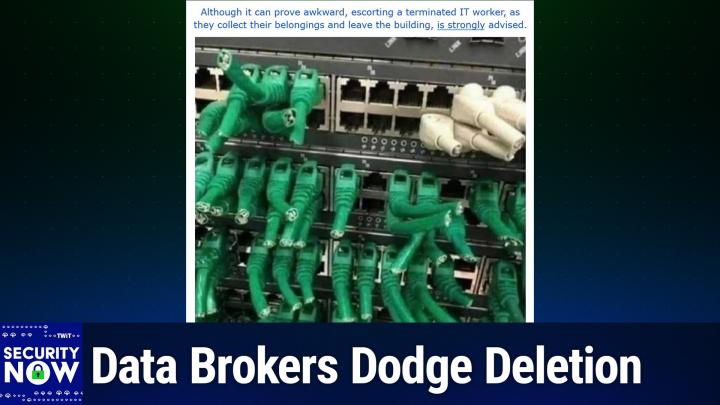
Okay, now this, this picture needed a longer caption. I see that I gave the ca. I gave it the caption. Although it can prove awkward, escorting a terminated IT worker as they collect their belongings and leave the building is strongly advised.
- [16:21]
A
Walk them out of the building. Don't let them back into the wire closet. Is that what you're saying?
- [16:25]
B
That's what I'm saying. And you see why?
- [16:27]
A
See why Here is scrolling up. Oh dear. Oh, this is your worst nightmare.
- [16:35]
B
Oh, so what we have. What we have is a picture of what was a heavily populated rack of switches and routers of some sort. They looked, just looked like, you know, high density switches which were very highly populated with, with green, you know, Cat 6 networking cables and some white ones where they've just all summarily been clipped with wire cutters leaving about a 1 inch pigtail off the end of the.
- [17:09]
A
Somebody was RD45 connector.
- [17:12]
B
So and in a hurry, they didn't have much time so they couldn't pull everything out. They just went through and went snip, snip, snip, snip, snip, snip, snip. So as I said, although it can prove awkward, escorting a terminated IT worker as they collect their belongings and leave the building.
- [17:28]
A
I thought there was going to be a pun with terminated. I thought maybe there was a pun in here, but no, this is the worst kind of termination. Oh boy. Yikes. Wow.
- [17:36]
B
Okay, so what I learned. In following up a bit further on the whole Cloudflare versus Perplexity question.
- [17:44]
A
Oh, good.
- [17:45]
B
Is that the Internet is. Is facing a profound change that's being driven by the presence of AI Web summary generators. When I went poking around to better educate myself about this issue, I discovered that a lot of the portion of the Internet that thinks about such things had blown up over this, you know, over the cloud, fair perplexity thing. I mean, it was a catalyst. And by this, I don't mean the mechanics of bots and user agents, which is what we were focused on last week, but over the fundamental change that users, and that's the key users are driving in the way information is obtained from the Internet. I found a terrific posting on a site called Contrary Research. Last Friday, they posted a piece titled Debating the Open Internet Cloudflare versus Perplexity. I've got a link in the show Notes for anyone who wants to go to that source material. They examined and explained both viewpoints of the debate, and toward the end they said this. They said, regardless of what people may think the Internet should do, it seems clear what it will do, which is to march to the beat of consumer preferences. Just ask Betamax, laserdiscs and the Concord. And if, you know, if this podcast's younger listeners are unaware of Betamax and Laserdiscs. That's the point, they said. What the consumer wants, the consumer tends to get, consequences be damned. And today the consumer is compelled by agentic Internet consumption. Many people believe the future of the Internet is what's now being called zero click. Those seeking to bring that future to life see Cloudflare's concern as the worries of a bygone era. And I think that's the key more than anything else, and it signals a profound change in the economics of the Internet. Well, I've been. While I've been working out, you know, all of this for myself, you know, and our listeners have watched me do it in plain sight on this podcast, trying to figure out what AI means. I've observed that my own use of chatbot AI has evolved into using it as a sort of super Internet search engine. And I know that's what you're doing also, Leo.
- [20:20]
A
Yeah.
- [20:21]
B
And whereas I would once have spent 15 minutes poking around the Internet looking for an answer starting from a page of Internet search engine result links, today I often start and finish my search simply by asking ChatGPT. That's often all I need. You know, I'll get a satisfying answer almost immediately, and that will often be the end of my quest. The reason this represents a massive change in the economics of the Internet is that the Internet is still by and large advertisement driven. And in the old days, meaning before last year, those 15, yeah, those 50 minutes of poking around, which no longer happens for me, I would have been exposed to many advertisements which would have served to finance the sites I was visiting. That's the traditional economic model that AI summarizing has flipped on its head and killed. TechCrunch's August 6 headline was Google denies AI search features are killing website Traffic. Whether or not and to what degree that might be true, the fact that it's a headline is the message. In mid April, Forbes wrote roughly 60% of searches now yield no clicks at all as AI generated answers satisfy them directly on the search results page. In addition, Google's AI overviews have displaced top ranked links by as much as 1500 pixels, which is about two full screen scrolls on a desktop and three full screen scrolls on a mobile device and significantly lowering click through rates even for highly ranked pages. Recent research has shown that AI overviews can cause a whopping 15 to 64% decline in organic website traffic based on industry and search type. This radical change is causing marketers to reconsider their whole strategy regarding digital visibility. Four months ago over in the SEO, you know the search engine optimization Reddit, a poster wrote, in the recent months one of our top performing websites visits decreased by 66% and after some investigation we noticed everything is going well. We still have the same positions and the same click through rates. However the only issue we see is that websites are are not getting searches. It dropped by like more than 50% when we search for it we see it's still on the top like normal. Are people not using Google search as often and relying more on AI? Are we missing something? Please advise and let us know if you're experiencing something similar. And that posting began a thread that was followed up on by by many people saying variations of chat GPT perplexity and Google's AI overviews. One person wrote, I recently performed a study on SERPS search engine results pages. He said it's quite obvious that three things are happening. Zero click is a real thing. Every person in the study expanded the AI overview and nobody opened the citation links. Second, some people scrolled to see up to the top five links and fewer opened them. And finally, most people trust Google entirely and don't fact check the aios. That's AI overviews. He said. Those who don't trust Google were showing signs that they eventually Will, he said. Perens one tester said out loud, hmm, I don't feel I trust these entirely. But out of all the queries they performed, they only briefly read the first result once. And he said, and he finished and yes, Google has lost some market share to ChatGPT perplexity, Claude and others. So paraphrasing what the contrary research site said, consumers usually wind up dictating what wins and what loses. It's quickly become clear I'm doing it too, that consumers simply want quick answers to their questions. They want them quickly and without a lot of muss and fuss. Given that so much of the web has been financed by search engines driving traffic to websites, which in turn generate revenue for themselves by presenting visitors with advertisements, large language model chatbots appear to be driving a generational change in the way the Internet finances itself. The political strategist James Carville is credited with coining the phrase it's the economy, stupid, meaning nothing else matters. So it's going to be interesting to see what shape the next generation Internet economy takes. And Leo, I, I have no idea what's going to happen.
- [25:46]
A
No, we have to solve this, obviously, because the other side of it is, as we mentioned last week, AI needs content. So if people who create content aren't getting paid to create content and disappear, the AI is going to suffer from it too. So that's not the solution.
- [26:03]
B
Yeah, I mean it really, I mean, I mean, and there's been sort of a precarious feeling. I can't remember what the top, what the context was when we were talking about this years ago, but there was like a question of, you know, do we need all these websites? Like there were like, there seemed to be like just so many junky websites just to show us ads. And it's like, well, you know, that's.
- [26:29]
A
By the way, part of the argument is look what you know. Yeah, okay, we created an ad supported Internet, but look what happened as a result, right? It became the Internet crap.
- [26:39]
B
Yes.
- [26:41]
A
Plus, you know, people are blaming Google for a loss of traffic. But a lot of this also is because people have decided to monetize by putting themselves behind paywalls, which people get around. But definitely it's going to hit your traffic.
- [26:59]
B
I think I've seen the paywalls getting stronger too.
- [27:02]
A
Oh yeah, yeah. I think that's the other cat and mouse battle. Look at YouTube. I mean that's back and forth and back and forth all the time. I just don't know what the answer is. I think the ad model is not a Good answer. Look at this is what we've concluded on Twitter. That's why we have the club. But we don't want to do a paywall either. Because I don't want to. I want, people want to see this show, for instance, be able to see it for free, ad supported for free. But if advertisers abandoned podcasts, which they're by the way kind of in the process of doing right now, then I think the club is the only sensible way to go forward. We can't do it for free. That's the problem. And you know, look, I'm on both sides of this equation. Cause I'm a content creator and might make my living on, on, you know, the support of our audience, whether through advertising or subscription. So I don't know what the answer is, but.
- [27:57]
B
And keeping one's wife happy is important too.
- [28:01]
A
Yeah, that's true too. I mean, I'm a believer in what we do and I think it's really important what we do. I think the content we create is really important. I probably would still do it for free, but I would have to have another job. I have to make a living. I have to pay rent to keep the lights on. I have to pay our hosts. So it's a really an interesting challenge. And at the same time, yes, people want these AI summaries. People want what AI is giving them.
- [28:30]
B
And I do too. I mean it is a shortcut. It is, you know, I mean, and presumably I was just telling you before we began recording that I asked AI a very, I asked, I, I just put it into, into my Google search a very specific question and I got Google's AI overview and it was definitively incorrect. And so that we got to fix that too.
- [28:58]
A
I mean this is a problem with Google, particularly because Perplexity and Chat, GPT and others, while they do hallucinate, seem to do a much better job than Google does.
- [29:08]
B
Google, you have, you have to imagine that they were in a hurry to get something up on.
- [29:13]
A
Maybe that's it too. Yeah, they rushed it. I mean I, I pay for a Google replacement called Cocky. We've interviewed the, the founder and creator of Coggy. It's a public benefit corporation. He was on intelligent machines a couple of weeks ago and they have a perplexity style search orchestrator that's really, really, really useful. And the future of search is clearly doing this. Even despite the fact that Google's AI summaries are awful. There are good ways to do this. So we got to find a way to make this work all around. I think the problem is AI companies, as much money, as much funding as they have, they are not an infinitely deep well of funding for content creators. I mean, certainly the New York Times and Reddit and others have gone to them and said they can't even fund.
- [30:01]
B
Themselves ourselves at this point.
- [30:03]
A
Yeah. So that's not it. Part of this is that we're living in a fool's paradise. We thought the Internet was free and for 20 years we've told people, we've communicated that, ah, it's free. It's not. It's not. So we need to find a way to make it work. I don't know if that's going to happen. I don't know what's going to happen. We live in interesting times, Mr. Gibson.
- [30:27]
B
We do. And we're here to chronicle it to our best ability.
- [30:30]
A
Yes.
- [30:31]
B
Last Thursday Plex notified some of its users to urgently update their media servers due to a recently patched security vulnerability or, you know, made available security vulnerability. Patched but not yet updated. So you got to follow through and update. Otherwise, you know, the patch sitting over at Plex doesn't, doesn't do your server any good. Although the unknown vulnerability doesn't yet have an assigned CVE id, Plex did indicate that it impacts their Media Server versions 1.41.7.x to 1.42. 0.x, they said. We recently received a report via our bug bounty program and so props for Plex having one, that there was a potential security issue affecting PLEX Media Server. Through those ranges, thanks to that user we we were able to address the issue, release an updated version of the server and continue to improve our security and defenses. You've received this notice because our information indicates that a PLEX media server owned by your Plex account is running an older version of the server. We strongly recommend that everyone update their Plex Media server to the most recent version as soon as possible if you have not already done so. So PLEX media Server version 1.4.2.1.10060 has this vulnerability patched and can be downloaded from the server management page or the official downloads page. And again, props to Plex for also being so proactive. You know that is very nice to see. Our longtime listeners will recall and actually it wasn't that long ago. Plex has experienced its share of critical and high severity security flaws over the years. It was in March of 2023 that CISA tagged a then 3 year old remote code execution flaw which was numbered CVE2020 hyphen 5741 in the Plex Media server as being actively exploited in attacks. That was after three years, actively exploited and as we're going to see a little bit later, hackers don't bother with their well, and there aren't many of them, so there were a bunch of them. Plex had explained two years earlier at the time it released the patches that successful exploitation can allow attackers to cause Plex Server to execute malicious code. Our listeners will also likely recall that it was a long neglected Plex server running at a LastPass developer's home that was eventually found to be the cause behind the devastating LastPass security breach that led many of us to decide that it was finally time for us to change our password manager allegiances. The engineer had never updated their Plex server. This allowed the bad guys to surreptitiously install a keystroke logger onto the developer's PC, which then allowed them to obtain his LastPass authentication credentials, then compromise LastPass's network, their corporate vault and their backups. So Plex is being much more proactive today, which is great to see. And anyone who may still be using a Plex server will would be, should I say, well served to make sure that they're running the latest release. Three weeks ago we noted that Alliance Life's network and servers had been breached and that they had lost control of their customers data. So last week we learned that hackers had released that stolen data, exposing 2.8 million records worth of sensitive information on Alliance Life's business partners and their customers in ongoing Salesforce data theft attacks. What we learned last month was that Alliance Life had suffered a data breach when the personal information for what they said was the majority of its 1.4 million customers was stolen from a third party cloud based CRM system on July 16. Although Alliance Life did not name the CRM partner, it was reportedly part of a wave of Salesforce targeted thefts carried out by the Shiny Hunters extortion group. Yes, the Shiny Hunters bleeping Computer reported over the weekend Shiny Hunters and other threat actors claiming overlap with Scattered Spider. Now remember, the Scattered Spider are the very potent social engineering guys and Lapsus. Another group created a telegram channel called scattered lapsus SP1D 3D hunters to taunt cybersecurity researchers, law enforcement and journalists. While taking credit for a string of high profile breaches. Many of these attacks had not previously been attributed to any threat actor, including the attacks on the Internet Archive, Pearson and Coinbase. One of the attacks claimed by the Threat actors is Alliance Life, for which they proceeded to leak the complete databases that were stolen from the company's Salesforce instances. These files consist of the Salesforce Accounts and Contacts database tables containing approximately 2.8 million data records for individual customers and business partners such as wealth management companies, brokers and financial advisors. The leaked Salesforce data includes sensitive personal information such as names, addresses, phone numbers, dates of birth and tax identification numbers, also known as Social Security numbers, as well as professional details like licenses, firm affiliations, product approvals and marketing classifications. It's just awful. Bleeping Computer has been able to confirm with multiple people that their data in the leaked files is accurate, including their phone numbers, their email addresses, their tax IDs and other information contained in the database. So again, props to. To bleeping for like following up and actually contacting some of these people and saying, hey, not noticed your data among. That is. Is that correct? And they said, oh yeah, it is. Unfortunately, Bleeping Computer contacted A Lion's Life about the leak database, but was told that they could not comment as the investigation is ongoing. And we know how these things go. It will be for years.
- [37:50]
A
Yeah, we're never going to comment.
- [37:52]
B
That's right. That's right. Well, like, until it all dies down and then no one cares anymore and it's like, oh, well, who cares now? The sale. They, they, they finished saying. The Salesforce data theft attacks are believed to have started at the beginning of the year with the threat actors conducting social engineering attacks to trick employees into linking a malicious. Get this, Leo. Tricking employees into linking a malicious OAuth app with their company's Salesforce instances. That's just diabolical. Once linked, the threat actors used the connection to download and steal the databases, which were then used to extort the company through email.
- [38:35]
A
So, social engineering.
- [38:37]
B
Yes. Yeah, it was the. Who are they? The Scattered spider are the social engineering guys, you know, in this team. So bad guys convince an employee with sufficient access privileges that they are the company's IT department, or maybe an outside agency that's been tasked by the company with increasing the company's security profile. So the unwitting employee is instructed to download an OAuth application to strengthen their authentication, which they'll then use to authenticate. It would never occur to the employee that the OAuth app itself is malicious and it's been modified and that its use will be creating a backdoor for the bad guys to use to get in. So once again we see that despite all of our fancy technology, it all depends upon people doing the right thing.
- [39:40]
A
Yeah. And you got to train them and it's hard. It's hard.
- [39:43]
B
I would argue that that's a four letter word. It's the word we need. Is impossible.
- [39:48]
A
Yeah.
- [39:48]
B
Which has many more letters. Unfortunately. It's the nature of security. Right. That every single person must never even once do the wrong thing since all that's needed is a single slip up. And you know, it's really not fair that the good guys must always be perfect every time, while the bad guys only need to find or create a single mistake once. I mean this. The asymmetry of this is insane.
- [40:23]
A
It's funny. That's exactly. One of our listeners was maybe still is responsible for security at West Point, the US Military Academy. I said that's a terrible job. He said, yeah. I only I only I never. I have to be perfect. I cannot make one mistake.
- [40:41]
B
Yeah.
- [40:42]
A
Unbelievable.
- [40:43]
B
Yeah. Bleeping Computer even had a conversation with the perps which I love. They wrote extortion demands were sent to the companies via email and were signed as coming from Shiny Hunters. This notorious extortion group has been linked to many high profile attacks over the years, including those against AT&T power School and the Snowflake attacks. While Shiny Hunters is known to target Cloud SSAs, applications and website databases, they're not known for these types of social engineering attacks, causing many researchers and the media to attribute some of the Salesforce attacks to Scattered Spider. However, Shiny Hunters told Bleeping Computer that the Shiny Hunters group and Scattered Spider are now one in the same. They said, quote, like we have said already repeatedly, Shiny Hunters and Scattered Spider are one and the same. They provide us with initial access and we conduct the dump and exfiltration of the Salesforce CRM instances just like we did with Snowflake.
- [41:59]
A
It's synergy, man. It's a corporate synergy.
- [42:02]
B
Yeah. We each have our. We each have our roles. That's right, they said. It's also believed that many of the group's members share their roots in another hacking group known as Lapsus, which was responsible for numerous attacks in 2022 and 2023. Before some of their members were arrested, Lapsus was behind breaches at Rockstar Games, Uber 2K, Okta T Mobile, Microsoft, Ubisoft and Nvidia. Like Scattered Spider, Lapsus was also adept at social engineering attacks and sim swapping attacks allowing them to run over billion and trillion dollar companies. IT defenses and they finish. Over the last couple of years there have been many arrests linked to all three collectives. So it's not clear if the current threat actors are old threat actors, new ones who have picked up the mantle or are simply utilizing these names to plant false flags.
- [43:02]
A
So how do you feel about publicizing these guys though? I mean, maybe they're in it for the money, but it feels like especially when they create a telegram channel to taunt the journalists that they really love the publicity. They eat this stuff up.
- [43:17]
B
Yeah.
- [43:18]
A
Why did. I mean. Yep. It was a scattered spider.
- [43:24]
B
Yeah. I think the good news is it probably stays within a relatively small audience. I mean we're talking about it.
- [43:30]
A
Bleeping computer is it's security experts know the names.
- [43:33]
B
Not normal, normal folks and you know, no one cares unless they end up being victims. But the story is interesting I think because it is another in what has now become a long string of examples of the way modern attacks are now occurring. It is now the people, not only the technologies that present the greatest source of vulnerabilities. Therefore it's the people who are now being attacked.
- [44:04]
A
Yeah.
- [44:05]
B
You know, the only recourse I can imagine for any large company with many employees. Remember I famously said back in the early days of that Sony breach, I don't want that job of, of like trying to secure Sony Entertainment. Just like the poor, you're, you're a West guy.
- [44:22]
A
He's like ah, he loved his job by the way. I don't want to imply that he didn't like his job. He loved it it. But it's stressful. Yeah.
- [44:28]
B
Yes. Yeah, yeah. So the only, the only recourse I could imagine for any large company with many employees, you know, each and every employee of which presents a pot a potential vulnerable point of entry for bad guys is to unfortunately assume that inadvertent misconduct with will occur on the part of any employee. So work to design a network architecture that inherently mistrusts its own users. That's the way our operating systems are now designed. You know, there's a well understood concept of a system administrator versus its user. Of course it's easy for me to sit back here, you know, an armchair quarterback. The network architecture that enterprises should design. I don't have, you know, the task of actually doing so. And I cannot imagine the difficulty of actually doing so. But for what it's worth, what I'm sure of, what all the evidence teaches us is that the, the designers of any contemporary enterprises information systems must design their systems under the assumption that malicious users will be authenticated on that enterprise's network. It should be clear that having an impenetrable perimeter Defense is important, but it's now equally clear that the battle has moved inside and is now being waged against individual employees inside that perimeter. The malefactor's goal is to penetrate an employee's human defenses and from there to move laterally into the enterprise's network. This means that today's and tomorrow's rational security design needs to be resilient against attacks from the inside.
- [46:31]
A
Well, and if you'll forgive me, but that's why you see advertisers like Threat Locker promoting zero trust. Because that would have worked. That would have stopped it here, like.
- [46:42]
B
And why Thinkst Canary.
- [46:44]
A
The thinks canary, which at least if somebody gets in, you would know that they're wandering around. And advertisers like Hawkshunt and other advertisers that do training. But I think this is where zero trust is. Great, because you could install that oauth as an employee, but it wouldn't be useful as malware until somebody with a higher level of authorized it. Right. And so you can. It's a lot easier to say, well, look, our customer service reps, as good as they are, we can't fully trust them. Anything that's going to roam the network has to be authenticated by somebody with a lot more skills and training.
- [47:24]
B
Yeah, yeah.
- [47:26]
A
You could see, it's funny because I've watched the flow of advertising and you could see how it's moved more in that direction.
- [47:33]
B
Well, and we know that. That the users chafe, right? It's because. Oh, yeah, they used to. What do you mean? I have to authenticate to use the printer. I never used to have to do that, you know. What do you mean? I have to, you know, I have to use a. My, my, you know, entry card to. To go use the bathroom. I never used to have to do that, you know. Are you tracking me around the building?
- [47:54]
A
Yes, yes.
- [47:55]
B
We. If something bad happens, we need to know where you were.
- [48:01]
A
It is a. It's a rough world out there. Most of our listeners are CISOs or I T. Professionals or people who really are dealing with MSPS day in, day out.
- [48:11]
B
You.
- [48:11]
A
You have our support and our sympathy. Yes. Yeah.
- [48:15]
B
And our next sponsor.
- [48:17]
A
Oh, well, I'm glad to tell you about our next spot. We have great sponsors. It's funny because for a long time, remember, it was. It was. Well, our very first sponsor, Staro, was about perimeter defenses. That was the gold standard. But over time, that's evolved, it's moved in. It's not enough to just keep people out because you can't guarantee that's going to happen. Our show today, brought to you by Bit Warden, another great sponsor. You know, we love bitwarden, the trusted leader in password, pass key and even secrets management. I use them for all three. Bit Warden consistently ranked number one in user satisfaction. See, this is a security tool that your users will actually like. Number one. According to G2 and Software Reviews, more than 10 million users across 180 countries, over 50,000 businesses and bit Warden. What I love about Bit Warden is they are, they are constantly improving. This is not a company that rests on own its laurels. For instance, Bit, get this. Bitwarden just launched an MCP server. It's available on the Bitwarden GitHub. Why would you want an MCP server? So that you could integrate AI agents and credential workflows. You don't want to just tell an AI agent, yeah, go ahead, log into everything. Here's the password. No, that seems like a bad idea, doesn't it? So with this MCP server, the AI agent can click contact the MCP server, prove that it has authorization to do this, and have the credentials stored in Bitwarden. Bitwarden's own MCP server. Expanded documentation, distribution are also planned. It's all on the Bitwarden GitHub. This is a secure, standardized way for AI agents to communicate with Bitwarden. Brilliant. Who else is doing this? I mean, this is why I love Bitwarden Users benefit, because you get a local first architecture for security. The Bit Warden MCP server runs on the user's local machine. So it keeps all those client interactions within the local environment, minimizing exposure to external threats. It works by the way, with the, and maybe people don't even know about this, but the bitwarden command line interface. Yeah, Bitwarden has a cli. I use it and I love it. Most people are going to use the browser extensions or the gui, which they have by the way, for every browser and every operating system. But users can also host if they wish for a self hosted deployment. They keep their vault local as well for greater control over system configuration and data residency. The MCP server is using an open protocol for AI assistance. MCP server. Of course, MCP servers enable AI systems to interact with commonly used applications. Applications like content repositories. Yeah, imagine, right, you've got an AI locally and you want it to be able to get into the GitHub repository to, let's say, you know, do a pull request or, or clone the repository or whatever. Well now instead of having some sort of Insecure, you know, saving the password into the code it can authenticate. With Bitwarden. It's great for business platforms, for developer environments. It gives you a consistent, very important always with Bitwarden open interface, Bitwarden's driving secure integration with agentic AI. That Bitwarden MCP server is a foundational step towards secure agentic AI adoption. And if none of that makes any sense to you, don't worry. The people who need it know. But you could still use this great password manager in your business and at home and know that you are secure. Infotech's research group just published a white paper, Streamline Security and Protect yout Organization. It highlights how enterprises in the Forbes Global 2000 are turning to Bitwarden to secure identity and access at scale. You gotta read the report emphasizes growing security complexity. You know about that. With globally distributed teams, you've got fragmented infrastructure credentials dispersed across teams. This is like your worst nightmare. Not just teams, but contractors, even devices. Enterprises are addressing this thorny problem of credential management and strengthening their security posture by investing in scalable enterprise grade solutions like Bitwarden. I love Bitwarden. Its setup is easy, very simple. If you use another password solution to import directly into Bitwarden fast, just take you a few minutes. Steve and I both moved from another unnamed password manager to Bitwarden a few years ago. Wasn't hard. It was very simple. The Bit Warden open source code. It's right there on GitHub. You can look at it, but it's also regularly audited by third party experts. And of course Bit Warden meets all the security standards. SOC 2 type 2 GDPR, HIPAA, CCPA compliant. It's ISO 27001:2002 certified. Their big 6th Open Source Security Summit's coming up. September 25th. The 6th Open Source Security Summit register now. It's a virtual event, so everybody can go and it's free. Open SourceSecuritySummit.com Open SourceSecuritySummit.com, a great way to learn about advancements in open source security. I think open source is key to security. It's vital to trust, right? If it's a binary blob and you don't know what's in there, can you trust it? You can with open source. You can with Bitwarden. See how using open source tools can build trust with customers and consumers. Get started today with Bitwarden's free trial of a teams or enterprise plan. Or get started for free across all devices as an individual user. Bitwarden.com TWIT bitwarden.com TWIT I could not be a happier Bitwarden customer. I was surprised, I think on Sunday on Twitter I did the ad and then. But two of our panelists said oh yeah, I use it. I use it pretty much. You know, now everybody I know uses it bitwarden.com twit you should be using it in your business and at home. Bitwarden.com TWIT thank him for supporting the important work Steve does here at Security now. Now I've been using that effort tool to see how secure my browser is and I'm very happy to say that Safari blocks fingerprinting. I was really pleased to see that. And all the Safari derivatives block fingerprinting.
- [55:02]
B
Cool.
- [55:03]
A
Chrome on the other hand, almost feels like they encourage it.
- [55:08]
B
Fingerprinting. What's that? So I just fired up Chrome to see what version was shipping. It's been quite a while since I last launched it because that's not what I use. So I got the big what's new announcement page, you know, because they're like oh, he hasn't used me for a while. So let's tell him the how the help about showed that we're at currently at major version 139 and the goodie that I want to talk about isn't due to land until major version 140. Chrome 140 entered into beta two weeks ago on August 6th and it is scheduled to begin rolling out to its general audience two weeks from today on Tuesday, September 2nd. So two weeks from today Chrome will have get this script blocking in incognito mode.
- [56:07]
A
Oh yeah, that's interesting.
- [56:11]
B
Yeah, the overview says and what they're doing is in the dirt. They're doing it in an interesting way, which is not kind of what we want, but okay, we're going to understand this. Their overview says mitigating API misuse for browser re identification. Okay, Mitigating API misuse for browser re identification.
- [56:35]
A
Isn't that what we're talking about with fingerprinting? That's fingerprinting, right?
- [56:38]
B
That is fingerprinting. That. That's the fancy way of saying yeah, like you know, deleting your cookies and getting and then getting your browser re identified, you know, otherwise known as script blocking they said is a feature that will block scripts engaging in known prevalent techniques for browser re identification in third party contexts. These techniques typically involve the misuse of of existing browser APIs, meaning, you know, JavaScript stuff that we've talked about like browser like battery level and canvas Drawing, you know, subtle changes in what the pixels end up being set to. They said to extract additional information about the user's browser or device characteristics. In other words, a fingerprint. They said this feature uses a list based approach, okay. Where only domains marked as impacted by script blocking on the master domain list, the mdl, we'll get all. We'll explain all this in a minute. In a third party context will be impacted in otherwise, in other words, blocked. They don't want to say that for some reason, when the feature is. Yeah, when the feature is enabled, Chrome will check network requests against the block list. We says Google will use Chromium's sub resource filter component, which is responsible for tagging and filtering sub resource requests, meaning third party based on page level activation signals and a rule set is used to match URLs for filtering. So this is a little inside baseball, you know, develop developer jargon. They said the enterprise policy name is Privacy Sandbox. Fingerprinting Protection Enabled. Okay, so the section headlined Motivation says Browser Re. Browser Re identification techniques have been extensively studied by the academic community, highlighting their associated privacy risks. We want to improve user privacy in incognito mode, but not otherwise, by blocking such scripts from loading. Okay, so just to be clear, this is not at all what, for example Safari, to your point Leo, or the Brave browser is doing. Brave is deliberately fuzzing the results of various fingerprintable modern browser techniques to prevent any and all known and unknown first and third party fingerprint tracking against a user's wishes. What Chrome is doing, it was better than nothing, but it's a far cry from what Brave is doing in the first place. Chrome is only doing anything for users who are in incognito mode. And when in incognito mode, based upon Google's description, Chrome will cross reference the domain names of any third party resource fetches against their, what they're calling their mdl, their masked domain list. And if a cross reference is found, if a match is found, then they will proactively block the execution of any scripting by any resource returned from a fetch from any of those domains. So on the one hand, it's better than Brave in that all potentially troublesome scripting is blocked, completely blocked. You know, scripting just doesn't work rather than allowed to run and be fuzzed. But on the other hand, it only applies while the user is viewing websites in incognito mode and it only blocks previously known and, you know, blacklisted troublesome domains. So you know it's better than nothing. And it also makes sense that Chrome would do this, since Chrome's MDL is already being used to deliberately obscure the user's ip, which is an extremely cool and useful feature, which I don't think Google and the Chromium developers have received enough credit for. I previously noted that despite any other measures we users might take, our IP addresses are likely still providing the strongest possible of all tracking signal since they so very rarely change. Given that, it's reasonable to ask what's the point of jumping through all those other hoops with anti fingerprinting and cookie erasing and all if all of our browser fetches to third party trackers will be made from the same ip? The Chromium developers clearly understood this. The MDL team, meaning the masked domain list team, that whole thing. It's a list of domains from which someone using incognito modes Internet IP address will be masked. In other words, Google actually takes it upon themselves to proxy any requests a user in incognito mode might make to any third party domain on the mdl. Meaning that Chrome doesn't request that domain, it requests it through Google so that the domain sees Google making the request, not the user that that MDL is a public GitHub hosted list of domains that Chrome treats as as as higher risk for cross site tracking. So when one of those domains loads in a third party context in incognito, Chrome provides extra identity protection by routing the request through privacy proxies so that untrusted third party sites what they see are requests arriving from it's what Google calls a male masked IP rather than the user's actual Internet address, which is extremely cool. As for the mdl, Google defines their inclusion criteria for participating in the list and disconnect me evaluates and maintains the list on you know, for the Chromium project following the criteria that Google laid down, it's published publicly and maintained on GitHub. You know that that naughty list contains domains that commonly run as a third party across multiple sites and you know basically their trackers and either participate in ads and marketing data flows so you know, serving targeting, measuring ads or collecting user data or which appear to collect device and user data that might be useful for for cross context reidentification. I mean so they're working hard to the degree that they are to shut that down in third party contexts. And additionally Chrome also detects independently widely used JavaScript fingerprinting patterns which can also get a domain listed. The IP proxying has been in place for most of this year, but someone must have also noticed that it would still be possible to run a powerful fingerprinting script through a proxy, which would only be obscuring the user's IP address. In other words, sure, the proxy is good for masking the ip, but if you are still allowing fingerprinting through the proxy, then you're still allowing some way of tracking. So what's being added in two weeks to Chrome 140 is that in addition incognito mode will be blocking third party scripting in addition to the existing IP proxying. So props to Google and the Chromium team. You know, these are useful, good additions. And then we're getting a couple other things in two weeks from Chrome140. Anyone who's ever been annoyed, as I have been, by the need to explicitly write JavaScript to encode text or binary data into URL safe base64 ASCII text and also go the other direction, decode base64 back into its original form essentially by hand in JavaScript. We'll be happy to see Google writes base64 is a common way to represent arbitrary binary data as ASCII JavaScript has uint8 arrays to work with binary data, but no built in mechanism to encode that data as base 64, nor to take base 64 data and produce a corresponding U8 int array or uint8 array. They said this is a proposal to fix that. It also adds methods for converting between hex strings and uint 8 arrays. So that's a handy new feature coming to JavaScript in two weeks in Chrome. And you know, it is part of the W3C standard. So you know, I mean, W3C just keeps throwing all this stuff out there and the various browsers are, you know, moving forward at whatever pace they are to to, you know, incorporate the, the standard as we go. Which is why there are always tables of which browser versions support which features and not because they're, they're, you know, everybody's always playing a game of catch up because the W3C never stops throwing new stuff out there. And here's a second biggie regarding something we just been talking about recently. A web browser directly accessing the network of its own hosting machine right through local Host, Google writes Chrome 140 restricts the ability to make requests to the user's local network, not just local host, but its local network, requiring a permission prompt. They wrote A local network request is any request from a public website to a local IP address or loopback or from a local website, such as an intranet to loopback gating. The ability for websites to perform these requests behind a permission mitigates the risk of cross site request forgery attacks against local network devices such as routers. It also reduces the ability of sites to use these requests to fingerprint the user's local network. This permission is restricted to secure contexts. If granted. The permission also relaxes mixed content blocking for local network requests since many local devices cannot obtain publicly trusted TLS certificates for various reasons. So all of this is great. This means that IPs within the same network as the browser's host machine will require an affirmative granting of permission before Chrome 140 and later will fetch anything from that local IP. For example, I currently access my cable modem at 192-16-81001 and my pfsense firewall is at 192168.0.1 and our ASUS router is at 192.168.1.1. So in two weeks any attempt to access those devices through my browser, which is the way we access them, is through browser uis, should produce some sort of are you sure? Permission request like telling me what my browser is trying to do and saying something about this is on your own network, do you want to go there? You know, is this what you're intending? So that seems given you know, how infrequently we need to do it from our browser. Minimally intrusive and definitely worthwhile. One of the things that the testers of the DNS benchmark, you know, the one I'm working on, have noticed since the benchmark has always tested remote DNS resolvers to see whether they would block or resolve private ips. None should is that the once common prevention of what's known as DNS rebinding attacks has apparently disappeared. It's fallen by the wayside from the public Internet. A rebinding attack is something which we actually talked about a few months ago when a public domain name was returning the IP127001 that can be used as a type of black hole to kill traffic. But doing that is not safe and that was a malicious domain that we were we were talking about at the time. Returning 0000 is a much better solution for null routing a domain name. If a public domain were to return for example 192.168.1.1 then asking a browser to con a browser page to connect to a public appearing domain name would cause it to connect to a network's local ASUS router In my case, which is almost certainly not what you would expect or want to have some JavaScript running in your browser to be doing. So the abuse of this is known, as I said, as a DNS rebinding attack. And there is no clear reason for resolvers of public DNS domains to return non routable IPs which have been reserved for use within private networks. But unfortunately now all of them are doing that, except just a very, very few which exist out on the public Internet. So I'm glad that Chrome is now taking proactive measures and hopefully Firefox and other browsers will, will follow because there are, there was, there were, there was an attack we talked about a few years ago involving other protocols which routers were involving themselves in. Essentially routers were proxying some other protocols and there was a way of using, if you could determine what the address of the router was, that is actually the user's gateway on their local network, then you would be able to use other ports on that gateway and, and, and create some, some, some security vulnerabilities which, you know, put all this on the map. And people were saying, okay, browsers should not be poking around behind their users back on their own local networks. And look how long it's taken for anything to happen to, to begin to fix that. The Markups headline was we caught companies, and this is not surprising, but the number of companies is somewhat surprising. We caught companies making it harder to delete your personal data online. Now I suppose we shouldn't be surprised, but I thought it was interesting. The articles Tease said dozens of companies are hiding how you can delete your personal data. The markup and Cal Matters found after our reporters reached out for comment. Multiple companies have stopped the practice. So this is why it's good to have people like, you know, poking at things and looking at things and reporting on things and basically embarrassing companies into changing their, their practices. Unfortunately, unless we have that, you know, companies will do it until they're found out. The Markup wrote explaining what they found. They said data brokers are required by California law to provide ways for consumers to request their data be deleted. But good luck finding them. Yep, and wait till you hear the number of them. Leo. They wrote more than 30 of the companies which collect and sell consumers personal information hid their deletion instructions from Google, according to a review by the Markup and Cal Matters of hundreds of broker websites. This creates one more obstacle for consumers who want to delete their data. Many of the pages containing the instructions listed in an official state registry Used code to tell search engines to remove the page entirely from the search results. Not something that can happen by mistake. Popular tools like Google and Bing respect the code by excluding pages when responding to users. Okay. So upon reading that, I was tempted to suggest that users ask perplexity. But anyway. Data brokers nationwide must register in California. Get this. Data brokers nationwide must register in California under the states Consumer Privacy act, which allows Californians like you and me, Leo, to request that their information be removed.
- [75:32]
A
Yeah.
- [75:32]
B
That it not be sold. Or that they get access to it. After reviewing the websites of the 499 data brokers registered with the state. Wow. 499.
- [75:51]
A
It's a good business to get into. Anybody can do it.
- [75:55]
B
We found that 35 they wrote had code to stop certain pages from showing up in searches. Okay. There are 499 data brokers registered with the state who said the data broker business was not booming? We didn't. But in any event, 35 of those 499 had website pages containing search engine non indexing flags. The markup said. According to Matthew Schwartz, a policy analyst at Consumer Reports who studies the California law governing data brokers and other privacy issues. While those companies might be fulfilling the letter of the law by providing a page consumers can use to delete their data, it means little if those consumers cannot find the page. Matthew said, quote, this sounds to me like a clever workaround to make it as hard as possible for consumers to find it.
- [76:55]
A
Clever. It's pretty.
- [76:56]
B
Yeah, right.
- [76:58]
A
It's a little clever.
- [76:59]
B
Those who. Those who aren't doing it just never thought of it, apparently.
- [77:04]
A
Yeah. Yeah. I'm surprised it's only 30. That actually shocks me.
- [77:08]
B
Yeah. After the markup and Cal Matters contacted the data brokers and eight said they would review the code on their websites and remove it entirely. And another two said they had independently deleted the code before being contacted. The markup and Cal Matters later confirmed that nine of the 10 companies had removed the code. Two companies said they added the code intentionally. Get this to avoid spam at the recommendation of experts and would not change it. The other 24 companies didn't respond to a request for comment. However, three removed the code silently, apparently after the markup, and Cal Matters contacted them after publication. One company that had not previously responded, that was uspeoplesearch.com said it had removed the code. Most of the companies that did respond said they were unaware the code was on their pages. What? How'd that get there? Huh?
- [78:15]
A
Right.
- [78:17]
B
May Hadad, a spokesman for data company 4th wall. This is one of the brokers said in an emailed response. Quote, the presence of the code on our opt out page was indeed an oversight and was not intentional. Our team promptly rectified the issue upon being informed. As a standard practice, all critical pages, including opt out and privacy pages are intended to be indexed by default to ensure maximum visibility and accessibility. Okay. The markup in calmatters later confirmed that the code had been removed. As of July 31, I still cannot get over that number. That one. Fewer than 500 registered data brokers exist in California. Yeah, some companies, they wrote that hid their privacy instructions from search engines, included a small link at the bottom of their homepage. Accessing it often required scrolling through multiple screens, dismissing multiple pop ups for cookie permissions and newsletter signups, and then finding a link to that was a fraction of the size of the other text on the page. And of course this should not surprise anyone. Right.
- [79:42]
A
Yeah. This is why you. One of our sponsors today is delete me. And this is. You could say, well, the state makes, makes it possible for you to go to each of those 499 data brokers and request deletion. You could do it. Yes. You could do that manually if you could find the link.
- [80:02]
B
Yeah. You know, these companies are scraping and purchasing personal information from everywhere they can about everyone they can. So the last thing they're gonna do is invite anyone to delete the data that they've purchased. It's malicious compliance, California law notwithstanding.
- [80:23]
A
Right.
- [80:23]
B
Unless the law were to explicitly and clearly state that their opt out pages must be as accessible and searchable as any other page, you know, with opt out links prominently displayed and as visible as any others. And with stiff fines imposed if these requirements are ignored, companies are going to do whatever they can to make it difficult and they're going to always say, oh, we're sorry, we don't know how that code got in there that wasn't supposed to be there. And then they'll reluctantly remove. Remove it.
- [80:59]
A
Our anti spam experts told us to.
- [81:01]
B
That's right. We were told that we. If we were going to get search engine spam if we didn't block those, if we didn't put that in there.
- [81:09]
A
By the way, how hard is it to do their job when companies like Allianz basically give our Social Security numbers away for free? It's not hard to create those dossiers, is it? I mean, yeah, that's why there's five.
- [81:23]
B
Web and you just suck them up.
- [81:25]
A
Suck them up.
- [81:26]
B
They gave two other examples. They said consumers still faced a serious hurdle when trying to get their information deleted. They said take the simple opt out form for IP API, a service offered by Cloud End, spelled with a K Inc. That finds the physical locations of Internet visitors based on their IP addresses. People can go to the company's website to request that the company do not sell their personal data or to invoke their quote, right to delete it. But they would have had trouble finding the form since containing code since it contains code excluding it from the search results. A spokesperson for Cloud N described the code as an oversight and said the page had been changed to be visible to search engines. The markup and calmatters confirmed that the code had been removed as of July 31st. Telesign, a company that advertises fraud prevention services for businesses, offers a simple form for data deletion and opt out do not sell. But that form is hidden from search engines and other automated systems and is not linked to to its homepage. Leo, how do you find it? Instead, consumers must search about 7,000 words into a privacy policy filled with legalese to find a link to the page. A spokesperson for Telesign didn't respond to a request for comment. Wow. So, yeah, we are in an industry where our data is being collected without our permission. None of us asked for those big credit bureaus to collect and sell all of our information. It happened anyway and they're all resisting its removal. To no one's surprise. Leo, after this next break, we're going to talk about the changes. The changes coming to messaging in Russia.
- [83:39]
A
Yeah. How exciting. From Russia.
- [83:42]
B
Well, we actually have some Russian listeners that occurred to me, so it may affect them.
- [83:47]
A
I wonder if I should get my gasp. What is it? Roscomnanzor we will be talking about Ross. I'll get it ready. Okay. Just in case.
- [84:01]
B
No, you're gonna need it.
- [84:05]
A
Our show today, brought to you by a name I know you know Acronis. The folks at Acronis and their amazing Acronis threat Research Unit. You deserve fewer headaches in your life. Even something as simple as watching TV these days can become a headache when your favorite shows are scattered across different streaming services and no search engine can find them anywhere. It's impossible to find one place that has everything you need. Well, I have a solution when it comes to cybersecurity. Acronis. Acronis takes the headache out of cybersecurity with a natively integrated platform that offers comprehensive cyber protection in a single console. And if you want to know what's happening in cybersecurity. Ho ho, you know the Acronis Threat Research Unit, TRU is the place to go. It's your one stop source for cybersecurity research. TRU also helps MSP stop threats before they can damage you or your client's organization. Acronis Threat Research Unit is a dedicated unit composed of experienced cybersecurity experts. Imagine having a team of Steve Gibson's working on your behalf 24 7. It includes cross functional experts in cybersecurity, AI and threat intelligence. TRU conducts deep intelligence driven research into emerging cyber threats and proactively manages cyber risks and responds to incidents. They could come, you know, save you and provide security best practices to assist IT teams in building robust security frameworks. So before, during and after an incident you want these guys on your team. They also offer very valuable threat intelligence reports. These are fantastic custom reports designed for your specific field for your company. Custom security recommendations. They've got educational workshops. We just heard how important that is. Whether you're an MSP looking to protect clients or you need to safeguard data in your own organization, Acronis has what you need. It's all there in Acronis Cyber Protect Cloud. It's edr, it's xdr, it's remote monitoring and management. It's managed detection and response. It's even email security and Microsoft 365 security. And even, maybe not even most importantly maybe security awareness training. And it's all available in a single platform with a single point of control for everything. I love that. So it's very easy to deploy and manage. If managing cybersecurity gives you a headache, it's time to check out Acronis. Know what's going on in the cybersecurity world by visiting go.acronis.com twit and take the headache out of cybersecurity. That's go.acronis.com TWIT great solution. We thank him so much for supporting the work Steve's doing here at Security Now.
- [87:04]
B
Steve, so assuming that we may have some listeners in Russia and I know that we do, I've heard from them.
- [87:12]
A
Have you? Oh wow, that's cool.
- [87:13]
B
Oh yeah. Now this may be of direct interest to them and for everyone else it's at least interesting. As another example of the changing Russian cyber landscape, everyone's. And here comes Leo, everyone's favorite Russian Internet watchdog.
- [87:32]
A
I'm sorry, I can't resist.
- [87:35]
B
It's perfect. It's coming up again. A second has started restricting voice and video calls over Meta's WhatsApp messenger and Telegram for.
- [87:45]
A
For everybody?
- [87:47]
B
Yes, everybody.
- [87:49]
A
Okay.
- [87:50]
B
Restricting voice. Yes, this is why this is really important. Restricting voice and video calls over Meta's WhatsApp messenger and Telegram said the two messengers were used to commit fraud and terrorist activities. Right, of course that's what they're going to say. Yeah, we know. But get this, there's actually a different reason. We know from our previous reporting that there has been some correlation between Telegram use and arrests in Russia. The assumption has been that while the content of any messaging using Telegram remained secret, the metadata, that is to say the fact that there had been messaging between two given endpoints may have remained accessible to those in a position to monitor Telegram's digital traffic. Forbes Russia reported last Monday that Russia's get this, here it is. 4 largest telcos petitioned the government for the ban.
- [88:56]
A
Oh, they wanted it because they argued.
- [88:59]
B
That a ban would return traffic to the phone networks and increase their revenue. So that's the way things operate in Russia, rather self serving there. The ban also comes as the Russian government is pushing users over to its own soon to be released, never to be trusted national instant messenger app named Max. And to that end, the Kremlin has ordered government officials to move their Telegram channels to the country's emerging domestic messaging app, max. Officials will still be allowed to have accounts on other platforms, but the MAX channels will are now mandatory. The official MAX accounts are expected to go live in the coming weeks when the Max app is expected to come out of beta and become broadly available to the public. Okay, so that's kind of clever, right? No one is saying they cannot also use something else. But if every government official is required to have an account on Max, it's foreseeable that over time government employees will gravitate, will just are likely to gravitate to it since they will know that all other officials will be there also. And again, who's gonna trust the official Kremlin instant messaging app? Who wouldn't? Yeah, that's right.
- [90:35]
A
That's right. Hello comrade. Are you listening?
- [90:41]
B
So is Ross Kamnad Zor.
- [90:42]
A
So is Roscommonador.
- [90:45]
B
Okay, so the United States nist, you know, nist, the National Institute of Standards and Technology is the organization the entire world has come to rely upon to corral and organize technical domain experts and manage the complex development of current and next generation technologies and protocols. Even though the results, excuse me, emerging from these efforts are open and free for the world to use, there is still a desperate need for there to be universally agreed upon standards for things like communications protocols, device interfaces, and encryption algorithms. Even Russia uses them. Nothing works for anyone unless we have as a bare minimum interoperability among interacting systems. NIST provides the required organization to see that we have at least that. So thank God for NIST in fulfilling that mission. Last Wednesday, NIST posted some welcome news under their headline NIST Finalizes Lightweight Cryptography Standard to Protect Small Devices with the teaser, four related algorithms are now ready for use to protect the data created and transmitted by the Internet of Things and other electronics. And NIST's announcement led with three bullet points. First, many network devices do not possess the electronic resources that larger computers do, but they still need protection from cyber attacks. NIST's lightweight cryptography standard will help. Second, the four algorithms in the standard require less computing power and time than more conventional cryptographic methods do, making them useful for securing data from resource constrained devices such as those making up the Internet of Things. And finally, NIST has finalized the standard after a multi year public review process followed by extensive interaction with the design community. Of course, this is crucially important for the future, so I want to share NIST's overview and their brief summary comments about these four new, finalized and now standardized algorithms. They said NIST's newly finalized lightweight Cryptography standard provides a defense from cyber attacks for even the smallest of networked electronic devices released as ascon. A s C O N ASCON not the greatest choice? No, only 1s, luckily. Okay, A S C O N ASCON Based Lightweight Cryptography Standards for Constrained Devices NIST. That's under NIST Special Publication 800 232. The standard contains tools designed to protect information created and transmitted by the billions of devices that form the Internet of Things, as well as other small electronics such as RFID tags and medical implants. In other words, we really need this miniature technologies like these often possess far fewer computational resources than computers or smartphones do, but they still need protection from cyber attacks. The answer is lightweight Cryptography, which is designed to defend these sorts of resource constrained devices. Okay now, so I'll break in here just to comment that all around us we see everything becoming smaller and lighter and running on smaller and smaller batteries. And Leo, as I mentioned, your upper body has become encrusted with various AI monitoring, recording and summarizing technology.
- [95:14]
A
Glad you finished that sentence.
- [95:18]
B
In many cases, they need to communicate through the air, and privacy may be important. Or take the case of wireless keyboards. We've seen how past keyboards used incredibly lame fixed byte XOR encoding which statically flipped some of the bits of each transmitted byte. Determining the byte for any given keyboard and decrypting all of the keystrokes would make a great junior high school computer science fair project. Because it's at about the seventh or eighth grade level of difficulty, keyboards were forced to go to Bluetooth or to proprietary systems to obtain greater security. But unless we have encryption that is both secure and lightweight, meaning requiring very little or very economical computation, either battery life or security will need to be compromised. Having a NIST approved standard that's both secure and lightweight at the same time will translate directly into superior IoT consumer products and much greater security, they wrote. NIST computer scientist Carrie McKay, who co led the project with her NIST colleague Meltem Samez Tehran, said, we encourage the use of this new lightweight cryptography standard wherever resource constraints have hindered the adoption of cryptography. It will benefit industries that build devices ranging from smart home appliances to car mounted toll registers to medical implants. One thing these electronics have in common is the need to fine tune the amount of energy, time and space it takes to do cryptography. This standard fits their needs. The standard is built around a group of cryptographic algorithms in the ASCON family, which nist selected in 2023 as the planned basis for its lightweight cryptography standard after a multi round public review process. ASCON was developed in 2014, so it's 11 years old, by a team of cryptographers from Graz University of Technology, Infineon Technologies and Radboud University. In 2019, it emerged as the primary choice for lightweight encryption in the CAESAR competition. This. This all showed that ASCON had with withstood years of examination by cryptographers.
- [98:13]
A
Are you saying that ASCON came from Radbod at the Caesar competition? Okay, I'm not going to say anything more. Just continue on please.
- [98:24]
B
In the standard are four variants from the ASCON family that gives designers different options for different use cases.
- [98:33]
A
Could it be oz? Oscon? Never mind, I'm contin.
- [98:39]
B
As, I guess. How about ASCON instead of as? ASCON instead of ascon. Okay, ascon. Thank you. We'll pretend it's a Z.
- [98:50]
A
Yes.
- [98:51]
B
The variants focus on two of the main tasks of lightweight cryptography authentic authenticated encryption with associated data, which is abbreviated AEAD and hashing. Okay, now AEAD algorithms are where the world has ended up with authenticated encryption because it is extremely useful. For example, I used it to securely store Squirrel's user identity. For Squirrel, there needed to be some parameters of the user's identity that were accessible without the user's secret key in other words, stored as plaintext and other parameters that needed to be protected by the user's secret. So they were stored encrypted. But all of the information, whether stored without encryption or oh, and well, well stored without encryption. That's what's known as associated data. So it, it's, it's bound to the encrypted blob, but not itself encrypted. It all needed to be protected either way against tampering. If any bit of the stored data, whether the encrypted data or the visibly readable plain text was altered, the authentication of the entire package would be broken. That's aead, and these AEAD algorithms are very cool with many applications. So here's what NIST says about the four Ascon algorithms we have. Ascon 128 AEAD, they said it's useful when a device needs to encrypt its data, verify the authenticity of the data, or crucially, both. A common weakness of small devices is their vulnerability to side channel attacks, in which an attacker can extract sensitive information information by observing physical characteristics like power consumption or timing. And Boy Leo so much of this early podcasts episodes talked about side channel attacks because they used to be a.
- [101:17]
A
Real problem, at least timing attacks.
- [101:19]
B
Yeah, right, they said. While no cryptographic algorithm is inherently immune to such attacks, ASCON is designed to support side channel resistant implementations of more easily than many traditional algorithms. Devices that can benefit from this approach include RFID tags, implanted medical devices, and toll registration transponders attached to car windshields. Then we have ascon #256, they wrote, takes all the data it encrypts and uses it to create a short hash a few characters long, which functions like a fingerprint of the data. Even a small change to the original data results in an instantly recognizable change in the hash, making the algorithm useful for maintaining the data's integrity, such as during a software update to ensure that no malware has crept in. Other uses are for protecting passwords and the digital signatures we use in online bank transfers. It's a lightweight alternative to NIST's SHA3 family of hash algorithms, which are widely used for many of the same purposes. And then finally, Ascon XOF128 and Ascon CXOF128, they wrote, are hash functions with a twist. Both algorithms allow the user to change the size of the hash. This option can benefit small devices because using shorter hashes allows the device to spend less time and energy on the encryption process. The CXOF variant also adds the ability to attach a customized label a few characters long to the hash. If many small devices perform the same encryption operation, there's a small but significant chance the two of them could output the same hash, which would offer attackers a clue about how to defeat the encryption. Adding customized labels allows users to sidestep this potential problem. And I should note, if any of this sounds familiar to our listeners, it also sounds familiar to me because we talked about this like six years ago back in 2019 when this was all happening pre standardization, which only happened last week. But once again, this podcast did cover all the important news of of the time. McKay said the NIST team intends the standard not only to be of immediate use, but also to be expandable to meet future needs. She said, quote We've taken the community's feedback and tried to provide a standard that could be easily followed and implemented, but we're also trying to be forward looking in terms of being able to build on it. There are, are additional functionalities people have requested that we might add down the road, such as a dedicated message authentication code, you know, a Mac. We plan to start considering these possibilities very soon. So the world now has a new set of NIST approved, well vetted, easy to implement lightweight and secure cryptography standards for the first time ever. I have a link to NIST's announcement and to the 52 page app. The full specification of, of the, of the encryption, cryptography and hashing for anyone who wishes to dig deeper. So very cool that we now have that.
- [104:57]
A
Do you think it's any less robust because it's small?
- [105:00]
B
Oh yeah. There's definitely a trade off in security. For example, I'm assuming and I did not look that the Ascon 128 encryption is a 128 bit as a 250 instead of a 256 bit key.
- [105:16]
A
Yes.
- [105:17]
B
So it's, it's going to be, you know, still better than xor.
- [105:21]
A
Yes.
- [105:22]
B
Oh my God. Yeah. And the idea is that many applications do not need the kind of encryption and authentication security that for example a, a long term digital signature must have. You know they're just sending a message to, to turn on the coffee pot or, or turn on the lights. So they want to prevent, you know, malicious spoofing. But, and that's why for example the, the, those, those variable length hashes where like okay, we don't need you know, an 8 by byte hash verification for our purposes 3 bytes is enough and in and in turn you save a lot of time and you Save a lot of power. So there are absolutely applications where. Where you can trade off the strength of your cryptography for power saving where you. Where. Where. Any greater crypto is just overkill. I mean, really, really overkill because you don't expect a message to have a life of more than a few seconds.
- [106:31]
A
It's. Right. Sizing it. That makes perfect sense.
- [106:33]
B
That's exactly what it is. It is right. Sizing it. Sync thing had a major upgrade and Leo, we're an hour and a half in. Let's take our almost our second to the last break and then we're going to look at that and a couple other bits of trivia.
- [106:50]
A
Yeah, I'm just checking my sync thing to see which version I have. We'll see. Talk about that in just a bit. You and I are both syncthing fans.
- [106:58]
B
Yes, ma'. Am.
- [106:59]
A
Our show today brought to you very appropriately by Delete Me. Okay, now, by the way, somebody sent me an email saying, I know, isn't that appropriate after hearing about the 500 data brokers in California alone? Somebody sent me an email saying, delete me doesn't do what you said it does. You got to go to the right website. There might be a name collision confusion in Europe. There's a Delete me that does GDPR deletions. That's not. That's DeleteMe. Com. We're talking JoinDeleteMe.com TWIT okay, so make sure you go to the right Delete Me. If. If you have ever wondered how much of your personal data is out there on the Internet, it's easy to find out and it's more than you think. I don't recommend it because these data brokers as a tease, right? Put information out and say you want more. Send us a buck fifty and we'll send you the rest. Right? Your criminal record or whatever. They know it all though, thanks to reaches like we were just talking about, to companies that sell your data. I'm not going to name names, but you know who I'm talking about. Not only your name, your contact info, your Social Security number is on there. You'd think that'd be illegal to sell Social Security numbers, and it's not, not in the U.S. your home address, even information about your family members are constantly being compiled by these hundreds of data brokers and then sold online. And that's to anybody. A marketing company, a foreign country, law enforcement, anybody, anybody on the web can buy your private details. And this can lead to a nightmare. Identity theft, phishing attempts, doxing harassment. There is a way to protect yourself. Yes, you could go to all 500 of those sites if you could find the right link, which you often can't, and one by one delete them. But how much time do you have? How about just doing it once with Delete Me? You know, I, as Steve has mentioned many times, I live in public. I share my opinions online. I know how important it is to think about the safety of my company and the security of my company and my family. And because it is so easy to find personal information about people online, we recommend and use Delete Me. In fact, it all came to light for us when a phishing attack tried to hack our company through our CEO and her direct reports. And they knew everybody's number, they knew all sorts of personal information. I realized it's easy to get on the Internet so we immediately signed up for Delete Me. It's a subscription service. It removes your info from hundreds. All of those data brokers you sign up now, you have to give them the information about you that you want deleted so they know what to delete. And it also means they don't know what not to delete. Right. So just be prepared because you're going to have to give them some information so they can find your information and delete it. They're experts though, will take it from there. They send you regular personalized privacy reports. We just got one the other day, as a matter of fact, showing. And that's the thing you could say, oh, it's done, we deleted it all. No, these guys, first of all, there's new data brokers every day because it's such a lucrative business. But these guys also start repopulating those dossiers. Probably in violation of the law, but nevertheless, they're rebuilding it. Oh, this is a. Oh, this is Leo G. Laporte. Oh yeah, we don't know anything about him. Let's fill up. So Delete Me sends those reports out and then they go out and they do it again. It's not a one time service. Delete Me is always working for you. They're constantly monitoring and removing the personal information you specifically don't want on the Internet. To put it simply, DeleteMe does all the hard work of wiping you and your family's personal information from data broker websites. Take control of your data. Keep your private life private. Sign up for Delete Me at a special discount for our listeners. Right now, 20% off your delete me individual plan. Join DeleteMe.com twitch okay joinedeleteme.com TWiT and then if you use the promo code Twitter checkout, you're going to get 20% off. But you have to go to that site joindeleteme.com TWIT Enter the code TWIT at checkout, go to joindeleteme.com twit and the offer code is TWIT joindeleteme.com Twit Promo code TWIT and I think just from listening to the show alone, you realize why you need to do this. Thank you. Joinedeleteme.com TWIT 20% off when you use the offer code twit right now.
- [111:30]
B
All right, Steve, so Syncthing's version announcement page started off with this is the first release of the new 2.0 series. Expect some rough edges and keep a sense of adventure.
- [111:47]
A
Oh wait a minute, maybe I don't want to update Holy.
- [111:51]
B
Now there are places where a sense of adventure makes sense. Not here, but syncthing takes an honored place in the middle of my workflow and adventure is not something I'm hoping to be treated to by my multi system backup solution.
- [112:07]
A
Yeah, I'm still on. I just looked and I'm still on 1.3, which I think I probably want to stay there. Gold.
- [112:14]
B
Yeah, that's exactly where I was and that's where I'm standing staying also. Yeah, what's more, in my case the UI pop up warned this is a major version upgrade. A new major version may not be compatible with previous versions. Please consult the release notes before performing a major upgrade. Now, as I said, this is particularly salient for me because one of the systems I'm syncing I'm still syncing with sync thing is a Windows 7 machine and I had to turn off its automatic updating quite a while ago when syncthing's newer release broke it and and it stopped working. I had to roll back to the previous version and then turn off automatic updating. So I'm not updating. By the year's end, I plan to be consolidating my two locations into one, and that will spell the end of the Windows 7 machine. And I'm happy with Windows 10, but that hasn't happened yet. But syncthing, as our listeners know, is this podcast's favorite file synchronization tool. You and I both use it, Leo, and we could use anything there is in the world. And I've looked at them all and I'm sure you have too. This is the one we've chosen. So I wanted to quickly note the changes to syncfang with its move to version 2.0. They said database backend switched from level DB to SQLite. They said there's a migration on first launch which can be lengthy for larger setups the new database is easier to understand and maintain and hopefully less buggy. Well, yes, let's have fewer bugs. That'd be good. Also they changed. They said the logging format has changed to use structured log entries, a message plus several key value pairs. Additionally, we now control the log level per package and a new log level warning has been inserted between info and error. And they talk about logging some more. And here's one that's interesting. Deleted items are no longer kept forever in the database. We were just talking last week I think Leo about. About deletion. Deleted items are no longer kept forever in the database. Instead they are forgotten after 15 months. If your use case requires deletes to take effect after More than a 15 month delay, set the hyphen, hyphen db hyphen, delete retention hyphen, interval, command line option or corresponding environment variable to zero or a longer time interval of your choosing. Presumably zero disables deletion completely. They said modernize command line option parsing old single line or single dash long options are no longer supported. You know, for example, dash home must now be given as dash dash home and that's you know, in keeping with the standards that we're all familiar with from, from Linux and Unix and other, you know, modern OS command lines, rolling hash, detection of shifted data is no longer supported as this is a. This effectively never helped. No idea what that that even is. They said instead scanning and syncing is faster and more efficient without it. So. Okay, good. They. They like something never was useful and they got rid of it. Now it's faster. Thank you very much. They set a default folder is no longer created on first startup.
- [115:54]
A
That's good because I always have to delete that. It makes me so angry. Yeah, I don't want.
- [115:57]
B
Really annoying. And so they, I'm sure they, they listened to all their users and said why do we, you know, if we're using this thing we really know what we're doing. Because I should just mention sync thing is not for the faint of heart.
- [116:09]
A
No, I mean you need especially the command line version. Let me tell you. That's fun.
- [116:13]
B
Yeah.
- [116:14]
A
And here's a good XML files.
- [116:17]
B
Yeah and here's a goodie. Multiple connections are now used by default between v2 devices. The new default value is. Is to use three connections. One for indexing metadata, two for data exchange so that just seems like a, like a nice performance improvement. And here's something that might get some people the following platforms unfortunately no longer get pre built binaries for download@syncthing.net and on GitHub due to complexities related to cross compilation with SQLite. That's Dragonfly on AMD 64, Illumos on AMD 64 and Solaris on AMD 64. Linux on PowerPC 64. I don't think anybody is using that NetBSD everywhere. OpenBSD 386 and OpenBSD on ARM and Windows on ARM.
- [117:25]
A
Oh, that's a big one.
- [117:26]
B
Yeah, it is a big one. So. And they said the handling of conflict resolution. I didn't understand this. The handling of conflict resolution involving deleted false files has changed. A delete can now be the winning outcome of conflict resolution resulting in the deleted file being moved to a conflict copy. I know what, I'm sure it'll be.
- [117:56]
A
Logical when it does it.
- [117:57]
B
Yes, they were. They're not going to do the wrong thing. So anyway, the biggest functionality change is is the decision that not to retain deleted files forever. I assume that the long term endless collection of every past file depending upon, you know, what the application may have been. Lots of people have automation like logging and scripting and who knows what that might have finally caused the development team to reassess their previous forever, you know, keep it forever policy. Still, a 15 month default seems ample which is probably why they chose that, you know, a year and a quarter essentially multiple connections between peers. That seems like a nice addition. But I suppose that the lack of pre built binaries may be a bit of an inconvenience. Especially as you noted LEO for Windows on arm. Building binaries from source, however, is a common occurrence for the various Linuxes and Unixes. So I don't imagine that anybody using OpenBSD or NetBSD is probably going to have a problem, you know, building their own binary. They're doing that for lots of other things and I imagine that their package managers probably make that easy, you know, to manage. Anyway, the final thing I'll mention is that since the the version 2.0.0 release, which is the first notification I got, I looked at my because I have sync thing statically open on one of my screens. I mean I use it a lot.
- [119:36]
A
Yeah, I have a browser bookmark that's always there.
- [119:38]
B
Yeah, yeah, yeah. So I saw the in red, a red banner at the top that notified me of v2.2.0. Then I watched the subversion number advance. I didn't touch it, of course, because also, I mean, if nothing else, it was, you know, a 0.0 release, which means let it stew for a while. The next time I looked it, sure enough, 2.0.1 and then again the next time I looked 2.0.2. So, you know, that's to be expected following the, you know, feedback being received from a greater number of users after a release. And we don't know what sort of adventures they may have had with the very first cut release. As I said, you and I don't need adventure from our backup solution.
- [120:32]
A
No.
- [120:33]
B
I scanned the change log and it appeared that the changes may have related mostly to the need for some users to build their own binaries there. There were tweaks to the minimum compile time library build versions and that kind of thing. So since my current sing sync thing is the same as yours, 1.30.01.30.0 for, for, for 64 bits. And that was built recently, that was built on June 20, less than two months ago. And which is working perfectly for me, I see no need to go seeking adventure from my Cross Device file syncing system. So I'll be remaining where I am until I decommission that old Windows 10 machine a couple months from now. If anyone's interested, I've got a link to the to the releases version tracking in the show notes. And finally, before we talk about our main topic, I wanted to mention that IMDb's ranking of alien Earth has dropped from its stratospheric 8.8 to 7.8, still respectable, following last Tuesday's wider release of the first two episodes. And really, I think that makes sense given that the earlier release during Comic Con would likely be a strongly skewed demographic. I have to admit that my wife Laurie was somewhat bored by those.
- [122:06]
A
I didn't finish the first episode. And I love Alien. I mean, it's not that I don't love Alien, but it was okay.
- [122:13]
B
You know, she will be glad that she'll only need to sit through another six episode hours of the first season because I'm curious enough that I want to see what the writers do with the various new pieces that they set in motion.
- [122:30]
A
There's some interesting stuff in it.
- [122:32]
B
Yeah, for me it was interesting to see all of the alien mythology that was still present, you know, and actually to appreciate how much of it we have internalized.
- [122:45]
A
Yes.
- [122:46]
B
From the previous movies canon.
- [122:48]
A
Yeah.
- [122:49]
B
Well, you see a ragged edged hole in the floor and you immediately think, yes, blood. Molecular acid for blood. Exactly. Or you see some egg shaped pods split at their tops, sitting beneath a blue tinged mist and you think, don't get your face too close to those, you know. So there was a great deal of familiar comfort in what we saw during last week's two introductory episodes.
- [123:18]
A
And it's well done, it's beautifully produced.
- [123:21]
B
Oh, they spent a lot of money, apparently around $250 million on this. On this. So they're really, they're, they're hoping that they're creating something that, that's going to have some future. And there were some promising new critters that we don't yet know much about. Maybe they'll be developed further. And I have to admit, Leo, I understand what you said and I could see what, what my wife meant. The aliens themselves, you know, the alien aliens that we know so well, they've become rather boring because we know them so well. We know what they look like.
- [123:58]
A
Right.
- [123:58]
B
We're aware of their entire life cycle, you know, so we have a creature here that is pure animal. It has no language, it cannot be negotiated with. It is physically huge, ruthlessly brutal, and effectively unstoppable. So, yeah, while it's terrifying if it's in your neighborhood, it's also somewhat limited as a plot device because, I mean, it's just a Berserker, you can't talk to them. Right. What do you do with this thing except run as fast as you can?
- [124:30]
A
Right.
- [124:31]
B
So the, the, you know, the, the value of the Alien franchise, actually, when you think about it, it's always been the human interest side of the crew's reactions to this creature and the events surrounding it. Without that, we only have what Bill Paxton's character said with some disgust in the second movie. It's a bug hunt.
- [124:55]
A
So he also, by the way, said something else.
- [124:59]
B
It's dry heat.
- [125:01]
A
I think he said. Game over. Am I right?
- [125:04]
B
You did. Game over.
- [125:06]
A
Game over, man. Game over was.
- [125:08]
B
He was wonderful. So the most interesting new feature, which I'm sure is the intended focus of the series are the. And no spoilers here, because everyone gets this immediately, are the recent Earthbound experiments with a new hybrid.
- [125:26]
A
Yes.
- [125:27]
B
Which is created by transferring a human consciousness into a fully synthetic, superhumanly strong and highly intelligent body.
- [125:38]
A
That's, to me, the most interesting part of this.
- [125:40]
B
Yes.
- [125:40]
A
Yeah.
- [125:41]
B
And what, and to see what they're gonna do with this.
- [125:43]
A
Yeah.
- [125:43]
B
The, the, the female leader of the group has already manifested an unexpected new ability. And I'm curious to know what she and her fellow hybrids will do next. So tonight's Tuesday. This evening I'll be watching episode number three. Not with super high expectations of being blown away, but at least with some curiosity to see what happens. Game over, man. It's game over. Oh, I, I do miss that second, that second movie.
- [126:14]
A
That was a great episode.
- [126:15]
B
So good. Well, and that was James Cameron bringing everything he had to. You know, he gave us, he gave us Terminator and then he gave us, you know, that second Alien movie. Okay, so, so that we don't break this in pieces, let's do our final sponsor insert. And then. And we're at about two hours, so it's correct.
- [126:36]
A
Good time.
- [126:36]
B
Timing is right.
- [126:37]
A
Yes.
- [126:38]
B
And then we're going to look at the sad case of scriptcase and the gelling of a final important message. Why the responsibility is not that of the people who have bugs.
- [126:54]
A
I think that's fair. Not the buggy. The bugger. Oh, no, no.
- [127:02]
B
Fastcon.
- [127:06]
A
Our show today, brought to you by Vanta. Compliance regulations, third party risk and customer security demands. They're all growing. They're all changing fast. Is your manual GRC program actually slowing you down? If you're thinking there must be something more efficient than spreadsheets and screenshots and all manual processes, you're right. GRC can be so much easier. All while strengthening your security posture and actually driving revenue for your business. Vanta's trust management platform automates key areas of your your GRC program, including compliance, internal and third party risk, and customer trust, and streamlines the way you gather and manage information. And the impact is real. A recent IDC analysis found that compliance teams using Vata are 129% more productive. So you get more time and energy to focus on strengthening your security posture and scaling your business. Vanta GRC. How much easier can trust be? Visit Vanta.com SecurityNow to sign up today for a free demo. That's V-A-N-T-A.com SecurityNow. We thank Vanta so much for their support of Steve's work and security. Now, I love their slogan. You see it on billboards when you go up and down a Highway 1 in the Silicon Valley area. Compliance that doesn't sock too much. Thank you, Vanta. All right, back to Steve.
- [128:44]
B
Okay, for this week's podcast topic, I wanted to focus upon an interesting vulnerability that will not make any headlines. As I dug into the story, I started to get a sinking feeling. Not about it specifically, but about something we often touch on here, which is the state of today's cybersecurity environment. I titled today's podcast the Sad Case of Scriptcase. Not because what I discovered about Scriptcase was special. What was sad about Scriptcase was that it was not special. So let's first back up to take a look at the flaw which somewhere around 2800 of Scriptcases users have remained vulnerable to months after it was discovered and patched by its publisher. Then we'll look at what all this means. The score the the story here begins with a vulnerability disclosure posting by the well known cybersecurity company Synactive. We've mentioned them often. They're posting on the 4th of July was titled Scriptcase Pre Authenticated Remote Command Execution. Now everyone who follows this podcast will be well aware of the severity of the inherent problem of any pre authenticated remote command execution. Pre authenticated means that anyone, anywhere can remotely execute commands on the targeted system without any need to be authenticated because this remote command execution is able to somehow be induced before any authentication is required of them. That being the case, we would not be surprised to see the severity of this was set to critical because indeed it is. Synactive wrote Scriptcase is a low code platform that generates PHP web applications. Developers use a graphical user interface to design and generate their website. Production Environment is the name of an extension of Scriptcase that will be called Production Console in the advisory for clarity. It's an administrative field to manage database connections and directories. While Scriptcase itself is not necessarily deployed with the website, the Production Console mostly always is pre authenticated Remote command execution is achieved by chaining two vulnerabilities. The first is the ability to change the administrator password of the production console under certain conditions, and the second is the simple authenticated remote command execution in the connection features where user input is directly concatenated to an SSH system command. Okay, that's just bad design, but okay, okay, so this seems rather, you know, like a straightforward mess for anyone who has this system deployed in the field. Synactive discovered a means for remotely changing the administrative password, and they also discovered that remote user supply data is being directly concatenated onto an SSH command. The ability for an anonymous unknown remote user to remotely change an administrative password is clearly a very big mistake. We all know that. I draw a distinction between mistakes that happen and policies or designs that are necessarily the product of some deliberation. When you hear that a system allows anyone to remotely change an administrator's password, you think that it must be a horse horrible bug. But digging into the details of this reveals that the author of this system failed to provide the safeguards we all live with daily. Specifically, any new password can be set without the user providing their current password. Wow. So this too was a design level decision. So here are the interesting details of this first mistake. There's a flaw in the system's PHP code logical flow. The first thing the change password function does, which can be invoked remotely, but the first thing it does is check to see whether the user's session has an isauthenticated variable defined for it. Since the is authenticated variable is only created inside the initialize session function, the intent was that only someone who has already authenticated would be able to change their password. You know, this perhaps excuses the lack of need to provide the current password, though if that had been required, this house of cards would not have collapsed. The clear intention was that at the time the user was being authenticated, the initialized session function would be called to initialize the session, and that would define the is authenticated variable for the future. What the author of this code failed to take into account is that even a failed login attempt, trivially caused simply by directly calling the login PHP function with an HTTP get query, causes the initialize session function to be called, and thus the isauthenticated variable would be created. At that point, the system falsely believes that the user's session has been authenticated, and the change password function, which checks for the presence of that variable, will then allow itself to be remotely called. And since that function requires no provision of the user's current password, any unauthenticated remote user is able to set whatever password they choose for the system's administrator simply by deliberately failing a first login attempt, setting the administrative password to anything they wish, then logging in for real. So we have an unintended code path coupled with the bad design pattern of not always requiring a user's current password when they're requesting its change. And we have the first half of a critical remote command execution vulnerability. The synaptive guys wrote an attacker can arbitrarily reset the password of the administrator of the production console. So take it over. With this accessibility, the attacker could retrieve database credentials and get access to them. As the production console is also vulnerable, the attacker could also leverage it to gain access to the server recommendation. Access to the password reset feature should be given only to authenticated users, which is, you know, change the condition checked by the password, but by the change password function. Also, it should be based only on the session cookie. The change password function should not take an email argument from the user, but extract it from the session while waiting for an official fix from the vendor, one should restrict the access to the scriptcase production environment extension, completely blocking and then they give a couple PHP files that that should be blocked, which would be enough to prevent any unwanted connection as well as the exploitation of the password reset vulnerability. So at this point in the flow of the of the exploit chain, essentially we've remotely logged on as the systems administrator. So now what the now what is the exploitation of CVE 2020 547228? The first one was 27, this one is 28 a shell injection allowing remote command execution. The exact sequence of actions here is somewhat too dense to explain verbally on the podcast, but the situation is similar to what we've already seen. The developer of this low code PHP driven website creation system developed a system to allow less sophisticated users to create a complex PHP driven website using a graphical user interface. The idea was that it would not be necessary to understand PHP to create a website. Unfortunately, SYNATIVE's analysis of the design and implementation of the tool would lead an impartial observer to conclude that this tools developer also failed to fully understand the operation of PHP enough to create a system that not only worked, but also worked securely. So what are the real world consequences of all this? For that we turn to vuln checks Vuln Checks V's recent posting last Thursday, which is what brought all this to my attention. On August 14, V posted under their headline Script Case Hunt it, Exploit it, Defend it. They began with three key takeaways. First, hundreds of scriptcase instances remain exposed a month after disclosure, with attackers actively scanning for them. Second, exploitation is simple, requiring only a few curl commands once a target is found, allowing full remote code execution. And third, clear detection paths exist and including version strings, network signatures and suspicious processes or PHP files in the webroot. So they write. One month ago, Synactive published their disclosure and deep dive on the vulnerability chain affecting Scriptcase. The vulnerabilities CVE 2025, 4722, 27 and 28 or an unauthenticated password reset and an authenticated command injection that when combined, give an unauthenticated attacker full remote code execution. And yet, despite public disclosure, functional exploits and available patches, hundreds of scriptcase instances remain exposed on the Internet. That leaves the obvious question, does this matter enough to go hunting at Volumcheck? One way we determine if a vulnerability matters is by looking for targets online. The logic is pretty easy if there are zero targets online. Well, who cares if there are many targets online, then we care if it's somewhere between zero and many. Well, it depends. Naively, we started with a Shodan query of the title scriptcase. The results were annoying. Annoying because there aren't real script because they aren't real scriptcase servers at all. These are honeypots, Franken pots that seemingly polluted every single query we've written about before the problem in quote there are too many damn honey pots, unquote. And this is another textbook case. But the fact that there are honey pots suggests that others care about Scriptcase too. So we grabbed a copy of the software, built a Shodan query to avoid the decoys, and in a rare win even got a simple Google search to find to to to work for finding actual instances and they said AI slop. The AI slop ification of Google has largely destroyed this so this felt like a small miracle. They said the volume check Initial and Access Intelligence team routinely develops queries for Shodan, Fofa, Zoomye and Census to track down vulnerable targets. While building out our fingerprints for scriptcase on these services, we also found that our friends over at Driftnet had turned up a solid hit count of roughly 2800 Scriptcase servers exposed to the Internet via their scan content functionality. So 2800. Finally, it's not just researchers looking for Scriptcase. Gray Noise is tracking a couple dozen known malicious IPs scanning specifically for Scriptcase. That's proof attackers are on the hunt too. At the end of the day, you've got all the ingredients to answer. Does this matter? There are discoverable targets online, there's a public proof of concept, and attackers are actively looking for these systems. That matters. And now we've determined that this matters. They're now looking at exploitation, they said. If finding vulnerable scriptcase servers is straightforward, exploiting them is even easier. Synactive's blog and Proof of Concept go into detail, but the reality is that it boils down to just a few curl commands, no custom tooling required. Once the password reset has been achieved, we can navigate to the production environment login page and authenticate with the new credentials and they show script cases. Very nice looking production environment login page with a password that they provided to Scriptcase and then they provide to the login page which logs them in. They said once authenticated, we land in the production environment. With access to the production environment, we can move to exploiting CVE2025 472 28A command injection vulnerability in the content. I'm sorry, in the connection creation and testing feature. The injection logic lives in a modified version of the third party library ADoDB. First, the command is built in in str understore command using attacker provided variables. With a web shell or reverse shell in place, the exploitation chain is complete. But that's only half the story for defenders. The question becomes how do you spot this activity before or after it happens? Defenders should check whether their scriptcase deployment is vulnerable by default. The landing page exposes a version string in its HTML which can be compared directly against patched releases. We built a passive version scanner to run across shodan data and 57% of observed instances still reported a vulnerable version. That's of the publication. That's as of the publication date, which was last Thursday. And they conclude whether you're hunting, exploiting or defending the playbook is straightforward. Know how to find vulnerable targets, understand how the exploit chain works, and have a clear detection and response strategy in place. The attackers looking for Script Case aren't waiting for you to patch. And the sooner you close those holes, the less likely you are to see your own server in someone else's shell prompt. Okay, so one final piece of this that I didn't yet share was back at Syn Active's disclosure timeline. In their disclosure, although they patiently they didn't complain about this in their posting. They patiently waited until the 4th of July before their public release. And there's no doubt the developer behind scriptcase tried their patience. They show in their in their disclosure timeline that it was on February 18th of this year that they first sent a message to the editor at Script Case. They got first contact live via T chat. I don't know if that means telegram or what or, or T chat might be, you know, on the website because they do have a support chat on the website that was on. So they sent their first message on February 18th. Chat occurred on March 12th. On March 20th, their advisory report was sent to the editor. It took eight days until March 28 to get the first response from the editor. On April 4, the editor asked to retest the vulnerability on the latest version. Meaning apparently they didn't even check it themselves. They said, well tested on what we have now. On the 29th, Synactive confirms the vulnerability still works on the latest version. Then on May 15, synactive contacts the editor for a status update on the progress of the vulnerability analysis. Because they had heard Nothing, they waited two weeks. On May 30, synactive contacts the editor for status update on the progress of the vulnerability analysis. Still nothing on. On June 5, Synactive sends the exploitation script to the editor and and basically said okay, we're releasing this publicly in a month, so you know, you've had many months to fix this, you guys. And on July 4th they make their public release, full disclosure, proof of concept, everything any attacker needs to attack these systems. So from their initial contact, which occurred on the 18th of February, to their eventual release of the exploitation details on the 4th of July, nearly five months elapsed with Synactive typically responding within days and Script cases side often responding either never or only after several weeks had had transpired. As I've repeatedly observed, this bizarre system of vulnerability and reporting and updates and patching and often never patching is badly broken. Now Scriptcase, which is at www.scriptcase.net has one of those stunning, lovely, state of the art websites with beautiful graphics, happy people, tasteful imagery and design that would inspire confidence in anyone who visited. The company is based in Orlando, Florida and along the bottom of the first page the names of several of their more prominent 45,000 plus customers scroll by. If you wait a minute, you'll see the names of Bosch, hp, Hyundai and Yamaha slide past. One reason Scriptcase might have taken so long to respond to Synactive's many attempts to communicate is that their developers appear to be far too busy just trying to keep up fixing the many other problems that appear that this product has and appear to be broken. I thought that Microsoft was bad. Okay, Microsoft is bad, but these guys are even worse.
- [150:12]
A
You think it's PHP is the problem?
- [150:14]
B
I don't know. I don't think they know how PHP works. Give it given you you should take take a look at the change log Leo. Scriptcase.net changelog Open those up. I'm just astonished. Every three or four days they, they do another release. Their change log goes back 11 years and 11 years of going back only gets them back to major release version 8. They're now on major release version 9. But it reveals that they have been updating this product every few days. Sometimes it's three days, sometimes four, sometimes five. I've seen a week go by and this appears to have been going on since the early 2000s. Every few days they release another update and their change long reports like 10 or so important appearing things that they've just fixed.
- [151:21]
A
Isn't that good?
- [151:22]
B
Well okay, except talk about update fatigue. You know maybe they actually, maybe they are ex Microsoft engineers. I don't know this. Now this development style, I have to say drives me nuts. One of the reasons I stopped using GitLab for development tracking was its developers would never leave it alone. They were constantly spewing out new features that often fixed like spewing out new features, but that they were often mixed in with critical must patched immediately, hands waving in the air. Updates the process to update had never received much attention. It was not clean and seamless. Each one was a mess the and it was not possible to skip any. It was an endless series of incrementals and it created a disaster. As our listeners know, I've often been annoyed. I've I've I've also been annoyed by Notepad plus plus author who similarly has a seemingly never ending list of things he's fixing in his Notepad app. So if today's Think about it. If today's model a vulnerability discovery, patching and updating is already badly broken because users get tired of stopping everything they're doing to update some software that's already working fine for them, what do you imagine happens when new versions of a non mission critical website authoring system are being offered daily or weekly? No one cares and before long no one will bother to install updates. You are training your users. You're abusing them. I looked through scriptcases changelog for the two CVEs that Synactive went so far out of their way to report and manage. There is no sign of them anywhere. Last Wednesday on August 13, they fixed four security problems. Missing Permissions policy in the Script Case environment, Missing Cache control in the Script Case environment interface, missing Content Security policy instances in the scriptcase environment, and missing X Frame options header instances in this in the scriptcase environment. I'll just mention that those are not good to have missing and they're fixing it now after decades. The week before Tuesday, August 5th, they fixed another two. There was something that they labeled CVE 26024 which is a shell injection remote command execution in Production environment. They said Production environment needs to be updated, updated and then duplicate HTTP headers detected in scriptcase environments. Now the shell injection remote code execution and production environment sure sounds like Syn Actives, but it has a different CVE and there's no mention of or thanks anywhere to synactive. And nowhere is there a mention of this password change vulnerability. Maybe that didn't get fixed because these guys don't think it's important. I don't know. Volnchek noted that more than half of the publicly accessible instances of scriptcase were still vulnerable a month after their disclosure, and that dozens of known malicious IPs had been seen actively scanning for vulnerable systems. Dozens. And we all know where this story ends, right? Every One of those enterprises that made the terminal mistake of giving this far from secure script case system. Any presence on the public Internet, almost certainly without need, will find itself ransomed and extorted. I never want to see that happen. No one ever deserves that. But the saddest thing is that the correct lesson will never be learned from experience. While we've made an example out of scriptcase, they are more the rule than the exception. There's now a massive industry composed of super slick appearing fancy websites which front for not very professionally designed software that nevertheless gets the job done and supports its own existence. We've spent a great deal of time on this podcast examining the extreme difficulty of making any software securely publicly accessible. The only rational conclusion is that this should never be done unless public accessibility is the entire purpose of the software. Public accessibility is the entire purpose of a public web server, a public email server or a DNS server. But it is assuredly not the purpose of the low code script case website designer. Scriptcase does not exist for the purpose of being on the public Internet. It has no purpose or reason for being widely visible on the Internet. And that is the lesson that should be learned from this. Not Oops, a bug was found in some random software system we use and before before we could update with the patches, high power super skilled anti western genius hackers in China or Russia got into our system and are now holding us for ransom. No, that is not the lesson. There will always be bugs just like this occurring in random networked software. Always. And the anti western genius hackers who are also never going away, they're now part of the ecosystem too. So we should not be waiting around for the day when all the bugs are gone and the hackers have been arrested. That day will never come. Ever. In the same way and following the same philosophy that today's IT designers need to design their networks so that malicious insiders cannot damage the company, the IT managers need to understand the only, only, only server server style systems that can be publicly visible to anyone everywhere are the servers that are expressly designed to be publicly exposed. Those whose sole purpose is to offer widely available public services. That is the proper lesson to take away. It does not matter whether a server appears to require an identity authenticated login. It doesn't matter. We've seen this over and over and over. How many times are we going to point the finger at this mistake or that mistake, or they didn't update their software, or before we start to realize that the actual mistake is ever attaching anything to the public Internet that does not, by virtue of its purpose, need to be widely visible to everyone everywhere. I titled this podcast the Sad Case of Scriptcase. Not because what I discovered about scriptcase was special, but because it was so sadly common. No company should have become a victim to script cases mistake because no company should have ever made their script case instant instance publicly visible to everyone, everywhere on the Internet.
- [160:13]
A
There's the key, right?
- [160:14]
B
Yes, any. Yes. Any company that rigorously adopts. Think about this. Any company that rigorously adopts and enforces the policy and philosophy of never having anything publicly visible to everyone everywhere, unless that is the server's entire purpose, will automatically think about this, automatically be protecting itself from all of the script cases now and in the future. Bugs are never going away, ever. And neither are bad guys. So it should be obvious that the only possible solution is to make. Make certain that the bad guys can never get their hands on those bugs.
- [161:05]
A
Fair enough. Certainly air gapping things is always a good way to secure them. Can't air gap everything.
- [161:14]
B
There, there is what, what's happened is the world has adopted this belief that it's possible to authenticate. You cannot authenticate. We see it. I mean, everything is authentic. Is authentication failure. So don't make it important. You do not authenticate to a website. You, you, you, I mean you, you, you log in after you've gone in anonymously, but you're making an anonymous connection. You make an anonymous connection to an email server and you anonymously, anonymously ask for DNS. Anything that authenticates is bound to fail. So don't requ. Don't use authentication to protect yourself. That's not protection. It will fail.
- [161:59]
A
Good to remember a lesson for us all. Unless you have.
- [162:03]
B
We see it. We, I mean, we've been talking about, we've been talking around this for the last couple years and I finally gelled for me, as I was looking at yet another sad instance of this, 2800 companies, many of whom are now ransomed and they're going to be extorted because they put this crappy software on the Internet. If it's crappy software, keep it inside, it doesn't. It cannot defend itself against, against the Internet.
- [162:32]
A
So th, so this company isn't designing websites for people, just tools for people which they choose to put online, which.
- [162:41]
B
These, some of the user idiots put on the Internet.
- [162:44]
A
Right.
- [162:44]
B
It has no purpose of being on the Internet. But because it says, oh yeah, you know, you have to log in to be an administrator, it's like, oh, let's put it on The Internet. You'll have to log in. Except it turns out you don't.
- [162:55]
A
Here's the problem. Nowadays many companies have a majority of remote workers.
- [163:02]
B
And so we have, we have, we have overlay Networks, we have VPNs, we have all kinds of ways of getting into the corporate network. Yes. Then, then use it inside the network.
- [163:15]
A
Yes.
- [163:16]
B
And so all of the show dance scanning all of these scanners, they're looking for, for morons that have put insecure servers on the Internet.
- [163:25]
A
Yeah.
- [163:26]
B
And from now on I'm calling them moron because it is their fault that they got, they got hacked in.
- [163:33]
A
In modern business you do have to put stuff out in the public, but only limit it, constrain it as much as possible because that's always a vector for attack.
- [163:43]
B
It's if, if, if it requires authentication. You have to put things in the public, but you're putting your website on the public because you want everyone to visit.
- [163:52]
A
Right. You don't have to authenticate to visit grc.
- [163:55]
B
Obviously bots come in, bots are welcome here. You know, it's all, it's all anonymous. Authentication doesn't work. I mean that's what we know. The, you know this dumb script case thing you had. You're supposed to have to log in, except it turns out you don't. Authentication doesn't work.
- [164:13]
A
Yeah.
- [164:14]
B
And so you can't have all of this crapware stuck on the Internet where you have to authenticate it, hide it.
- [164:23]
A
Yeah.
- [164:24]
B
And, and, and you know, we've been blaming the wrong person. We've been blaming the authors of crappy software. Well, yes, technically. Are we. And we're blaming, we're, we're blaming hackers in Russia and China. Well, yes, technically, but if it wasn't ever exposed to the Internet, the bad guys could never find it and the bugs could never hurt you.
- [164:44]
A
Right, Right, right.
- [164:46]
B
Don't put this stuff on the Internet. Period.
- [164:50]
A
Just the words pre authenticated remote command execution should send a chill down your spine.
- [164:57]
B
Well, look, look at all the ransomware. Remember that page that monitors by day how many new victims? Well, I mean it was hourly, it was constant.
- [165:10]
A
Yeah, I mean, I understand. I don't want to blame the victim. And yet there's plenty of culpability to go around. I mean the people wrote the software, put the bugs in, but you didn't have to expose it to everybody else. Right?
- [165:25]
B
Right.
- [165:26]
A
If you don't have to, don't, I guess.
- [165:27]
B
Apparent. Apparently there are 45,000 plus customers. 2800 of them. Put this on the Internet. So obviously you don't have to put it on the Internet in order to use it.
- [165:38]
A
Yeah, right.
- [165:38]
B
And no one should have. And, and, and essentially they were trusting that you needed to log in using your administrator password. Turns out you don't.
- [165:47]
A
What could possibly go wrong?
- [165:49]
B
What could possibly go wrong? What is guaranteed to go wrong?
- [165:53]
A
Right, Right. Steve Gibson at grc. Don't even try to log in. You can't log in. Grc.com but you should visit it. Everybody's welcome for a few reasons. Of course, you can get the podcast there. GRC.com Security Now, Steve's got three unique versions of the show. He's got 16 kilobit. He's actually got four 16 kilobit audio, 64 kilobit audio. We don't offer either of those. He's got the show notes, which are very complete, very well done. You'll hear him say, you know, I put a link in the show notes. There's a graph in the show notes. All of that is in there. It's a really valuable companion PDF to the podcast. You should absolutely be getting that. I'll tell you how you can get it automatically in just a second. He also has transcripts written by Elaine Ferris, who does an excellent job that's useful for a variety of reasons. I know some of our audience likes to read while they listen because it's helpful. It's great for searching all of that. Grc.com now if you want to get the show Notes emailed to you every week, a couple of days before the show. In most cases, you could do that as well by going to GRC.com SL email. That's not the purpose of that page. That page is so you can provide Steve with your email. Get it whitelisted so you can communicate with him. But in the process of doing that, you'll notice there's two checkboxes at the bottom of the page, both unchecked by default. One is for the show notes email, which go out every week. And one is for a much less often very rare email about new products that kind of once ever, once ever. Okay? So don't expect a lot of. Don't sign up so you have a new buddy on the Internet. It's not gonna work. GRC.com Email While you're there, pick up a copy of Steve's Bread and Butter, the incredible software which, by the way, if you look at the change log, there's not a lot.
- [167:49]
B
There's not a lot on the change log.
- [167:51]
A
He writes it right the first Time. That's called Spinrite. The world's best mass storage, maintenance, recovery and product performance enhancing utility. Works on everything, including, as we learned last week, Kindles, for crying out loud. That's@grc.com as well. Plus a lot of other stuff. He gives away so much software. Never ten shields up.
- [168:14]
B
In control.
- [168:15]
A
In control. There's just so much good stuff. GRC.com the DNS benchmark, the new Pro version. Coming soon. Coming soon. Thank you, Steve. We also have copies of the show. Well, there's a variety of ways you can watch when it comes to us. First of all, we do stream it live as we're doing it, which it turns out I just read, is the latest thing in podcasting. We've only been doing it for 20 years. Everybody. Oh look, you could do video. Oh my God. How did they. Whoever thought that up? Anyway, if you're in the club, of course you can watch the live stream in our club. TWIT, Discord. But there's also YouTube, Twitch TV, TikTok, Facebook, LinkedIn, X.com and Kik. We stream on all those platforms. Many of them have chat rooms. You can chat with us. I see all the chats coming through. Thank you. It's a nice way to interact with us while you're doing the show and other listeners at the same time. You don't have to listen live though. And if you do want to, I should give you the schedule. It's every Tuesday right after Mac Break weekly, usually about 1:30 Pacific PM 4:30 Eastern. That's 20:30 UTC. But really all you have to do is go to Twitter TV SN or Steve's site and you can download copies of the show. We have 128 kilobit audio and we have video available at Twitt TV SN, not just for this week's show, but all the way going back to the very first episode 20 years ago. That direct address, if you just want to hear it. Twit. We didn't do video in those days. Twit TV SN1. We didn't do video for a few years. And I remember trying to telling Steve, let's, let's do video. I said, why would anybody want video of this show? He said, nobody wants to see me. I know, but it just, I don't know why. But we do it anyway. We do it and that's the good thing. You can also get copies of the show. We have a YouTube channel dedicated to the video. That's a great way to share clips. And I know this show above all others that we do is clip worthy. You know, your boss, your coworker, your employees. There are, there are going to be things you want them to know. It's very easy to clip that on YouTube. They make it simple and of course the best way to get it and subscribe so that you get it every week so that you can start building up your collection so someday you can have all 10, 39 episodes. Just go to your favorite podcast client. Subscribe. Do leave us a strong five star review, if you will, because believe it or not, even after 20 years, there are people who never heard of Security now and they all. Anybody who uses a computer should know about this. Certainly anybody who's going to use scriptcase should know about this show. So tell your friends, leave a good review. Let everybody know. That's true. You can't do the picture of the week without video. Well, Steve does a pretty good job of, of describing it, so I think you actually could do that even with just audio. Steve, have a wonderful week. I'm going to go watch the next one of that alien show just to kind of. I think it gets better over time and more. You know, that's usually the case. Takes a couple episodes to get into.
- [171:20]
B
It and I, and I. Yeah. And I think that the, you know, the, the aliens will just represent the, the bad guys for our team of hybrids to the mutants. Yeah, yeah. To pursue. So it'll be, it'll be, you know. Oh, I'm going to watch it.
- [171:37]
A
I will too. Thanks.
- [171:38]
B
See you next week, buddy. Episode 140, here it comes.
- [171:42]
A
And year 21. Here it comes. Congratulations. 20 years. Steve, good job. Take care. Bye. Security now.