← Security Now (Audio)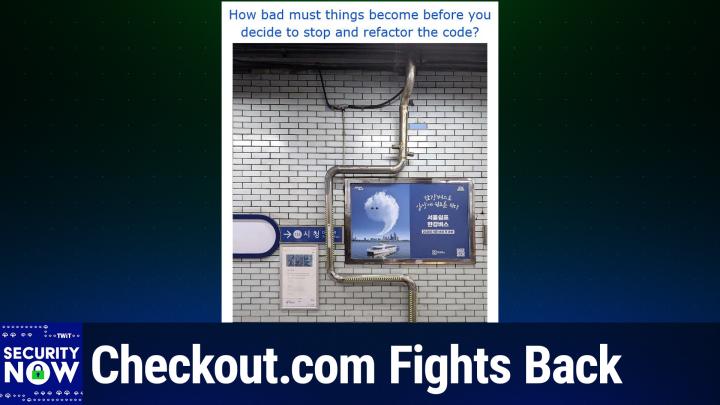
Security Now (Audio)
SN 1052: Global Cellphone Tracking - Checkout.com Fights Back
03:18:13
Checkout.com Fights Back
Loading summary
Transcript227 lines
- [00:00]
Leo Laporte
It's time for security now. Steve Gibson is here. Apple has added a new digital ID inside its wallet. You can even put your passport in there. I think we're getting closer and closer to secure age verification via Apple. Steve will talk about that. Google backpedals on their demand that all developers for Android phones must register with Google. Russia is tracking SIM card appearances. Google is suing a Chinese phishing us as a service platform. And then we'll talk about how it's almost impossible if you have a cell phone not to be tracked. It doesn't require malware. All that and more coming up next on Security Now. Podcasts you love from people you trust. This is Twit. This is Security now with Steve Gibson. Episode 1052 recorded Tuesday, November 18, 2025. Global Cell Phone tracking. It's time for security now.
- [01:08]
Steve Gibson
Everybody.
- [01:08]
Leo Laporte
Been waiting all week long to see this cat right here. Mr. Steve Tiberius Gibson, host of the show and our expert on security, privacy and all good things. Hello, Steve.
- [01:20]
Steve Gibson
Hey, Leo. Great to be with you. For episode 1052. I heard that MacBreak is about to go to the 1000.
- [01:28]
Leo Laporte
Yes, we're catching up and they weren't.
- [01:31]
Steve Gibson
Worried about stopping at 999. So there was none of that, there was none of that anxiety. So that would say since we're at 1052, that they started exactly one year after.
- [01:41]
Leo Laporte
Oh, that's right, we did. Yes. Assuming we do 52 shows a year.
- [01:47]
Steve Gibson
And I think we were a few months after the main Twit podcast.
- [01:50]
Leo Laporte
Right. So that's right.
- [01:51]
Steve Gibson
And I think I was number two. Security now is the second one.
- [01:54]
Leo Laporte
I can't, I'm not sure where Twitter is these days. It's just a little ahead of you, I guess.
- [01:58]
Steve Gibson
And actually the topic of my passport and our meeting in Toronto comes up today on today's podcast.
- [02:05]
Leo Laporte
Oh.
- [02:06]
Steve Gibson
For reasons that you will soon. I look forward to that along with our listeners. Okay, we're going to talk about, we're going to talk about something that was, that actually began with a, with a pointer from a listener in feedback from our listeners which again, it's like so valuable to me. And I, I gave it a scan and part of what it said just sucked me in because I thought, oh, this is such a perfect topic for us to talk about today. We're going to talk about global cell phone tracking and why it's not about Pegasus or the NGO group or any of these, you know, high end malware spyware people that Apple is trying to get, get rid of. And there's nothing Apple can do about this or Google or Samsung or anybody. It is far more pervasive than than we have previously understood and it's available commercially as a service and it is having the crap abused out of it.
- [03:16]
Leo Laporte
Oh yeah.
- [03:18]
Steve Gibson
So a great topic but we're going to talk about Apple's introduction of their new digital id which is something that just happened on Wednesday. I got a pop up note on my phone which was when Apple announced it. So we'll cover that. Also checkout.com refusing to pay a ransom demand and what they're going to do instead with the equivalent amount of money. Google's announcement of their private AI compute in the cloud. Should we trust it or what? We'll kind of put that in context. Also they're backpedaling surprise on their all devs must register demand. It's not dying completely but they got so much pushback from the world. You know, we talked about it and raped them a little bit here, you know and there was a whole F Droid problem. I mean it was just going to be a problem. So we'll update on where they are. Windows 11 with the November update has added a pass keys, API and Leo. Wouldn't you know the top two password managers that are both supporters of the podcast are the only two which currently support the API at its release.
- [04:31]
Leo Laporte
Really? Huh.
- [04:32]
Steve Gibson
Yeah. So we're choosing well is all I'm saying.
- [04:35]
Leo Laporte
Yes.
- [04:36]
Steve Gibson
And our listeners are of course as well. Russia turns out is tracking. This is really kind of clever SIM card appearances within their borders as a means of thwarting their abuse for drone attacks which kind of ties back into this global cell phone tracking topic. So we're going to get into that. Also Google is suing a Chinese phishing as a service platform where those are the main highlights. Although we're going to then get into some listener feedback which leads me down some interesting trails. So we'll do that and then wrap up by talking about something that I wasn't aware was going on. And it turns out lots of actual cell phone providers were not either. Old technology, the oldest which is under continuous use and abuse. So I think another great podcast for our listeners for this 1052nd episode and we do have a fun picture of the week. So I think I have maybe I.
- [05:42]
Leo Laporte
Have kept my eyes averted when loading the the screens so we shall enjoying it together. That's all coming up as this episode of security now episode 1052 gets underway. But before we go too far, perhaps I should say hello to one of our Sponsors, if you don't mind. Steve.
- [06:01]
Steve Gibson
Hello.
- [06:02]
Leo Laporte
One of my favorites. I know you know, sponsors are like your children. You're not supposed to pick favorites. I happen to like these guys a lot. In fact, we might be going to visit them in Orlando next year. I'll tell you a little more about that. I know who our show brought to you by Threat Locker. If you listen to this show, you know ransomware is killing businesses worldwide. But Threat Locker can prevent you from becoming the next victim using a technology Steve has talked about for years. You were the first person to tell me about Zero Trust and you convinced me. I think it was Google that really came up with this concept. The idea that, you know, until then you just assume and everybody on your network belongs there. They got in. They must be, they must be an employee or somebody. Well, Google realized that's probably not the best policy. Zero trust means no, no trust. Just because somebody's in your network doesn't mean they belong to your network. ThreatLocker Zero Trust Platform takes a proactive and this is the key deny by default approach that blocks every unauthorized action. If you don't explicitly say yes, this person can do that. They can't. Which protects you from both known and unknown threats. Zero days exploits that have never seen before, they still don't work because you haven't given them permission. That's why businesses that can't afford to be down for even a moment, Global enterprises like JetBlue or the Port of Vancouver trust Threat Locker to shield them from zero day exploits and supply chain attacks while providing complete audit trails for compliance. Because if you think about it, you know exactly who did what when it's all logged, right? As more cybercriminals or who didn't do what when, right? Who couldn't do what when. As more cybercriminals turn to malvertizing, this is something to be aware of. You need more than just traditional security tools. Malvertizing gets bad guys in over the transom. Lickety split. Attackers create convincing fake websites, websites that look like popular brands, AI tools or software applications. Then they publicize them on social media and they use hijacked accounts to create them. And then, and this is the most insidious thing, they go to legitimate ad networks. These are all automated ad networks, right? So nobody's keeping an eye on things. And they buy ads. In fact, they embed in the malware in the ad. They embed it, which means anybody, even if they're browsing on your work systems and you've got it all locked down your employees are going to go look at those ads. They look real. Traditional security tools almost always miss these attacks because they're clever. They're using fileless payloads. They run in RAM only. They exploit trusted services. They bypass typical filters. They can't bypass ring fencing. That's Threadlocker's innovative technology that strengthens endpoint defense by controlling what applications and scripts can Access or execute.0 trust containing potential threats. Even if malicious ads get to the device, they can't do anything. Threat Locker works in every industry. It supports PCs and Macs. They've got great US based support. They're there 24, 7 for you. And as a side effect of zero trust, well, it's not a, it's not incidental. It's important. It enables comprehensive visibility and control. Jack Sennasep, director of IT infrastructure and security at Redner's Markets Redner's uses Threat Locker. He says, quote, when it comes to Threat Locker, the team stands by their product. ThreatLocker's onboarding phase was very good. They were very hands on. They were able to help me and guide me to where I am in our environment today, end quote. And I can tell you Jack's really happy with where he is today. You get unprecedented protection quickly, easily and cost effectively with ThreatLocker. Visit threatlocker.com twit to get a free 30 day trial and learn more about how ThreatLocker can help mitigate unknown threats and, and Ensure compliance. That's threatlocker.com TWIT. We thank them so much for the support of security now. All right, Steve, I'm ready for the picture.
- [10:29]
Steve Gibson
Okay, so this is just a wonderful picture. The picture itself tells a story. So let's show the picture first and then I will explain the headline, the title that I gave it.
- [10:41]
Leo Laporte
Let me, let me put the picture up big here so everybody can see it. And I'm going to scroll up and I'm going to see it with you, everybody at home for the first time. Okay. Okay. You better explain this.
- [11:00]
Steve Gibson
So. Oh yeah, I have to explain it. So first of all, a number of our listeners who received the email with this yesterday morning wrote to tell me exactly where it was and what it was. I mean, they, they, it's Korean and it's, it's a subway hall near the Korean or attached to the Korean city hall of some, some city in South Korea. And so what, what this shows is that somebody wanted to bring, apparently needed to bring a drain pipe down from a particular location in the ceiling to where it goes in the floor. But there was a very nice sign in the way.
- [11:49]
Leo Laporte
An advertisement, I think. I know. You don't block an ad, right?
- [11:53]
Steve Gibson
No, no, no, no. And so had the pipe simply come down from the ceiling straight down to the floor, it would have covered. It would like, you know, bisected this sign. It would have been in front of the sign, which was. But a very unsightly. So instead, a industrious South Korean plumber decided to do a. A right or a left turn above the sign, go over past the sign, then another left turn or down, downward turn to go down past the sign. Then he still has to get back to where the drain was originally going to go. So back around again over to the middle of the sign.
- [12:35]
Leo Laporte
It's a little like Ms. Pac man or something. It's.
- [12:38]
Steve Gibson
Yeah.
- [12:40]
Leo Laporte
Of this. Whether you would route the pipes around. I remember.
- [12:43]
Steve Gibson
Yeah. Anyway, so I, I gave this one. In order to put this in the context of our community. How bad must things become before you decide to stop and refactor the code?
- [12:58]
Leo Laporte
Now I understand. I like it.
- [13:00]
Steve Gibson
So, so this. So refactoring is sort of a. A term that's come into use a lot more lately. I mean, I mean, I grew up coding and I, I wasn't like, I didn't feel like refactoring what was a piece of jargon that was commonly used until relatively recently. The idea is, and we have talked about this, code does not evolve. Well, normally what the. The. The way code begins is a coder or a team lay out a specification or have a clear idea of what the code, you know, what the overall project's goals are, and then that gets cast into code. Basically, the architecture of the code reflects those original ideas. Then either management gets involved or somebody comes along later and says, hey, what about this green right angle doohickey? You don't have that. And the coders go, oh, crap. We didn't know we were supposed to do that. So something gets hung on to the existing code. An exception essentially, to what was originally probably hopefully a beautiful architecture, a structure that, well, represented that original set of goals. Now we have a barnacle that's sitting there. Then time is also not code's friend. Time goes by and some new features are made available that the code had no way to anticipate, but we got to support those. So more barnacles. And before long, you just end up with what can only be described as either a kludge or a message, because. Yeah, and, I mean, there are consequences to this, but some of those Barnacles may have knocked off some other ones or be, you know what, you might have a barnacle that's already in the way of where another barnacle is. So you can't put that barnacle where you want. I mean, there starts kind of being a tug of war and you get maintainability problems, you get security problems, you get reliability problems. Bugs start cropping up because of interactions that. Oh, and you've got new, new coders, right? The coders who, who wrote the original system, they wandered off somewhere or they got promoted or, you know, refactored. So anyway, the, the point is, at some point you recognize you. Okay, just stop. We got, you know, what we have no longer represents the reality that is present. So it's time to refactor. The idea being basically reconceive the underlying structure so that it now supports everything which has been learned, which has happened, which has been added, which time has done all these things that are hostile to code. And so anyway, the, the, the point here being, rather than moving the sign.
- [16:21]
Leo Laporte
Which might have been the obvious solution.
- [16:25]
Steve Gibson
Exactly. Oh, no, the sign. You know what, it's. It's got lag bolts two feet into the wall or something. Or maybe, maybe there's some ugly blemish on the wall that the sign is covering up. You don't know what's under the sign. There might be a hole there or something. So rather than move the sign, which would have sort of been obvious. No, we're just going to plumb around it. I very much like one of those Three Stooges episodes.
- [16:54]
Leo Laporte
Or. And Paul, remind me, the game Pipe Dream did this too. Or Pipe Mania. Yeah, you know, it's funny, I actually relish refactoring code. I actually love to refactor code. There's something. Because it's aesthetic. Right, I get it, yes.
- [17:13]
Steve Gibson
In fact, I did it yesterday. There was. For the benchmark. There was. There was a feature in the benchmark which I originally wrote in 2008, which, which was slowing down the end of the benchmark because I switched one of the pages from a bitmap, which I was able to paint quickly, to a rich edit format, which. And this thing ran on Windows 95 originally, which. And, and, and so, in order. So I was using my code to populate a rich edit control, which is very much like WordPad. Basically, WordPad is just the rich edit control with a bunch of chrome, you know, window dressing, literally, in effect, manually.
- [18:02]
Leo Laporte
Draw the screen with.
- [18:03]
Steve Gibson
Yes, I was. And, and there, there is an API that Windows provides called it's stream in and stream out that allows you to feed, basically feed content into this. But it's really slow. Microsoft never bothered to optimize it. I don't think probably I and a couple other people ever used it, but it's there. The problem is it's so slow that, that, that I realized when I was looking at the benchmark again that I was holding down the end, like the announcement of the completion while I was painting this other tab that the user might not even be looking at right now, but I was like holding down, holding everything up. So the first thing I did was that instead of doing that, I spawned another thread to do this painting in the background. And I would be able to declare the benchmark done immediately. But then if the user clicked on that tab while I was busy filling its contents, I needed to have a little signage that said, please wait one moment while this tab finishes updating at the completion of the benchmark. I had that. Then one of our testers said, steve, this always sorts of in the way that we have four different sort orders now for the results. Someone commented, the way this tab is is the way that the bar graph of the results were sorted when it finished. But I changed the sort order and it'd be nice if the tabular display of all of the details would resort. Okay, so now that means that I need to be able to come in later. But what if the user changes it while the sort is underway, which is a time consuming process. That means I need to be able to interrupt the ongoing sort and painting of the control, abort it, and then restart it at any time if the user changes the sort order. And while I was at it, while the benchmark was underway and I was displaying a bitmap pretending to be the rich edit, which I was able to paint quickly. I gave that all the same features. Well, the point is that as a consequence of all that, I had introduced some sort of a subtle hang in the UI where, I mean, because there was a lot of stuff going on, I was setting semaphores and flags and aborting threads and checking to see whether, you know, what was going on and all this. And yesterday I just, I had that experience you have had, Leo, where I just said, okay, you know, I, I really want this thing to be done. I'm ready to have it be done. It's been a year. It's really good. I mean, it's gotten so good, but I can't live with the way it is. So I just, I scrapped all of that. Code from the beginning. And I rewrote it and oh, it is a thing of beauty now. It is nice.
- [21:12]
Leo Laporte
It's like cleaning it up. It's just. It feels good and then it runs faster and it's.
- [21:17]
Steve Gibson
It looks better and understandable. I was having like. I was like, okay, what does this flag do again? You know, because, you know, and I've always said I code so that I can read it more than so that the machine can read it. And that's. And in fact, one of our listeners, I don't think I shared his feedback, but it was really. He was a neat guy. He said, I started programming shortly before the. I started listening to the podcast. And at some point in the podcast, you made the comment that you named variables for what they did. Like, you know, are we done with this yet?
- [21:57]
Leo Laporte
Was.
- [21:57]
Steve Gibson
Is like the name of a variable, of a Boolean. And he said, when I heard that, my life changed. He said I, I was, you know, I was naming variables WDGT2, you know, and he said, I couldn't remember what they meant. He said, now I just name them what they are. And he says, if life is better. So anyway, you and I both love to code and, and refactoring is a. A necessary process.
- [22:30]
Leo Laporte
You do a coding show with me at some point. I would love. That would be really fun.
- [22:35]
Steve Gibson
Yeah, I could definitely get into that.
- [22:37]
Leo Laporte
This reminds me that one of the great books on coding by Dave David Thomas, the Pragmatic Programmer, it just reissued it its 20th anniversary. I don't know if you've ever read this, but this is one of those books that has, that is full of that kind of thing, name your variables meaningfully and so forth. And it's really good. They've just updated it because it was a little out of date, to be honest, with concurrency and some other things.
- [23:02]
Steve Gibson
Yeah, cool.
- [23:04]
Leo Laporte
Coding is, is an art and it's a science, and it's just really enjoyable. And there's, you know, I have the luxury as a hobbyist coder. You have a luxury too, because it's your code. You don't have a company. You get to do it what you want. Right. And so I think a lot of people who are working, you know, professionally as programmers don't get to make their code aesthetic. And, you know, they probably have rules about how to name variables, and there's all sorts of stuff that probably gets in the way. But if, if. But we're lucky, we could pursue it as an aesthetic art and science.
- [23:38]
Steve Gibson
And for me, I've really learned. I'VE talked often about what I call switching cost. The cost to. To acquire a knowledge of a large code base. I now, after a year, I am the DNS benchmark. I mean, I. And I. And I'll tell you, when I began, I hadn't looked at the code since 2008. I didn't know how it worked. And many times, I mean, I remember opening it up and going, wait a minute, this supports Windows 95 still. So, you know, I mean, it was jumping through some hoops in order to do that, but I bet it was. So. So for me and our. Everybody who's been following me knows this. I'm going to get this done. It is really going to be done, and then I am going to never probably touch it again. If there are bugs found, I will of course fix them because it's going to be commercial as opposed to freeware. But even my freeware, it doesn't have any bugs. This thing doesn't have any bugs. So for me, because it is so expensive for me to leave and then I pretty much quickly forget, even, especially at my age. Exactly. All of the nuances. I mean, you and I code Leo because it is so difficult. I mean, we do stuff, which is really hard.
- [24:58]
Leo Laporte
Yeah, because that's your brain work. Yeah.
- [25:00]
Steve Gibson
That's what's interesting. Exactly. And so that also means that you lose the sharp edge of your knowledge of a particular solution pretty quickly. I mean, it's very complicated. So my whole point is, it is so much better for me to fix something now while I am it, than it would be for me to switch over to the next version of validrive and Beyond Recall and then need to come back to the benchmark and do something. It's just, for me, switching cost is so high, I want to get it perfected so that I don't need to come back to it.
- [25:39]
Leo Laporte
For me, it's just aesthetic. I mean, nobody's using my code, nobody's reading my code except me. But it's just an aesthetic thing. It's so much prettier when it.
- [25:48]
Steve Gibson
Yeah.
- [25:48]
Leo Laporte
When it.
- [25:49]
Steve Gibson
When.
- [25:50]
Leo Laporte
And it's hard to describe, but you know what I'm talking about. When it's smooth, the shape is right. You know when it's right, you know, and you know, when it. That's. There's something wrong with this. It's too many lines. There's something going on. I can make this prettier. And then you. Then you've got this great satisfaction of you did it anyway. Good on you. And I can't wait to see the DNS benchmark. That's good.
- [26:09]
Steve Gibson
There is a beauty to it.
- [26:10]
Leo Laporte
You're right, there is. There really is. It's an art. Yeah.
- [26:13]
Steve Gibson
Okay, so last Wednesday, I received a notice on my older iPhone 12, which as I have mentioned, I had upgraded to iOS 26 because I wanted to see how bad that liquid glass thing was before I. Before I moved my newer phone, which I purchased out of fear for that upcoming tariffs. Like earlier this year, the announcement said that something called Apple's digital ID was now ready for me. The hook was that while the announcement was focused upon using this new digital ID as a replacement for the real ID, which USSA, you know, airport security guys are now requiring, the. The announcement also noted the app's use for age verification. So I was like, okay, Apple kind of slipped this one in under the radar. So at this time, Apple's new digital id, which is now available. Anyone can set it up, is tied to a passport. Fortunately, I happen to have one. And Leo, I originally obtained my first passport when I was joining you in Toronto for appearances on call for help and. And then that was when. That's when I got my first passport and then I later renewed it for the OASP Squirrel presentations, which I gave in Sweden and Ireland. And it was still current as a consequence because passports last 10 years. So the process that I went through to establish the digital ID was fascinating. The app required me first to aim the iPhone's camera. And this is an iPhone 12. It run, it works, it's all the way back to iPhone 11 and forward. But you do have to have iOS 26, the latest iOS on it. So it first asked me to aim the camera at the photo page of the passport, whose image it acquired and processed. Then, oh, I love this. It had me scan the RFID chip that's embedded in the back cover of the passport. The app showed me in a little on screen graphic how to position the phone over the back page of my passport. And it locked onto the RFID chip and made some wonderful, you know, data acquisition noises, while a little. A little blue bar ran across the bottom of the screen, sucking in the digital equivalent of the photo from the passport. Presumably, that chip contains much the same data as the visual page, but in obviously digitized format. Then the app required me to follow its step by step instructions, sort of in selfie mode with a screen showing my face to prove to it that I was alive and that I looked like the picture on my photo in the passport. So I was instructed to position my face in a frame look at the screen. Then it told me to close my eyes until the phone vibrated. So I did that and after a few moments it vibrated and it was satisfied. Then it told me to give it a big smile which I did and phone vibrated again and then it told me to look to the right which I did. So it was confirming by that I was able to follow its instructions in real time and that my face was all doing the right thing and presumably was all doing that whole 3D, you know, IR imaging stuff that that the iPhone has as well. So, so I I went through that a verification was complete and I I poked around in the app and it it noticed that or it notified me that it had finished and then offered to add it to my wallet which I did. So I now have a passport authenticated dig you know government issued identity in a in this new digital ID that Apple has started offering last Wednesday. Their announcement last Wednesday was was headlined Apple introduces Digital ID A new way to create and present an ID in Apple Wallet. And then the tagline was Digital ID offers a secure and private way for users to create an ID in Apple Wallet using information from their US passport and present their ID with iPhone or Apple Watch. I'm going to share two things, Apple's little blurb and then a more less Apple centric take from Lifehacker. So Apple said Apple today announced the launch of Digital ID new way for users to create an ID in Apple Wallet using information for their US Passport and present it with the security and privacy of iPhone or Apple Watch. At launch, digital ID acceptance will roll out first in beta at TSA checkpoints at more than 250 airports in the US so it's not universal. But at launch time 250 airports do support this in lieu of real ID. And I've not yet had a need to get a real id, but I recognize I probably will at some point. They said for in person identity verification during domestic travel with additional digital ID acceptance use cases to come in the future. And again it already talked about age verification as one of those instances. They said Digital ID gives more people a way to create and present an ID an Apple Wallet, even if they do not have a real ID compliant driver's license or state id. Digital ID is not a replacement for a physical passport and cannot be used for international travel and border crossing in lieu of a US Passport. So it's not meant to be a digitalized universally accepted passport. It's just a way of using an authenticatable US Government document meaning your passport in order to create a a working domestic ID that you can use and presume well and presumably international identity not for for in passport use but for age verification. We'll see then they said. Jennifer Bailey, Apple's Vice president of Apple Pay and Apple Wallet, said quote, with the launch of Digital ID we we're excited to expand the ways users can store and present their identity, all with the security and privacy built into iPhone and Apple Watch. Since introducing the ability to add a driver's license or state ID to Apple Wallet in 2022, we've seen how much users love having their ID right on their devices. Digital ID brings this secure and convenient option to even more users across the country and as they can now add an ID to Wallet using information from their US Passport. So that's the right way to think about this. And the announcement finished saying the launch follows the capability for users to add an eligible driver's license and state ID to Apple Wallet. If users do not have a US Passport to create their digital id, they can still add an eligible driver's license to Apple wallet for those 13 states that allow that. Okay, so Jake Peterson, Lifehacker's senior technology editor, offered. As I said, you know, a little more balanced, less Apple centric view of this, he wrote. Back in 2021, Apple announced a new feature for the Wallet app that allowed users to add their driver's licenses or state IDs to their phones. To me, it sounded like the beginning of the end for physical wallets. In reality, it was anything but. Not only are the applications limited, but even after all this time, only 12 states and Puerto Rico actually support the feature. While the rest of us wait for our respective states to get on board, many might have another option for these virtual documents on Wednesday meaning Last Wednesday, Apple announced Digital id, a new initiative that lets you create an ID in the Wallet app using your Passport. This bypasses the waiting period for the 38 states that don't yet support these ID features. If you have a passport, you can try this feature today. Even if your state supports driver's license and state ID uploads to the Wallet app, you'll miss out on features if you don't have a real id. If you have a passport, however, you can use it instead, which opens up the Wallet ID feature to even more users than before. Like previous attempts at virtual IDs, however, don't expect to be able to use this digital ID just anywhere you'd normally show documentation. Right now, the main use for digital ID is is for flying According to Apple, digital ID is launching in beta at over 250 airports to be used at TSA checkpoints. Importantly, this feature only supports domestic flights, even though it uses your passport as such, do not rely on your digital ID when flying outside the us you'll still need your physical passport in order to validate your identity. In the future, however, Apple says you'll be able to use this digital ID for other purposes such as booking flights and hotels, as well as opening new accounts. And it also said all over the screens and age verification. Okay, so clearly we still have a ways to go. In California, where Leo and I are, we have digital driver's licenses as do 11 other states and Puerto Rico. But as we've noted before, support remains spotty. So Jake's point that a passenger I'm sorry, that a passport can provide Apple's digital ID with a verified identity source means that those people who live in a state that does not yet support a digital driver's license, but who may have a valid passport now have an alternative means to robustly identify themselves through their phone. And for what it's worth, to use that if you don't have a real ID license to use that at a TSA checkpoint, many pieces of any complete solution for online age verification still remain missing. And we talked about that many times. We need the W3C to get going here and you know, those pieces are big. But we do need to start somewhere. And I was encouraged by last Wednesday's pleasant surprise of Apple's digital id. Since this is likely the foundation which will develop into more in the future, this is a logical place for it to be. You know, from a foundation like this, Apple will be able to generate secure privacy preserving assertions such as over 18 without revealing a single additional fact about a device's user. And given everything we know about Apple, there is no company whose motivations surrounding the prev the preservation of their users of their users privacy that I would trust more. I mean if I were going to trust any entity, it would be Apple. You know, they've made this a feature of, you know, of their, their own identity. So anyway, it exists. Anybody who's got a an updated iPhone can and who has a passport can give it a try. It's a cool process. Oh and as I mentioned, I have two phones because I saw that I was able to turn virtually turn off all the annoying aspects of Liquid Glass. I did update my more recent iPhone to iOS 26, so I'm running it on both. Although I've got the Reduce motion and increase contrast features selected. Those two things basically shut down a lot of the annoyance of liquid glass. Just this morning, I was curious to install the same identity with my passport in my other phone. I went through all the process. Oh, and interestingly, it gave me a different set of proof of life motions to go through. This time I had to open my mouth wide and also look down. So it mixes that up from time to time in order to, you know, keep, keep it interesting and to keep people from being able to, to, to spoof this presentation in some means. Although I'll bet you that they're using their IR technology to see that you're a 3D and not just some sort of a. A 2D presentation. Anyway, the point was, once it got all done, I hit a roadblock. It said, whoops, this ID is currently installed in another device. You can only have it in one device at a time. So I thought, okay, well, I had in I. The device I'd installed it in was not the one I carry around with me. So I removed it from the wallet in my older phone. That's sort of my desk phone here. And then I went through all the rigamarole again and it was different rigor a third time. And then it installed this identity into my phone. So for what it's worth, you can't stick it in multiple devices. It is very tightly bound to 1. One physical idevice at a time, probably an iPhone. So anyway, cool that Apple is doing this. And again, you know, I think we're gonna, I know we are gonna get to a point where we have robust privacy, preserving age verification as quickly as we can. And it will be, you know, this sort of initiative that like has Apple completely ready to engage that as soon as there's an API for them to talk to. And for what it's worth, the there is that True Age system and it is in my Apple wallet as part of my California driver's license. And it does allow me to scan a QR code to do some sort of magic. There's no. Nobody's doing anything with it yet. And you need to be, you know, in the, the True Age enclave, you know, in order to, to use that. I expect that that'll be opening up because we did hear that the W3C was adopting some of the True Age technology for their, their work in progress on online age verification.
- [42:02]
Leo Laporte
So anyway, kind of interesting that the Apple technique reads the RFID in the past.
- [42:08]
Steve Gibson
Oh, I think it was so cool, Leo.
- [42:10]
Leo Laporte
Yeah, yeah, I didn't. It's the first time I've seen anything use the rfid.
- [42:14]
Steve Gibson
Yeah.
- [42:16]
Leo Laporte
It actually vibrates as you're doing it, which is great.
- [42:18]
Steve Gibson
Yeah, it's really cool.
- [42:20]
Leo Laporte
Yeah. So now I'm going to do my live photo. And then it's going to ask me to open my mouth. Let's see.
- [42:31]
Steve Gibson
It does different things Sometimes close your.
- [42:33]
Leo Laporte
Eyes, several movements and all angles of your face will be scanned and evaluated by Apple. All right. Position your face, your movements will be recorded. Okay.
- [42:49]
Steve Gibson
He's got his eyes closed now.
- [42:51]
Leo Laporte
Yeah.
- [42:52]
Steve Gibson
And then he'll have you do something else.
- [42:54]
Leo Laporte
Yeah, I think it's gonna have the mouse open thing.
- [42:59]
Steve Gibson
Yep. Mouth's open now.
- [43:02]
Leo Laporte
I guess if I was still picture, I couldn't do any of that. Right.
- [43:05]
Steve Gibson
Well, and, and right. And it's probably watching you all the time. Like, you know, I'll bet you they've done a great job. Did it tell you to look to the right or to your left?
- [43:15]
Leo Laporte
Left. Yeah.
- [43:16]
Steve Gibson
Yep. You know when you saw you do that.
- [43:19]
Leo Laporte
Yeah. When you're doing the Sora thing, you know, to scan your, your, your digital thing to make AI videos, it takes a, a picture of you, but it also has you read three random numbers. And it's the same concept. Right. It's like these are zero proof identity because if it were, if it were a fake, you couldn't read because you don't know what those numbers are ahead of time you couldn't read those numbers. So it's kind of interesting the techniques people are coming up with to validate this. So. Yeah. So I just set my passport. I already have my driver's license. As you know, we set those up a while ago. Now you better get a real id. You might be required to board an airplane at some time in the near future.
- [44:01]
Steve Gibson
Well, this actually is a substitute given that the airport supports it. 250 airports at launch, dude.
- [44:08]
Leo Laporte
Oh, and you still have your passport is a real life and I realized driver's license.
- [44:12]
Steve Gibson
Yeah, exactly. Yeah, exactly. Okay, so checkout.com we'll do one more before our next break. Checkout.com says no to extortion. Last Wednesday, Mariano Albera, the chief technology officer at Checkpoint who's been around, he was previously the CTO at Expedia OVO Energy and Thomas Cook. He posted his company's decision to say no to the and we know these people well. The Shiny Hunters extortion gang. In his posting headlined Protecting our merchants Standing up to extortion. Mariano wrote. Last week, checkout.com was contacted by a criminal Group known as Shiny Hunters, who claimed to have obtained Data connected to checkout.com and demanded a ransom. Upon investigation, we determined that this data was obtained by gaining unauthorized access to a legacy third party cloud file storage system used in 2020 and previous years. So not for the last five, he said. We estimate that this would affect less than 25% of our current merchant base. This is checkout.com the system was used for internal operational documents and merchant onboarding materials at that time. This incident has not impacted our payment processing platform. The threat actors do not have and never had access to merchant funds or card numbers. The episode occurred when threat actors gained access to this third party legacy system which. Which was not decommissioned properly. This was our mistake and we take full responsibility. We are sorry. We regret that this incident has caused worry for our partners and people. We've begun the process to identify and contact those impacted and are working closely with law enforcement and the relevant regulators. We're fully committed to maintaining your trust. We will not be extorted by criminals. We will not pay this ransom. Instead, we're turning this attack into an investment in security for our entire industry. We will be donating the requested ransom amount to Carnegie Mellon University and the University of Oxford Cybersecurity Centers. To support their research. Yes, to support their research in the fight against cybercrime security. Transparency. Transparency and trust are the foundation of our industry. We will own our mistakes, protect our merchants, and invest in the fight against the criminal actors who threaten our digital economy. We are here to assist our merchants in whatever way we can. As always, we are available through your regular checkout point of contact for any further assistance or questions you may have. So this is the way to handle a data breach? You know, if there's any way to do so. Mariano's donation is meant to have the effect of backfiring on the attackers. Not only will they not be paid, but the security researchers who work to track them down and take them down will be strengthened by receiving the money that checkout.com refused to pay to the criminals. Nice going. Yeah, that makes lots of sense, Leo.
- [47:57]
Leo Laporte
Yeah, that's the way to do it. That's a way to do it.
- [48:01]
Steve Gibson
As does our next sponsor.
- [48:03]
Leo Laporte
Oh, yes, they make a lot of sense. We'll be back with more security now in just a bit, but first, a word from BigID, our sponsor for this segment on security. Now, Big ID is the next generation AI powered data security and compliance solution. Big ID is the first and only leading data security and compliance solution to uncover dark data through AI classification. They can identify and manage risk, remediate the way you want, map and monitor access controls and scale your data security strategy. Along with unmatched coverage for cloud and on prem data sources. Bigid also seamlessly integrates with your existing tech stack. That's nice and allows you to coordinate security and remediation workflows. You could take action on data risks to prevent against breaches, annotate, delete, quarantine and more based on the data, all while maintaining an audit trail. And it works with everything you work with. Partners include ServiceNow, Palo Alto Networks, Microsoft, Google, AWS and more. You could find it all at their website. With Big ID's advanced AI models, this is cool. You can reduce risk, accelerate time to insight and gain visibility and control over all your data that maybe that's why Intuit named it the number one platform for data classification and accuracy, speed and scalability. And I'll tell you what, if you want to think about what company, what group, what what, what institution might have the most dark data, I can't think of anybody might have more than the United States Army, 250 years worth of it, right? They used big ID to illuminate their dark. Yes, the US army, their dark data to accelerate their cloud migration, which has been a big priority for the services, to minimize redundancy and to automate data retention. Imagine the amount of data they have to keep track of. This is a great quote from US Army Training and Doctrine Command. They said, quote the first wow moment with Big ID came with being able to have that single interface that inventories a variety of data holdings, including structured and unstructured Data across emails, zip files, SharePoint databases and more. To see that mass and to be able to correlate across those is completely novel. I've never seen a capability that brings this together like Big ID does, end quote. Wow. CNBC recognized Big ID as one of the top 25 startups for the enterprise. They were named to the Inc 5000 and Deloitte 500 not just once but four years running. The publisher of Cyber Defense magazine says quote, Big ID embodies three major features we judges look for to become winners. Understanding tomorrow's threats today, providing a cost effective solution and innovating in unexpected ways that can help mitigate cyber risk and get one step ahead of the next breach. End quote. Start protecting your sensitive data wherever your data lives. @bigid.com SecurityNow you can get a free demo to see how BigID can help your organization reduce data risk and accelerate the adoption of generative AI Again, that's B I G I D.com SecurityNow oh, also there's a free white paper that provides valuable insights for a new framework. People are just starting to talk about AI Trism. That's AI Trust, risk and security management to help you harness the full potential of AI responsibly. @bigid.com securitynow get that white paper for free bigid. Thank him so much for supporting the important work Steve's doing here at Security now. Now back to the show.
- [51:57]
Steve Gibson
So last year Apple launched their private cloud Compute and Google is now offering a similar solution under the banner Private AI Compute. Our next step in building private and helpful AI. Last Tuesday Google said, today we're introducing private AI Compute to bring you intelligent AI experiences with the power of Gemini models in the cloud while keeping your data private to you. Okay, so I've took out a bunch of the glad handing market speak and I'm excerpting just the technical bits from their announcement. They said, today we're taking the next step in building helpful experiences that keep users safe with private AI Compute in the Cloud, a new AI processing platform that combines our most capable Gemini models from the cloud. And they just released three by the way, with the same security and privacy assurances you expect from on device processing. It's part of our ongoing commitment to deliver AI with safety and responsibility at the core. They said AI is evolving to become even more helpful, personal and proactive. It's moving from completing simple requests to AI that can anticipate your needs with tailored suggestions or handle tasks for you at just the right moment. This progression in capability requires advanced reasoning and computational power that at times goes beyond what's possible with on device processing. Okay, now I suspect there's universal agreement about all of that. The thing that appeals to me about this is that AI inherently requires short but massive bursts of computation, you know, often followed by long periods of quiescence where you're not doing anything with it. You know, anyone who, who's been around since the days of the mainframe will recognize that this was the original brilliant concept that became known as time sharing. Time, you know, it's now we all just talk about it like it's nothing but you know, it it before time sharing that was, you know, there wasn't any such idea. Time sharing changed the world. The ide that and the idea there was that no one needed the full time services of a massively expensive and very capable mainframe. And mainframes was all there was back then. So instead hundreds of people could use Little time slices of that big machine's power. And the result of that was massive efficiency. Then later the mini computer it more encouraged a one on one usage mode. Although there were certainly many minicomputers running time sharing operating systems back then, although those really might have been called mini mainframes. What really drove the nail in the time sharing coffin was the microcomputer, where the costs had come down so far that it no longer made any sense to share that machine. So what developed was a truly personal computer. So the Internet, massive connectivity and massive data storage has begun to shift this model back toward the shared massive resources model. With cloud computing, it's pretty clear that Microsoft for their part would be delighted to be servicing everyone out of their data centers. And of course that would be terrific right up until everyone suffers a massive service outage as Microsoft and all their cloud dependent users recently did. And by the way it hood it, a similar outage took down Cloudflare for many hours this morning. And like global outage at Cloudflare. So yeah, the cloud is great right up until it's not. So as I first noted though, everything about the usage model of today's AI suggests that time sharing is back and for exactly the reasons it was first explored in the early 1960s. Massive resources used only briefly and intermittently by a great many people. So that leaves us with the question of security. You know, the architecture makes sense, but what about the security? Google wants us to believe that this can be every bit as secure as running on device, meaning locally, you know, on some poor overworked array, you know, but that we're probably pouring ice water on and which is converting into Steam. You know, everything we know tells us that it cannot be as secure. Right? I mean it's not going to be. Nothing in the cloud is going to be as secure as on premise. By definition the security models are just not identical.
- [57:29]
Leo Laporte
Well, and it's in transit anytime it's there's going from one point to another.
- [57:33]
Steve Gibson
I know, I think that's exactly right. So the question is, if it cannot be identical in security, can it be secure enough?
- [57:43]
Leo Laporte
Right.
- [57:44]
Steve Gibson
The pro the problem with local compute is that to be fast enough it needs to be super powerful. And being cost effective while being super powerful means somehow keeping the darn thing super busy. So the test for Google or Apple or any other cloud based AI what amounts to a time sharing farm is not whether it's as secure as local, because it's not. The question is is it secure enough? So here's what Google, you Know says claims to convince us that theirs is. They said we built private AI Compute to unlock the full speed and power of Gemini cloud models for AI experiences while ensuring your personal data stays private to you and is not accessible to anyone else, not even Google. Private AI Compute allows you to get faster, more helpful responses, making it easier to find what you need, get smart suggestions and take action. Private AI compute is a secure fortified space for processing your data that keeps your data isolated and private to you. It processes the same type of sensitive information you might expect to be processed on device, meaning locally within its trusted boundary. Your personal information, unique insights and how you use them are protected by an extra layer of security and privacy. In addition to our existing AI safeguards, Private AI Compute is built on a multi layered system that is designed from the ground up around core security and privacy principles. And they have two bullet points. First, one integrated Google Tech stack. They said private AI Compute runs on one seamless Google stack powered by our own custom tensor processing units which they call TPUs. World class privacy and security is integrated into this architecture with titanium. That's titanium, Leo, not iron, not steel, not, not, you know, diamond, gold or anything. Titanium intelligence enclaves. Those are ties. This design enables Google AI features to use our most capable and intelligent Gemini models in the cloud. With our high standards for privacy and the same in house computing infrastructure you already rely on for Gmail and search. Except I don't think these are. It's the same, but okay then second, they said no access, remote attestation and encryption are used to connect your device to the hardware secured sealed cloud environment. Oh, it's sealed. Okay. Allowing Gemini models to securely process your data within a specialized protected space. This ensures sensitive data processed by private AI Compute remains accessible only to you and to no one else, not even Google. Okay, now I don't know how they do that because you know the model is being trained on plain text, which means any prompting you do has to be submitted as plain text to the model, which means it needs to be decrypted and presented to their GPU farm. So you know, maybe they've got an electric fence around the data center, I don't know. But does this make sense for whose application? I don't know. It's not for me to judge. What I can judge is that the concept of sharing massive AI compute in the cloud makes all kinds of sense the architecture. Absolutely. That's what rings so true here. And I would also note that doing this is a, you know, in doing this in a truly privacy preserving Fashion is not for fly by night outfits. I, I would stick with brain, with brand names here. You know, Apple. Yes. They clearly have invested heavily in this. Google says they have. You know, I would, I would not.
- [62:32]
Leo Laporte
They seem pretty good with security. I can't think of any breach that Google has ever experienced. Can you?
- [62:40]
Steve Gibson
It's true, it's true. We are unaware of them ever having a big data breach.
- [62:46]
Leo Laporte
Yeah, yeah.
- [62:47]
Steve Gibson
And so that's, that's, that's significant. You're right, Leo. So, so if you're using cloud AI to quickly compute gambling odds for, you know, near real time betting, then I would say it probably doesn't matter who you use. But if you're using Cloud AI to form your publicly traded Fortune 500 company's 10 year product development plan, that's another matter. Frankly, I'd have a difficult time letting that anywhere near the public Internet, regardless of what assurances are being made. But if you need to use a security first host. And I would agree with you, Leo, Google has a great track record. Whatever tensor processing units wrapped in titanium intelligence enclaves are. It all sounds really good. Yeah. Yeah. Okay. Sounds like we're safe there. So. No, so anyway, it's there. AI. You know, Apple introduced their concept. We know that the, Apple is going above and beyond by x raying the, the, the servers that come from offshore to make sure that there's no unknown components that have been added. And you know, I mean they're, they are really making sure they don't get caught with their pants down. We can assume that Google has means of doing something similar. Certainly they got the money to do that. And you know, there, there is money pouring in and out of all this. There was a really cool article in Vox that I read this morning about. Is it, it's something weave, a major third party.
- [64:36]
Leo Laporte
Core Weave. Yeah, Core Weave, they're, they're a network operations solution.
- [64:42]
Steve Gibson
Yeah. And you know, basically providing this service as a third party to these big guys who have all announced they're building their own data centers to compete with Core Weave. So it's an odd deal but you know, nobody's making any money on this.
- [65:02]
Leo Laporte
Yeah, well, the stock market's crashing today because Nvidia was down hugely.
- [65:07]
Steve Gibson
So yeah, fourth day in a row, bubble to pop.
- [65:11]
Leo Laporte
And I don't want it to because my entire retirements based on everybody is.
- [65:16]
Steve Gibson
Speculating that they're like, that we are in an AI bubble which is responsible for all the growth that we've seen recently. So you know, I.
- [65:27]
Leo Laporte
I feel like I Understand why everybody says that. I really do. But I also, and you agree with me, I think, think there's real value in the stuff that AI is doing.
- [65:35]
Steve Gibson
I am, I am.
- [65:36]
Leo Laporte
It's amazing what it means.
- [65:38]
Steve Gibson
Stunned, yes. By it now, I mean as a research assistant it is invaluable. One thing in this article that, that caught me off guard a little bit was that this Core Weave group, they own 250,000 Nvidia GPUs. They are an Nvidia only company.
- [66:03]
Leo Laporte
That must be more than anybody. That's amazing.
- [66:06]
Steve Gibson
They own a quarter million Nvidia GPUs. And get this Leo, they used it as collateral to collateralize a massive multi billion dollar loan.
- [66:23]
Leo Laporte
It's like gold bars.
- [66:26]
Steve Gibson
Okay, now what I remember about Mark Thompson, when Mark was, because he was an early cryptocurrency miner, he would, he would fill his garage with racks of mining rigs and he would mine for like, I think it was a, like a year or a year and a half until those rigs became obsolete.
- [66:54]
Leo Laporte
Right.
- [66:55]
Steve Gibson
Because there was constant evolution in the chips. He would then resell these, these G, I know hundreds of GPUs on the secondary market, make back the money that he had spent and then reinvest in the next generation of, of mining rigs and mine for another year and a half and then again sell it all off on the secondary market, recapture his capital investment and then do it again.
- [67:25]
Leo Laporte
That's a lot of work.
- [67:26]
Steve Gibson
It's a lot of work. But what worried me about Core Weave is they now have a quarter million aging and soon to be less valuable than state of the art Nvidia GPUs.
- [67:41]
Leo Laporte
Right.
- [67:42]
Steve Gibson
So unfortunately you know, the world is moving forward. Microsoft is apparently building their own chips, you know, you know, engineering and, and you know, in having their own chips in the works somewhere I don't know who's going to do their fabric but, but anyway I'm, I thought it was interesting that here they're saying oh yeah, we have 250000 Nvidia GPUs.
- [68:05]
Leo Laporte
Woohoo.
- [68:06]
Steve Gibson
And where we use it to collateralize our debt. But they're getting old, right. And they're not going to be worth, they're not going to be what you want in five years.
- [68:17]
Leo Laporte
Right. It's a interesting. Yeah. Conundrum Situation.
- [68:25]
Steve Gibson
Situation.
- [68:26]
Leo Laporte
Just you know, just don't hit my IRA too hard. Okay. I'm just.
- [68:30]
Steve Gibson
Well my problem, and I've said this over and over, is that I've talked about it last week. None of this making money yet I think it will. I, I, that's, that's the question.
- [68:39]
Leo Laporte
Is there value being created? And I, I think there is, yes.
- [68:43]
Steve Gibson
I think I, I think we are, we're in for a reckoning because you know, there's just too much cash has poured into this. Speculatively but long term, as I said back when I, when I purchased my 10 megabyte hard drive, we did not know that we would ever have a 64 gig dongle that on our keychain. We didn't know how to get there from here yet. We got there anyway. And similarly we don't know what is going to come next. Everything, every instinct we have tells us that we are going to get there, that there will, that AI will become so cost effective that it is going to change everything.
- [69:31]
Leo Laporte
I think a lot of, of course we talk about this on Intelligent Machines every Wednesday and it's a great subject because it's just, it's, it's happening so fast that it's unknown. But I think that we had a great conversation with Kelly, Kevin Kelly last week and his opinion is that there will, AI will be embedded in everything. Just as computing has gone to the edge, the next step is for AI to go to the edge and it will be embedded in almost everything we use. And I think that's going to be a very interesting world.
- [69:59]
Steve Gibson
Right.
- [69:59]
Leo Laporte
That's all I have to say about it. I don't know if it's good or bad. It's interesting. I used Claude code the other day to completely refactor my Emacs. Very complicated Emacs setup and it did a great job. It understood Emacs deeply and was able to write all this code and do such a great job of it. I was very impressed.
- [70:21]
Steve Gibson
And remember that as I said very early on, to me code was the obvious target.
- [70:29]
Leo Laporte
Yes.
- [70:29]
Steve Gibson
Because it is rigorous, it obeys rules, it's got syntax and semantics and you can understand, it can be understood.
- [70:37]
Leo Laporte
Right.
- [70:37]
Steve Gibson
And so I'm glad you know, I mean, I know lots of coders are threatened by AI. I'm not, it's not going to bother me.
- [70:44]
Leo Laporte
No, no, no. Yeah, well, but it's also mind boggling that you could take something that is basically just trained on a massive text. It is a sophisticated prediction model and it can understand code and write code. I don't understand. That's mind bending. It's amazing. Anyway, yeah, we live in interesting times.
- [71:09]
Steve Gibson
Steve, and I know that our listeners are following along with this and are interested too. So last Wednesday, Google tacitly acknowledged that they had been wildly overzealous with their pronouncement that all Android developers would henceforth be required to register using their real world identities and pay for the privilege before they would be able to publish their apps on the Google Play Store for Android devices. Their first update reiterated the crucial importance of tightening down the security of Android's apps. But then, on the subject of students and hobbyists, they began the backpedaling writing we heard from developers who were concerned about the barrier to entry when building apps intended only for a small group like their families or friends. We're using your input to shape a dedicated account type for students and hobbyists. This will allow you to distribute your creations to a limited number of devices without going through the full verification requirements. Okay, so that sounds like a terrific option to address the needs of those who are not looking or needing to reach a mass of users. Certainly there is that community. Okay, but what about users of, for example, F Droid who are advanced and security aware? Google has made a carve out for them too, explaining While security is crucial, we've also heard from developers and power users who have a higher risk tolerance and want the ability to download unverified apps. Based on this feedback and our ongoing conversations with the community, we're building a new advanced flow that allows experienced users to accept the risks of installing software that is not verified. We're designing this flow specifically to resist coercion, ensuring that users are not tricked into bypassing these safety checks while under pressure from a scammer. It will also include clear warnings to ensure users fully understand the risks involved, but ultimately it puts the choice in their hands. We're gathering early feedback on the design of this feature now, and we'll share more details in the coming months. So again, this sounds like the right approach, and it solves the F Droid dilemma that we talked about previously. But so far, Google's primary goal of knowing and holding accountable the developers of apps for Android. That's not disappearing. You know, it's. It's onerous, I get it. But I don't see any other way to deal with this problem, which has admittedly grown out of control. Something needs to change. Any developer who wishes to offer apps to the wider Android user base, and who doesn't want to subject their potential users to Google's deliberately terrifying advanced installation flow, will need to register. That's the way to avoid that. Otherwise, for any app published by an unregistered developer, which Google is now calling them, Google will probably be say something like please acknowledge that you understand that by downloading this tiddlywinks in space game, you may be placing your life and the lives of everyone, everyone you hold near and dear, at significant risk. Now of course, developer registration will prevent those notices, which would probably dramatically increase download counts at some point. It's also conceivable that the Google Play Store may even offer a filter to only show apps from known, which is to say registered developers. So anyway, they clearly they, they faced a bunch of blowback from that, you know, blanket pronouncement that, you know, you got to be registered to, to play in, in our sandbox in the future. And they said, okay, we're going to make that optional. But you know, but if you're not registered, then your user is really going to have to recognize, you know, risk and accept risk and, and push past a bunch of notifications. And if you only want to publish this thing for a few people just, you know, as a hobbyist or a student, then you don't, you know, you don't have to do anything. So, you know, that was a, a good change. And Leah, we're a little bit past an hour in, we're going to Talk about Windows 11 adding a Passkeys API, which two of our sponsors, 1Password and Bit Warden, just happened to both be the only supporters of at launch as.
- [76:45]
Leo Laporte
Opposed to supporting passkeys. It's supporting the API basically do with that.
- [76:51]
Steve Gibson
Yes. It allows those two to deeply integrate with Windows 11 as the passkey supplier for the OS.
- [77:02]
Leo Laporte
By the way, my, my passport was initially rejected for some reason. The verification didn't happen, but I did it again and now I do have my US passport in my wallet. I don't know what I can do with it, but I got it.
- [77:16]
Steve Gibson
That's what mine looks like too.
- [77:18]
Leo Laporte
Yeah, it's just a blue card.
- [77:21]
Steve Gibson
Yeah. I think what will happen is, what I'm guessing is that Apple now absolutely, positively knows your age. So when, when there is an API that allows your phone to scan a QR code on a site that says you need to prove that you are an adult, they do say that online you if.
- [77:46]
Leo Laporte
But you have to use Safari, their browser. So there's an API, there's some sort of interaction they've built in, Right? Yeah. Right, interesting.
- [77:53]
Steve Gibson
So at that, at that point there will be privacy preserving again. I trust Apple to do this. That's all they would allow.
- [78:03]
Leo Laporte
Yeah, this is what we need.
- [78:04]
Steve Gibson
We're getting there.
- [78:05]
Leo Laporte
Yeah. Speaking of getting there, let's talk about surviving a disaster like Ransomware in your business. Our sponsor for this segment of security now is a name you should know. Veeam. When your data goes dark, Veeam turns the lights back on. Veeam v Eeeam keeps enterprises running when digital disruptions like ransomware strike. This is, it seems to me, if you have a business and you're not using Veeam, you're not paying attention. This is something everybody needs. Veeam's powerful data recovery options ensure you've got the tool that you need for any scenario. Broad, flexible workload coverage. And one of the reasons you know Veeam is more than backup is because your data is in clouds, it's in containers, it's on prem, it's all over the place and everything in between. But Veeam can handle that. You see full visibility into the security readiness of every part of your data ecosystem. That's key. And also it's tested, it's documented. You will have provable recovery plans that you can deploy with the click of a button using Veeam. That's absolutely critical because you don't want to be searching for that button when the system is down. You don't want to load a restore that doesn't work. You need Veeam. Veeam is the number one global market leader in data resilience. Just call them the global leader in helping you stay calm under pressure. With Veeam, it's all good. Keep your business running@veeam.com that's V double E a M dot com just look at all the Fortune 500s that use Veeam. Just look at all the companies all over the world. Go to the website, take a look and you will see why you need Veeam. Don't be another headline, another company brought down by ransomware. V e e a m.com data resilience isn't just a buzz term. It is something we all need. Veeam.com could give it to you. All right, back to the show at hand. Mr. Gibson, let's talk about pass keys.
- [80:34]
Steve Gibson
Yeah. This month's November Update to Windows 11, which Windows 11 users will probably have added an API that allows third party password managers near and dear to our heart to deeply integrate with Windows 11. Under the heading Windows 11 expands pass key Manager support, here's what Microsoft explained last week. They said Windows is committed to making sign ins simpler, quicker and more secure for every user. Today we're excited to announce a major step forward in passwordless authentication native support for passkey managers in Windows 11. This new capability empowers users to choose their favorite Passkey manager, whether it's Microsoft Password Manager or trusted third party. Wait, where'd that come?
- [81:29]
Leo Laporte
How do you feel about that, Steve?
- [81:34]
Steve Gibson
Or whether it's Microsoft's limited password Manager or trusted third party providers, they said it's generally available with the Windows November 2025 security update. By partnering closely with third party managers, we're delivering a more flexible, secure and intuitive experience for Windows users Everywhere, starting with 1Password and Bitwarden today and other Passkey managers coming soon. But who cares about them? Okay, so I had to smile when I saw that the two top password managers we're affiliated with are the two that are enough on the ball to be participating with Microsoft on this out of the gate. Microsoft's announcement then quoted Travis Hogan, End User product manager for 1Password, saying quote, working alongside the Windows Security team on the development of the Passkey Plugin API for Windows 11 has been a rewarding partnership as the first password manager to offer native Passkey Support in Windows 11. And actually he's tied for first. We're proud to give customers a seamless, passwordless experience inside and outside the browser. Together, we've ensured that 1Password and other third party passkey providers can deliver a secure, standards based experience natively on Windows, marking another major step towards a passwordless future. Okay now. However, as I said, it appears that 1Password is actually tied for first with Bitwarden, since we also have in Microsoft's announcement Bitwarden quoted saying Bitwarden is delighted to collaborate with Microsoft on bringing native Passkeys to Windows 11. This partnership enables more organizations and users to embrace passkeys confidently, knowing they can manage their credentials securely on Windows and across all their devices and platforms platforms. Microsoft then asks themselves the rhetorical question why plug in Passkey managers? Which they answer. Passkeys are phish resistant, less vulnerable to data breaches, and easier and faster to use than passwords. With Plugin Passkey Manager support, you get choice and flexibility. Use your preferred Passkey manager natively on Windows Easy Authentication Create and sign in with passkeys using Windows hello Pass Keys everywhere your passkeys are synced between your Windows PCs and mobile devices. They go where you go. They finished with Plugin Passkey Manager support package. Credential managers can integrate directly into Windows. Users can save, manage and use passkeys across browsers and native apps thanks to the new Plugin provider capability. Setting up your credential manager is part of the Passkey creation flow. Authentication uses Windows hello whether that is a pin face or fingerprint so only you can access your credentials. And then of course, not to be left out talking about their own Microsoft Password Manager, they remind us of its benefits writing we've integrated Microsoft Password Manager from Microsoft Edge natively into that every.
- [85:14]
Leo Laporte
Time you say.
- [85:17]
Steve Gibson
Natively just comes out, it just, it just comes out into Windows as a plugin. So they've made their own and like a, a peer plugin. So they said that means you can use it in Microsoft Edge, other browsers or any app that supports passkeys. This integration of Microsoft Password Manager from Microsoft Edge comes with added security benefits. Passkeys, operations, creation, authentication and management are protected by Windows. Hello. Passkeys stored in Microsoft Password Manager will be synced and available on other Windows devices where the user is logged into Microsoft Edge with the same Microsoft account.
- [86:05]
Leo Laporte
So arguably this would be better than a JavaScript password plugin, right? This would probably be more secure.
- [86:12]
Steve Gibson
Oh yeah. And I mean and if you weren't on if, if, if you were com, if you didn't have already one password or bit warden and you were and you were happy to be contained within Microsoft, within the ecosystem of Microsoft's Password Manager which again you don't. Can't use it on an iPhone or Android or elsewhere, you know, you don't get all the, all of that cross platform support then that would be, that would be great. Essentially what my, what Microsoft did was they took the Password Manager that is in Edge and they wanted to the passkeys manager that's integrated into Edge and they wanted to make it available to Windows natively. But the way they did this was to create an API for Windows which Edges Password Manager can now talk to. But being fair, so can 1Password and Bitwarden. So any, any of those three. Microsoft's password manager supports the API as does 1Password and Bitwarden. So users get to choose and they talk about how their solution is able to use Azure's managed hardware security modules for synchronization and tamper proof recovery with Azure's confidential ledger. So there are. Microsoft of course is always looking at the enterprise. So there are enterprise use cases where that may be the best solution for that application environment. But for all of our users who are not in the enterprise world now for the first time after this November, after getting this November 11th November Windows 11 update, they're now able to link one password or bit warden directly into Windows 11. So I think that they probably recognized that this was going to happen one way or the other. Right? I don't think they created the API out of the goodness of their heart. They must have realized that there was no way they could force everyone to use their Windows centric solution, because a lot of us are using Bit Warden and one Password.
- [88:50]
Leo Laporte
So instead of what was that other one that Microsoft's suggesting people use?
- [88:55]
Steve Gibson
That would be Microsoft Password Manager.
- [89:03]
Leo Laporte
Nice.
- [89:05]
Steve Gibson
Yes. So last week, Microsoft 1Password and Bitwarden published synchronized news releases about this appearance. Here's what Bitwarden themselves said about this they said now available in beta, the Bitwarden desktop application integrates with Windows 11 for an OS native passkey experience. That's what this means, is that Bitwarden will be able to provide passkeys natively to Windows 11, which you know itself has pass keys as as part of its structure. Natively, any passkey created they wrote and securely stored in the vault is synced to all your devices, providing you access from anywhere. And that's the big advantage over get ready for it when the Microsoft Password Manager Right.
- [90:06]
Leo Laporte
Sorry, a little late on the button.
- [90:08]
Steve Gibson
This worked both ways. They said this works both ways, allowing for pass keys already saved in Bit Warden Vault to be used in Windows 11 for applications outside the browser and for the use of Passkey website logins inside the browser even. And here it is Leo without needing to have the Bit Warden extension installed.
- [90:33]
Leo Laporte
Yeah, I think that's probably better, right?
- [90:36]
Steve Gibson
Better? Yes. Simply select the Bit Warden desktop application when Windows prompts you to choose a passkey provider. So now in Windows 11 there is this new passkey provider interface choice and Bitwarden with it installed will be listed there. And they and they finished saying Bit Warden worked closely with Microsoft to develop the Windows component required for this functionality. In this beta release, the feature requires installing the desktop application from the GitHub repository. It will later be widely available through the standard desktop application install. And Travis with one Password wrote After six months in beta and working hard to address all your feedback, today's the day we finally bring desktop level support for pass keys on Windows 11. No browser, no problem. You'll be able to seamlessly sync and manage pass keys on Windows with 1Password as your credential manager. We're also introducing an improved onboarding Flow to enable 1Password passkeys on Windows 11 to better meet you where you are. However, this integration requires the MSIX version of 1Password for Windows. It uses the MSIX that's their latest installer. Essentially it replaces X's and Zips and MSIS. So it's MSIX, they said, or Travis said it uses the MSIX technology to better support all the functionality Windows 11 offers, including system level Pass keys. We've already begun to process the process of migrating nightly and beta users to the MSIX build and we're starting to migrate those on stable today. If you'd like to get a jump start, you can download the latest version of 1Password for Windows, he said. Try out the new Pass Keys features on Windows Ensure you or to try out the new Passkeys features on Windows ensure you're on the most up to date version of Windows 11, meaning you have to have November's this month's update. Download the latest version of 1Password for Windows here and I've got the link in the Show Notes. Enable the Passkey feature in your desktop app through the new onboarding prompt or with Settings autofill and enabling the Show Passkey suggestions setting and he says you should be Redirected to enable 1Password as the system authenticator. If not, enable System Settings, Account passkeys, Advanced Options, then enable 1Password using the toggle. As of today, the ability to use passkeys is available to all Windows 11 users. We'd again like to thank the Windows Security team for partnering with us so closely in order to get this out the door. Try it out and let us know what you think. So I've got three links in the Show Notes, one to Microsoft announcement that has links to everything else, Then also the 1Password announcement with their links and the bitward announcement with theirs. So anyway, I know that a lot of people have moved to Windows 11. Lots of our listeners are there, the community is there, and now you can turn this stuff on to get, you know, really, really nice deep integration with Windows. That's very cool.
- [94:12]
Leo Laporte
Yeah, yeah, yeah.
- [94:15]
Steve Gibson
Okay. I ran across an interesting piece of news which was weirdly tied in with today's topic about cellular technology. Here's what the news that was published, reported this is from an organization that got kicked out of Russia and then all of their staff moved to Europe where they could continue reporting in an unbiased fashion as they had been. But of course you can't report in an unbiased fashion if you're in Russia. So really good reporting, they said. The Russian Ministry of Digital Development, Communications and Mass Media announced on Monday that's a week ago that Russian authorities have begun blocking mobile phones being brought back into the country from abroad for 24 hours in an attempt to undermine Ukrainian drone strikes. The ministry said that the measure had been applied to test mode on Monday with mobile Internet and SMS messages being blocked for 24 hours for anyone returning to Russia from abroad or for those who have not used their SIM card for three days, 72 hours, they wrote. While users should receive a notification informing them of the block via sms, the ministry did say that Internet access could be restored before the end of the 24 hour cooling off period is what they're calling it by completing a captcha set by individual telecom operators. Investigative news outlet Vertska said that two of Russia's largest telecom operators, Megaphone and Beeline, were already warning their customers about the temporary suspension of their mobile data, but said that Beeline linked to restore access to data services did not appear to work. So still getting the bugs out of this the ministry said the measure had been introduced to avoid SIM cards being used to navigate Ukrainian drones. The cooling off period was first reported by Russian business daily Commersant on Friday, with some experts warning that technical glitches could mean that SMS notifications warning clients about the measure would not arrive, leaving people confused who had just re entered the country, why their phone wasn't working. Last month, the Russian authorities began blocking foreign SIM cards from accessing data networks and texting services for 24 hours after entering the country to enable them to distinguish genuine foreign SIM cards from those being used to navigate Ukrainian attack drones, according to tech specialist media outlet Rodskid. So anyway, I thought that was a pretty clever idea. It's likely to have the tendency, not surprisingly, to false positive somewhat, but Russian citizens will just need to put up with that inconvenience. You know, it's probably better than getting blown up. And since most in country SIM cards will be persistently connected to Russia's internal network, the idea would appear to be broadly workable. So the idea of not giving any newly appearing SIM card, Internet or SMS messaging access for a period of time after it first appears, I would call that pretty clever. What's not clear though, is how this would prevent an enemy drone from using cell towers for navigation. Navigation and communication would appear to be separate, and it was my impression from the reporting that I've seen that Ukrainian drones were using Russia's cell towers to determine their location just by knowing where the towers were and what the relative signal strengths were from the towers. But perhaps there is also command and control happening as well, which is required. You know, I, you can be, you know, you can begin to think of ways to get around this, right? Like, like how long must you be out of country and out of cell service before the, the, the, the boom drops so that Maybe you could take SIM cards which had been active in country, quickly send them to Ukraine, installed into drones and have them come back.
- [98:56]
Leo Laporte
I don't know, you could see how it would be a big problem in Russia. They, they are fighting this drone battle and yeah, people are controlling these drones using sims. So yeah, I can see why they want to do it.
- [99:09]
Steve Gibson
And the question, you know, it's like, okay, apparently voice service is not disconnected, only Internet and sms. Which makes me wonder why you couldn't switch to voice channel control. It would take a little cleverness but.
- [99:24]
Leo Laporte
You know, could you do data over the voice channel?
- [99:27]
Steve Gibson
Yeah, exactly. Like modems used to. Right, yeah.
- [99:31]
Leo Laporte
In fact SMS uses is data over the voice channel, so. Right, yeah, yeah, right.
- [99:36]
Steve Gibson
So maybe you just identify it differently. Why is that drones lagging so well, 300 baud, you know, doesn't give us much control. Right. Google has filed a lawsuit against a Chinese phishing as a service platform called the Lighthouse. The numbers are what caught me up here. The Lighthouse is believed to be behind that recent waves. Well, recent waves. Many recent waves of SMS spam that targeted users across the world posing as Google, the United States Postal Service and other services. The service has compromised to get this LEO, over 1 million victims across 120 countries. Google is seeking a court order to shut down Lighthouses infrastructure and seeking injunctions against 25 identified individuals with the organization. And you know, and I know this thing is out there. Every week or so, as I've mentioned before on the podcast, Lori will show me an SMS message and ask me whether it's legitimate. You know, and it's like, no, they never are. But you know, more than a million victims.
- [100:54]
Leo Laporte
Oh, I see him every day. Every day.
- [100:56]
Steve Gibson
It's just, it is a flow. Yeah, not good. Okay. A listener who asked for anonymity, he identified himself as Anon the Moose. He said to Mr. Steve Gibson, he said I needed to stop the most recent podcast and pen a reply because I must respond. I also must disclose that I'm unable to speak for my employer or anyone else, including myself.
- [101:30]
Leo Laporte
Okay, you can speak for yourself. Speak for yourself.
- [101:34]
Steve Gibson
So please refrain from using my name.
- [101:37]
Leo Laporte
Oh, okay.
- [101:38]
Steve Gibson
I hope that Anon the Moose is not his name, but okay. He said, I won't say I'm old, but I have been messing with computers for only five decades or so. I don't remember when I first started listening. I know I can't claim number one, but it was definitely in the low one or two hundreds. I'm also a fan of the TWiT network and several of the past and present podcasts.
- [102:02]
Leo Laporte
Thank you Mr.
- [102:03]
Steve Gibson
But you yes Mr. Moose, but your rant today about the demise of XSLT technology is what made me respond. This is not the first time you talk about some format or another about how bad it is and that is and that how great it is to have it finally going away. If I had a bingo card with the stuff I work on, it would mostly be filled in by now.
- [102:32]
Leo Laporte
Oh dear.
- [102:33]
Steve Gibson
Yeah, he says Yes, I understand that interpreters are gaping security holes. I would also like to point out that the metrics the various companies are not accurate when you talk about things in closed environments. With respect to xslt, I work on an international standards group that has tens of thousands of XSLT code that converts files of many different formats into an HTML deliverable that describes the Exchange model that is a fairly complex graph. As a side note, there is a significant amount of Leo's favorite language Lisp in play too.
- [103:19]
Leo Laporte
I bet there is also an ancient.
- [103:23]
Steve Gibson
Yeah, he says ironically tomorrow morning I will be in a meeting where my proposal for a new technology stack will be questioned by folks that started working on this project before XSLT was invented. The refrain I always get is if it works, why change? Because it will cost millions of dollars and several years to change. In the past you spent several episodes dancing on the grave of Flash. It turns out it can create a very good UI in a PDF file, and when Adobe finally pulled the plug, it killed a set of PDF applications that were used to maintain some expensive hardware. Even further back you had a minor ago at CGM where people were hiding malware in graphic files. I work in an industry that uses those files for illustrations, and now that they are only uncommon on the web internally I need nine plus digits to count them, especially when data retention and archiving is needed. I once wrote a tic tac toe game to demonstrate the things you could do with a graphics file. If you want a crystal ball of what will be the next thing to be disallowed, I could look at the other things I have in my development directories to give you an idea of what the world will probably deprecate next. Keep keep the content coming. It might be what is keeping me sane. Signed Anon the Moose well, I guess.
- [105:03]
Leo Laporte
If you've been working this business long enough, you're probably going to work on a few deprecated technologies.
- [105:09]
Steve Gibson
I think that our anonymous Moose intends to make the point by way of grumbling about past work that occasionally needs to be Tossed into the dustbin of history that the world is changing and that development is a moving target that's probably never been more clear than what the relatively sudden rise of AI coding agents. It seems that production coding tomorrow is not going to look anything like production coding today. Leo, we're at an hour and a half in. Let's take a break and then we're going to continue looking at some other aspects from our listeners.
- [105:45]
Leo Laporte
Well, maybe this would be a good time to mention Bitwarden, our sponsor for this segment of security. Now, our favorite password manager. It is a trusted leader in passwords, but also in passkeys and in secrets management. In fact, they recently this is a niche feature, but if you need it, it's great. They recently added the ability to generate and store SSH keys, public and private, within Bit Warden. I have all my SSH keys in there. I can very easily access the public keys to put them on a server, keep the private keys secure, which is really important and I trust it. In Bitwarden. Bitwarden is the place to store stuff you just want complete control of. You don't want anybody else to get. Bitwarden's consistently ranked number one in user satisfaction by G2 and software reviews. I mean, sure, it does encryption, right? It stores everything securely, but if it weren't easy to use, people wouldn't use it. So it's important that it is number one in user satisfaction. More than 10 million users across 180 countries and over 50,000 businesses. Because it's open source, I think Bitwarden's faster moving than almost anybody else in incorporating new important technologies like the ability to store SSH keys. They were able to add the Argon 2 implementation very quickly to replace PBDKF and provide a much better memory hard encryption technology. And because it's open source, one of our listeners, in Fact wrote an Argon 2 and bcrypt implementation, submitted the pull request to Bitwarden. They reviewed it, they approved it. They said, let's just do one. We don't want to confuse people. They implemented the Argon 2. It's in there. It's things like that that make me really appreciate Bitwarden and really appreciate open source. Here's another example. We talk a lot about AI and AI authentication is becoming very important, especially for agents who are going to go out and act on your behalf. Right? Bit Warden has launched an MCP server. Now, it's early days. It's available on the Bit Warden GitHub along with all the other Bitwarden code. What does it do? It enables secure integration between AI agents and credential workflows. Expanded documentation, distribution are planned. This is, you know, part of the roadmap, but they wanted to give you a heads up. It's available now on GitHub. This is a secure, standardized way for AI agents to communicate with Bitwarden. Users benefit from a local first architecture for security. The Bit Warden MCP server runs on your local machine and all those client interactions within the local environment, they stay within the local environment which minimizes the exposure to external threats. As we talked about, when it gets on the wire, you lose control of it. Not with this, it stays local. It also integrates with the Bitwarden command line interface. One of the reasons I love Bitwarden works on Windows beautifully, great GUI, works on Mac great GUI beautifully. But there's also. And there's a GUI for Linux as well, but it also has a command line interface and I really appreciate that. You can also as an end user opt for self hosted deployment that's really local, that is trust no one, you know, you're the one hosting it. I don't do that. I trust Bit Warden. I think they know a lot more about security than I do. So I host my vault on the Bit Warden vaults. But you can also host it locally for greater control over system configuration and data residency. Now let me talk more about this MCP server. It's mcp, as you probably know, is an open protocol for AI assistance. The McP servers enable AI systems to integrate with commonly used applications. Things like your content repository like GitHub or GitLab or business platforms, developer environments. They they provide a consistent open interface driving secure integration with agentic AI. The Bitwarden MCP server represents a foundational step towards secure agentic AI adoption. You got to keep that credential workflow in there. That's a really important part of it. Bitwarden is. It just does it. It does it right. Take a look at if you're thinking about it for your enterprise, take a look at this research group. Infotech Research Group's new reports streamline security and protect your organization. It talks about how enterprises in the Forbes Global 2000 are turning to Bitwarden to secure identity and access at scale. The report emphasizes the growing complexity of security these days with globally distributed teams and fragmented infrastructure credentials dispersed across teams and contractors and on different devices. It is a scary problem. Enterprises are addressing credential management gaps and strengthening their security posture by investing in scalable enterprise grade solutions like Bitwarden and if you're thinking of moving to Bitwarden, you'll be very pleased to know that the setup is super easy. It now supports Steve and I kind of did the manual export from LastPass Import into Bitwarden. It wasn't hard, took me a minute or two. But now it supports importing directly from most password management solutions. So that's a very easy thing to move to Bitwarden. And I think this is so important. Bit Warden's open source, which means the source code can be inspected by anybody, regularly audited by third party experts. If crypto is not open source, you cannot be assured there's no backdoor in it. With Bitwarden, you know, it's using good strong encryption technologies and it's private and secure. You can verify that Bitwarden meets SoC2 Type 2 GDPR, HIPAA CCPA compliance. It's ISO 270012002 certified and it's free for individuals forever. So I want you to try it out, especially if you're in a business. I know you all use password managers. My gosh, how could you listen to the show and not. But I bet you Thanksgiving's coming. You're going to be called upon by family members. You're going to be challenged. You know, they're going to say, oh yeah, I got all my passwords in this little book here. I keep it in my back pocket. Or oh, it's all in post it notes. This is an opportunity. This Thanksgiving, tell your family members, Bit Warden free forever for individuals. Unlimited passwords, unlimited passkeys. It even supports yubikeys. You know what? Bring a couple of Yubikeys to Thanksgiving. Two per person, distribute them, maybe put Bitwarden on a USB drive and give it to them. Get started today with Bit Warden's free trial of a teams or enterprise plan. Or get started for free across all devices as an individual user@bitwarden.com Twitter that's bitwarden.com Twitter. Yes. Now let us go on with the conversation. Steve. Oh, you're muted. Are you muted?
- [112:58]
Steve Gibson
Yep. Sorry.
- [112:59]
Leo Laporte
Yep.
- [113:00]
Steve Gibson
Okay. I was typing a little bit while you were.
- [113:03]
Leo Laporte
Yeah, yeah, yeah. Thank you. I appreciate that.
- [113:05]
Steve Gibson
Yeah. Matt said. Steve, as you have stated, many listeners likely run their own mail server as you do and have ventured into the world of spf, dkim and extra hoops Google and Microsoft require and all of that work. As you know, having an email domain can have lots that needs done. And a great tool I found in keeping mine running is sending an email from the domain you care about to this email address check c h e c k@d markley dmarcly.com he said even just a blank email to that domain will result in an email that will return to where you emailed from containing all of this information. The header from the domain using RFC5322DMARC's pass or fail DKIMS Pass or fail alignment domain and your selector record SPFS Pass or fail the alignment and the domain Be me. You know the logo that we talked about he says I don't do this on mine just says no record found. Unsure what it would show if you had installed. I do have installed and it showed me my beme record MTA, STS and TLS rpt he said Again he says I don't do these so mine just says record policy not found Blacklists checks your IP and mail server to see if it has any hit on blacklists. A spam score tells you what Spam assassin sees as the score of your email and he says mine is a pleasant 0 to 1 or mine he said my 0 I'm sorry mine is a pleasant minus 0.1 so and he said demarkly themselves of course offers paid tiers of email support, but this email check service is completely free and I have a weekly tasker set for myself to send it an email to just see how my email server is doing in the real world. I probably should automate that to a script. That way the email just shows up once a week to me he said I also think this tool could be helpful for those who don't run their own server. Just to see how the provider they are using is keeping their email deliverability something of a priority. As we all know, setting up an email server is dead simple. Getting emails to deliver from it is a whole nother matter. Matt. So following Matt's suggestion I went over to demarkly.com be sure to spell it dmarc not dmark since that's a different email service. Don't ask me how I know that. It appears that they're wanting to collect business business email accounts. I took Matt's suggestion and sent email to check markly.com but I didn't receive a reply.
- [116:05]
Leo Laporte
Yeah, neither. Yeah, I'm wondering why.
- [116:08]
Steve Gibson
Yeah, I figured that I might need to create an account which Matt might not have known since he may have already had a free account. So I did that, created an email, an alias email for myself, my address you know@grc.com and then I went to Demarkly created a free account under that alias and then I received the expected email confirmation. You know, click here to confirm your email and your free account. Then I sent another check@dmarcle.com email from that alias and that did the trick. I received a very nice and thorough analysis of GRC's SPF, DKIM and DMARC status, as well as the GRC's beamy email logo. And for what it's worth, I mean I spent a lot of time looking around dmarky stuff, but I didn't run across D. Markley. It has that that site regardless has a bunch of very nice tests and some advice and educational resources. So to me it looks like a very reasonable place to learn about DMARC and to test out one's email setup. So thank you for the pointer, Matt. Oh, and what matters most to me, as I've said, is that Google now and still blames GRC for zero, absolutely zero of the spoofed email that is apparently continually flowing into them from people pretending to have sent it from grc. You know, since, since I showed that flat line which was flat at zero in the chart last week, you know, I, I keep looking at it every couple days. It's that line is con is continuing to extend at zero. Not a single additional instance of spam yet. I'm sure that, you know, the, the, the cessation of spam pretending to be from GRC didn't stop just because I updated my, my, my DMARC stuff to, to I set it for strict alignment rather than the default, which was relaxed. And it made a lot of difference. So that's mostly what I care about. Because Google, you know, they own email for all intents and purposes, I guess you know them. And Microsoft, Scott Ulrich, his subject, was still getting Windows 10 updates. He said, hey Steve, I made a point on principle of not doing anything. Microsoft required to obtain Windows 10 updates past October. No storing settings in the cloud, no payments, and I don't have enough Microsoft brownie points to get the extra year. I'm not in Europe and I still seem to be getting Windows 10 updates. C attached. Curious if others are seeing the same. Cheers, Scott. So Scott attached a screenshot of his Windows update showing two seemingly contradictory things. His Windows 10 machine I've got that. I duplicated his screenshot in the show Notes for anyone who's interested. His Windows 10 machine is reporting that it's receiving a November 2025 cumulative update for Windows 10 version 22H2 for x84 based systems and it notes that it's KB507 1959. So this is clearly what Scott was referring to when he noted that his machine was still receiving updates. But then below that, in the screenshot Scott thoughtfully provided, we see the familiar notice Enroll in Extended Security update with the explanation your device is no longer receiving security updates. Enroll now to stay protected and productive for another year. Because of course, you know you can't be productive unless you have the latest.
- [120:25]
Leo Laporte
You got to be productive.
- [120:26]
Steve Gibson
Yeah, that's right. Okay, so what's going on here? The key is that specific knowledge base number KB507 1959. It turns out that's not what it might appear to be at first glance. Despite its November 2025 date, it is not providing November's security fixes for that machine. Instead, it's repairing a known set of ESU bugs that have been collectively preventing machines from successfully being able to enroll in Microsoft's ESU program, even if users want to. Some of the reports of ESU failure are somewhat comical, since Microsoft will simply report something went wrong. Yeah, Microsoft, something's wrong in Redmond, which is not very satisfying for someone who's panicked about keeping their Windows system up to date. And Julio is desperate to stay productive.
- [121:36]
Leo Laporte
It's very important.
- [121:37]
Steve Gibson
Oh my God. I found some terrific reporting on this over on the Guru of 3D site, where its author wrote Windows 10 users sticking with the older operating system have one remaining lifetime for security updates, ESU, Microsoft's Extended Security Updates program. I'm sorry, one remaining lifeline. Not lifetime, I thought. What is that lifeline for Security Updates? Esu, Microsoft's Extended Security Updates program. It's designed for systems that cannot move to Windows 11, or for users who simply prefer to stay on Windows 10 a little longer. ESU provides up to three years of critical security patches, but you need to be enrolled to receive them. Depending on the device, enrollment can be either paid or linked to Windows Backup, and it also requires a Microsoft account. The problem is not that everyone could enroll. Over the last few months, a mix of bugs made ESU activation unnecessarily difficult. Some users in the EU saw messages claiming the service was temporarily unavailable even though the program was active. Others trying to use the free activation method through Windows Backup ran into a generic something went wrong message that stopped the process entirely. These issues appeared right as Windows 10 transitioned out of standard support, which created more confusion during a time when many users were already dealing with upgrade decisions. There were also earlier cases where Windows 10 insisted that the system had reached end of life even when ESU was active. Wow. The odd part was that this affected not only standard Windows 10 installations, but also Enterprise LTSC 2021 and LTSC IoT 2021 editions. That's the long term servicing channel editions that still have years of official support ahead of them, yet they stopped getting support. Microsoft really screwed things up here. He didn't say that. That's me, he said. Microsoft patched those cloud based configuration errors earlier, but the enrollment bugs continued to cause trouble. Microsoft has now addressed the remaining issues with an out of band update, KB507 1959. This patch fixes the EU enrollment failures and the signup errors tied to Windows Backup activation. If your device could not enroll in ESU before this Update to Windows 10 is required to restore the system's ability to join the program. On the other hand, if ESU already works on your machine, the patch is not mandatory. It mainly targets systems which were blocked by the earlier bugs. With KB507 1959 now available, all known ESU enrollment problems should be resolved. Windows 10 users who rely on extended support can finally complete the process without running into misleading warnings, regional availability errors, or dead end messages. Nothing about ESU's requirements has changed, however, but at least the signup path is no longer impeded by those software faults. If you're still running Windows 10 for the long haul, installing this update is worth doing before attempting ESU enrollment again. It ensures the latest security update window Microsoft offers for Windows 10 actually works as intended, especially important for anyone keeping older hardware in service. So that's what's going on. Microsoft's page for this explained that this out of band somewhat emergency update, you know, not only fixed these well known persistent ESU problems, but it also included all the security Updates up through October 14th when all non ESU security updating ended. So I wanted to take the occasion of Scott's note to let everyone know what was going on. This fix, which became available last week, will be automatically installed into all Windows 10 machines and should then resolve any remaining ESU enrollment problems. So if that happened to you, make sure you know, go to Windows Update, make sure that you are as current as you can be. If not, you'll get that last 5071959 knowledge base update and then you should be able to enroll in ESU and be updated through October or something or other. Middle of October of 2026 and same guy Scott added ps there's been talk in recent weeks about going back and listening to previous episodes. I have some experience with this I found your podcast in 2019 while I was studying for my CISSP during a career change toward a focus on security, I started listening weekly to all fresh episodes, then went back to start listening from episode one while exercising and working on projects around the house. It took several of the early episodes before I realized Leo was the same guy I used to watch in high school on tech tv.
- [127:27]
Leo Laporte
Yes only much all been at this.
- [127:30]
Steve Gibson
For a while, he said. The episode I started with was episode 723 from July 16, 2019, and I finally caught up with all prior episodes on October 28, 2023. So four years, three months and 12 days.
- [127:51]
Leo Laporte
That's dedication to get caught up, he said.
- [127:54]
Steve Gibson
While I cannot credit you with achieving my CISSP at the time, I do thank you for keeping me interested in infosec and on top of the current topics ever since. Listening to all those old episodes was a great refresher on various IT topics and the evolution of security over the past 20 years. You helped to reinvigorate my career in technology and I've been happy to Support you and TWiT as a TWiT member since 2021. Keep up the great work. So thank you Scott, for the great backstory and thanks for sharing it. Larry Wilson said, actually, he quoted me quote this is my voice quote Indeed, only about 0.02% of web page loads today actually use SSLT at all, with less than 0.001% using XSLT processing instructions. Actually that was me quoting Google. And so that's Larry quoting me quoting Google. Larry said, while I agree that those percentages indicate that XSLT is a small minority of wed web page loads, I have to imagine that the raw number of loads per day, say, is actually tremendously large. Not to say that this changes the security concerns, but I don't interpret those numbers as saying that it use that it sees little use. It seems like the hiccups. Sorry, it seems to me that it says that it's being used that what, hundreds of thousands of times a day. Millions. So Larry's point is that even 0.02% of all web page loads, while representing a small fraction of the total, still represents a large absolute value. And of course he's right. And Lisa Lombardo wrote I hate to admit it, but but I'm aware of enterprise product use of xslt. Thanks for for sharing this so I can forward this news. Thank you, Lisa. So, as I noted last week, I suspected that within the reach of our listeners would be people who were actually using and still depending upon xslt or knew of others who were. And when I say still depending upon, that's kind of unfair, right? Because it has been a universally supported standard from the day of its original release, so there's no reason for anyone to not still be depending upon it. Except of course that everyone listening is now aware that some re engineering of those existing aging solutions is going to be required. What's going to happen for those who are not listening to this podcast, or who are not tapped into some similar source of information is that come next March of Come March, you know, next year there will be a rude awakening to the coming demise of XSLT when Google flips the default on switch to off. Suddenly all those facilities serving pages that are being displayed only thanks to the XML to HTML translation provided by those built in browser features will fail. Those sites will fail. After some panic scurrying around, everyone will figure out that the switch needs to be flipped back on. At which point those still using XSLT will have at most eight months to redesign their perfectly working system for the last couple decades around more modern solutions. So hearing firsthand from some, some, some of our listeners who will be directly touched by this, you know, Google's quite apologetic announcement is a bit more understandable. I mean they get it that 0.02% is still a lot more than zero. John G Atta said, looks like Apple podcast subscription has doubled. He said, I'm in the business of supporting grc, not Apple. So I canceled. Suggest you talk about this on your next episode. I wanted to do that. I don't know anything about Apple's podcast subscriptions, Leo, but I don't know if that's anything that that twit has any.
- [132:40]
Leo Laporte
No, I don't think this has anything to do with us. I don't know and I haven't heard.
- [132:46]
Steve Gibson
It from anybody else. Something in John's world.
- [132:49]
Leo Laporte
So John and anybody wants to subscribe, you can just go to the TWiT TV Club TWiT page and there should be links there to Apple as well. Let me just check, but I'm. Maybe Patrick is listening too. Yeah, I think it's four bucks for an individual show or 4.99 for an individual show. Let me see if we have it here. Yeah, Single show plans. So if you scroll down at Twit TV Club Twit, go to the single show plans. Click on security. Now it's $5 and it should be right there. Everything you need. So just do that. You'll get a a special URL to add to your podcast client, which works with Apple Podcasts, and that'll be that. That's a direct way to support us as opposed to I don't know what Apple is doing. I think he's mistaken.
- [133:52]
Steve Gibson
But okay, I think.
- [133:54]
Leo Laporte
Yes, I think we would hear about it if Apple doubled the cost.
- [133:57]
Steve Gibson
Yeah, yeah. David Lemire said hi Steve, Your recent coverage of AI related topics caused me to realize I have zero clue how an AI shopping agent works. Full disclosure, I've yet to deliberately try out any AI tools. I found this brief article about a Columbia Business School study that offered some interesting insights. A paragraph that stood out, and he quotes it One of the study's most striking conclusions is how different AI models behave. Claude Sonnet 4 GPT 4.1 and Gemini 2.5 flash frequently made divergent choices when asked to choose among identical assortments. For example, Claude favored one brand in the Fitness watch category nearly twice as often as the other models. These preferences were consistent and measurable, suggesting that each AI model effectively creates its own miniature market with its own demand patterns. Always love your work. Always, David. So thanks David. His quote from Columbia and the surprise that might first be felt causes me to note that with AI, we're no longer working with the sorts of computers that we always have before. With a computer, we assume that there's one right answer. So we might at first be inclined to imagine that asking three different AI models to select from, you know, for example, the treadmill that offers the most value for the price, they ought to all converge to the same conclusion. But of course we know better. If we ask three different people the same question, we'll likely get three different answers. Today's AI models are individually handcrafted by their designers, and the modeling data they train on and the details of the way they train and are reinforced may be similar, but in detail they're all different. And we know that even if they were all given the same identical training data, the differences in their internal design and operation would likely still cause them to reach different conclusions, just like those three different people we might have asked. So yeah, you're gonna, you know, the the AI models are going to be different and are going to have divergent, you know, results. And finally, Simon Zirafa, a frequent contributor to the podcast's Feedback, says hi Steve. For podcast listeners who are tech support for their non techie friends and family, it is possible to disable the Windows Run dialogue through Group Policy or the registry. Okay, now he's talking about that that very high profile, very active new phishing attack where people are being asked to hit copy in a captcha which puts a malicious string on their clipboard. Then being told to paste it into the run dialog and hit Enter which then moves them, you know, breaks out of the browser's confinement and containment and a lot and it's like there's like a huge it's called the Click Fix campaign and it's going crazy. So Simon says navigate to Hkey current user software Microsoft Windows Current version Policies Explorer if you don't have the Explorer key under Policies, right click on Policies and create new key and name that key policies. Right click on it on the right side and Click new D word 32 bit value and name it no run capital N O capital R U N Double click no Run and change the default data to one and he says or you can change the the. The the the the value data to 2 to re enable the Run dialogue or delete the no Run registry key if you no longer need it anyway. He says users who don't need access to the Run dialogue, many don't. For them, this might be an effective solution to the problem of pasting captcha commands and unwittingly compromising their systems. Of course, this will disable the Run Dialogue for maintenance purposes. To ensure you have access to the tools, you might need some other route like launch a command prompt, but it's unlikely that the captcha instructions would do that. So anyway I thought that was a cool tip. If you know people who might be get themselves in trouble or this, you can certainly do this through group policy as Simon also noted. So it could the Run dialogue could be disabled enterprise wide to keep people from getting in trouble by using it for things they shouldn't. I thought that was a great tip. So thank you Simon and Leo. It's time for our main topic. Let's do our last commercial break and then we're going to talk about global cell phone tracking.
- [139:11]
Leo Laporte
And I have checked on Apple podcasts and the good news is it is still $5 a month so I'm not sure what he was seeing but maybe you should be careful. If you saw a doubled price that might not be the place to go. Do it through our webpage would be my recommendation. Twit TV Club Twit we appreciate your support. For a couple bucks more you can join the whole kit and caboodle, get ad free versions of all our shows and get all the fun stuff we yesterday we we had a lot of fun. We did play Dungeons and Dragons in Club Twit, in the Discord with Paul Thurat as Helm Hammer Bland. Jacob Ward was there. Paris Martineau from the Untitled Linux show. Jonathan Bennett, he was like the professor. He had a pipe. I was Sag bottom. The cheerful Micah Sargent was our dungeon master. We got out of the corn maze. We had a lot of fun doing it. We've got Chris Markworth's photo, Monthly photo visit. We got Stacy's Book club. Scott Wilkinson's gonna do a Q and a, another Q and A. Home theater geeks this week. Micah's crafting Corners tomorrow. I mean, there's. There's always something going on in the club. And with seven bucks, actually. Did I say seven? It is now ten bucks a month. I apologize. Ten bucks a month. If you're grandfathered in, if you had a membership, you know, at the seven bucks, we're gonna keep you at seven bucks. But for new members, ten bucks a month. But you get so much benefit, we think, and you really support what we do. This pays for, you know, 25% of our operating costs, including this show and all the shows we do. So Twitter, tv Club Twit, we would love to have you. If you only listen to Security now, fine. Join. Join. You know, five bucks a month for Security now, but for a little bit more, you get all of the content that we produce here at Twit Now. Let me talk about our sponsor for this segment of Security Now, Delete Me. We use Delete Me because I realized that all of that data, all that information that's about us, that's online through data brokers is more than just a privacy issue, more than just an annoyance. It's actually a security issue. It's being used by bad guys to target you with phishing attacks, with text messages. And it happened to us. And so we immediately signed up for Delete Me for our management, because we don't want to be hacked. If you. If you have ever searched for your name, you know how much personal data is out there for anyone to see your name, your contact info, but even more, your Social Security number. And it's not expensive. It's like a buck, a buck fifty. Your home address, information about your family members. Data brokers compile this completely legally because we don't have a good privacy framework in the United States. And they sell it online to the highest bidder, which could be a marketer, sure. But it also could be the government, law enforcement, foreign powers. Anyone can buy your private details. And I don't think it takes Much imagination to think about how that could go wrong. Identity theft, those phishing attempts I talked about doxxing, harassment. You really should protect your privacy with Deleteme. Uh, it's very easy to do. You go to. It's a subscription service. It removes your info from hundreds of data brokers. You go there, join DeleteMe.com Twitter, you're gonna sign up, you're gonna tell them what information you want deleted. So you do give them some information. They need that to find you and to find the data you want deleted. But this is the key. This is their job. This is their business. They will find your data and delete it. Then they will send you regular personalized privacy reports showing what they found, where they found it, what they removed. So you know they're working. You don't want a one time service that's not Delete Me. Delete Me is always working for you. Constantly monitoring and removing that personal information you don't want on the Internet. We just got another email from Delete Me for Lisa saying, hey, we found some stuff, we deleted it. Put it simply, delete Me does all the hard work of wiping you and your family and your business's information from data broker websites. No one does it better. Take control of your data. Keep your private life private. By signing up for Delete Me, we've got a special discount for our listeners for individual plans. 20% off when you go to JoinDeleteMe.com TWIT and use the promo code Twitter checkout. The only way to get 20% off is to go to JoinDeleteMe.com TWIT and enter the code TWIT at checkout. That's JoinDeleteMe.com TWIT offer code to it. Make sure you get that URL right. There's another Delete Me. It's a different company in Europe. Don't go there. Go to join deleteme.com twit make sure you put the Join in there. Offer code twit for 20% off your individual privacy plan. Join deleteme.com twit we thank him so much for supporting security now and the vital work that Steve does every Tuesday on the show. All right, now. Okay, back to Steve.
- [144:27]
Steve Gibson
So I need to credit today's topic to a listener of ours named Amir Katz who wrote the following. He said, hello, Stephen Leo, longtime subscriber and spinride owner. Etc. This is about a different type of phone hacking, so you may find this story very interesting. And he sent me a link. It's in the show notes to LighthouseReports.com blah blah blah. He says it was pointed out in Bruce Schneier's monthly newsletter, to which I'm sure you subscribe as well. Thank you. So I do subscribe, but I subscribe to more than I can consume, and when I'm intentionally focused on coding, I fall much further behind. So I didn't see Bruce's pointer to this, but I did see Amir's pointer to where Bruce was pointing. So, as usual, I'm primarily driven by technology. That's what I find most interesting. And that appears to be the main reason our listeners keep listening and find this podcast worth their precious time. So when I understood the enabling technology underlying this global cell phone tracking, I just closed my eyes and shook my head. It was so insidious and obvious in retrospect, and I knew that everyone would feel the same way and would get it as I did. So I've trimmed the original report where I could to keep its length under control. But it does contain a bunch of interesting detail that I'm sure everyone will find as fascinating as I did. The pieces title is how first wap. First WAP is the name of this bad company. First WAP tracks phones around the world. It's a private company. And the articles, the articles teaser reads from telecom providers to A1, get this, a 1.5 million row data set that is of tracking results. Here's how we uncovered the reach and tactics of a mercenary phone tracking company. Okay, so before I share the edited down version of their reporting, stop for a moment to ask yourself exactly how something that we all take entirely for granted works. How does the global telephone network know where everyone is all the time? You know. Sure, we know that as we roam around, our handsets are pinging and logging into various nearby cell towers. And that relative signal strengths are compared to determine which cell tower base station should handle our connection. But what underlying protocol is used and who exactly has access to it? And more importantly, can anyone anywhere query the instantaneous location of anyone else? And by now you know where this is going. You know, we talked about that instance last June where as a security precaution, senior Iranian officials were deliberately not carrying mobile phones because they were acutely aware of their trackability. But they failed to insist upon the same level of care from their bodyguards who were carrying cell phones and who were, you know, being bodyguards, in close proximity to their bodies. We assumed at the time that the bodyguards must have been practicing poor personal phone security hygiene and had their phones infected with some form of tracking spyware. But what if the reality is far worse? What if the underlying global cell phone network itself is so poorly designed and so insecure that anyone's location can be known at any time by anyone else without the aid of any spyware of any kind, just by virtue of it being a cellular phone? So here's what the team at Lighthouse Reports wrote. They said in the spring of 2024, Lighthouse found a vast archive of data on the deep Web. It contained thousands of phone numbers and hundreds of thousands of locations from nearly every country in the world. What was it? The data came from a little known surveillance company called first wap. Wap. Headquartered in Jakarta but run by a group of European executives, First WAP has quietly built a phone tracking empire spanning the globe. There have been leaks of telecom network targeting data in the past, but none of them has included this amount of successful targeting of individual phone numbers. The team found material inside the archive for dozens of stories, including how the company's tracking tech was used against Rwandan dissidents, targeting targeted in an assassination campaign, a journalist investigating corruption in the Vatican, and a businessman being investigated for compromising material. Unlike top tier spyware firms such as the notorious NSO Group, phone tracking firms like First WAP have flown under the radar. It's possible to view the surveillance industry as a pyramid. At the top are the elite spyware companies selling expensive, highly targeted and invasive tools like NSO Group's Pegasus or Intellexa's Predator. At the bottom sit the preliminary tools that help enable surveillance operations osint, as in open source intelligence and social media scraping tools to develop profiles of targets, Internet infrastructure to spin out lists of honeypot domains and vulnerability vendors, trading identified weaknesses and operating systems and other software. Sandwiched in between these is the middle layer, firms that track locations or intercept communications at scale like first wap. With the top of the pyramid grabbing the most attention, the middle tier has managed to operate with less scrutiny despite enabling surveillance on a far broader scale. A key player in this middle tier is first wap, a little known phone tracking firm headquartered in Jakarta. First WAP's primary product is a surveillance tool called Altimedes, an acronym for Advanced Location Tracking and Detection System. While Altimedes boasts a number of capabilities, its flagship feature is the ability to track a phone number anywhere in the world without leaving a trace on the device. Besides location tracking, Altimedes also has the ability to intercept text messages and phone calls, spoof messages, and even breach encrypted messaging apps like WhatsApp. Okay, now they rattled off all of that. But the key quote here, its flagship feature is the ability to track a phone number anywhere in the world without leaving a trace on the device. In fact, without anything installed in a device whatsoever, it leaves no trace because it's leveraging the fabric of the global telecom system itself to do all the work. As I noted earlier, though, it's obvious once you stop to think about it, the global cell phone network somehow always knows where every cell phone in the world is located. It has to in order to work Their report included a snippet from the first WAP brochure describing Altimedes. It says, for example, under location tracking I've got at the bottom of page 18 of the show notes Monitoring and profiling multiple suspects and groups of suspects is a time consuming and arduous undertaking. Altimedes facilitates location profiling of suspects and groups of suspects to detect and analyze movement patterns, potential meeting locations and times, and the like. Under and then they have this thing called Rapid Tracks. An organized crime investigation requires the immediate localization of several suspects in order to coordinate a concerted action of law enforcement personnel. Monitoring center staff utilize the Altamedes module Rapid Tracks for ad hoc location interrogations and forward the results directly from Rapid Tracks to individual law enforcement officers in the field and under selected key features. Quick and simple Single mobile number location interrogation Detailed location information on maps and in textual format Retrieving of It's blurry, so I'm having a little trouble reading.
- [154:22]
Leo Laporte
Retrieve I can read it for you. Retrieving a call forwarding number Mobile phone status IMSI IMEI with phone model and brand oh my God. Etc. Location result forwarding by SMS Scheduling of interrogation interrogations Scheduling of the phone Interrogations of the location the location yeah. Display and download of historical reports Fixed line number location lookup capability Yikes.
- [154:52]
Steve Gibson
Yep. So they said the investigation started with a 1.5 million row archive that basically their log of all previous surveillance operations carried out via First WAPS systems. Within the dozens of columns, we found a relatively straightforward taxonomy of data. Times and dates, latitude and longitude, phone numbers, country and phone operator names, map URLs alongside fields that were at first glance less obvious, such as query methods, cell identifiers and other technical details. Numerous internal references in the data set demonstrated its ties to to First WAP and the Altimedes tool. What was clear was that this was a record of years of location tracking targeting thousands of phone numbers in a vast range of countries. What was less clear at first was how to make sense of this massive data. On any given day, the data set might exhibit activity in dozens of places. On initial analysis, we saw that the majority of targets were tracked a small number of times, while a minority were tracked heavily, heavy or regularly. Similarly, while nearly every country in the world featured in the data set, certain regions emerged as clear hotspots, either in terms of total volume of tracking or in terms of number of devices being tracked. We wanted to understand who was being targeted, so we ran all of the more than 14,000 phone numbers through a combination of open source intelligence tools which link phone numbers to Internet accounts. We mapped the links between numbers and people using Maltego and then connected this to the diachronic tracking data with an interactive user interface developed by a team member, Christobuscheck. Now okay, this Maltego they mentioned is a potent open source intelligence and link analysis tool which is used to discover interrelationships among people, organizations, websites, domains, social media accounts, IP addresses, breaches and many other entities. It's able to integrate with Shodan Virus, total have I been pwned whois social media lookups, public breach databases and many cyber security tools. In other words, it automates all of this legwork. Now I wanted to point out this is the kind of tool that now exists which is available to law enforcement and anyone wanting to do intelligence gathering. It is somewhat stupefying to under to appreciate all the little bits of leakage that we have and the idea that there's something out there able to vacuum it all up and then pull it all together and make sense of it. It is a commercial tool used by developers, I mean sorry, used by professionals. But there is also a free rate limited community edition that is available Malt ego M A L T E G O they said although this automated process surfaced thousands of potential matches between phone numbers and names, we only considered identifications to be valid if more than one data point connected the number to a person beyond simply a matching name. A team of more than 10 reporters at Lighthouse and Paper Train Media spent months building up a high confidence list of targeted individuals which at time of publication included over 1500 phone numbers. So they had out of that 1.5 million record database they they positively and confirmed the phone numbers of 1500 individuals that that database represented. Looking for outliers in the data set led us to cases of harm and obvious misuse. Among the most heavily featured numbers we came across Ann Wojcicki, co founder of 23andMe and at the time married to Google's Sergey Brin, who was tracked more than 1,000 times as she moved across the San Francisco Bay area. We also detected cases where tracking was automated with timestamps at the same time of each hour, as was the case for Gianluci Nuzzi, a well known Italian journalist who had uncovered a corruption scandal inside the Vatican. While we could see who was being tracked, we could not determine which Altamedes user was carrying out the tracking. So no way to know on whose behalf these individuals were being tracking, spied on essentially, and tracked with just by their phone. The fact that they were carrying a phone with them, no spyware installed. Understanding the broader patterns of surveillance and ultimately their motivation required searching for clusters of targets, networks of people whose tracking was connected in time or space. A series of Nigerian election officials, for example, were all tracked in the city of of Bouchie ahead of Nigeria's 2011 election. In 2012, meanwhile, the wife of General Foston Kumba and the bodyguard of Patrick Carriega, two founders of the Rwanda National Congress, an opposition movement operating in exile in South America, were tracked within minutes of one another. Both men had been targeted for assassination, with Cariega found strangled in a Johannesburg hotel room 18 months after his bodyguard was targeted by Altimedes. As we continued to identify phone numbers, we homed in on a portion of the data set that indicated use in customer demonstrations. This data showed how First WAPS executives, or middlemen they had contracted to market their technology, tracked themselves and their associates so the potential clients could experience Altimedes inaction. In turn, these records allowed us to see the movements of first wap's salesmen as they hopscotched the globe, interacting with potential customers, who themselves were sometimes exposed in the data, either by identity or location. Okay, and now we come to the technology answering the question, what made all of this not only possible but feasible and functional? They said. So how did First WAP connect the numbers in the data set to locations? And why did some of the data contain blank locations or unsuccessful location attempts? In contrast to top tier software like Pegasus, First WAPS Altimedes does not infect a phone. It operates entirely at the level of the telecom network. First WAP's late founder, Joseph Fuchs, realized before almost anyone that by exploiting an antiquated communication system, he could trick phone networks into revealing the locations of their users. And here it comes. Signaling system seven. SS7, of course, of course is a decades old set of protocols that allows phone networks to communicate with one another, routing messages and calls across borders. And here comes the phrase we have so often mentioned on this Podcast quote It was never designed with security in mind.
- [163:09]
Leo Laporte
Right, right.
- [163:11]
Steve Gibson
Just like the Internet. That came later in the early days. It was a miracle that it worked at all. Yes, right. I was like, wow, this, this stuff works.
- [163:22]
Leo Laporte
It works.
- [163:22]
Steve Gibson
It's amazing the fact that it doesn't work securely. You know, there were only four people using it at the time, so who needed it? Wikipedia tells us that they said signaling system 7 is a set of telephony signaling protocols developed in the 1970s that is used to set up and tear down telephone calls on most parts of the global public switched network, the pstn. The protocol also performs number translation, local number portability, prepaid billing, short messaging service, SMS and other services. The protocol was introduced in the Bell system in the United States by the name Common Channel Inner Office signaling in the 1970s for signaling between number 4 ESS switch and number 4A crossbar toll offices. The SS7 protocol is defined for international use by the Q700 series recommendations of the 1988 by the ITU T. Of the many national variants of the SS7 protocols, most are based on variants standardized by ANSI and the European Telecommunications Standards Institute ETSI. Then Wikipedia adds, Right on cue. SS7 has been shown to have several security vulnerabilities allowing location tracking of callers, interception of voice data intercept, two factor authentication keys, and possibly the delivery of spyware to phones. In other words, first wap. The company First WAP has weaponized and commercialized the world's dependence upon the original insecure telephony system, which is still in use and will always probably be because it's the lowest common denominator. And one of our lessons of this podcast is these things never die. So what about improvements to the security since then? The report says starting with it was never designed with security in mind, they said. And while operators have moved to more secure evolutions with 4G and 5G, they still need to maintain backwards compatibility with SS7. This is likely to remain the case for years, if not decades to come. Phone networks need to know where users are in order to route text messages and phone calls. Operators exchange signaling messages to request and respond with user location information. The existence of these signaling messages is not in itself a vulnerability. The issue is rather that networks process commands such as location requests from other networks without being able to verify who is actually sending them and for what purpose.
- [166:36]
Leo Laporte
Now, the request you would get would be merely the information you get would be merely which cell tower is this phone on right now? Right.
- [166:43]
Steve Gibson
The request would be is where is this phone number Located.
- [166:49]
Leo Laporte
And that would be by cell tower, right?
- [166:51]
Steve Gibson
Yes, the response is by cell tower. Exactly.
- [166:54]
Leo Laporte
Not triangulation, which is important. Yeah. Okay.
- [166:57]
Steve Gibson
Right. So these signaling messages, they said, are never seen on a user's phone. They are sent and received by what's known as gts Global titles, which are phone numbers that represent. They're like pseudophones, phone numbers that represent nodes in a network but are not assigned to subscribers. Surveillance companies have often leased GTS from phone operators. Yep. And used them to send unauthorized signaling messages into other networks, benefiting from the fact that the signaling messages appear to be coming from the legitimate operator which owns the gt.
- [167:39]
Leo Laporte
So you don't even need a Stingray, you just lease a legit gt.
- [167:43]
Steve Gibson
Yep. First WAP primarily works via in country installations of Altimedes. In this setup, a government client uses altimedes via an SS7 link belonging to a local phone operator. The local phone operator provides the gts and Altimedes uses these GTS to conduct location tracking domestically and internationally. But the company also offered customers SS7 connectivity through Lichtenstein's national operator, Telecom Liechtenstein, formerly Mobilecom. The first WAP archive shows Altimedes using GTs from Mobilecom to carry out hundreds of thousands of location tracking queries, meaning from Liechtenstein Telecom. Their report then digs into the details of the data they obtained, explaining the operation of the various commands that were issued to the global network. They address the question of abuse of the system by writing. Over time, more phone operators have started to install firewalls to counter this type of threat. But maintaining them is complicated. And spotting this type of location tracking request within the millions of legitimate queries sent to an operator's subscribers on a daily basis is challenging. The more legitimate the source, the more likely it is that the operator on the receiving end of the query will let it through. Examination of the data set shows that a considerable proportion of the activity it was sent via mobilecom Liechtenstein, which has excellent worldwide links to other networks and operating in the heart of Europe, also appears to be a trustworthy traffic source. In response to this investigation, Telecom Lichtenstein, formerly mobilecom Liechtenstein, said it was unaware of any misuse of its network by First. By we. What? What?
- [169:47]
Leo Laporte
I don't know. What are you talking about?
- [169:49]
Steve Gibson
How much money are we making from them? The phone operator said it had immediately, quote, suspended its business relationship with first wap and that, quote, if the allegations are substantiated, the collaborate, the collaboration will be terminated without notice. Wait, I thought they already did. And the company reserves the right to take legal action, unquote. Oh, we're we're we have no idea. First WAP stated in response to this investigated that it has First WAP said it has fully complied with with the statutory and legal requirements and have also imposed this on our business partners, unquote. And we of course we hear that every time and you ask anybody about malware. The company stated that it has, quote, never attempted to hack an SS7 stack or similar, unquote and has, quote, not offered or sold our products and solutions to repressive systems or sanctioned countries or individuals. 1 and a half million data records to the contrary. As for the determinant of determination of location, they wrote the SS7 commands used do not themselves return longitude and latitude coordinates. Instead they return a cell id, which is a unique number assigned to a cell in a mobile network and physically designating a tower or base station. A complete ID is made up of four parts the country, the network, the area, and finally the cell. Cell IDs can be mapped to a longitude and latitude using proprietary or public databases. Governments and operators will maintain their own lists, while there are also publicly available crowdsourced databases such as Open Cell id. When first WAP installed a system in a country, it requested the client to provide an up to date mapping of its domestic cell towers so that Altimedes could convert cell IDs into locations. But as a brochure we obtained demonstrates, the company also offered to facilitate foreign cell ID mapping for its customers, thus allowing them to carry out tracking operations abroad. In the case of the first WAP sales representative cited in the data, the cell ID was successfully mapped and the phone was tracked right next to the headquarters of Nigeria's State Security Services. The accuracy of such mapping depends on the density of cell towers in an area. In urban areas such as Union Square in San Francisco, the high density of towers means that individual cell IDs can be quite precisely located. In rural areas, there might be only one tower servicing a much larger area, so the accuracy of the map depends on real world physical context as well as technical issues of signaling queries. Across the span of this archive, it is clear that First Wap's database of cell IDs was still evolving. This meant that in many cases Altimedia successfully obtained a cell ID but was unable to map it into longitude and latitude. In these instances, the tool would either provide no coordinates or would provide an estimated center of a much larger area and they conclude their investigative report writing Most countries have a legal mandate to carry out domestic phone network surveillance. The first WAP Archive demonstrates, however, how phone network connections can be leveraged to allow tracking all over the world without authorization from the targeted networks. In recent years, a number of investigations have explored the ways in which surveillance companies gain access to phone networks to enable this type of tracking. Lighthouse and its partners have previously written about how SS7 abuses were linked to a number of a reporter in Mexico and a crackdown on an activist in Congo, and how they were enabled via leasing of global titles. So anyway, today we've learned that without ever having to have any prior access to someone's cellular phone, and without any necessity of installing any sort of spyware or malware, once someone's cell phone number is known, which can often be accomplished through some digging or a bit of skullduggery, it is then possible to track their global movements with a. With the granularity of cell phone towers. So wow. In, you know, in past podcasts we've seen how much damage this form of metadata can do, even lacking any communication content. For example, by simultaneously tracking multiple individuals who may be affiliated, it would be possible to determine when and where they meet by monitoring the convergence of their locations. You know, and as, as individuals there's likely, well, there's very little that we could do, though I doubt, you know, that there's little we really should do. Right. It's only very high profile people who probably have anything to worry about. You know, though the wake up call here is that no amount of cell phone hygiene will prevent this tracking. Nothing can prevent it. It's part of the fabric of the cellular radio based system we all use today. And I suppose this re. This really does argue for the use of cheap burner phones by anyone who wishes to have a phone with them, while preventing any subsequent forensic analysis of their movements. We don't know how much logging of our locations is being done by the providers in our area for after the fact forensic, forensic data mining. In any event, I wanted to make sure that everyone listening was at least aware that a malware infection is not a prerequisite to being tracked on the Internet and that there's nothing Apple or Google or Samsung or anyone else can do to prevent it. You know, rotating WI Fi Mac addresses or using ephemeral Mac addresses, you know, associated with a WI FI access point will not help. Switching a phone to airplane mode or completely switching a phone cellular radio off so that it drops from the global cellular network is the only way to disappear. Wow. And tracking really is happening again.
- [176:23]
Leo Laporte
You've done it again, Steve. I'm going to let you Go. Because I know you got an appointment, but you got to get out of here. I will take care of the final duties.
- [176:32]
Steve Gibson
Sign off for me and we will be back next week.
- [176:35]
Leo Laporte
Thanks, Steve.
- [176:35]
Steve Gibson
Bye everybody.
- [176:36]
Leo Laporte
Bye bye. Thanks, buddy. We do security now, as you probably know. I know you're here listening to it. Maybe you might not be listening live every Tuesday. We're right after Mac break weekly. So that's about 1:30pm Pacific, 4:30 Eastern, 21:30 UTC. You can watch it live now if you're in the club. Of course you can watch in the club, Twit Discord. But you can also watch on YouTube and Twitch and X and Facebook and LinkedIn and Kick. So those live streams, if you want the very freshest live version of the show, are the way to watch. But honestly, who has time for. Ain't nobody got time for that. You should probably get a copy of the show. There are many places you can go. Steve has the show at his website, GRC.com, the Gibson Research Corporation. That's where you'll get spin right the words Best mass storage maintenance, performance enhancing and Recovery Utility. Currently 6.1. He also has a bunch of other great stuff there. In fact soon I think the new DNS Benchmark Pro. So that'll be worth a visit. There's a, you know, it's fun just to browse around. When you go to the podcast section, he's got menus at the top. Very 1990s looking website. Drop down the menu, you'll see the security now. Sure. Or just go to grc.com security now. He has a couple of. Actually all the versions he has are unique. He's got a 16 kilobit audio MP3 that's very small so it's going to be a little bit scratchy. He also has a 64 kilobit audio version. That's a good, perfectly good mono version of the show. He has show notes which he will send you via email. I'll explain how you can get it via email. But he also has them linked there so you can download them. And he does incredible, very detailed show notes. Let's see, 23 pages for today's show. All the links, pictures, the picture of the week, everything you need. The show notes are great, you can read along as you're listening. But he also has transcripts written by Elaine Ferris, a real human being.
- [178:45]
Steve Gibson
Court.
- [178:46]
Leo Laporte
She works as a court reporter, so she's very quick and she transcribes those. A few days after the show those transcripts will appear on his website as well, which makes it easy to search for terms, things like that. So that's all on GRC.com if you want to get the email of the show notes, go to GRC.com email now that page he set up initially to whitelist your email address so that you could send him email. So if you have comments, questions, suggestions, pictures of the week, that kind of thing, you've got to go there first. Grc.comemail Put your email address in there, he goes through some process and validates it and then you'll be whitelisted to send him email. Otherwise you're just going to go into the BitBucket. But down below the email address there are two checkboxes, unchecked by default. One is for that weekly security now email with the show notes in it. It goes out the day before the show. Usually the other, he's only sent out one email ever. It's an announcement email for when he has new products. Now the next time you'll get an email on that address is it's actually pretty soon, as soon as the DNS Benchmark Pro comes out. So go to grc.comemail Put your email in there, get whitelisted and check those two boxes if you want to get those two emails. We have copies of the show at our website, TWiT TV SN. We have 128 kilobit audio. We also have video. So if you want to watch the show, you could do that there. We do also put the video on YouTube. YouTube.com I think security now actually if you go to YouTube.com twit there's a link there to all the shows, individual YouTube channels. That's useful if you want to share clips. And this is one show, I think people are often sharing clips with friends, family, co, workers, bosses. That's easy to do. Everybody can see a YouTube clip. So if you want to clip something there, that's the place to do that. The YouTube channel for security. Now, the most practical solution if you want to listen to every show is just subscribe and your favorite podcast client. Yes, we're an Apple podcast, but also Pocket Casts and Overcast and all the other podcast clients. We even have links at Twitt TV SN to some of the big ones or simply the RSS that you could paste into any podcast client. That way you'll get it automatically. You could choose the audio vidish version of the video version or both. Let's see what else. If you're not a member of the club please join. We'd love to have you. You'll get special URLs for all the shows including this one without ads. And as I mentioned it is still $5 to subscribe to this show alone. You can either do that on our website. That would be our preferred method. Twitter, TV Club Twit or go directly to Apple Podcasts and subscribe there. I think that's. That's everything. We'll be back next Tuesday. I hope you will too. You don't want to miss a single episode. Every single episode. Chock full of information you need to know. On behalf of Steve Gibson grc.com I'm Leo Laporte. Thanks for watching watching. We'll see you next week on Security Now. Security now. Introducing Family Freedom from T Mobile. We'll pay off four phones up to $3200 and give you four free phones all on America's largest 5G network. Visit t mobile.com family freedom up to $800 per line via virtual prepaid card typically takes 15 days. Free phone via 24 monthly bill credits with finance agreement example Apple iPhone 16128 gigs $829.99 eligible trade in example iPhone 11 Pro for well qualified credits end and balance due if you pay off early or cancel contact us High interest debt is one of the toughest opponents you'll face unless you power up with a SOFI personal loan. A SOFI personal loan could repackage your bad debt into one low fixed rate monthly payment. It's even got super speed since you could get the funds as soon as the same day you sign. Visit sofi.compower to learn more. That's s o f I.com P-O-W-E r loans originated by SoFi Bank NA member FDIC terms and conditions apply. NMLS 696891.