← Windows Weekly (Audio)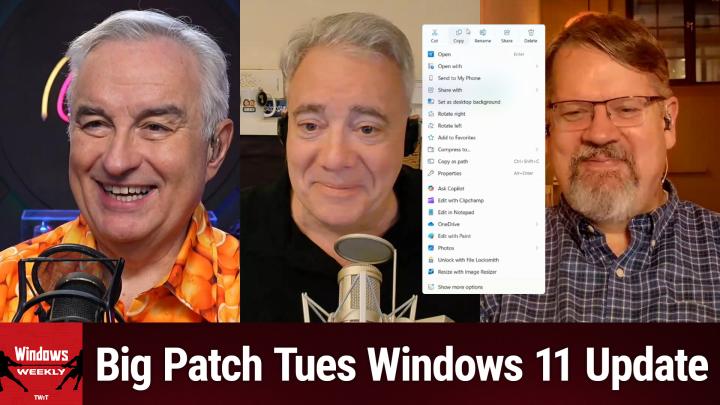
Windows Weekly (Audio)
WW 949: How Do I Get Back to Windows 7? - Microsoft's Patch Tuesday Update Packs Big Windows 11 Changes
02:41:07
Microsoft's Patch Tuesday Update Packs Big Windows 11 Changes
Loading summary
Transcript795 lines
- [00:00]
A
It's time for Windows Weekly. Paul Thurat is in Makunji, Pennsylvania. Richard Campbell's in Copenhagen. We are going to talk about Patch Tuesday. It was a big one yesterday with lots of new features for Windows 11 users. We'll run them down. We'll also talk about some of the hardware Paul saw at IFA in Berlin. He's back now. And Microsoft Open Source is a classic. It's all coming up next on Windows Weekly. Podcasts you love from people you trust. This is twit. This is Windows Weekly with Paul Thurat and Richard Campbell. Episode 949 recorded Wednesday, September 10, 2025. How do I get back to Windows 7? Hello, you winners. Dozers 2. I'm sorry. Did I scare you? It's time for Windows Weekly. Paul Thurat just suddenly woke up. What? What?
- [01:03]
B
He.
- [01:04]
A
He is in beautiful Macunji Township, Pennsylvania, United States of America. Hello, Mr. Thurat.
- [01:11]
B
Hello, Leo.
- [01:12]
A
Good to see you.
- [01:13]
B
You too.
- [01:14]
A
To your left, a wonderful, wonderful, wonderful Copenhagen. Yes, it is Mr. Richard Campbell of Runners Radio fame. Hello, Richard. Hi.
- [01:25]
C
Good to be here. It's what, eight past eight o' clock in the evening?
- [01:30]
B
Yeah. Oh, I know the feeling.
- [01:34]
A
That's not too bad. That's not too bad.
- [01:36]
B
Yeah.
- [01:37]
A
Well, welcome, gentlemen. Normally on this show we talk about, you know, Microsoft and Windows, but I guess this show will be no different.
- [01:51]
B
I was like, where's he going with this? We are talking about that.
- [01:56]
A
Sure.
- [01:56]
C
The whole first page is Windows 11 stuff.
- [01:59]
A
Let's talk Windows 11. Paulie, why don't you kick things off for us?
- [02:04]
B
It's been a busy week, you know.
- [02:06]
A
It'S a busy week.
- [02:09]
B
Yesterday was a big day. Not because of Apple, but because of Patch Tuesday. And yeah, this is actually a big one. So this has been a big year for Windows 11, you know, monthly updates. This is one of the bigger ones. I think this might be the last. Not that it matters, honestly, but the last monthly, whatever Patch Tuesday update before we get 25H2. Right?
- [02:33]
C
Okay, maybe.
- [02:35]
B
I don't know. Anyway, because of the way Microsoft does things, these features are all. I gotta. I have to use the same browser for my camera window and my regular browser, which is going to confuse me this entire show. I'll be okay. Because Microsoft is providing the same features to 24 and 25H2. Well, actually 23H2 right now. The Patch Tuesday updates we got, even though they're different, KBS different cumulative updates are in fact the same. And I'm just looking at my. The article I wrote I can see I screwed up the KB number. So those KBs are exactly the same.
- [03:14]
C
Nice.
- [03:15]
B
It seems like that would explain it, Paul. That's why they're the same. That's not why. That was just me making a mistake. So for those of you without a copilot plus PC, by my math, that's about 99 points.
- [03:26]
C
Everybody.
- [03:26]
B
Pretty much, yeah. Some changes to search, some changes to Notification center, some changes to system dialogue, some changes to lock screen widgets, et cetera, et cetera. We can go through this if you want, but we've talked about most of this before. All of this, I guess, really, as these features have kind of wound their way through the inside of program. So search from taskbar. This is when you actually still leave the search button or whatever that is there in the taskbar when you search from there. Just search, really. I don't know why they're calling it this. You'll get a new grid view for images like we had on the web in 1999. So that's fun. Some other small changes. Nothing really big there. If you are coming to Windows 11 from Windows 10, you may know that when you brought up that kind of. The naming here is a little tough, but the notification center, which in Windows 11 is actually two different windows that appear together, one of which says notifications. The other one's kind of a date calendar deal doesn't have the clock right. That used to be there in Windows 1010. Now you'll be able to enable that. Still can't screw with your schedule in there like you could windows 10. Baby steps, you know, it's only been like what, four and a half years? We'll get there. I don't know, it's kind of weird, but whatever. If you want to turn that on Settings app and then probably what time and language date and time. And then you'll see an option in there for show time in the notification center, which again is I guess those two panes today. It's kind of a weird naming system dialogues that are generated by the system. I'm trying to think of an example of this. Like you're going to write a file or something. Well, no, they weren't. Some of them were modal, some weren't, but now they're all modal. And they also did that deal where they dim the background of the desktop, which is actually a cool effect that you can put in individual apps as well. It's pretty good. Someone called this out when I wrote about this. And if you look at the image that I have in my article for this story, I only have one of the File Explorer updates in there, and it's the most subtle and no one will have noticed this, but the cut, copy, rename, share, delete buttons that are at the top that used to be just hieroglyphics and now have the words now have a thin sliver divider between them. Super exciting.
- [05:51]
C
Because that makes it better.
- [05:52]
B
Yeah, no, it's way better. But what's coming. And this is the thing we talked about on the show that I don't think I've written about per se, but I've been kind of raising this issue. If you look at that image, the context menu is actually pretty humongous. Right. Like in that picture, I'm right clicking on an image file. So I have various system apps or Inbox apps that come with Windows Photos and Paint that can work on images. And so they appear in this thing as discrete commands at the bottom of the menu. And I've talked in the past about how there's this notion of app actions that are occurring in Windows 11. AI is going to tie into that.
- [06:33]
A
And you can barely fit this on the screen.
- [06:36]
B
Right. Well, this is. Then this is the. I know it's going to get. It's bucket longer. So Richard last week described this as kind of a glorified open width, which it absolutely is, by the way.
- [06:47]
A
Yeah, but you know, still have Open with.
- [06:51]
B
Well, in other words, you. All right, so let's just step through this. Right? So you have an image and you right click on it, which I have to say 90% of people use when this. Probably never do that. But okay, let's say you're, you're smart, you know this, you can do this, you can open it, obviously you can open with. And it's not there, but the Open with menu will have some kind of a list of apps there. It's going to have Affinity photo, it might have Photoshop it, Paint and Photos and whatever else you have on your system, whatever it is. But the idea behind App Actions is that those apps all have specific actions they can perform. And instead of just opening it in the app and then finding the command, this is a way to get to that command directly from File Explorer or Windows. Right. And that's one of those AI orchestration things, I guess, or whatever. So they're adding that to this menu now as well. So in addition to all this stuff you see here, there's also going to be like app actions, I think is the way that. Let me see if that's exactly how they phrase it. Where is this thing? It's in there somewhere. There's so many things. Yeah. And I don't even write what it is. I believe it says actions or app actions. And then that will be another sub menu. Right. And so there's going to be all these, this kind of growth of stuff that's going to be on these right click menus. Now the reason I point all this out and I beat that one to death, I apologize, is that one of the points of Windows 11 was to simplify these menus. Right. And to simplify the whole UI. Right. So one of the big complaints about Windows 11 from power users was they would right click on things and stuff would just not be there. And they're like, what is. Well, here we are four and a half years later and this is getting, you know, that's what happens is what always happens. It's getting longer and longer and longer. And because of AI or Microsoft's desire to cram AI into everything, you know, we've got off the kind of deep end on this. So this is just going to keep getting worse. And the more stuff you have installed in your system, that does.
- [08:56]
C
I saw a few, a few in the ones in your context menu were like Image Resizer, which is the Power Toy. Like.
- [09:01]
B
That's right. No, I installed that. I mean that's, yeah, that's. That's on me in a way. But I mean. But all of these things can attach themselves.
- [09:08]
C
Yeah.
- [09:09]
A
What you're saying is it's. It's like a lady's purse.
- [09:12]
B
I'm actually.
- [09:13]
A
It never gets smaller.
- [09:14]
B
Okay. I was gonna say it's like cancer, but that's a, that's a friendlier way. Yeah, it's like it's metastasized.
- [09:20]
A
So you have a choice between misogynistic or fatalistic. Your choice.
- [09:25]
B
Yeah, I usually go with the fatalistic. Yeah, no, I know you will. If you go into the Settings app and go into privacy and security, you will see a fairly new page called text and image generation. And there's a couple things going on here or there will be someday soon, but one is you can turn this stuff off. So if you don't want to use that stuff, you turn it off. You could actually, you wouldn't do it to make the menu smaller, but just maybe you don't like this stuff. You can do that there. But the other thing this thing will start doing soon is that as you use third party apps, which I think is notable by the way, not Microsoft Apps, but third party apps that use generative AI, they'll start appearing in kind of a recent activity list. And you can go in and say, actually I don't want that app to be able to use those features or whatever. So you could actually, you can do a little bit there. The other interface for this is if you go into Settings app again, but then apps and then I believe it just says actions. Yeah, you will one day on this particular computers or absolutely nothing, but you will one day have a list of this actually should have stuff because there are some Microsoft apps that should be there. You should see Paint, photos and probably Notepad in here and you can go in and customize which actions appear. There's ways to fix this, but no one's going to know how to do that stuff. But anyway, that's happening, they could go.
- [10:49]
C
So far as to say, hey, any of these items you never used, it's behind a thing called never use.
- [10:56]
A
Yeah, or I do that with my email. I have a unimportant folder.
- [11:00]
B
Yeah, yeah, unimportant, right. So Microsoft's approach is a little different. They notice you're not using it and then they just start promoting it to you.
- [11:08]
C
Yes.
- [11:08]
B
You know, so it's bad enough that it's like on the system and you're just like, look, I'm just trying to deal with this thing and not, I don't want to, I'm not going to play with it, I just want to leave it alone. And it's like, no, we're going to berate you. So you know, we have to deal with that aspect in this world.
- [11:21]
C
We're going to make this menu item hover under your mouse no matter where.
- [11:24]
B
Yeah. It's going to follow the mice cursor. Sooner or later you're going to click this.
- [11:27]
C
You have no choice.
- [11:29]
B
So actually it's funny because as we were talking, I opened the Settings app and it actually wish I had taken a picture of it. It displayed a UI I've never seen before, which is, it has that new centered search bar. It actually dropped down a list of recommendations, even though the homepage is literally recommendations. So yeah, Microsoft is so much fun. Anyway, anyway, if you're wondering why I'm crazy, I keep saying this. If you haven't seen the new Windows hello experience, the new tedious, slow moving one that uses new visuals and all that stuff that's part of this. There are improvements to the widgets both in Windows, on the desktop and then on the lock screen. The lock screen bit is that you can go out and customize which widgets appear finally, which was the first thing we asked about when they added widgets. You can actually reorder them, you can resize them. They have a smaller size now, which is pretty cool. Then the widgets interface. I keep clicking on things to see if I have any of this in this computer, and I do not. But the widgets interface, the widget board is being improved so you can have multiple widget boards and also multiple feeds, which has been one of those things we've actually supposedly had for a while. But I've never seen a third party feed and navigation bar. So you can switch between all those things. And there's some other stuff, but that's most of it. And oh, except for you who have copilot plus PCs. So the other 99% walk away for a few minutes. This doesn't regard you. Just kidding. But. So Recall is Recall like Copilot, by the way, I don't know if there's anyone out there who opens Copilot on purpose, but I do it all the time by mistake. And there is a. They obviously have that alt space kind of mini quick view, whatever they call that. It's kind of like the light tan small window. But the main copilot window now is this whole kind of experience, right, with graphics and stuff. And someone correctly I think has likened it to a sort of like AI start menu. And it shows you all this different stuff that you might. It's not just like a prompt, right? It gives you kind of ideas about things you might want to do. They're doing this to Recall as well. And actually this one I kind of like. So Recall now has a bunch of big thumbnails, like big tile type thumbnails with recent activity. The apps you've used the most, the websites you've used the most, you can filter the view, you can go and easily pick the apps. You don't want this thing to record this navigation bar, et cetera, et cetera, et cetera, et cetera. And this is the type of thing. I mean, I don't use Recall, but if you are using it, this is why you're there, right? You're trying to find something. So I think that's. That's actually pretty good. Click to do is just getting an interactive tutorial when you run it the first time and then you can go access it in more options if you already start and need to reference it again. And Click to do sorry is, I guess in my opinion is probably the best. Well, maybe the Search thing. But that and, or search is maybe the best kind of Copilot plus PC specific figure feature. And it's. Yeah, I mean that's. Yeah, it's to interact with anything you see on screen, whether it's text or graphics or whatever. There's the agent in settings that actually arrived a month ago for Snapdragon X based copilot plus PCs. But now if you have a normal computer, you can get that as well. Although your primary language has to be set to English for now for that to work. So those three copilot plus PC features as well.
- [15:01]
C
Cool. And they too will get 25H2 soon.
- [15:07]
B
Will is a strong word.
- [15:09]
C
Okay.
- [15:09]
B
It's so definitive. But I, I'm sure you're right actually, because it's an enablement package and you know, it should happen. Shoulda, coulda, woulda. I don't know.
- [15:22]
C
It's really not a lot of conversation about recall these days. I guess the two guys who've got the machines don't care.
- [15:27]
B
So. Yeah. So two things to this. I don't, I, I don't. I'm not going to call out the person and this is not an invitation for someone in chat to go find the person and put his name in there. But there's a guy who writes for a publication. It's been around for a while. Both him and the publication actually like and respect the guy. But he's one of those kind of like, like never Recallers, we'll call him. And he back in March or May, one of the months, published an article about how like, okay, this thing's going out now. It's actually out in the world. No one should use this. It's the most unsafe thing in the world. And I read this at the time and I started writing an article which I've not published because I just hate to personalize this too much, but it's just ignorant. And the reason it's ignorant is he explains like all the Microsoft security controls and blah, blah, blah, all this stuff. And then he says, yeah, but what if you're in like some scenario where someone forces you to log into your computer and sign in with your face and now they have an access to everything you've ever looked at on your computer because all these screenshots are unlocked by this. Which actually isn't true, by the way, but whatever, stop. Because if you're in a world where someone has taken your computer, held it up to your face and forced you to sign into with Windows. Hello. Yeah, recall is a problem, I guess. But so is every password, every email, every whatever you've done. Not enabling recall is not saving you from anything. You still have a history of all of your activities in this computer. And that's just silly. So it's silly in the sense to broadly suggest that no one should ever use this because this is like the worst case scenario. This is the what if scenario. Like I, I'm kind of a optimize for the everyday kind of person, you know, do. You don't optimize. You know, like, in other words, like we had friends who would fly to Europe with these two huge umbrellas and I would be like, guys, we're only here for five days.
- [17:23]
A
If it's, if it rains, will have an umbrella.
- [17:25]
B
They have umbrellas. Europe makes umbrellas, you know. Yeah, that kind of thing. Like you can kind of over. You know, it's like people will say you can't be too careful, actually. Yeah, you can. Like the granny driving 40 miles an hour in the fast lane is being a little too careful, don't you think? Yeah, that kind of thing. So I, I just. Yeah. So look, there's a, there's an excellent Microsoft Security story that comes up later in the show. Maybe we can just move on to the next stupidity instead of this thing. Because it's just like everyone who's concerned about recall is the exact audience of people who will never use recall.
- [18:02]
A
And you don't have to. That's the beauty of it. Nobody's making you do it.
- [18:05]
B
Yep.
- [18:06]
A
I think it's kind of important to note that this is the penultimate Windows Update that Windows 10 users are going to get. They'll get one more next month. Well, I mean, unless of course, they.
- [18:19]
B
I mean, I think, I think they're going to keep. Well, I mean, there's extended security support. Right. So I assume they're going to keep putting out the normal Updates for Windows 10. I mean, they'll just be security updates. Right. We're not going to see function.
- [18:32]
A
I thought that that was the point of end of life is no more security updates.
- [18:36]
B
It is. But, but see, everything with Microsoft has an asterisk. So end of life asterisk is. There's extended security support still. Right. So you can pay or.
- [18:47]
A
But you have to pay for it or you get it for free if.
- [18:49]
B
You'Re a person like a normal human. Yeah.
- [18:51]
A
If you have 5,000 points.
- [18:54]
B
Yeah. So I do think we're still going to get a KB every month for Windows 10 that will list the security.
- [18:59]
C
I mean, the bottom line is they don't want Windows exploited. So they will keep pushing. There's a significant vulnerability.
- [19:05]
A
Oh, okay. So never mind. Forget what I just said.
- [19:08]
B
No, no.
- [19:08]
C
Can we talk a bit about the Windows hello?
- [19:11]
B
Oh yeah, sure.
- [19:12]
C
Yeah. The Windows hello updates just like making passkeys more visible for Windows login.
- [19:17]
B
Like so that part is better. The thing that they've added that's better if you haven't seen it is a little. It's just a simple little thing in the authentication dialogue, I guess that lets you choose between different ways you can authenticate. Right. Which actually that's good. And that includes security keys if you have a physical key. Pass key if you have that another device, whatever you have.
- [19:38]
C
Because they've often buried these like you have to go to, you know, I can't log in. Try another way. And like several layers down is oh, you want to use a Yubikey, fine.
- [19:48]
B
And if this isn't there quite yet. But they're also testing now and will soon ship a feature that allows third party pass key managers to integrate with Windows 10 Windows 11. Sorry. Like they do on mobile. Right. And there was basic support for this I think that started 24h2. I'm losing track when things happen but it doesn't really do much right now. It's not very good. But. But now yeah, whatever passkey like Password manager probably that you use if they support. This is what will come up now, right. So you can authenticate against your passkey provider or whatever the term is I'm looking for here. Does.
- [20:28]
A
Does Windows have anything like on Linux you have something called PAM which is password authentication modules. And the idea is it's a text file and you can add. That's if you want to use a Yubikey or a fingerprint or hello or whatever you can add to the configuration of Linux PAM to say okay, and this will work. And you can even say this works for ssh, this works for login. It's a very nice way of explicitly now admittedly you have to edit a text file but explicitly telling it how to authenticate version.
- [21:01]
B
Honestly, I mean that's one of the big debates in the Windows world because you know, we moved to a registry over 30 years ago now.
- [21:08]
A
Right.
- [21:08]
B
And is it not better or is it better to just use plain text configuration files like we used to have these system. We still. They're still in Windows actually we do have text based configuration files but they're not really used as much anymore with a random temporary. I'm going to call it exception. Windows has pretty Much always been GUI focused. Right. For this kind of stuff. And so I don't believe there is. I guess to answer your question, no, I don't believe there is a text file you could go and edit to achieve what we're talking about here.
- [21:46]
A
I feel like this should be a standard. I know it's a Linux feature, but it just seems like such a good way to do it.
- [21:52]
B
Yeah. Yep. Linux audience is obviously more technical on average than Windows. Yeah.
- [21:58]
A
And they're willing to edit a text file to do that.
- [22:00]
B
Yeah. This is a bit much to ask. I think about most like my mother, sister, brother, whoever. I would, you know, I don't think they could write a text file, you know, so I don't, you know, I don't, I don't. You know, I, I hear you, but I don't know. I don't believe there was a. Richard knows this pretty well too. There was a moment of time in the early 2000s where they kind of reverse course on this and things like Server core came out of this exchange. I want to say 2003, maybe that version or if it wasn't, I guess it would have been 2007. Whatever the next version was, they actually built it. I think that one was built on PowerShell and the subset of functionality in that case was actually in the gui, whereas the superset, all of the functions were in the.
- [22:44]
C
Yeah, that was the big push. The same happened with IIS administrator was it's PowerShell first and then these MMC shells literally just wrote PowerShell.
- [22:53]
B
It's the front end. Yeah. Calling the PowerShell back end. Right. Which honestly that's closer to what you see on linux and because PowerShell is so sophisticated to me this is a great way to do things. But I don't, I don't know. Like I was just playing one of the. I was working on the. What's it called, Paul? Quick Machine Recovery feature that's 24 and 25H2 and I don't know that that's how it was built but obviously there's a GUI front end that's for an individual's distance settings and you just kind of. I want it to work this way, whatever. And the feature is mostly automated, just how it occurs when you need it, but you can actually from the command line view and change the configuration and that's very interesting. Like that it's going out the door. Part of it is because it's a feature for both businesses and individuals and obviously for businesses you want to be able to script it or Remotely manage it, et cetera. So that makes sense. But I. But I just thought about this because I was in writing about it, I was like, this is the way everything should be. You know, it isn't always. It usually isn't, I would say, in Windows, probably Windows Client anyway. But, yeah, I think I talked about this a little bit last week, but the problem with this Windows hello thing, because Windows hello is great and whatever, but the new ui, which is admittedly pretty, you'll have a chance to see it because, man, it's slow, too.
- [24:25]
C
You have time.
- [24:26]
B
Yeah. You'll be able to really take. Just enjoy. Comes up. It does its little blanky thing. It looks around. It's like, oh, it is you. Yay. It's you. It's really you. Okay. Click here to make sure. And you're like, come on, man, do it. Would you just do it? But just do it. A little tedious, but anyway. Yeah, so it's a big one. Like I said. So. Yeah. Heading into 25H2. You know, it's been a lot of changes this year, and this is. I don't know if it's the biggest month, but it's. It's right up there. It's one of the top two or three. Wow. Yep. And this in this week's episode of Where's Waldo? By which I mean, where's the Canary Channel?
- [25:08]
C
Canary 4 Again, what is that?
- [25:09]
B
Nobody knows. It's like that George Washington skit, you know, from SNL with Nate Bargazzi. It's like, yeah, why do we use leaders for liquids? And, you know, empirical measure for everything else. Nobody knows. And that's what Canary Channel. It's like, what is this thing? So if you're in the dev channel, you're testing what's now going to be 25H2 or future versions of that. If you're in beta, you're testing 24H2. If you're in least preview. It depends on what you're doing, because you could technically have one of several things going on there. But let's just say the next version of the latest one is the next version of Windows 11, which is 25H2. Right. They all. The point there is just that they all tie to something like a version of Windows, which in my reptile brain, makes a lot of sense. Canary doesn't match to anything. So Canary has like a build. It's not like Windows 11 version something, build number. It's just build, build number, whatever it is. So there are new features in this most recent build from this past week, but they're all features we've seen elsewhere, including hilariously, by the way. I'm just looking at this. Actually, it's possible all three of these. Yeah, actually now, now that patch Tuesday has occurred, all three of these are shipping and stable. So. All right. If you're in that advanced Canary branch.
- [26:31]
C
Remind me again about Canary.
- [26:33]
B
I can't. I couldn't explain this if my life depended on it. I. It blows my mind. It just blows my mind.
- [26:40]
C
They take the time to make another.
- [26:42]
B
Build, but it's crazy. By the way, someday soon. This was supposed to happen by now, but they delayed it. Microsoft is soon. Like it could happen during the show, but if not next few days and certainly by next week will in fact release an ISO for Windows 1125H2 based on that build they shipped to the release preview channel. And I don't know this for sure, but I believe this is the first time we've seen a 25H2 ISO. And it. It won't be. But it will be really close. It won't be the final version, but it'll be pretty close, I would say. So. I was hoping to be able to tell people about that today, but that hasn't happened yet. It will eventually in the dev and beta channels, which again are 25H2 and 24H2, respectively. Microsoft is testing a few new features, but the big one is the ability to use a secondary camera. So not the camera built into a laptop in most cases, but like a USB based camera with Windows Studio Effects, which I read that and thought, wait, is that.
- [27:45]
C
Could you not do that before?
- [27:47]
B
That's what I'm saying. Like could you not do that before? I feel like. I guess you can't. I guess not. But I feel like you could. I thought you could. I don't know why this would be. Well, I kind of do. I guess I was gonna say I'm not sure why this is copilot plus PC specific, but of course Windows Studio Effects requires an MPU. There are pre copilot plus PCs with MPUs that are garbage like Meteor Lake and before that. But so they. That, well, it's not going to work. But that could work, but they're not going to let that work. So this will be for copilot plus PCs and here's a little wrinkle that's brand new, has never happened before. This one is rolling out to intel powered copilot plus PCs first and then will later come to AMD and Snapdragon because you know Consistency. I don't know. And there's other stuff, but whatever, that's. That to me, that's the big one. And yes, like Richard said, I'm like, yeah, my first exper. My first question was like, wait, are you kidding me?
- [28:50]
C
What?
- [28:53]
B
I pretty. You ever hear something that makes you dumb?
- [28:55]
C
It was just not supported. Right. Like, it may have worked, but it was.
- [29:01]
B
I don't know. I'm. I'm. I don't know. I. Look, when I'm on a laptop, the truth is I typically just use that camera. I don't really. I guess I don't think about it too much. But I have done that thing where you switch between cameras, right. Like in the camera app or whatever. And I've seen Windows Studio effects. I guess not. Yeah, either come on. Or not be there. Right. Depending on what the cameras. So maybe it's so strange.
- [29:20]
A
Shouldn't it just be in the camera pipeline? Whatever camera you use?
- [29:24]
B
So the sentence you just asked or the question you just asked, you know, shouldn't it be. Is this thing we ask about Windows pretty much every day? Yeah. Yep.
- [29:35]
A
Okay. Maybe every camera has its own pipeline.
- [29:39]
B
Oh, I'm sure every camera has its own pipeline. Pipeline being one of my favorite words. And also something that has come up multiple times this week with Google and Apple for some reason. But yes, camera pipelines.
- [29:52]
A
You know, I love camera pipelines.
- [29:54]
B
Yeah, I do too.
- [29:55]
A
Yeah, I know.
- [29:56]
C
I'm excited.
- [29:58]
A
All right, let's pause for just a moment so we can bring the temperature.
- [30:02]
B
Down a little bit.
- [30:03]
A
Starting to steam up a little bit in here. Now would be a good time perhaps to mention our sponsor and talk a little bit about chilling, relaxing, just staying calm. Our show today, brought to you by Helix Sleep. You know, I'll tell you, this is a good measure of how much we love our mattress. We've been undergoing some construction and we had to take down the window treatments in our bedroom. And so we've moved temporarily while the construction is going on to a back room. But I gotta tell you, instead of just putting in the hide a bed or I don't know, inflating an air mattress, I literally moved the Helix Sleep mattress into the back bedroom because I was not going to not sleep on my brand new Helix Sleep mattress. Your mattress is more than just sleep though. I mean your mattress. And last night Lisa and I cuddled up and watched our favorite TV show with the kitty cat. Movie nights with your partner, morning cuddles with your pet, your wind down ritual after long days. I love curling up With a good book, your mattress is more than just a place to sleep. It's the center of your life, more than eight hours a day. And a mattress can make a big difference, for good or for ill. Are you waking up, for instance, sweating at night because your mattress is like retaining all the heat? Or does your back kill you in the morning cause your mattress sags like this? Or do you feel every toss and turn your partner makes? These are what we call in the business classic mattress nightmares. Well, I gotta tell you, my Helix Sleep, I love my Helix Sleep. Helix Sleep changes everything. No more night sweats, no back pain, no motion transfer. You're gonna get the deep sleep you deserve. We realized after reading that you should replace your mattress every six to 10 years. That we'd had our mattress for eight years and it was time to get a new one. So I started looking around, looking at the reviews. I saw a recent review from a Helix Sleep owner. Five stars. They said, quote, I love my Helix mattress. I will never sleep on anything else. Okay, I thought, that's interesting. Then I saw the awards time and time again. Helix Sleep remains the most awarded mattress brand wired mattress. Best mattress of 2025, best period Good Housekeeping's bedding awards 2025 for premium plus size support. GQ Sleep Awards 2025 best hybrid mattress, New York Times wire Cutter Award for 2025. This year featured for plus size and Oprah Daily sleep awards for 2025 best hotel like feel. And I have to say, it is like. It is like the bed. You know, when you sleep in a first class, you know, five star, six star hotel, really nice hotel, and you get in that bed and you go, wow, I wish this was. I wish this was what it was like at home. It is for me now. It is. Go to helixsleep.com twit for 25% off site wide during the Labor Day sale. Extended. That's helixsleep.com twit for 25% off sitewide. The software ends on September 30, 2025, so make sure you enter our show name after checkout. That way they know we sent you. And if you're listening after the end of the month and the sale ends still, be sure to check them out@helixsleep.com TWIT I cannot recommend this mattress more highly. So much so that I schlepped it all the way. I schlepped it down the hall. I took the topper too. I love the mattress topper we got. It's about this thick and it just. Oh, so all from Helix schlepped it down the hall so that I can sleep well in the back room. Thank you. Helix.
- [34:01]
B
That'S where that word comes from.
- [34:03]
A
Schlepping. Schlepping your sleep. On we go. Intel. But you know, intel, they're making lip Bhutan is making some changes here.
- [34:14]
C
Yeah.
- [34:15]
B
Yes, yes. Yeah. So they announced the reorder.
- [34:20]
A
Here's the question. Is it moving? The chairs on the Titanic, the deck chairs.
- [34:24]
B
So some of it is about saving. The saving facing it's like so something goes wrong and someone's got to go.
- [34:30]
A
Somebody's gonna take the blame.
- [34:31]
B
And you look around you're like, well you're in charge of that part of the company. See you later. Sorry. And who knows, maybe this woman was going to retire anyway. I don't know but this was interesting to me because the person, I guess he was doing this on an interim basis. So when their pack Elsinger was let go by intel they had two people temporarily as co CEOs. One of them was a name a woman named Michelle Johnson Halthis who was previously in charge of the business inside of intel that does the PC chips. Right. The clients for 30 years. She.
- [35:09]
A
30 years, right.
- [35:11]
B
Is that true? That long? Yeah, maybe. Okay. I'm not really sure but okay. So I don't, look, I don't actually know anything about that person. I'm not criticizing her. I don't actually, I, I don't. Look, there's no one at intel who is singularly responsible for their problems. Right. And it's certainly not her. Like this was a bunch of mistakes by many people over a long period of time. You know, right now we're just in the, you know, let's stop circling the toilet and see if we can, you know, get out of this hole. So Pat Gelsinger had his plan, he was out, so she moved in to, to be one of the CO CEOs temporarily. Now we have Lip Bhutan and the guy who stepped in as the interim leader of that part of the company, the client computing group is a guy named, I'm trying to get his first name here is guy named, his last name. Jim, sorry, Jim Johnson. So I know this guy mostly because he appeared at IFA last year at the intel announcement for Lunar Lake and he gave one of the most confident presentations I've ever seen it. And this is the guy you want to see, right? The 40 year intel vet. He looks like a Linux programmer, you know what I mean? Like he's an engineer, old school. He's been. Been there forever. He's, you know, Lunar Lake didn't go great. He also. But the funny thing is now I can. I. I was able to link to the video so you can see this for yourself if you want. He was at the Lenovo event at IFA last week. And again, super confident still and great. They have a big partnership, obviously. Lenovo is the biggest PC maker in the world. Intel is still the biggest chip maker in that world. And they, they have a really tight partnership. And. But see, the thing is he, he really. I don't. This, I don't appreciate. He kind of co mingled. So there's something called intel core Ultra Series 2, which is a combination of architectures. There's the Lunar Lake chips that ship first last year, a year ago, literally, that are mobile chips, and then there are the desktop chips, which are Arrow Lake, and they do not share the same architecture. It doesn't have integrated ram, doesn't have the same mpu. It has various pros or cons. I, in my, I have limited experience with those chips, but in my limited experience, they have been more reliable.
- [37:33]
A
This is the clip that you're talking about.
- [37:36]
B
No, no, no, that's all right. That's the wrong. That's the wrong part of it.
- [37:39]
A
Oh, I clipped. I clicked your link.
- [37:40]
B
I'm sorry.
- [37:41]
A
Okay.
- [37:41]
B
No, then I screwed it up. I'm sorry. But if you go much earlier in the, in the clip. In the, in the clip. I guess if you, you'll see this guy. But it's okay. I quoted it. I can, I think I can. I think I can probably. Yeah, I can give you the quote. So anyway, this guy comes out same, same presentation style, very confident. He's, you know, again, you look at him, you're like, this guy knows what he's doing, you know, whatever. And he says he co. Mingled Lunar Lake and Arrow Lake in the talk. I didn't quote from that part because that's not really important. I didn't appreciate that though. But whatever. Anyway, he says, with Coal Series 2, by which he meant Lunar Lake, we re engineered the CPU, the GPU, and the MPU and delivered faster compute, improved AI experience, and busted the myth that x86 can't be power efficient. And then he paused to silence because everyone in that audience has reviewed these laptops and we all looked at each other.
- [38:36]
C
We were like, what?
- [38:38]
A
I'm sorry, you busted. What myth?
- [38:40]
B
What myth did you bust? The thing is like, oh, you can play it if you want.
- [38:44]
A
Yeah, should I play it from where you started?
- [38:47]
B
Yeah.
- [38:47]
A
Okay, we can hear the audience.
- [38:50]
B
And with core ultra series two, we re engineered.
- [38:52]
A
Oops.
- [38:53]
C
That's it.
- [38:54]
B
The CPU. The GPU. The NPU. And delivered. Faster compute, improved AI experience and busted the myth that x86 can't be power efficient. Efficient for enterprise.
- [39:10]
A
Dead silence.
- [39:11]
B
Dead silence. By the way, not even an abortive. Like one guy in the back.
- [39:16]
A
Golf clap would have been appropriate.
- [39:18]
C
There should have been at least an intel person out there to start the rally. Right.
- [39:23]
B
By the way, this guy's a seasoned professional. He moved right along. It's not this again.
- [39:27]
C
But he's got the grin of a. Well.
- [39:32]
B
I actually really like this guy. It's not him. It's not his fault. But the thing is now he probably.
- [39:37]
C
Didn'T write that script either.
- [39:39]
A
He didn't even write it. Exactly.
- [39:40]
B
Yeah.
- [39:40]
C
But he's now the CEO of Intel.
- [39:42]
B
Product of Intel's. Yeah. Client computing group. Yep.
- [39:47]
C
Yeah.
- [39:47]
B
So he's in charge of this now. So, you know, we'll see. So obviously Nova Lake is coming down the pike. Did not announce that at faa, by the way. And then after, you know what. At Panther Lake and whatever else after that. And so at some point these things are going to kind of come together. But we, we know from, you know, history or whatever. I think it was the first quarterly earnings report after Luna Lake ship. Intel was like, yeah, we're never doing this thing again. We're never doing. We are never making one of these again. So he's sort of bragging about how x86 can be power efficient. It doesn't talk about the reliability, which in my experience is the worst problem. But also doesn't mention, like, we're never doing that again. That thing. Like we haven't even got the place.
- [40:27]
C
To fall back on. It'll be fixed.
- [40:29]
B
Yeah. There's not going to be a version two. It's like, no.
- [40:31]
C
So from a specs perspective, Lunar Lake looks great and Aero Lake is a step back.
- [40:38]
B
Yeah. If. If what you're looking for is power efficiency, I guess, and.
- [40:41]
C
Well, just the bigger NPU and things like that. From a specs perspective. From an experience perspective, clearly there's a problem.
- [40:49]
B
Yes. So I'm about to really criticize intel, so I just want to step back for one moment and say they did make gains across the board. Like you said, the m. Sorry, the GPU in particular is actually really. It's. It's good. It's not as good as the AP stuff that AMD is doing, but it is an advance. I. You're we're closing it on two years ago when they did Meteor Lake. And I got the first Meteor Lake based laptop that December and I was like, this thing can actually play video games and it's not horrible. And then you move forward to Lunar Lake and it can actually play modern video games pretty well. I mean it's going to be 1080p, it's going to be 30 to 60 for 30 to 45, whatever frames per second, you know, graphics going to be on low, whatever. But like a game like Call of Duty, the latest one, actually looks really good on Luna Lake. It runs well, it's fine. Like it's good. And for, you know, for integrated graphics, remember, I mean it was 2006, right when Vista first came out and none of us had integrated graphics in our PCs that could even run glass. Like now they can play modern video games. Like this is, this stuff's come a long way. So there have been improvements. I don't want to, you know, completely kind of crap on intel, but now I'm going to completely crap on intel because I, I have to tell you, I, I, because of my schedule, I won't review as many laptops this year as I did last year. But last year was somewhere in the 24, 25 range.
- [42:10]
C
It was a ridiculous number of machines.
- [42:11]
B
It was a stupid number of computers. And most of them are intel based because that's, you know, that's the market.
- [42:16]
A
Sure.
- [42:17]
B
And I, the experience on Lunar Lake is so all over the map and continues to be like that that I can only conclude that this thing is a disaster. And the most recent laptop that I reviewed, which by the way, I will admit could, maybe it's a one off, maybe it was just that one thing. Maybe the PC maker had something to do with it. I had so many problems with this thing. I had problems here in Pennsylvania before we left. I used it on the plane on the way to Berlin and was yelling at it to the point where my wife is literally like, seriously, you're in public. Could you please be quiet? I was in the hotel room trying to use this thing on battery connected to power, five edge tabs was too much for this thing to handle like you could. And I eventually came to realize you could hear it coming because I would be sitting there working and you'd hear the fan would go like, what's that? Why is it doing that? I'm not doing anything. I'm not rendering video or whatever. I'm not playing a game. What is that? And then suddenly nothing would work. And I was instantly transported back in time to when my wife had gotten an IBM PS1 computer, which you may remember they sold them at Sears. It was a little expensive for us at the time, but she wanted, you know, an IBM computer for work stuff. And this thing had a. It wasn't even black and white. It was like four shades of gray was the color that this 286 thing put out. Stupid. It was probably two megabytes of RAM and nothing. It was horrible. And I installed, I think it was Windows 3.0 at the time on it to see it and kind of experience it. And it was so slow, it was unusable to the point where the example I always use is you click on a menu and it would draw the box around the menu and then it would draw the lines that were like the dividers between some of the items, and then it would draw each of the items and then once that was done, you could click on it and it would slowly go do whatever the thing was like. It was that bad. And that's what this slowdown was like on this Lunar Lake based computer. And I don't own this thing. I can't damage it. I got to tell you, if this was my computer, I would have snapped it in half over my knee and thrown it in the trash. I was so mad at it. And the way I. I don't know if I said this to you guys last week, but I say this all the time. There are things that just work. And in our industry, we need to celebrate that because it's becoming increasingly rare.
- [44:38]
C
How many, how many weeks of shows were you giggled about opening a Snapdragon laptop and it was just there.
- [44:44]
B
Oh, well, by the way, this is going to factor into the story too. Yeah, there are those things that just don't work right. And okay, nobody likes things that don't work, but if it's a known thing, at least you're like, all right, look, I'm not even going to try. I know this thing's not going to work. The things that work inconsistently, the things that work sometimes, but not most of the time, maybe, or whatever it is, that's the real frustration. And that's the Venn diagram where in the Lunar Lake lands. And the, the behavior that I was seeing was a lot like what it was one year ago when it first came out, where intel actually had to come out and say, guys, here's the workaround. Just put it on high performance mode for everything. Power or battery? Yes, it's going to impact the battery but we'll put out some firmware fixes in the next month or so. We'll fix it. And it, by the way, by early 2025, it did seem like they had kind of gotten around it.
- [45:32]
C
Got it figured out.
- [45:33]
B
Yeah. I've reviewed some that were fine. You know, this one was not one of those. And happened like a year later to me is frightening. And, yeah, I am. I still hear from people that will say things like, well, I just. I just want intel to survive. Like, why? What? Why? You know, like, what. What have they done for you? What do you mean? You know, like. Or why do they deserve this? Or, like, I just want work, you know, I want their stuff to actually work. I. I don't like, resent that.
- [46:05]
A
We need competition. It's good. It's good.
- [46:08]
B
We, everybody.
- [46:09]
A
Yeah.
- [46:09]
B
I would like to see more competition in arm and no competition at x86. And I'd like to see this platform die, because I am.
- [46:15]
A
Well, I think that's what's happening. I hate to say.
- [46:18]
B
I know, but it's not happening quick enough world. It's terrible. All right. I don't. Again, not to beat this to death last week, I guess this could have been an AI story, but I don't know why I put it here, actually. But Atlassian, that company we all know and love, bought the browser company. These are the guys that make ARK and also make DIA. I think it was like $610 million in cash.
- [46:41]
C
Did you blow past that IFA thing with Lenovo?
- [46:44]
A
Oh, yeah. We didn't do.
- [46:46]
B
Oh, I did such a great story. I am so sorry. I didn't mean. I'm sorry. Yeah.
- [46:51]
A
Plus, I want to know more about Aoife. You were the Denver lady.
- [46:54]
B
Yeah. Yeah. So, yeah. Somebody says, somebody asked me last Friday. Well, you know, what's it like going to ifa? I'm like, I have no idea. I come to Berlin while IFA is going on, and then I do not go to the show. Oh. And that's how I would handle CS if I was going to go this year, for example. Like, I would go to vendors, press conferences. I would never walk around on the show and never go to the floor. I would never. Why? Why would I do this? This is for younger people who don't maybe have a life or care about whether the time is important or not or whatever. So I don't do that stuff.
- [47:25]
C
But they're in a step count competition.
- [47:28]
B
Yeah, exactly. But in the PC space, yes. There were some interesting things. And so Lenovo, if you go Back. And look, if you go back to ces, if you go back to Mobile World Congress, and now again, at ifa, they typically announce one to three kind of concepts. Usually they're computers, but this particular show, they weren't all computers. And there's going to be some range of, like, this is silly to. Oh, maybe you know, the nature of concepts. Right. Yeah, right, right. I mean, I interviewed the guy who runs ThinkPad, actually, I think is what his job is. But he, I said to him, you know, it's fascinating to me that the world's biggest PC maker, who, by the way, Blockbuster Quarter, just had grew share. Grew units. Right. Grew their lead over everything. These are not the companies that typically experiment. Right. They're like.
- [48:23]
C
Yet they can afford to because they have all that headroom.
- [48:25]
B
They can. But, like, it's, it's, it's fascinating to me that they do. Right. This is not what we typically see from the market leader and they've been super consistent on this for several years. So they showed off three concepts. Like I said, two of them were. Well, no, actually, that's not true. Only one of them was a competitor. The other two were what I call peripherals. So one of them. I don't know if it's in these. Yeah, I didn't link to this one, but one of my articles about FAA, I linked to a video that's up on throttle.com of the. It's a laptop stand and it's a pretty beefy one. Like, it's kind of big, it's got all the stuff built in, but it's. Because you connect it with USB to the laptop and it uses the sensors and camera and whatever else in the laptop to do various things. And the big one is it's, you know, you have your laptop in front of you. Like, I don't have. This isn't a laptop, but if it was, you know, it's the camera on the top. And if I were to stand up, this thing would raise up on its thing and it would tilt the camera up if necessary to. Or, you know, actually would tilt the, the thing holding the. The computer, slash, camera, but to. So I'd always be in frame. Right. And of course, the microphones would be facing. If I was using those microphones would be facing me as well. And I could move over here, I could walk around the table and the thing would kind of turn with you. And this is kind of, kind of an expansion on this idea they had from last year that, that was actually a concept computer, which they've never built by the way, but okay.
- [49:43]
C
Concepts.
- [49:44]
B
Yeah, well there was one that was a concept which was the rollable PC. Right. So that one is shipping now. So this is the thing.
- [49:52]
C
But it doesn't have, it doesn't happen the next year anyway. It takes a couple of years to get it into a production product.
- [49:56]
B
Yeah. So you know, so the, the, the rollable screen is very successful technically. I mean I don't know how it's selling but it's, technically it works. It's, it's, there's no seam or anything. It's great. And I was like, yes. Okay, so vertical.
- [50:13]
C
Cool.
- [50:14]
B
You ever think about doing a, like a horizontal landscape style scrollable screen? And he's like dude, just stop. He's like, obviously we think about that, you know, like, you know, it's like I can't talk about that. So you know, we'll see what happens.
- [50:27]
C
I'm not going to say anything.
- [50:29]
B
One of the other non PC concepts was a screen which I, I, I guess they announced in that press conference. I didn't notice this but when I was walking around the show floor, that not show floor, the little hands on thing they had. There was a guy there with like one of those loops and he's looking at the screen and everything and I'm like, what's going on here? And he goes, oh, this computer basically doesn't emit blue light. Even though this, the display looks pretty much the same. So they had it next to a normal monitor. Two monitors side by side, same background, same display, look identical basically. But when you held this thing up it would show you how much blue light was coming out of it. And the normal one, it's just bright blue. And then this one, it was just clear and it was like huh. So it's a hardware based thing. This one will almost certainly just happen. It's, it's just, you know, reduces eye strain. All the, everyone knows about blue light. So that was pretty cool. But the, the video that Leo originally showed and I have a separate video of that also on my YouTube channel. Short, very short. But of that I think it's of that segment actually is a rotating screen right now this one, this is the.
- [51:32]
A
Vertiflex they call it.
- [51:33]
B
Yeah. So this one to me makes a ton of sense. Like I actually, I would be shocked if they didn't make this. So if you think about a monitor that might be floating in space in front of you because it's on an arm so you have like a base amount or whatever or you can't see it. But over here to my side, I have a little USB C monitor. So a little stand or whatever. And. And you know, you can. You can flip it around. Right. And so when you do the screen reorient, like that's built into Windows, it has to be built into the screen too, I guess. But it will happen automatically if it is built in. And like, it works well. Right. And so when I go back to Mexico in about a week and a half, I have a USB C display 16 by 10 that I use like in portrait mode, which looks pretty good. And I put it next to the big. The bigger screen. It's, you know, it's kind of a nice little setup. So they were like, well, okay, so you get this thing and you could rotate the display. What if we could do that in a laptop? Right. And obviously the back of the thing has to be thin enough. And the. The little mechanical hinge thing or whatever that is, that does the work has to be.
- [52:36]
C
It looks very.
- [52:37]
A
Have monitors that did this. Yeah. I mean, this isn't that new of a concept.
- [52:42]
C
It's kind of monitors clunkier than that. That's very slick.
- [52:46]
B
Yeah. Like, typically if you were like traveling around, like, I know Richard does this like you have a laptop and it has a horizontal or landscape display.
- [52:53]
C
Yeah.
- [52:54]
B
Then you might have a secondary display like a USB C. And Yeah. And you probably use the tech all the time and. Or most of the time in landscape. But you could, if you wanted to rotate it. Yeah.
- [53:03]
C
Put a longer cable on it, flip it up.
- [53:04]
B
Yeah. So like, developers, I think would enjoy this kind of display often do probably at home or in their office when they have big displays. As a writer, like, I've always been kind of intrigued by this. And so having it just built into the one thing actually to me is like, yeah, I like this. And it. It's really slick. It was also a good moment of humor. I wish I didn't videotape the meeting, but like, this guy was like, I don't understand how this works. He's like, couldn't figure it out. And the. The guy from the Cat walks over the one finger, he goes dupe. And it was just like. And I was like, are you lacking body strength? What's going on over here? It was pretty funny. But so I. This one, I would be shocked if they made a rollable one. I mean, this is just a straight up screen here. It's just. It's easy.
- [53:53]
C
But that they're watching that video. The mechanism itself looked really smooth.
- [53:57]
B
It is yeah, yeah. No, in real time, like when you actually do it yourself, you're like this, you're like, yeah, this is exactly what I want this to do.
- [54:03]
A
Is this a concept or are they going to actually sell?
- [54:05]
B
It's a concept but I think it's the, what's the holdup is two things and it's not really a hold up. Like I think this is just going to happen. So they want it to be as thin as possible. Yeah, obviously the whole mechanism. But it also one of the things with like folding displays. You see this or with any laptop or whatever device with as a hinge. There's a, there's a term for this. But you, you automate the. We're going to open and close this thing over like 200,000 times or whatever it is. It has to meet that standard. Yeah. One of the reasons they do these kind of experimental devices even when they ship them like the rollable is it's a, it's a thinkbook, not a thinkpad. Because once you put it out thinkpad, it's like now enterprises can buy it, they can support, support a thing for eight years or whatever the time frame is. It's like. Yeah, well, yeah, I don't know. Well, how about the other one? We'll do the other one. We'll do it the other way. Yeah. Because you don't want to get caught.
- [54:55]
C
Probably take a couple years to get it to production caliber and get the price to something reasonable. Nice thing about concept is goodness knows how much they spent on that, you know.
- [55:03]
B
Right, right. And yeah. And the thing they showed us, the thing I got to play with, I, you know, I, which is probably the same. It might have been the same when they on stage, but maybe there's one, I don't know. But really felt like a production quality machine. It wasn't fake, it wasn't like a fake display. It was, it was a real computer running Windows 11. Real screen really rotated. The mechanism was super smooth. And I think they just have to get through the testing and like you said, probably cost, bill of materials etc as well. And then what else? Yeah, so I, yeah, I talked to this guy about this and I like, I said to him like I just, I love that Lenovo is the one doing this. Typically this would be like an Asus or you know, Acer or one of.
- [55:46]
C
These like kind of companies struggling for market share.
- [55:49]
B
Yeah. It's like we want to make a name for ourselves like lg. I think it's lg, right? Yeah. LG ships Graham laptops they're like super thin and light and if you were a Dell Lenovo hp, you might look at this and be like, but I can bend it with my hands. Like I can't. We can't sell this to businesses especially because those guys are going to beat, you know, the hell out of these things. And we can't do that. LG is like, yeah, we don't care. We don't sell the enterprise, we just sell the people. So they're going to baby it. It'll be fine. And honestly I think it has been fine. But anyway, that's cool. I like that kind of stuff. So I thought that was pretty, pretty good.
- [56:24]
C
Yeah.
- [56:26]
B
And I didn't put this in the notes, but they also have these. I'm trying to think of the brands. It's like Yoga Tab or whatever their Android tablets are, but with these kind of really nice built in. Oh, they're not really built in, but they're. It's like a, you slap a thing on the back and it gives it a kickstand, this keyboard, you know, pen, trackpad, everything. So it's like an iPad now with ipados 26 and like a magic keyboard or whatever and not uncommon, you know, like Samsung makes things like this. But these things are like 2 or 300 bucks like and they're, they're actually really nice. And it, and I'm really, I'm working on something that I'll publish probably closer to when Ipados 26 comes out. But this is something Microsoft tried to do almost 30 years ago. So when I started working on Windows CE, remember that the first devices were these hand. I think they were just called handheld PCs. And it was basically the form factor of a keyboard, right? Like a thin, you know, really thin, not 16 by. It was like 16 by 3 or something like really thin. And so the screen was wide and super not tall. And they were monochrome, the first version, eventually color. But you know, Jerry Purnell swore by this thing, like he loved these things and, and then the whole mobile thing took off and they went through various permutations of palm sized PCs which they had to change the name of because of Palm because obviously Pocket PC and eventually Windows Mobile. But early on, right then the reason Jerry Pernell would have liked this thing, aside from just, you know, weight, battery life, you know, whatever is it looked like Windows 95. Right. So it was, it wasn't real Windows, but it was, but it seemed like it was. And that's kind of like what the iPad does today. It's not the Mac, but it's, like, close enough where I think most people like. Yeah, Nice. It's too bad, because I don't. I. Microsoft will. They'll never be a Windows like this. Like, we're never doing this. It's just never going to happen.
- [58:30]
A
You just gave me an idea, though. Maybe I could take all of the Jerry Pornell appearances on Twit, feed them to an AI who, and we could have virtual Jerry every once in a.
- [58:40]
B
While in his voice. We need the key to pop it in.
- [58:42]
A
I love that. When I was 95. That's great fun.
- [58:46]
B
I have so many Jerry Pernell stories, but I always tell the same one because it's just him. So Jerry, which is him trying to get into the press room at CES or Comdex, maybe. It was a long time ago, and he didn't have his badge because he's Jerry Purnell.
- [58:58]
A
You know, I need a badge.
- [59:00]
B
I could hear yelling right at the press room, which is very unusual. Usually it's a very calm place, and it's Jerry, and he's. He's flailing around. So I walk out, and I'm like, what's going on? And she's. And I. What I hear him say is, honey, I've been coming to this show for more years than you've been alive. I was like, that's Jerry Pernell. He's. Okay, please let him in.
- [59:23]
A
And did she? Did she?
- [59:25]
B
Oh, yeah.
- [59:25]
A
Okay, keep. My favorite. One of my favorites is every time we would talk about the handwriting recognition on Windows tablets, back when Bill was.
- [59:35]
B
Pushing a compact remote transmitter thing, he loved it.
- [59:38]
A
Yeah. Loved that. But he was very proud of the handwriting recognition on Windows tablets because he said, Microsoft asked me to come in. They wanted to use my handwriting. So it's trained in my handwriting.
- [59:49]
B
I love it.
- [59:50]
A
So that's why it works so well for you, Jerry. But it's only you.
- [59:53]
C
Only you.
- [59:55]
B
Well, yeah, that was. The thing they never got a handle on, was how to make it universally, like, immediately reliable or whatever.
- [60:04]
A
That's why we hate graffiti.
- [60:06]
B
Some people would be like, oh, this works great. And then some people, like, what is this thing?
- [60:11]
A
Jeff Hawkins at Palms Great insight was, oh, you know, everybody writes letters differently, but if we have a.
- [60:18]
B
It's like a Alphabet that the computer.
- [60:21]
A
Can understand, you'll have to learn a little bit of a different Alphabet. And it wasn't hugely different, but it'll be much more reliable. And it was.
- [60:27]
B
So that was hugely popular. That company was the cheapest company I've Ever dealt with as a person in the press. Ever in my. I still remember this. I will never forget this. I. And I love Palm device. I. I think I owned every palm and third party, like, hit Handspring. Sony.
- [60:45]
A
Steve Gibson still has five Palm sevens in his freezer.
- [60:50]
B
Oh, yeah, no, these were his freezer. Okay.
- [60:54]
A
He says that that way the battery doesn't decay.
- [60:56]
B
Well, next to, like, bodies or something.
- [60:59]
A
He freezes electrons.
- [61:00]
B
We're taking them to the mothership. This is how the aliens determine we weren't sophisticated enough to worry about. No, I love. I love that stuff. But. But then again, you know, technology that forces you to conform to something is kind of by nature, like. Like, not. Yeah. You want it to work. No, it's better. Right.
- [61:21]
A
Ideally, it shouldn't, but remember the Newton and all the jokes people made about that Ginsbury.
- [61:28]
B
Yeah.
- [61:29]
A
Ideally, you shouldn't have to learn something to learn new technology, but if technology isn't good enough yet.
- [61:36]
B
So to contort the. I think it's the Arthur C. Clarke quote. It's like, what do you call technology that isn't sophisticated enough to be confused for anything other than something stupid? It's just like, what is this? Like, it's like a kid's drawing. My kid, I put it on their fridge because I felt bad for him. And it's like. It's actually terrible. And I don't even know what it is. Right. You know, we don't have a word.
- [62:00]
A
For that, but this is one of the advantages we have. Having lived through a few of these eras, we have some perspective on it all.
- [62:08]
B
Yes. I call it ptsd. Yeah, but.
- [62:11]
A
But the other way of putting it.
- [62:13]
B
Yes.
- [62:13]
C
Perspective, trauma, whatever.
- [62:17]
B
Yeah, yeah. Oh, I was almost in tears last week, literally, because this laptop. I was talking. I was. I was losing my mind. My wife literally said, you're burning out. You need to get out of here. And I'm like, I cannot leave. I have so much I have to get done. And it's just. It's really. I. If I could, you know, it's like. If you could boil things down to, like, simple sentences. Right. AI at its heart, the goal. If this thing is going to work, it saves you time. Right. And then we can get, you know, specific about how it's going to do that. But whatever. I. Technology, which is what it always is in my case, that prevents me from moving forward and just getting stuff done is the most frustrating part of my life, is why I said earlier, every once in a while, you'll find, like, notion is like, this or maybe like a MacBook Air, you know, I'm sure there are things. There are. I'm sorry. There are things, but they're very rare. Where it's like, this thing just works all the time. It exceeds what I need.
- [63:14]
A
Very rare.
- [63:15]
B
Oh, my God. You brace that stuff that if that was a woman or whatever, you would marry it. Like, you don't. You know what I mean? Like, you.
- [63:22]
A
If notion were a woman, I would. I would marry her.
- [63:25]
B
Yeah. No, like, I'm just saying, like, when you find something that. Yeah. I'm not sure if I want to. Want to say, but. Yeah. Likes robots, I guess. No, but more frequently, in my experience, it's frustrating. It's frustration. Yeah. And it's just.
- [63:47]
A
It's death by a thousand paper cuts.
- [63:49]
B
Yep. And it's just offensive because you. You have some day. I've got this stuff to do. I've got so much time. And then you slow down, slow down, slow down. Stopped. And then suddenly you're off troubleshooting and you're like, what was I doing? And when you finally get back, you forget where you were. You've done one of eight things and it's 4 o' clock in the afternoon and you're like, what just happened by day? That's me. Every day or every day you get.
- [64:12]
A
Something you really like. Like the ARC browser. It's really good. It does exactly what you want.
- [64:18]
C
And they take it away and they.
- [64:19]
A
Say, you know, nobody liked this, so we're gonna pivot.
- [64:24]
B
So.
- [64:27]
C
My lair is a big old.
- [64:28]
B
Yeah, this. So this. This story or this anecdote, whatever. Maybe two adults. I will just throw this up because.
- [64:36]
A
I'll bloop you if it is. I will.
- [64:38]
B
I'm not going to say anything. Well, maybe so. Not everyone, but many people have heard of the show Kids in the hall. Right? And so this was on TV in the early 90s. It was not late at night on Fridays. The Canadian. Yeah. One of my.
- [64:53]
C
That's why it's funny.
- [64:54]
A
I love Very Funny. Really great show.
- [64:56]
B
A lot of adult stuff in it, but I. I love it. I. The movie they made was something. Brain candy. Unbelievable. They're back now, by the way. They're making new seasons and shows. Whatever. Okay. So one of they had his recurring bits and one of them was like the aliens that are doing, like, anal probes or whatever. So it's like the two aliens are standing as the guy under the. The sheet and he goes, I don't understand what we're doing. We've been. We've been probing these guys for 20 years and the only thing we've learned is that one out of 10 of them seems to really like it. And that's arc. Right? So most people look at this and think, what is this? It's too complicated. There's too much stuff going on. They change too many of the basic interfaces that we've used in browser for 20 years or more, whatever it is, and it just turn them up. But then there are people like Leo and me too, by the way, and who tend to be technical people. I'm not saying ADHD is like required, but it helps. And they love it. They love it. They love everything about it. Right. And so, yeah, so the. When the browser company kind of hit the wall with that architecture, whatever, and then went to dia, everyone was like, it's like it went. So last week, Atlassian, which I've heard the name, I've heard of Jira, I. I had to kind of look it up because I really don't.
- [66:28]
A
Speaking of ptsd, there are a number of people in our audience who, when you say the word Jira, go, oh.
- [66:34]
B
Well, okay, look, Salesforce bought Slack, so I. Yeah, yeah, so, okay, browser company. Look, I want them to be successful. I guess this was good for them. I don't know, whatever. But I know that Perplexity made an offer for this company, by the way, as they did with Chrome, but also brave. Okay.
- [66:54]
A
So the real question is, what will Atlassian do with the browser company? My guess is nothing.
- [67:00]
B
Well, my guess is they're going to screw it up because there's an interview with a guy.
- [67:05]
A
That's what I meant to say.
- [67:06]
B
Yeah. The head of product for Atlassian was interviewed by Computer World. If you are an ARC fan, he was a little more definitive on them keeping that product going. It's not going to be the focus. Like it wasn't at the browser company explicitly. But it's not clear if he said anything new, honestly. But he did say, look, it has fans, there are people just love it. Like, don't worry, it's not going anywhere. But the commentary around the D A browser to me was not good. In fact, it was bad enough that I thought to myself, this is over. And what I mean by that is the language he used, I don't even want to find it. They're kind of all in on AI and the enterprise and like Microsoft or Google might do, it will work best if you're using all this stuff. I don't know anyone who uses any of their stuff, but whatever if you use all their stuff, that will work, obviously. But it will work with business stuff from Microsoft, it will work from Google Docs, Google Workspace, whatever. But when asked, well, what about consumers? The first thing he said was, ark will continue to exist. And you're like, okay, that's a weird opening for that question. Doesn't say yes or no, anything about dia. But he kept talking and this is in the Atlassian press release or blog post, whatever. He kept using the term knowledge worker. Right. This thing is for enterprises.
- [68:33]
A
Yeah, that's what Atlassian is too.
- [68:35]
B
Yeah.
- [68:35]
A
It's for developers.
- [68:36]
B
Yeah, No, I get it. But like, I. Look, I don't care about this world at all, but. No, but I mean, but I, but I do know that there is this world below the enterprise that ranges from people like me, like an individual with a business and 28 cents of profit from last year, and then all the way up to like small, medium sized, you know, startups, small business, medium size, whatever. And these companies today have an astonishing range of choices when it comes to technology. They don't have to go all in on Google or Microsoft. They can Notion and Proton and Slack and whatever else. Right. And so salesforce.com bought Slack. And if you're one of those startups or small companies or whatever. I'm not saying Slack is any good. In fact, I could make a compelling case that Slack is freaking terrible and I hate it. But.
- [69:25]
A
But, well, we still use it and.
- [69:27]
B
We do too. And works. It works. I mean, okay.
- [69:30]
A
And they didn't kill it.
- [69:31]
B
I mean, they didn't, they didn't ruin it. No. You read this interview with this guy, I don't know if you're a person, like an individual and you're thinking, you know, this might be it, this might be the browser, I would ask you to go look at Comet from Perplexity because I am really nervous about what they're going to do with this thing. And.
- [69:54]
C
That $600 million, like you must have had a plan.
- [69:57]
B
Yeah.
- [69:57]
A
That seems like an awful lot for a company that hasn't made $1.
- [70:00]
C
It has made a penny. Yeah.
- [70:02]
B
Yeah.
- [70:03]
A
And I should say I'd actually like Atlassian. We used Jira. I've used Jira on projects and it's the default. We used Confluence, which is their kind of database, to document our whole workflow. I think the documentation is still in Confluence.
- [70:18]
B
You never read like a Stephen King book. And he'll have a location in New England somewhere that sounds like a place, but it's not real. Right? Yeah. He does this all the time. So Atlassian's product names are like that. You're like, it sounds like it's a tech product. I've never used Loom.
- [70:36]
A
To record videos to send to clients and stuff to. Lisa uses Loom all the time. Okay, so we use a lot of their stuff.
- [70:45]
B
But I am coming to this from.
- [70:47]
A
I don't see what they're going to do with a browser. I really don't.
- [70:50]
B
Yeah, I don't either. Well, okay, well the theory, but. Well, so the language the guy from Atlassian use, that was the same as the CEO, whatever founder or co founder, whatever he is of the browser company from a year or two ago was some, some high percent. He said 85% of the work, of the work that Enterprise employees do happens in the browser. That's true, right? Yeah. So the theory here is like, look, this browser has not really evolved in 20 plus years to adapt to these new workflows, especially now that AI is happening and this is the center and could be just the day for every, you know, for a lot of people. And we just need to, you know, do the work to kind of make that possible. So. Yeah, yeah, I agree with that.
- [71:28]
A
That makes sense. And a browser for enterprise, I mean there isn't really anything like that, is there?
- [71:33]
B
I mean, well, this, I mean Edge has like a. What do you call it, Business mode or whatever it's called.
- [71:40]
C
Let be clear, a browser for enterprise is a browser that maintains compatibility with older versions of browsers for apps you built.
- [71:46]
A
Internet Explorer is the browser for Internet.
- [71:50]
C
And Edge, Edge's enterprise mode is actually turn on IE emulation mode.
- [71:55]
B
Right.
- [71:56]
C
IE rendering engines are in there.
- [71:58]
A
Not what you want, really. Not what anybody should want.
- [72:00]
C
You would prefer not to.
- [72:01]
B
But on a secure comes out of your USB port, when you open this thing up, it's like there are, there's.
- [72:08]
C
Companies out there that have web pages that only work in IE55.
- [72:13]
A
Right.
- [72:13]
C
And you can run Edge with the configuration settings to make that work for you.
- [72:17]
B
I desperately need to work for a company that's still doing that. Well, like it's like, like a local county government office or something like, you know, still on Windows 2.
- [72:27]
A
I think a lot of banks, I think a lot of businesses have written line of business software that, that is designed to work in XP dependix. Yeah, yeah, okay, so I understand why that exists. I don't know how owning the browser company would help.
- [72:41]
C
And by the way, IE6 is the one browser you cannot emulate. Oh, interesting that one doesn't exist. 5, 5, then 7, 8, 9.
- [72:50]
B
Interesting.
- [72:52]
C
6 is a special, special fairy.
- [72:54]
B
Which is. Which is I think the one that came in xp. And yeah, there was this. Must have been the height of ActiveX. And that's probably what it is, ActiveX, isn't it?
- [73:05]
C
Well, the big thing was that it shipped with a version of CSS before the version one was ratified. And so it had a totally unique version of.
- [73:12]
B
They can never change it because now it's been written to it and they can't.
- [73:16]
C
It only would work in ISO and that's why there was that huge push to get rid of it because.
- [73:20]
B
Yeah.
- [73:21]
C
So it also had a rendering engine that was not going to run well anywhere else. And so they just had to get. Get it out.
- [73:26]
B
Wow. Just to. Just to be super clear, it's fine that the enterprise exists. I'm not asking for its abolition or anything like that. It's fine.
- [73:34]
C
It's kind of you.
- [73:36]
B
It's fine that there are products that target this market explicitly. My problem is DIA is only available in preview only on the Mac, which, by the way, tends not to be like the enterprise box. Creative types, individuals, normal people, whatever.
- [73:50]
C
Now it's owned by it. Last.
- [73:51]
A
Here's my guess. Here's my guess.
- [73:53]
B
Yeah.
- [73:54]
A
Both DIA and ARC were based on Chromium.
- [73:58]
B
Yeah.
- [73:59]
A
Atlassian sees the importance of having a browser that could go with all their tools and is somehow magically an enterprise browser.
- [74:07]
B
And it's already instantly compatible.
- [74:09]
A
And so you're hiring a team that knows how to take a Chromium base and turn it into something. I don't think it bodes well at all for DIA or ark. They're gonna throw that out the window. They hired the team.
- [74:22]
B
Oh, I. Well, they're supposedly going forward with the browser too. Right. So. Yeah. Well.
- [74:29]
A
I don't know. What would an enterprise browser be more secure? SaaS focused.
- [74:33]
B
It's like everything you don't want. So I don't believe that there's going to. First of all, would not discuss pricing. Never said. He said there would be a variety of pricing things and blah, blah, blah, whatever, but never said, oh, don't worry, there will always be a free version.
- [74:47]
A
No, there's not. No.
- [74:48]
B
You know, paid 600. Yeah. I think this is over and I'm sorry. Sorry. But like, just as an individual, and we just mentioned this, like, optimizing for the everyday. Right. You buy and use products that make sense for you and as an individual, that's not the browser that's gonna make sense. Yeah.
- [75:03]
C
How many people are excited to pay money for a browser.
- [75:05]
B
That seems right. So, yeah, I'm pretty sure Microsoft killed that business model literally in 1997 or whatever year that was.
- [75:12]
A
But yeah, ie three killed Netscape, which they were charging for Netscape.
- [75:19]
B
Right. So I don't like dia, that the browser company has probably still has a paid subscription for the AI stuff. You can get more limits or less. Fewer limits. Comet has a perplexity plan for the agentic browse.
- [75:35]
A
They're agentic browsers. And by the way, that's something Atlassian does not have. In fact, it doesn't have much of an AI position at all. So I think that's the other thing. They were looking.
- [75:44]
B
Well, they do now, because actually the DSF is pretty good. It's the only thing that I've tried so far, and I've tried several of these types of browsers that approaches what you can do with Comet. So it's in the ballpark.
- [75:59]
A
This is from Atlassian. It's a brand new product called Rovo. It's AI teams.
- [76:06]
B
Oh, is that Rovo Main from the Stephen King book? Yep.
- [76:11]
A
Saint Rovo Main.
- [76:13]
B
Yeah, just down the road there.
- [76:15]
A
So I suspect it's more like this is where the browser company team is going.
- [76:21]
C
But this is the most compelling argument you've made so far. Leo is $600 million for a working AI team. Okay, yeah, for a browser, not so.
- [76:29]
A
Much a browser, but yeah, a browser with AI. Okay, maybe.
- [76:33]
B
Yeah, yeah.
- [76:34]
A
We're going to take a break, so I don't. I. I don't want to interrupt, but we got to get Richard back.
- [76:39]
B
No, it's fine. I just. I'm just going to say you're just.
- [76:42]
C
Going to the bar after this, so.
- [76:43]
B
You don't need to run. Nobody cared about this last week when I was in Berlin. No, you're staying late, buddy. You're staying late.
- [76:50]
A
No, no, I'm not talking about that. It's just he's out of sync and we're gonna. Oh, we gotta do it and we're gonna get it.
- [76:57]
B
I was just gonna say real quick, I. I don't think you'll pay Atlassian to use a browser. I think you would pay them to access whatever the AI services are.
- [77:04]
A
Rovo comes with all the other Atlassian products. So you pay for Jira and you get Rovo. So that's the model you hit.
- [77:11]
B
Atlassian does have free versions of their products in it.
- [77:13]
A
Yeah, yeah, we used Jira. We were very happy. That's how we built our website.
- [77:18]
B
Yes, you've established that you're a JIRA fanboy, but I hear from so many.
- [77:23]
A
People and partly it's because it's that Agile thing and people just have PTSD about Agile in general. It's like, oh yeah, my God. Stand ups. Oh no.
- [77:32]
B
It's like those things we thought were the future that just came back and smacked us right in the face. Like Object Oriented Programming. Yeah, I would say Agile. What's the next big one? You know? Yeah.
- [77:44]
A
All right, let's take a little break. You're watching Windows Weekly. Paul Thurat, Richard Campbell, we're so glad you're here. This portion of the show brought to you by. They now have a little. A little tagline.
- [77:57]
B
It's brought to us by Jerry, isn't it?
- [77:59]
A
Is that what this is?
- [77:59]
B
No, no.
- [78:00]
A
You know, we have, have had Atlassian as a sponsor, guys.
- [78:05]
B
I hope I made that clear. I.
- [78:07]
A
No, no. And that's not why I'm defending them. Because we use them. We have used them. They had. We used it before Slack. We used their team chat thing, which I can't remember the name of it, and then they deprecated it and that's where you Slack. And they gave. There was a little tool that ported Slack over. I mean supported their thing, headspace or something. What was it called? I can't remember. Ported it over into a Slack. So that's, that's. We were. At one point, I would say we were in Atlassian house. We used everything that they made. So there. So there. What was I saying? Oh. This portion of the Windows Weekly program brought to you by BIT Warden, I'll tell you that is something I am happy to use and tell you about. They are the trusted leader in password pass keys and secrets management. I love BIT Warden. BIT Warden is consistently ranked number one in user satisfaction by G2 and by software reviews. More than 10 million users across 180 countries. Over 50,000 businesses. Bit warden. What I love about BIT Warden is it's rock solid, it is everything you want in a password manager. But they don't rest on their laurels. They're always looking at new ways to make themselves more useful for you. For instance, and they're very attentive to developers. If you're working with AI, you'll be glad to know bitwarden has just launched their own MCP server. In fact, it's available on the bit warden GitHub. And if you're using AI, you all understand you want this because what it is, if you're using AI agents, you want to be able to use your credentials securely, safely in your workflow. And that's exactly what the Bit Warden MCP server does. Expanded documentation and distribution on the way. But I wanted to tell you about it now it's available in the GitHub. It'll soon be kind of built in. But what it is is a secure and standardized way for AI agents, your agents to communicate with Bit Warden users benefit because it's a local first architecture. Yay for security. The Bit Warden MCP server runs on the user's local machine, which is really important. So all the client interactions are kept within the local environment, minimizing exposure to external threats. It also integrates with the BitMorden command line interface. I know this is kind of a niche thing, but it's one of the reasons I love Bit Warden. I use the CLI on Linux. I love it. Users can also opt for self hosted deployments. This has always been one of the great features of Bit Warden if you want greater control over system configuration and data residency. It's an open protocol for AI assistance. MCP so MCP servers enable AI systems to interact with commonly used applications. You know all the things you have your AI agent work with, you know GitHub and you know all the content repositories, the business platforms, JIRA developer platforms. It provides a consistent open interface. But there's always been this issue. But where do I. What do I do about keeping my credentials secure when I'm logging in? Well, driving secure integration with agentic AI. The Bitwarden MCP server represents a foundational step towards secure agentic AI adoption. I only bring this up just to show you how forward thinking these guys are. They're always looking ahead to how they can make Bitwarden more useful for you. Infotech's research groups streamline security and protect your organization report just came out highlights how enterprises in the Forbes Global 2000 are turning to Bitwarden to secure identity and access at scale. A report emphasizes growing security complexity. You've got globally distributed teams, you've got fragmented infrastructure, you've got credentials dispersed across teams. Plus you also have contractors, a huge variety of devices. Enterprises are addressing credential management gaps and strengthening their security posture by investing in scalable enterprise grade solutions like Bitwarden. Bitwarden setup is easy. It supports importing from most password management solutions. So if your password management solution isn't filling the bill, you know it's easy to move to Bitwarden and I strongly encourage it. The Bitwarden open source code and this is the other reason I love them regularly audited by third party experts of course. Highly secure. Bitwarden meets SOC2 type 2 GDPR, HIPAA CCPA compliance. It's ISO 270012002 certified. Oh, another thing Bitwarden does to support open source, they have a annual Open Source Security summit. It's the 6th annual summit's coming up the 25th of the month in just 15 days. Now you can go. Cause it's virtual and it's free. So you can register right now for this virtual free industry event at open sourcesecuritysummit.com open sourcesecuritysummit all one word.com to explore advancements in open source security. To see how using open source tools can build trust with customers and consumers. Frankly, when it comes to crypto. And of course a password manager's chief attribute is strong encryption. I wouldn't use anything that isn't open source. It's gotta be open source. How else do you know that it really does what it says it does? You know, Bit Warden works. Get started today with Bitwarden's free trial of a teams or enterprise plan. Or get started for free across all devices as an individual user. Bitwarden.com twit that's bitwarden.com twit by the way. Individual users can also host their own vault if they want. I mean it is powerful. Open source is magic. We thank them so much for supporting Windows Weekly. I am a proud Bitwarden user. So Steve Gibson, so is most of our team. We love Bitwarden. Let's welcome Richard Campbell back into the fold now with Lip Sync Way. I'm so excited.
- [84:13]
B
It's not like a Korean movie or like one of those countries, one of.
- [84:16]
A
Those bad Japanese Gargantua.
- [84:19]
B
It's him.
- [84:22]
A
Let's talk about, here's something novel. Microsoft.
- [84:26]
B
Yeah, I know we're eventually going to get back to it. Yeah, Microsoft. I mean this is kind of building for a while, but they, they're almost the last. Yeah, this is the thing. People are so outraged by this. But honestly, I feel like one of the first big pushes in this direction came from Zoom. This direction being we want people back in the office. Right. And so these companies that all made the solutions that enable us to work remotely are all like, you know what? We actually need people to be in the office, you know. So I think they might have adjusted this schedule at least one time in the past. But what they've done is said that starting in late February 2026 in the US if you are within, I think it's 50 miles of a Microsoft Office, you need to be in the office at least three days a week, you know, and I want to say it was probably one day at one time, maybe two days. I think maybe they've been going up a little bit. So this is, I would assume this is where it's going to land. This makes some sense to me. But, you know, people are freaking out. I, I'll just say this like, I, I've been, well, not self employed. I've been working by myself for 30 years basically, right. And so I will go on these work trips and go to conferences and things. And that's when I see people, you know, or go to it. When I worked at Patton, I would go to the office in Colorado and I would see my coworkers and more recently with a small company that I was at before. Now I just own this thing and I'm driving it into the ground as fast as I can. George, you know, the guy who owned that company ran it. You know, he would. We'd have get togethers, you know, two to four times a year, New York City or wherever else, and the team would get together and, man, more stuff happens when you're there.
- [86:17]
C
Face is powerful. No question about it.
- [86:19]
B
Not saying it has to be every day. I mean, honestly, every day would be bad too, but like there is something about it. And you know, we could spend weeks and months talking about stuff on like a zoom call or whatever and then we get in a room together and someone's standing at a whiteboard and stuff happens. I'm just saying, so I, you know, I'm not.
- [86:36]
C
The important part is whatever day of the week you're going in, the whole team is there. Because that's the whole point is the collaboration.
- [86:41]
B
Yeah, exactly. So there's something to that. So, you know, we can kind of debate whatever.
- [86:46]
C
But I'm also finding that there are, I'm already hearing about teams where their VP has said, no, we're going to do this differently. But yeah, don't worry about this.
- [86:54]
B
Right. That's part of this program is team leaders can determine that. And so I just kind of caveat it. They could also go in the other direction. By the way, there might be a team somewhere within Microsoft who says, actually we're going to need you in here four days a week or something, you know, depending on what it is, or maybe it's for a particular project, a certain time of the year or something like that. But yes, you're right, they could. They don't have to do this, but this is their, this is the general rule. And then, yeah, leaders in various parts of the company can. Yeah.
- [87:25]
C
And you have to wonder if that's not going to start. People are going to start shuffling around because of what one leader's doing versus another leader too. If they've released a diversity of option there. You can see how the folks.
- [87:34]
B
I mean this past year has been so great for employees at Microsoft. I mean I'm sure they're like, I'll just do anything you want because I'm so glad to be here.
- [87:40]
C
And it's almost a setup right now that we've sufficiently scared you.
- [87:44]
B
You.
- [87:44]
C
We have new requirements.
- [87:46]
B
Anyone else want to leave? Yeah, that's what we thought. Shut up. You know, so anyway, that's, that's that I am not going to write this story, but I put it in here for Leo because I'm sorry, that's not. Usually some, someone in the chat will be like, how come you're not talking about this? So this, this is, this one's beautiful. So there is a senator, I think he's from Oregon, which is weird, but because the company involved here is not from Oregon. But he has asked, demanded really that the FTC investigate Microsoft for what he calls gross cybersecurity negligence. Right. So when you see this headline you think, well, okay, so this is going to be some cloud strike type thing or something, right? No, what happened was a guy who was, I think it was a contractor, but let's say an employee of a, like a healthcare hospital network in some other state by the way. And they're based in I think Kansas or Missouri or whatever, but whatever. Binged. What Used Bing to find software. There's a problem right there. Right. And the thing that he downloaded was malicious and malware in it.
- [89:00]
A
And that's Microsoft's fault.
- [89:02]
B
Well, that's the. Well, so there's two parts to this. That's how it started. But it's just funny like this is how the breach began with Bing, as most bring breaches do. But I guess also, you know, they're on, they're on like a, they have a Microsoft infrastructure too. Right. And so there is a protocol called RC4, which is this story says remains enabled by default on Windows, which I actually don't think I've heard of, that has weak encryption and Microsoft discourages its use. Does not use.
- [89:38]
A
It's there for compatibility. You have to leave it in.
- [89:41]
B
Yeah. Okay, there you go. So they're going to disable it by default, in new installs of Active directory starting in 2026.
- [89:50]
A
This is like TLS 1.0 and stuff like that. It's deprecated because it's not secure anymore. But if you take it out, things break.
- [89:58]
B
Things start breaking. Yeah. Yeah. This is historically a big problem in the Windows world, so. But gross cybersecurity negligence. I mean, look, we can talk.
- [90:09]
A
I mean, if you went after Exchange Server, if you. I mean, there have been issues, but.
- [90:14]
B
I mean, someone's telling me this story, and they're like. I'm like, okay, what happened? They're like, all right. The first thing I did was I went to Bing. I'm like, let me stop you right there. What?
- [90:26]
A
I mean, I found something, I did bad, and I downloaded it.
- [90:30]
B
I'm surprised you found anything. I mean, like, that doesn't make any sense to me. I was. I. This came up. I don't remember why, but I stupidly say things like this to my wife. I'm like, you know, the typical Bing experience, which I know because I. You know, you always get these new computers and they're always. Whatever are defaults, and you search for something, you're not really paying attention, and you're like, here's something. If you go to Google search and you type in the number of the phone, the name of a phone, and then the word specs, the first listing that always comes up is for a site called, I think it's GMA Arena. And they have a really nice way of listing out specs. And I love that. So I typed in the name of something, type specs and something. What is this? And I'm like, what is this garbage? And I'm looking at her, I'm like, oh, this? Bang. So I'm like, google.com, boop. And then came right up. And I'm like, I hate this thing so much. So the typical Bing experience for me is like, you use it. You're like, all right, whatever. And then you can't find something, and you can't find something, and then you switch to Google and everything works again. Like, I don't know. Anyway, look to me, they opened the door, you know, to start, like, what do you use? Bang. What are you doing?
- [91:36]
A
Gross.
- [91:37]
C
Yeah, I've done shows on. Run ads around these. These changes they've been making over the past two years to stop from breaking most people, to retire, all these ciphers. And yeah, they're going to hit a lynch point. They're hitting it right now in the next couple of months, basically.
- [91:53]
B
Okay.
- [91:53]
C
Like going forward, like all of those things could be off. Like they're pretty much the example of not gross negligence. Like acknowledging these issues have been there and finding paths forward.
- [92:02]
B
That, I mean, but I mentioned this in passing. This quick machine recovery feature that's now in Windows 11 administrative protection coming soon, which is going to break things, right? This is a lot. You know, when they did XPSP2 and the firewalls on, they locked down the browser, all the stuff they did. You know, it's like this is going to break things. Like you don't want to do this, but, but we're going to fix the problem, right? And so we, you know, we, we do these things not because they're easy. That's what we were doing and now.
- [92:34]
C
We'Re doing the hard because we thought they'd be easy.
- [92:36]
B
Yeah, well, we wanted, you know, you gotta, you want convenience versus, you know, security, whatever. I don't know. Okay, so that's that. It's just funny. Past couple of years, Microsoft has open source old versions of Ms. DOS, old versions of GW. Well, there's only old versions, but you know, GW BASIC. When Bill or Microsoft celebrated their 50th anniversary back in April, Bill Gates and Paul Allen's original Microsoft BASIC for the Altair was released. The source code, right? So you can see that stuff. So there's been a lot of stuff. They have now open sourced the source code for 6502 basic. Right. And so that's the MOS Technologies chip. That's. It's a lot like the predecessor to the 68000 chip from Motorola. It's like 6800, I guess it was.
- [93:27]
A
What ran the Apple II, the Atari.
- [93:29]
B
It ran the world.
- [93:30]
A
I mean, yeah, it was everything. It was kind of a crappy chip, let's face it.
- [93:34]
B
But yeah, but people were able to wring so much out of this thing and so many different things. I think it was in the Nintendo Entertainment System, wasn't it the first one? I think it might have been, yeah. Anyway, easy enough to look up, but so when Microsoft starts, they do alter basic and now they want to start porting it to all these other architectures. And at the time, you know, obviously there's different versions of intel chips. There's, you know, the 8800, I think was the one in the military. 8806, 8808, you know, on we go, right? And there was 6502, which is actually the, for the 1980s, the most popular Micro Micro processor architecture, I would say, and then whatever else, like the Motorola 6800, etc. So Gates, Bill Gates actually co authored the port. He actually worked in this. Although he thought this thing was garbage. The chip, he hated it. But Rick Wayland, if you know anything about Microsoft history, another famous person from the past. The big thing about this to me, because I read a book about Commodore history fairly recently, I talked about this where the guy was the guy's name, the guy who ran Commodore at the time was such a shy Stu.
- [94:45]
A
Oh God, yes.
- [94:47]
B
Jack Tramiel. He got. He got them to license it to Commodore for a flat $25,000 fee. And then they could just use it everywhere. Like they just kept using it. So the version that they open Sourced is the 1.1 version it is by Microsoft. It's got an Easter egg built into it that Bill Gates put in there and it fixes a bug. Like I think Commodore actually reported back and said, hey, there's a bug in whatever it was. And they fixed it. And that's 1.1 and that's the one they open source.
- [95:13]
A
So Apple II, Commodore PET, Ohio Scientific. Remember that? Moss Technology, Kim One and the PDP 10 simulator.
- [95:23]
B
Wow. Yeah.
- [95:25]
A
All ran this BASIC.
- [95:26]
B
Yeah. So Commodore is sort of back.
- [95:29]
A
It's just one. This is hysterical. It's just one file and it's probably.
- [95:33]
B
Like bytes big, right?
- [95:35]
A
It's 158 kilobytes.
- [95:37]
B
Yeah.
- [95:38]
A
6995. 6773 lines of code. Oh my God, I love it that it says. You know, it gives credit it to Bill Gates, Paul Allen and it says math by.
- [95:53]
B
Yeah, the guy who did it in the cafeteria, he heard them. He's like, I could do that.
- [96:00]
A
You need floating point.
- [96:01]
B
Actually, I doubt it had that's what they needed. They couldn't figure out.
- [96:03]
A
Oh, he did. Floating point.
- [96:04]
B
Yeah. That's what it wasn't alter. Well, Microsoft basic, whatever, would not have had that because Gates was just going to do the integer stuff.
- [96:14]
A
It's so cool to see this, actually.
- [96:16]
B
Yeah, really cool, you know. Yeah. So. And you could. I suppose if you get one of Those new Commodore 64s that's come assemble.
- [96:24]
A
It and run it.
- [96:25]
B
Go do it on real hardware if you want. I mean there's lots and lots of. You know what?
- [96:31]
A
The comments are good. This is.
- [96:33]
B
Yeah, it's.
- [96:34]
A
Well, it's documented in the code, especially.
- [96:36]
B
For that day, you know. Yeah.
- [96:39]
A
I think that's probably Bill. I feel like he's. He's a kind of OCD nerd there.
- [96:44]
B
Yeah, exactly.
- [96:45]
A
Well, let me explain how I did four. Okay.
- [96:47]
B
Yeah. In 80 lines.
- [96:49]
A
In 80 lines of card.
- [96:51]
C
Because it's. If. It's what, 160K? The bloody 64.
- [96:56]
B
The. The.
- [96:56]
C
The 6502 can only address 64K, so.
- [96:59]
A
Right. Well, I mean, obviously that's pre assembly. This is all esky. So you assemble it down, it's probably 8k or less.
- [97:05]
B
Yeah, yeah, that's.
- [97:06]
A
That was just 8k basic, because that's.
- [97:07]
B
What it was called.
- [97:08]
A
Right.
- [97:09]
B
On the IBM side, it was. But on this one, there was just the one version, I think.
- [97:13]
A
I think, if I remember, pretty cool.
- [97:17]
B
Yeah, yeah. And this is, you know, kind of came out of there, you know, out of nowhere in a way, but really cool.
- [97:25]
A
Another line feed, then print Written, then print Weiland and Gates, then do another line feed.
- [97:33]
B
I love this. Like, want Sin coast sign. You know, like.
- [97:36]
A
Oh, it's so good.
- [97:37]
B
So funny. Yeah. Those are the days. I bet.
- [97:41]
A
This type, this value. More BS.
- [97:46]
B
Wow.
- [97:47]
C
This is 16k when compiled.
- [97:49]
A
16K when compiled. Okay.
- [97:51]
B
I'm surprised it's that big, actually. Yeah. Yeah.
- [97:55]
A
Hey, well, probably it takes all the memory. I mean.
- [97:57]
B
Yeah, everything's in the 16k you're storing on a Commodore or data set.
- [98:02]
C
It's not like you're running more than one app in a 6502.
- [98:04]
A
Exactly.
- [98:06]
B
Barely run one app.
- [98:07]
A
Wow, so cool.
- [98:09]
B
Yeah.
- [98:10]
C
That's amazing.
- [98:10]
A
It's all there. It's on GitHub Basic M 6502. It is. Unfortunately, you cannot submit a pull request.
- [98:19]
B
Sorry, I found a bug in the.
- [98:24]
A
That's nice. Good job. Well done. That is really great.
- [98:30]
C
And how did they get it to be 48 years ago?
- [98:34]
A
I know, that's amazing.
- [98:36]
C
Decades before GitHub existed.
- [98:39]
A
Yeah, it's pretty cool that GitHub actually can do that math and say, display it correctly instead of saying, this was a million negative a million years ago. I wonder if they had to patch GitHub to make that work.
- [98:52]
B
That's funny. It's like a Y2K problem in the reverse. Yeah, yeah.
- [98:57]
A
48 years ago. We don't have any repositories that old. You do now, buddy.
- [99:02]
C
Wait a second.
- [99:03]
A
Hey, wait a minute.
- [99:07]
B
Two more dev stories. Oddly, it's a big week for dev developers or something. Microsoft yesterday announced and released the first preview version of Visual Studio 2026, which is. They used to have like, what do you call it, a Visual Studio kind of a preview channel, I guess, for future versions. Now they're using the insider terminology, but it is the. They have an insider channel. Anyone can get this. It's all three primary editions. It's. I've only just started looking at it. It has a fluent user interface, so it's not using that old WPF stuff anymore. For the first time in.
- [99:44]
C
Since 20.
- [99:45]
B
15 years. Yeah. So 15 years. Yeah. It's been a long time. And it's, you know, we'll see. Like, I haven't spent enough time. It is prettier. It has like, tinted color themes. The options interface now opens in a tab, which I'm kind of. Whatever. But it's simple. It's easier. It's kind of easier to look at and figure out where things are. It supposedly offers big performance improvements. We'll see. But the big deal, of course, is that now, as is the case with Visual Studio code, the AI functionality is just integrated into the deeply. Yeah. And it will kind of pop up as needed. And we're.
- [100:20]
C
We have an interview with Mads on. Net Rocks Publishing tomorrow.
- [100:25]
B
Okay. So they talk about this, I assume.
- [100:28]
C
Yeah, we go through it.
- [100:29]
B
Okay.
- [100:31]
C
We got the interview done yet? Last week.
- [100:35]
B
I use Visual Studio almost every day. It's a big, heavy program. This one does look a lot better. The installer program is interesting because you can run Visual Studio version side by side, which is great. That's fairly new. By which Even probably like 10 years ago, it's been there for a while. You can do that. You can keep your existing stable version and run this side by side. It's good, but it has a little migration thing where you can bring over. You can choose what to bring over. If you have extensions installed is fairly obvious, but also just configurations of things. I actually have to say that's pretty good because I spent a lot of time. Where is this thing again? I'll bring the app I'm working on. I'll do like a new version on a different computer. And it's like, oh, shoot, I had some kind of extension. I don't even remember what it. I have to go back and look, you know. So this is nice because it just kind of brings everything in. I thought that was pretty cool. So we'll see.
- [101:37]
C
It's also a long time coming, right? Like, one of the things you talk about is four years, dude. Like, but let's face it, the AI wave hit in the middle of their creation of the next version and kind of derailed everything.
- [101:49]
B
It's also. We mentioned 2010. I mean, honestly, the product itself, the app, Visual Studio has not changed Dramatically in that time frame either. Right. Some things don't have to change. Don't get me wrong, it's a developer tool, but if you switch back and forth between code and full up Visual Studio, obviously they're not the same. They're not based, they're not related at all. Not related at all. But you can really feel the difference in the. You know, I know it's weird to say Electron is lightweight, but compared to Visual Studio. Full blown, yeah.
- [102:22]
C
Pretty much everything is lightweight compared to.
- [102:24]
B
Yeah, it's like pulling a battleship through the McDonald's, drive through to get a hamburger.
- [102:28]
C
Carrying a lot of baggage, man. Like a lot of stuff. That's an old app. It's been around a long time. This is version 18 they're working on here.
- [102:36]
B
The second time I visited the Microsoft campus was for the first time, beta of the first version of Visual Studio, which was codenamed Boston.
- [102:51]
C
It becomes Studio 97, I suppose the next version, which was Studio 6 because numbers are hard.
- [103:00]
B
Please don't do this to me. That stuff makes me crazy. But the all caps menu in that one version of Visual Studio, it's like of.
- [103:13]
C
Yeah, in 2013, guys, come on. 2012 was the all caps version. 2013. That took it out.
- [103:19]
B
Yeah, they literally did one a year later just to take that. Yeah, no more caps. Like that was it.
- [103:25]
C
That was it. Main feature, no caps.
- [103:27]
B
Oh, stupid. Anyway.
- [103:28]
C
Oh, that's so fun.
- [103:30]
B
The goal there was pretty cool because they had all these different editors and the Visual Basic editor was, you know, visual and amazing. Right. And so it's like, yeah, let's put this there and then let's bring the powerful C editor and let these things all do things together. And I know that part was codenamed like Vegas, but they never got there.
- [103:49]
C
It all got done as visual studio.net yes.
- [103:56]
B
Okay. So, I mean, in context, you have to remember the world was moving quick back then, right. And it was Internet and web services.
- [104:04]
C
Now, where it's so leisurely.
- [104:06]
B
Well, that's what I meant by context. I mean, today that looks like Driving Miss Daisy by comparison. Like at the time it was kind of crazy and scrolling with developer tools is, you know, it's. It's like kernel, enterprise server and then developer tool. As far as, like what you don't want to touch, you know, as much as possible or something like that. But anyway, they. Yeah, you know, we've had ups and downs, I think is what I'm trying to say.
- [104:30]
C
It's been a ride.
- [104:32]
B
It sure has. Visual Studio 6.0. Okay. Boy. Yep. Talk about PTSD. I'm developing it.
- [104:41]
A
Don't worry.
- [104:41]
C
The next number will be even funnier.
- [104:43]
B
I know. Yeah. And then Microsoft announced today. I was going to write this later, but actually Laurent wrote this since we started the show. Thank God. So they announced at Ignite and have now implemented the ability for an individual developer to sign up for. To put their app in the Microsoft Store without needing a credit card or any of the other stuff and just get it going, you know, And I guess that was one of the big deals. So for, you know, individual developers or hobbyist developers, whatever, that this process is now, well, cheaper but also much easier. And this is the. This is one of those things. This was a Windows 8 thing originally. There's a. Go find this. It was probably a PDC build, I guess build by that point where, you know, they. They stepped through the first one, which obviously was based on the mobile app stores we see on iOS and Android. Right. But things have changed. So now you can put anything you want in the store. I think you could put a loaf of bread in there, you could put a car in there. It doesn't matter. They'll take anything. It's not just like what we used to call store apps, so desktop apps, whatever you have, they'll. They'll take anything. And it's free. Right. So you keep 100 of the revenue if you have in app purchases. Microsoft's not going to take any of it. I do find this number a little. I'm curious what anyone else thinks about this. They say that the Microsoft Store, which is Windows, essentially has 2, over 250 million monthly active users.
- [106:13]
C
Which, you know, is that just 250 million people who start Windows? Because you don't have a choice. The Star Store is going to.
- [106:19]
B
It's how they update all their apps. Yeah, Yeah.
- [106:22]
C
I mean, so call that an active user, an involuntary user. 250 million involuntary users.
- [106:29]
B
So I mentioned. We just told a story about that Lenovo press conference last week. Right. So one of the other bits of that was there was a guy from Microsoft there. Now, a year ago, it was Pavlon Dabalari, the guy runs Windows. And so, you know, we're sitting there in the audience, it's like, you know, I'd like to welcome on stage from Microsoft, like, oh, cool, Devon's here. And a guy I've never heard of gets up on the stage and I'm like, okay, I don't know who this person is. Mark linton.
- [106:54]
C
Is he 12?
- [106:55]
B
Well, compared to me, was Yeah, I mean, just normal adult, really. I mean, he looked fine. He was great. He was great. It was really good. But I was a little surprised by that. But he mentioned in his talk, he just threw it out as he's talking, he just said, you know, there are 1.4 billion Windows 11 users. And as soon as he said that, the guy next to me looked and he kind of leaned in and he goes, 1.4 billion. Really? And I said, yeah, that's one of four numbers they use now. I don't think anyone actually knows. I know, you know, but let's say it's at least a billion. I'm sure it's a billion. Right. So 250 million of those billion actively, whatever that means. I guess that means purposefully or something. Click on the Store, open it, browse, download something. I don't know, because the argument is.
- [107:41]
C
750 million of them uninstalled the store. But that seems likely.
- [107:46]
B
That's what.
- [107:46]
C
I've never installed a Store app of any kind.
- [107:49]
B
Yeah, so is that good? I don't know. Like, I used to have this conversation with Chris Capicella and he, you know, Microsoft at the time, this is eight or 10 years ago, maybe, you know, Microsoft has Microsoft Office 365 at the time, Microsoft 365 today. On the consumer side, I don't know what the number is today off the top of my head, but let's say at the time it was like 70 or 80 million active users. And I was like, so is that good? Because, I mean, there are 1.5 billion office users. Most of them bought or got it for with their computer eight years ago, and they're still using the same version. They never upgrade. Right. And he kind of said to me that, like, I think the way he said it was, he says, look, every one of those people is incredibly valuable because that's ongoing pay, you know, money. Like it's a regular stream of income. So, Right. Even though the number is like smaller, you know, by number of users, they're actually those people worthless. More than the guy using the 8 year old copy of Office. I mean, he's not paying anything. And I was like, all right, fair enough. So, you know, there's some line where maybe this becomes, you know, makes sense. But the store is tough because I feel like the advantage of the store is that it does automatic updating if the app allows it. And most apps, I would say mostly most people, People want probably.
- [109:09]
C
You know, it occurs to me that maybe that 250 million is how Many consumer users there are, and the rest are enterprise ones. Who's up?
- [109:15]
B
Yeah, that's. That's kind of where I was heading. Is that what that means? Like to, to be an active user? It's like, so you sign in with a Microsoft account, so that passes through to the App Store. You're doing all your app updates. That's just happening. You don't have to touch it for that to happen.
- [109:28]
C
But.
- [109:28]
B
But you might look at it like some people might look at it. I. I do. I mean, I know, you know, I'm.
- [109:34]
C
Not thinking like, the store is a happy place. Most of the time when I'm staring at the store, it's saying, is that the real app or is that some deceptive piece of software is going to infect my machine if I click on it?
- [109:43]
B
Oh, no, you get. No, those apps are on Bing. So sorry.
- [109:48]
A
Yes, yes.
- [109:49]
B
So confused. Yeah, I don't. So I don't know. Anyway, the story, honestly, I, I especially technical people, I think are a little callous about the story and they're like, I'd never use it.
- [110:01]
C
Like, actually, I'm a big Winget fan, man. I just set up two machines with Winget.
- [110:06]
B
I do so same. And. But what I do, I don't do this. You know, I have a script that does all that. But if, if an app that I use is in the store, I always get that version.
- [110:16]
C
Right?
- [110:17]
B
Winget. Because of the, you know, usually not. Again, not every app does it. You can download Photoshop from the store, but when you do it, actually downloads the Creative Cloud app and then that downloads Photoshop from Adobe the way you would get it from the web.
- [110:31]
A
That's heinous.
- [110:32]
B
You still have to sign into your account and do your whatever, two FA thing and you have activations to think about. And the updating is through that stupid Creative Cloud app that everyone hates and which itself has to be updated all the time. And if you thought Windows was bad, man, just put Adobe on there. It's going to be Chef's Kiss. So, yeah, so it doesn't, you know, it's not universal anymore. That was the original Toby, where good.
- [110:54]
C
Licenses go to die.
- [110:56]
B
Yeah, but, but like I said, like, I think I'd have to go look at the script. But I bet two thirds to three quarters of the apps that I do install that way automated. When I bring up a new. I think they, I think it's somewhere in there, come from the store, and that's the preferred way to do it for me.
- [111:13]
C
There's a group of people who are the opposite where it's like if I can get it any other way, I will. If I have.
- [111:17]
B
Why like I mean just too convenient, too automated to what, what's the, you know, just two micro deep seated resentment. I don't know. Yeah, well that I understand. I guess that would be okay. Yeah. There's a bunch of mobile stuff has happened in the past week or so.
- [111:38]
C
I don't even understand my Android phone anymore.
- [111:40]
B
Yeah. Yeah, well that's one of the things I want to talk about.
- [111:42]
A
So speaking French what's the deal?
- [111:44]
C
Well, everything's moved around.
- [111:46]
B
Yeah, it's, it's interesting. So I don't want to beat this to death, but Apple obviously announced a bunch of devices yesterday. They also announced the schedule for the 26 OS releases. So iOS 26, iPadOS, 26, etc. Which I think is next week. And so middle probably next Tuesday or Wednesday, something like that or whatever. They do fine and they have new devices and then Google probably a week earlier announced the Pixel 10 stuff and we know there's other stuff happening I think in October around the home stuff, whatever, but they have hardware and they have software and if use a Pixel phone like I know Richard does, one of the big advantages of this platform is that you get month or rather quarterly feature updates in the form of like Android Plat, like OS features that go to everybody and then Pixel drop features which go to supported Pixel devices. And it's not chaotic and stupid like we see in the Microsoft space and Windows 11 World or whatever. And these updates are more meaningful typically, not always, but typically than what Apple does. Apple also releases point releases to their OS not on a quarterly basis, but when they iOS 18 I guess it was a 0.1, 0.2, 0.3, 0.4, etc. And they kind of dribbled out, you know, mostly Apple intelligence features but they do that every, every year. There's stuff like that. And so you know, you get, you have a phone of whatever platform, wherever you get it and there are updates and that hopefully they make your phone better and not worse. But whatever. But there's a, it's a lot of hope. So good for consumers and like Richard and I, you know, we both own Pixel phones, we like Pixel and one of like I said, one of the advantages there is you buy this thing, you can use it for X number of years and it keeps getting better. Right. Which is just not the typical, you know, relationship we have with electronics or personal technology. But it's kind of a weird I was thinking, you know, this is a weird issue for the companies to make this stuff, right? So Google comes out and they're like, all right, here's our new stuff. Like we have new generation, we have all new phones, we get new gadgets, we get new peripherals, whatever. And if you follow Pixel, if you're a Pixel guy, you will know almost every single unique feature that today is only on Pixel 10 because of its processor, maybe or whatever it is the version of the Gemini Nano model. You know, it's coming to other devices. You know, it is. So October, December, March, whatever time frame they're going to announce. Oh, you know that feature we said was unique. Yeah. It's on the.
- [114:12]
C
Not coming.
- [114:13]
B
Yeah. And that's cool for people, like for customers, that's great. But it's kind of weird for Google, right, Because it makes it harder to sell like a new device. You know, these things are only minor increments, you know, upgrade wise on hardware. You know, how do you. And I was just kind of thinking about this and it made me just kind of step back and be like, well, how, like, how do we handle these things? And like, you know, smartphones have gotten mature. The Upgrade cycle averages 3.5 years now apparently. So some people are upgrading three years, some people are upgrading four. You know, they're extremes as well. But. And it's like, what is the upgrade cycle on a typical PC? What do you think it is? I bet it's seven or eight years. I bet it, yeah, I bet it's out there, right?
- [114:52]
C
I mean in the Enterprise it's four or five, depending on the warranties. Okay. But yeah, most consumers, you use it till it breaks.
- [115:01]
B
Yeah. And so this makes it weird to me because from Microsoft's perspective, they're like, look, people aren't going to upgrade. Like we're never going to come up with some awesome feature like, oh my God, I need a new computer. It will be pretty good when you do it, I would think.
- [115:14]
C
No, they just tried that with copilot plus PCs. We know how well that went.
- [115:18]
B
Yeah, right. So, yeah, it turns out limiting features to a subset of the audience that doesn't even exist yet is not always a great strategy. But. Okay. But it's weird. Like it. Microsoft every like just talked about this Patch Tuesday thing. This is one month of 12, right. It's an explosion of new features. Yeah. And it is fascinating to me that the thing that gets upgraded the least is the most chaotic and kind of spastic schedule of all. Right. Apple is very conservative, slow Moving, they do their thing and then Google's just like, they've somehow threaded the needle on this. Like they, it quarterly's pretty aggressive and these features, they're usually pretty good. Like they're usually not. Here's a list of bug fixes. One minor change. So the thing that just happened in the Google space, we'll come back, couple things, but they released Android 16 QPR1, which is the first quarterly release after Android 16. And that might be what you're referring to because when you install it, reboot, everything looks different and you're like, oh my God, what is this?
- [116:22]
C
Where did everything go?
- [116:23]
B
Yeah, and so this gave me kind of an interesting opportunity because I normally would have traded in my old phone and I still actually may just trade it in and get the store credit. But like the, I still have my old phone. So I had the old thing and the new thing and they're almost identical physically. So I'm like, okay. So I took a bunch of screenshots and everything. And then you boot in and you see all the differences that come in this, like the material. Three expressive. It's, it's, it's pretty good. Like it's, there's some, well, there's probably some debate on both sides, but like Liquid Glass is coming next week to all these Apple platforms. It's just like arc, except maybe the ratio is different. But some percentage of people love it. Love it. I want everything to be white and classy and hard to understand icons. I love that. I don't like a new phone.
- [117:08]
C
I'm so excited.
- [117:09]
B
I have a new iPhone in my iPhone. Yeah. But some people are gonna be like.
- [117:14]
C
But most people is. You move my cheese and I mean.
- [117:16]
B
How do I turn this off? This is terrible.
- [117:18]
C
Yeah, that's like fine yesterday. Why is it broken today?
- [117:21]
B
My friend Chris called. He got a new computer right after Windows 8 comes back. And he goes, he doesn't know anything about technology. He goes, what's, what's this thing that's on here? Like, I'm like. But he's like, it's got, it looks like tiles and squares. And I'm like, oh, Windows 8? And he goes, yeah, yeah. He goes, how do I get Windows 7 back? I'm like, oh, I got bad news for you. That's not how that world works. So yeah, there's going to be a lot of tips, I think for probably in both these things. Like, how do I get it back? You know, I like the ui, the thing Google did. I really like the thing Apple did. I'm like maybe, I don't know.
- [117:54]
C
I got to tell you, the last three PCs I've touched that were not my own all had fan failures. That's why they replaced them.
- [118:04]
B
This thing was actually probably fine otherwise.
- [118:07]
C
Yeah.
- [118:08]
B
It could be viable for someone. Yeah.
- [118:11]
C
My mother in law's machine, the cooler on the CPU had popped off and had been probably off for a year and was still running some of the time.
- [118:21]
B
It looked like a flag heap in Pennsylvania, one of the steel factories.
- [118:25]
C
But it was an old 1012 year old machine. It owed nothing. Right. And I, I had a spare. I usually have a, a box of laptops from friends of mine that run enterprises. Right. Where these, these go to, to charities and things like that. And I keep a few for kids I bump into. And in this case for a mother in law, it's like, here you go, take one of these. It's a, it's a 12th gen. Like it's a 4 year old machine just out of warranty.
- [118:50]
B
Yeah.
- [118:50]
C
And you know, it's a big step up from what you're running and it'll be fine.
- [118:53]
B
It is probably way better.
- [118:55]
C
Reset has a, you know, got a win 11 license on it then it's often. Often.
- [118:59]
B
Yep. Yeah.
- [119:02]
C
I never regret having that, that box of machines.
- [119:05]
A
How do you get Windows 7 back, just out of curiosity?
- [119:08]
B
Well, you get available. No, I mean back then Windows 7 was still around and support. You could, you could buy it and. But my point was only like your PC came from whatever company, it's got all this customization stuff. It's like there's no, you don't press a button to reboot and you know, like it's, they want you on the new thing, Microsoft and you know, we'll spend three years getting it right and we'll, we'll eventually get it, you know, back to something usable. But it took a while. He hated it.
- [119:38]
A
Oh, didn't like the charms.
- [119:42]
B
I, most people probably couldn't find them.
- [119:44]
A
What charms? There's charms?
- [119:46]
B
Yep.
- [119:49]
C
Yeah. If you don't go looking for a win 7 ISO, that's a great way to download some malware.
- [119:53]
A
Yeah, that's a good point.
- [119:54]
B
Yeah.
- [119:55]
A
Just, especially on Bing.
- [119:56]
B
Just ping it.
- [119:56]
A
Yeah, just ping it.
- [119:59]
C
Poor Bing. What did Bing ever do to you, free Windows?
- [120:03]
B
What it did to me? It doesn't do what I ask. I'm like, you know, I, I'm sure I always hear from people like I don't know what you're talking about. I use it every day and it works fine.
- [120:16]
C
It's just fine.
- [120:17]
B
Everything's fine.
- [120:19]
A
This is Bing Dose Weekly, the show where we cover the late. Maybe we should. Lisa keeps saying you got to rename the show, give it more of an enterprise focus. How about Bing Do's Weekly? What do you think of that?
- [120:31]
B
We can workshop it. I I don't think that's going to be the name.
- [120:39]
A
That's Paul Thurat there to my right. To his right, Mr. Richard Campbell. Richard from Runnisradio.com Paul from Thorat.com and you, my friend, you have shown the excellent taste to be listening or watching Windows Weekly.
- [120:54]
B
Let's map out this week's amazing destinations and travel tips. Honestly, Will, I didn't plan any trips, but I did switch to T Mobile with their new family Freedom offer.
- [121:06]
A
That's not the itinerary we're following.
- [121:08]
B
Well, I'm departing from AT&T and embark embarking on a new journey with T Mobile. They paid off my family's four phones up to $3200 and gave us four new phones on the house. Bon voyage. Introducing Family Freedom, our lowest cost. To switch our biggest family savings all on America's largest 5G network.
- [121:30]
A
Visit your local T Mobile location or learn more@t mobile.com familyfreedom.
- [121:37]
B
Up to $800 per line via virtual prepaid card typically takes 15 days. Free phones via 24 monthly bill credits with finance agreement eg Apple iPhone 16, 128 gigabyte eligible trade in eg iPhone 11 Pro for well qualified credits end and balance due if you pay off earlier. Cancel contact T Mobile.
- [121:50]
A
From unsolved mysteries to unexplained phenomena from comedy goal to relationship fails. Amazon Music's got the most ad free.
- [121:57]
B
Top podcasts included with Prime. Because the only thing that should interrupt.
- [122:02]
C
Your listening is, well, nothing.
- [122:05]
B
Download the Amazon music app today.
- [122:14]
A
You know, we haven't talked much about Bing AI.
- [122:20]
C
Oh my.
- [122:22]
A
I thought that was very inter. There's a couple of very interesting AI stories with Microsoft.
- [122:27]
B
I tried to. I, I left out a bunch of stuff because I it.
- [122:30]
A
This is a problem we have on the next show on intelligent machines. I don't even know much AI news.
- [122:35]
B
Every week to like wait, it almost to be like, look, we can. Oh yeah, we can only cover the top 25 or whatever. Like this is too much. Yeah, but these are all. No, it doesn't matter anyway. So this is a story from. I don't know, it's. No, no, sorry. This one is actually confirmed. Sorry. The first time I saw this story, it was kind of a Like a source to say. But actually the. The company that is doing this deal, which by the way, used to be Yandex, the Russian technology firm, but now is a new name, is going to license their AI infrastructure, mostly GPUs, to Microsoft once they get their New Jersey facility up, which they will buy at the end of the year.
- [123:17]
A
Wait a minute. There's a Russian AI company that's building a facility in New Jersey?
- [123:23]
B
Yeah. Why did that not make sense? So, no. So Yandex, because of sanctions against Russia at the time, left the company country, went to the Netherlands, rebranded itself as Nibius. That makes sense. They have data centers in Finland and Paris.
- [123:43]
A
So they're no longer affiliated with a Russian.
- [123:46]
C
They're primarily Russian investors.
- [123:48]
B
Sorry, I was gonna say. I didn't say that. Yeah, it's. Anyway, they're building two data centers in the United States, one in Kansas City and one in New Jersey. And the one in New Jersey, I believe is where Microsoft stuff is going to be. So Microsoft can't meet its own infrastructure needs, even though it's spending. I think it's probably this quarter or something like 25, 26 billion dollars.
- [124:13]
A
Don't they own Azure?
- [124:14]
C
I know they're building as fast as they can, but these guys have data centers and they have GPU clusters. Like it's a shortcut.
- [124:23]
A
It's amazing.
- [124:23]
B
Wow. And it's crazy.
- [124:25]
A
So it's good. We're going to now have Russian status centers.
- [124:29]
B
What could go wrong in Russ, the data center downloads you.
- [124:35]
A
That's true.
- [124:36]
B
Or whatever. Yeah. It's curious. By the way, this company's stock price has doubled this year and. Yeah, they're going.
- [124:47]
C
When I first saw this, my thought was, hey, they probably have a Dutch data center because the Netherlands has made it impossible to build new data centers now. But they don't. They just are headquartered there.
- [124:56]
B
That's right.
- [124:57]
C
There's one in Finland and one in Paris and one in Iceland. I don't think you mentioned one in Iceland.
- [125:02]
B
I didn't. Yeah. I must have missed that one. I'm sorry. Yeah. So this one is a rumor. I haven't read this firsthand. I don't have a subscription. But the information reported that Microsoft is going to. Or. Yeah. Is going to turn to anthropic for. I think what they really mean is some of the Microsoft 365 copilot type stuff. So I think. I'm not quite sure what this means. So Microsoft, was it 11, 14 billion, whatever it is, totally in OpenAI, created their own in house Microsoft AI group after acqui hiring most of God, I always forget the name of this company, Silly man's company, whatever, just started eking out their first models and it's like, we still have to do. We still need more. So not only do they need more infrastructure, but apparently they need just more. I don't know what they need. What is this? Like models? I guess. I guess they're using their models or something. It's very strange. Anyway, we have talked on the show and I'm sure on the other. On the show that actually knows what they're talking about with this topic, has talked about this notion of AI models kind of evolving into single use cases, Right. So instead of having one model that's like this mass, you know, master of all trades or whatever, you have multiple models that are specifically fine tuned to a particular task. And that's what this is for. So Anthropic is particularly good at that kind of thing. And they have models that are good at extracting information from text or graphs or diagrams or whatever that would be good for PowerPoint. So we could have, you know, models just running that version of Cloud and there you go or something. I don't know. We'll see. That's just. That one's just a rumor. There was a blockbuster story about a week ago, Anthropic, which like, by the way, every single AI company on earth of scale, accused of stealing content. A lot of them stealing books. This one's actually really funny if you do the math. I love doing the math on this kind of thing. They were sued, turned into a class action. It was heading to trial in December. The problem is because the judge found them liable for willfully stealing the books and the content. They, they could, if they lost, this case could have to pay up to $150,000 per book in damages. They stole 7 million books.
- [127:38]
C
Oh, boy.
- [127:39]
B
So 7 million. I did the math times. 150,000 is whatever number. It's quadrillion. A quadrillion is described as a million billions or a billion millions. You can use either one. It's a lot. That would have put them out of business, obviously. So they settled. And so there's some subset of this. I think it's 5,000. 5,000 works.
- [128:08]
C
It's a trillion dollars.
- [128:10]
B
Yeah. We'll pay $3,000 to each of those authors. All right, so, wow. So this is $1.5 billion. They're going to settle the case. They don't want this thing to go to court. They can't afford for this thing to possibly not go their way. Which, by the way, it's not going to go their way. So. Great. But then the judge, the judge who has come down pretty hard on these guys, came back and said, yeah, we're not doing this. I. He said, I've done. I've been down this road before. What happens is you guys settle. You say, we're going to pay out the money. You put the money into some account, and then it never gets. The people that were in the class, like we. You've never found anyone, You've never identified them, you've never identified each of the works that they stole and blah, blah, blah, blah, blah. The stupidest thing about this is they actually bought some of these books. It's just that they stole most of them. They. The average price of like a. Someone came with some lawyer, came up with this of one of these books was like, if they paid $20 a book, it would have vastly undercut what they have to pay now. And let alone what they might have to pay if they're from. You know, it's like a stupid. It's like, just buy the freaking books. And then the real funny thing is Apple right now is being sued for exactly the same thing. So those squeaky cleaners over there and Cupertino did exactly the same thing. They went to the same sites, they.
- [129:37]
A
OpenAI as well. Because this was a database that was floating around. This wasn't. When you say stole, I mean it was a database of pirated works. But everybody used it.
- [129:48]
B
Oh, yes, no, I know. Everyone's doing it. There's a lot of responsibility going around in the Met. So there are legal cases, I think, for all of these things, by the way. And in Meta's case, like, a lot of the internal emails came out and they were like, guys who are like, what are we doing here? You know this is legal, right? Like, like, all we have to do is pay for the books. Like just pay for the books. And it's like, nope. These companies wrote like special software that would, like, do the scanning. They wrote, they made machines if they got a physical book to like take them apart, slap them on a scanner.
- [130:20]
A
Because they did buy many physical books.
- [130:22]
B
They did buy some books.
- [130:23]
A
They didn't buy them new, they bought them used, but they sliced them up and the judge ruled that was legal, that was fair.
- [130:29]
B
That's right, yeah. As long as they bought it. You know, I think that's part of.
- [130:32]
A
The problem is no one knew what would be fair use and what wouldn't be fair use. And I think they thought everything would be fair use.
- [130:39]
B
I don't. I bet there were people in every. I know there weren't meta, but I certainly met it. Yeah. I guarantee there were people like, what are we doing over here? It's like, just shut up and do it, you know? Yeah. Anyway, what a world. So it could still be approved. There's going to be a new hearing at the end of the month. And if they, the lawyers for the anthropic can get back and be like, okay, look, they're like, we're not going to mismanage this. They kind of made the case like, this thing is so high profile. Like, we could not just walk away from this when it's over. Like, we're not going to abandon this. It's going to happen. We're going to do it. It's like, okay, but you have to do it by the end of the month because if you don't, we're going to trial. And that's. Nobody wants that. Well, maybe the, Maybe the lawyers, the authors do. I don't know. I don't. I'm not going to step through this at all. But I thought this was fantastic. I think the reason we don't see a lot of this yet is just because things are moving so fast and this will absolutely change. But Google on their, you know, Google support site, basically documented for individuals and then separately for businesses, enterprises and education. What you get across all of their tiers, including the free tier with all of the Gemini features. Right. So there are free Google accounts you could pay. I think it's 20 bucks a month for Google AI Pro, where you pay 200 bucks a month for Google AI Ultra. And then they just step it through it. It's like the models, you get the context window, how many audio overviews, how much deep research, whatever. And I look at this and I'm like, this is not a reasonable. By the way, it's nice, but we need this for everything. Right. I mentioned a few times how I use GitHub copilot all the time. It's never once been like, you get pretty close to the limit. I use it pretty regularly. I'm kind of confused how I don't hit the limit. And you see this on the Google AI things on the web and wherever in Gemini, whatever it is, I mean, you see it everywhere. But I'd like to see Microsoft do this for copilot copilot, Microsoft 365 copilot especially. I'd like all the AIs to kind of do this because you Know, all of them have some or most of them have some kind of free thing and then. But when, how do we exceed that? Like what. At what point is. You know, so they've kind of laid it out or they literally have laid it out. So I think it's good, good for them on this one's kind of interesting. So I normally, you know, it's a headline like 5 Firefox Mobile on iOS or iPhone is going to start or has a new feature they were calling Shake to summarize. So forgive me if you're watching the video version of this podcast, but in other words, you do this motion with the phone because you're looking at a webpage and it summarizes. So I'm like, I'm not writing about that. That's stupid. But the reason I mentioned it is because if you have an iPhone running iOS 26, it actually uses Apple Intelligence. And I'm not saying this is the first time, but that a third party has done something like this. But it's getting, it's pretty close to it and especially for kind of a well known product or whatever if you have an older iPhone or an iPhone on an older version or I guess. No, not if you're offline actually. Offline works. It goes through. I guess it just doesn't work if you're offline. But it will go up to the Mozilla AI thing which I think is actually using anthropic, something like that. But. But they'll use the on device Apple Intelligence on newer iPhones with iPhone or with iOS 26. That's kind of. That might be a first. You know, you ask it a question, it's like Siri, is it raining?
- [134:13]
C
It's like, I don't know, look outside.
- [134:17]
B
So there you go. There's other stuff but you know, who cares? Well, people watching the next show might care. So I'll let you guys.
- [134:24]
A
We do an intelligent machines show every, every, every Wednesday right after. Yeah, Windows Weekly. We're going to talk about. It's a really great website for teaching young people how to use AI and, and consume AI generated content responsibly and critically. Critical thinking.
- [134:47]
B
Not a Google site, though.
- [134:49]
A
Not a Google site. It's two professors at the University of Washington. It's really, really good. I can't say the name on the air. BS Machines.
- [135:00]
B
Yes, yes, yes, yes.
- [135:02]
C
It's great.
- [135:02]
A
Call it. The website is the BS Machines. If you spell it out. Oracles or BS Machines. How to Thrive in a Chat GPT World. It's a Real, really, it's a really nice site. So our guests will be the authors, the creators of this site, Carl Bergstrom and Javin West.
- [135:23]
B
Coming up, let's map out this week's amazing destinations and travel tips. Honestly, Will, I didn't plan any trips, but I did switch to T Mobile with their new Family Freedom offer.
- [135:36]
A
That's not the itinerary we're following.
- [135:39]
B
Well, I'm departing from ATT and embarking on a new journey with T Mobile. They paid off my family's four phones up to $3200 and gave us four new phones on the house. Bon voyage. Introducing Family Freedom. Our lowest cost will switch our biggest family savings all on America's largest 5G network.
- [136:01]
A
Visit your local T Mobile location or learn more@t mobile.com familyfreedom.
- [136:07]
B
Up to $800 per line via virtual prepaid card. Typically takes 15 days. Free phones via 24 monthly bill credits with finance agreement eg Apple iPhone 16, 128 gigabyte $829.99 eligible trade in eg IPH for well qualified credits end and balance due if you pay off early or cancel contact T Mobile.
- [136:20]
A
From unsolved mysteries to unexplained phenomena, from comedy gold to relationship fails, Amazon Music's got the most ad free top podcasts included with prime.
- [136:31]
B
Because the only thing that should interrupt.
- [136:33]
C
Your listening is, well, nothing.
- [136:36]
B
Download the Amazon Music app today. Yes. Okay.
- [136:48]
A
Is it Xbox time or am I.
- [136:50]
B
It is. It is.
- [136:53]
A
So I was just wishful thinking, but it came true.
- [136:57]
B
Last week at ifa, Lenovo also announced a second gen version of Legion Go, which is one of those first kind of Windows, what we now call a gaming handheld. Right.
- [137:08]
A
I'm feeling left out because I, I played with a Steam deck when it first came and I thought, I don't want this.
- [137:12]
B
Yeah, it's the hottest category. I know it's kind of. Yeah. I don't have one myself, so I am kind of curious.
- [137:18]
A
It's just too small a screen for me. I just.
- [137:21]
B
That's. Yeah, yeah, same. So, yeah, I mean we're old man. I don't know what that. So I think the previous version, if not mistaken, I think this might have been the one that they brought the Steam OS to. Like you could install that on, I think I believe that was.
- [137:39]
A
It was Windows, but.
- [137:41]
B
Well, it came with Windows, but if you wanted to, they made it. Or maybe you could configure. I don't remember how they did it, but I believe this is the one. Right. We could Get Steam os. So the first non Steam deck to have steamos I think anyway they just announced and we'll soon release the second version. It's bigger but has the same size touchscreen. The controller bits come off so it's like having a little screen and you can do a normal controller. Whatever.
- [138:06]
A
It's like an 8 inch screen. It looks heavy. It looks like something I don't want to hold up for very long.
- [138:10]
C
It's pretty big with the Steam deck too. They're not light.
- [138:13]
B
Yeah, yeah. I bet this one's even bigger and heavier. It's pretty beefy but you know again this is like 1080p basically gaming. It's the next gen of the Ryzen Z 2. Well Z.
- [138:28]
A
So that's interesting. This is a lower resolution than the original.
- [138:32]
B
Yeah but I think it was like look, let's just get serious about the frame rates here, right? Like what are we doing? Like it's a small screen. Like let's 1080. Plenty for 1080 is great. In fact, if you could make a really good argument for a 16 by 9 screen. I'm not sure where they went 16 by 10 but it's okay. But the big news here. Well this is big news regardless. These kind of devices are, you know, they're having a moment for sure. But in January it's going to have. It's going to be updated with the software Microsoft's putting in that Xbox rug or Rog. Ally. Xbox Ally. Whatever it is. Gaming handheld. Right. That the Asus is putting out in October. October. So this device will ship in October too but with the. This standard Windows. And then in whatever. I think it's February, whatever time frame they're going to allow, they're just going to give them a free update so they'll get that full screen kind of new Xbox OS based on Windows that you know, the Rog Xbox la gaming handhelds are going to get. So that's cool. I. There's nothing here really stands out but just because we were talking about Lenovo, they did do an unbelievably good looking laptop desktop computer but also really nice gaming displays. I just happened to go to this press conference but the thing at the bottom here though is Lenovo like a lot of other companies has these classes. Right. And so I don't have them here. I don't remember the brand but these aren't like VR glass or whatever glasses. These are just what they really are is just an external display. So you. In the case of the one I have, it's a USB cable, but you can connect it to a phone, A tablet, Android, iOS, Windows, doesn't matter computer. And it becomes like a screen. And so Windows, you can literally do like, Windows key +P and make that the display. And maybe, like, I didn't do this with a game, but you could. On the flight to Berlin, I use this to watch a movie. Movie. So I just kind of lean back in the chair. The movie's up. You know, it's in space above the chair in front of me. It was fantastic, actually. But you could play a video game this way.
- [140:39]
A
It's interesting because this is the feature of the very expensive $3,500 vision pros from Apple that people most like is watching videos.
- [140:48]
B
That's right.
- [140:48]
A
You don't need all of that other stuff.
- [140:50]
B
Exactly. And it also doesn't have to be the size of a alien facehugger. It's like just glasses.
- [140:56]
A
Glasses.
- [140:56]
B
The. The. What do you call the. The parts go via a little thicker and all that stuff.
- [141:00]
A
That's where the battery or. No, it doesn't.
- [141:02]
B
There's no battery. Right. At least in the case of the one I'm using. It's a USB cable. There's no. You couldn't. There's nothing to charge.
- [141:07]
A
It's just screens in a glasses format.
- [141:10]
B
Literally just an external screen. The thing that's kind of cool about it is I wear contacts. My eyes are on slightly different prescriptions, but I also. I don't know if you call this, but one of them is a little strong, and one of them is a little. Not strong, less strong, whatever. And so with one eye, I can see better long distance. And the other one nearsighted.
- [141:31]
A
Farsighted.
- [141:31]
B
Right. Yeah, yeah, I'm a mess. But. But these glasses have little dials. And so you put it on and.
- [141:38]
A
You, like, see a little diopter.
- [141:39]
B
Yes. One's a little further over one's. You know, and it makes binoculars, like, super crisp. And I'm coming around to this. Like, I. The whole VR ar. Mr. What? XR, whatever we're calling this stuff. It's like maybe. I don't know, maybe. But playing a game or like I did in a. You know, we were in a coach seat. It's a long flight overnight, people sleeping or, you know, whatever. And being able to. I could have actually opened a device. I could have watched. I should have just watched it on whatever. I think I played this off the iPad, if I'm not mistaken. It doesn't matter. But. But, you know, like, if you. If you didn't have it. Like the guy in front of you is like back, you've got a laptop and you're done. Screens, you know, at a 45 degree angle facing you can't do it. But if you're wearing these glasses, the key. You could still be open at that kind of little angle. You have your hands on the keyboard and you can do. You know, you could be writing, you could be using Visual Studio, you could be writing a start. You could use it as a. It's just. It's a display and it makes this thing that's cramped and impossible for getting anything done, if that's what you want to do, possible. So to me that's actually very interesting thing. So anyway, so they have these glasses, they came out at CES but they're getting a software update to do 3D and this is for games and it explicitly has to support the game. So they have at launch like over 20 games. They're going to add more of a time, etc. Etc.
- [143:04]
A
Just for the 3D part though.
- [143:05]
B
Just for the 3D. Yeah. Which just works normally as a display otherwise. Right. Designed for games at 400 bucks.
- [143:12]
A
Oh my God. It's like a tenth of what the.
- [143:15]
B
Yeah. And it's kind of expensive for a display, I guess.
- [143:18]
A
But the Meta. Meta glasses are close to that.
- [143:20]
B
Yeah. This is to me is actually really this kind of product. There's a niche here. I think this is. This is very interesting. I really.
- [143:29]
A
From today, before you rush to the store to buy these, Meta is going to announce its new Meta glasses at the Meta Connect. So you might want to wait and see what Meta announces we're going to cover.
- [143:39]
B
Yeah, no, I'm not. I've never used these glasses. I'm not even saying I said. I'm just saying they have it. It's interesting.
- [143:44]
A
I think it's great. I'm very tempted.
- [143:47]
B
Yeah.
- [143:47]
A
Yeah. But you can watch a movie on them that's.
- [143:50]
B
Well, yeah, the ones I have, I. What I did notice is if I play a. Like a game like Call of Duty off the laptop, the two things I noticed there's a little bit of the frame rate isn't quite as good. So if it was like 40 to 60, it's 30 to 50 or something like it's not. It does a little bit of a hit from that. But the other one is. And I just can't. Never would have anticipated this. If you think about it like if I was playing Call of Duty on this screen, that screen just sits there. I can fly around this room like an idiot. And that screen is locked in, but when it's on your head, you know, the screens go like this. So I don't get like dizzy or whatever playing Call of Duty normally, but when I play Call of Duty with the thing on, I'm like, oh my God, what's going on? It was like so disorienting. Like you have to kind of of force yourself not to move. Which I found that my case is kind of hard. So anyway, that's a, that's a thing, but whatever. I think that's a good use case. So I thought that was pretty cool. A couple of small things, this one of which is hilarious. There is a yet another gaming show. It's happening next week. No, maybe in two weeks. I'm sorry. Yeah, two weeks. Sorry, sorry. The Tokyo Game show, which will be broadcast. You'll be able to watch it, although because of the time change that means it's going to be 6 o' clock in the morning on the East coast and 3am PT. So probably gonna watch a video of it later. But whatever. They're gonna show off some of the new games. A lot of these are going to be cross platform games just to prep yourself for that. And people go to the show, be able to go hands on. Like was the case at what's it called, Gamescom last month with that Raw Xbox Alley game set as well. So those things are coming a month later in October 16th I think this one. So you know, I liked a Lorang story. So, you know, in the tech world, one of the most common memes is they got Doom running on like whatever it is, right? Like Doom runs on a toaster. It runs on everything. We got it running on the back of a matchbox. Apparently this game, which was such a technical marvel in 1992 or three, whatever year, is now the easiest thing in the world for anyone to emulate. I don't know how that happened. So in our space, we're starting to see Xbox cloud gaming coming to more and more devices, right? So smart TV's just starting to happen. Fire TV dongle. You know, it's just like, like, it's like where can. Like what is an Xbox? You know, it's everywhere. Like Xbox are all around us apparently. But it's hitting. This is like the jump the shark moment. So it's coming to select cars. Oh yeah.
- [146:35]
A
No, bad idea.
- [146:37]
B
Yep. So you can get like a jerk with an auto drive vehicle, like sitting there playing Call of Duty, you know. So if you thought like there was Latency in your house when you're just sitting still. The wired Internet connection. Wait till you see what it's like driving around in the car.
- [146:55]
A
Oh, you probably can't. I mean, I don't know. But my. Most cars, you can't play a game while you're driving, so.
- [147:03]
B
I hope so. I want. I have the same question. Right. And so obviously, if you're alone in the car, you're driving, what are you doing? I mean, you could park maybe. I don't know, maybe this sometimes, whatever. But I guess the question here is there are other people in the car, right? So the same way that you might have like a SUV or a truck or something, where it has like those two screens behind the front seats so the kids can be watching movies. Back in the day, we literally had a VHS player. That's how old I am. For our kids. There were DVD players, of course. And now then you have laptops and digital and phones and devices, whatever. But I guess you could kind of make the argument, well, it's a screen. Someone else could be in the car. Maybe it's a kid. Maybe they're playing the game. Maybe they're in the back seat. I guess the thing's on the dash. That's the problem. I don't know how this works. I don't know. I don't know. I do have a question.
- [147:52]
A
It's running WebOS because it's from LG, which bought WebOS.
- [147:56]
B
Yep. From HP.
- [147:59]
A
Oh, I love it. They had a start button that was an Xbox X. So this is the Kia. Wow.
- [148:06]
B
That's just so you could be playing Forza and crash in two places at the same time. Time.
- [148:12]
A
I have never been so car sick in my life.
- [148:16]
B
Yep.
- [148:16]
A
When I played Quake on a bus. Yes, because you're moving one way, the.
- [148:22]
B
Car'S moving another way. You don't know how disorienting that is until you experience it.
- [148:27]
A
Like it's a nightmare. I was so sick.
- [148:31]
B
So anyway, yeah, this is like I said, jump the shark. It is.
- [148:37]
A
That's a jump the shark moment.
- [148:39]
B
It really is. It's just bizarre. And then I never really thought of the PlayStation 5 as being like modular per se. But it is fair to say there's a version without the disc. There's a version with the disc. Now they have a semi smaller one and I guess there's a. I think. I guess you can add a disc to it if you want to. If you have the non. I don't know. But they're going to continue with this.
- [149:01]
C
So I'd want the disc.
- [149:03]
B
I know, I. Right. Well, maybe for Blu Ray movies or something. You know, as I said that, I. I have no idea. Yeah, I don't know. But Sony, what are you gonna do? But yeah, this is just a report. They've not said this, but apparently it's going to continue forward with this kind of modular design and. Great. I don't know the modular design popularized by the intellivision in 1978. So. Yeah, there you go. That's fine. I don't care.
- [149:34]
A
Can I get a stringy floppy with that?
- [149:37]
C
Nice.
- [149:37]
B
Yep, there's a. Yep, there'll be a floppy module. So be like a. What do you Clip disc.
- [149:43]
A
And that was the Colecovision that had. It had a cassette player, but they called it a stringy floppy.
- [149:49]
B
Stringy floppy. Oh, the. That was the. The Atom, that computer with the Clinko Adam.
- [149:54]
A
That's right.
- [149:55]
B
Right.
- [149:55]
A
Yeah. Wow, you got a good memory for this stuff. All right, we have less than half an hour left, but I want to make sure we get.
- [150:02]
C
I got security guards hovering over me.
- [150:04]
A
So I saw you looking over your shoulder.
- [150:06]
B
I will, I will. I'm sorry. I have a lot of stuff doing, but I can do this really quick.
- [150:10]
A
Okay, well, hold on. We just want to tell everybody to join the club. It won't take. It won't take long to re. To join the club. In fact, it's the best. It's going to be the best $10 you ever spent. The club Twit, which basically Lisa created about right in the height of COVID because advertisers were dropping like flies. And I loved the idea. The idea that, well, what. Who better to support what we do here than our audience? And you responded. 25% of our operating expenses now are paid by club memberships, which is. Is more than I ever dreamed possible. But I would like to make it more. I'd like to make it 50%. Advertising is getting tough, tight once again, and I want to keep doing what we do. I think what we do is really important. This show and all the other shows we do, I think, I hope, provide both entertainment and information to you in your life. If you like the shows, consider supporting us. And I understand times are tight, and if you can't. I understand, understand we will always have this content for free for you. But if you don't want ads. If you want to join us in the Club Twit Disco, which is actually discord, but I like to call it disco for our special events, including, for instance, yesterday's Apple event was a club only event. Thursday or next week's Next Wednesday's Meta Connect again will be club only. We stream those into the club, club members can participate, they can chime in with your thoughts and so forth. Consider joining the club Twit TV Club Twit. Lots of benefits but I think the best benefit is the knowledge that you're supporting the programming that you care about and that means a lot to us. Twit TV Club Twit. Now back to Paul ET and the tip of the week.
- [152:06]
B
Just real quick. So I have four tips and I just round robbing this real quick. There's a book coming out I think it's next week called iwar which is about all of the companies trying to get rid of Apple's incredibly high fees and all the restrictions. The App Store so that's it's written by a Wall Street Journal columnist seems sounds good something to look up. Look out for Dave Plummer, the former Microsoft engineer, big YouTube channel, big fan. Did a really good interview with what's the guy's name, Lex Friedman, who I find to be a little awkward frankly but just he asked some questions and Dave answers them and you know it's an interview pricing one it's worth if you care about this stuff, Microsoft, the history and all that stuff. Really interesting and one of the questions was about like what's the best version of Windows ever made? You should just watch the video. If you are a student in the United States you can get Microsoft 365 personal for free for the next year. So that's something to look forward to. And then this is what I would have spent time on. But Proton offers something called Emergency Access on its accounts now. So if you have a paid account or any of their products or other products, you can designate up to five people and get into it in the event of your untimely passage. That's good with all kinds of restrictions but like it will actually contact the person and you can configure it. So if they don't reply it has to wait for some amount of time. Or it could be immediate.
- [153:27]
A
Yeah, it's a deadman switch. Yeah, Bitwarden does this too. Where, where I've designated my wife as my surviving heir. So then it says well okay Leo, are you dead? If you don't respond and you can set the amount of time. Yeah, you can set the amount of time. So I said if I don't respond, if you ask me if I'm dead and I don't respond in A week, I'm dead.
- [153:54]
B
And then Lisa.
- [153:55]
A
And then. So she has to wait a week. But then she can have access to.
- [153:58]
B
The bit warden, which I've been.
- [153:59]
A
Gives her access.
- [154:00]
B
Really good timing for me because I use proton and I've been working on it and I've never publicly talked about this. Briefly, months ago, probably about this post call I would think of as succession. And now that this, I. I need to look into what other companies do because this is. This is. This is it. Like, this is. This solves the problem. I get hit by a bus, the plane goes down, whatever it is, my kids have to pick up the pieces. There's a million things going on, like, how do they get into all my stuff? So that's how. So that's good. Anyway, we'll talk about that more later. I mentioned at the beginning of the show that the Windows 1125 H2 ISO was supposed to be released, and then they delayed it. It came out during the show.
- [154:36]
C
Oh, wow.
- [154:37]
B
Yeah. So it's available now.
- [154:38]
A
Breaking news.
- [154:40]
B
Yep. So.
- [154:42]
A
So that's in the Windows Insider preview download inside.
- [154:46]
B
Because it's the release channel build. But like I said, it's not, you know, it. There is no such thing anymore as the RTM or whatever in the sense that the thing is updated every month now. Right. So. Right. It's a slice in time. There will be a October update that probably be the preview and then there will be the. Probably November will be broad release and there'll be, you know, there'll be changes. But. But this is the first. I believe the. No, it is. It's the first 25H2 ISO, so it is available.
- [155:15]
A
Nice.
- [155:17]
B
And I don't.
- [155:17]
A
I think I'm no longer in the Insider ring, but I could still sign it anyway.
- [155:21]
B
Yeah, you can. As long as you had done it at one time. Sign it with that and. Yeah, yeah, exactly.
- [155:26]
A
Cool. All right. Thank you for whizzing through those. That was impressing.
- [155:30]
B
I don't want. I feel like I often strand Richard at the end. I feel bad about that. So.
- [155:35]
A
No, no, he's not stranded. He's a beautiful Copenhagen.
- [155:39]
B
He has things to talk about and, you know, I want to be sure.
- [155:42]
A
Is the wonderful, wonderful Copenhagen. What is coming up on Runners Radio.
- [155:48]
C
Published today, episode 1001. And this is the one I did with Stephanie Donahue. He's one of the Accenture folks who. Or Avanade folks who. And was talking about the procedures they're putting in place to train up staff to utilize AI technology properly. So we A lot of conversation about what goes on in organizations when you don't have a strategy, how folks tend to work around any rules, do their own thing. And so like they're going to use the tools one way or the other. Best to have a strategy and actually teach them how to use it properly. And so walk through some methods for trying to get folks up to speed with that and understand what they're doing with it and put some governance in place. Good grown up conversation about helping companies be successful.
- [156:29]
A
Yeah, it's a really challenging environment right now. I think it's.
- [156:32]
C
Yeah, no, it's definitely a battle and folks are all trying to figure out what to do.
- [156:36]
B
Yeah.
- [156:37]
A
Hey, there's plenty of time to talk about a whiskey pick.
- [156:41]
C
One sec.
- [156:42]
B
Just finishing.
- [156:43]
A
Oh, oh, Devon, they're on me.
- [156:45]
C
I told you. Okay then, for our very last bit at a party last night, my friend William came up from South Africa, brought a bottle of the Beauplas 8 single grain whiskey. So this is from the Cows Drop region in South Africa which is generally known for making wine. And they famously made brandy going all the way back to the 1880s and then it became illegal to make distilled spirits in the 1920s. So they shut that all shut down until the 1980s when they finally were great. They've been making wine still and they got a license finally to start making distillates, although I suspect they were still doing it. And they actually started were growing grapes from Portugal. So they started making port.
- [157:28]
B
Huh.
- [157:29]
C
And their ports are very good.
- [157:31]
B
Good.
- [157:31]
C
Without a doubt. And they do have a brandy again, but this particular is called the. The eight single grain. But that grain is corn. It's maize. And it's not great. It's a very, it's. It's corny, very sweet. But had been aged in port barrels sweeter still. That, yeah, really became problematic. But it's inexpensive if you can find it. It looks like it's only in South Africa. It's a thousand round, which is about $60. And now my first choice. If you're going to buy something from Bow plus, buy the port. You'll be happier, but it'd be good.
- [158:03]
A
For mixing into, I don't know, a Long island iced tea.
- [158:07]
B
Absolutely.
- [158:08]
C
No, I wouldn't do that.
- [158:10]
A
Don't do that to yourself.
- [158:13]
B
All right.
- [158:13]
C
With that I gotta go. There's right beside me here. It's time to go.
- [158:17]
B
Yeah.
- [158:17]
A
The Danish have come for you.
- [158:18]
C
All right.
- [158:19]
A
Thank you. Richard Campbell run his radio Bucks. See you later.
- [158:23]
B
Thanks.
- [158:24]
A
Take care. Paul Thurot of course. Thurat.com and his books. Let's watch Richard get run off. What do you think was going on there, Paul? Oh, you're muted. Is it me? No, it's you. There's shovel on.
- [158:43]
B
Sorry. Yeah, I think they were just using a bridge.
- [158:47]
A
It is after 10 o'.
- [158:48]
B
Clock.
- [158:48]
A
We have to shut the whole place down.
- [158:51]
B
Yep.
- [158:52]
A
That's wild.
- [158:53]
B
So funny.
- [158:54]
A
Anyway, Paul Thorote is@leanpub.com for his books including the Field Guide to Windows 11 and Windows Everywhere, which is a great read. Everybody should get a copy of both. And you can get them right now. You don't have to wait. Thank you, Paul.
- [159:09]
B
Thank you, sir. Going to Mexico next week after the show next week, so I won't be talking.
- [159:14]
A
Okay, so one more in Makunji. I think Richard's going to the Netherlands next week, so we'll get some fine Dutch whiskey perhaps.
- [159:21]
B
Where is he now? I thought he was in the.
- [159:23]
A
He's in Copenhagen.
- [159:24]
B
Oh, Copenhagen. Okay. Yeah, Cool.
- [159:26]
A
Which is why they're much more polite about pushing you out of the room in Copenhagen.
- [159:30]
B
Yeah. Either way, you land in water at the other side, so you know.
- [159:33]
A
That's true. He says he's right next to Tivoli Gardens so he can go out for a late night.
- [159:37]
B
There you go.
- [159:38]
A
Stroopwafel or something. Thank you, Paul. Thanks to all of our wonderful winners and dozers. We do Windows Weekly every Wednesday, 11am Pacific, 2pm Eastern, 1800 UTC. You can watch us live on eight different platforms. Of course, club members get behind the velvet rope in the club Twit Discord, which is always a great way to watch, if you could do that, because it's hysterical. The people in there just love their animated gifs and they love literally going.
- [160:06]
B
Through this right now.
- [160:08]
A
It's very fun. It's very fun. And of course we got Joe, who's always doing these amazing.
- [160:14]
B
I love these kind of posters. It's like a Life magazine ad from 1956 or something. Yeah, I like the whole.
- [160:22]
A
That's what he does.
- [160:23]
B
I really.
- [160:24]
A
This is a Photoshop. This is not AI. He slightly modifies.
- [160:28]
B
No, but it's great. I like the look of them.
- [160:32]
A
Oh, yeah. He even matches the fonts and everything. He does a great job. That's why I like the club. We get such great, talented, interesting people in there having a lot of fun.
- [160:43]
B
It looks like Mary Jo Pell from Mystery Science Theater. I think that's what that is. Oh, yeah, it is. Because that's the man who, sans a fake guy that's funny. Anyway, that's from MST 3000.
- [160:52]
A
Is it? Oh, that's funny. Pay up, freeloaders. Keep the money coming. She says there's Snoop. I don't know why he's there. There's somebody getting dragged off. Well, you get the idea. And you get some of these. Multipass. Multipass. Thank you.
- [161:09]
B
Pretty fly movie would have been slightly different with you in that.
- [161:14]
A
Very different with my multipass. Join the club. We'll see you in here. Club members of course get to watch live, but we can, we can do the show. You can watch the show in public as well during those hours on YouTube, Twitch, TikTok, Facebook, X.com, linkedIn and Kick, seven other platforms. So there's plenty of places to watch. In fact, you don't even have to be here on a Wednesday. You can also just download the show after we're done. We have audio and video versions at our website, Twit TV WW. You can also watch on YouTube. There's a dedicated channel for Windows Weekly. Just go to YouTube.com twit and you can see all the channels for all the shows, plus little shorts and so forth. It's great to subscribe to Mall because we like to see those numbers go up. And of course, best thing to do, find your favorite podcast player, subscribe there, get the audio version, the video version, or both. Leave us a five star review. Tell the world you listen. Share your affiliation. Thank you. Thank you, Mr. Tharat. Thank you, Mr. Campbell. Thanks to all of you. We'll see you next time. Windows Weekly. Multipass.
- [162:38]
B
Hey, this is Dan Harris, host of the 10% Happier podcast. I'm here to tell you about a.
- [162:42]
A
New series we're running this September on 10% happier.
- [162:45]
B
The goal is to help you do your life better. The series is called Reset. It's all about hitting the reset button in many of the most crucial areas of your life. Life. Each week we'll tackle a topic like how to reset your nervous system.
- [162:56]
A
How to reset your relationships.
- [162:58]
B
How to reset your career. We're going to bring on top notch scientists and world class meditation teachers to give you deep insights and actionable advice.
- [163:07]
A
It's all delivered with our trademark blend.
- [163:09]
B
Of skepticism, humor, credibility and practicality.
- [163:12]
A
10 Happier is self help for smart people.
- [163:15]
B
Come join the party.