← Windows Weekly (Audio)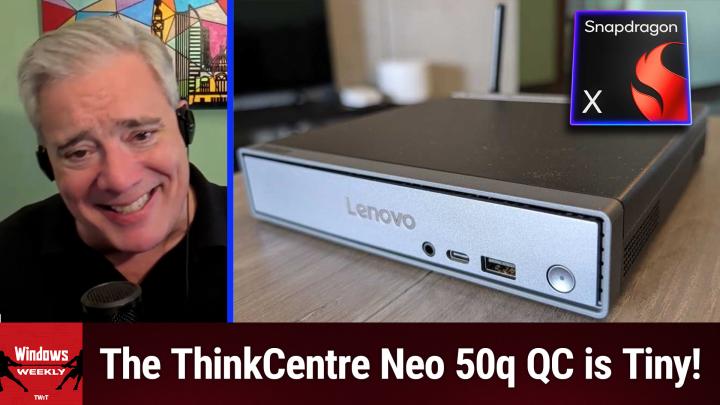
Windows Weekly (Audio)
WW 954: We're Just Getting Started - Windows 10's Last Day of Support (But Not Really)
02:43:17
Windows 10's Last Day of Support (But Not Really)
Loading summary
Transcript868 lines
- [00:00]
Leo Laporte
It's time for Windows Weekly. Paul and Richard are here. The end of Life for Windows 10 was yesterday. Paul says no big. We'll talk about the Windows Insider updates. Yes, I called it Windows. And is AI the end of apps? All that more coming up next on Windows Weekly. Podcasts you love from people you trust.
- [00:25]
Paul Thurrott
This is twit.
- [00:33]
Leo Laporte
This is Windows Weekly with Paul Thurat and Richard Campbell. Episode 954, recorded Wednesday, October 15, 2025. We're just getting started. Hello, all you winners and you dozers. It's time for Windows Weekly, the show where we get together with Paul Ferrat and Richard Campbell and talk about the latest news from Microsoft. Paul is in his getaway flat. It's where he goes when the Fed. When the heat is hot, he goes. He's in Mexico City. Hello, Mr. Thurat.
- [01:10]
Paul Thurrott
Hello, Leo.
- [01:11]
Leo Laporte
And in beautiful Lisbon, because we called it Libson for a while. But no, he's not in Libson. He's in Lisbon. Mr. Richard Campbell run his radio fame. It's sunset in Lisbon. Or is it sunrise?
- [01:25]
Paul Thurrott
Sunrise.
- [01:25]
Richard Campbell
No, it's sunset. We're just losing the light. No, it's getting dark.
- [01:28]
Leo Laporte
It's a pretty day. I love Lisbon. Stay away from the funicular, however, because that's.
- [01:33]
Paul Thurrott
I don't think. Yeah. If you had to.
- [01:35]
Leo Laporte
We did the funicular when we were there because there's. Lisbon is at sea level, but then there's kind of bluffs and cliffs.
- [01:44]
Paul Thurrott
It's like San Francisco.
- [01:45]
Richard Campbell
There's a lot of very steep.
- [01:46]
Paul Thurrott
A lot of up and down.
- [01:47]
Leo Laporte
Yeah. And so they have funiculars. Well, they have a couple of things. One, they have these weird little towers like the Miradors.
- [01:55]
Paul Thurrott
Yeah. Where you can go up.
- [01:56]
Leo Laporte
Yeah. And for the view. And so those. They have elevators on most of those funiculars and some. And then they have these cable. Little cable cars that just go like a block, but it's like straight up.
- [02:08]
Paul Thurrott
Like 45 degree angle almost, or whatever. But yeah.
- [02:11]
Leo Laporte
And that's the only way you can get to the. Easily get to the bluffs. I mean, I guess you could walk it, but it's tough. And they had a terrible wreck.
- [02:19]
Paul Thurrott
A couple Discord mashed potatoes says there's no fun in ick and funicular. But there is an ick.
- [02:26]
Leo Laporte
You know, actually there is a fun in funicular. I enjoyed the funicular. It's all graffiti and kind of fun and funky.
- [02:32]
Paul Thurrott
But it's just, you know those. You have those beautiful little cable cars throughout Lisbon. Right. It's that kind of car, but it's at a. Whatever angle.
- [02:39]
Richard Campbell
45 degree angle or whatever.
- [02:40]
Leo Laporte
Yeah, yeah. And it's not a tourist thing. I mean, there's. Everybody rides it. It's the. It's.
- [02:44]
Paul Thurrott
People ride it. That's right.
- [02:45]
Richard Campbell
Yeah.
- [02:46]
Leo Laporte
So it's kind of cool.
- [02:47]
Paul Thurrott
Anyway, we have cable cars in Mexico City that people use to commute to work. Like it's the type of thing you take at a ski chalet, but you're, you know, you're going above the city or whatever. Wow. Yeah, that's neat.
- [02:57]
Leo Laporte
What a way to go to work. Well, let's go to work here and talk about. By the way, yesterday I hung crepe around the old studio. Sad day. A little bit of mourning for the death of Windows 10. You didn't even know where I was going, did you?
- [03:13]
Paul Thurrott
I was like, is it because of. I just forgot the name of it. There's a connoisseur we go to that has had all these banners up and I asked the guy if it was for him and he said no, it was for the place. They were also celebrating their 64th birthday. I guess I'm in Spain now.
- [03:30]
Leo Laporte
Well, there you go.
- [03:32]
Paul Thurrott
Anywho. Yes, yes.
- [03:34]
Leo Laporte
Yesterday was the last patch Tuesday for you Windows 10 folk.
- [03:39]
Paul Thurrott
But not really, right? But not really.
- [03:42]
Richard Campbell
That seems unlikely.
- [03:44]
Paul Thurrott
It's like Windows 10 end of support. Asterisk. Asterisk.
- [03:48]
Leo Laporte
Yeah, yeah, yeah. Although I saw a piece in 404 Media which does really good work, and they said 400 million PCs are possibly going to end up in the landfill, which is not a good thing.
- [03:59]
Paul Thurrott
Yeah, except that's nonsense.
- [04:02]
Leo Laporte
Yeah, I don't think that's going to happen either. People are going to keep using them. They're going to figure out a way to get the esu, the extended service update, or they're going to put Linux or Chrome on it. Chrome OS or win 11.
- [04:12]
Paul Thurrott
Right. And that was the article I wrote yesterday.
- [04:14]
Leo Laporte
Win 11, let's not forget.
- [04:16]
Paul Thurrott
Yeah, let's not forget the million and one ways. You can just say, forget about the hardware requirements. Get Windows 11. Don't worry about it.
- [04:21]
Leo Laporte
Is there any way. Absolutely no strings attached. I keep hearing people in our chat and elsewhere saying, yeah, it was just offered to me, right.
- [04:31]
Paul Thurrott
Windows 11 or the ESU.
- [04:34]
Leo Laporte
Oh, maybe it was Windows 11. Maybe I misunderstand.
- [04:36]
Paul Thurrott
Well, either one could be right. So if you have backed up, by which I mean synced your settings through the Windows Backup app in Windows 10 OneDrive.
- [04:43]
Leo Laporte
Right.
- [04:44]
Paul Thurrott
Well, yeah, in the back end it goes to OneDrive, but you can't go access it. It's stored up in the cloud, Whatever.
- [04:50]
Leo Laporte
Right. So you don't have to have a OneDrive account to do that.
- [04:53]
Paul Thurrott
You do have to sign in with a Microsoft account.
- [04:55]
Leo Laporte
Okay.
- [04:56]
Paul Thurrott
Which is most people. Right? So fine, yeah, you just get the year. Like you'll just get it. It's free. You don't have to do anything.
- [05:02]
Leo Laporte
That's the easiest way. It's better than a thousand Bing points.
- [05:06]
Paul Thurrott
Well, I mean, you could. There's no reason to pay for it. Look who has Bing Rewards points or whatever they're called and is not signing with a Microsoft account.
- [05:14]
Leo Laporte
It's kind of hard not to have Bing Rewards points, to be honest.
- [05:17]
Richard Campbell
That's what you've almost certainly got a Microsoft account.
- [05:19]
Paul Thurrott
I have thousands.
- [05:20]
Leo Laporte
I didn't even do anything. I don't. I don't know. Well.
- [05:25]
Paul Thurrott
Listen, we'll take usage wherever we can get it, but yeah. Yep.
- [05:29]
Leo Laporte
I moved to Windows 11 a long time ago and as most of the people listen to this show probably did, it's the Steve Gibsons of the world. We're still operating under windows 10.
- [05:38]
Paul Thurrott
Yeah, okay. I can't help you with that. But look, I keep pointing this. We talked about this, you know, a few times recently, but if you actually follow the Windows 11 hardware requirements and think back, like how old were this computer be to basically not meet those requirements, you're talking about 2017 or older. So, yeah, no, I get it that there are people out there on those computers and they work fine for them and they're using them and whatever, and that's great. But if you're one of those people and you're listening to this and you have had this argument with me, we're not worried about you. You get it. You're going to figure it out. It's fine. This isn't in my article, but Microsoft Defender, which is the antivirus thing built into Windows, keeps working in Windows 10. They're not going to screw you over there. You don't have to go buy third party antivirus anything. Like you're gonna. The truth is you're gonna be fine. I mean.
- [06:27]
Leo Laporte
Well, I guess we should say though that you're not gonna be fine if you don't do anything. If you just stay on Windows 10, you're. You're running.
- [06:34]
Paul Thurrott
No, even people who stay in Windows 10 for the foreseeable future will probably be fine.
- [06:38]
Leo Laporte
Oh, okay.
- [06:38]
Paul Thurrott
And if there is some horrible event, some terrible something, something, whatever it might be, some zero day, whatever it is.
- [06:45]
Richard Campbell
There'S no way Microsoft doesn't push out a patch.
- [06:47]
Paul Thurrott
Yep.
- [06:48]
Richard Campbell
They don't want the coin either.
- [06:49]
Leo Laporte
They've done that before actually. They did that the last time.
- [06:52]
Richard Campbell
Yep.
- [06:52]
Leo Laporte
There was a crisis, you know, as pretty.
- [06:54]
Paul Thurrott
It was a UK hospital event that they did. It was, I think they were running Windows 7 after that was out of support. Windows 10 was the ongoing concern. And you know, Terry Myerson said, he's like, what am I going to do? Say no to the UK hospital? We fixed it, you know, of course, of course. So.
- [07:10]
Leo Laporte
And it's not unreasonable for, I think for Microsoft to encourage people to move to the modern version of Windows. The more people that are all on the same version, the easier it is for developers and Microsoft and everybody.
- [07:21]
Paul Thurrott
If you can buy a new PC and you get one of these copilot plus PCs, this is a next level security situation. It's a best case scenario and you know, you'll get there eventually. I mean, I think basically all computers are going to be copilot plus PCs pretty soon. So whatever. Like at some point you'll get a new computer. You won't, I guess you move on. But if you do stick with the PC, you'll be in good shape.
- [07:45]
Leo Laporte
Okay, so I didn't need to hang the crepe. I'm going to take it all down now.
- [07:49]
Paul Thurrott
Well, the bad thing about our industry is to me, the good thing about our industry today, because now that it is one day after that event and now tomorrow will be two days, everyone who is bitching and moaning about this is going to move on to the next thing and we can just forget about it. So this is not, you know, like as a couple of weeks ago, I think it was, you were talking about the. I don't know if it was Consumer Reports or whatever at the time was saying Higginbotham's and it's like this is a curious target given how many more billions of Android phones are out there with way less support.
- [08:22]
Leo Laporte
Good point.
- [08:23]
Paul Thurrott
If you think about 11 years of free support for a consumer product, which is what Microsoft is doing with Windows 11, please point me to the Apple product that got that many years of support, or the Google product or the Amazon product. I mean, it just kind of doesn't exist. Not for like a complicated personal computing platform like this. So I get it. But there are many, many more phones especially and maybe tablets too, but it's certainly a lot of tablets that are going out of support too. And where are all the Consumer Reports stories about those things? Like where's the outrage there? Any Outrage for Apple? No, just Microsoft.
- [09:01]
Leo Laporte
Okay, well Android is a good case, but I mean Windows, there's what Bill took about billion And a half, 2 billion?
- [09:08]
Paul Thurrott
Yeah, but they're only, I mean only some of them are on Windows 10.
- [09:12]
Leo Laporte
Half are on 10.
- [09:13]
Paul Thurrott
Okay, but of that half, how many are at businesses which are centrally managed and they're going to be secure forever regardless of what anyone does. I mean this is not the extinction event people are making out to be. And when I look at consumers, just think about individuals keeping their own devices, whatever. I don't think people care that they're using an out of date Android tablet. It still works all these years later. They don't really think about it. They're out there browsing the web, whatever. You don't really hear a lot of stories about those guys getting hacked either actually. But whatever. I think Microsoft has done right by this audience frankly. They've done something unprecedented by offering extended support to consumers and then they did it again by making it free. So yes, I guess we can sit here and go through the weeds and be like, yeah, but you have to sign in with a Microsoft account. Yeah, I mean the people who are affected by this are signing in with the Microsoft account. They're fine, it's fine. I'm fine, you're fine. Everyone good?
- [10:08]
Leo Laporte
We're all good.
- [10:09]
Paul Thurrott
I think it's fine.
- [10:10]
Richard Campbell
And nothing seemed to burst into flames on the 14th either.
- [10:14]
Paul Thurrott
No, the world. This was not a Y2K in the making or anything. And look, if you want to move on, I got outreach like the Chrome OS Flex guys feeling pretty good right now. Zorin OS is a Linux distribution that just issued a major update that has kind of these windows looking UIs you can use and integration with things like Microsoft 365 and OneDrive and the file system, etc. So they're really going for it. But the truth is no one's going to do that stuff, right? I mean not in any appreciable numbers that people are going to stay there or they're going to get whatever device, whether it's a new PC, a new Chromebook, a new Mac or whatever, an iPad, whatever they do. So anyway, it's fine, that's all I'm saying.
- [10:59]
Leo Laporte
I'm much reassured.
- [11:00]
Paul Thurrott
I'm happy to be on the other side of this.
- [11:03]
Richard Campbell
I'm still surprised they didn't bump it out, but okay, here we go.
- [11:08]
Leo Laporte
Yeah, I kind of thought that that pressure from Consumer Reports might do that, but I guess they, I just, they didn't care.
- [11:13]
Paul Thurrott
I Don't know. I.
- [11:14]
Richard Campbell
They bumped from April, right. Like it was originally April this year. That's October.
- [11:19]
Paul Thurrott
And they made it free. Right. I mean originally I think the plan was like, you can pay for this thing, it'll be 30 bucks. And then they were like, you know what, we'll make it free.
- [11:28]
Richard Campbell
Yeah, it's good.
- [11:30]
Paul Thurrott
I think if Windows users have proven anything to Microsoft, it's that they're not willing to pay for anything. So yeah, that was never going to work. Yeah. Okay. Anywho, in the land of supported operating systems yesterday was Patch Tuesday. Actually Windows 10 got a patch yesterday too.
- [11:48]
Leo Laporte
It was the last one.
- [11:49]
Paul Thurrott
Well, but it wasn't because they're going to get security patches for the next three years every month.
- [11:55]
Leo Laporte
Okay.
- [11:57]
Paul Thurrott
But yeah, I mean as far as. But we don't talk about security patches, you know, every Tuesday every month or the first, second, sorry, second Tuesday of every month. We're not like, okay, here are all the security fixes that are in the latest Patch Tuesday update. You know, we focus on the new features and so that's been on the light to non existent side on the Windows 10 half of the house for a long time. Right. Except for the kind of co pilot type stuff they started adding toward the end there. But actually Windows 10 is going to be a pretty nice place to be for the next 12 months. Not going to get a lot of features. So that's going to be pretty good. If that bothers you, a lot fewer.
- [12:32]
Richard Campbell
Surprises, that's pretty good.
- [12:35]
Paul Thurrott
But for the rest of us it's going to be a fricking nightmare. And so starting with today in that the nightmare continues I guess. Right. So if you've been following along with us as we talk about these almost every episode, none of these will be unfamiliar. Right. So some components. Sorry, some Updates specifically for copilot plus PCs Click to do gets that summarize action. For more concise summaries, the AI agent in Settings will now show you direct ways to change the settings. Right in the dropdown instead of just you click and go to the place which is kind of cool. That works pretty good. By the way, there's a change to File Explorer for new AI actions on images and documents. I was just looking at this this morning actually for something we're going to talk about a little later. But you can add to the list of things that are making the Windows 11 context menus humongous after they culled them down to almost nothing. Remember in the original release and now they're like. And they're also going like on the sides because there's all these submenus. So there is now an AI actions submenu. But again, we're going to talk about that one a little later because that one's. This is. This is yet another step toward a very interesting future, I think. And then. Yeah, no, not submenus. AI actions sub menus are ridiculous. And then just for everybody, obviously, lots of improvements on the desktop. They've sort of retroactively named this thing, but hardware indicators. If you press the volume up or down button on your keyboard and that little on screen overlay comes up and you can see where it's at. You can now position that in different corners of the screen, which I think is pretty cool. So that will appear for that, for brightness, airplane mode, whatever. And then virtual desktops, so you can tell which desktop as you switch around. It's pretty cool. There's other context menu related File Explorer improvements, which is hilarious. You'd have to be Mary. This is the type of thing Mary Jo would never notice. Mary Jo infamously, they literally would switch from Windows 10 to Windows 11 and not even notice that change. This one is super subtle and I got to almost bring up a thing for myself to even remind myself of how this works. But if you right click on something like an image and you get open width, right? So if you compare the open with sub menu to the normal context menu, the thing you would have noticed last week is that the icons for apps in the normal menu have a like a transparent background. So whatever shape they are, you see the shape. But the icons for apps in the open width menu used to have a square around them and a color fill and now they don't. Now they're consistent. So I just spent two minutes talking about nothing but, you know, whatever. It's a change. A change.
- [15:27]
Richard Campbell
So subtle. Even if you said even.
- [15:29]
Paul Thurrott
I admit it's. I'm going to speak about this at length, but let me tell you something, it's not going to impact you in the slightest. We have keyboard shortcuts now for M and N dashes, which is actually pretty cool. It's kind of weird to me. That's never been there before.
- [15:42]
Leo Laporte
Yeah, I really like that. I wish I had that on my other.
- [15:45]
Paul Thurrott
Yeah, if you do a lot of typing and you heard about this, there's a thing you can hit Windows key plus period. Don't hit Windows key plus comma by the way, that hides everything but Windows key plus I know, brings up this emoji and more window picker yeah, it's an emoji picker, essentially, so it lets you add emojis, but if you click through the various things at the top, there is actually some stuff that might be of interest to you, even if you're a person who's like, emojis, Are you out of your mind? And I actually am not seeing it right now, so that's working out great for me. But usually, where is this thing I see?
- [16:24]
Leo Laporte
So I have emoji and more.
- [16:26]
Paul Thurrott
There should be a way to get the special characters here. This is one of the weird things about Windows. Like back in, you know, 30 years ago, you would type.
- [16:33]
Leo Laporte
Is that special?
- [16:35]
Paul Thurrott
Oh, sorry, I'm not even. Like, I can't see you when you're. Oh, yeah, yeah. Oh, actually, you're seeing it. Oh, there you go.
- [16:40]
Leo Laporte
Yeah, it's got this weird thing.
- [16:42]
Paul Thurrott
No, but go to that. Right.
- [16:43]
Leo Laporte
Symbols, it says.
- [16:44]
Paul Thurrott
So this is the type of thing people, like normal people would want. If you're like an adult and you say, I'm never going to use an emoji ever in my life. Okay, I got you. But you should look at the. This anyway, because this is a great way to get to these characters, which.
- [16:55]
Leo Laporte
Are really hard to get to copyright.
- [16:58]
Paul Thurrott
So I have to.
- [16:59]
Leo Laporte
Oh, there's my. There's my accent.
- [17:01]
Paul Thurrott
Yeah, so that's. This is. That's actually pretty important. Yeah, that's a good. That's a good one to know about.
- [17:06]
Leo Laporte
I like that.
- [17:06]
Paul Thurrott
Actually, I'm seeing it now. Okay. Yeah, yeah. So anyway, yeah, don't, you know, I get it. I'm. I'm with you on the emoji thing. Although I use them more than I'm.
- [17:14]
Leo Laporte
Embarrassed to admit, but they even kept cow emoji. That's nice. Gifts and other whatever symbols. That's nice. Yeah, that's nice. Clipboard history. Nice. This is a little handy little thing. That's Windows.
- [17:35]
Paul Thurrott
Windows key. Yeah, that's right.
- [17:37]
Leo Laporte
Nice.
- [17:38]
Paul Thurrott
The thing is, most people, because they literally call it now, I think originally it was just emojis and it was like emojis. And more and more, I think, to any adult who is never going to use an emoji, they look at it and they're like, yeah, I'm never using this. But actually give it a second because there's some stuff in there that I think most people would find useful. Yeah.
- [17:57]
Leo Laporte
There'S a dedicated key on their keyboards for that.
- [18:00]
Paul Thurrott
Yeah. Actually, I'm sure certain Windows keyboards do, too. This one I'm using is older, so it doesn't. But See if that one has it. No, that one doesn't either, actually. I think. I bet some do, though. I think some do.
- [18:12]
Leo Laporte
Yeah.
- [18:12]
Paul Thurrott
Dedicated key, you kids. Anyway, eventually the keyboard will be one giant key that will just be the emoji key. And that's how we're going to.
- [18:20]
Leo Laporte
There must be a key stroke that you could enter for the EM dash. It's probably alt zero.
- [18:24]
Paul Thurrott
There is no. No, that was. They just added it. So Windows key shift plus minus is M dash. Windows key minus is N dash.
- [18:36]
Leo Laporte
Okay. Capital capital dash and lowercase dash. That's what the shifts for. So Windows key dash.
- [18:43]
Paul Thurrott
Well, it's the. The shift key is like a modifier. So it's Windows key minus, Windows key shift minus to get either one. Like the. The two sides. Yeah. Yep. Okay. So that's built. Yeah, I mean, that's like. It's quicker than using the.
- [18:59]
Leo Laporte
Yeah, I like it.
- [19:00]
Paul Thurrott
Emoji thing. Or a lot of times, depending on what you're typing in, there'll be it like you'll have an autocomplete thing that will turn like dash, dash into. And I forget which is which all the time. I don't know. I'm sure it's an important distinction that the 20th century doesn't care about anymore. So who cares? So whatever. We use those things. I don't know. Administrative protection was supposed to be a feature of 25H2 and now it is. So belatedly a month, I guess they've added that it's off by default. Remember, this is super disruptive. You as an individual, if you want to be more secure, it's worth trying to. You will hate it. I just want to be super clear about that.
- [19:38]
Richard Campbell
Does create friction.
- [19:39]
Paul Thurrott
Yes, it does. Yeah. If you were like, I'm being super efficient. I'm getting work done early every day. Want something that could slow me down a little bit. This is the answer. This will do it. Yep. It's going to come up when you least want it, and then there'll be more steps than you want every time. It's unbelievable. But I appreciate what they're trying to do. I mean, it's all in a good cause. I mean, it really is for better security. And it tunes down that administrator account to not be running with admin privileges 100% of the time, which is really what we're shooting for, so.
- [20:07]
Richard Campbell
And de escalates every time you do a command and it takes.
- [20:11]
Paul Thurrott
That's right. It's one time temporary authentication off. And that's it. Yeah, every time. Which is why it's tedious frankly, because you have to keep re authenticating.
- [20:19]
Richard Campbell
But yeah, if you're doing a bunch of admin stuff but we rarely are, we usually do an admin thing.
- [20:24]
Paul Thurrott
Well, you're going to find out how much you're doing it because over and over again there's no quite like you just don't. We don't think about this stuff like as we. We go throughout our day, we click on things, we do things you don't really have a handle on. When your authentication level I guess is escalated, you don't really think about it. And you got to think about it a lot. I can tell you it's not that simple. This is in your face. The passkey improvement thing we talked about a few times. This is where you can integrate a third party password manager that does pass keys. Like one password I believe is the one going out the gate into the windows. Hello, passkey Support in Windows 11.
- [21:04]
Richard Campbell
Is Bitwarden there? I thought Bitwarden was in there now.
- [21:06]
Paul Thurrott
Oh, maybe it is. I haven't looked at this since they announced it, so that's something I'm going to get to soon. But yeah, this is open to anybody. I mean anybody could get into this, but yeah, and then some game bar improvements because they can't stop doing this. And this is for those handheld gaming machines that just started coming out the rog Xbox ally because that Xbox app will be the UI when you bring up game bar. Well, it's not really, I don't know why they associate this game bar but when you long press the Xbox button, which is that lit up white button in the middle, you'll get a new task manager. It's essentially Task View so you can use the controller to switch between running apps like you would like Alt tab or whatever. The theory here is you're using the two controllers and I don't know why you would want to do this, but whatever you want to switch tabs, you can long press, you know, use the bumper or the trick, whatever, all the directional control, whatever. They can probably use eight different things but left and right move through the app list, go to the new app and then get back, et cetera, et cetera, et cetera. So a bunch of other small things, but those are the, those are the big ones. So again like nothing, nothing in this list where you're like oh, I didn't know about this but you know, some good stuff. So good.
- [22:21]
Leo Laporte
That's exciting.
- [22:22]
Richard Campbell
Are you starting to see 25H2 showing up on machines?
- [22:26]
Paul Thurrott
I have heard from three people now. So yeah, it's barreling out the gate. No, I'm sure most people aren't writing me, obviously, but I guess it's happening. I spent well. We're going to talk about some of this stuff later in the show, but I've never seen it, so me not seeing it doesn't mean it doesn't exist. I haven't seen Jupiter either, but I know that it's real, so it's easy to do.
- [22:50]
Richard Campbell
It's like over there.
- [22:51]
Paul Thurrott
Yeah, that was a bad example I've seen. But you know what I'm saying.
- [22:56]
Leo Laporte
I'm sure I've never seen my bottom.
- [22:59]
Paul Thurrott
I've never seen Pluto. How about that? I've never seen my bottom, but I know, I know that exists because it's killing me right now.
- [23:05]
Richard Campbell
I thought you were going to say you didn't see Uranus, but that's a different thing.
- [23:08]
Leo Laporte
That's another planet entirely.
- [23:10]
Paul Thurrott
No number of mirrors seems to do enough.
- [23:12]
Leo Laporte
Let's not go there.
- [23:14]
Richard Campbell
Ice giants are a long way away.
- [23:16]
Paul Thurrott
Yeah.
- [23:17]
Leo Laporte
All right. Can we take a break?
- [23:19]
Paul Thurrott
Yeah.
- [23:20]
Leo Laporte
Since we are at the break. I didn't, by the way, I did my Windows update yesterday, hoping I would get 25H2. I did not.
- [23:27]
Paul Thurrott
I'm still same. Yeah. Yep.
- [23:30]
Richard Campbell
No, it's not on this machine either.
- [23:31]
Leo Laporte
Three people have it. That's the good news.
- [23:34]
Richard Campbell
And they're so happy.
- [23:37]
Paul Thurrott
They're probably a little upset, you know, frankly, if my understanding of this audience is in any way accurate. But yeah.
- [23:48]
Leo Laporte
Moving right along, let's talk about our sponsor, shall we? Zapier. I love Zapier. And I can say I love it because I use it. I use it all the time. I probably used it, oh, I don't know, 30 or 40 times this morning alone. What you may ask, is Zapier? Zapier automates the work that I do constantly and I don't want to do by hand. So the reason I used it 30 times this morning is when I bookmark stories for our shows, which I do all the time. That's kind of, you know, a big part of my off the air job is going through all the tech news and bookmarking it. I bookmarketandraindrop IO, which has a connector to Zapier, which has a connector to Mastodon. So it posts on my Mastodon. Here's a news story I'm working on. It also posts to Google because it's supports Google Docs. It also adds a line. It's more than just supports Google Docs. I mean it integrates deeply into these thousands of applications that Zapier supports and automatically adds a line to a Google spreadsheet called Leo's Links that then the producers can take and post into our rundowns. For all I know, they're using Zapier to do that too. That's the beauty of Zapier. Whatever you need to get done, you can get done with Zapier. But now Zapier is. Has just gotten a whole lot more powerful. You know, one of the things we've been talking about a lot on this show and all the shows, we do AI, right? But, you know, I think for a lot of us, I know it's for sure. For me, I'll look at a prompt, an AI prompt, and think, I don't know what to do here. I don't know. Okay, what's next? Talking about these trends doesn't help you be more efficient at work. For that, you need the tools. And this is where Zapier comes in. Zapier is how you break the hype cycle and put AI to work across your company. See, I can actually now add AI to that workflow I just told you about to have it automatically summarize those stories that I bookmark and then take the summary and put it in my Obsidian, or I could put it in OneNote, or, you know, this is the beauty of it. Everything works together and it does it without any effort on your part. Zapier can be, for your company how you actually deliver on your AI strategy and not just talk about it. With Zapier's AI orchestration platform, and we've talked a lot about the idea of orchestration. That's. That's a really powerful idea in AI. You can bring the power of AI to any workflow, so you can do more of what matters. And you suddenly get superpowers. Connect top AI models too, by the way, this is the beauty of Zapier. It works with everything. You like ChatGPT, use ChatGPT. You like Claude, use Claude. Whatever tools your team already uses, you can then add AI exactly where you need it. So it's not some general. Let's just throw some stuff at AI, see what happens. It's part of your. It's part of your workflow. Whether that's AI powered workflows, an autonomous agent, a customer chatbot, or anything else, you can orchestrate it with Zapier and AI. Zapier is for everybody, by the way. You do not have to be a tech expert to use this. It's not like programming. It's easy. And I'll tell you how we know. Teams have already automated over 300 million AI tasks using Zapier. 300 million. Join the millions of businesses transforming how they work with Zapier and AI. Get started for free by visiting zapier.comwindows that's Zap. Ier.comwindows zapier thank you, Zapier, for your support of Windows Weekly, and frankly, thank you for helping me do my job. I couldn't do it without Zapier. It's been a real boon for me. And that's been going on five, six years now, I think, at least. Zapier. All right, Mr. Thurat, let's talk about the insiders now. Instead of just the regular people, let's talk about the real people.
- [27:55]
Paul Thurrott
Yeah, so just had a patch Tuesday, and that's not the end of the line.
- [28:03]
Leo Laporte
It's just beginning.
- [28:04]
Paul Thurrott
Yeah, it's just a slice in time. So this is kind of unusual, but in the past week, there have been two standalone updates to the Copilot app in Windows 11 in preview that has gone out through all of the insider channels. So if you have a PC in any channel in the insider program, you'll eventually get it, if you haven't gotten it already. I mean, this is one of those things like these just app updates. Like everything else in Windows, it will happen on whatever random schedule Microsoft prefers. The first one is probably the more profound of the two, and that adds two big bucket features. One is connectors, and this allows you to connect to consumer services like Microsoft's OneDrive and Outlook for email, contacts and Calendar, and interestingly also Google Drive, Google Calendar, and Google Contacts. So then you can use natural language to access data that's held in those silos or buckets or whatever you want to call those. So in other words, you can say to Copilot, hey, what's the email address for some person? And if you've connected it to Google Contacts and you can find that person there, it will tell you what it is through there.
- [29:17]
Richard Campbell
Right.
- [29:17]
Paul Thurrott
And this is again, I keep alluding to this for some reason. I don't mean to always do this, but a little later in the show in the AI section, I'm going to talk a little bit about what I think is the beginning of the end of apps as we know them. But for now, it's just that apps are becoming programmatic, meaning they can be controlled or orchestrated from the outside, typically by some AI, Right. Yeah. Which is how those app actions occur. So if you. Right Click on an image in File Explorer and you go to AI Actions. You'll see options like remove background with paint. Right. And so today that brings up paint and it does it for you. You see it and then you can go from there and save it or not. But in the future, I think these are going to be. These things will essentially be UI less.
- [30:05]
Richard Campbell
Right.
- [30:06]
Paul Thurrott
It'll be a prompt. Yeah. It'll be part of a workflow script. Right. Of some kind. So that will be part of it. And then you'll say. You'll just say it out loud. You'll say remove the background, you won't care about which program does it. And then save the file with a new file name or whatever. Right. The whole workflow will occur as part one.
- [30:26]
Richard Campbell
I've been experimenting with various AI tools to make the run as headshots that we.
- [30:31]
Paul Thurrott
Oh, nice.
- [30:32]
Richard Campbell
Take the color out, turn high contrast, sort of bitify, you know, pixel in.
- [30:36]
Paul Thurrott
So have you had any success?
- [30:37]
Richard Campbell
No.
- [30:40]
Paul Thurrott
So I think for. Yeah, for that to work like, I don't know what apps or services or whatever you're using, but yes, I mean apps. This is why, you know, every day, if you like, in my newsfeed, because of what I do for a living, I'll see things like Google Ads, single feature to single Google app or service and it's always AI related. So it will be like they add Nano Banana support to and then name some Google service. It's like a Mad Lib game. Right. And you'll see the same thing on the Microsoft side. This is essentially that we've listed specific apps, but over time, of course these things are open. They're APIs. Anyone can do this. If you're in this ecosystem as an app developer, you're going to probably want to open yourself up because otherwise people are going to move on and do the next thing.
- [31:18]
Leo Laporte
But you know what I did, Richard, it might work for your run as things. I used Nano Banana to do a Wall Street Journal stipple and it actually.
- [31:30]
Paul Thurrott
Did a pretty good one.
- [31:31]
Leo Laporte
So here's the. This is the original. I took this when I was shopping for eyeglasses and I just thought, well, let me see what I can do. And that's the stipple.
- [31:39]
Richard Campbell
Wow, that's impressive.
- [31:40]
Paul Thurrott
That's really good.
- [31:40]
Richard Campbell
And it took the background and I.
- [31:42]
Leo Laporte
Asked to take out the background.
- [31:43]
Paul Thurrott
I'm sorry, which one did you use?
- [31:44]
Leo Laporte
No, this is Nano Banana. Okay, this was perplexity, but I think it might have used Nano Banana because it's pretty close under the hood.
- [31:52]
Richard Campbell
It's so close.
- [31:52]
Paul Thurrott
Yeah.
- [31:53]
Leo Laporte
And then so I had a prompt that said use pen, blue pen on. On paper.
- [32:01]
Paul Thurrott
Nice.
- [32:02]
Leo Laporte
But I don't think that.
- [32:03]
Paul Thurrott
I don't think that's like you as like Hurston or Thurston Howell iii, you know, like love it. Gilligan.
- [32:08]
Leo Laporte
Gilligan. But I, but I thought that the Wall Street Journal one was pretty darn good.
- [32:12]
Paul Thurrott
That's amazing. That looks like it's the real thing.
- [32:15]
Leo Laporte
It looks like a real. I always. I came really close. I was told the Journal was doing a story about twit or tech TV or something.
- [32:22]
Paul Thurrott
Here we go.
- [32:22]
Leo Laporte
I can't wait. I'm going to get my stipple. And they didn't do it.
- [32:25]
Paul Thurrott
So I'm sorry.
- [32:26]
Leo Laporte
But. But thanks to AI, 20 years later I got a stipple.
- [32:32]
Paul Thurrott
It's like a. I mean you could probably tab thing you take for that.
- [32:36]
Leo Laporte
On the runners radio thing.
- [32:37]
Richard Campbell
Yeah, I almost could.
- [32:38]
Leo Laporte
Yeah. It's worth the price.
- [32:39]
Paul Thurrott
Yeah.
- [32:40]
Richard Campbell
I got to tinker around with it again.
- [32:42]
Paul Thurrott
Yeah.
- [32:42]
Richard Campbell
But you know all about trying to automate that workflow.
- [32:45]
Leo Laporte
You could say I want this to look like this. That's right.
- [32:48]
Richard Campbell
Yeah.
- [32:48]
Paul Thurrott
And then you basically.
- [32:49]
Richard Campbell
That's the tool I've been looking for. See this, this was made from.
- [32:52]
Paul Thurrott
You're creating like a GPT essentially where now you just pump a photo into it and it will. And it will randomly color it.
- [32:57]
Leo Laporte
I mentioned Zapier lately.
- [33:01]
Paul Thurrott
Why do they do workflows?
- [33:04]
Leo Laporte
That's the kind of thing they could do very, very easily, I suspect. Yeah. The other thing, people, a lot of our people who are roll your own home server types and I know that's what you are. Richard uses N8N, which is a nodal automation tool with AI. So you could say take images like this and this and then have put an AI in the middle of it. It's kind of the same idea. Create a workflow and you run the server locally.
- [33:28]
Paul Thurrott
This is like an if, then that. But with.
- [33:30]
Leo Laporte
Yeah, it's like if, if, if, if, then, then that works.
- [33:33]
Paul Thurrott
If this AI, then that AI. Yeah, you know, whatever.
- [33:35]
Leo Laporte
But it's. But it's a. It's a open source. You run it locally. I'm sure you can run it hosted, but you're a guy who likes to run stuff locally. Richard.
- [33:43]
Richard Campbell
Yeah, absolutely. Now. Now I'm looking at those new Nvidia little micro.
- [33:47]
Leo Laporte
I'm so happy with this framework. This worked. This thing is snappy as heck. I'm able to run the open source GPT OSS 120 gigabit gigabyte one, the biggest.
- [34:00]
Richard Campbell
Wow.
- [34:00]
Leo Laporte
No problem. 20 or 30 tokens per second. It's really fantastic. Yeah. So, I mean, I don't know if I really need a local AI, but it's nice.
- [34:12]
Paul Thurrott
This is not about need, Leo. Come on.
- [34:14]
Leo Laporte
Actually, at some point I want to ask you some questions because I know you're using WireGuard on your Ubiquiti. So I'm running these servers, but I don't want to run the servers open to the public. I want to run this framework and have you log in via wireguard. Right. That's how you would do it. So you connect via WireGuard and now you're in the home network, basically, and you can do anything you would do if you were at home. Okay, I have some questions, but I'll ask those.
- [34:38]
Richard Campbell
And funny you bring that up because in one, at least one of the hotels in the trip so far I've run into. Oh, blocks VPNs. But if I tailscaled it, I wouldn't have that problem.
- [34:46]
Paul Thurrott
Yeah.
- [34:47]
Leo Laporte
Because tailscale uses NAT.
- [34:48]
Richard Campbell
It's going through port 80.
- [34:49]
Leo Laporte
Yeah. So that's the advantage. Of course, Tailscale, you have to go through their server for that.
- [34:54]
Richard Campbell
You have to do. You have to Web proxy, but that's fine.
- [34:57]
Leo Laporte
But that's an advantage to it. Yeah.
- [34:58]
Richard Campbell
Yeah. It's absolutely. A lot of. You never know what you're getting in a hotel.
- [35:02]
Paul Thurrott
Right.
- [35:02]
Richard Campbell
Never know.
- [35:03]
Leo Laporte
Tailscale uses wireguard, but it gives you NAT traversal, so you don't have. You don't have to say. I'm. I'm using a VPN here. That's funny. The hotel blocks VPNs.
- [35:13]
Richard Campbell
That, that was, you know, this random stuff happens.
- [35:16]
Leo Laporte
It's Portugal.
- [35:17]
Richard Campbell
You got to take. It wasn't. It's not this hotel, but you got to take a guess at, you know, how many hotels I go to in a given year. Like you're gonna. You're gonna hit stuff like that. Yeah.
- [35:26]
Leo Laporte
So. So you set up tailscale.
- [35:28]
Richard Campbell
I have not. I didn't need to. I was able to work around it.
- [35:31]
Leo Laporte
Yeah.
- [35:31]
Paul Thurrott
Yeah.
- [35:32]
Leo Laporte
I've been tempted, but then I think I can just do native wireguard because it doesn't, you know, it seems pretty secure and all that.
- [35:38]
Richard Campbell
Anyway, it is good. Yeah. It's not.
- [35:40]
Leo Laporte
Sorry, Paul. Didn't mean to bore you. Can I help you with anything? Is there something going on? Are you doing one of those puzzles where you rearrange the numbers?
- [35:48]
Paul Thurrott
If I put my thumb in there and then it gets cut off If I don't solve the puzzle.
- [35:53]
Richard Campbell
Broke it.
- [35:55]
Leo Laporte
I'm sorry.
- [35:56]
Paul Thurrott
No, it's okay. The other update that was part of that. Well, part of that same update, I guess, same app update is document creation and export. And actually I think this speaks to a future of kind of app less apps where you can just go to Copilot and say, I want to. We've. You've created something now. Make this a Word document, create an Excel file from the table, etc. Etc. So again, same, same idea. Programmatic. Programmatic access to what are essentially standalone apps today, but are going to be very different soon. And then I think it was just yesterday.
- [36:32]
Richard Campbell
The question is, do you have to specify I want to make a Word Doc versus I want to make an Excel Doc or it's just like I want to make a thing. Just make that thing and put it where I want.
- [36:40]
Paul Thurrott
I mean, you may want it to be in that particular document format. Right. I mean, so yeah, you would say, you would say Word Doc. Yeah. Because that's the. It's going to export it as a file.
- [36:50]
Richard Campbell
Yeah. And it is still mapping that. This is the thing that Bill always railed against. Right. In some ways I felt like OneNote was the solution where it's just like, here is the universal what do you.
- [36:58]
Paul Thurrott
Want to make thing so much as is the case with religion. Right. For a religion that is 2000 plus years old to still be successful today, you have to kind of adapt to what's there at the time. Right. And so as we move forward in time and things are going to change, this is. Again, I keep saying this, we're going to talk about this a little bit, but people today have familiar apps and workflows that they use. And so to get them onto this AI train, you have to make that stuff work with the stuff they understand. And then the harder step, especially for the older guys like me, who just are stuck in their ways, is going to get them to just kind of move fully to these new workflows where you're still doing the same thing, but you're not using the familiar tool, you're not bringing up Photoshop, which you've spent a decade learning, and you know exactly where all the menu items are to do whatever effect you're saying do it.
- [37:49]
Richard Campbell
Yeah.
- [37:50]
Paul Thurrott
And it just do this.
- [37:51]
Richard Campbell
You know, that's where I'm trying to get to with that, with the headshot things.
- [37:55]
Paul Thurrott
Exactly.
- [37:55]
Richard Campbell
Do this.
- [37:56]
Paul Thurrott
Yep. I think you're going to get there. I mean, I know you're going to. Of course you are. I mean, yeah.
- [38:02]
Richard Campbell
And it's just one of those things where you just want to simplify the workflows more and more and more. Like that's what's going to make a difference for you.
- [38:08]
Paul Thurrott
Yeah. The example I had always used was every January I make that chart and I never can do it right. Because I don't know Excel very well. And the other example of that is like the logo we have for Eternal Spring is whatever font. It's a special font that I've kind of contorted into my own thing. But I want images behind in each letter, but not around. I want the outside of it to be transparent, but I want the image to. There's a term for this. I don't know what it is. I actually don't care, by the way, but I just want to know how to do that. Right. And so I just had to do that again. And I did figure it out. And now actually, I think I've remembered it too. This is an example of like, you know, I can actually learn something, apparently. But again, here's a logo. Put this image behind it. That's a very easy thing to describe. And anyone should be able to do that. And that's the point. I mean, that's. That's why this stuff's going to be pretty powerful. The other app update that we got to Copilot in across all insider channels is not as interesting, but it's tied to that AI agent in settings. Although I don't think that this is tied to copilot plus PCs. Right. So I. My assumption is that this is a way to do what the agent does, but without having a Copilot plus PC. And you would do it in a Copilot app, which is hitting the cloud. Right. So they probably using the same model in the cloud and they have the same understanding. And you ask it, how do I do this thing? That is essentially a setting. And it will, depending on what you ask, it will show you how to find that thing. Or you click here to go to that thing or even do the thing. Right. Which is of course the ideal end game. I'll remind everyone, by the way, that this was a feature that copilot had in November 2023 and it went away. And whatever. Okay. But whatever that's happening, I suspect what they did was change the back. And I think at some point they were like, you know what? We got to do this programmatic app thing. And I think it just kind of came full circle. So, okay, so there's those two, right?
- [40:11]
Richard Campbell
Yeah.
- [40:11]
Paul Thurrott
And Then I don't remember when. It doesn't matter, who cares. But sometime in the past week we got dev and beta bills. So this is 25, 24 H2 respectively. Same features. And you know, again, you can kind of see things are just progressing across the board, often in the same places. Right. So the settings feature where you can like there's an inline agent action so you can do the action inside was part of this. Although that apparently is now rolling out in stable settings search was improved so that it can show you actionable items when you find things that you can search on. Like it's kind of interesting. So that's okay. If you are a fan of the Snap layout feature where you drag the window and a little bar comes down from the top. It's one of the first things I disabled. I can't stand that.
- [41:01]
Richard Campbell
Me too. Yeah.
- [41:02]
Paul Thurrott
Because it tends to grab the window and it's like.
- [41:04]
Richard Campbell
Yeah. And change its size.
- [41:06]
Paul Thurrott
Yeah, it's a little too.
- [41:07]
Richard Campbell
Don't do that.
- [41:08]
Paul Thurrott
Yeah.
- [41:08]
Richard Campbell
I don't like enthusiastic.
- [41:10]
Paul Thurrott
Exactly. One too many times I'm like, screw this thing.
- [41:12]
Richard Campbell
You're like a two year old with marshmallow on figures. And I walk, you close, you stick me. Yeah.
- [41:18]
Paul Thurrott
I don't, I've never. I don't have this one yet. So I've installed this update. I don't have this. But there is a feature in there for a similar feature for drag and drop. So now or soon, when you drag a file toward the top of the screen, you'll get a what they're calling a drag tray that will suggest relevant apps and other options for share, essentially with sharing. So the 21st way to share a file now in Windows they really want you to share stuff I don't.
- [41:47]
Richard Campbell
Yes.
- [41:49]
Paul Thurrott
Called the drag tray. So have fun with that. I think most people are going to find that one by mistake. I can't imagine anyone would do this on purpose, but. Okay, fine. More click to do improvements with regards to visual entities in the screen. You're sort of looking at where they do the highlight of all the elements that will let you know kind of what you can do with those things. So things that have specific actions associated with them. In other words, not just images and text, but emails or a table will be highlighted especially because they actually have a very specific action associated with them. Right. You can turn a table into an Excel table or whatever, that kind of thing. And then the actually only important thing in this whole list of updates, which is just seriously 8 years, 15 years. I don't know. So Many years in the making. Windows 10, remember, introduced dark mode.
- [42:45]
Richard Campbell
Yeah.
- [42:45]
Paul Thurrott
We spent several years flailing around with that. Some apps do, some apps don't, some do. Well, some do terribly. Yep. So if you open File Explorer in Windows 11 today and then you go to the little menu options, you'll notice that thing opens up as a stark white window. No matter if you're in dark mode or light mode, those things are getting fixed. So I don't have that yet. But the run dialog, that window I just talked about, the file transfer dialog you get, the file progress dialog, a couple of other dialogues are actually going to be dark now if you're in dark mode, just.
- [43:19]
Richard Campbell
I just checked. No, my options is bright white.
- [43:21]
Paul Thurrott
I know, it makes me crazy. It's like a. It's like I'm looking for a way to light up the room in the darkness and also hurt my eyes. Yeah. Open File Explorer options. Yeah, it's bad.
- [43:31]
Richard Campbell
So, yeah, you can see it's the old style Windows like management interface window. That's right. So just stop poking back.
- [43:41]
Paul Thurrott
Old fashioned.
- [43:42]
Richard Campbell
Yep, it's old fashioned. It's underneath everything. Windows 11. I never really know if my audio settings are right until I can get all the way down to the old audio settings underneath the Windows 11 stuff.
- [43:53]
Paul Thurrott
We're never, ever, ever, ever, ever going to have consistency in Windows. But this is a step in that direction, I guess. So. God love them, they keep doing it. Yeah. So I might have misspoken, actually. Maybe the bigger change is this next and last one, which is they redesigned the OneDrive icon. Oh, boy. I'm excited, given the commentary I just had about inconsistency. Thy name is Windows and how we're never escaping from this prison. If you are in a darkly, there.
- [44:24]
Richard Campbell
Must be somebody working on the OneDrive book. That was within a week of finishing. And so they had to change the graphics.
- [44:29]
Paul Thurrott
No, no. Yeah, well, yeah, I'm trying not to let that stuff bother me anymore. I'm doing great. Drugs. Drugs really help. But there's a medication, if you haven't seen it, strongly recommend, just for the humor. There's a Microsoft design blog. There's a site, Microsoft Design, and it's on Medium, of course, but there's a whole article there about. Actually there's a different site, there's a full site for this, so you should look this up. There's a Microsoft design site and they explain themselves there. But God, you read them talking about themselves and how, you know, they're crafting icons, you know, for Office And Windows and they're crafting the Windows 11 UI and it makes it sound like there's people who really care and know what they're doing. And it is in sharp contrast to the reality where I experience every day. Right. Like I don't know what they're talking about. Who are these people? But like I said I would. Don't go in there unless you're like drunk or whatever. You walk away very upset. At least I would. But. So there's that. Okay then. Outside of that one app thing Dashlane announced, I think yesterday, they're partnering with Yubico who makes the Yubikey hardware security keys, which I think Richard uses.
- [45:44]
Richard Campbell
Right. I carry one.
- [45:45]
Paul Thurrott
Yes. Yeah. They're used as. Technically they're like secondary authentication methods. So they're billing themselves as the first top level password manager, passkey manager to use Yubikeys as the primary access to the vault. Yeah. And yeah, actually that sounds pretty good to me. So I. I would expect eventually I'll.
- [46:11]
Richard Campbell
And in general the motion is just get rid of the password I use. Exactly. Else.
- [46:16]
Paul Thurrott
Right, that's right.
- [46:16]
Richard Campbell
So we talk about pass keys, which I was still hesitating on. I've stopped recommending UB key to anybody just because.
- [46:24]
Paul Thurrott
Well, this is too much.
- [46:25]
Richard Campbell
You know, accepted mints. You know, it is too much.
- [46:28]
Paul Thurrott
It's a lot too much for people. Yeah.
- [46:29]
Richard Campbell
That's the whole thing. It's like it does not scale. You have concerned about it like you, you a.
- [46:34]
Paul Thurrott
You never really need to have more than one of them. Of course you need to have a backup video somewhere and then.
- [46:40]
Richard Campbell
Yeah.
- [46:40]
Paul Thurrott
What do you do with that and, and what happens if you're on the road and you know, I ended up.
- [46:45]
Richard Campbell
With five two A's.
- [46:46]
Leo Laporte
Yeah. I always buy five at a time when I buy them.
- [46:50]
Paul Thurrott
Yeah.
- [46:51]
Richard Campbell
I mean I've got the two NFC ones that are A's that I can also tap to my phone and those. One of those is always carried in. One of those is a storage. I have two little micro. Micro ones that are actually plugged into the UX on keyboards.
- [47:03]
Paul Thurrott
Yeah, right.
- [47:04]
Richard Campbell
Of my main machine. So they're just readily available there.
- [47:06]
Leo Laporte
So that way anybody breaks into your house, they don't have to go searching. It's Right.
- [47:09]
Paul Thurrott
Yeah. It's just always super convenient. Yep.
- [47:12]
Richard Campbell
And then I got one C because I had some stuff. I had that Google tablet. It only took C. Yeah.
- [47:18]
Leo Laporte
So really though, if you have pass keys or using two factor Authenticator, that's probably the app.
- [47:23]
Richard Campbell
Yeah.
- [47:23]
Leo Laporte
Right.
- [47:24]
Richard Campbell
Yeah. If you're if you're using an authenticator app this is a more or less equivalent of authenticator app but don't use.
- [47:29]
Leo Laporte
SMS obviously But if you authenticator app one time password but how many products.
- [47:33]
Richard Campbell
Out there automatically use your SMS whether you want them to or not?
- [47:36]
Leo Laporte
That's the biggest things you really care.
- [47:40]
Richard Campbell
Airlines like only important things they keep depending on.
- [47:43]
Paul Thurrott
And you know why that is as we've take we don't use our phones for phone calls and so you could make this argument that phone numbers don't matter anymore except phone numbers really matter and it's for this reason it is astonishing how many times I have to turn to my phone to approve something and I you know a lot of times I don't. You really don't get. I mean I guess you could not configure the phone but like you pretty much you. It's not something I'm looking for. It just happens, you know I had to.
- [48:08]
Richard Campbell
There's going to be a airline strike on the weekend here so I decided I got to get out ahead of that. So I had to change a bunch of flights today and that involves a certain number of fees and every time I use the card I need additional validator and then the validator asked wanted to send me an email and ask for a code and it's like five of them. It's like I feel really safe and angry but safe.
- [48:30]
Paul Thurrott
I like that my Amazon account in Mexico is tied to my US phone.
- [48:37]
Richard Campbell
Number.
- [48:39]
Paul Thurrott
Which is like okay. I mean actually honestly it's convenient that it works. I'm not really complaining. It's just. It's weird to me but whatever.
- [48:48]
Richard Campbell
It is strange.
- [48:50]
Paul Thurrott
Yeah. And now a bunch of hardware stuff interestingly so I know one of the big discussions has been around whether we're ever going to see Snapdragon x based desktop PCs. Lenovo had announced one. I think it's CES. I'm not sure that one ever appeared or maybe this is that one. But they are now shipping something because.
- [49:08]
Richard Campbell
It was small form factor. Yeah, it might have been.
- [49:11]
Paul Thurrott
Yep. And it was supposed to be one of those NUC type companies whose name I'm now zoning on. Was kind of supposed to be making one. They announced that in December last year. That's the B. The B I think. Yeah. B or something. Is it BCom or something? One of those signs. One of those companies maybe.
- [49:28]
Leo Laporte
Yeah.
- [49:28]
Paul Thurrott
Anyway, this one's out now. It's called a terrible name but think as every phone in my home rings here. It's called the ThinkCenter Neo50QQC oh wow.
- [49:42]
Richard Campbell
Microsoft called and wants his naming strategy.
- [49:45]
Leo Laporte
Somewhat like the demo. What was it? The developer kit that we. The little.
- [49:51]
Richard Campbell
Not that far from the.
- [49:52]
Paul Thurrott
It's way smaller than that. Is it really? Way smaller?
- [49:55]
Richard Campbell
Yeah.
- [49:56]
Paul Thurrott
So this is a true.
- [49:56]
Leo Laporte
Put up next to it or something because it's hard to tell.
- [49:59]
Richard Campbell
It's got a USB port that's usually a good.
- [50:01]
Paul Thurrott
I mean it's, you know, roughly, whatever. So here's the problem. Honestly, it's neat. I mean, you know, I love that it exists. This is the same processor which is. Depending on which one you get, it's either the second or a very lowest Snapdragon processor in that whole list.
- [50:18]
Richard Campbell
Right, right.
- [50:19]
Paul Thurrott
16 gigs, I think you can get a 32 gig configuration and then it's got a normal SSD. You can swap that out. I did open this thing up. I couldn't help but open this thing up and I took off all the fans so I could see the processor and all that stuff. And yeah, you know, it's a PC so I don't know what I did that for. But they do have multiple M2 slots. So if you want to add a second storage, you can, you know, SSD, you can do that. You want to replace the start, you can do that obviously. But it has what I'm going to call fatal flaw, which I just don't understand. I don't mind that the USB ports top out at 10Mbps, gigabits per second rather. That's fine. I mean for most people it's fine. But there is no USB C port. There's only one USB C port. It's on the front. It doesn't support the display port.
- [51:06]
Richard Campbell
Oh no.
- [51:08]
Paul Thurrott
Yeah. So I got this thing here and I was like, how do I connect to anything?
- [51:13]
Richard Campbell
It's got a DP in the back, right? Or is that just.
- [51:16]
Paul Thurrott
Yeah, it does. It has HDMI ndp.
- [51:18]
Richard Campbell
Right.
- [51:19]
Paul Thurrott
We only have one normal desktop monitor here. Right. My wife's using it, so you can imagine that conversation. I bought this cable that has HDMI on one side and USB on the other side. I can't get this to work. I suppose the more common use for this is to go from USB on a device to HDMI on a monitor. Maybe it's. Maybe it's one way. I don't know.
- [51:44]
Richard Campbell
I don't know. They do make one way cables like that.
- [51:47]
Paul Thurrott
I might have screwed that one up. So today I had to connect it to my wife's monitor while she was taking a call in the other room and then beg for more time. So I did go through the whole hundred bucks.
- [52:00]
Richard Campbell
You can get yourself a DV monitor. They're not that hard to come by.
- [52:03]
Paul Thurrott
Well, I'm in Mexico, so. Yeah, you're right. You're right. I mean, yeah, I, I mean I really don't. I, I don't want one. I mean, I have to send this thing back. I'm not going to get one to test. I don't.
- [52:13]
Richard Campbell
So the funny part is I got a stack of them because I took some.
- [52:18]
Paul Thurrott
Well, I have a bunch at home. If we were in Pennsylvania, I'd have my choice of five or six, you know.
- [52:22]
Richard Campbell
Yeah. Should probably leave one down there. Paul, you know, I think you're staying.
- [52:29]
Paul Thurrott
I struggle with how much technology I have here. It's embarrassing. But yeah, this is one of the one things. I don't know.
- [52:36]
Richard Campbell
It's going to slowly creep up. Maybe I'm not fine. Everything's fine.
- [52:39]
Paul Thurrott
I'm going to be fine. So here's an interesting little factoid. This thing, if you think about it, this does not have Windows hello, esn.
- [52:50]
Richard Campbell
That was my first question. I waited for you to get here because how could it.
- [52:53]
Paul Thurrott
Yeah, so here's the. You can kind of logic your way through, through this one because it will make sense when you kind of talk yourself through it. So having connected to a monitor and actually set it up and I signed in with my Microsoft account, updated it, blah, blah, blah, completely normal. Just everything you've ever done with Windows 11 works normal. Okay. But if you go into account settings in the Settings app and sign in options, Windows hello, facial and fingerprint recognition are not available. Now we know that there are fingerprint readers coming that will be compatible.
- [53:26]
Richard Campbell
Okay?
- [53:27]
Paul Thurrott
You could get an existing facial or like a webcam or a fingerprint reader and then disable, you know, flip the switch that allows for these things. But now you're not using ess, right? You're not getting the more stringent.
- [53:42]
Richard Campbell
You're going to land on recall here at some point, right?
- [53:45]
Paul Thurrott
Oh, well, that I have not tried.
- [53:47]
Richard Campbell
Because I imagine it won't work without essential. Right, that's what they said.
- [53:52]
Paul Thurrott
I will test that as soon as the show is over. Now that one I'm not sure of. So. But, but here's the thing. Windows, hello, Windows, hello ass. The basic lowest level, the thing that it always has to be, there's a pin. And the truth is this bugs people. I've gotten a lot of questions about this. How on earth could a four digit PIN be You know, secure in any way or more secure than a complex password, whatever it is. But if you sign into Windows 11 with an account that has a password, whether it's a local account or an online account, like a Microsoft account or a work school account, you have to make a pin. This is a requirement. And it is a requirement. And it's a requirement with Windows hello Assess. And technically it is Windows hello ess. It's just not ESS when you add a webcam to it. So it is in fact ess. So you do get those, you know, those protections. You get that stuff. It's got that end to end thing going. But. But yeah, without a, you know, not as convenient as a fingerprint reader or a facial recognition system. So yeah, no.
- [54:53]
Richard Campbell
So are there actually hello ESS capable external webcams that I can just plug into the machine?
- [54:59]
Paul Thurrott
No, but there is one.
- [55:01]
Leo Laporte
How about fingerprint?
- [55:02]
Paul Thurrott
Fingerprint reader is happening. So this is brand new there. I think this capability is still in the Insider program. I don't think it's in mainstream Windows 11 yet. But yes, that is coming is right.
- [55:12]
Richard Campbell
And I'll get one. I mean, I'm not a big fingerprint reader fan, but just to qualify for esf.
- [55:18]
Paul Thurrott
Yep. And I look, if they can do it with the fingerprint reader, I feel like they could do it with facial recognition. Obviously there have been some issues there. You know, it's not like you can hold up a photo and sign in, but there people have fudged with it in some ways over time. So we'll see. But I, I feel like you once, you know, once you take that first step, we're going to hit some logical endgame there or whatever. I think, I'm sure I've mentioned this at some point, but over the summer I bought with my own money the lowest end Snapdragon computer you could buy. Well, second lowest. I got the 16 inch version, so it's a little more expensive. But they make the same laptop in 14 and 16 inch versions. And when I went to IFA in Berlin over the beginning of September, I brought two other computers, two intel computers, and I wanted to snap one in half over my knee. I hated it so much. It was so unreliable. I was so effing mad at this thing and it would just, oh, it was so unreliable. The performance was so garbage. And when I got home and this thing by the way, retails like 2499, you know, expensive laptop. I got home and I went to this $600 piece of junk, opened it up, the display Came on, signed in, it just worked. And I was like, thank you, God. This thing costs less than a third of most of the laptops I review, and it is better than 95% of laptops I review. Like, it is awesome. And this is the lowest end chip you can get. It's only 16 gigs of RAM. The only issue I ever ran into with it was storage. And this is the lowest end storage you can get.256. It's not enough. I don't have it right here, but I ordered a. Now that I've reviewed it, I got a one terabyte SSD and I'm just going to swap it out because you can open it up and do it yourself. That's designed to do that. Other than that, it's fantastic. And this is exactly the platform that's inside the Lenovo SFF PC. So it's probably going to be pretty good. I personally, you know, if you're a developer or you're doing something, you know, you know who you are. But you might need 32 gigs of RAM if you're a power user or whatever. But honestly, this thing, I use it every day. I was like, I was using it until we started the show. It's fantastic. So that's, that's just awesome and a great example of how, you know, review, you know, hp, Lenovo, Dell, whatever. They typically send out the really nice ones, you know, whatever they want you to review. Like, oh, here's the $3,000 version. It's normal, don't worry. $600. Snapdragon. I've often made the case, like, there's no such thing as, like, you know, Consumer Reports will do this. Or the wirecut will be like, best Windows PCs for $500. It's like an empty page. It says this page intentionally left blank. There's no such thing. Those things are all garbage. They're terrible. To spend 100 bucks more. 150 bucks more. Awesome. It's awesome.
- [58:08]
Richard Campbell
You know, remember when the iPad first came out back in 2010? They were struggling to get to a $500 laptop. And they were truly awful. Like, they still are giant pieces of plastic. They were just dreadful.
- [58:21]
Paul Thurrott
They were netbooks, literally when that thing first came out, that was Apple looked at that they would, like, we could make a netbook. And I don't know who it was, you know, Steve Jobs by. Or whatever someone, Jony Ives or someone was like, why don't we just get rid of this? You know, get rid of the keyboard. How does that sound? And also get rid of the Mac part.
- [58:39]
Leo Laporte
There is a rumor that they're gonna, they're about to release a five or six hundred dollar MacBook.
- [58:44]
Paul Thurrott
Yes. We should run like an A series processor. Which I have to say I think for them, if you think about M series and a Mac and you know, they have M5 now and the Pro and Max renditions of the M4, et cetera, you could look at the A series as being the Snapdragon X of that world. Right. Because it's essentially the same architecture and it will obviously will run Mac OS and yeah, it's not going to be as whatever, it won't have as the same performance per core or whatever it is, but it's probably going to be good enough for a lot of people. And this gives them like another tier for that and another price point, right? Yeah, I think it's important because when you want to get people switching to your platform, it's nice to have something that's. I don't think MacBooks are particularly expensive by the way. Like a MacBook Air is, you know, typically 899. Not even, you know, it's, you know, it's nice. But yeah, you get one that are like 650. Now we're talking because there are not that many good PCs right there.
- [59:36]
Leo Laporte
No, no, it's almost.
- [59:38]
Paul Thurrott
So it's a good idea. And you know, and I'm not saying ARM is the only thing that makes it possible, but you know, actually I am saying that. So screw UX86. I hope you die soon. Speaking of which, speaking of death, speaking of things, I want to die. Intel this past week answered one of the questions I had which was where is the next gen chips? Right. So the IFA came and went. Nothing. Right. CS is coming up. They have done late year announcements in the past several years for their x86 stuff like the meteor lake, you know, came late that year. And actually that year, if I'm not mistaken, I think the first PCs came out that December ahead of CS. Right. Meteor Lake laptops, which were garbage because they're Intel. But anyway, so the intel core Ultra Series 3 chips for mobile are built on Intel's new 18Amanufacturing node in Arizona. Right.
- [60:33]
Richard Campbell
Made in America, US manufactured and extreme ultraviolet as well. Like the 2 nanometer process.
- [60:40]
Paul Thurrott
Like this is 2 nanometer equivalent. 2 nanometers, yeah, 2 nanometer assets. *. * doesn't mean anything. It's probably.
- [60:48]
Richard Campbell
But it is using the new hardware like this is what the US government, several of them have tried to get to is can we start making this stuff in the US and here it is.
- [60:58]
Paul Thurrott
Yep. Now I wonder.
- [60:59]
Richard Campbell
And it's Intel.
- [61:00]
Paul Thurrott
I know, I know. So we'll see. Right. So the promise they've made here is that this will combine. This is what people want in mobile, frankly. This is what we're getting on the AMD side by the way, is the efficiency of the Lunar Lake stuff which is their one time special design, you know, chiplet whatever with RAM embedded inside. But this one, the RAM will be alongside. So the efficiency of that and battery life. Right. So you get like a better efficiency, better battery life, but then also the performance of what is now an Arrow Lake which is the, actually a continuation of the meteoric Meteor Lake line in the sense that it has the old school NPU and just more kind of more beefy old school style chip. So that sounds great. I will say a year ago when they came out with Lunar Lake, that sounded great. I thought they came out really confident, you know, good for them. The problem for intel and this is not unique to Lunar Lake, you know, just reviewing laptops over the past several years I actually struggle to remember how far back to go, but at least as far back as 12th gen core and then there was 13th and then there was a 14th sort of. But that was when we did Meteor Lake in the first Core Ultra chip. So at least four if not five generations of these chips I have seen major reliability problems like with each gen and I don't doubt their efficiency and performance claims, but they also never address reliability. And that has been a sore spot for me with intel. That's really the problem. Right. It's not performance, it's not efficiency. Honestly, the stuff they have today is good enough. I would say in those areas it's reliability. And I'm sorry but as the world's biggest maker of chips in the PC space, like this is something you, this is a fundamental, like you have to nail this. So we'll see. I.
- [62:50]
Richard Campbell
And they. The new, one of the new PCs I built is an Arrow Lake PC. Right.
- [62:54]
Paul Thurrott
So and I mean they're good for desktop PCs.
- [62:58]
Richard Campbell
I mean, you know, it's smoking. No.
- [62:59]
Paul Thurrott
2 and you probably want to throw an Nvidia GPU in there or whatever.
- [63:02]
Richard Campbell
But it's got a 5080 on it. And so you know what I don't worry about on that machine? Battery life. Not a thing.
- [63:08]
Paul Thurrott
Yeah, but you know, but I have these things like I'll write so two things tied to that. So I have this, you know, I showed you that Lenovo Legion go handheld, right, that I've been, I'm going to review. I have played around with the power management stuff. I put it on, just balanced across the board. Not better performance. It. Honestly, the games play fine. The thing sounds like a jet engine 100 of the time. It doesn't matter if the thing's just sitting there on the desktop. It's like the whole time, I don't know what's going on with that.
- [63:41]
Richard Campbell
Now, admittedly, I put a honking big face.
- [63:44]
Paul Thurrott
Yeah, you need something 140 mil. That's what this thing needs is like a hood off the back that's just like this.
- [63:49]
Richard Campbell
I got a cooler the size of a laptop strap to it, right.
- [63:52]
Paul Thurrott
I can't get more than two hours of battery life on this thing. I, I, no matter what I change, I just don't know what to do anymore, you know?
- [63:58]
Richard Campbell
And it's funny you say that because it's like, oh, I don't really need battery life. And yet I upgraded to the APC 1500 VA with the extended battery pack for that machine.
- [64:08]
Leo Laporte
So you do need a battery for the upc.
- [64:11]
Paul Thurrott
So it's like one of those. Like you can get an AC unit, it's like a cube and it has a tube that goes out to the wind.
- [64:15]
Richard Campbell
It's like, that's it.
- [64:16]
Paul Thurrott
You just add it to the thing. You know, the other thing I've experienced lately because I, I play Call of Duty, the late, the latest game, and I just, A couple times lately I've been playing the game and the computer just turns off, you know.
- [64:27]
Richard Campbell
Wow.
- [64:29]
Paul Thurrott
It just turns off.
- [64:30]
Leo Laporte
I don't know.
- [64:31]
Paul Thurrott
Not the little, just like a normal lap. Well, that one too, actually. That's, it's. Sorry it has happened, but just a, like a, like a laptop. It's just. You're playing, the fan's going, you know, you get the thing. It's like click. It's like, enough.
- [64:42]
Leo Laporte
I can't.
- [64:43]
Paul Thurrott
And it's like there was a blessed moment of silence, actually, which is kind of nice. And then suddenly that 14 year old.
- [64:49]
Richard Campbell
In your ear is gone and you're happier.
- [64:51]
Paul Thurrott
You're like, my tinnitus is gone. And then, and then it comes on again. You know, I, it's very strange.
- [64:56]
Richard Campbell
But anyway, look, very funny.
- [64:58]
Paul Thurrott
I really do hope that Panther Lake is what they say it is. And like I said, I do believe them on the efficiency and performance stuff.
- [65:05]
Leo Laporte
If it's 2 nanometer, it probably is that.
- [65:07]
Richard Campbell
And again, 2 nano.
- [65:09]
Paul Thurrott
Well, reliability. Reliability is. This is a tougher problem. Right. So this is nano code problem. This is their, this is, you know, when Lunar Lake came out, remember, no one was getting the performance or was it performance barely. Yeah, performance that intel was talking about and they said, oh yeah, yeah, yeah, sorry, you got to put it on best performance all the time before your battery. Like, okay, so that actually does solve the performance problem. But now I'm getting three hours of battery life, not nine hours of battery life. So what's going on? Like, well, we're going to release a nano code update or we'll fix it. And they did like January and then again in February and then again in March and then. But it just, it didn't actually solve the reliability problems. Like really. So they kind of, you know, up and down. So I hope they get it right. Like, I really, I'm not like, I, I can't stand x86 and I desperately need it to die. But I also appreciate that people want to have this choice and I want it to work.
- [65:59]
Leo Laporte
I mean, would buy intel over amd. Why don't you just get amd?
- [66:03]
Richard Campbell
Hey guys. It's just the. They have EUVL working in the us that's huge.
- [66:09]
Leo Laporte
I agree.
- [66:10]
Paul Thurrott
That's big and it will be awesome when they can give it to some other chip maker that makes chips I want to buy. So right now I just don't like whatever, but.
- [66:16]
Leo Laporte
Well, maybe this is it. Let's give them a chance.
- [66:18]
Paul Thurrott
Yeah, no, that's what I'm saying. I'm willing, you know, we'll see.
- [66:21]
Leo Laporte
They call it, by the way, 18A, which I presume is 18 Angstroms, which is like 1.8 nanometers.
- [66:29]
Paul Thurrott
Well, it's. These things are not tied to.
- [66:33]
Leo Laporte
I know. It's no longer the measure. Stopped using measurement of the traces.
- [66:36]
Paul Thurrott
They're like, our chips don't look good when I use your math. So we're going to use different numbers.
- [66:42]
Richard Campbell
I'm just interested to see who's operating those machines in Arizona. Like how many of them are in.
- [66:48]
Leo Laporte
Taiwan, I bet you.
- [66:51]
Richard Campbell
But it means if we've at least got a pipeline training up so that you have operable gear, then there could be more.
- [66:56]
Leo Laporte
Yeah. This is a big victory.
- [66:57]
Richard Campbell
Yeah. This just points the way to a war in Taiwan.
- [67:03]
Paul Thurrott
Well, we've been.
- [67:04]
Leo Laporte
Well, aren't you cheerful?
- [67:07]
Paul Thurrott
Well, no, he's right. I mean this was, this was always.
- [67:10]
Leo Laporte
This is.
- [67:12]
Paul Thurrott
You know, eventually we're not going to rely on China so much and they're going to say, yeah, let's bring that.
- [67:16]
Leo Laporte
One back in the new hardware Apple announced today. No, actually, I think it's still China, but the next generation is going to be Vietnam.
- [67:26]
Paul Thurrott
Yeah. The rumors are the next gen. Yeah.
- [67:29]
Richard Campbell
So they're propagating those machines out and training up a broader range of people and all of that is good.
- [67:33]
Leo Laporte
That's how they should.
- [67:34]
Paul Thurrott
Well, one of the things that they're trying to do in India, which is tied to that book, Apple in China, which is the unique nature of China, and the companies in China, which is that they're willing to take a loss on everything they're doing for you to learn everything that you're doing. So we can apply it to other companies. And India's like, yeah, we're not doing that. So.
- [67:54]
Leo Laporte
And we're taxing the hell out.
- [67:55]
Paul Thurrott
It is like, no, we're gonna have normal. This will be normal. Right? Yeah. And so Apple's like, yeah, but could we get that sweetheart deal that we have in China? Because that really helped us a lot. And that, you know, that was really like, yeah, Foxconn.
- [68:06]
Leo Laporte
According to that book. It was. The Foxconn guy was willing to just.
- [68:09]
Paul Thurrott
Yeah.
- [68:10]
Leo Laporte
You know, prostrate himself at the feet of Tim Cook.
- [68:14]
Paul Thurrott
That company's doing pretty good.
- [68:15]
Leo Laporte
And it works.
- [68:16]
Richard Campbell
Yeah, it did.
- [68:17]
Leo Laporte
It was a gamble, but it worked. But the Chinese government was willing to give them, you know, effectively. There's no city here, it's just a farmland. But you could build a city here.
- [68:25]
Paul Thurrott
And then six months later, we'll build a city here. You could just have a city. Here's the city.
- [68:29]
Leo Laporte
They call it iPhone City. It's amazing.
- [68:31]
Paul Thurrott
Yep. Yeah, yeah. China's unique. This is. That will never be replicated anywhere. That's part of the problem. You can always find a third world country to build stuff in. That's not the issue. It's getting all the government.
- [68:41]
Richard Campbell
The recovery of Japan back in the 50s, like, oh, interesting.
- [68:44]
Leo Laporte
That's what Japan did.
- [68:45]
Richard Campbell
That's it.
- [68:46]
Leo Laporte
With South Korea.
- [68:47]
Paul Thurrott
What we did for Japan, I think is what you meant. But yeah, yeah, we helped out with that. This was like the Marshall for Europe was.
- [68:54]
Richard Campbell
Yeah, this was literally Douglas MacArthur. Right.
- [68:56]
Leo Laporte
Oh, interesting.
- [68:57]
Richard Campbell
Yeah.
- [68:57]
Leo Laporte
Ah, okay. Yeah. That Apple in China book. Excellent. Highly recommend it. Brutal. Even if you're not interested in Apple, it's really about the global economy.
- [69:06]
Paul Thurrott
Apple is the tip of the spirit because Uber and Tesla and many other companies have done the same thing and they're all own industries. They've screwed us over horribly. It's. They're all great. Our industry is great. Love them all. It's My smart people doing smart things and doing the right thing, frankly, which I love.
- [69:23]
Leo Laporte
Hey, but here's the good news. PC sales jumped in Q3.
- [69:27]
Paul Thurrott
All of which are made in China. Yes. So. Well, according to IDC. Right. So. But here's the thing. 9.4% year over year in the most recent quarters.
- [69:37]
Leo Laporte
That's amazing. Is that Windows 11.
- [69:40]
Paul Thurrott
It's. None of it is in the United States. Like, none of it. And that's kind of the weird thing. Like.
- [69:46]
Leo Laporte
No, none of it's in Alaska. I mean, in Canada. Right.
- [69:49]
Paul Thurrott
None of it's in the United States or anything. Like, it's. It's. This is basically.
- [69:53]
Richard Campbell
Yeah, that's for Richard.
- [69:57]
Paul Thurrott
Yeah. Anyway. But, yes. Overall.
- [70:00]
Richard Campbell
So you figure the US Was left out of that because of the tariffing?
- [70:03]
Paul Thurrott
Yep. Yep.
- [70:04]
Richard Campbell
Makes.
- [70:05]
Leo Laporte
Yeah, of course it was. Of course it was.
- [70:07]
Richard Campbell
But we also. I also thought we had a push of PCs ahead of the tariffs that bumped.
- [70:15]
Leo Laporte
The thing happened with evs. EV market went crazy before the end of months because. Yeah, those subsidies went away.
- [70:21]
Richard Campbell
So now that we're in that period and they're still selling well. What's going on?
- [70:26]
Paul Thurrott
They're selling well in other countries. I mean. Yeah, it's. It's. Where. It's. It's. PC. United States was like 1% growth. You know, Asian Pacific is the big one. And then emea, those two combined.
- [70:42]
Leo Laporte
It was about Europe and Middle East. Right. And Asia. No.
- [70:45]
Richard Campbell
Europe. Yeah.
- [70:46]
Paul Thurrott
I think it's, like, European. I don't remember exactly. Turkey. Yeah. Like, it must be Mediterranean or something. Like, I don't know, Euro, Asia. I don't know, whatever. But, yeah, it's weird here. Nothing. Right? Just Nothing.
- [70:59]
Richard Campbell
But.
- [71:00]
Leo Laporte
Okay, 1% compared to 14% for EMEA and Asian Pacific.
- [71:06]
Paul Thurrott
That's amazing. Yes. We dragged it down, basically. You know, we're getting used to our new role in the world. So it's fine. We just drag the rest of you guys down. It's. It's. It's good. We have to be good at something.
- [71:14]
Leo Laporte
So people are that responsive to the fact that the price went up a hundred bucks and that just killed the sales?
- [71:21]
Paul Thurrott
Yeah, I guess so. I mean, it doesn't seem.
- [71:25]
Leo Laporte
I mean, maybe it's just me, but it feels like. Are people that sensitive that they go, oh, no, no, no.
- [71:31]
Paul Thurrott
I don't know if you follow the price of eggs or guacamole or whatever. I mean, yeah, people are super sensitive to this stuff.
- [71:37]
Richard Campbell
The other side of this is you were worried about it. You didn't know how much it was going to be. So you did a bunch of buying in advance. Yeah, I think that's more like, you don't have to do anybody.
- [71:44]
Leo Laporte
That's more likely.
- [71:45]
Paul Thurrott
So that did happen. Right. And if you go back and look at the two pretty previous quarters this past year, you will see loads. It's 3, 4, 5%, maybe growth. Like that's where that was. So that was the build, the buy up before the crash or whatever. We'll see. I mean, look, Windows 10 just went out of support sort of asterisk, asterisk. And maybe you know, this in, in the same way that Windows doesn't get this big update every three years and then nothing happens. We just get updates, update. You know, I, this probably smooths out this spike a little bit too. Right. There's no, no one is like, oh my God, Windows 11 is here, let's go get a new PC. You know, Windows 11 kind of improves a little bit over time every month, you know, so well.
- [72:26]
Leo Laporte
And also I would imagine businesses are pretty sensitive. I mean, 100 bucks a unit and you buy 10,000 units.
- [72:32]
Richard Campbell
Yeah. If you're buying at scale, then you're literally going through the hardware roster and so forth.
- [72:36]
Paul Thurrott
Yeah.
- [72:36]
Richard Campbell
Which means you are going to know how much the tariff is and then you're going to put it off because they change so often. It's like, why would I pay this? Well, just wait a month.
- [72:46]
Leo Laporte
You don't know what it's going to be next month.
- [72:47]
Richard Campbell
That's right.
- [72:48]
Paul Thurrott
Yep.
- [72:49]
Richard Campbell
And the bigger issue now is even if I order, I don't lock in the tariff rate. The tariff rate is when it arrives at the port, right?
- [72:58]
Paul Thurrott
Yeah.
- [72:59]
Richard Campbell
That's very frightening.
- [73:00]
Paul Thurrott
I've had two instances this year, I can think of, and one of them was just this past week where you have a virtual meeting with some PC company and they show you, here's some new products coming, whatever. And then right before the announcement, they're like, we have a couple of price adjustments and they change the price on a couple of the products they're about to announce at the last second up by two to 300 bucks a whack. Because of this reason, because they didn't build the correct cost into the price because, you know, tariffs, they couldn't, they didn't know. Yeah, well, I mean, this was like in the span of a week to 10 days. Like, it's weird. Like this has happened now twice. I can think of, I'm trying to.
- [73:42]
Leo Laporte
Think, but I think Framework absorbed the tariff bump because I ordered it well before, you know, like Last spring.
- [73:48]
Paul Thurrott
Oh, right. Because of the way they do it. Yeah.
- [73:50]
Leo Laporte
And I think they said, you know.
- [73:51]
Paul Thurrott
We'Re gonna be paid for it then or something, or.
- [73:53]
Leo Laporte
Yeah, we're gonna be paying more, but we're not going to charge you. Which is generous for them.
- [73:57]
Richard Campbell
Yeah.
- [73:58]
Leo Laporte
Because it just comes off their bottom.
- [73:59]
Richard Campbell
Line and we should probably wait. Look, look, if the. If the tariff stays in place and doesn't change for another quarter, those that need machines will buy machines.
- [74:08]
Paul Thurrott
They'll have to buy machines. Yeah.
- [74:09]
Richard Campbell
They just need certainty.
- [74:11]
Paul Thurrott
Yep. Yep.
- [74:13]
Leo Laporte
You know how I find out how the tariffs are doing? I check my portfolio.
- [74:18]
Paul Thurrott
Oh, boy. I strongly recommend not babysitting that.
- [74:23]
Leo Laporte
That's a lot of fun.
- [74:24]
Paul Thurrott
That's a path to despair.
- [74:25]
Leo Laporte
Let me just check today and see how much money I made or lost. Oh, I'm up. So that means Trump said something that reassured the market, because he did that on Saturday and the market tanked on Friday.
- [74:38]
Paul Thurrott
It's amazing he could say anything reassuring other than, I'm dying.
- [74:43]
Leo Laporte
Anyway, you're going to get some emails too much.
- [74:48]
Paul Thurrott
That guy. I don't care about him. All right.
- [74:53]
Leo Laporte
So you're in Mexico. You don't have to worry. I'm in the United States because some.
- [74:58]
Richard Campbell
Of us have to cross borders. So, you know.
- [75:01]
Leo Laporte
Yeah.
- [75:01]
Paul Thurrott
You know what? Including me. I mean, I.
- [75:03]
Leo Laporte
Do you bring. Do you bring. Just out of curiosity, do you bring, like, dummy phones and laptops that can be searched?
- [75:09]
Paul Thurrott
No.
- [75:10]
Leo Laporte
You never. Nobody's.
- [75:11]
Paul Thurrott
I guess I'll tell you this story.
- [75:12]
Leo Laporte
White men we're not gonna get.
- [75:14]
Paul Thurrott
Right. I'm just go. You're fine. Yeah, except that one of the stories about Mexico is like, you come here with some bag of electronics and they stop you in customs and they go through your bag and they're like, sorry, you're only allowed to bring in X amount of dollars worth of stuff. We're going to tax you on this. And they pay, like a fee of $90 or something. Right. So I've heard these stories. I have a friend who this happened to actually at the time, worked for Microsoft, and he flew in through Merida, out on the Yucatan Peninsula there. I've never seen this in Mexico City, ever. I mean, my experience is obviously anecdotal, although I fly here probably more than most people, but whatever. And then the last two trips here, we flew on Aeromexico, not United, and Aeromexico lands in a different terminal. And that terminal has these crazy. They look like tunnels you put your bags through after you exit security or as you exit security. And they scan them again on the way out. And the last time, the very. This time on this trip, when we arrived, I brought. I don't remember off the top of my head, but I'm going to say four laptops, five phones. You know, I had, like, a bag full of.
- [76:19]
Leo Laporte
I'm not smuggling. I'm not on.
- [76:21]
Paul Thurrott
I'm not. Look, personal use. You're supposed to be able to show. Like, I've been told, like, I think Lenovo said to me, like. Like, I could show them the email. Like, hey, look, they're telling me I need to review this, and that's why it's my job. I'm not selling it on the street.
- [76:34]
Leo Laporte
You know, does that work?
- [76:35]
Richard Campbell
Right?
- [76:36]
Paul Thurrott
I haven't tried it. Right. I've never experienced this.
- [76:38]
Richard Campbell
Right.
- [76:38]
Paul Thurrott
And so. But now we're standing in line and thinking, I made it all the. Oh, I had the nas, too. I also had my nas in my luggage, like, inside my. With my clothes. And I'm thinking, this is the time I'm gonna get back.
- [76:49]
Richard Campbell
And he was never seen again.
- [76:51]
Paul Thurrott
We're standing in line to go through this tunnel thing.
- [76:53]
Leo Laporte
And I'm like, you ever seen airport jail?
- [76:56]
Paul Thurrott
I know. Well, airport jail in Mexico, and let's elevate it a little bit, right? So there was a sign over it that said. It said something about the cost if you have over. I think it was $10,000 US in electronics. You know, you could get taxed. And I was like. And I'm like, doing the math in my head. I'm like, okay, okay. This one, like, I'm like, man, I think I'm coming in right at the line of this thing. And then. And we had flown through Philadelphia. You go through the security thing. I was, you know, you. This is happening. You're like, you're. I have my NAS in the back, right? You can picture it goes to security, stops.
- [77:26]
Richard Campbell
Yeah.
- [77:26]
Paul Thurrott
What Comes back?
- [77:27]
Richard Campbell
And the guy's like, what the heck was that?
- [77:29]
Paul Thurrott
And then the two guys look at it. They're like, you come over here. No, Mike went right through. Right through. And I'm like.
- [77:36]
Leo Laporte
I'm like, I don't care anymore. You know what?
- [77:37]
Paul Thurrott
You should have stopped me. Like, I would have stopped me even. I didn't want to be stopped. And I was like, I deserve to be stopped anyway. But we arrive in Mexico, I'm thinking, oh, my God, this is happening. Two guys looking at the screen. My bags go through with five laptops, whatever just said. And then the bag with the nas. And they, like, just come at the end, Nothing. They never didn't pause. They didn't look twice. They just. They're like, no problem. So I don't know, don't.
- [78:01]
Leo Laporte
Do they do that thing I think they do where they. As you walk out, there's a button and you hit it, right? And if it goes, then you get it. You get.
- [78:10]
Paul Thurrott
Oh, I do. No, I've never seen that. But that's.
- [78:12]
Leo Laporte
You haven't seen that.
- [78:13]
Paul Thurrott
So we arrived when we left Mexico. No. Oh, yeah. No. So we arrived in Mexico. We're here for two days. We flew to Hawaii. So that morning, it was like 4:30 in the morning and I got pulled. The guy came over with the sign, says something Spanish. And I was like. I looked at my wife and I was like, I'm sorry, I didn't understand that. And he holds up the slide in English and says, you've been specially selected for an additional security. Something, something, whatever it said. And I was like, yay. And he was like, that was not the reaction I expected. I'm like, I have two hours to kill, man. Take your time.
- [78:40]
Richard Campbell
Let's go. Let's have some fun.
- [78:42]
Paul Thurrott
And I was flying with one laptop like a normal human being. Like, I'm kind of lonely and I.
- [78:47]
Leo Laporte
Hadn'T been touched in a while. So come on in.
- [78:49]
Paul Thurrott
Yeah, get aggressive, man. I took a shower this morning. Everything's good. But no, it was. It was fine.
- [78:54]
Leo Laporte
I think it might have been a Cabo or Cancun, like a tourist area, but they have a button as you're leaving.
- [79:00]
Paul Thurrott
I think these more stringent things are in other airports in Mexico. Like, I think that's the deal. I don't see.
- [79:05]
Leo Laporte
They're probably.
- [79:05]
Paul Thurrott
You don't see them in Mexico City.
- [79:07]
Leo Laporte
Yeah. All right, let's take a little break. And by the way, we have a show titled you've been specially selected. We'll get back to Windows Weekly in just a bit with Paul Thurat from thurat.com and Richard Campbell of dotnet rocks. Yes, we have a lovely little red wheat something coming along, you know.
- [79:30]
Richard Campbell
We do, yes.
- [79:31]
Leo Laporte
And many other wonderful delectables. As you continue to listen to Windows Weekly. Our show today, brought to you by Bit Warden. It's funny that you mentioned that other password guys just added support for Yubikey. Bit Warden's had Yubikey support for as long as I can remember. This is the password manager. I recommend the trusted leader and our sponsor in passwords, pass keys and secrets management, they do it all. I put everything in bitwarden. Because I know it's safe, it's trusted. Open source means no backdoors. Bitwarden is consistently ranked number one in user satisfaction by G2 and software reviews. With more than 10 million users across 180 countries, it's really gaining momentum. In fact, this kind of surprised me. Over 50,000 businesses, sure, businesses, more than anybody, need to protect their passwords, Scoop. You've got. Your employees have the keys to the kingdom. You got to make sure that they're keeping them secure, right? You know that more than 9. Get ready for this. 19 billion billion with a B passwords are available on the dark web right now. Here's the scary part. 94% of them have been reused. They're reused across accounts. This is a massive problem because this leads to what they call credential stuffing attacks, where bad guys get these, you know, giant dumps of email addresses and passwords. And they know you're going to reuse them, right? You don't because you're smart, but you know, your employees might. And so what they do is they go from account to account to account, trying the same login and password. And if it's been reused, chances are they're going to get in. Infosteeler malware threats surged by 500% in the last year alone. See, these days, modern hackers, they don't hack accounts. They don't have to. They log in with weak or reused passwords. It's easy, no work involved at all. In fact, there's even tools to do it automatically, right? You just hammer away. Bitwarden access intelligence. This is something you want to know about an enterprise. It's a new enterprise feature. It allows enterprises to proactively defend against internal credential risks and external phishing threats. There's two core functionalities here. There's the risk insights, which allows your IT team to identify, prioritize and remediate at risk credentials. You probably see this in the consumer version where it says, you know, that password is in a. I've seen it in a data dump. This is like that on steroids. It's for enterprise risk insights. They also have an advanced phishing blocker which alerts and redirects users away from known phishing sites. It does it in real time. It's using a continuously updated open source block list of malicious domains. You know, everything helps. Security is not a single solution. It's a layered solution. And these things can really make a difference. And then I got to give a plug for passwordless authentication.
- [82:29]
Paul Thurrott
This is.
- [82:30]
Leo Laporte
Microsoft was early in on this, it's transforming digital security. As always, Bit Warden is on the forefront offering support for passkeys, which I am now a huge fan of. And I highly recommend using Bitwarden for your passkeys, not your device. Because if you use your phone for instance, and store the passkeys there, you got to have your phone, right? Bit Wardens on everything I use, so I don't. That's where my passkeys are stored because they're always available to me. They also support Fido 2 standards, which is great for the Yubikey and other hardware keys. To strengthen and simplify the login experience, Bit Warden's passkey support includes enhanced passkey support across web, desktop and mobile platforms, enabling you to store and sync passkeys in Bitwarden with end to end encryption. So they're absolutely safe. Two step login with Fido 2 or WebAuthn allows that. We were just talking about Yubikey, but there's many ways to do this. But hardware key authentication, that could be your second factor or it could be your primary method for supported logins. In fact, nowadays a lot of people log into their operating system using a hardware key and of course biometric unlock enhancements like Windows hello on mobile and desktop, streamlining access face id, touch ID without compromising security. All of this means you can have high security and it's still convenient, it's still easy to use. And that's important because your employees are not going to use it if it's complicated, if it's hard to use, if they have to get dig in their wallet and get out something and it's too complicated, it's not going to be used. Improved autofill experiences for pass keys and cards and identities, which means Bitwarden now logs in seamlessly in many cases across modern browsers and apps. I tell you, the more I use it, the more I love it. And I use it everywhere. And I especially love it for passkeys. I mean it's, to me it's the best passkey solution out there. You'll be glad to know it's very easy to move to Bitwarden. The setup only takes a few minutes. They support importing for most password management solutions. And I'm of the opinion personally that anything that uses crypto has to be open source, otherwise how can you trust it? Bitwarden, of course is open source. That means the code, it's GPL licensed, it can be inspected by anybody. And to add to their security, they regularly audit with third party experts. So Even if you're not reading the source code, somebody really knows what they're doing is and they publish those results because they care. They meet SOC 2 type 2 GDPR, HIPAA CCPA compliance. They're ISO 27012002 certified. They're secure, they're the best. There's nothing better. Open source, highly secure, and you can try it for free. Get started today with a Bit Warden free trial of a teams or enterprise plan. And if you're an individual, get started for free across all devices, including hardware keys, pass keys as an individual user, unlimited passwords@bitwarden.com TWiT that's bitwarden.com TWiT they have the best free offer. I mean, it's fully functional. And here's the best part, because it's open source. I asked him, I said, well, you're not going to do a rug pull at some point and say, well, enough of that free thing. No, no, they said we can't. We're open source. We can't. Somebody would just fork it. So free for individuals forever. Bitwarden.com TWIT I know you use it, or at least you use some password manager, but if you've got friends and family who are resistant saying, I don't want to pay for a password manager, tell them Bit Warden's free for individuals. Bitwarden.com Twitt we thank him so much. Let's talk AI. What do you say?
- [86:11]
Paul Thurrott
Yeah, so I've been kind of coming to this over time, and this is not the full kind of thought on this, but I wanted to get something out just to kind of get this conversation started. But the two little bits of recent history to think about is back in late 2023, I think it was actually. Yeah, I think it was when Snapdragon or when Qualcomm announced Snapdragon X Satya Nadella appeared and at the time, remember, they had just forced Copilot out into the world ahead of 23H2. And he said, saja, that copilot was going to be like start the new start, right? The orchestrator of all your app experiences. And then more recently, Pavan Davaluri, who runs Windows, said in a Vision video, which is something Microsoft hasn't made in a long time, at least the Windows group, that Windows would be kind of taking an AI term and applying it to Windows, like multimodal, meaning that we'll have keyboards, we'll have mice and touchpads, we'll have pen. If you have that kind of thing, multi, touch, et cetera. But we're also going to have two things you said, natural language, interactions and vision. Meaning that in this case your computer will be aware of what's going on around you, but more typically the screen. Right. I think when you're on a phone, it makes a lot of sense for it to be aware of the outside world because you can, what is this building? What does this thing do, et cetera. So both of those things I just described were roundly met with a lot of criticism from kind of the traditional old school windows guys like me, you know, like guys have been around a while and just maybe struggle with the fact that we tried to turn computers into tablets for a little while, whatever. Like, yeah, no, we don't need this. The thing is, this is fairly inevitable, I think. And at first it will be additive. Of course it will. That's how we make those transitions. Right. But when you think about making apps programmatic from the outside, when you think about simple stupid little features in Windows where you can right click a, an image and say AI services, remove this background in paint right, where you're seeing the first step toward that app actually not needing to be there as a thing that you interact with directly, of course it will be for the short term and maybe forever for some audiences or for some types of devices. But really this is that if then do this, whatever this kind of power automate, however you want to frame it. Yeah, this world of automating app features. Right. So we have online services that kind of do this today, but apps are going to increasingly do this. And I think that in the course of this shift we're going to really change what apps are. And I think for a lot of people, apps kind of go away, right?
- [89:06]
Richard Campbell
I would say certain classes of apps, certainly.
- [89:09]
Paul Thurrott
Yeah. I mean, and you know, this past week, for example, OpenAI announced app SOL support, like third party app support and ChatGPT. So one of the things I just did this this morning, this is a little test. You can go to, you connect chat GPT to your Spotify account and then you say, hey, I'd like a playlist for this weekend. I would like it to be this kind of song, you know, bright, poppy, you know, blah, blah, blah, whatever kind of songs. It asks you a couple of questions, you know, do you like particular kinds of music? Do you want them for different, certain eras? You know, there's a little bit of feedback there and then it makes the playlist and it adds it to Spotify. And interesting right now, I did Because I'm me. I typed this into with the keyboard like a jerk. But I mean a lot of people will just say this and it will just happen and then they'll walk into the living room on Friday night maybe and say, hey, whatever thing they're using for AI, play that. Play the, here's the name of the playlist and just play it. And yeah, this is maybe a stupid one off example, but that's kind of the point because if you think about any of the apps that we currently use on a day to day basis, whatever we might do with those things, and you can see how some of the apps, like the apps that are built into Windows, the apps that come in Microsoft Office, are starting to support this kind of functionality. You can go to this logical endpoint where we're not going to be launching an app. I think it's interesting that this language is being used now, like when Spotify. I'm sorry, when OpenAI announced this feature for ChatGPT, at least one publication said something to the tune of ChatGPT is coming in operating system. I'm like, yeah, not exactly. We have platforms that have apps and have app models and they're platforms or whatever. But then again, I mean if you think back to like Netscape and this notion of reducing Windows to this set of badly written device drivers is like, it becomes like a front end for most of what you do in the day. The point of like a ARC browser DNL is that we do most of our work in the browser. Yeah, we have to boot up into an operating system, but this is where we work. And you could see ChatGPT turning into that or Copilot or whatever AI piece of it.
- [91:20]
Richard Campbell
I mean the example I use is somebody who works in accounts receivable and currently uses an ERP system. In the end, all that data is sitting in a database. If I mark up that data so they have the correct amount of rights to it, we can literally have a set of prompts that retrieve the information that they would need.
- [91:37]
Paul Thurrott
I mean in any given situation it's a shared computer. Maybe in a retail situation or like a coffee shop, whatever it is, you know, you, you try to come up with this UI that's simple enough for the people there to use it. They don't have to be computer users. They don't understand how things work. They don't have to launch multiple apps. I've been in an IKEA where one time they couldn't find the thing they needed in the IKEA app, which to them was the ui and they had to go to another guy who just switched over to something else, typed some stuff in, found the thing they were looking for. I could see AI doing that, but.
- [92:14]
Richard Campbell
You speak to the reality of it. Somebody who works in Accounts Receivables job isn't to run an ERP piece of software, it's to a collect receivable, it's.
- [92:22]
Paul Thurrott
To do the thing.
- [92:24]
Richard Campbell
And the tool is supposed to serve for doing the thing.
- [92:26]
Paul Thurrott
That's right.
- [92:27]
Richard Campbell
And so these are new tools to do the thing.
- [92:29]
Paul Thurrott
Yep. Yeah. And look, I know for certain people AI is still this stupidity that is half fake and it's just, you know, do whatever they think of AI.
- [92:39]
Richard Campbell
Yeah, but the other half, I mean.
- [92:41]
Paul Thurrott
The reality is there's some of that. Yes. I mean, I don't want to dispense. I'm not saying that's completely incorrect, but. But yeah, anything that can make things easier. Earlier I mentioned Photoshop as kind of an obvious example. So top heavy app, million features, Office apps are like this. But then even a relatively simple app like Paint or Notepad, which are both getting more sophisticated, are now becoming programmatic. I don't know. This is my language. This is not how Microsoft describes it. Maybe they're a better way to say what I'm saying. But I always tie this back to the old, you know, DDE Olay, you know, comm stuff from the 1990s, where ActiveX.
- [93:23]
Richard Campbell
Yeah, yeah.
- [93:24]
Paul Thurrott
And ActiveX being the logical end game because once they brought it out to that network, it was like, oh, shoot, this is like actually really insecure. But the point of this is at the time was basically app to app communication, right, that you, you know, copy and paste is the earliest example of this. You have one app over here that does whatever it does and then you have this other thing over here and you're going to copy here, paste here. If they support the same file formats and stuff, great. But if they don't, that has to work intelligently. So if you could do this yourself, you take a rich document in Word and copy it to the clipboard, paste into the notepad, you're going to get a plain text representation of that thing. There's some intelligence to that. There's something in the system that makes that work properly. It's smart. And this is the. It's not even the next gen, it's the next, next next gen. But whatever. It's the. You're. You're basically treating an app like an online service. It has public connections or public interfaces, I guess is the Better word, that expose themselves. And this is the contract, you know, date back to the contract thing we had in Windows 8, that an app could promote itself as being compatible with whatever contracts. Right. And so when you right click on a text document in Windows 11, it's the same system, essentially. Right. What documents can do some. Or app, sorry, can do something with that thing, and then what options will appear there. And it's interesting how granular it can get because, you know, the simple example is remove the background, which I've done, and I have a screenshot of it, but right click an image, remove background, paint, paint comes up, background's gone, and then you can save it, do whatever you want with it. Right. This is a kind of a brave new world for apps.
- [95:12]
Richard Campbell
If you stay with the paint metaphor. There's still a moment where you want to draw with a brush.
- [95:16]
Paul Thurrott
Yeah. Yep, there is, and that's why that. But there is, for some people, maybe, is the way to say that. Right?
- [95:24]
Richard Campbell
Yeah. But there's another schism here, which is as a piece of software gets more sophisticated, the menus get deeper, you just can't find things anymore.
- [95:31]
Paul Thurrott
I know.
- [95:33]
Richard Campbell
Class of features.
- [95:34]
Paul Thurrott
We're already seeing this right now. This is where things are going to get complex. I'm curious how Microsoft or the Windows team, whatever, is going to deal with that, because right now, depending on what system you're running, if you have a copilot plus PC, et cetera, you're going to see that Windows 11 menu is like this. And now it's like. And it's got all those offshoots and. And it's like. But I think the end of apps has a lot to do with. It's almost like the identity of the thing is what goes away, because when you right click an image and you want to remove the background, you want to remove the background, you don't want to remove the background with paint. I don't care what's doing it, Just do it like I wanted to, you know? And that's going to be an interesting problem for people that make apps. Right. Because they want their identity to be there. They want you to launch the app and do the thing, not for you to right click and just have it happen. I mean, this is the Windows Phone problem, by the way.
- [96:30]
Leo Laporte
This is also what AI has been doing, though, is taking over.
- [96:33]
Paul Thurrott
Yep. Yeah.
- [96:34]
Leo Laporte
For artists.
- [96:35]
Paul Thurrott
Yeah.
- [96:35]
Leo Laporte
So for app creators, it's doing it all. It's like the real question, though, is, do you want a voice interface? I think we know now that people don't really want to talk to their computers.
- [96:45]
Paul Thurrott
I'm not sure about that, honestly. Right, so it's true with. Because the nature of computers, it's kind of an old school tool. It's the thing you kind of go to when you have to in a way, like, if I can get this done on my phone, I'm going to do it on my phone, but I need a big screen or I need to type a lot or whatever it might be. Use a laptop, whatever. Yeah, I think it's a tougher sell on a computer than say on a mobile device.
- [97:10]
Leo Laporte
But I guess you're right.
- [97:11]
Paul Thurrott
There are people walking around just talking to their phones all day long.
- [97:15]
Richard Campbell
I generally see people resist talking to their devices when it doesn't work because the only thing dumber than talking to your phone is saying the same thing.
- [97:22]
Paul Thurrott
Talking to yourself and repeating yourself.
- [97:24]
Richard Campbell
And so as it works more reliably, people are more likely to use it.
- [97:28]
Paul Thurrott
That's right.
- [97:29]
Leo Laporte
Yeah. That's the problem with these voice devices like the Echo and Siri is they don't. They don't. But that's stupid.
- [97:36]
Paul Thurrott
But this is a transition, right? So in the beginning you could think about the Stevie Batiste 3 app models if you want, however you want to frame it. But in the beginning you add AI capabilities to existing apps. They could be outside the app, it could be inside the app, but ultimately you're interacting with AI in Windows when we switched over to Windows 95 and I bet this is still in there somewhere in Winnie or something, you could change the default shell back to progman Exe. And we're not literally going to get to the point where it's like chat chatgpt EXE becomes the shell, but I think it's more like ambient computing where you're not really necessarily even thinking about what it is you're interacting with. Depending on the task, if it's simple.
- [98:22]
Leo Laporte
Enough or whatever, especially if you're wearing a nerd helmet or.
- [98:27]
Paul Thurrott
Well, I mean, in the context of your own home, I would imagine walking around just talking and getting. You think about how agents work. And a lot of times what you're doing is setting it off to go do some tasks and sometimes it takes some time, it comes back later, whatever.
- [98:46]
Leo Laporte
This has been a holy grail of computing since as long as I can remember.
- [98:50]
Paul Thurrott
But I mean, I guess my point is you can see the steps taken toward that goal even in something as humble as Windows 11, with all these old school apps that we've had for 30 to 40 years, whatever, are becoming More sophisticated. Everyone gets a little oh, I can't believe this scrolling with an oad again. But again, the point of it is to get us ready. Almost like here's an interim step and then eventually we're just going to be well, look, you can type if you want, but you can talk and accomplish the same thing.
- [99:24]
Leo Laporte
So is Microsoft well positioned in this new world or is it going to be somebody like OpenAI that wins?
- [99:29]
Paul Thurrott
Yep. I mean they both have their own good position in a way. I think Microsoft obviously has their historic strength and productivity services with Office, et cetera, et cetera. They have have strengths in businesses just with all the management and identity and et cetera, et cetera there. ChatGPT is like the Kleenex advantage. It is such so well known and.
- [99:50]
Richard Campbell
They'Ve just recently announced their platform play so they're trying to get.
- [99:53]
Paul Thurrott
That's right. And you can see these two companies doing their things.
- [99:56]
Richard Campbell
But oh yeah, and the M365 Play is one thing, but if I was in the Dynamics team right now, I'd be in the midst of a huge rethink.
- [100:06]
Paul Thurrott
Yep.
- [100:07]
Richard Campbell
And look at what's happened with Visual Studio for the in the Insiders edition of 2026 they are rethinking Visual Studio. There's no two ways about it.
- [100:14]
Paul Thurrott
Visual Studio is a great example of a Photoshop type app where it's look, if you know this thing inside and out, you're in great shape because it can do everything. It's incredible.
- [100:22]
Richard Campbell
The problem is there isn't anybody left. There's too many things.
- [100:25]
Paul Thurrott
Yeah, we used to talk as far away, as long in the past as the mid-90s. Like there's no one human being that can keep nt in their head. We have like Mark Lekowski knows the file system or whatever and Cutler knows the kernel, whatever it was. Right. But our role today is dramatically more complex.
- [100:46]
Leo Laporte
Do people in the office want to talk to their computer? Because that's where there is a definite.
- [100:50]
Paul Thurrott
People don't want to be in an office for starters. So that's true.
- [100:53]
Leo Laporte
We're all home now, so who cares?
- [100:54]
Paul Thurrott
No. Well, to Pavan Devolari's point, these things will be multiball. So some of it will be just up to the comfort level or the use case of the individual involved. Whatever they're doing, some of it might be based on their location. So if you're in an office, especially if it's one of those stupid open offices where everyone's in the same room and we're all like, oh, talking to each other and screwing up everyone else's calls. You don't want that, obviously.
- [101:20]
Leo Laporte
Although I'm thinking about Spike Jones. Her and the only really interface he had was voice to that computer at work. He was having it write those letters, remember? And it was all. He was talking to it.
- [101:33]
Paul Thurrott
Yeah.
- [101:34]
Leo Laporte
And everybody in the office was kind of talking.
- [101:36]
Paul Thurrott
I think we kind of knee jerk reject this kind of thing. But the reality is I thought so here when, you know, copilot started happening two and a half years ago, ChatGPT obviously was huge. It's like so I'm like, excuse me, 40 years after the GUI revolution, you're telling me we're going to start typing to these things again? That didn't make any sense to me. No one can type. We can't. Who typed? Like, I can't, you know, like, I mean, I can type, but I mean like most people, like, you know, I don't know. So we can all talk at least. Unless you're Irish, obviously. But I mean like most people can, you know, you can talk, you can talk to the screen. And I know it's bizarre for some of us, especially people my age are like, you know, you'll pry this most my cold dead fingers or whatever, but okay.
- [102:20]
Leo Laporte
There's a difference in how, in what you type and what you say though. And I think these tools lend themselves more to speech than they do typing.
- [102:28]
Paul Thurrott
I was curious what you're going to say. I agree with that 100% because this is that weird. I don't know if it's a paradox, but one of the weird things about AI today is that search taught us to be very terse. Get to the point, get the answer, get out of there, put it in quotes. AI is actually better if you kind of blab a little bit. And that's more natural. When you're talking, you're like, like, I want to playlist. That's like fun, but I don't want any depressing songs. And I, I'd like to have like, you know, like some sunny songs and you know, like you could just babble, it's true. But you would never type that. What did I, what I just said is ridiculous.
- [103:02]
Richard Campbell
Imagine trying to type, you know, even once. Okay, yeah, yeah.
- [103:08]
Paul Thurrott
So, yeah, anyway, I, I, I just feel like the end game here is almost preordained in a sense. You know, it's just a matter of getting there. And you can now understand one of the things that comes out of this is like, you understand why the companies that make platforms like Apple Google, Microsoft, and I guess to some degree Meta and also Amazon are all of the companies involved in big tech that are doing AI right, because this is the biggest threat ever to their entrenched empire. If apps go away the way I just said they are going to, then the App Store that Apple has and the Google Play Store don't matter anymore. That is those companies, that's a big chunk of what those companies are. They're going to fight that or they're going to do something. Like in Apple's case, they'll probably do a really good job eventually of making it make sense to stick with an iPhone because that's where they really make money. And you'll have whatever access to AI you have on those devices that's good for them. But no one else can do that business model. So Google, Apple, Apple, Amazon to some degree, sorry, Google, Microsoft, Amazon to some degree. They're really going to have to think this stuff through. I don't know. I don't know what happens. I think it's. Well, it's monthly subscription fees, which is a proven concept, obviously. I don't know.
- [104:28]
Leo Laporte
But the whole computer, the whole desktop computer, even the laptop is designed around.
- [104:33]
Paul Thurrott
I know that's the next step. So I did, literally at the end of the article, I'm like, look, look, this goes off in a million directions. One of them is hardware. So, yes, you're right.
- [104:42]
Leo Laporte
Maybe that's why Vision Pro, as stupid as it was, made sense, in a sense, because you're stepping towards that future. It's not the end game 100%.
- [104:52]
Richard Campbell
One of the arguments is that we're going to need generative AI to make augmented reality work, right?
- [104:59]
Paul Thurrott
There are videos for this. You'll hand a kid a rotary phone and they're like, all right, I think this thing might be a phone. I don't understand what this thing is. They don't get that. But here's the thing. You could hand anyone alive today who has used a computer a manual typewriter from the 1920s, and they would be like, all right, I understand what this thing does. Basically, like, there's no screen, but like, you get it in many ways, the PC is. This is not fair. But less of an advance off the manual typewriter than Vision Pro or that kind of stuff is off of PC, right? Because this is. The fundamental way that you interact with these things changes, I think, at some point, forever, like for certain things. And yes, in the interim, we're still going to type, we're still going to mouse, we're still Going to write whatever, multi touch, whatever. Some devices can go away, some will need to stay, whatever, but things are going to change. Yeah.
- [105:58]
Richard Campbell
So I, it's a disruptive time and certainly they, you know, the tech companies you listed, they all recognize that their current business models are being disruptive. And so they're right. They don't want to be the innovators dilemma person lagging behind. They're trying to get in front of it.
- [106:15]
Paul Thurrott
One of the many things I left out of this article, but it's burning in my mind, is this notion of web browsers as these uber apps that we do so much in and how they're evolving and I have to think they have to go away. No one reads, no one browses. And I know people here are viscerally reacting that negatively. I get it. Like you guys are the exception, I am too. But realistically, we have been trained over a period of decades now to have smaller and smaller attention spans. Most of us can barely handle a 20 second TikTok video, let alone read a 3,000 word article on the web. You know, in the sense it's like if the keyboard goes away, how are we going to write? My answer is no one's going to write because no one's reading anyway. So what are you talking about? Don't worry about it. Like it changes everything. It's more disturbing and more profound the more you get into it. Which is why I kind of wrote this thing. And I'm like, look, I just got to.
- [107:15]
Richard Campbell
But also the more suspicious you get. Right? There's some great studies showing that the better educated, educated you are in utilizing these technologies, the less you trust that the least knowledgeable trust them the most.
- [107:26]
Paul Thurrott
Yeah, but one thing I've noticed in my little area is just that because AI will do something wrong that you try early on, highly technical people will sometimes say, see this thing doesn't work and they'll never look again. And you got to be careful with that because this stuff has been evolving so quickly now for two and a half years and it's just, it, I don't, I'm not saying it's accelerated, but it certainly hasn't slowed down. And if, if you tried something six months ago or a year ago, something that didn't work, you need to take another look, try again.
- [107:58]
Richard Campbell
It also has them in a straight line. Like there's a big debate right now where the GPT5 is actually a step backwards.
- [108:04]
Paul Thurrott
Yeah, right, right. Which we are.
- [108:08]
Richard Campbell
We have done the sprint now to the edges of what the OpenAI paper in 2020 says just build a better model and all will be well. That goes against everything that machine, well.
- [108:20]
Paul Thurrott
That they're trying to promote, of course. But look, they've got their own strategies and intents. But to me, what you just said, and I think you're correct, is that that might be one of the first visible signs of this thing maturing. Right. It's like when you say we could talk about intel chips and be like, well, they came up with Arrow Lake and it's a push forward for performance, but it's a push backwards for efficiency. And the NPU stinks. It's like the old 13 tops thing that nobody wants. Okay. But we're in the middle of this transition and the next one will be better and yada, yada, yada. And I feel like that's, maybe that is what we're saying is the case with GPT5. Like, it's like, well, you, you hit a point, you're doing great. You know, a few steps forward, few steps back. I mean, but this, maybe this is where it kind of starts, you know, normalizing.
- [109:17]
Richard Campbell
We could get deeply into the weeds about what's going on for GPT5. Oh yeah, but it is, I do agree with you in the sense that the sprint to bigger is better. Seems to be over.
- [109:29]
Paul Thurrott
Yeah. And so Leo earlier was talking about his Framework PC and he's like, I don't even know why I need local AI. And it's like, like, you know what? Actually I think it's important to be on the front end of that and see what's going on because I do think that's going to be really big. And that stuff just like the stuff in the cloud gets better and better and better.
- [109:46]
Richard Campbell
I got to tell you, what's on the mind of European developers here at this conference is getting off US servers, not being dependent on US company and local AI.
- [109:56]
Paul Thurrott
That actually works. Right.
- [109:58]
Richard Campbell
And be one element of it.
- [109:59]
Paul Thurrott
Yep.
- [110:00]
Richard Campbell
But it is a talking point that data sovereignty suddenly took a step up in priority these past few months.
- [110:06]
Paul Thurrott
And if you don't have top level cloud vendors in EU that are on par with whatever Google, Microsoft, Amazon are doing, this helps. This gets you to. Is it good enough? Definitely. If you're doing. Not that anyone is doing this pretty much as a job per se, but image generation, no, but the text stuff, maybe not generation, maybe I don't actually know. But summarize, rewrite, that stuff actually works really well on local AI right now. And that's something Microsoft has made very easy for Companies to. For developers rather to take advantage of in their own apps. Right. And so it's all part of the process. But I don't know, like LibreOffice or something like that. You could imagine they're going to be like, all right, so if you have like a Mac or a Copilot plus PC that has a pretty good mpu, you can do this stuff with AI that will impact your writing, but it stays on the device. Privacy. Love that in Europe. Right. I think that those are good things and those are good things. Honestly, they're good things for everybody. But as far as the industry goes, I think that stuff, I think it will across the board be good enough pretty quick for most mainstream things.
- [111:24]
Richard Campbell
There's still a lot of hoops to be jumping through.
- [111:26]
Paul Thurrott
Oh yeah, yeah.
- [111:27]
Richard Campbell
We have a ways to go, but clearly the market is disrupted.
- [111:30]
Paul Thurrott
The good news is the turbo button has been pressed in on the front of the computer and we're going pretty quick.
- [111:35]
Leo Laporte
You know, we're at 8 megahertz.
- [111:38]
Paul Thurrott
That's right.
- [111:39]
Richard Campbell
Yeah.
- [111:39]
Paul Thurrott
Turbo boost.
- [111:41]
Richard Campbell
Some of my games are unplayable.
- [111:46]
Paul Thurrott
Yeah, there's this. They move so fast you can't even talk to them. All right. And then these last two we can go through pretty quick.
- [111:53]
Leo Laporte
Quick.
- [111:53]
Paul Thurrott
In the AI section, Microsoft this past week announced Mai Image one, its first image generation model. So generative AI to create photorealistic imagery. So this is the second major in house model Microsoft has created without any involvement whatsoever, supposedly from OpenAI. Actually, I guess it's the third because they had a general one than a voice one. So now we're doing an image. We're just assuming videos on the way. But I don't think. I'm trying to say there's no way to access this in a Microsoft tool right now. It's kind of weird. Like you can. This tool called LM arena, which is like an open. I think it's an open source platform for testing AI models. So you can kind of go check it out that way.
- [112:37]
Leo Laporte
But it's on hugging face too, I would guess.
- [112:40]
Paul Thurrott
Okay, yeah, maybe, yeah. Early days, but yeah, this is Microsoft just kind of, you know, like, we can do this, you know, we can do it.
- [112:48]
Leo Laporte
Yeah, but why? I mean, I just, I can't.
- [112:49]
Paul Thurrott
Because they want to get rid of subscriptions.
- [112:53]
Leo Laporte
Bananas. So good.
- [112:54]
Paul Thurrott
I know, I saw them. Yeah, yeah.
- [112:56]
Richard Campbell
But yeah, you know, you can't blame them for want. Not wanting to be dependent on other vendors.
- [113:00]
Leo Laporte
Yeah, no, absolutely. Yeah.
- [113:02]
Paul Thurrott
Yeah.
- [113:03]
Leo Laporte
Especially OpenAI.
- [113:04]
Paul Thurrott
And Google has rightfully kind of been like, yeah, Microsoft's doing pretty good. I mean, they're using someone else's models, but you know, they're, you know, they're a competitor.
- [113:13]
Leo Laporte
Fee was good. Microsoft has good models. OpenAI was, I think people forget was kind of its hedging its bets. It wasn't that it didn't have just, you know, anyway.
- [113:25]
Paul Thurrott
Well, I mean, it's sort like Open AI's Sora model is to video what Nano Banana is to images. Right.
- [113:32]
Leo Laporte
I mean, but then Google just updated Veo, so of course it's a arms race here. It is an arms race.
- [113:38]
Paul Thurrott
Yep. You can't go a single day without someone.
- [113:41]
Leo Laporte
No. That's why I love doing intelligent machines. There's so much news.
- [113:44]
Paul Thurrott
You'll never stop talking.
- [113:47]
Leo Laporte
We, we rarely get to a quarter of the stories. It's so much stuff to talk about.
- [113:51]
Paul Thurrott
I know, I know. So I, I, I've, I ran into that problem with the show in the notes and I'm trying to.
- [113:56]
Leo Laporte
This was a good discussion. I'm glad you brought the AI app space up. I've been trying to get people to talk about this because once OpenAI announced that at developer days, I thought, yeah, yeah, you know what? This is the next platform. I don't know if it's OpenAI. I don't know who's going to own this.
- [114:10]
Paul Thurrott
They're all going to do it. It's a question of which will be the most popular.
- [114:14]
Leo Laporte
You know, who may end up winning. Somebody like Perplexity.
- [114:17]
Paul Thurrott
Right.
- [114:17]
Leo Laporte
Orchestrating a variety of models. You know, they're maybe in a better position than than anybody.
- [114:23]
Paul Thurrott
They're interesting because they offered out of the blue to buy, you know, remember Chrome for whatever that was 30, 30 bucks or whatever. And it was like, you know, you might, I know, but it's like you might not actually need a browser. Guys like.
- [114:36]
Leo Laporte
That's right.
- [114:36]
Paul Thurrott
It's. I don't, I think that's going away.
- [114:38]
Leo Laporte
Cocky is getting very active about this kind of thing. They keep adding new features.
- [114:41]
Paul Thurrott
Yeah.
- [114:42]
Leo Laporte
I think people see this, this is the next big thing and everybody's working their butt off to get it.
- [114:46]
Paul Thurrott
Kagi is in that Cory Doctorow book and I was just watching an interview with him that was for the past week or two, and he was talking about how when this thing first came out, it was just Google Search, but they didn't do all the tailoring for advertising and stuff. And he's like, we're just using Google Search and it works great. It stinks for everyone else. If you go to google.com, it's terrible, but if you use it through us. Yes, it's awesome. And that's a really good example of, you know, kind of insertification there. It's like, take something that works great but screw it up for users because it's better for your business customers or just for you, you know, in general. It's a weird. It's a weird business model, but it's a good book. Yeah, it is.
- [115:28]
Leo Laporte
Yeah.
- [115:29]
Paul Thurrott
Actually, I wasn't intending. Where are we with time? I can't even see the clock.
- [115:33]
Leo Laporte
Oh, we're almost, we're almost out of time, so I shouldn't ask you any questions.
- [115:39]
Paul Thurrott
There's one thing in this book where I'm like, I'm not sure that's true. We'll get there. I'm going to review it, so we'll talk about. Yeah, yeah.
- [115:46]
Leo Laporte
When you review it. I'd love to.
- [115:48]
Paul Thurrott
There's one thing I'm like, oh, I don't know. And I researched it and I'm like, yeah, I don't know. But anyway, most of it's awesome. Opera Neon. Right. This is the paid only browser, but.
- [115:58]
Leo Laporte
It gives you another example like Perplexity and Kagi of where this one.
- [116:03]
Paul Thurrott
Yeah. Perplexity Comet and this one to me are the two ones that so far.
- [116:08]
Leo Laporte
Yep.
- [116:08]
Paul Thurrott
So they just in the past week have added support for both Sora 2, which is the video model from OpenAI and Nano Banana, which is the image generation model From Google Gemini 2.5, Flash or whatever it is. So yeah, if you're paying for this thing, you get that stuff. Right. So that's.
- [116:24]
Leo Laporte
Is it a good browser just on its own merits?
- [116:26]
Paul Thurrott
Yeah, yeah. You know, Opera. Opera's a little interesting. Well, strange interesting, whatever you want to say. Because they, they have multiple browsers for some reason. So they have the Opera flagship browser. They have Opera Neon, which is their new AI agentic browser. They have Opera Air, which is the mindfulness kind of browser, which is a little lightweight, minimalist. They have Opera gx which is for gamers. It's like I kind of feel like you should have one browser and maybe have those as modes or whatever you want to do it. But yeah, I would say of this, this is moving quick. But of these first gen kind of agenic browsers, whatever you want to say it. Yeah.
- [117:00]
Leo Laporte
You don't have an invite by any chance, do you? Hanging around.
- [117:04]
Paul Thurrott
So I don't know.
- [117:05]
Leo Laporte
No, for I will look, I have Sora for Neon.
- [117:09]
Paul Thurrott
If I. If that's something I can do, I'll do that for you?
- [117:11]
Leo Laporte
Send it to me. Yeah. Because I would like to try it. It's not free though, right? Eventually you have to pay for it.
- [117:15]
Paul Thurrott
Yeah. So I think for, like, if you're a journalist, I think they give you like three months to give it a shot. And you can also, for the first year, buy. I think you buy like nine months, but it costs the same as three months or something. You know, you can get it cheap if you do want to pay or, you know, maybe pay. I don't know. But yeah, it's very good, actually.
- [117:33]
Leo Laporte
Yeah, I mean, I'm. I can't decide what browser you use.
- [117:39]
Paul Thurrott
You know what?
- [117:40]
Leo Laporte
It's all your fault Ball browser.
- [117:42]
Paul Thurrott
So browsers are suddenly changing a lot. And this is something, you know, maybe it's tied to this app thing I wrote, but year and a half ago, it was like, these are the apps. This is kind of what the browser company was saying too. Like, these are the apps we use the most. Why they do still work. Like, it's 1998. Like, we. The UI is the same. We have tabs, we have whatever. It's like, okay, but this is like an app platform. Like, this is the computer. You know, this should be more sophisticated. But I feel like actually I think web browsers are going to go like any other app. I think they're going to fall to AI. Like, I think AI is going to, I don't know, take over those use cases, maybe.
- [118:22]
Leo Laporte
I'm very intrigued, as always, by all this stuff.
- [118:25]
Paul Thurrott
Yeah, it's really interesting. It's scary. It's weird.
- [118:27]
Leo Laporte
Interesting. Yeah.
- [118:28]
Paul Thurrott
Yep. 25 years ago, a small group of business and government leaders met in Washington, D.C. they envisioned the creation of an independent nonprofit organization with a mission to help people, businesses and government mitigate the growing threat of cyber attacks. Today, the center for Internet Security embodies that vision. For 25 years, it's worked with a global community of IT and cybersecurity experts to develop the CIS benchmarks and CIS critical security controls. These proven security best practices defend against common cyber threats and streamline compliance with industry frameworks, regulations and standards. Today, CIS provides cybersecurity services, threat intelligence and critical resources to help help public and private sector organizations alike strengthen their Cyber defenses. Visit cisecurity.org today. That's the letters cisecurity.org to find out how CIS can help your organization as we create confidence in the connected world.
- [119:30]
Leo Laporte
Today's show is brought to you by Progressive Insurance. Do you ever find yourself playing the budgeting game? Well, with the name Your price tool from Progressive. You can find options that fit your budget and potentially lower your bills. Try it@progressive.com Progressive Casualty Insurance Company and affiliates. Price and coverage match limited by state law. Not available in all states. Let's get ready for the Xbox segment. So, I don't know, is there a special helmet you like to wear? Anything you want to. Any costume you want to put a cost.
- [120:05]
Richard Campbell
We used to have a theme song.
- [120:07]
Leo Laporte
Did we? For the Xbox.
- [120:08]
Richard Campbell
For the Xbox segment, yeah. It was the Halo.
- [120:10]
Paul Thurrott
Well, we have a theme song now. It's the one they play at funerals.
- [120:14]
Leo Laporte
What's it called? The Xbox segment. Coming up. You're watching Windows Weekly with Paul Thurot and Richard Campbell. We'll be back.
- [120:29]
Richard Campbell
It's a little warhammerish.
- [120:31]
Leo Laporte
You know, it is kind of spooky.
- [120:33]
Paul Thurrott
Yeah, well, it's got that. It's a religious undertone too. Like.
- [120:37]
Leo Laporte
Oh, yeah, yeah. It also sounds like people singing like cortana gang are in there. And anyway, it is. It is. Wait a minute. I thought. Okay, now this first story is the contrary of what I had read, that Target and Walmart were going to pull the Xboxes, right?
- [120:55]
Paul Thurrott
No, Costco pulled the Xbox. Target and Walmart said, no, we're going to keep selling these things.
- [121:03]
Leo Laporte
As long as they keep making them.
- [121:04]
Paul Thurrott
They'Ll take up a lot of space on the shelf. It's fine. I don't know. So this is a weird thing for Microsoft because there are these persistent rumors which, understandable. They have to kind of respond and they're like, no, they're not. Whatever.
- [121:22]
Leo Laporte
Okay.
- [121:23]
Paul Thurrott
I don't know. I heard from someone who had worked at Target and they were like, listen, you can't walk into a Target, ask someone who works there what they're doing and expect to get corporate policy. You know, this is not the way it works. I mean, that's what, like, some sites are doing. They're like, oh, I went to my local Target and they said, yeah, we don't have any Xboxes. Well, good for you. Like, that does nothing to do with Target, but we'll see.
- [121:46]
Richard Campbell
It's not surprising. Costco tends to have a return. An internal return policy.
- [121:50]
Paul Thurrott
That's right.
- [121:51]
Richard Campbell
So they often.
- [121:52]
Paul Thurrott
Very liberal, like. Yeah, that's my guess.
- [121:54]
Richard Campbell
I mean, you're talking about their consumers. I'm saying on their vendors. Like, you don't get to have stuff in Costco.
- [121:59]
Paul Thurrott
That's right.
- [121:59]
Richard Campbell
If they can't just pack it all and send it back to you.
- [122:01]
Paul Thurrott
Yep. And that's what I think. That was the bar that Microsoft could.
- [122:05]
Richard Campbell
Not meet is so generous and why it's very hard on vendors to sell stuff.
- [122:09]
Paul Thurrott
Costco does have a dedicated Snapdragon section now. So, you know what, I'm just saying. So I guess they meet the bar. I don't know. We'll see. Speaking of the Halo music, what is now called Halo Studios, there was a. They're calling him an industry veteran, published this thing on LinkedIn. He left the company after 17 years. So he must have been there through 343 Industries and probably Bungie before that. Right. And he kind of. He minced his words a little bit, but he's like, I know it seems like things are really bad. They're way worse than you think they are. Like, you know, and it's like.
- [122:51]
Richard Campbell
But we don't have his name, so he wasn't that stormy out. He.
- [122:56]
Paul Thurrott
You want to be careful, I guess, obviously. And he very specifically said, like, look, I'm. I have an NDA. There's a lot of things I can't say right now, but yeah, it's bad, but this makes sense. I mean, look, at the end of the day, video games are some kind of artistic content. They're a lot like a movie, a TV show, whatever content you want to compare it to. These games, especially the one he was working on, these are very expensive games, massive teams of people. This industry is going to be completely revamped with A.I. i mean, there's no doubt about it.
- [123:33]
Richard Campbell
And, yeah, and, and, and was begging for it. Right. Like we've been talking literally for years about it's too expensive to make a tier one game.
- [123:42]
Paul Thurrott
Actually, let me tell you what happens when you don't use A.I. you get Black Ops 7. Right. So.
- [123:49]
Richard Campbell
Well, now you're talking about the whole other issues. You spent 200 millions in four years building this game and it sucks. Like, look, so this is tough.
- [123:57]
Paul Thurrott
Black Ops 7. This is the second time in the modern era of Call of Duty where they just basically made a sequel to the previous game with another studio they built on it. It's the same game, basically. So what you're looking at, what I'm looking at, because I care about multiplayer and very specifically like hardcore multiplayer modes. So it's kind of a sliver of the game. But this is what I see is the same game, a couple of different capabilities. There's probably different weapons and all that. Like, who cares? It's just collections of weapons and loadouts and kill streaks that they're not calling core streaks. Whatever they're calling It.
- [124:33]
Leo Laporte
Who cares?
- [124:34]
Paul Thurrott
And what it comes down to ultimately is the levels, right? And the three and then four levels they made available during the public beta, which I think just came to a close, were some of the most terrible multiplayer levels I've ever experienced in Call of Duty. And I hated it. I hated it so much that I just went back to playing Black Ops 6. And look, I'm going to play this game, I'm going to get it through game pass, whatever, but I'm sure some of them will be good, you know? But going Black back to Black Ops 6 was kind of like a refreshing. Like, it was like, I appreciate a little bit more because some of those levels, the multiplayer levels, are actually very good. And that's a problem because, like, I keep using this example because it's where my brain's at, but it's like you have all this data, you know, what people play over time. You know, when people get into a game and they're like, nope. And they leave and you can train AI on this and say, make games like our levels like this. They didn't do that. They made garbage levels. And I feel like humans made them. And I'm not saying get rid of the humans exactly, but, like, I don't know, like, maybe do something there. I don't know.
- [125:44]
Richard Campbell
Like I said, a lot of the gaming industry seriously demoralized. The beatings will continue until morale approves. Like, it's just. They're in a real state right now, so I'm not surprised that they're struggling for quality product.
- [125:55]
Paul Thurrott
Yep. Now there's way worse news than what I just said because that piece of junk Minecraft movie is going to have a sequel now, and that means that.
- [126:04]
Richard Campbell
Movie is Beloved Friend. Not by me.
- [126:07]
Paul Thurrott
Black.
- [126:08]
Richard Campbell
Yes. I just want to remind Jack Black on a chicken.
- [126:10]
Paul Thurrott
Yes, I know Jack Black was in the Borderlands movie.
- [126:14]
Richard Campbell
Yeah.
- [126:15]
Paul Thurrott
And look, if you're in the right frame of mind, by which I mean, like, drunk and really tired, that movie is actually hilarious. But it's hilarious in, like, a stupid way. Like, I. This movie, I. I can't bring myself to get through this.
- [126:29]
Leo Laporte
I started it too, and I couldn't. And I love Jack Black.
- [126:33]
Paul Thurrott
Do you?
- [126:33]
Richard Campbell
Yeah, if you're gonna. Yeah, just go watch Nacho Libre. You'll be happier.
- [126:37]
Paul Thurrott
Yeah. Like School Rock, even, like, he kind.
- [126:39]
Leo Laporte
Of is a character, a game character really, in real life.
- [126:43]
Paul Thurrott
So I just hear his voice coming out of this stupid little robot in Borderlands, and I want to kick it across the room. Like, I just hate it so much.
- [126:49]
Leo Laporte
Yeah, that could be annoying. I agree.
- [126:51]
Paul Thurrott
Good. Anyway, anyway. Oh, I mentioned Black Op 6. If you don't own this game for some reason and you have a game, I don't even understand what this means because game, you get this game through game pass. Well, anyway, it's free to play for the next couple of days. Not even sure what that means. That's the one I've been playing. It's actually, it's pretty good within the context of these games. And then there was that weird little Sony AMD announcement. Did you see this thing? Anyone want to watch this?
- [127:25]
Leo Laporte
No.
- [127:27]
Paul Thurrott
One morning I get up and Laurent, the guy writes news. He's like, there's this new video out with the guy, some guy from AMD and some guy from PlayStation. And I'm like, oh my God, they're seizing the day. They can see all the stuff that's going wrong with Xbox. And they're like, all right, we're going to show leadership here. We're going to be like, we're making a next gen console. We're doing this awesome stuff. I challenge you to watch this and have any idea what the heck they're talking about. They just talk about these really esoteric kind of GPU features. And he does. At the very end of the video, the guy from PlayStation says something about, you know, within a couple of years we'll have this stuff will be appearing in a next gen console of some kind or whatever. A couple of years?
- [128:09]
Richard Campbell
Well, in other words, just doing explorations.
- [128:12]
Paul Thurrott
Well, yeah, in the sense. Well, I took it to mean like, okay, so we are absolutely making a next gen console, which no one should have doubted, but they kind of gave a little time frame for it. I guess it's probably going to be a PS6 or whatever. Whatever. But man, this video, I don't even know what they're talking about. It was like, it's like the craziest. And look, anyone who's been around the industry for a long time, so all of us will appreciate how overused certain terms are. So if you go back to this is not the earliest version of this maybe, but it's the one I remember the best when PDC 2003 occurred. Longhorn. They're doing Longhorn. The lights go dark, the video starts playing. We're getting to see the Avalon UIs for the first time. And it was like, bump, bump. It's doing the music and then it's like. And we're just getting started. You could make a highlight reel of Tech Keynotes where someone says that that guy from amd, I swear to God, says it three times in this video. And I wanted to murder. I was like, stop. And it's like, and we're just getting started. And it's like, stop.
- [129:19]
Leo Laporte
Did he say at the end, we can't wait to see what you do?
- [129:22]
Paul Thurrott
Exactly. You are not just getting started. You have been working on this for a long time. You are probably almost done. But you know what? Nobody cares. It doesn't matter. Stop saying it. We need to just getting started. If you're just getting started, why are you talking about it? Here's an idea. Why don't you get a fully formed thought and then tell us when you're not just getting started. Were you sitting on the toilet one morning and you're like, let's make a video with the guy from PlayStation.
- [129:50]
Richard Campbell
What are you doing? Yeah, forget getting started. Get your act together.
- [129:54]
Paul Thurrott
Yeah, this is like getting ready to install. It's like, so you're not installing. Here's an idea. Why don't you tell me when you're installing it? Don't tell me you're thinking about installing it.
- [130:06]
Richard Campbell
Tell me when it's installed. I don't even.
- [130:07]
Paul Thurrott
Our industry is the worst. We are the worst. This stuff makes me crazy.
- [130:13]
Leo Laporte
But we're just getting started.
- [130:16]
Paul Thurrott
It's like we're two and a half hours into Windows Weekly, but we're just stop, stop.
- [130:24]
Leo Laporte
Well, maybe I should stop it for a minute because the back of the book is just around and we're just.
- [130:29]
Paul Thurrott
Getting started on the back of the book.
- [130:31]
Leo Laporte
We're just getting started. We've got whiskey, we've got tips, we've got picks. But first, ladies and gentlemen, a little plug for the club. If you're not in the club, I want to get you in the club. We've actually made it very easy to get into the club. We've got a couple of new features that you might be interested in. First, let me explain what the club is. Club Twit gives you ad free versions of all the shows, of course, because you know you're giving us money so we don't have to charge you, but you get a whole lot more. You get the good feeling of knowing you're supporting this network and all the shows we do. And I think we do a lot of really good stuff. Some of it's a lot of it's pro bono because we can't get advertising support for it. So, you know, the club supports it. But that's great. You also get access to the Club Twit. Discord, which is the best social network ever because you're hanging out with other smart people talking about all the things geeks are interested in. You get special programming. We only do in the club. We've got some stuff coming up. In fact this week we've got Chris Marquardt's photo time is coming up on. I think it's. Well, let's see. Starting starting today. I should actually start today because Micah's crafting corner. Micah Sargent Chills does some Lego. You could do your craft, bring your own craft. It's always a lot of fun. That's 6pm Pacific on the third Wednesday of every month. Then on Thursday, 1pm photo time with Chris Marquardt. Friday, Stacy's book club. You see the club is really quite active. We're doing a memory called Empire. Really interesting sci fi book. And we'll announce our next read. There's home theater geeks, there's iOS today, there's Hands on Tech. Our AI user group, always a lot of fun and we've set a date for the DND One Shot adventure. Micah Sargent is going to be our dungeon master and we're going to have a lot of fun with that. All of that available to club members. So go to Twit tv Club Twit sign up today. Now there are some things you might want to know about. First of all, if you want to give Club Twit, it's an excellent gift. The geek in your life will guarantee you appreciate it. You get 10% off new annual subscriptions or gift subscriptions. Could be for you or yourself or your friends. The code is HOLIDAY25. This is now through Christmas, December 25th. So 10% off new annual subscriptions and new annual gift subscriptions, but only through Christmas. Holiday 25 is the offer. You'll find this at the website. You don't have to remember any of this. Twitter, tv, Club Twit. There's also family memberships, there's corporate memberships, group memberships, that kind of thing. So we would like to get you all involved, support what we're doing, help us out here and you can even get a 14 day free trial. So your first two weeks are free. You can cancel at that time if you say, nah, it's not worth the 10 bucks a month I think it is. And Again, brand new Holiday 25 offer code for 10% off annual new annual subscriptions. You can't apply it to your existing subscription. Thank you ladies and gentlemen for your support in the club. We really appreciate it. And if you're not a club member. Twit. TV club. Twit. We would love to have you. Now it's time for the back of the book. Little Paulie Thurat has his tip of the week.
- [134:04]
Richard Campbell
Little Paulie.
- [134:06]
Paul Thurrott
Morning Zoe. Got donuts. Jeff Bridges, why are you still living above our garage? Well, I dig the mattress and I want to be in a T mobile commercial like you. Teach me. So Dana. Oh no, I'm not really prepared. I couldn't possibly at t mobile get the new iPhone 17 Pro on them. It's designed to be the most powerful iPhone yet and has the ultimate pro camera system. Wow, impressive. Let me try. T Mobile is the best place to get iPhone 17 Pro because they've got the best network.
- [134:37]
Richard Campbell
Nice.
- [134:38]
Paul Thurrott
Jeffrey, you heard them. T Mobile is the best place to get the new iPhone 17 Pro on.
- [134:43]
Richard Campbell
Us with eligible traded in any condition.
- [134:46]
Paul Thurrott
So what are we having for launch? Dude, my work here is done. 24 month bill credit is on experience beyond for well qualified customers plus tax.
- [134:53]
Leo Laporte
And $35 device connection charge credit send.
- [134:54]
Paul Thurrott
And balance due if you pay off.
- [134:55]
Leo Laporte
Earlier Cancel Finance agreement. IPhone 17 Pro 256 gigs $1099.99 a.
- [134:59]
Paul Thurrott
New line minimum $100 plus a month plan with auto pay plus taxes and fees required. Best mobile network in the US based on analysis by Oklahoma Speed Test Intelligence data 1H 2025 visit t mobile.com so last week the big controversy was that Microsoft had was in the process of removing some of the more common workarounds to installing Windows 11 with the local account. And look, I've made this argument for years, I mean for most people, and I mean like 99% of people like signing in with an online account, whether it's a Microsoft account or a Microsoft Word or school account is the right choice. It's the right thing to do for all kinds of reasons. But I get it. I know people want this, but I got ripped to shreds on my own site from people. Everyone has their little use case, whatever. I get it. Okay, fine. Thing is, you knew this was never really going away, right? There were always going to be other workarounds. And yeah, I identified I think seven of them and then documented two because how many do you need? Right? And the two I documented are the two that work are two of the ones that work in both home and pro and presumably other Windows 11 versions. Right? So one of the famous workarounds that actually still exists today is the domain workaround where you choose the work or school thing and Then you're like, just kidding, I don't have an account. And it's like, oh, you can make a local account that still works, but you need to have Pro, right? And so I can't read this out loud. One of them literally is a command line for adding a Registry key that is literally adding back the old bypass in a row workaround that existed up until two seconds ago. But the short version is, in both cases, you start Windows setup. So that white screen comes up. Maybe it's a new computer, maybe you reset it. Shift F10 to bring up a command line in one case, and then a couple of commands and then you reboot and it goes. There's actually one that's. It's a JavaScript console that appears as an overlay over the thing. It's kind of interesting. This is actually the shorter one, and it doesn't require you to reboot, which is kind of nice. And same thing, just. You just do an offline install. So it just works. So, yep, all that. All that anger and noise over nothing. But, you know, like I said, I feel like we have kind of an unspoken contract with Microsoft. Like, as power users with whatever needs we have, we sort of respect the fact that what we're doing is a little unusual. It's not what most people need or want. But Microsoft will always give us these workarounds or at least allow them to exist. So they still are. There are many of them. Right. So, but anyway, I've documented too. So you want to see that it's up on the site. You can go see it. It's not hard, people. You know, it's just. I don't know what that was all about. Last week I mentioned, because Microsoft announced it, that there was a new OneDrive app coming for Windows. And they said it's coming next year. And I was like, okay, that's curious, because at the time before the announcement, this had leaked and I had downloaded the new version of the app. But it was just like the OneDrive experience that you get in Windows through the taskbar, etc. I didn't see an app, but as it turns out, this app is probably on your computer right now. So if you go into your. There's actually a couple ways to find it, but the easiest one is just to navigate into your user account. And then this is hidden. So you append the app data single word folder, and then from there it's local. I'm just doing it now, as I say this in Microsoft and then OneDrive and then in there you will see OneDrive EXE, which is the OneDrive experience of this that's built into the operating system. But there's a second app there called OneDrive App EXE and that's the new OneDrive App. So you can actually experience it right now. It's basically a front end to the new OneDrive site actually. But it's pretty. And if you. The file experience is terrible and pointless, but the photo experience is actually really nice and that's the reason they're doing it. If you don't see it there, I've also been told, actually let me look on this computer, see if I see it here. You can also just go into Program files and then OneDrive should be. No, maybe let me just look on this one. It was x86. Yeah, I don't see it in here somewhere. I'm just. Oh, maybe it's under Microsoft. One more time, sorry, Microsoft. Yeah, I don't actually see it on this computer, but some people are saying they see it in somewhere in one of the folded driver, sorry, program files subfolders. OneDrive is in there somewhere. You can see it there as well. So it's probably on your computer right now. Like if you want to experience it, go get it. It's not like a beta thing. It's not in the preview. It's just stable Windows 11, it's just there. They just kind of quietly threw it in there. And tied to this, by the way, is a pop up I saw in Phone Link. In fact, let me see if it appears in this computer. Where. No, I haven't connected this yet, but when you have a phone connected through Phone Link, you'll see a bar at the top. Maybe it's when you go into Photos, but at some point you'll see a bar that says they're actually going to get rid of that experience. Like they might be getting rid of any photos interface inside Phone Link and they'll to put it in that app instead. Right. And so the current situation is we have this kind of weird thing. I don't know, I don't know why they did this exactly, but there's a gallery view in File Explorer which just mirrors the way that the Photos app displays your photos. But if you go into the Photos view, one of the things you can do is see your phone photos, obviously. I mean, and it works with an iPhone too. So if you have an iPhone, you don't see photos in the Phone Link app. So maybe this is a way to make this more consistent. But I think in the future, it's going to all go through this new photo OneDrive app. So that seems to be the progression there. And this doesn't impact too, too many people. But DIA is now broadly available for anyone, including those people who don't have, like, early access or whatever. But it's Mac only, so someday we'll have it on Windows. But for now, I would look at Comet and Neon, you know, as the.
- [141:07]
Richard Campbell
For an AI centric.
- [141:08]
Paul Thurrott
Yep. If that's what you want to need. Yeah.
- [141:10]
Leo Laporte
Yeah. D is from the folks who gave us arc and they've been purchased by.
- [141:15]
Paul Thurrott
Atlassian, Love, the big consumer company.
- [141:19]
Leo Laporte
They're going to see what's going to happen to, I don't know, either ARK or dia.
- [141:23]
Paul Thurrott
I know, I know. We'll see.
- [141:25]
Richard Campbell
It's really interesting.
- [141:26]
Paul Thurrott
Yeah.
- [141:26]
Leo Laporte
I'm hoping they'll keep one or the other of both. Ideally, I think they're going to keep.
- [141:30]
Paul Thurrott
Both, but it's a question of, like, focus, you know, Are they going to turn it into more of like a work kind of workflow kind of a deal, or is it going to be something consumers might want?
- [141:39]
Richard Campbell
I don't know.
- [141:39]
Leo Laporte
Yeah, maybe it's what we were talking about, which is they realize that you have to have kind of an agenda platform going forward. I mean, that's. That's going to be where.
- [141:48]
Richard Campbell
Yeah, you talk about you. They may have products too, that are going to be disrupted by AI, so they're obviously trying to make some moves.
- [141:54]
Paul Thurrott
Yep.
- [141:54]
Leo Laporte
Right.
- [141:55]
Paul Thurrott
Yep. I mean, Comet is unique in a small legacy is like this, but Mac only where you can access it without having to pay for it and kind of at least see if you, you know, maybe this is something that would be useful to you. I mean, I think there'll always be some kind of free option.
- [142:10]
Richard Campbell
Yeah.
- [142:10]
Leo Laporte
I've been using Comet. I'm gonna try to get into the Neon sphere and see.
- [142:15]
Paul Thurrott
I don't know that I. Do you know that people who have it have the ability to do what you say.
- [142:19]
Leo Laporte
I know nothing because I can't use it.
- [142:21]
Paul Thurrott
I'll.
- [142:22]
Leo Laporte
Look, I can.
- [142:23]
Paul Thurrott
I can throw your name. I can. I can give you a name to opera. Like, I know those guys pretty well.
- [142:26]
Leo Laporte
I don't like to do that. I like to pretend that I don't exist. Once you let the PR people know you exist, they crawl over. All over you. Yeah, you're used to that.
- [142:38]
Paul Thurrott
The people, they're good people, though. They're. They're.
- [142:40]
Leo Laporte
Well, they're Norwegian. They have to be good.
- [142:42]
Paul Thurrott
They have to be.
- [142:42]
Leo Laporte
They can't Are they still Norwegian or. It's China now, isn't it?
- [142:46]
Paul Thurrott
No. So they were. No, they're independent now.
- [142:50]
Leo Laporte
They're actually. Oh, they went back.
- [142:51]
Paul Thurrott
Yeah, yeah.
- [142:51]
Leo Laporte
Oh good. Yeah. Because they were for a long time.
- [142:53]
Paul Thurrott
Yep.
- [142:54]
Leo Laporte
And then I think Tetchner sold it to a.
- [142:57]
Paul Thurrott
No, Tetchner is Vivaldi. But. But yes, they. Yeah, I think they were briefly owned by a Chinese company, you know, like sub Volvo or I don't know, like.
- [143:09]
Leo Laporte
Microsoft or Alta Motors. Ladies and gentlemen, now that the tips and tricks and apps have concluded, it means it's time for Richard Campbell and a run as radio show of the week.
- [143:26]
Richard Campbell
Steve Sifus was my guest. He's one of the very rare twice in a year guests. The earlier show that I did with him this year was talking about strong certificates in active directory which has been a major security vulnerability that it's taken a couple of years to fix. And in the early this year they, they did finally did a breaking change that you could fix with the registry changes to get everybody on board. And so this show we were initially. We actually did talk about the fact that that fix is now over and they've locked everything down and nothing bad has happened. They've done very well. Steve has got built really good on how to get very busy CIS to pay just enough attention to get over these hurdles. And now he's taking on an even bigger hurdle, which is the retirement of ntlm.
- [144:12]
Paul Thurrott
Oh boy.
- [144:13]
Richard Campbell
For those who have forgotten, NTLM stands for NT as a new technology Land manager.
- [144:19]
Leo Laporte
Oh, land manager. Woohoo.
- [144:21]
Richard Campbell
This is a, this is a tech from the 1990s, right.
- [144:25]
Paul Thurrott
This is like the main services essentially.
- [144:28]
Richard Campbell
But yeah, this is your, you know, LAN security protocols that are wildly out of date. The Microsoft's official guidance has been to not Deploy NTLM since 2010. The reality is it's just been really hard not to use ntlm. There's lots of stuff that depends on it. It's still in there by default. Like it's risky. And so it's time to put NTLM to bed. Finally, it really does need to go. And so there's a push to get serious about fixing things up. Starting with. This is a feature I really appreciate, didn't realize until I went and looked. You now have really good logging for when anything invokes an NTLM security requirement. It used to be that you could see that it was being used, but it was hard to see what was using it. It would give you a process id, which isn't helpful because, you know, you by the time you've read the log, that process is long gone. Now it's actually identifying applications so you can, you have a better chance of actually being your track down what still using it. They've created some new services like Microsoft Negotiate to help you actually create an intermediary for anything NTLM dependent so that you can force it into higher protocols and as alternatives come become available they can fix it. But the goal is truly to retire NTLM in the near future because it.
- [145:45]
Leo Laporte
Doesn'T have a strong authentication.
- [145:48]
Richard Campbell
Hasn'T for ages.
- [145:50]
Leo Laporte
It's completely crackable. Okay.
- [145:53]
Richard Campbell
Yeah. It's so vulnerable and so it's so vulnerable I've included in the links for in the show notes a video that was actually an internal video by Steve internal to Microsoft that they later published called deprecating. NTLM is easy and other.
- [146:09]
Leo Laporte
Oh my God. Oh my God. That's hysterical.
- [146:14]
Richard Campbell
Because he just got in. It's one of those things where it's like this shouldn't be that hard. Hard. It's like no dude, it's hard.
- [146:18]
Leo Laporte
It's just, just so everybody relies on it, right?
- [146:20]
Richard Campbell
Yeah, yeah. And a lot of hardware is built to use it only like and you know, old printers and all kinds of things. So it's very, it's just not an easy problem. And I, you know, Steve's taking it on. He wants to put that one to bed. He put the strong authentication to bed. Now he's putting, he's trying.
- [146:39]
Leo Laporte
SMB survives though, right? I mean, yes.
- [146:43]
Richard Campbell
Although again, you know, Ned Pyle and all those guys have been pushing hard on. Just don't use SMB when it's so incredibly vulnerable because SMB3 is extraordinary. Like it's, it's great. But you know, again, there's a lot of old hardware out there that just has SMB1 or nothing.
- [147:00]
Paul Thurrott
Right.
- [147:00]
Richard Campbell
Or it doesn't work.
- [147:01]
Leo Laporte
Right.
- [147:01]
Richard Campbell
And so for, for assistedmin you sometimes have an old critical piece of hardware that's got these dependencies and you've got to try and put it in this tight box as you can and put it as high as list as you can on replace this before it takes us down because before it becomes an attack vector.
- [147:19]
Leo Laporte
Well, that's a show to listen to. We're on his radio 1006. The end is nigh.
- [147:26]
Richard Campbell
Yes. And TLM. Your days, your days are numbered.
- [147:30]
Leo Laporte
Somebody said out of sync says lead it out to behind the barn and.
- [147:35]
Paul Thurrott
Put it out of its misery chasing rabbits.
- [147:38]
Richard Campbell
Yeah, but it's just going up to the farm. It's Going up. That's going upstate.
- [147:44]
Leo Laporte
They're all good.
- [147:46]
Richard Campbell
Yeah.
- [147:46]
Leo Laporte
Protocols go someday. All right, let's. Let's put our miseries to rest with a. With a fine coif.
- [147:56]
Richard Campbell
And I flashed this bottle.
- [147:58]
Leo Laporte
Look.
- [147:58]
Richard Campbell
It's so little as it was giving him. My friends Heather and Ben gave this to me. They've given me a number of whiskeys over the years and this was another one of it. It's out of Missouri because they're from Kansas City. And this is holiday soft Red Wheat bourbon, which I've deliberately not had a taste of, knowing I was going to get a chance to try it with all you fine friends. So this is out of western Missouri, right. Which is probably a place you probably haven't heard of. But you know, it's. There's this bit of a story here on what made western Missouri important. And you got to go all the way back to New France. So, you know, before the United States was the United States, when it was just a set of call, New France at its height in the early 1700s was territory covering from Texas almost all the way to Florida, going all the way up through the Great Lakes into parts of Manitoba, Ontario, Quebec, even all his way as far as Newfoundland. It obviously shrank over time. The Spain took some territories. There's the conflicts with Britain that led to the expulsion of the Acadians who were French speaking colonists up in the area around Newfoundland and Labrador, who then fled to Louisiana. You now know them as the Cajuns. Ultimately the Louisiana Purchase, which this is Napoleon Bonaparte, kind of low on money, afraid of the conflict he's about to have with the English, decides rather than have the English seize more of New France, he sells it to the Americans for $15 million in 1802. 3. And that splits up all of these things and starts to. Sets us out of this path. And immediately after Louisiana Purchase was done the next year in 1804, Lewis and Clark starts their way across these new lands of America. And while traveling they ran across a very rare limestone spring in what was still called the Louisiana Territory, would eventually be known at the Missouri Territory because we're not, we don't have the name Missouri yet. Right. Missouri doesn't become a State until 1820 when you get the Missouri Compromise. This was a slave issue where the northerners didn't want more slave states. So the compromise was okay, we'll, we'll grant Maine statehood at the same time as Missouri statehood. So it still remains equal. A non slave slave in the slave state by 1873, 1837. So just a few years later, Weston is formed. It's a little town on the river, fewer than 300 people, but at that moment was one of the largest ports on the Missouri River. It's still very early days. And a few years after that, the brothers Ben and David Holliday buy the land where this spring is. Now Ben Holiday is kind of a legend if you may or may not have heard him. He's born in 1819 in Kentucky. And they moved to the Missouri land, Missouri lands which was now a state. And we were able to buy an old stone meatpacking plant built on the site around that spring. And being from Kentucky and familiar with Burbie realized how valuable a limestone spring was because while the water has a lot of mineralization and it has no iron, it has calcium carbonates and magnesiums and so forth which are far more palatable, which you don't want in this waters that's been used in distilling is any iron at all. And limestone gets rid of that problem entirely. And so they set up a distillery over a few years. Ben is the one who had the money and made the deal and land. His brother David bought a lot of the equipment. They dug out the limestone spring to make it a larger well so that they could use more of the water. And by 1856 they have a distillery operating they call the Blue Springs Distillery. And they're making Whiskey as at 35 cents a gallon. Now within a year or two, Ben sells gas. Oh, it's crazy. Well, it's also 1856 and there is no gas. That's not a problem. Okay. Within a year or two Ben sells his share to his brother and goes on to become a very become the stagecoach king. He forms the Overland Stagecoach Company who provides travel services from the from the Missouri in the central states all the way to the Oregon Territories. He'll ultimately sell that to to Wells Fargo in 1866 for one and a half million dollars.
- [152:27]
Leo Laporte
Wow, that's a lot of money.
- [152:28]
Richard Campbell
Recognizing that the railways were coming. So he got rid of that and tried to get into railways. The sad part of the story of course is that he, he was a wheeler dealer, politically connected, made a fortune, lost a Fortune, died in 1887. Broke, broke. David Holiday stayed happily running that distillery until he, until he passed away. And it passed on to his son and his son in law who Rainy renamed it as the Barton and holiday distillery. In 1894 they get out of the distillery business entirely. In 1900 when George shot and of the shot of distillery and the shot distillery had burned down in a neighboring county. And so he wanted to get back into business. So he bought the distillery from Holidays and it stayed with him for about through Prohibition. The shot and distillery had a medicinal license during Prohibition, the way you should do it. And in 36, it's sold to Isadore Singer, who renamed it the old Weston Distilling Company. And then it's renamed the McCormick Distillery after the Singer folks buy the rights to another distillery. Burned down the McCormick distillery. And so they and the McCormick brands are more popular, better known than Old Weston. So they start using the name McCormick for everything. That company is acquired in 1950 by a larger conglomerate called Midwest Grain Products. So they were making the grain products, they wanted to have the distillery as well. The operator was a guy named Cloud L. Gray. And then they ran for about 30 or so years, but in 1985 making a variety of products, they stopped making bourbon entirely to make more cost effective liquor. So that's vodka, rum, gins, those kinds of, of things. And so for 30 years, this distillery did not produce any whiskey whatsoever. But in 1993, McCormick Distillery was acquired by this private investing group that has a couple of serious industry professionals, guys named Mike Greisner and Ed Petchar, and they rehabilitate the entire facility. In 2015, they do a major reservation and restart bourbon production. And that's when they rename it back to the Holiday Distillery, even though there's no Holidays involved and they haven't been involved for more than 100 years. So it's just a name. But they're also part of a group of folks in Missouri that went to the government and got the term Missouri Straight Bourbon Whiskey declared as a standard in 2019 to me. So first off, to be a Missouri Straight Bourbon whiskey is to be compliant with the bourbon standards, which is at least 51% corn aged in American oak, made in the US and so forth. But it also has the additional requirements to be Missouri Straight Bourbon to be mashed, fermented, distilled, aged and bottled in Missouri with barrels made in Missouri from corn grown in Missouri. That's the only way you get to call it Missouri Straight Bourbon whiskey, which is what this is. Now, this particular edition has, even though the bottles named Holiday is not remotely related to any of the whiskey that the Holidays once made back in the 1890s, because it has soft red, soft red winter wheat in it. So it is a weeded bourbon like a Pappy Van Winkle, which is unusual, or a maker's mark. And it's only been made for a couple years. The mash bill this is 73% corn. That's a lot of corn. 15 red winter wheat, 12% barley. So when you smell it, it smells sweet. Like that is sugary. Boy, that's a lot of corn. Hmm. Yeah, that's potent. Of course, none of the bite of rye, just that sort of sweet, broad flavors.
- [156:10]
Leo Laporte
Why is corn, corn, bourbon sweeter?
- [156:12]
Richard Campbell
Wouldn't.
- [156:13]
Leo Laporte
Doesn't all the sugar get converted into alcohol or.
- [156:15]
Richard Campbell
Most of the sugar does, but you still have those sweet notes to it.
- [156:18]
Leo Laporte
It's a flavor.
- [156:19]
Richard Campbell
Yeah, you can, you can definitely sense it. It's very different from barley in that respect. The distillery itself is actually that original meatpacking house that Ben Holiday bought back in the. In 1847. They still. That building still stands and that is still the distillery, but it's also a protected building. It's been there for so long that when they went to replace the still that was there with a Modern1 In 2015, they weren't allowed to take the building apart because it's considered a heritage site. So they had to get a deal with the state to open up a piece of the roof to lift this massive Vendome column still, a 50 foot tall still in. To put in a modern still and still use the same building, they use the dual cooker system, which is very common for these kinds of mash bills. So they actually cook the corn separately from the wheat and the barley and that's an amylase problem. So they, they. It's just. It's pretty common in that part of the world. They use the sour mash process. Super common. When you have a high alkali water from limestone. Right. That water is going to be 8.5 pH, which is a little too alkaline to use. Sour mash is really the practice of taking the residues from previous distillation runs and putting it back into the still. It's quite acidic, so it offsets the effects of the water and it introduces some better flavors to it. You can see this got a lot of character to it. As is typical with a column still, when they do a distillation straight to 60%. Unlike when you do pulse pot stills where you'll get an interim step around 40 and then you'll get up to the 60s. The second round, the first pass raises it right to 60 and then the second pass is not in the column still, it's in a doubler, which is a simplified version of a pot still, which takes it to about 65. They barrel at 59. So they'll cut it with water and then put it into new make toasted American oak barrels from trees from Missouri assembled in Missouri. They have two rack houses which are wood iron strap style rack houses. One of them seven stories tall, considered extremely large. Although they just recently got the old cave that was part of the original structure certified to start aging barrels in. So we haven't seen any whiskey out of that old cave yet. But the side effect of those big wooden rack houses is that Missouri is similar to Kentucky in terms of the water and their growing conditions. But they have colder winters and hotter summers, so their aging process is more severe and it's hard on the barrels. The range of ABV from the top to the bottom of a seven story rack house is going to be massive. So they do have to do a lot of combinations on it. But yeah, this is a weeded bourbon that and it's relatively unusual. And it's from Missouri, It's Missouri straight. You can find it at Total wine for about 55 bucks. And it's 50% ABV, which is a very traditional hundred proof Missouri whiskey kind of number. So it's call back to the past while being contemporary whiskey.
- [159:22]
Leo Laporte
And it tastes like corn flakes.
- [159:25]
Richard Campbell
Not so much. No, it's just, it's got that very corny, sweet sort of note. Like it's lovely. Right. That's nothing. This is, you know, it's a different. You would get this for a friend who likes Maker's Mark. Yeah, right. Because he likes. They like a bourbon. But this is a Missouri straight, so it's a little different. It's not especially expensive. You're not going normally seek it out because you probably never heard of it before. It's got. It's one of the oldest distilleries in the United States, full stop.
- [159:53]
Paul Thurrott
Yeah.
- [159:53]
Richard Campbell
Right. Except to be clear, there's almost nothing left of the original distillery that the holidays. But other than that building, it's a new, still new process. You know, they've rebuilt all that thing and they claimed the old name.
- [160:07]
Leo Laporte
They're good marketers. They've got a podcast, they've got tours they know how to. And by the way, way children under four get the bourbon tour for free. So. Nice. That's a good deal. I think alcohol, kids love bourbon. Just. Yeah, yeah.
- [160:22]
Paul Thurrott
My kids complain at the Heineken plant that they're like, what is this? Like we don't even get. I'm like, it's basically water. You can have some at the end.
- [160:32]
Leo Laporte
As always, love the Love the brown liquor segment. Thank you. Richard Campbell. You find Richard and the of the rest as radio show@runasradio.com that's where you'll find his.net rocks program too with Carl Franklin runasradio.com and we are blessed with him every Wednesday on this show. Next week, Lisbon to Stavanger. To Stavanger.
- [160:55]
Richard Campbell
Yeah. Stop off in Trondheim for a few days and then I'll be in Stavanger.
- [160:58]
Leo Laporte
By as one does. You should never go to Stavanger without stopping off at Trondheim.
- [161:03]
Richard Campbell
Yeah, coastal Norway's level this time of year. It's a bit wet.
- [161:07]
Paul Thurrott
You should visit the fine folks at opera while you're there.
- [161:11]
Leo Laporte
Good point. Yeah. That is Mr. Paul Thurat. He is of course@therot.com even when he's in Romanorte he's in the rot.com that is his website. Become a premium member. Lots of great content behind the paywall. Lots of great content in front of it too though, so make a visit. And don't forget his books, the Field Guide to Windows 11 and Windows everywhere at LeanPub. Thank you gentlemen. Appreciate your wonderful contributions. We do Windows Weekly every Wednesday, 11am Pacific, 2pm Eastern, 1800 UTC. You can watch it live. Well, if you're in the club, of course, in the Discord. And you can chat with us in the Discord. But we also stream it live on YouTube, Twitch, Facebook, LinkedIn, X.com and Kick. So pick your poison, as it were, and join us live. If you can't watch live, it's available on demand. We make recordings of it. It's a miracle. Technology allows us to do both audio and video, which is, by the way, the video has the audio as well. So you don't have to combine the two. You could pick one and you'll get the audio in both. That is available at our website, Twitter, tv, ww. I know people sometimes are concerned when I say you've got a video version, that it's just like a slideshow. But no, there's actually audio as well. Windows Weekly is also on YouTube. There's a channel dedicated to it. Great way to share clips from the video. And of course you can subscribe in your favorite podcast client. And that way you'll get it automatically the minute we're done. Thanks to Kevin King, our producer and editor on the show. And thanks to you guys for joining us. Thanks to our wonderful, wonderful club members for making it all possible. We will see you next time on Windows Weekly. Marketing is hard, but I'll tell you a little secret. It doesn't have to be. Let me point something out. You're listening to a podcast right now, and it's great. You love the host. You seek it out and download it. You listen to it while driving, working out, cooking, even going to the bathroom. Podcasts are a pretty close companion. And this is a podcast ad. Did I get your attention? You can reach great listeners like yourself with podcast advertising from Libsyn Ads. Choose from hundreds of top podcasts offering host endorsements, or run a pre produced ad like this one across thousands of shows. To reach your target audience in their favorite podcasts with Libsyn ads, go to Libsynads.com that's L I B S Y N ads.com today.