← All TWiT.tv Shows (Audio)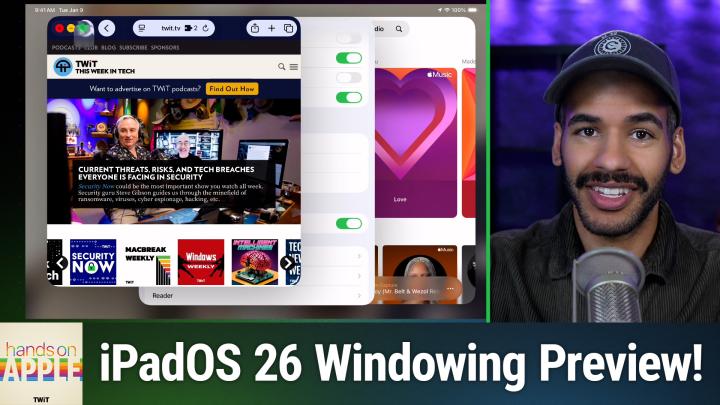
All TWiT.tv Shows (Audio)
Hands-On Apple 187: Windowing System in iPadOS 26
00:09:03
The future of UX navigation on iPad?
Loading summary
Transcript23 lines
- [00:00]
Micah Sargent
Coming up on hands on Apple, let's take a look at the windowing system in iPadOS. 26. Stay tuned.
- [00:07]
TWiT Host
This episode brought to you by Red Canary when cybersecurity threats hit fast, you need an MDR partner that moves faster. Red Canary delivers 24.7expert MDR support, total visibility and actionable insights. Plus it helps you detect four times more threats so you can stay ahead with without burning out. Red Canary clears the noise and has your back every hour, every incident. Get the backup you deserve. Visit redcanary.com difference to learn more.
- [00:38]
CIS Representative
25 years ago, a small group of business and government leaders met in Washington, D.C. they envisioned the creation of an independent nonprofit organization with a mission to help people, businesses and government mitigate the growing threat of cyber attacks. Today, the center for Internet Security embodies that vision. For 25 years, it's worked with a global community of IT and cybersecurity experts to develop the CIS benchmarks and CIS critical security controls. These proven security best practices defend against common cyber threats and streamline compliance with industry frameworks, regulations and standards. Today, CIS provides cybersecurity services, threat intelligence, and critical resources to help public and private sector organizations alike strengthen their Cyber defenses. Visit cisecurity.org today. That's the letters cisecurity.org to find out how CIS can help your organization as we create confidence in the connected world.
- [01:38]
LinkedIn Advertiser
Does it ever feel like you're a marketing professional just speaking into the boy? Well, with LinkedIn ads you can know you're reaching the right decision makers. You can even target buyers by job title, industry, industry, company seniority, skills. Wait, did I say job title yet? Get started today and see how you can avoid the void and reach the right buyers with LinkedIn ads. We'll even give you a $100 credit on your next campaign. Get started at LinkedIn.com results, terms and conditions apply.
- [02:11]
Micah Sargent
Podcasts you love from people you trust.
- [02:15]
TWiT Host
This is tw.
- [02:26]
Micah Sargent
Hello and welcome back to Hands on Apple or welcome to Hands on Apple. For the first time, I am Micah Sargent and today we are taking a look at an upcoming feature. Yes, Apple has introduced its latest round of operating systems just recently at the Worldwide Developers Conference, and now is our opportunity to kind of get an early look at what's to come. Now I'll be going in much more depth as we continue to move through the summer and of course as we hit fall when these operating systems actually ship. But I've been trying to give you some early previews of what you can expect to kind of get you ready so today I thought it'd be a good idea to give a quick look at the new windowing system in iPadOS 26. Because, yes, we can finally have, in I think, a very clear and clever way, a multi window, multitasking setup on the iPad. So let's head over to ipados to take a look. All right, here we are on ipados 26. And as you can see, the iPad is a little bit more glossy and glassy, thanks to the liquid glass setup that is now part of ipados and the rest of Apple's platforms. But I want to show you what you need to know when it comes to windowing. As it stands now, keep in mind that Apple can and will and often does change many aspects of the operating system over the course of the summer. So what you're seeing now may not be what it looks like later, but the idea tends to stay the same. And so that's why it's worth kind of showing you right now. If I open a Safari experience, you know, this is me opening the Safari app. You will see in the bottom right hand corner there is a curved sort of macaroni noodle piece. And that new little shape indicates that the app is able to go into windowed mode. You should see this in every app across every use case. If I tap on this, it will, or rather if I tap and move it, it will allow me to resize this page and turn it into a window that I am able to use. Now, first and foremost, look in the top left hand corner. You will notice that there is something that those of you who are have used a Mac will be aware of, will have seen before, and that is the stoplight icons. The stoplight buttons, red, yellow and green. Those are the ways to control windows on macOS. And it works the same or mostly the same on iPadOS. If we take our cursor and we move it up to those icons, I can see the red button lets me close, the yellow button lets me downsize the window, and the green button lets me make the window larger, smaller, or arrange it. Now, if I move over those spotlight, those stoplight, excuse me, icons, then I can see what kind of move and resize functionality I have. I can move it to the left, move it to the right, move it to the top of the screen, the bottom of the screen, I can fill the entire page, which kind of turns it back into a full screen app and go on from there. Now let's go back to the main screen and let's launch the music app. We're going to take the music app and we are going to make this a Windows experience here. And I'm going to close the messages app and then we will go back to the main screen and I will launch Safari again and we will change the size of this window. Now you'll notice that I can click on the tag on the tab bar at the top and I can move it around so that I get two different windows that I could have open at the same time. Now if I were to go to Safari and choose new, it will open it as a new tab, not as a new page, but you can open it as a new window if you'd like. And we'll take a look at that next. So along with the new windowing system in ipados which gives you this great experience of being able to view all of these windows at once, if I want to launch the Settings app and also turn this into a window, I can do that. Well, there's also something that will be familiar to those of you who are on macOS. We're going to make Safari full sized. And here I am scrolling through the Twit page, but check out what happens if I move to the top of the page. Yes, menu bars have come to ipados. I can see the Safari name here and choose Safari Settings. I can adjust the extensions for Safari Manage profiles and make changes there as I see fit. I have file edit, view history. I mean I've got everything there. Let's change this back back to a window so that I can go into settings and see what we have in settings which will make full screen. You don't have to make it full screen to view the the menu bar, but it's kind of nice just to see what you're working with here at the top. So I can scroll up here. Settings, I've got Settings Settings which should take us back to the general page file to close the window view to search window to minimize exit, full screen, etc. And help, which is just the search functional. Then let's go into music so you can see what it looks like there. I have access to controls, I have access to view the sidebar, show what's now playing, show lyrics, access to songs, and of course access to the settings for music which will pop us right in. That's one of my favorite new features, is being able to quickly access the settings for an app with that keyboard shortcut of command comma so that is a look at the menu bar which has come to IPADOs as well. That again, a very, very quick look at the windowing system in ipados 26. I'll be keeping an eye on how things change, morph, improve, don't improve over time as the hardworking developers at Apple continue to polish this in time for the fall release. But as I mentioned, it's a great time to kind of get ready for what you will soon be able to experience, even if you don't plan yourself to be a person who is riding and rocking the beta train, as it were. Thanks so much for tuning in to this week's episode of Hands on Apple. Back next week with another episode and I'll see you then. Bye bye.
- [09:42]
TWiT Host
From Silicon Valley boardrooms to tomorrow's AI breakthroughs, if you need to keep up to date with tech, you need TWiT TV. At TWiT, we are tech experts who understand what's happening and can keep you in the loop. And we do it in a thoughtful, informed and fun way. Start your Sundays with this Week in Tech, a roundtable of tech journalists and people in the know with a rundown of the week's most important tech news. But that's not all. All week long you can stay ahead of Security Threats with Steve Gibson and Security. Now. Keep up on all things Apple with MacBreak Weekly. Listen to the most informed Microsoft experts in the world with Paul Thurat and Richard Campbell on Windows Weekly. Our flagship shows feature tech's most respected voices, giving you the insight you need to understand and benefit from the changing world of technology. We give you analysis you won't find anywhere else so you can make smarter business decisions and take advantage of the technologies transforming your world. Whether you're a CEO, IT professional, or simply passionate about technology, TWiT's network of shows gives you the edge you need in today's digital landscape. Don't miss a minute. Subscribe to TWiT TV today.
- [10:58]
LinkedIn Advertiser
Foreign.
- [11:05]
T-Mobile Representative
Saldana welcome to T Mobile. Here's your new iPhone 16 Pro on us.
- [11:09]
Customer
Thanks. And here's my old phone to trade in.
- [11:11]
T-Mobile Representative
You don't need to trade in. When you switch to T Mobile, we'll give you a new iPhone 16 Pro plus we'll help you pay off your old phone. Up to 800 bucks and you still get to keep it.
- [11:20]
Customer
There's always a trade in.
- [11:22]
T-Mobile Representative
Not right now. @ T Mobile.
- [11:23]
Customer
I feel like I have to give you something in return for karma.
- [11:25]
T-Mobile Representative
That's okay.
- [11:26]
Customer
I don't really have much in my purse. Oh, let's see. Hand sanitizer. It's lavender.
- [11:31]
T-Mobile Representative
I'm good.
- [11:31]
Micah Sargent
Seriously.
- [11:32]
Customer
Let me check this pocket oh, mints.
- [11:35]
T-Mobile Representative
Really, I'm fine.
- [11:36]
Customer
Oh, I have raisins. I'm a mom. Wait, wait one sec. I've got cupcakes in the car.
- [11:40]
T-Mobile Advertiser
It's our best iPhone offer ever. Switch to T Mobile, get a new iPhone 16 Pro with Apple Intelligence on us. No trade in needed. We'll even pay off your phone up to 800 bucks with 24 monthly bill credits. New line $100 plus a month on experience beyond Finance Agreement $999.99 and qualifying ported for well qualified plus tax and $10 connection charge. Payout via virtual prepaid card. Allow 15 days credits end and balance due if you pay off early or cancel. See T mobile dot com.