← All TWiT.tv Shows (Audio)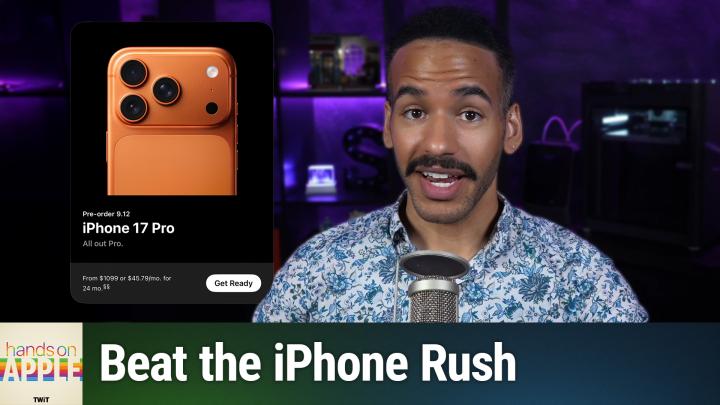
All TWiT.tv Shows (Audio)
Hands-On Apple 199: Preordering the iPhone 17 Like a Pro
00:08:53
Step-by-Step Tactics That Work
Loading summary
Transcript21 lines
- [00:01]
Micah Sargent
All right, Apple has announced new iPhones and that means it's time to prepare for your order. Stay tuned.
- [00:07]
Will
Let's map out this week's amazing destinations and travel tips.
- [00:11]
Honestly Will, I didn't plan any trips, but I did switch to T Mobile with their new Family Freedom offer.
- [00:19]
That's not the itinerary we're following.
- [00:22]
Well, I'm departing from AT&T and embarking on a new journey with T Mobile. They paid off my family's four phones up to 3200 doll and gave us four new phones on the house.
- [00:35]
Micah Sargent
Bon voyage.
- [00:37]
T-Mobile Advertiser
Introducing Family Freedom. Our lowest cost will switch our biggest family savings all on America's largest 5G network. Visit your local T Mobile location or learn more@t mobile.com familyfreedom up to $800 per line via virtual prepaid card typically takes 15 days. Free phones via 24 monthly bill credits with finance agreement eg Apple iPhone 16128 gigabyte 802999 eligible trade in eg iPhone 11 Pro for well qualified credits end and balance due if you pay off early or cancel contact T Mobile Ever.
- [01:03]
Will
Notice how ads always pop up at the worst moments when the killer's identity is about to be revealed during that perfect meditation flow on Amazon Music, we believe in keeping you in the moment. That's why we've got millions of ad free podcast episodes so you can stay completely immersed in every story, every reveal, every breath. Download the Amazon Music app and start listening to your favorite podcasts. Ad free included with prompt.
- [01:36]
Odoo Advertiser
Imagine you're a business owner relying on a dozen different software programs, each one disconnected. More expensive and more complicated than the last, it can be incredibly stressful right now. Picture Odoo Odoo brings all the tools your business needs into one simple platform. CRM, accounting, inventory, manufacturing, marketing, HR and more. All seamlessly connected. Everything works together, giving you the peace of mind that your business is running smoothly from every angle. Odoo's open source applications are user friendly and designed to scale with your business, saving you time and money. Say goodbye to juggling multiple platforms and hello to efficient integrated management. Stop wasting resources on complicated systems and make the switch to odoo today. Visit odoo.com o d o o.com and discover how Odoo can simplify and streamline your business operations. Odoo Modern Management made simple.
- [02:39]
Will
Podcasts you.
- [02:40]
Chris Gethard
Love from people you trust.
- [02:43]
Micah Sargent
This is twit. Hello and welcome to Hands On Apple. I am Micah Sargent and today I've got a quick one for you this, of course, is a timely addition because Apple has announced that the iPhone is here. The whole new set of iPhones, in fact, We've got the iPhone 17 Pro and Pro Max, we've got the iPhone air and we've got the iPhone 17. So with that in mind, tomorrow as you're watching this episode, hopefully on Thursday the pre orders will open for the new iPhone. And I thought it'd be a great time to talk about the process for setting up a pre order ahead of time so that. But when it comes time to order your iPhone, you know you can get it on day one. There are a lot of new colorways, a lot of new fun stuff to be able to check out. And so if you want to make sure you get the one that you want, this is the way to go about doing it. Now, I also want to recommend that you go and watch Leo and my coverage of the live Apple news event that we did earlier in the week. But let's head over to iOS and take a look. So you can do this on iOS or iPados, but I would recommend doing it from a mobile device again, iOS iPadOS as opposed to using the website on your Mac. What we'll do is we will go to the Apple store app. Now, if you don't have the Apple store app, go ahead and head to the app store, download the Apple store app, and you will see on the main page that it doesn't have much information here. But if we tap on products, you can see that the iPhone pops up as one of the options and you can see a button that says get ready. Now whether you're wanting to buy the iPhone 17, the iPhone Air, the iPhone 17 Pro. That will determine which version you choose. I want to buy the iPhone 17 Pro. So I'm going to choose get ready with this. From here, we need to choose the model that we want. So iPhone 17 Pro Max, I want mine in deep Blue. I want 512 gigabytes. You're choosing your different storage spaces. So your first your model, then your finish, then your storage space, then you decide if you have a trade in or not. I do have a trade in. I have an iPhone 16 that I'm holding in my hands. I'll tap on that. And it says, says that the trade in value is up to $700. I say, yes, the trade in is in good condition. And then I say whether I would like to buy or finance the device. I'm going to buy it outright. And this is great. If you do it on the phone, it can determine hey I know this phone works on your AT&T account and therefore I am able to tap on yes replace this on my existing device and then you can add Apple Care be it AppleCare One, no AppleCare coverage or AppleCare plus with theft and loss now AppleCare plus with theft and loss is that standard AppleCare product that has been around for a while with Theft and loss. Of course it helps if you lose your phone or if it's stolen. AppleCare One is the subscription service 1999amonth that gives you multiple product coverage and then of course you can choose no Apple Care. I'm going to choose AppleCare plus with theft and loss. If you do the monthly coverage it's 1399amonth or $140 a if you go that way and then we can choose now get ready for pre order up will pop some options including browsing for iPhone accessories. I've already pre ordered my case or ordered my case as they're available now but this is where you would go to add these if you'd like them. If you don't need one of these you can simply click skip and then you choose a payment method. So during this process it did do a quick face check for me face ID unlock and now what we'll do is we can choose a credit or debit card option or we can choose Apple Pay if we'd like to pay with Apple Pay. So I'm going to switch away for a moment while I type in this information.
- [06:52]
Will
Today's show is brought to you by Progressive Insurance. Do you ever think about switching insurance companies to see if you could save some cash? Progressive makes it easy to see if you could save when you bundle your home and auto policies. Try it@progressive.com Progressive Casualty Insurance Company and affiliates. Potential savings will vary. Not available in all states. Let's map out this week's amazing destinations and travel tips.
- [07:20]
Honestly Will, I didn't plan any trips, but I did switch to T Mobile with their new Family Freedom offer.
- [07:28]
That's not the itinerary we're following.
- [07:30]
Well, I'm departing from AT&T and embarking on a new journey with T Mobile. They paid off my family's four phones up to $3200 and gave us four new phones on the house.
- [07:44]
Micah Sargent
Bon voyage.
- [07:45]
T-Mobile Advertiser
Introducing Family Freedom. Our lowest cost will switch our biggest family savings all on America's largest 5G network. Visit your local T Mobile location or learn more@t mobile.com FamilyFreedom up to $800 per line via virtual prepaid card typically takes 15 days. Free phones via 24 monthly bill credits with finance agreement eg Apple iPhone 16128 gigabyte $8,029.99 Eligible trade in iPhone 11 Pro for well qualified credits end and balance due. If you pay off earlier, cancel contact T Mobile.
- [08:11]
Micah Sargent
Once I have that information, I'll be shown a screen that has all of the stuff I need to confirm what I plan to do to pay for it, the summary of how much it's going to cost, the fact that I'm going to be using theft and protection, that I'm going to be doing a trade in that I've decided to have AppleCare Plus. And then if you do tie it to a cellular plan that you agree to those terms and if you agree to the trade in terms afterwards, we click save your pre order info. And then sometimes you'll get this option which requires you to type in the security code for your card and this is just a confirmation of that as well. So I'll type that in and choose okay. And once that information is saved, then it shows for me. 5am on Friday 9 12, I have to use the app to complete my order. I am going to choose to add my pre order to my calendar, allow full access and then add this event. You can see it automatically populates with alerts at 5 minutes before and 15 minutes before. And so that way I've got That saved on 912 I will be able to come back to this app and I will have my pre order option here on this screen. So from that point on in the for you section right there at the top, it shows that I'm ready for my iPhone preorder on 9 12. So as soon as the Apple Store opens up on in my case 5am on Friday, boom. I'll be able to hop in here, tap on that and make my pre order. Now, depending on what color option you choose to get, what storage size you choose to get, you may not run into issues with plenty of iPhones being available to you. But this tends to be the case if you go for a more unique model, like the orange one for example, or some of the higher or in some cases lower storage space options. You may struggle to get an iPhone if you don't get it the morning of when pre order becomes available. So this is in particular the reason to go about making sure that you're ready for your pre order. Now, a couple of other things. If I am having trouble getting into the store, if it seems to be taking a really long time to load. Sometimes I will open up the store app on a second device so I'll have an iPad nearby. I'll have my iPhone. I start with the iPhone iPad nearby. You're by loading the store and go between those two. Some people will have multiple websites open. Multiple it seems like Apple has gotten better over time to make that less of a requirement and I have found, knock on wood, iPhone pre orders to be relatively peaceful things at five in the morning as is the case for me. So I wish you all the best of luck in getting the iPhone that you're after and of course look forward to being back with you next week for another episode of Hands On Apple. Bye bye.
- [11:27]
Will
Hey, thanks for tuning in to Twit, your tech hub for intelligent, thoughtful conversations. If you want to take your experience to the next level and support what we do here at Twit, say goodbye to ads and say hello to Club Twit. With Club Twit, you unlock all our shows ad free. You also get exclusive members only content. We do a lot of great programming just for the club members. You also get behind the scenes access with our show Twit plus bonus feed and live video streams while we're recording. And don't forget the fantastic members only discord. It's where passionate tech fans like you and me hang out, swap ideas and connect directly with all of our hosts. It's my favorite social network. I think you'll like it too. Club Twit. It's not just a subscription. It's how you support what we do and become part of the Twit family. Your membership directly supports the network, helping us stay independent and keep making the shows you love. If you're ready to upgrade your tech podcast experience, head to Twit TV Club Twit and join us today. Thanks for being here and I'll see you in the club.
- [12:42]
Chris Gethard
Hi, I'm Chris Gethard and I'm very excited to tell you about Beautiful Anonymous, a podcast where I talk to random people on the phone. I tweet out a phone number. Thousands of people try to call, talk to one of them. They stay anonymous. I can't hang up. That's all the rules. I never know what's gonna happen. We get serious ones. I've talked with meth dealers on their way to prison. I've talked to people who survived mass shootings. Crazy funny ones. I talked to a guy with a goose slap, somebody who dresses up as a pirate on the weekends. I never know what's gonna happen. It's a great show. Subscribe today. Beautiful Anonymous.