← All TWiT.tv Shows (Audio)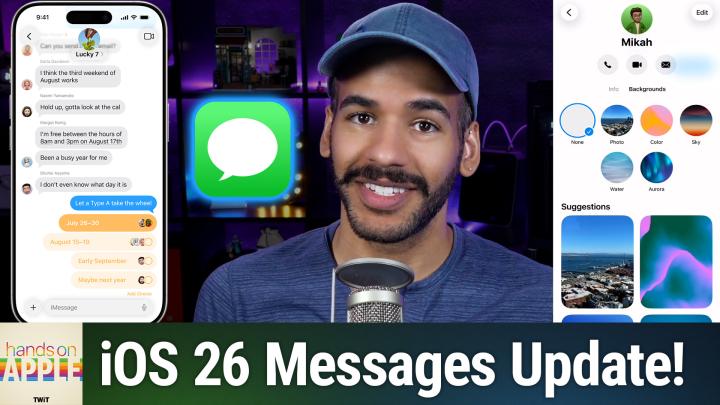
All TWiT.tv Shows (Audio)
Hands-On Apple 200: New Messages Features in iOS 26
00:11:54
Custom Backgrounds, Polls, & More!
Loading summary
Transcript21 lines
- [00:00]
Micah Sargent
Coming up on hands on Apple iOS 26 is here, so let's take a look at one of the features you're likely to see first. Stay tuned.
- [00:09]
Progressive Insurance Announcer
Today's show is brought to you by Progressive Insurance. Fiscally responsible financial geniuses, monetary magicians. These are things people say about drivers who switch their car insurance to Progressive and save hundreds. Visit progressive.com to see if you could save Progressive Casualty Insurance Company and affiliates. Potential savings will will vary. Not available in all states or situations.
- [00:36]
Micah Sargent
Let's map out this week's amazing destinations and travel tips.
- [00:40]
Will
Honestly, Will, I didn't plan any trips, but I did switch to T Mobile with their new Family Freedom offer.
- [00:48]
Progressive Insurance Announcer
That's not the itinerary we're following.
- [00:50]
Will
Well, I'm departing from AT&T and embarking on a new journey with T Mobile. They paid off my family's four phones up to $3200 and gave us four new phones on the house.
- [01:04]
Micah Sargent
Bon voyage.
- [01:05]
T Mobile Announcer
Introducing Family Freedom. Our lowest cost to switch our biggest family savings all On America's largest 5G network, visit your local T Mobile location or learn more@t mobile.com familyfreedom up to $800 per line via virtual prepaid card typically takes 15 days. Free phones via 24 monthly bill credits with finance agreement eg Apple iPhone16128 gigabyte $829.99 Eligible trade in eg iPhone11 Pro for well qualified credits end and balance due if you pay off early or cancel contact T Mobile.
- [01:32]
Will
Ever notice how ads always pop up at the worst moments when the killer's identity is about to be revealed during that perfect meditation flow on Amazon Music, we believe in keeping you in the moment. That's why we've got millions of ad free podcast episodes. So you can stay completely immersed in every story, every reveal, every breath, every download the Amazon Music app and start listening to your favorite podcasts. Ad free included with prime.
- [02:07]
Progressive Insurance Announcer
Podcasts you.
- [02:08]
Will
Love from people you trust.
- [02:12]
Micah Sargent
This is TWiT. Welcome back to Hands on Apple. I am Micah Sargent and as you probably know, you can hit that update button on your iPhone now. Yes, iOS 26 iPadOS 26 plus the whole suite of 26 updates is now available to you and I wanted to take a look at There are going to be a lot of features that we'll talk about on Hands on Apple. A lot of new stuff to dive into, to check out and to fully understand. But when I thought about one of the first places that you're likely to sort of interact with the system And a place that you might want to make a change. It is in the Messages app. There have been a few updates there. And look, everybody's using their phone to send messages, right? So let's take a look at what has changed there. All right, so here we are in iOS 26, and the first thing we're going to do is launch the Messages app. From the Messages app, I'm going to tap on this message exchange that I have technically with myself. This is that Micah Twit account. And what we're going to do is look at the top of the message. You can see that it has the person's name. In many cases, it will show their face. And there's a little arrow that points to the right. Again, not the arrow in the top left corner, the back arrow, but the little arrow that points to the right that is next to the name. If we tap on that area, it brings up the information about that person. Now, this first page is the Info page, and it has contact information about this person. So it's a really great way to edit your contacts without having to hop all the way into the Contacts app. There is, of course, though, a shortcut that lets you actually hop into the Contact if you want to. So show in Contacts is right there. Now, from the page, you can choose to hide alerts, meaning that new messages from this person won't show up and send read receipts. So in this case, if the person on the other end is looking, they can see when I have seen a message. Now, from this page, you can also hit the Edit button in the top right corner. And that lets you make some changes to this contact so you don't actually have to hop into the Contacts app for that either. Up at the top, we've got shortcuts that allow us to quickly place a call, Quickly place a FaceTime call, or quickly send an email. And those will update based on the information that you have about this contact. Now you can go ahead and try and call this phone number. It's not connected to anything at this point, so I'm not worried about showing it. And of course, this address is where we used to work at the studio. So what I want to show you, though, the new thing is that now there are backgrounds for your messages. If we tap on the backgrounds option, we can see that there are some different things we can do. As a background for the message, you can select a photo. So this can be any photo that you have in your photo library. You can select a color option and Apple will pop up and show you the different color options available. There's mango, there's ice, there's plum, there's deep sea, there's green apple, there's cherry, there's bubblegum, there's tangerine, magenta, lime, silver, carbon, stone. And at any point, if you want to, you can tap in the bottom left hand corner to change the darker color. Tap in the bottom right hand corner to change the lighter color and create your own. I'll hit X. We'll go to sky and there are some options here. Dusk, haze, sunset, clear sunrise and dawn. We'll go to water. We've got light water and dark water and then Aurora. There's a green aurora, a purple aurora and a pink aurora. Lastly, I'll tap on photo and this lets you choose a featured photo as we have here. So we'll just go with that because it is the featured option and it will select that. We've got some options. We can change it from natural to black and white to duotone to color wash, similar to what we have in lock screen options. I really like that black and white. So I'm going to tap the checkbox, the check a box, the checkbox to have that lock in. And now if I hit back here in my conversation, I can see now that I have changed the background of this imessage so I can send a message. Just checking in once again and you'll see that that background stays back there. And the new kind of look and feel of iOS 26 with the liquid glass sort of adjusts itself around what you have on screen so I can easily tap and kind of see the glass peeking through with the photo that I took from Coit Tower in San Francisco. Now another cool messages feature. Very excited to see this come to messages. It used to require a third party app to do, but what's a common thing you need to do with a group of friends? Make a decision. Where are you going to go to eat? Where are you going to go to, you know, have some beverages? Well, it used to be you'd send a message to say hey everybody, download an app and we'll all get into a poll together. Now that's built in if we tap the plus icon in the bottom left hand corner to bring up the different imessage apps and options. We can tap polls which is again now built in so I can say go with Applebee's Chili's and Outback Steakhouse. Not Outbreak. Oh dear Steakhouse. Not out beak out back Steakhouse. And as I add an option it does give me the option to then add one more Taco Bell and it can continue to add those other choices. I'll say where are we eating? And hit send. Then you can add choices on if you'd like. But I can make a selection. I choose Chili's. As people make selections, their options will appear here and it will begin to kind of collect and show you what the choice is. I would not actually choose Chili's. I would choose none of the options here. So you can make those changes as you want. And also I love that we can tap and hold and choose poll details and it shows you what different people have voted for. Now it's a little confused here because I am on both sides of this. So it's showing that I currently have not made a vote and I have also made a vote, but that is again because I am just texting with myself let's map out this week's amazing destinations and travel tips.
- [09:14]
Will
Honestly Will, I didn't plan any trips, but I did switch to T Mobile with their new Family Freedom offer.
- [09:22]
Progressive Insurance Announcer
That's not the itinerary we're following.
- [09:24]
Will
Well, I'm departing from AT and T and embarking on a new journey with T Mobile. They paid off my family's four phones up to $3200 and gave us four new phones on the house.
- [09:37]
Micah Sargent
Bon voyage.
- [09:39]
T Mobile Announcer
Introducing Family Freedom. Our lowest cost will switch our biggest family savings all on America's largest 5G network. Visit your local T Mobile location or learn more@t mobile.com FamilyFreedom up to $800 per line via virtual prepaid card typically takes 15 days. Free phones via 24 monthly bill credits with finance agreement eg Apple iPhone16128GB8299 Eligible trade in eg iPhone11 Pro for well qualified credits end and balance due if you pay off early or cancel contact T Mobile.
- [10:06]
Will
Ever notice how ads always pop up at the worst moments when the killer's identity is about to be revealed during that perfect meditation flow on Amazon Music, we believe in keeping you in the moment. That's why we've got millions of ad free podcast episodes so you can stay completely immersed in every story, every reveal, every breath. Download the Amazon Music app and start listening to your favorite podcasts. Ad free included with prime this episode.
- [10:40]
Progressive Insurance Announcer
Brought to you by Red Canary when cybersecurity threats hit fast, you need an MDR partner that moves faster. Red Canary delivers delivers 24.7expert MDR support, total visibility and actionable insights. Plus it helps you detect four times more threats so you can Stay ahead without burning out. Red Canary clears the noise and has your back every hour, every incident. Get the backup you deserve. Visit redcanary.com difference to learn more.
- [11:09]
Micah Sargent
Now I want to take a quick look in the settings menu for messages. So we'll go to settings, we'll scroll down until we get to apps, and then we'll scroll down until we select messages again. You can just access that by using the search functionality in the top. And here we can set up something that I find to be very important. If we scroll down to the unknown senders option, we have a new thing that says screen unknown senders. If we turn that on, what it does is it hides these notifications so you won't get a little pop up saying, hey, you got a message from someone. But on top of that it puts it in a special list called the unknown senders list. So if you're getting lots of messages from, you know, different campaigns trying to get your attention, this is a great way to move those along. And then it does have the option to allow notifications for what are considered time sensitive notifications. Now one of these is a verification code and I do recommend turning this on that will allow it so that if you have not received a message from this before, but you've set up SMS verification codes with an online service, this is a great way to make sure that you still get those and that they don't just kind of miss you and you're not seeing them. So I have this turned on. That's been helpful so far as I've used this feature. It keeps those good notifications coming through and available to. If we go back to messages and we go back to this main page. Now on the right hand side I've got in the top right hand corner a filter button. If we tap on the filter button you can see we've got filtering between messages, unknown senders, what you and iOS determine as spam and then recently deleted. And you can always tap on Manage filtering to go back into this filtering option. So from there you can easily go through and see what you're, you know, what, what changes you need to make. Now a couple of other changes here you'll see Conversation backgrounds is able to be toggled on and off. If we toggle that off and we go back, then we go to our message. Now you'll see that beautiful background we set up is turned off. I'm going to turn that back on and now you can see it again. And then the start with Photos visible option basically makes it so that photos that are sent will be visible, but if you want to, you can turn that feature off as well. Lastly, Show Contact Photos is something that you will be familiar with which just lets it show the person's contact photo there at the top. So that hasn't changed in terms of the settings, but it is a feature that you might want to have enabled for this kind of new look and feel to really kind of bring home this new way of doing things. Now as I mentioned, there's a lot in iOS 26 and macOS, Tahoe and ipados 26 that we'll be covering over the coming weeks, so be sure to tune in every week to Hands On Apple to stay up to date with what's new as you kind of dig in yourself and begin to discover the new features. Thank you so much for tuning in today. I'll catch you again next week for another episode of Hands On Apple. Bye bye.
- [14:36]
Progressive Insurance Announcer
Hey, thanks for tuning in to TWiT, your tech hub for intelligent, thoughtful conversations. If you want to take your experience to the next level and support what we do here at Twit, say goodbye to ads and say hello to Club Twit. With Club Twit, you unlock all our shows ad free. You also get exclusive Members Only content. We do a lot of great programming just for the club members. You also get behind the scenes access with our Twit plus bonus feed and live video streams while we're recording. And don't forget the fantastic Members Only discord. It's where passionate tech fans like you and me hang out, swap ideas and connect directly with all of our hosts. It's my favorite social network. I think you'll like it too. Club Twit. It's not just a subscription, it's how you support what we do and become part of the Twit family. Your membership directly supports the network, helping us stay independent and keep making the shows you love. If you're ready to upgrade your tech podcast experience, head to Twit TV Club Twit and join us today. Thanks for being here and I'll see you in the club.