← All TWiT.tv Shows (Audio)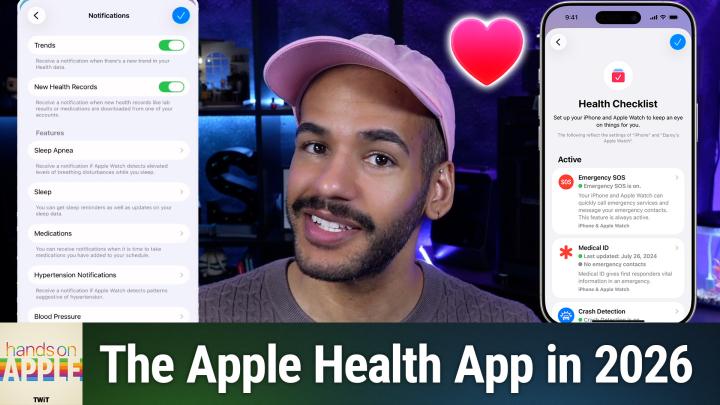
All TWiT.tv Shows (Audio)
Hands-On Apple 213: Apple Health Checkup!
00:15:28
Stay on Top of All the Vital Features
Loading summary
Transcript2 lines
- [00:00]
A
Hey, it's Brooklyn Adams and I'm partnering with Abercrombie to tell you about the newest drop from their active brand. Your personal best YPB leggings are made with buttery soft fabrics that hug you in all the right places. And common Abercrombie's viral curve Love fit designed to eliminate waist gap. Paired with sports bras and super soft sweatshirts. It's activewear that supports every part of my busy lifestyle and gives me my best butt ever. Heading to the new year feeling your personal best shop Active by Abercrombie in the app, online and in stores.
- [00:30]
B
Oh, such a clutch off season pickup, Dave. I was worried we'd bring back the same team. I meant those Blackout motorized shades. Blinds.com made it crazy affordable to replace our old blinds. Hard to install? No, it's easy. I installed these and then got some from my mom. She talked to a design consultant for free and scheduled a professional measure and install hall of Fame son. They're the number one online retailer of custom window coverings in the world. Blinds.com is the goat. Visit blinds.com now for up to 45% off with minimum purchase plus a free professional measure. Rules and restrictions apply. Coming up on Hands on Apple, let's take a look at the health app and some of the notifications and features you can access there. Stay tuned. Podcasts you love from people you trust. This is twit. Welcome back to Hands on Apple. I am Micah Sargent, and today we are heading back into an app that is familiar to you. I'm sure Apple over time has added more features, more functionality to the health app to let you track even more when it comes to different aspects of your health. So the last time we looked at this and we looked at the health checklist, there weren't as many features as there are now. And I thought we'd take a opportunity to kind of see where things stand and what you have access to now should you choose to go into the app. So let's head over to iOS to take a look. All right, here we are on my iPhone and the best way to kind of see what Apple has is to tap on your face in the top right corner of the screen. Now, mine currently just shows a little person icon. It's to the right of the word summary. And now you're seeing an update live in front of you to actually show a little photograph of my face. I'll tap on that. And up pops a little window that has our health details, medical ID and under features. This is the part we want to take a look at now again before we did a whole episode on your health checklist. So we're going to tap in there so that we can see what's new, what's the same, and kind of get a refresher here in the health checklist. Our first thing is emergency sos. If you use this feature, what it does is it will automatically contact emergency services and will also message your emergency contacts. This gives you the ability to say, hey, something's going on and I need help. The next section is medical id. Now this is very helpful for first responders. You fill this information out and it gives them a little bit of information about you. It will tell them of course your name, but it also gives them information about whether you're an organ donor, if you have certain drug allergies, and loads more information. So that is the next section you can see that I have active. Next is crash detection. Your device will be able to detect if there's a car crash and then call emergency services for you if you need help. Importantly, you can see under each of these features, it says what devices are being used for these features. So emergency SOS is active on both my iPhone and my Apple Watch Medical id. The same crash detection, the same fall detection, which listens for or waits for, feels for you to have a hard fall. Then the Apple Watch will actually call emergency services for you. That again is a specific Apple Watch feature not available for the iPhone. Walking steadiness notifications. So this is something that will look at your gait over time and will determine if, based on what it knows about your walking ability, whether you have a higher than normal chance, higher than typical chance of falling. So an elevated risk of falling. And so that is something that can kind of let you know and perhaps let your caregivers know if you might need some more monitoring to make sure that you are able to move around safely. Next, high heart rate notifications. This is just for the Apple Watch and basically if you, you are inactive, if you're not actually, you know, doing something and you are, your heart rate is detected on the Apple Watch above a level that you set. I have mine set to 120 beats per minute. Then it will notify you and say, hey, your heart rate's really high right now. Something might be going on. The reverse is also true. Low heart rate notifications will determine if your heart rate is low for at least 10 minutes. I have mine set to 45 beats per minute. The next one is hypertension notifications. This is a newer feature so here's the first one to know about this is an Apple Watch feature. And essentially your Apple Watch uses a bunch of different patterns to detect if you might have hypertension. And the way that it works, it has to do with the way that Apple has to word things in order for it to be a feature that it can, you know, tout and put out there. So it's very especially and specifically worded to say it detects patterns that may be hypertension. But tapping on any of these will let you turn, toggle on or off this specific notification. The next one is cardio fitness notifications. That one's been around for a while. Again, an Apple Watch feature. Basically, if you have low cardio fitness, if your heart responds poorly to activity, then this will notify you of that, the ECG app, which will let you know when you take ECG measurements on your Apple Watch, it will notify you and give you information there. Irregular rhythm notifications so if the Apple Watch over time detects multiple irregular heart rhythms, it will let you know something's going on and you can kind of look to see if you've got atrial fibrillation Blood oxygen Now of course this is a feature that's a little bit at issue given the fact that it has Apple has come up against court rulings regarding the ability to detect your blood oxygen. However, Apple figured out a way to give people the ability to do a blood oxygen measurement where the calculations happen on the iPhone instead of the Apple Watch. So that feature is now available. Again, the next one is vitals and this one kind of looks at your vitals overnight. So breathing and heart rate and all those sorts of things. And if things seem off from what is your typical, your base measures, then it will let you know. Noise notifications I say if volume goes over 90 decibels, then please do let me know. That's if it remains over 90 decibels for three minutes or longer. So that is a way to kind of protect your hearing. Or if you are in a place where you can't get away from that sound, pop in some some earplugs to kind of help get rid of that risk factor. Sleep apnea notifications if you're wearing your Apple Watch and your Apple Watch detects changes in blood oxygen paired with changes in your respiration paired with changes in your heart rate and all of these things together, it can kind of give you a notification saying, hey, you might want to be tested for sleep apnea. And then headphone notifications this will let you know if you are listening to something at a volume that could be dangerous to your hearing, that could affect your hearing over time. And this is on iPhone and Apple Watch. It is a feature that is easy to use with Apple's own audio devices, but can be used with certain third party devices as well. As you can see in mine, there's one unavailable feature and that is the Afib history feature. And that is because Apple lets you decide between the two. Either you have been diagnosed with atrial fibrillation and so you want to keep track of when your heart is in AFIB over time, or you have not been diagnosed with afib and instead you want to keep track of irregular rhythms that could then be diagnosed as atrial fibrillation. So they both cannot be active at the same time. It's one or the other based on which which category you fall into. Now, if you haven't heard by now, our survey is underway and it's going strong. But we don't want to miss your feedback. So if you haven't done it yet, please take a moment to fill it out before it closes on January 31st. It only takes a few minutes and it helps us improve your listening experience and helps us understand a little bit more about you. Head to TWiT TV survey 26 to take it and of course thanks so much. That is the checklist. But you can actually gain access to even more by taking a look at the two down the notifications section in features. If you tap on this, the first thing in this category, trends. This will notify you of trends, which of course is kind of health data calculated over time. Hey, you're moving more than you did six months ago. Hey, your respiration rate changed overnight. It's lower than it was. That is a really great way to kind of actually tabulate, calculate and make use of that data that you have and do something with it. Right. The next option is new health records. If you are logged in with your your medical provider's portal and have your health records set up within the app, this will send you notifications when you are when you get these new health records in place. So for me, when my medication is prescribed, I'll get a little notification saying, hey, you've got a new medical prescription or when your test results are back. That's a great way to kind of keep track of it. Sometimes it'll come in even before you get the notification from your provider. The next section are different features that are tied to notifications. First being sleep apnea. So tapping on it says, yes, I Would like for you to send me a notification. If my Apple Watch detects signs of sleep apnea, the next one is sleep. Now the great thing about this is not only is it saying hey, I will remind you when wind down or bedtime are about to begin and we'll talk about those in a minute, but it will also give you notifications for your sleep score. If you use your Apple Watch for overnight sleep tracking, the last option shows manage sleep in the Apple Watch app. This lets you set up your sleep settings, which is the feature that talks about wind down and bedtime. So you set a bedtime, say you want to go to bed at 11pm, you want to wake up at 7am and you want a 30 minute wind down period. What happens is 30 minutes before 11pm So 10:30 your phone starts to go into wind down mode. It changes the brightness, it can do quite a few things and then it over the course of that time it can turn on your sleep focus mode which lets you truly wind down for the night. And then it makes it so that the system is more active in monitoring your sleep than it would otherwise be if you did not have this feature turned on because you're giving your phone and your watch a heads up. Essentially the next section, medications. If you would like, you can set it up so that your Apple Watch notifies you when it's time to take your medicine. You can get those dose reminders, reminders, you set those up in the in the iPhone app and then you can also, which I love, get a notification so that you can adjust your medication schedule based on if a time zone change is detected. So you know, if you take your medication typically at 9am in Pacific time, is that the same as 9am at another time? No, it's not. So it can kind of let you know and help you adjust based on that hypertension notifications. So again, if it detects hypertension patterns, it can let you know about that blood pressure. And this is a really cool feature where if you would like, you can track your blood pressure over the course of, you know, a few weeks, for example, or maybe even just a week. Whatever your doctor asks you for, maybe you just want to know for yourself. This is a blood pressure log and it will send you little reminders saying hey, check your blood pressure. Then you can check it at different times of the day and then it will complete and create a blood pressure log for you letting you know what your blood pressure has been over that period of time. So it's kind of a built in little kind of applet almost of blood pressure tracking that I find to be very handy. The next section is mental well being. And this is kind of, it's multifaceted. You've got your state of mind notifications and basically what happens is at a specific time of the day, it could be during your day, it could be in the morning, it can be at night, it can be whenever you set your reminders, it a little notification will pop up and kind of ask you, hey, how are you? And you can say, I'm feeling good, I'm feeling bad, I'm feeling. And there are ways to name the emotions of how you're feeling. Over time you start to see a log, you start to see kind of an understanding of what might be impacting your day. And so the state of mind is a really cool feature to use if you maybe have trouble checking in with yourself and want an external reminder to do so. Underneath that is the mental health questionnaire. And this is the standardized mental health questionnaires for anxiety and depression. You can have it pop up and ask you monthly, every three months, every six months, and then of course get notifications therein. And what that does is once again helps you kind of track your anxiety, your depression or your risk of those based on these standardized questions. The next section, the final one here is walking Steadiness. So remember, that was from the health checklist. This is just saying, yes, I do want notifications about it or no, I don't. The final thing here is a button that takes you to the checklist where you can see the rest of what you have. But between that health checklist and these notifications, you're hitting all of the different new and old features that exist within the health app. So that is a look at where things stand in terms of Apple's health app and the features therein. It's, it's jam packed with lots of awesome things that you can do right. And I think that it's worth checking it out from time to time to see what new features you're able to take advantage of. As always, I want to thank you for taking the time to be here with me today on this episode of Hands on Apple. I'll be back next week with another episode, but until then, I remind you all out there, if you have questions, comments, concerns, whatever it happens to be micahit TV is how you get in touch. And hey, don't forget to join Club Twit. Twit tv Club Twit. See you next time. Bye bye.