← All TWiT.tv Shows (Audio)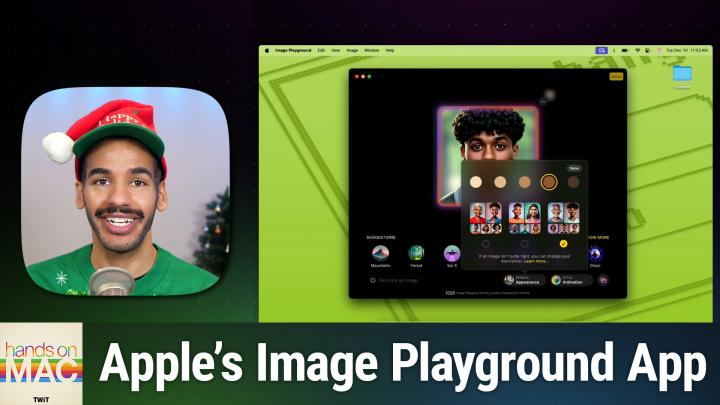
All TWiT.tv Shows (Audio)
Hands-On Mac 161: Image Playground
00:08:46
Create Images Easily With Apple Intelligence
Loading summary
Transcript13 lines
- [00:00]
Micah Sargent
Coming up on Hands on Mac, let's take a look at what it's like to use Image playground, Apple's new AI powered image generation tool on macOS. Stay tuned.
- [00:11]
Bluehost Ad
Got great ideas but no idea how to build a website? Get bluehost with their AI design tool, you can quickly generate a high quality, fast loading WordPress site instantly. Once you've nailed the look, just hit enter and your site goes live. It's really that simple and it doesn't matter whether you're a blogger, influencer or just starting your side hustle. Bluehost bluehost has you covered with built in marketing and e commerce tools to help you grow and scale your website for the long haul. And when you upgrade to Bluehost Cloud, you get 100% uptime and 24. 7 support to ensure your site stays online through heavy traffic. Bluehost really makes building your dream website easier than ever. So what's stopping you? You've already got the vision. Make it real. Visit bluehost.com right now and get started today.
- [01:00]
Got great ideas but no idea how to build a website? Get Bluehost their AI design tool creates high quality WordPress sites super fast. Whether you're a blogger, influencer or launching a side hustle, bluehost helps boost your growth with built in marketing and e commerce tools. Upgrade to cloud and get 100% uptime and 24. 7 security to stay online all the time. Why wait? You've got the vision. Make it real. Visit bluehost.com to get started.
- [01:30]
T-Mobile Ad
It's better over here now. At T Mobile get four 5G phones on us and four lines for $25 a line per month when you switch with eligible trade ins all on America's largest 5G network.
- [01:42]
Minimum of 4 lines for $25 per line per month with auto pay discount using debit or bank account, $5 more per line without autopay plus taxes and fees and $10 device connection charge phones via 24 monthly bill credits for well qualified customers. Contact us before canceling entire account to continue bill credits or credit stop and balance on a required finance agreement. Due credits end if you pay off devices early. CT mobile.com.
- [02:03]
Micah Sargent
Podcasts you love from people you trust. This is Twit. Welcome back to Hands On Mac. I am Micah Sargent and this of course is the show where we show you things you can do on your Apple devices. Today we are taking a look at Image Playground, that AI generation tool created by Apple that is available on iOS, iPadOS andMacOS. Let's head over to macOS and take a look. Here we are in macOS and I have launched the Image Playground app. You're immediately presented with kind of a boring ui, especially if you've actually generated images before. We're going to take a look at the menu bar at the top just so you can see see what we have here. You always know that an app is kind of probably not full featured. There's not a lot going on if there's no settings option here. And that is the case with the Image Playground app. You have your standard edit tools, your standard view tools. With image, you actually have some options that we'll talk about. Window tools are general and help is also general. If we select an image that has already been created, we have the option to delete it, to share it somewhere else, or to add an actual new image, which we'll talk about in a moment. But now we can go up to that menu bar, click on the image tab and we can choose to open this specific image, edit the image, share the image somewhere, or add a caption. We can also duplicate the image if we want to make adjustments to it after the fact. So let's talk about what we need to do if we want to generate a new image. We can go down to the bottom to the plus icon or up to the top right to the plus icon and we'll select it. And we're immediately presented with some suggest suggestions that start out and then we have some more suggestions after that. We can choose a to describe an image. We can choose a person that might be involved in this image, we can choose a style and then we can choose to be influenced by actual photos that we have. So it will create an image based on a photo of pets of nature or food. It will not create a photo based on a person via an image. Only if you choose a person from that person menu. That person menu is informed by the people in your photos library that you have tagged. So faces that have been recognized in your photos library.
- [04:43]
Bluehost Ad
Got great ideas but no idea how to build a website? Get bluehost with their AI design tool, you can quickly generate a high quality, fast loading WordPress site instantly. Once you've nailed the look, just hit enter and your site goes live. It's really that simple. And it doesn't matter whether you're a blogger, influencer or just starting your side hustle, bluehost has you covered with built in marketing and e commerce tools to help you grow and scale your website for the long haul. And when you upgrade to Bluehost, Cloud. You get 100% uptime and 24. 7 support to ensure your site stays online through heavy traffic. Bluehost really makes building your dream website easier than ever. So what's stopping you? You've already got the vision. Make it real. Visit bluehost.com right now and get started today.
- [05:31]
Micah Sargent
It's better over here.
- [05:33]
T-Mobile Ad
Now at T Mobile get four 5G phones on us and four lines for $25 a line per month when you switch with eligible trade ins, all on America's largest 5G network.
- [05:44]
Minimum of 4 lines for 25 per line per month with auto pay discount using debit or bank account, $5 more per line without auto pay plus taxes and fees and 10 device connection charge phones via 24 monthly bill credits for well qualified customers. Contact us before canceling entire account to continue bill credits or credit stop and balance on a required finance agreement due bill credits and if you pay off devices early ct mobile.com so here I.
- [06:03]
Micah Sargent
Could type something like a small laptop sitting on a desk and hit enter and that text is immediately part of the prompt for the image that's generated. You'll also notice that more images show well, or rather more circles show up below. Those circles refer to more image options that the app has generated and if you get to the end and you're still not happy with it, it will actually start to generate more after the fact. From here we can choose the three Dots, one of my favorites, to copy that image, share that image, save that image, or report a concern. And then this is where we have these suggestions because we can choose to inform what's going on in the image. I'm going to click show more and we can add a theme, for example, a summer theme. So now it uses my prompt of a small laptop sitting on a desk and it informs it with that summer theme. As I move over to the side I can see costumes. So if we were working with a person, that might be the case. I'm kind of curious what will happen if I choose mage and add that as a prompt. A mage shows up on the laptop screen. I can go over more to accessories, to places, and that is the end of those options. So we'll go back to the beginning. And now from here you can see that I've got the image kind of full screen. If I click out of that, it goes back to this bubble view. I can remove prompt options from this to limit it. So instead of having summer as part of it, let's just do Mage and a small laptop sitting on a desk. So we'll see what it suggests based on that. It also throws in an appearance because of the fact that we had the costume option selected. So I'm going to deselect mage, deselect appearance and just have that small laptop sitting on the desk. And then I want to show you some other options so we can come back to this main view. We'll click the plus button again and this time we're going to choose person. Now, because I'm using a work account, this test account that I use, I don't have any photos in my photos library that have faces recognized. If you have faces recognized and you've named those faces, this section will appear full and you can choose a person to use to base an appearance off of. But here we can choose appearance and edit that appearance. And we can offer skin tone options. We can make them lighter or darker. And then from there we can choose three different options. Now if you look at them, you'll get the understanding that what we're working with here is a female presenting option, or I should say a feminine presenting option, a masculine presenting option, and a sort of non binary option in the middle. So I choose, I chose male, I chose darker skin like myself. And I think I would probably kind of choose in the middle there. And I'll tap done. So that selects the person. Now I can do something like give a theme of sunset, give the person a mage costume. I can add a party hat to the image. And then I can see here we have a person wearing a party hat that appears to be standing in front of a sunset with some different options there, looking like a mage, which is very cool. So we've got like a party going on that this mage is attending. Now the other thing that I'll mention is again, outside of these options, we're also presented with a style. The current style that is chosen is animation. But illustration is another option here. I found that the illustration option is not as fun as the animation option. And you may find that that's the case, or you may find that you really like that animation option. So that's something that you can kind of consider based on your personal preferences and styles there of what you like. But after an image is generated, you can then take that image and again copy it, share it, save it. I'm going to choose Done, which will select this image. And now this is part of my image playground options. I generated an image before that I can share. I've got this new one right. Clicking on it lets me add a caption. For example, I can delete it at any time, but these are both here to play with as I see fit. So whether you want to use an image that already exists and sort of prompt based on that, again with a pet, with nature or with food, or you want to completely create a new image entirely or use an image from your photos library, those are the things that you can do within Image Playground to help you create it. A customized kind of AI generated image folks, that is going to bring us to the end of this episode of Hands On Mac. I of course thank you for tuning in to the show. I will be back next week with another episode. Until then though, remember that you can reach out to me at micahoot tv. I was thinking it was hot. It's micahot tv. Until next time, thank you for tuning in and we'll see you again soon. Bye bye now.
- [11:55]
T-Mobile Ad
AT T Mobile get four 5G phones on us in four lines for $25 a line per month when you switch with eligible trade ins all on America's largest 5G network.
- [12:06]
Minimum of 4 lines for $25 per line per month with auto pay discount using debit or bank account, $5 more per line without autopay plus taxes and fees and $10 device connection charge phones via 24 monthly bill credits for well qualified customers. Contact us before canceling entire account to continue bill credits or credit stop and balance on a required finance agreement due bill credits end if you pay off devices early. CTMobile Combat.