← All TWiT.tv Shows (Audio)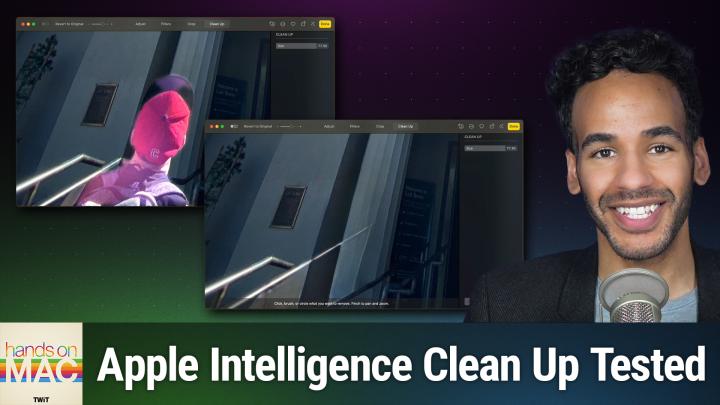
Loading summary
Transcript13 lines
- [00:00]
Micah Sargent
Coming up on Hands on Mac, let's take a look at an Apple Intelligence feature called Cleanup. Stay tuned.
- [00:07]
Tax Network USA
Attention taxpayers. The IRS is intensifying collections in 2025. If you owe $10,000 or more or have unfiled tax returns, it's time to take action. Tax Network USA's experienced lawyers have saved clients over a billion dollars. They're ready to negotiate with the IRS on your behalf. Don't risk wage garnishment, property seizure, or losing your home cost. Call 1-800-958-1000 today. Get the help you need at 1-800-958-10000 or visit tnusa.com if you have a.
- [00:37]
T-Mobile
Locked AT&T phone, we're here with bolt cutters. T Mobile will help pay off your locked phone and give you a new 5G phone for free. All on America's largest 5G network. Visit t mobile.com CarrierFreedom via virtual prepaid.
- [00:52]
MasterCard
MasterCard in 15 days. Free phone up to 830 via 24 monthly bill credits plus tax and a 10 device connection charge. Qualifying port and trade in service on Go5G next and credit required for canceling entire account to continue bill credits or credit stop and balance on required finance agreement as deal bill credits and if you pay off devices early.
- [01:07]
Bluehost
I'm no tech genius, but I know if I want my business to crush it, I need a website. Now. Thankfully, Bluehost makes it easy. I customized, optimized and monetized everything exactly how I wanted with AI. Within minutes my site was up. I couldn't believe it. Plus, Bluehost keeps me protected 24 7. No more worrying about hackers. I just relax and focus on my customers. So whatever your hustle may be, secure your online presence in 2025 with Bluehost. Head to bluehost.com to start now.
- [01:44]
Indeed
Podcasts you love from people you trust.
- [01:48]
Micah Sargent
This is Twit. Welcome back to Hands On Mac. I am Micah Sargent and today we are taking a look at a feature that lets you remove distractions from your photos with Apple Intelligence. It's a feature called Cleanup and it sort of works. Let's take a look. All right, here we are in macOS Sequoia and I've launched the Photos app. And you'll notice that I have a photograph here of an adorable dog. This is Henry when he was a puppy and here he is beautifully, adorably, wonderfully resting on the bed. But in the background is kind of a little bit of a distraction. There's this toy that is there and I want the focus to be entirely on Henry. Now, of course, one thing we can do here is to simply crop the photo to a square, for example, such that the toy is removed. But instead I'm going to show you a feature for macOS Sequoia and for devices that support Apple Intelligence that will attempt to remove the toy. So we'll go into the Edit menu and you'll see that we have four options up at the top. Adjust, Filters, Crop, and Cleanup. You'll be familiar with Adjust Filters and Crop, but Cleanup is the new section and when you run cleanup for the first time, it is going to download to your system. This is sort of an on device model that has been trained for removing things that you don't want from a photograph. And it downloads this because it needs to do this this locally on device so that model gets downloaded and made available to you. And once it's been installed, you have a few options. You can click Brush or circle the thing that you want to remove and you have your pan and zoom features available to you. As always, you can change the size of the brush in the cleanup menu on the right. But in this case, excuse me, what I'm going to do is zoom in on the toy here and I am going to circle this toy and you'll notice a kind of over the top, in my opinion, animation showing you what you've selected and we can click to let go. And now it knows that I want to remove the toy. But as you'll notice in this case it didn't remove it. It instead thought that I wanted to take away the stuff that was around it. So in this case what we want to do is change the size of the brush a little bit and we're going to brush across the entire toy here. So we will do this to select the toy like so. And now we'll see the removal. So here is the before and here is the after. Before, after, before. After. In this case, it did a pretty good job of removing the toy without making it look too much like there was an edit there. The textures seem to carry along just fine. It did remove some of the fold of the pillowcase there, but that's okay. For the most part the toy has been removed and we can choose done.
- [05:19]
T-Mobile
If you have a locked AT&T phone, we're here with bolt cutters. T Mobile will help pay off your locked phone and give you a new 5G phone for free, all on America's largest 5G network. Visit t mobile.com carrierfreedom Be a virtual.
- [05:34]
MasterCard
Prepaid MasterCard in 15 days. Free phone up to 830 via 24 monthly bill credits plus tax and a 10 device connection charge. Qualifying port and trade in service on Go 5G next and credit required. Contact us before canceling entire account to continue bill credits or credit stop and balance on required finance agreement as due of bill credits and if you pay.
- [05:48]
Indeed
Off devices early People are driven by the search for better but when it comes to hiring, the best way to search for a candidate isn't to search at all. Don't search Match with Indeed. The hiring process can be slow and overwhelming. Simplify hiring with Indeed. Indeed is your matching and hiring platform with over 350 million global monthly visitors, according to Indeed Data, and a matching engine that helps you find quality candidates fast. Ditch the busywork. Use Indeed for scheduling, screening and messaging so you can connect with candidates faster. Join more than 3.5 million businesses worldwide that use Indeed to hire great talent fast. Listeners of this show will get a $75 sponsored job credit to get your jobs more visibility@indoubtedly.com podkatz12 that's indeed.com p o d k a t z12 terms and conditions apply.
- [06:50]
Micah Sargent
Let's move to a different photo though, and let's take a look at how it handles something else. Here we have a photo of a building and it's almost entirely the building except for this little person that's right here in the front. So what we want to do is once again go into edit cleanup and then we're going and you can see that it actually makes a suggestion. It knows oh, this is a person that you probably don't want here. So all I have to do is click on this person and it removes them. So let's take a look at the before and the after again for this before with the person in, after with the person gone, before, after, before after. You'll notice it did a very strange thing with the stair steps here where it continued the stair steps on and up instead of actually ending the stair step here or handle here like the other one is. So in this case we don't want to do this and I'm going to try by brushing instead. So let's brush around this person and see what happens when we remove them this way. So there's that and we're going in and this time by selecting the person a little bit more closely, let's see if that helps, see if that makes a difference. No, once again it continues that line out. If at any point you're not happy with the results, you can Use this little report feature in the bottom right hand corner to provide feedback that says, sorry, but I don't think you did a good job. So we're going to click Done to leave this image alone and back out of it and we'll try one more photo. Let's try. I know I have a photo here of Leo and this is actually a spatial photo which is allowing for cleanup, interestingly. And you can see some different suggestions that it makes. Maybe it's the iPhone that's on the table. So let's click on that. It did an okay job of removing the iPhone, but you'll notice that some of the texture is lost from the table with the removal of that iPhone. And maybe we don't want the keyboard on there either. Okay, it did an okay job here. But look down here in the bottom right, there is still quite a bit left. So we can go through and make adjustments to that as well and hope against hope that that will take care of the stuff that we're having removed from the photo. And it didn't do a very good job. So before, after, before, after, I'm going to go ahead and choose Reset to remove those cleanup tools from this photograph. So as you can see, arguably Apple's cleanup tool is just not there yet. It is one of many features that are available as part of Apple Intelligence and some of them do a pretty good job. This one still needs some work. The good news is Apple is still working on these tools, working on improving them, and so hopefully we should see some improvements over time. But I think it gives you an idea of the difference between a company like Google, which has a fantastic magic eraser tool that relies in part on server side technology and a lot more processing power to properly remove something from a photograph versus on device training, which by its nature cannot be as large and multifaceted and may be limited by the power of the device that is connected to it. So all of those things kind of come together and working against something that could in theory be better if it relied on more power from the server side. But Apple's commitment to privacy and security run contrary, run counter to the tools that we see in use by other companies. So that's a little look at cleanup and what you're able to do on Mac. It's also of course available on iOS, iPadOS. Any device that supports the full suite of Apple intelligence features is able to use this cleanup tool. If you have questions, if you have suggestions, if you have any of that stuff, you can email me micahwit TV to get in touch touch for future episodes of Hands On Mac. Thanks so much for tuning in and I'll catch you next time for another episode. Bye bye.
- [11:56]
Club Twit
Hey buddy, are you a geek? Are you a tech enthusiast? Then I would love to invite you to join a tech community like no other. You can gain exclusive access to our incomparable quality tech content for just $7 a month with Club Twit as a member, you'll Enjoy all twit TV shows ad free, plus access private video feeds for insider shows like iOS Today, home theater geeks and so much more. Dive into the members only Twit plus bonus feed for behind the scenes content, club discussions and special events. But here's the best perk. Join our incredible Discord community to watch live show productions, chat with hosts and participate in exclusive members only activities. It's your backstage pass to the world of twit. Whether you're a tech enthusiast or a lifelong learner, Club Twit elevates your knowledge while entertaining your interests. Get two weeks free when you sign up now for $7 a month and unlock unparalleled access at Twit TV. Club Twit. That's Twit TV Club Twit. And from the bottom of my heart, thank you and welcome to the club.
- [13:17]
Indeed
People are driven by the search for better, but when it comes to hiring, the best way to search for a candidate isn't to search at all. Don't search Match with Indeed. The hiring process can be slow and overwhelming. Simplify hiring with Indeed. Indeed is your matching and hiring platform with over 350 million global monthly visitors, according to Indeed Data and a matching engine that helps you find quality candidates fast. Ditch the busywork. Use Indeed for scheduling, screening and messaging so you can connect with candidates faster. Join more than 3.5 million businesses worldwide that use Indeed to hire great talent fast. Listeners of this show will get a $75 sponsored job credit to get your jobs more visibility at indeed.com podkatz12 that's indeed com P O D K A T Z12. Terms and conditions apply.