← All TWiT.tv Shows (Audio)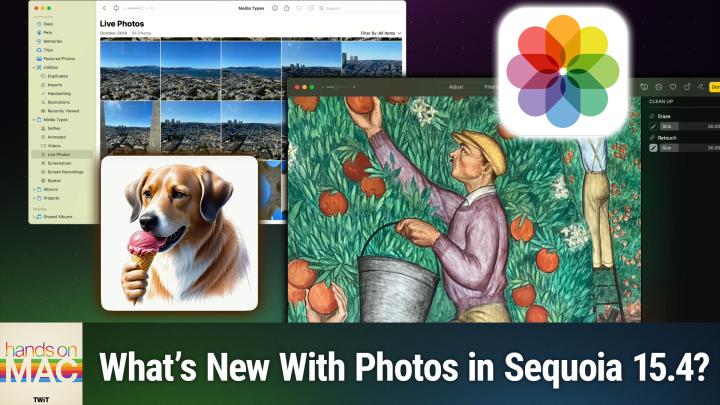
All TWiT.tv Shows (Audio)
Hands-On Mac 176: Photos in macOS Sequoia 15.4
00:13:10
Retouch brush, Image Playground Sketch, & more
Loading summary
Transcript9 lines
- [00:00]
Micah Sargent
Coming up on Hands on Mac, let's take a look at some of the new photos updates in Kos. Sequoia 15.4 stay tuned.
- [00:10]
CIS Representative
25 years ago, a small group of business and government leaders met in Washington, D.C. they envisioned the creation of an independent nonprofit organization with a mission to help people, businesses and government mitigate the growing threat of cyber attacks. Today, the center for Internet Security embodies that vision. For 25 years, it's worked with a global community of IT and cybersecurity experts to develop the CIS benchmarks and CIS critical security controls. These proven security best practices defend against common cyber threats and streamline compliance with industry frameworks, regulations and standards. Today, CIS provides cybersecurity services, threat intelligence and critical resources to help public and private sector organizations alike strengthen their Cyber defenses. Visit cisecurity.org today. That's the letters cisecurity.org to find out how CIS can help your organization as we create confidence in the connected world.
- [01:10]
Robinhood Representative
Missions to Mars, Driverless cars, AI chatbots Feels like we're already living in the future. Well, Robinhood is built for the future of trading. Robinhood's intuitive design makes trading seamless. Spot opportunities and take control of your trades with tools like screeners, simulated returns and strategy builder on Robinhood traders have access to hundreds of popular stocks and ETFs 24 hours a day, five days a week so you can keep up with today's fast paced markets. You can now even trade stocks and crypto all in one place with the new desktop platform Robinhood Legend. The future of trading is fast, powerful and precise. Experience it now on Robinhood Investing is risky. Robinhood Financial LLC member SIPC is a registered broker dealer. Trading during extended hours involves additional risks. Cryptocurrency services are offered through an account with Robinhood Crypto LLC. Nmls.id 1702840 Robinhood Crypto is licensed to engage in virtual currency business activity by the New York State Department of Financial Services.
- [02:12]
Micah Sargent
Podcasts you love from people you trust.
- [02:16]
Twit Host
This is Twit Foreign.
- [02:27]
Micah Sargent
Welcome back to Hands on Mac. I am Micah Sargent and today I wanted to talk about a few things that you will notice if you update to MacBooks Sequoia 15.4. It is Tuesday, April 1st and Apple rolled out this update yesterday. Monday, March 31st so if you have it, great. If you don't, you can update and check out some of these features. Now there are a whole host of new features and updates and security improvements. It's well worth downloading some fun stuff like eight new EMOJI with even a fingerprint emoji. But that's not what we're talking about today. Instead, we are taking a look at some of the quality of life improvements that have come to Photos in this version of macOS. So let's head over to macOS and take a look. All right, here we are on Mac OS and this, of course, is Sequoia 15.4. And I've got the Photos app open. One of the first things that you will. Well, you probably won't notice at first because you actually have to go into the menu, but one of the first changes that I want to show you is right here in the Photos app on this main screen. So given that we're on the libraries view, I can go up to the top of the screen here where I have the Filter option. And there's now a new filter option that joins the rest of the list called not in an Album. And we love this. This gives us the ability to quickly see which photos in our library have yet to be sorted into an album. This is great for quickly categorizing things that maybe you missed, that you meant to categorize or see different photos that for whatever reason didn't make it into albums, so maybe aren't of too much importance to you. There are plenty of reasons why a photo may not be categorized as such, but being able to quickly see what's in an album or not in an album right in that filter menu is fantastic. Now, on top of that, we also have the option to reorder the items that we have in certain collections. That was not possible before. So here in the menu on the left side, the toolbar on the left side, we have the Utilities collection and the media Types Collection utilities are kind of like sort of technical tags for photos. So photos that we've imported duplicates, which requires kind of a tool to figure out that there were duplicate photos. Handwriting, meaning that it used computer vision to determine that there was handwriting in the photo and provide a sorting based on that. Illustrations, same thing. It found what it believes to be our illustrations. And then last but not least, as is currently available, recently viewed. So the photos that you looked at most recently. Now, with this, we are then given the ability to actually make adjustments to how these collection albums essentially are ordered. This was not possible before. So if there's one that you use more often, perhaps you like to look for duplicates. You can click and drag to bring that to the top media types. Maybe you want to quickly find your selfies. You can click and drag to bring that to the top of the list and find those selfies that are there as opposed to the other options. So it's just very nice that you can finally reorder those items and see what you would like across the board. In all of these collections, you're able to filter options and sort them by oldest to newest. So on top of being able to kind of filter them as such, you can then take and sort them and make it so that they are showing the versions that you have. There you go by newest first by oldest first based on when you've added them and when they have been taken. Very handy. Very nice to be able to have that. And on top of that, if you've created your own albums, you can see we've got these albums here right now. They are listed based on when we've created them and we can click and drag right to reorganize them, but you can have them automatically sorted so that they are sorted by date modified. This is very handy when it comes to seeing which albums you've been working with most more recently and get the ones that you're not adding to anymore out of the way. Very, very nice. All right, let's take a look at one more feature that has come to the Photos app next.
- [07:11]
Amazon Music Representative
Hey prime members, Are you tired of ads interfering with your favorite podcasts? Good news. With Amazon Music, you have access to the largest catalog of ad free top podcasts included with your prime membership. To start listening, download the Amazon Music app for free or go to Amazon.com/ad free podcasts. That's Amazon.com/ad free podcasts to catch up on the latest episodes without the ads.
- [07:37]
Micah Sargent
The last thing that I want to mention as far as the Photos app goes, is a new tool that is part of the Apple Intelligence package for your system. So it will require a download of a special toolkit called Cleanup. But once you have Cleanup installed and you can always access Cleanup by selecting a photo, choosing Edit in the top right corner, and then when the tabs come up at the top that include Adjust, Filters, Crop and Cleanup. Selecting Cleanup. At that point it will go ahead and download the Cleanup toolkit, unless it's already on your system, in which case then it will be there. Now, I had it on my system before, but because of a new feature in Cleanup, it did require another download. This includes the new Retouch brush. With Retouch, we can do more than just erase something from a photo. If you've used an image editing program before, you'll be very familiar With Retouch, Retouch says, I want you to sort of improve upon this portion of the photograph, but more importantly, I want you to do so with a specific thing that I mention in mind. And the way that you choose what specific thing you are trying to have the Retouch tool keep in mind is by holding down the option or alt key, selecting the part that you want the program to keep in mind, and then selecting the part that you want to remove and having it use that information to make a change. There we go to that portion of the photo. So it will kind of keep in mind what you wanted and where you have selected a portion when it kind of does its thing to improve upon that portion of the photo. The idea is that without stipulating what part of the photo you want it to use, you may be doing something that's very near. In this case of the photo where I've got a person's head, it's an illustration of a person's head and their hair is here, right. If I were to select this portion to the left of the hair without telling the system what part I want it to use, it may use that hair to determine that the portion to the left needs to have that dark brown color added to it. But what I actually would want is for the program to use this sort of deep reddish pink color here to the left of the hair to inform what goes next to it. So telling the program pull from this and make something look kind of like this is what the Retouch tool does versus erase, where you're completely getting rid of a portion of an image and can kind of, you know, blur or repeat patterns to try to create a filled space where an item once was. So the addition of the Retouch tool, a very exciting thing that has come to the cleanup section of the Photos app. All right, last but not least, I did want to mention one other tool that is now part of the Image Playground, Apple Intelligence feature. So Image Playground is an app that lets you use Apple Intelligence locally on your M1, Mac or later, meaning a newer system to create illustrations. And up to this point, there have been two styles available, animation and illustration, that you can use to create a photo. So I could type in something like Dog eating ice cream and hit enter, and the animation style will show a cute dog that is eating an ice cream cone. And then I can change that style to illustration and you will see what kind of looks like a poster illustration. It's very filled in creepily. This dog has hands. And so we'll save that. But now we have the addition of the sketch style that is new in macOS Sequoia 15.4 that creates a more photorealistic. I wouldn't even call it a sketch. It feels like a this feels like the true illustration option here. And so we will I'll show you the three different versions. So again from the top we have animation which has a kind of cutesy, Pixar esque quality to it. Illustration which is sort of a comic zine, sort of a poster style, vector based graphics illustration. And then the new option which is sketch which is like colored pencil, colored pencil meets medical book. And I think that it is a really stunning style of illustration. Even though it's not called illustration, it's called sketch. And then here are two more sketches that I generated. If you are watching, it's just a dog that is supposed to be digging for a bone, but instead this dog is just kind of sniffing a bone that is sitting on top of some grass. But these sketches are really nice and I remind you these photos are generated locally on device. So keep that in mind that you're not going to the cloud, you're not going to a server somewhere to create these photos. That's why it requires an M1 Mac or later to do this level of image generation right there on your machine. So that is a look at some of the new features and settings coming to macOS that have come to macOS sequoia in 15.4. Thanks so much for tuning into this episode of Hands On Mac. As always, you can reach me micahit TV if you have questions, if you have topics you want covered, all of that is there. Thanks so much for tuning in and I'll be back again next week with another episode of Hands On Mac. Bye bye.
- [14:15]
Twit Host
Hey buddy, are you a geek? Are you a tech enthusiast? Then I would love to invite you to join a tech community like no other. You can gain exclusive access to our incomparable quality tech content for just $7 a month with Club Twitch. As a member, you'll enjoy all Twitter shows ad free plus access private video feeds for insider shows like iOS today, home theater geeks and so much more. Dive into the members only Twit plus bonus feed for behind the scenes content, club discussions and special events. But here's the best Join our incredible Discord community to watch live show productions, chat with hosts and participate in exclusive members only activities. It's your backstage pass to the world of twit. Whether you're a tech enthusiast or a lifelong learner, Club Twit elevates your knowledge while entertaining your interests. Get two weeks free when you sign up now for $7 a month and unlock unparalleled access at Twit TV Club. Twit. That's Twit TV Club Twit. And from the bottom of my heart, thank you and welcome to the club.