← All TWiT.tv Shows (Audio)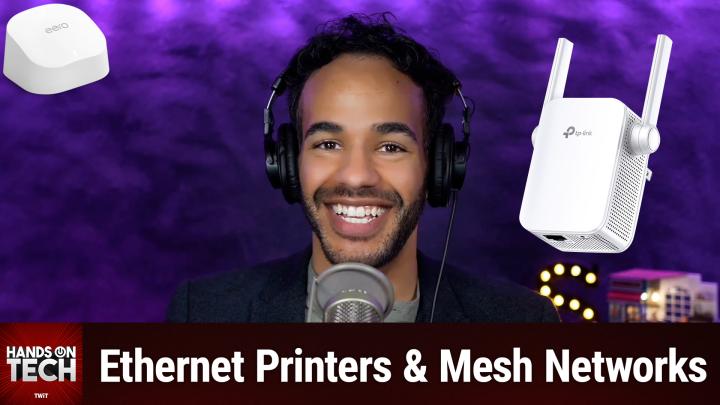
All TWiT.tv Shows (Audio)
Hands-On Tech 212: Connecting an Ethernet Printer to a Mesh Network
00:09:21
Ethernet Printers & Mesh Networks
Loading summary
Transcript9 lines
- [00:00]
Leo Laporte
Coming up on Hands on Tech, We've got a printer question and I will be answering it. Stay tuned. This is twit.
- [00:18]
Megan Morrone
25 years ago, a small group of business and government leaders met in Washington, D.C. they envisioned the creation of an independent nonprofit organization with a mission to help people, people, businesses and government mitigate the growing threat of cyber attacks. Today, the center for Internet Security embodies that vision. For 25 years, it's worked with a global community of IT and cybersecurity experts to develop the CIS benchmarks and CIS critical security controls. These proven security best practices defend against common cyber threats and streamline compliance with industry frameworks, regulations and standards. Today, CIS provides cybersecurity services, threat intelligence, and critical resources to help public and private sector organizations alike strengthen their Cyber defenses. Visit cisecurity.org today. That's the letters cisecurity.org to find out how CIS can help your organization as we create confidence in the connected world.
- [01:18]
Leo Laporte
Does it ever feel like you're a marketing professional just speaking into the void? Well, with LinkedIn ads, you can know you're reaching the right decision makers. You can even target buyers by job title, industry, company seniority skills. Wait, did I say job title yet? Get started today and see how you can avoid the void and reach the right buyers with LinkedIn ads. We'll even give you a $100 credit on your next campaign. Get started at LinkedIn.com results terms and conditions apply.
- [01:48]
Jason Howell
These days I can do anything from my phone book, a vacation order, a meal from a five star restaurant, buy and trade stocks. But maybe the most amazing thing I can do is make my dirty laundry disappear and then reappear perfectly washed and folded. I have Rinse to thank for that. I just schedule a pickup in the Rinse app or@rinse.com, a Rinse valet comes to get my clothes and before I know it, they're back, crisply folded and ready to wear. They even do dry cleaning, which is returned hanging in a nice Rinse garment bag. And with Rinse, my satisfaction is guaranteed. If for any reason I'm not happy, they'll reclean my clothes for free. Best of all, Rinse saves me tons of time each week. That's time I get to do something I love versus something I have to do. So if you want to save loads of time by not doing loads of laundry, remember there's an app for that Rinse. Sign up now and get $20 off your first order at rinse.com that's R I N S E dot com.
- [02:46]
Leo Laporte
Hello and welcome to Hands On Tech, the show where you write in with your questions and I answer them. I mean, that's really all there is to it. I am pleased to say that this week features a question about printers and I am pleased to say I can answer it very easily. So this question comes in from Kevin. Kevin writes in to say, I have a mesh network at home, but before I used conventional WI Fi and could not connect to a printer not connected to WI Fi. So I used a powerline adapter to make this connection. Now that I have a mesh network, I am looking for a solution to connect via an ethernet cable. I have another EERO add on available, but I don't think it allows a wired connection to this add on extender. What device do you recommend that will allow a connection to the printer? So when it comes to mesh networking, yes, depending on the brand that you choose to go with, you may or may not have access to some more ethernet ports on the back of the kind of other beacons that you place around your home. There are. It is often the case that there will be one or two on those extenders on those, those beacons because EERO likes to provide what's called wireless or wired backhaul, which essentially gives you the ability to, if you have it, run ethernet to each of those extenders from the main mesh node. I keep calling them extenders, they're not technically extenders, but let's just go with nodes and give or access points is probably the best bet. So from the main router to these access points and in doing so the connection there is is a little bit more robust because it's not just pulling the signal from WI FI and then trying to repeat that signal or extend that signal over WI fi. But if you have extenders that are, that don't have an ethernet port, well then you have an issue if you have a device like Kevin's printer that requires an actual wired connection. The good news is EERO doesn't need you to only use EERO devices as access points in your home. You can use third party access points with an EERO router. And in fact, in the past I had a printer that was still wireless, but it required that really old school WI FI protected access where you would hit the little button on the side of the router and it would temporarily kind of make your network available to connect to without a password and then let different devices connect to your router. So I had an Apple and now I'm forgetting Airport Extreme that I had connected to my EERO network. And its sole purpose was to give this printer access to my network. And that's because in the Airport utilities app I was able to turn on that WI FI protected access option for a moment to be able to connect to the printer to it. So all of that is to say I have tested this before and it does work. You can connect a third party router or extender or whatever it happens to be to make this happen.
- [06:22]
Megan Morrone
Cascade Natural Gas believes a warm home, hot water and natural gas energy should be available to everyone. That's why Cascade established the Oregon Low Income Bill Assistance and Energy Discount Programs. These programs provide income qualified applicants a discount on their monthly bill and if needed, help with past due balances. Qualifying for assistance is easy by calling Cascade or any of our partner community action agencies. Get complete bill assistance info@cngc.com help.
- [06:52]
Leo Laporte
The good news is TP Link, among others, provides a really inexpensive and also, might I add, wire cutter recommended device, which is the TP link AC 1200 wi fi extender. This device is available currently on Amazon. It's half off, so it's $27 and there's also a $5 off coupon so you can get it for not much at all. And it plugs into a wall and then you use its built in system to be able to connect it to your existing WI FI network and then it has an ethernet port on the side and that ethernet port is specifically for being able to connect a device to it. So Kevin, in this case you would take your printer and you would connect it to the side of this TP Link extender and then you would have access in your Mesh EERO home to be able to use that printer on your network. So again, it sounds like your printer is from an age when the WI FI connectivity was not built in and therefore requires that physical connection. So this is your answer in the time of mesh networking. Very simple. And I highly, highly, highly recommend that you just keep this for the printer that you don't connect a bunch of other devices to this TP Link device. It is last year's yesteryear's WI FI connectivity and so it's not going to be a speedy connection. I would give it a name that is separate from the rest of your network so that your devices don't get confused about it and just let it be the way that your printer connects to your network and nothing else. Don't try to use it as an extension of your network for other devices because that's where the EERO access points come into play. They'll be doing that and letting all of your devices kind of move around in your home while you maintain that great connection. This is not for that. It is. I mean, it's for that in a home where no other option is available. But my point is, I don't recommend using this as an extender if you have a better solution and you do so specifically for the sake of turning your printer into a wirelessly accessed printer. That's what this can do. And then you don't have to use that power line which is what you had going before. Kevin, thank you for writing in with your question. Love getting a printer question. I know I can answer and look forward to hearing how this solution worked out for you. Um, I will. I'm gonna reach out over email if I don't know if you're watching live, but if you're not, then this is not gonna come to you until April 20th. So I am gonna reach out over email to Kevin for those listening to let him know so that that way he can hop on it while there's still a nice deal going on. Who knows how much it'll be by the time he hears this. So, Kevin, let us know how things go and look forward to hearing from you. To those of you who are tuning in live and to those of you who are tuning in after the fact on our YouTube channel, I want to tell you about Club Twit. Twit TV. Club Twit. For $7 a month you can join the club and you get to kick things off with a free two weeks. Yes, we have a two week trial, so you can kind of check it out, see if it's for you. I think you'll find it is. You can check out the Club Twit Discord, which is a fun place to go to chat with your fellow Club Twit members and those of us here at TWiT. You can also access every single one of our shows ad free, just the content, none of the ads, and the Twit plus bonus feed, plus so much more Twit tv. Club Twit is where you go to check it out and we'd love, love, love to have you. Thanks so much. All right, that is going to bring us to the end of this episode of Hands On Tech. If you have questions, be sure to reach out. Hotwit TV is how you get in to. I've loved getting these questions. There have been some really good ones coming in, so be sure to write in there. Hotwit tv that is that on this? And I will catch you again next week for another episode. Bye bye. No matter how much spare time you have, TWiT TV has the perfect tech news format for your schedule. Stay up to date with everything happening in tech and get tech news your way with TWiT TV. Start your week with this Week in Tech for an in depth, comprehensive dive into the top stories every week. And for a midweek boost, Tech News Weekly brings you concise, quick updates with the journalists breaking the news. Whether you need just the nuts and bolts or want the full analysis, stay informed with Twitt TV's perfect pairing of tech news programs.
- [12:21]
Sarah Lane
You know when you're really stressed or not feeling so great about your life or about yourself? Talking to someone who understands can really help. But who is that person? How do you find them? Where do you even start? Talkspace Talkspace makes it easy to get the support you need. With Talkspace you can go online, answer a few questions about your preferences, and be matched with a therapist. And because you'll meet your therapist online, you don't have to take time off work or arrange childcare. You'll meet on your schedule wherever you feel most at ease. If you're depressed, stressed, struggling with a relationship, or if you want some counseling for you and your partner or just need a little extra one on one support, Talkspace is here for you. Plus Talkspace works with most major insurers and most insured members have a $0 copay. No insurance? No problem. Now get $80 off of your first month with promo code space80 when you go to talkspace.com match with a licensed therapist today at talkspace.com save 80 dol with code space80@talkspace.com Cascade Natural Gas believes.
- [13:23]
Megan Morrone
A warm home, hot water and natural gas energy should be available to everyone. That's why Cascade established the Oregon Low Income Bill Assistance and Energy Discount Programs. These programs provide income qualified applicants a discount on their monthly bill and if needed, help with past due balances. Qualifying for assistance is easy by calling Cascade or any of our partner community action agencies. Get complete bill assistance info@cngc.com help.