← All TWiT.tv Shows (Audio)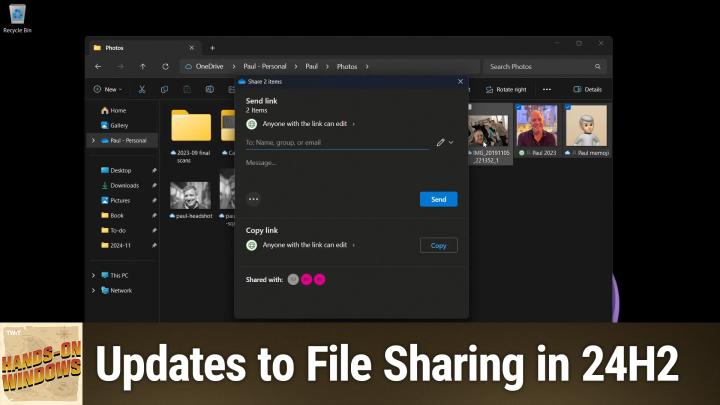
All TWiT.tv Shows (Audio)
Hands-On Windows 121: File Sharing in Windows 11
00:12:10
Updates to File Sharing in 24H2
Loading summary
Transcript1 lines
- [00:00]
Paul Throt
Coming up next on Hands on Windows, we're going to take a new look at sharing in Windows 11, both in the local file system and with OneDrive. There have been some changes in 24H2 podcasts you love from people you trust. This is Twit. Hello everybody and welcome back to Hands on Windows. I'm Paul Throt and this week we're going to take another look at sharing. I think we looked at sharing sometimes in the past year, but in Windows 11, 24H2, there's been a few updates and I thought it deserved another look. Sharing is something I actually use a lot, I suppose on a basic level. You know, using the clipboard is a basic form of sharing. Right. I sort of position that almost as a type of multitasking. I think I mentioned that in the multitasking episode we did recently. But over the years we've had all these different ways to share. You know, some have come and gone, like home groups. We've had removable storage, sneaker. Net network based sharing, which is more common in workplaces than at home. But you might have a NAS that you could do that as well. And then Starting in Windows 8, I think it was Microsoft added a system share feature, trying to get people to stop emailing themselves everything, because that's the only thing that seems to work really well. They've improved it in 10, they improved it in Windows 11, they've improved it again here in 24H2. We're doing everything we can to try to get people to use this functionality. But in Windows 11 today, this feature is just called Share. It's actually a couple of different features, but there are two versions. Essentially there's a version that works with local files, meaning files that are on your hard drive but not in OneDrive and syncing to the cloud. And then there's a second version that works with OneDrive. Right. And so it's fun that we have two different UIs, but I guess that's what it requires. There are two basic ways to get this going. So you could kind of imagine you have a file like I have here, maybe some selection of files, and you want to share them. So you could access the share button here on the command bar in File Explorer. This would work from the desktop as well, I should say. So in that case you have to right click it and then access Share this way. But you could do that from in here as well, of course. Oh, good. Now I have two copies of a file, so that works the same way. Now this file in this folder are on the local disk, but they're not being backed up, as you can see from that. A little annoyance there. So if I right click and choose Share, what you're going to see here is the local file version of it. So a couple of changes, like I said in 24h2. The first is that if I click out here, I'm clicking on the desktop, the share window isn't closing. I know that sounds like a small deal, but it's actually really easy to make that mistake and then it disappears and you lose what you were working on. So that's kind of. Actually, that's kind of a cool feature. If you want to get rid of this, you actually have to close it manually now. So I think that's smart. Some of the stuff is the same. So you get these contacts. I don't know how they chose these people. Some of these are a little out of date, but interesting. And some of them are with the old Mail app and some of them are with the new Outlook app. But the idea here is that you have some default email app and you have some contacts that you've interacted with a lot and they would appear here. And honestly, this is not very good. So that's the same. A lot of nearby share is the same. We've talked about nearby share. This is a little complicated. You have to work. You have to have it enabled on the both computers you want to share from and to. Or to and from, I guess. So you have to do that. It has to be configured correctly, but it works great. It works over WI Fi and Bluetooth, Bluetooth for discovery, WI FI for transfer. But it will just use Bluetooth if that's all you have to. Which is kind of cool. And then apps. We've had apps before, but there have been changes kind of to each of these steps too. So up here you see a copy button. This is to copy it to the clipboard. This is just a recognition that sometimes people are going to try to share this way and maybe they're going to paste it into an email app and then just that's how they think about doing things. That's fine. You could share to your Android phone. So in this case, I have connected the phone link app in Windows 11 to my Pixel phone. This only works with Android, by the way. You can't do this with an iPhone. And it will actually copy that file or whatever files you've selected to the files app or to the file system on the phone. So you can copy to your phone this way. Right? It's kind of cool. And this is particularly cool because this doesn't require a physical connection. This is going to work over WI Fi. My phone is not connected. You don't see it. Well, you wouldn't see it here anyway. But in a coming version of Windows, we will see it over here, but for now you don't. This is just going to go through phonelink, right? So that's kind of a cool, kind of a background feature. And then down here, there's been a few changes as well. So we have these default apps. What you see here will depend on the type of file you're sharing. So apps that are compatible. Over here we see an app that Microsoft has manually added. So this is a new thing for 24H2 where they're starting to put links to install compatible apps. So I only see one here, but sometimes you might see two or even three. And this is Microsoft doing the work just to make that compatible. So I'm amused that that's there because this computer is not actually on. So that's interesting. Normally you would just see the ones that are on and available. So I'm not going to click through any of these. But if I were to click on this. Well, actually, let's just bring up the little dialogue so you can see it. You'll get this dialog. You get a similar dialog on the other computer. You get to click save or save and open or cancel. If you don't want to do it, I'll just cancel it from here. But this will move those files across. Okay, so that's local sharing. But I mentioned there was a second half to the share experience, which is OneDrive sharing. So to do that I will just bring up my OneDrive. I use OneDrive a little differently than most, but I can go find. I guess I'll find some photos or whatever, a couple of little goofy photos of me. So same thing as before. If I want to share, I can share from the command bar icon up here. I can right click I can ignore this friend request on Xbox and choose Share this way. Right? So completely different window comes up here. There are actually three different sharing options in here for OneDrive. The first is sending a link. The second is copying a link. And for both of those, there's actually some properties you can look at. And then this is third one that just says share this link to more apps. Which is kind of interesting because when you do that, it goes into the normal share experience, right? So it has created a link which you can see up here. This is a link to whatever Those files are in one OneDrive with whatever set of properties which I haven't actually configured. So that's not necessarily the best way to do that, but let's go back and try that again. So I find it's actually better in here just to use OneDrive the way it was intended. Right. And so with the standard local share, you're actually shuffling files around. In this case, you're providing a web link. Someone will get an email and then they can click on it and open a web browser, and those files or that file will be available to them with whatever permissions you've established. Right. And so at a high level, you can give them editing capabilities or viewing capabilities. It doesn't mean they're going to edit the version that you own in OneDrive. It means they can get a version of the file that they can edit and change if you want them to be able to do that, or they can just view it. But I strongly recommend going into sharing settings, whichever you choose, because there's some additional things down here that I think are actually very interesting actually appear as well. So, by default, this link you're sharing is you probably send it to a very specific person, but they could share it with someone else by default, and that person could access those files as well. So if you don't want that, turn this to specific people, and then only that person that you've chosen to get the link can in fact access this file. This has that same editor view, and then there's an expiration date, which I actually think is a pretty good idea. So you could set it out a day or a week or whatever it is, so that if someone comes back a year later, it's not available to them anymore. If you choose anyone, you can also set a password. So there's another level of authentication, I guess. So you're going to allow anyone with the link to access. It doesn't have to be just that one person, but they need a password to get into it. So those are actually pretty good options to apply. I'm not going to do that here, but you can, you can do that, and then you just specify the people or person that you want it to go to, and that person will get this, an email. Right. So like I said, they're going to get a hyperlink, they click on it, web browser opens, and then they can do whatever it is you say they can do with it. Optionally, you can share through that local share experience, which works pretty well, or you can just copy the Link, right. And then in this case you would. So you can see the link, you can go in and change those permissions like as you should. Actually, I'll just put that in. I'll put that back the way it was. But. And then you get this link. So copy that to the clipboard, send it out. And now I can go into my own email app. I'm not going to do that either, but maybe I'm using Gmail on the web or whatever it might be. And then you can just copy and paste it like you would normally. So that works exactly as you would expect. So despite the fact that there are these two different ways to do sharing, right? I can share the old fashioned way like we did earlier with this share pane, which no longer goes away. Or if you're in OneDrive and you want to share that way, you can actually get to that old. Not old, but the other alternative, share experience by going through this link in the middle here. So it's available to you everywhere. That's kind of cool. But OneDrive is particularly powerful because you can share so many things. They stay up in the web and they just get a link. So you're not shuffling those things around. The other big limitation, of course, is that if I chose a folder like this, I can't actually, actually I can because that's OneDrive. If I did a. I don't really have a folder in here, but if I did have a folder in here, let me see if I can find a folder like this one. You see, Share is not an option. Share is grayed out here. So a local folder can't be shared because. Because why? Actually, I'm not even sure why, but Microsoft just doesn't allow you to do that. You have to go in and share individual files that you can share. No problem, many files. But if you're in the OneDrive side, these are all OneDrive folders here. But if I go into my to do folder, for example, I could say it will let me share these. Right. And so because it's making a link and you get it's. It's just a more sophisticated experience, you know, through OneDrive if you happen to be using it. So a little inconsistent, I guess. I use Local Share specifically nearby share every single day, literally to move files between computers. I find it to be very fast and, and efficient and reliable. But if you have a bunch of stuff you want to share with an individual, especially if it's something maybe transient for that day, whatever, OneDrive Share is a great option as well, alrighty. I hope you found this useful and interesting. We'll have a new episode of Hands on Windows every Thursday. You can find out more at TWiT TV. Hands ho. Thank you so much for watching. Thank you especially to our club TWIT members. See you again next week.