← All TWiT.tv Shows (Audio)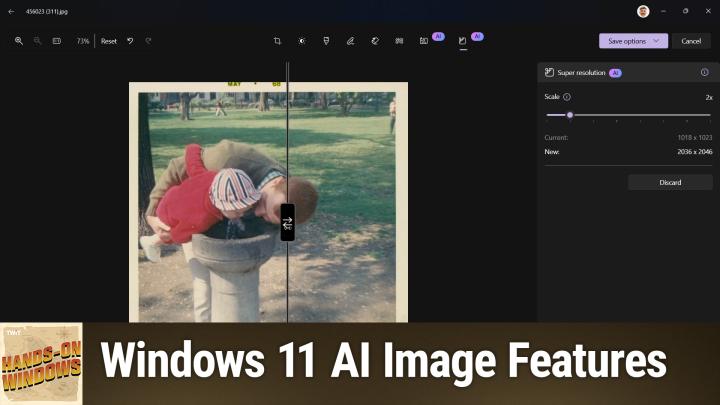
All TWiT.tv Shows (Audio)
Hands-On Windows 129: Windows 11 AI Image Features
00:14:24
AI Tools in Paint and Photos
Loading summary
Transcript10 lines
- [00:00]
Paul Thurott
Coming up next on Hands on Windows, I'm going to take a look at some of the new AI image editing features that are coming to Copilot plus PCs in photos and Paint.
- [00:13]
Unknown
Podcasts you.
- [00:14]
Chris Gethard
Love from people you trust.
- [00:17]
Paul Thurott
This is twit. Hello everybody, and welcome back to Hands on Windows, Paul Thurat. And this week we're going to take another look at finding Photos and Paint because I can't stop talking about these apps. Ever since Microsoft started its big AI push now a couple years ago, we've seen update after Update in Windows 11. So we're getting things in Paint photos elsewhere in the system notepad we talked about recently. But there are different waves of these things and there are of course, different ways of deploying them as well. So people who just have Windows 11 and kind of a normal PC will get some set of functionality. Those AI features run against the cloud. But if you have a Copilot Plus PC running a Snapdragon X ARM chipset or a AMD Zen 5 chipset, or an Intel Lunar Lake or newer chipset, you will also get additional features and functionality in Windows 11 in specific apps that will run against the MPU in that chipset. Right. It will run locally. It doesn't have to go to the cloud. So there's this set of features. It's a little complicated, but if you think back to the initial set of AI features in Copilot PC that impact images from last year, co creator and Paint is a good example of one. Restyle images and then the background there's blur and removal and replace, I think as well in Photos. So there's some interesting kind of AI capabilities in these, you know, image editing apps that are built into Windows. And now there are going to be more. So we're going to take a look at the, the features that are coming soon as I record this. So probably sometime in the first half of 2025 to Windows 11 PCs, that or Windows 11 on Copilot plus PCs. Okay. Okay. So the. I'll start with Photos, right? The Photos app. So if I, I showed this in a recent episode as well. But I can open this image of my dad and I with Photos. The Photos app is what it is. But. And if you go into Edit, you will recognize some features that have been around for a little while, like this background blur removal, replace, like I said earlier, and then some new ones we'll talk about in a second. But there's also this toolbar that's happening out here. They've been adding more and more apps up here, this one is just about brand new. As I record this in early 2025, it says edit with Designer. And what this does is it loads the Microsoft Designer web app inside of photos, a fairly complete version of it, too. You could also go to the web and upload this image and do these things there. But there's a whole set of AI editing features that are unique to this app. Selective Edit, Auto Enhance is a fairly obvious one. There's things like the background features which are just duplicates of what is already in photos. But there's other things in here as well. So you can, because this is a design tool, you can add stickers and images and do other things. Because the end result, if you're using designers, you're creating a design of some kind. Maybe it's a, you know, a, a handout or something, or it, more likely it's going to be a social media post or whatever it might be. So this is actually built into the app now, which is kind of interesting. So instead of just exporting it to another app, which in this case is on the web, they're using this integration model just to bring it right into the app. So that's pretty cool. There's also this little guy down here. So this is that visual search with Bing. I did show this off in a previous episode, actually. That begs the question, let me go to a different image so we can have a different result here, so I can do a visual search. This is again, me and my dad. Sorry to keep showing that, but. And it's opening in the wrong browser tab. So let me just bring that guy over here. So this is the search results. So again, the, this is me, small child, my dad and at a water fountain, probably in Boston, I would imagine. And here are similar images of a small child, usually not with a dad, always, but at least a small child at a water fountain. Right. And I, I, I still struggle in a way in my own existence to understand, like what I would use this for. Exactly. But it's, it's in certain use cases, you know, you're looking for particular image. I have this idea, or I have an image. I don't want to use this exact image, but I want something like this. This is where this visual search thing comes into play. It's, it's, to me, it's kind of fascinating. I, like I said, I'm not sure how I would use this for work exactly. But it is amazing how many images there are that are a lot like this. So that's pretty cool. Okay. So going back into the editor experience. So this is the Photos app editor, right? A lot of this stuff has been here for a long time. It's, you know, we've used this for a while. I skipped over this one earlier. So this is Generative Erase. This is the type of thing you see like Magic Eraser on a pixel. Apple Intelligence on an iPhone has a similar feature. Samsung has a feature like this. So the idea here is that you want to erase something that's in the image, like this person here in the background. So it does its little thing and it's, you know, it's pretty good. It's. You can make the smallest look. Still a little bit of a glitch in there. I might want to get rid of that. And, you know, depending on how big the change is, it takes a certain, you know, a couple seconds. It's not. Not too bad. So that's actually. Yeah, that's pretty nice. But there are these other tools here too, as well. So. Restyle Image. This is one that debuted late last year. So we've talked about that. But still kind of cool. You can go over to these style choices. It does its little, you know, AI Halo effect. Now we have an impressionistic version. It looks like an oil painting or some type of painting version of that image. Yeah, it's pretty cool. I don't actually want that, but. But still very interesting. So there's a lot of different styles you can play with. And then there is this new feature called Super Resolution. So this is particularly good for this kind of an image. This one is actually not super small, but a lot of these scans I have like this were things my dad did. They're lower resolution. The photos we take now on our phones are almost an order of magnitude bigger and of course, higher quality as well. And this gives you a way to upscale this image to a higher resolution. I found that if you go way up on the scale, it takes a really long time. So I'll just do a double size. So it's doubling the resolution in each axis. And that happened very quickly. Now, this is something I see fairly universally. Right. So you can see the original on the left. You can see the upscaled version, the super resolution version on the right. To me, these are identical. So there is no improvement in quality. Right. It's not. It's not correcting the little dots on the red jacket there. It's not fixing things, but it is creating a bigger version of this, which would then be better to work off of because, you know, you're not losing any quality at least. Right. These look to me identical. So I'm going to save that as a copy. I will call that sr. And if you go out to the file system here, let me just get them next to each other. So you've got the. The original version. I will open that. Actually, let me just do it. My normal app here. Because this goes full screen. Yeah. So this is this image at 100% resolution. Right. This is a 1080pmonitor, so it doesn't really have much to go. So this is the bigger version. Right. And what I can do with this is just zoom in. Again, it's not doing anything with the quality and I would want to go in here and probably edit some of these things. But this is twice as wide, twice as tall. I guess that's technically 4x, 2x 4x, whatever it is. But it's. It's a much bigger image. And so as this thing zooms in, the quality is just as good as it was when it started. Whereas with the original, if I zoomed in, you would start to see the blotches and all the little artifacts and stuff. So not as. Not as good.
- [08:49]
Unknown
The IRS is the largest collection agency in the world. And with April 15th fast approaching, it's more aggressive than ever. In 2025, enforcement has ramped up, and if you owe back taxes or have unfiled returns, waiting is not an option. The longer you do, the worse it gets. Ignoring your tax troubles is the worst thing you can do. April 15 marks another tax year that has passed you by. Getting ahead of this now is the smart move. But never, never contact the IRS alone. Instead, let the experts at Tax Network USA handle it for you. Why? Because not all tax resolution companies are the same. Tax Network USA has a preferred direct line to the irs, meaning they know exactly which agents to deal with and which to avoid. With proven strategies to settle tax problems in your favor. Whether you owe $10,000 or $10 million, Tax Network USA's attorneys and negotiators have already resolved over $1 billion in tax debt. Talk with one of their strategists today. It's free. Stop the threatening letters, stop looking over your shoulder, and protect yourself from property seizures and bank levies. Don't let the IRS control your future. Call 1-800-958-1000 or visit tnusa.com April 15th is just around the corner. Act now before the IRS acts first, listeners.
- [10:11]
Are you looking for a shortcut to better auto insurance for you? Something that takes all the research off Your plate. Something that's easy, something that matches you with lower rates. Something genius. That's where NerdWallet comes in. Their nerds already did the work for you. Just answer a few questions and ta da, you'll be matched with top insurance providers in your area. Find the right rate for you@nerdwallet.com after all, using NerdWallet is more than smart. It's genius. Not all applicants will qualify for the lowest monthly payments. NerdWallet Insurance Services Incorporated California resident license number OK 92033.
- [10:41]
Paul Thurott
So pretty good. Especially for something that works off of the MP array. It's not going out to the cloud to do that work. So to me that's not horrible. Okay, so that is Photos now the other big photo editing app or image editing app really I think the distinction here is this app is typically used for non photos, although not exclusively, whereas Photos is for Photos. Microsoft has been adding little AI bits and bobs here and there for two years now. Right. So we have this background removal which works very effectively. We've shown that before. But now we're getting enough of these new features that they they've decided to make a copilot menu over here to kind of hide them. All right, so Co Creator was one of the original Copilot plus PC features. And actually maybe this would make more sense if I actually opened a, an image, I'll open yet another image of me as a little baby. So Co creator brings up this tab here on the side or pane on the side and I can draw over here and it will. And then also I should say I can draw and I can and or I can create this text prompt and it will apply these things together and impact the image over there. I'm not going to do that here. But like the feature we looked at earlier in for Restyle image in Photos it has these different styles that you can apply as well. So there's all these different ways you can edit that image with Co Creator. Image Creator is a feature that is just available to anybody with paint, right? This actually goes out and hits the cloud. You can see this little. This is a stack of change. If it's not clear what that is. You're using AI credits each month. If you have a Microsoft account, if you have a Microsoft 365 consumer subscription, you can do a certain number of these every month for free. So I've never actually run into the limit. So it seems like it's pretty liberal right now. But very interesting. But again, text based prompt get the styles and you can, you can create an image. You wouldn't. This is not so much for editing this image, but rather for creating an image. Remove Background is literally just this feature over here. It says here twice. So this is something available to all people with paint. But Generative Erase is new and actually there's going to be a Generative fill coming as well, which will add information to images that I don't have yet in this particular version of the app. So as app updates come out, I will eventually get that. But the idea behind Generative Fill is I might say, well, I want this thing to be. Let's kind of resize it. Yeah, no, I've got this empty space over here. I want this image to be widescreen fill to the right and then it will use the information in the photo to add to the photo and make something that looks like it was there in real life. Which all I can do is talk about it because I can't do it yet. But you've seen things like this. Generative Fill is kind of an interesting idea. But Generative Erase is where you draw over parts of the image that you want to get rid of and you use this slider to determine the size. So this thing is like a really small little thing and it gets bigger as you go up on the slider. So for example, I'm going to make that a little smaller. Maybe I just want to get rid of this item here. In this case, I have to. It doesn't just do it like it does in Photos Apply, it does, you know, thinking it's hitting the MPU and, you know, not too bad. Yeah, a little bit of a. That might have been just me not clicking the wrong thing. I got into that little board game thing there. But I'll try it one more time. And you know, we. This is again, Magic Eraser. We've done this sort of thing on our phone in this case, you know, maybe that's all I want to do. I might want to go and, you know, remove other items in the background. But fascinating that this type of thing is just being made available for free in Windows now. Right. So it's just that the feature set you're going to see will vary depending on what kind of computer you have. So again, looking at the image, the capabilities here, Image Creator and Remove Background, every PC is going to get that. But if you have a Copilot plus PC you will have now co creator that's already there. And then Generative Fill and Erase are both coming soon. So pretty Cool, right? And then, you know, I, I would assume these things are just going to keep improving over time. So it seems like every three to six months we start getting this new batch of features. You know, Microsoft talked about the things I just showed you originally in late 2024. They're starting to roll them out in the Insider program in early 2025, and I would imagine by mid-2025 they'll just be broadly available for everyone. So you can look forward to that. All right, well, thank you for watching. I hope you found this interesting. We will have a new episode of Hands on Windows every Thursday. You can find out more at Twitter TV hrw. Thank you so much for watching. Thank you especially to our Club Twit members. If you are not a Club Twit member, definitely take a look at it. It's inexpensive, you get a lot of great content and you also get these videos ad free. Right? Which is huge. And you can learn more about Club twit@twitt TV. Thanks so much. I'll see you next week.
- [16:16]
Unknown
Here in America, work is in trouble. We've offshored our manufacturing, sent away good jobs and lost so much ability to make things. American Giant is a company that's pushing back against this tide. They make high quality clothing. Sweatshirts, jeans, dresses, jackets, and so much more right here in the USA. Visit american-giant.com and get 20% off your first order when you use code STAPLE20 at checkout. That's 20% off your first order at american-giant.com promo code STAPLE20.
- [16:45]
Chris Gethard
Hi, I'm Chris Gethard and I'm very excited to tell you about Beautiful Anonymous, a podcast where I talk to random people on the phone. I tweet out a phone number. Thousands of people try to call you talk to one of them. They stay anonymous. I can't hang up. That's all the rules. I never know what's going to happen. We get serious ones. I've talked with meth dealers on their way to prison. I've talked to people who survived mass shootings, crazy funny ones. I talked to a guy with a goose laugh, somebody who dresses up as a pirate on the weekends. I never know what's gonna happen. It's a great show. Subscribe today. Beautiful Anonymous.
- [17:15]
Mandy and Melissa
If you love chilling mysteries, unsolved cases, and a touch of mom style humor, Moms and Mysteries is the podcast you've been searching for. Hey guys, I'm Mandy. And I'm Melissa. Join us every Tuesday for Moms and Mysteries, your gateway to gripping, well researched, true crime stories. Each week we deep dive into a variety of moments mind boggling cases as we shed light on everything from heists to whodunits. We're your go to podcast for mysteries with a motherly touch. Subscribe now to Moms and Mysteries. Wherever you get your podcast.