← All TWiT.tv Shows (Audio)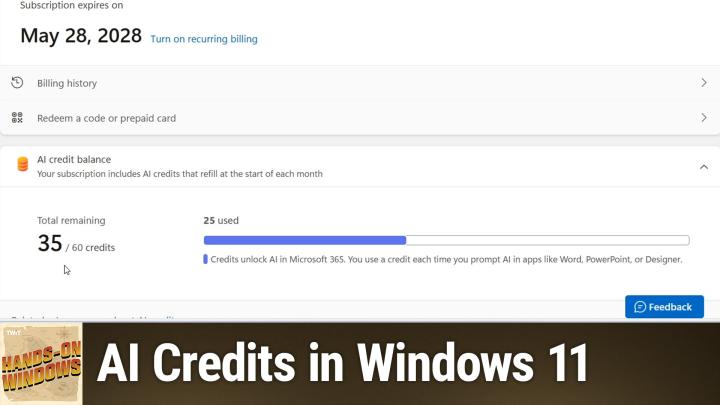
All TWiT.tv Shows (Audio)
Hands-On Windows 131: AI Credits in Windows 11
00:17:12
How to Spend Your Copilot Credits
Loading summary
Transcript6 lines
- [00:00]
Paul Perrott
Coming up next on Hands on Windows, I'm going to take a look at the AI credits that you get with a Microsoft 365 subscription and what you can do with them in Windows podcasts you love from people you trust. This is twit. Hello, everybody, and welcome back to Hands on Windows. I'm Paul Perrott and this week we're going to be talking about AI and Copilot again because we can never stop talking about AI and Copilot. There are copilots everywhere and it's confusing. A couple episodes back, I know we Talked about the two Copilot apps in Windows 11. Confusing, right? But if you think about it, Copilot is a brand that Microsoft uses to describe the services that they offer to consumers and businesses that are AI related. They overuse the term unfortunately, a lot. But Copilot itself, if you go to. I should probably have just brought this up, but bring it up here. So if you just go to copilot.Microsoft.com is essentially their version of ChatGPT, right? Or Google Gemini or the many other kind of chat based AI assistants that we see out in the world. This is also one of the two copilot apps in Windows 11, right? So if I, I hate bringing this up because then I never can get rid of it. But if you bring up the Copilot app here, right, same ui. So this is basically a web service with an LLM and some Microsoft Secret Sauce on the back end. You can chat with it, you can ask your questions, you can do things like that. So cool. So there's that. But there's a broader use case for AI and Copilot specifically that I think is more interesting and more useful to most people. And that is some of the stuff we've talked on or hit on, I guess, in earlier episodes. The generative AI capability, so creating images, which can be kind of fun, creating and manipulating text, which I think is much more useful, and also working with other, you know, document types and data types, specifically those that are part of Microsoft Office in, you know, Word, of course, but also Excel, PowerPoint, even Outlook with email and so forth. So there's a lot going on there. In fact, there's so much going on there that I'm going to focus just on the things that are in Windows and have the Office related things come in a future episode. So one of the big changes that's occurred early in 2025, or perhaps it was late 2024, but sometime fairly recently, was that to get these Copilot capabilities In the past, you had to pay for it. So if you were in a part of a business or an organization, you could sign up for something called Microsoft 365 Copilot, which is expensive. It's $30 per user per month on top of whatever the subscription for 365 costs. But for consumers, they offer this thing here, Copilot Pro. So Copilot Pro is essentially Microsoft 365 Copilot, but for individuals, this costs $20 per user per month. So still expensive, but not as bad. But it does require a Microsoft 365 family or personal subscription as well. So Microsoft raised prices on those things recently. The good news is that the price increase was the first time in the history of those subscriptions that they've raise prices. I don't feel that they were too onerous of an increase, but as part of that, what you get as the individual who owns the subscription. So if you are the person using Microsoft 365 personal or the person who started the Microsoft 365 family subscription, which also applies to five other people or up to five other people, however, they won't get any of these AI capabilities. You get credits each month that you can use toward Copilot tasks or action, for lack of a better term, that you can use across Windows and Microsoft 365. And yes, that's confusing, but what you'll start to see is these little. I don't know if it comes up in the browser or not. So up here you can see that, you know, Microsoft Rewards and Microsoft Cashback. I think pretty soon you're going to see your AI credits will be in here as well in the browser. But to see what those things are, you can go to the Microsoft account website, specifically to the page for your 365 subscription. So I've done that here for my Microsoft 365 family subscription. I am the owner of that account. And you can see my AI credit balance for this month. So I got 60 credits. That's the amount you get every month. I've used 25 of them. Doing mostly silly things, frankly, making images and so forth. Actually, just prepping for this episode, I probably used about, you know, 20 of the 25, but I have 35 remaining. And if the month runs out and I'm out of credits, my options there are to pay for a Microsoft 365. I'm sorry, Microsoft Copilot Pro subscription, right. $20 per month per person, or I just wait until the beginning of the next month and then I can start using it again.
- [05:29]
NerdWallet Ad Voice
Listeners, are you looking for a shortcut to better auto insurance for you? Something that takes all the research off your plate. Something that's easy, something that matches you with lower rates. Something genius. That's where NER Wallet comes in. Their nerds already did the work for you. Just answer a few questions and ta da, you'll be matched with top insurance providers in your area. Find the right rate for you@nerdwallet.com after all, using NerdWallet is more than smart. It's genius. Not all applicants will qualify for the lowest monthly payments. NerdWallet Insurance Services Incorporated, CA resident license number OK 92033.
- [06:00]
Paul Perrott
So that's how you manage it. But where, where do you see these things like where, where, where do AI credits kind of come up in the UI in Windows? Because they, they're starting to show up. It's kind of strange. A couple of different places. So Notepad for one, we talked about some of the rewrite capabilities. You'll see it there. Paint photos, right? Actually, if you go to the Microsoft Designer website, which is what you use to. Well, among other things to create images using generative AI, I usually go for like a widescreen image here. Yeah, I'll just try an example so they can give us a goofy example. But you'll see a notion of this. But as this thing is generating using all the fun AI colors up here, you can see this little stack of coins is what it looks like to me. These are, this is your AI credit usage tracking icon. So if I click this, it's actually going to go back to that same page we just looked at. It will go back to the, the micro. This page here on the Microsoft this page here. Right. So actually if I refresh this, I wouldn't be surprised to see this has gone down to 34 because I just used to create an image I'm never going to use. But let's see what happens. So yeah, see it just went down the credit. So there you go. So these images are kind of cool. I have no idea what it made. I wasn't really paying attention to the prompt. Usually I would type in something very specific and you can see some of the images I created in the past, including this set here, which I never actually ended up using because it looked kind of creepy to me. But usually this thing does a really good job. So that's kind of fun. One little asterisk about Designer. If you do not pay for a Microsoft 365 subscription, they actually give you some number of credits toward these generative images every month as well. I think it might be seven. So even if you don't pay, you can actually use Designer. It's the one thing that I'm going to show today that even someone not paying at all can actually access. So I will close these out. That is fine. So we looked at Notepad before. Notepad's kind of fun. And we talked about this rewrite capability. These are the new AI capabilities. But you can see there's a little picture here of my head, right? And one of the things you see here is that AI credit balance. Because every time you do something with AI in this app, it's going to go against that balance. And so again, if I were to click this, it's going to go back to that exact same page. So I'm not going to bother with that. But let's paste in some text from Typora. So I just wrote something, something, something. Is there anything fun in here? No, no, no, no. I guess it doesn't really matter, but I'll just. Yeah, let's just use this. So this is just a news story I wrote earlier today. So it's pretty short actually. Let me do that again. I want to copy that cleanly because you don't want extra code in there. So let me do that again. Okay, so paste that in there. Still got code. Okay, that's okay. So you've seen these things, right? And so you can make the shorter, you can make it longer, you can change the tone, make it more casual, humorous, whatever. You can also do this on a paragraph or just selection by selection basis. Or for example, if I go into this last one, I can do it from there. You can see the rewrite stuff is available there as well. I could change this entire. My favorite demo, I will never use this for anything in real life, is to turn this into a poem, which to me reads more like a Dr. Seuss story, but kind of a sing songy kind of a way, you know, to support ASL learning and accessible AI applications, bridging the gap with innovative creations. You know, it's really cool. And here again, you can see this little AI credit balance, right? They're kind of putting it in front of you. I think they're just trying to get people used to this notion. So I think. I know we looked at this UI earlier, but you know, you get three choices. You get a couple of options here for copying on the clipboard, regenerating, etc. But over here, again, you're going to see this AI credit balance. And if I were to go check, because I've done yet another useless thing with this, I will be down to 33. Right. Because I've done a couple of things here. All right, so we talked about that. We talked about paint as well. Paint is a strange one because there's a new Copilot icon. There's up to four options here. It depends on what kind of computer you have. You'll get all four with a Copilot plus PC. Some of these things are free and hopefully will remain free. I believe only one of these involves AI credits. So if I turn it, like co creator, for example, I believe this is a Copilot plus PC feature. I paid for that computer. It has an mpu. They're not going to charge me anymore for that or put credits against it. So that doesn't have it. Generative Erase is a fairly new feature. I actually would have to open a document for that to make any sense. So let me do that. And we probably looked at this one before, but, you know, if I wanted to make this bigger, you know, remove the people in the background, apply, I'd probably go on down to 32 credits, I would guess right now and then. But there's no mention here of those credits. Right. Which is kind of interesting. So it's not clear right now. I'm not actually 100% sure if these actions are going against that credit set that you get every month. Actually, I'm not really sure because they're not calling it out. The one that I am sure of is the image. Imagery is image credit. Right. So this is. This actually has. You can see down here the little AI credits balance. Now again, I'll just click on it for the heck of it. It's going to go to some. See where the number is now. It loads very slowly. I'm sorry, but I've been playing around with AI a little bit since we started recording the show. And survey says where am I? Yep, still at 33. That's pretty good. Okay, and then photos. And so photos. Let me just close. This guy is actually probably better just to open a. An image directly into photos. So I'll use that same image and photos and this app is. This app, if anything has even more going on, if it would just open. Let me try that again. Okay, wrong window, but here we go. Okay, so when we. We talked about this before too, in one of the previous episodes, this edit with Designer, which loads the entire Designer UI into this app, which is kind of interesting, but if you go into Edit, you'll see a variety of AI editing features, not all of which are called out that way, which is kind of interesting. So Generative Erase, for some reason doesn't have this little AI logo on it, but it's absolutely an AI feature. It's very similar to what we just did in Microsoft Paint. It works a little more automatically, which I'd say I like. Background removal, you can do blur or just completely remove the background. That stuff works really well. This is Restyle image, which I believe is Copilot plus PC specific. So you're not really going to see an AI credit anything here. But again, you can use all these different styles to create an abstract impressionistic version of the photo or whatever you want to do. And then the latest feature, which I know we did demo recently, super resolution. So in fact, this was one of the one. This was the image I used to. I think I supersized this up by at least 2 or 3x, I don't recall. But nothing in here about AI credits. So I think that's going to change in the same way that I think Paint is going to update a little bit to be a little more specific about what and what doesn't incur some kind of a cost. I think you're going to see that in photos as well. Right now, today as I record this, there's nothing there. So going back to those two Copilot apps, which doesn't want to load for some reason. So the main Copilot app is that Chatbot. At the time we recorded the episode about those two apps, this chat interface was not available for consumers, but it is now. So if you sign into this app with a business account, you will get this basic ui. I think these icons will be gone, but otherwise it should be about the same. And when you sign in now with a consumer account, you'll get these as well. And so this provides most of the features you get from the normal Copilot app. Right. You can just chat with it, ask you questions, etc. It doesn't have to be anything about your work documents or anything you're doing over here, but you can use it kind of as a chat. The one thing it doesn't have is an obvious way to bring in an image or a document, although I suspect you could just drag it, drag it in. So that's. That's new. That's new to the past 30 days. Ish. But as you click around here and you look at the different capabilities that are inside here, specifically around creating new documents or images. About somewhere out here is a. Oh, I just went by. It is the designer aspect, which goes out to the web app. There's nothing, there's no mention of AI credits in here. So for this app to make a lot of sense to most people, you would have to have this Microsoft 365 subscription. You could go into my content, see a list of these are a list of some of the documents I brought up most recently, all of the apps you have available to you across Microsoft 365, etc. But there is no mention in this UI anywhere of AI credits. Right. It doesn't matter where you click, you'll never see it. And I have. I think that's going to have to change as well. So for Today we see AI credits in some parts of the Windows UI but not in others. Apps like Copilot and Photos Copilot365 or Microsoft 365 Copilot can be updated at any time. So it's possible that by the time you see this episode, this could have changed. So this is something I'm going to be looking at because I'm really curious where the line between free requires credits and a paid subscription is right now. It's not completely clear. Depending on the app, I think it's. It's pretty clear in Paint, it's really clear in Notepad, it's not so clear in Designer, and it's absolutely not clear at all in Photos or in Microsoft 365 Copilot, but it's Windows, so these things are going to change. So I'm sure by the time we come back in a few episodes that will already be different. So hopefully you found this confusing. No. Informational, educational, entertaining, whatever. But you know, this stuff is in flux. But we will have a new episode of Hands on Windows every Thursday. You can find out more at TWiT TV handle HRW thank you so much for watching. Thank you especially to our club Twit subscribers. We love you and we ask everyone, if you're watching this on YouTube or wherever else are listening to the audio version, please consider subscribing, support the channel, support all the podcasts that they make and that we make, and not just Hands on Windows, but all of the great content that is occurring through Twitter. So thank you if you are subscribing. Thank you for watching and I'll see you next week. Geico's motorcycle expertise gives me the coverage I need. Like 247 claims I'm on cloud nine.
- [17:50]
Geico Ad Voice
Clouds are wholly unable to support the weight of an adult human.
- [17:52]
Paul Perrott
What's happening?
- [17:53]
Geico Ad Voice
Furthermore, clouds are not numbered. Even if you procured a jetpack and searched, you'd find no cloud numbered nine. However, at that altitude, you'd likely befriend a flock of migrating snow geese who'd encourage you to leave your 247 GEICO motorcycle claims insurance behind, as they would take you in and even share their dinner of crickets and clovers with you. GEICO assumes no liability for any indigestion that may occur from a clover cricket dinner. Geico expertise for your motorcycle.