← All TWiT.tv Shows (Audio)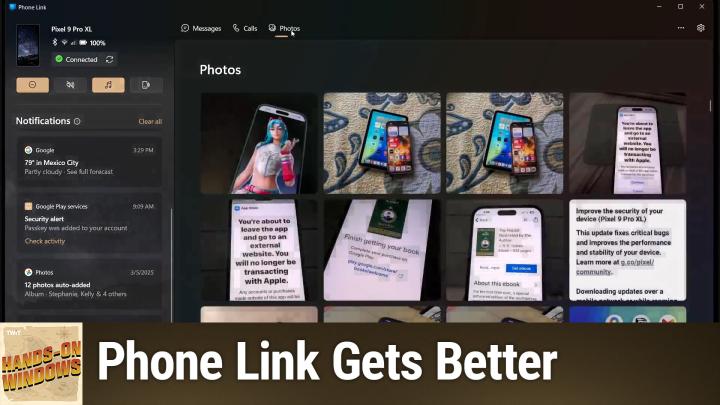
All TWiT.tv Shows (Audio)
Hands-On Windows 134: Phone Link Gets Better
00:11:01
How to Connect your Phone to Windows
Loading summary
Transcript7 lines
- [00:00]
Paul Throt
Coming up next on Hands on Windows, we're going to take a look at some cool new features in Phone Link in Windows 11, including the beginning of some phone integration features with copilot.
- [00:10]
CIS Representative
25 years ago, a small group of business and government leaders met in Washington, D.C. they envisioned the creation of an independent nonprofit organization with a mission to help people, businesses and government mitigate the growing threat of cyber attacks. Today, the center for Internet Security embodies that vision. For 25 years, it's worked with a global community of IT and cybersecurity experts to develop the CIS benchmarks and CIS critical security controls. These proven security best practices defend against common cyber threats and streamline compliance with industry frameworks, regulations and standards. Today, CIS provides cybersecurity services, threat intelligence and critical resources to help public and private sector organizations alike state strengthen their Cyber defenses. Visit cisecurity.org today. That's the letters cisecurity.org to find out how CIS can help your organization as we create confidence in the connected world.
- [01:11]
Robinhood Advertiser
Missions to Mars, Driverless cars, AI chatbots Feels like we're already living in the future. Well, Robinhood is built for the future of trading. Robinhood's intuitive design makes trading seamless. Spot opportunities and take control of your trades with tools like screeners, simulated returns and strategy builder. On Robinhood, traders have access to hundreds of popular stocks and ETFs 24 hours a day, five days a week so you can keep up with today's fast paced markets. You can now even trade stocks and crypto all in one place with the new desktop platform Robinhood Legend. The future of trading is fast, powerful and precise. Experience it now on Robinhood Investing is risky. Robinhood Financial LLC Member SIPC is a registered broker dealer. Trading during extended hours involves additional risks. Cryptocurrency services are offered through an account with Robinhood Crypto LLC. NMLS ID 1702840 Robinhood Crypto is licensed to engage in virtual currency business activity by the New York State Department of Financial Services.
- [02:13]
Paul Throt
Podcasts you love from people you trust. This is twit. Hello everybody and welcome back to Hands on Windows. I'm Paul Throt and this week we're going to take another look at Phonelink. This is the application Windows 11 that allows you to integrate your smartphone with the Windows 11 OS. We have looked at this in the past, of course the last time was actually quite some time ago, but I think you'll recall that there are basic features you get with an iPhone, limited in some ways. A lot more features with an Android phone. And then if you have a Samsung flagship phone or some. A few other phones, you get the kind of, you know, the full meal deal with all the features including screen sharing and remote apps and all that kind of stuff. But since the last time we discussed this, Phone Link has evolved. There's some features that we've talked about in previous episodes tied to 24H2, where the start menu is going to have like a phone link integration pane on the side that's been delayed. So I got that feature briefly. Microsoft took it away. I still don't have it, but that will be coming eventually. If you have an Android phone, you can also make a phone call from a conversation and chat from Phone Link, which is a fairly new feature. But I wanted to talk about three or four big bucket new features which I think are really cool beyond that that I actually can show you at least. So the first one is file system integration. So most people probably know that if you. If I can get a window going. Here, let me try that again. If you have a phone connected to your computer with a USB cable, you can, if you know, assuming it's configured correctly on the phone, browse through the file system or in an iPhone, just price, browse through your photos basically and then copy files back and forth. Right. And that's kind of a handy thing to do so with Android phones only this doesn't work with iPhone, yet you can actually just have your phone appear in File Explorer regardless of whether it's connected with a cable. So in this case, my phone is here. It's not connected, you know, not connected, wire, wired, connected to anything. But it's still available in File Explorer. Right. And so if I just. Oops, sorry, clicked on the wrong thing, go in, you can see storage and then you'll see the whole file system of that particular phone. Right. So if I go to movies, Instagram. Yeah, a couple of videos here. These are from a little while ago, but I can copy it out to the desktop. It happens pretty quick, you know, over WI Fi. It's not a very big file, but I can run that locally. And this is just a. What is this? This is off the video from Niagara Falls last year. So pretty cool, but like straight off the phone. So, you know, fairly obvious functionality but just a nice addition. You don't have to worry about wires and all that kind of stuff. So that's kind of cool. We've talked a lot about sharing in Windows 11 over the past months and years too. Actually that share is a feature that's continually updating. I know we talked about some forms of sharing this drag and drop sharing, et cetera, et cetera. But when you go to share a file now that your phone is a choice, assuming you have an Android phone again, right? So I had the same tired set of photos that I keep using. I'm going to try to maybe update those sometime soon. But when you rightclick share you get that new share interface which we talked about in a previous episode. And now my phone is one of those choices. And so when you go to that, oh, it's just not connected properly. Let me just make sure these guys are connected. But generally speaking this actually works pretty good. But this is of course the the problem with phone link, if you will. Sometimes it's a little bit unreliable, but normally what happens is you get a, you know, a banner like you saw there. It will say okay, this thing has made it through. And then on the phone you'll see a notification from link to Windows, which is the app that does the connectivity on the phone and that will show you that the file has downloaded. You tap it and it opens the files app on Android, the Google Files app, and then you can see that file on your phone and you can open it, do whatever you want with it. So that is usually pretty good.
- [06:34]
Robinhood Advertiser
Missions to Mars, driverless cars, AI chatbots Feels like we're already living in the future. Well, Robinhood is built for the future of trading. Robinhood's intuitive design makes trading seamless, spot opportunities and take control of your trades with tools like screeners, simulated returns and strategy builder on Robinhood traders have access to hundreds of popular stocks and ETFs 24 hours a day, five days a week so you can keep up with today's fast paced markets. You can now even trade stocks and crypto all in one place with the new desktop platform Robinhood Legend. The future of trading is fast, powerful and precise. Experience it now on Robinhood Investing is risky. Robinhood Financial LLC Member SIPC is a registered broker dealer. Trading during extended hours involves additional risks. Cryptocurrency services are offered through an account with Robinhood Crypto LLC. Nmls.id 1702840 Robinhood Crypto is licensed to engage in virtual currency business activity by the New York State Department of Financial Services.
- [07:35]
Amazon Music Advertiser
Hey prime members, Are you tired of ads interfering with your favorite podcasts? Good news with Amazon Music you have access to the largest catalog of ad free top podcasts included with your prime membership. To start listening, download the Amazon Music app for free or or go to Amazon.com adfreepodcasts that's Amazon.com ad freepodcasts to catch up on the latest episodes without the ads.
- [08:00]
Paul Throt
And then in the last episode, I think it was, I mentioned the new Copilot app. And the new Copilot app brought back some of those Windows integration features which aren't that great yet. But now that it's a native app, or now that it is a native app, I should say on Copilot they're going to increase the number of features there and they're adding phone integration features too. Right. So we had run Copilot before in the previous episode, but when you go into settings here, you can see this phone connection link down here and it's on for the phone that I have here. This opened off screen. Sorry, this is going to light up my face. I apologize. But it goes to this Microsoft support site. Sorry. That explains this new feature which used to be called Phone Plugin, which is hilarious because I've never heard of that. But this is the underlying technology that's being built into Windows to allow Copilot to integrate now with your phone. So they talk through how this works, what you have to do, what those features are, etc. But what I can tell you is that there is a list of functionality just like there is for Windows and that list will probably grow. You can ask it quite. So you can ask. Let me go back to the actual interface here. There we go. You can ask it questions about things that are related to your phone. So this will probably fail, like my last one. But for example, if I said something like set a timer for. I'll just do something short for 30 seconds. It will try to integrate with the clock app on the phone, presumably. Yep, there we go. So it's interesting how it says this. So it's got the 30 second timer going. It's not counting down on the computer, which you can see, but I can see on my phone there's no way you'll be able to see this. But if I bring this up to you, it's actually counting down. And so as this thing counts down, I'll let it just go the final several seconds here. It will actually eventually ring its little notification sound. So 3, 2, 1, 1 of that. So I can interact with it, however, I'll just stop it, obviously. But that's kind of interesting. I'm being generous, maybe it's not that interesting, but you build to do alarms, you'll be able to message your contacts from here. You can locate a Place I did this one earlier, it was like, you know, locate the where in Mexico City. Is that right? This will, you know, locate the nearest taco stand. I guess we'll see how that works. And actually maybe I should have specified using maps. Yeah. So no, it's already done that. So I've opened the map app on your phone. You get this link to Windows notification like I said. And on my phone there is a notification. I can tap it. It's asking me to choose an app which is interesting. I will choose Maps, Google Maps that is. And yeah, all it does is populate the search field in Google Maps for. For that phrase which is just says Taco stand. So which is honestly not what we call that here. But anyway, Rica's Canitas taco stand is indeed up on the corner. It's a block from here. So I guess that's sort of useful. But again the idea here is that we're trying to interact in ways that make sense. The main phone link app, which I should probably bring up, this is not my main phone right now. So I don't have messages or calls in here but I do have some older photos or just some photos I've taken for work related things. Right. Is good for those very obvious bits of functionality. Right. We want to send or interact with text messages on our phone. That's great. That works really great. We want to send and receive phone calls through our phone but on our computer. Excellent photos. Obvious. But these other features are. Is you can kind of see Microsoft's kind of thinking through like well, what. What might want. People want to do through services that are available on your phone that aren't maybe available in the same way on your computer or you might be getting up to leave and go do something. So you might start something here like a search for a place to go eat like I just did. But you want it to go to the Maps app on your phone. And if you've been around a while and if you've been in the Microsoft space, while you might remember that Windows used to do that with Windows Phone. Right. There was that brief window where those two things would interact in this kind of a way. You could start a search for a place on Bing Maps and then you could send it to your phone. Right. So I think this is Microsoft trying to make up for the lost time here and trying to get that kind of thing going with Android. Right. And hopefully one day with iPhone. Although I think we're going to have to get antitrust involved for that to ever come to fruition. So most of these features are not super exciting right now. You know, timers, alarms, the map thing, locating a place, navigation, whatever it is. But this is, I think the tip of the iceberg on this stuff. So I think in future updates to this app, hopefully, hopefully not a new app again, but not this app, I should say, but rather Copilot. We're going to see this improve dramatically. And of course Copilot runs on your phone too. So there's a lot of opportunity now all of a sudden for kind of cross device integration. If you don't want this, by the way, I should say. Oh, oh, that's interesting. You don't even get to look at your profile unless you go here. You can actually just turn this off, right? So if you go to this profile button settings, you can just turn this off. So if you don't want this thing integrating with your phone, but you do want to integrate your phone with Windows, which is a curious cross section, I guess you can turn this off at least. So that's good. Okay. Not too much, not too dramatic, but some interesting steps forward. So kind of a nice set of updates. Hopefully we'll see that start menu integration soon. But for now that is still a pretty good list of stuff. So I hope you found this interesting and entertaining. We will have a new episode of Hands on Windows every Thursday. You can find out more at TWiT TV. H thank you for watching. Thank you especially to our Club Twit members. We love you. And if you're not subscribing, please think about doing so. You can find out more about Club TWiT at TWiT TV. Club TWiT. Thank you.