← All TWiT.tv Shows (Audio)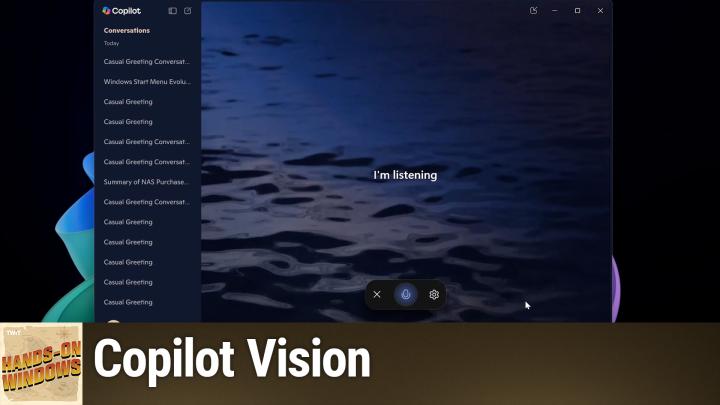
Loading summary
Transcript36 lines
- [00:01]
Paul Throt
Coming up next on Hands on Windows, Clippy is back. Well, not exactly, but there is something called Copilot Vision, which will feel eerily familiar. Podcasts you love from people you trust. This is Twit. Hello, everybody, and welcome back to Hands on Windows. I'm Paul Throt, and this week we're going to take a look at one of many, many new Copilot features, code called Copilot Vision. Sort of the return of Clippy. You'll see what I mean by that soon. Copilot is getting complex. We've talked a lot about Copilot this year. We've talked a lot about AI, all the new features that are coming. But one of the weird things about Copilot is that it's in a lot of places, right? So I tend to focus on it in Windows, which makes sense. It is an app. That app has changed a bunch. But Copilot is also on the web@copilot.Microsoft.com it's part of Bing Search now. It's also Bing searched as part of Copilot. Now. There's a whole mess there. There's a standalone Microsoft 365 copilot app that's in Windows 11, but it's also in the individual Office apps, right. On Windows and the Mac, right. It's on mobile. So there's a standalone Copilot app, Microsoft 365 Copilot app, and then other Microsoft apps that have Copilot capabilities. And so once you get into this weird matrix of Copilot implementations, sometimes it gets hard to know where certain things are, right? So Microsoft introduces these new features. You're like, great, well, where do I get that? It's not always obvious. So I'm going to bring up the Copilot app in Windows to show you just one example. So in Windows, if you go into settings, one of the unique features you'll see here is this phone connection feature. So in Windows only, I can have Copilot give me information that's based on things that are on my phone, right. In addition to things that are on Windows or on the web or wherever else. So that's kind of interesting. There's this voice mode where you have different voices to choose from. This is kind of a minimalist user interface. If I choose a different voice, it doesn't give me a sample. And it also doesn't have other options that are available in other places. So, for example, if you were to bring this up on your phone in the Copilot app, you would have the opportunity not to just hear, try different voices. But you'd hear those voices and you could control the speed of those voices. So you could speed them up or slow it down. Which actually, I have to say is kind of a. Kind of a useful feature. So for some reason that's not in Windows yet. So one feature that's like that, it's brand new, announced recently, and it's just starting to roll out as I record. This is something called Copilot Vision. And this is in some ways Copilot, as I think people think of it when you think of what a copilot is. Something, someone or something in this case that is next to you, helping you as you do your thing. To date, it's been a user interface, so it's a pane or whatever that you see on the side of another app. Maybe in this case, you're interacting it with your voice. And so in addition to typing queries and asking questions, you. You can actually just use your microphone and talk to it. Right. And that, you know, depending on how you do things, that might be better, worse, you know, it might be just a different way to do it. So it's just a different way to look at it.
- [03:31]
Sponsor
This episode brought to you by Red Canary. When cybersecurity threats hit fast, you need an MDR partner that moves faster. Red Canary delivers 24.7expert MDR support, total visibility and actionable insights. Plus it helps you detect four times more threats so you can stay ahead while without burning out. Red Canary clears the noise and has your back every hour, every incident. Get the backup you deserve. Visit redcanary.com difference to learn more. This episode brought to you by the Electronic Frontier Foundation. In fact, if you ask me, the whole Internet's brought to you by the EFF. For 35 years, the Electronic Frontier foundation has been fighting to make sure that when you go online, your rights go with you effort. I owe them a big debt of gratitude. They rescued our podcast and every podcast from patent trolls. They helped encrypt the web to protect your privacy. They prevail in lawsuits against government, secrecy and surveillance. These are the good guys. And they have a podcast, how to fix the Internet. It's all about what happens if we win the fight and get things right online. And it's a great listen. The fight for digital rights, it's bigger and more urgent than ever. EFF is member supported. I'm a member. You should be a member. The more members they have, the stronger they can fight in statehouses, courthouses, and on the streets. Season six of how to Fix the Internet started May 7th. Listen@eff.org podcast and while you're there, join the EFF.
- [04:59]
They're the good guys 25 years ago, a small group of business and government leaders met in Washington, D.C. they envisioned the creation of an independent nonprofit organization with a mission to help help people, businesses and government mitigate the growing threat of cyber attacks. Today, the center for Internet Security embodies that vision. For 25 years, it's worked with a global community of IT and cybersecurity experts to develop the CIS benchmarks and CIS critical security controls. These proven security best practices defend against common cyber threats and streamline compliance with industry frameworks, regulations and standards. Today, CIS provides cybersecurity services, threat intelligence and critical resources to help public and private sector organizations alike strengthen their Cyber defenses. Visit cisecurity.org today. That's the letters cisecurity.org to find out how CIS can help your organization as we create confidence in the connected world.
- [06:02]
Paul Throt
This particular computer does not yet have Copilot vision, but if it did, I would click this and then I could talk to it, right? So I could say, hello, copilot. Oh, I didn't do it. Oh, I did do it. It's not listening. Anyway, I'm just going to say, not going to worry about that one because I know it doesn't work on this particular computer, but one place I do know that it works on this particular computer is in Microsoft Edge. So Edge has this copilot pane that's on the side. Start a new conversation here. And it supports Copilot vision.
- [06:39]
Copilot AI
Hey, Paul.
- [06:40]
Paul Throt
All right, so it comes up, it asks, it says, hi, Hi. Hello copilot. We can talk to it.
- [06:46]
Copilot AI
Absolutely, Paul. We're having a.
- [06:48]
Paul Throt
Okay, I'm going to cut them off because seriously. Okay, so what are the types of things you might do with copilot? Right. So I have. Let's see if I can find this article. I wrote an article recently about a NAS that I'm purchasing and why I'm getting it and so forth. And so I could go into co pilot. Actually let me turn this off. Sorry. I could go into co pilot normally and create a summary is right there. Right. So summarize the main points of this page. So it's going to look at this article that it's right next to right side by side and then give you information about the article. Okay, that's cool. That's text based, right? So I, I did, I clicked a button. But typically I would, you know, type in that Prompt and then it would answer the question. Right. It's giving me a nice little hint here about what I can do, but with Copilot Vision, I can just ask.
- [07:39]
Copilot AI
Hi, Paul.
- [07:40]
Paul Throt
Hello, Copilot. What is this article about?
- [07:45]
Copilot AI
Hey, Paul. It's talking about the author's journey in setting up a network attached storage device. They've gone for a synology distation DS224 + with a ram up.
- [07:56]
Paul Throt
Thank you. That's good enough. I'm just going to cut it off. It would go on for a little while there. Right. And then one thing you'll see every time is this kind of needy. Hey, how was it? Was I good? You know, and it wants this feedback. It's not much else you can say, but it's usually pretty good. So that's fine. I don't have Copilot, or rather Copilot Vision in Copilot, the app and Windows yet, but if I did, I could also bring up, you know, an image and say, what is this image? But I can do that. I'll just do it on the web. You get an idea of how that can work. Hi, can you tell me what this is a picture of?
- [08:31]
Copilot AI
Sure thing, Paul. This image shows a sleek laptop, likely a Microsoft Surface, known for its detachable keyboard and touchscreen capabilities. It's looking pretty stylish with that colorful display, isn't it?
- [08:43]
Paul Throt
Okay, thank you. That's good. Okay. It's, yeah. A little super positive about Microsoft there, but that's fine. It's fine. So when you think about what AI is really good at these days, I think that summarizing is right near the top of the list. So it makes sense you'd see. Create a summary here in the Copilot pane. You could do this in the app when you do run the app, by the way, I don't think I showed this earlier, but one of the things you can do is go into this Quick View. And the nice thing about Quick View is it it's over the top of other things because the Copilot interface itself can be kind of big on Windows and this is a smaller ui. It lets you interact with something else. Now, I don't have Copilot Vision, so I can't do that yet in this interface. That will happen very soon and it might have already happened on your computer, depending. So summarizing. Right. So I used it to summarize this article started. It got going on that. Okay, that's pretty good. This is an article about extended security Updates for Windows 10. We did an episode about this pretty recently. This program is typically for businesses, but in Windows 11, I'm sorry, Windows 10, for the first. First time, they're allowing individuals or consumers to do it for one year only. Right. And this article is mostly about businesses, but it does mention consumers. Right. And so I could go in here and ask it about that.
- [10:08]
Copilot AI
Hey, Paul, how's it going?
- [10:10]
Paul Throt
Good. Could you tell me what parts of this Extended Security Updates program article concern consumers?
- [10:20]
Copilot AI
Sure thing. This article primarily talks about the extended Security Updates ESU program for Windows 10, which is mostly for businesses and organizations, but for consumers, the key point is that Support for Windows 10 ends on October 14, 2025. After that, the ESU program allows consumers to get security updates if they choose to continue using Windows 10. There's also.
- [10:44]
Paul Throt
Stop it right there. But there you go. So, yeah, so that bit was right here. Right. You can see that text that he basically read there. But then he also went through this. I'm calling it a he already. Right. But the, the AI looked at this article and it jumped down to this bit about. About consumers, which I'm having trouble finding because it is hard. So it says for individuals or Windows 10 home customers, extended security updates for Windows 10 will be available for purchase at $30 for one year only, which would eventually be part of that summary. So that's actually really useful. Right. So this is not a particularly long article, but it's kind of long. And if you were just looking. Well, what parts of this apply to me, that's a nice way to. So it's not just a summary, but it's a very specific kind of a summary, if that makes sense. Right. So we've got summaries for articles like we did with these two things. Summary is kind of a weird term, but basically, you know, described an image using image recognition. You could do this with PDF files. Right. But you can also do it for videos. So when I switched this video. This is Dave Plummer. This is a former Microsoft engineer. Welcome to his. I love his channel. I watch every one of his videos. You can see. Summarize this video as one of the options. But I can also ask Copilot Vision to discuss this. Instead of getting a printout or, you know, like a text based response. Can this thing summarize this video for. For me.
- [12:12]
Copilot AI
Hey, Paul.
- [12:13]
Paul Throt
Hey, copilot. Can you tell me what the top five points of this video are?
- [12:20]
Copilot AI
Sure. Happy to summarize it, Paul. First, the video dives into the origin story of the Windows Start menu, tracing its evolution from the early days of Microsoft's operating systems.
- [12:31]
Paul Throt
Okay, thank you, that's enough. So it would have kept going, obviously, and that's great, right? So that's useful. But how does it do this? Right? This is only a 14 minute video. I would just watch this, frankly, but. And I would watch all of his videos. I really like this channel, like I said, but how is it doing this? It turns out that it's just doing it the same way. It summarizes any document because Every video on YouTube basically has a transcript. So it's actually just doing the same thing. So whether it's this transcript from the video, a web article of whatever kind, a PDF file, it's using the same type of AI to examine the text, provide a summary, and then it can tailor it to how you described it. I said this case I wanted, you know, the top five points. I said with that Microsoft learned article about extended security updates that I wanted only the bits that were related to consumers. And so it can kind of dive in and pull out those bits. So, you know, it's. It's useful. I could have done this like this. In fact, I will. If you prefer the text based approach, that's still part of it, so that's cool. And once this comes online in the Copilot app on Windows, I would be able to do it from there as well. So this is nice because it's built into Edge. If you don't use Edge, use Chrome or Brave or whatever browser you might use, you can still use the Copilot app to get the same functionality. You can do it with text, you can do it with Copilot vision. It's up to you. So pretty powerful and useful, right? And also one of dozens, if not now, hundreds of features that are part of Copilot that are all over the place. This particular one, I believe, is only in these two places. I believe for now it's just Edge and Windows. But inevitably it will probably appear in other places where Copilot can be found, maybe even someday on our phones. Although I think that the big screen that you get on a computer is particularly good for this kind of implementation because it's nice having those two things side by side, right? I'm not much of a talker, so I don't really interact with the AI willfully, but I bet a lot of people will. And I. It's hard. You find it's. It is kind of strange, like how you fall into this pattern with it where you, you know, you apologize for interrupting or you say thank you. Or you address it as if it were a person. Like, this is, you know, we're getting into a weird space here. But that's. That's what's happening. I mean, that's what AI is doing to us. Or for us, I guess. I don't know. So hopefully you found this educational. Certainly the copilot responses in some ways were hopefully, at least a little entertaining. We will have a new episode of Hands on Windows every Thursday. You can find out more at Twitter tv. H O W. Thank you for watching. Thank you especially to our Club Twit members. We love you as always. If you're not a member of Club Twit, do consider joining. You get these videos without any ad breaks, but also you get to support a great company that's making a lot of great content and it's good for your soul. So consider it. You can learn more about that at Twit tv. Club Twit. Thank you so much. I'll see you next week.
- [15:51]
T Mobile Representative
Hi, Zoe Saldana. Welcome to T Mobile. Here's your new iPhone 16 Pro on us.
- [15:56]
Zoe Saldana
Thanks. And here's my old phone to trade in.
- [15:58]
T Mobile Representative
You don't need a trade in. When you switch to T Mobile, we'll give you a new iPhone 16 Pro. Plus we'll help you pay off your old Phone up to 800 bucks and you still get to keep it.
- [16:07]
Zoe Saldana
There's always a trade in.
- [16:08]
T Mobile Representative
Not right now. @ T Mobile.
- [16:09]
Zoe Saldana
I feel like I have to give you something in return for karma.
- [16:12]
T Mobile Representative
That's okay.
- [16:13]
Zoe Saldana
I don't really have much in my purse. Oh, what's the. Let's see. Hand sanitizer. It's lavender.
- [16:17]
T Mobile Representative
I'm good.
- [16:18]
T Mobile Voiceover
Seriously.
- [16:19]
Zoe Saldana
Let me check this pocket. Oh, mints.
- [16:21]
T Mobile Representative
Really, I'm fine.
- [16:22]
Zoe Saldana
Oh, I have raisins. I'm a mom. Wait, wait one sec. I've got cupcakes in the car.
- [16:27]
T Mobile Voiceover
It's our best iPhone offer ever. Switch to T Mobile, get a new iPhone 16 Pro with Apple intelligence on us. No trade in needed. We'll even pay off your phone up to 800 bucks with 24 monthly bill credits. New line $100 plus a month on experience beyond finance agreement 999.99 and qualifying ported for well qualified plus tax and $10 connection charge payout via VIR will prepaid card allow 15 days credits end and balance due if you pay off early or cancel ctmobile. Com.