← All TWiT.tv Shows (Audio)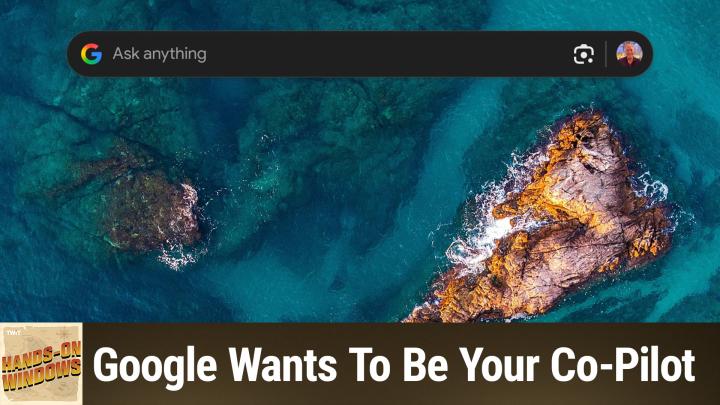
All TWiT.tv Shows (Audio)
Hands-On Windows 161: Google Wants To Be Your Co-Pilot
00:13:29
Google's Surprise Desktop App for Windows
Loading summary
Transcript20 lines
- [00:01]
Narrator/Announcer
25 years ago, a small group of business and government leaders met in Washington, D.C. they envisioned the creation of an independent nonprofit organization with a mission to help people, businesses and government mitigate the growing threat of cyber attacks. Today, the center for Internet Security embodies that vision. For 25 years, it's worked with a global community of IT and cybersecurity experts to develop the CIS benchmarks and CIS critical security controls. These proven security best practices defend against common cyber threats and streamline compliance with industry frameworks, regulations and standards. Today, CIS provides cybersecurity services, threat intelligence, and critical resources to help public and private sector organizations alike strengthen their Cyber defenses. Visit cisecurity.org today. That's the letters cisecurity.org to to find out how CIS can help your organization as we create confidence in the connected world.
- [01:01]
Leo Laporte
This episode is brought to you by Cohesity. For security and IT professionals, resilience is not just a feature, it's a movement. Cohesity makes sure you're ready for the midnight alerts and morning reviews. With Cohesity, you can secure and protect your company's entire data estate with a single platform, reduce your risk from threat actors, and quickly respond and recover from destructive cyber attacks, strengthening your company's resilience. That's why Cohesity is trusted by 70% of the Global 500. Learn more@cohesity.com Resilience everywhere and now a.
- [01:32]
Commercial Voice
Next level moment from ATT Business. Say you've sent out a gigantic shipment of pillows and they need to be there in time for International Sleep day. You've got AT and T5G so you're fully confident, but the vendor isn't responding and International Sleep Day is tomorrow. Luckily, AT&T 5G lets you deal with any issues with ease, so the pillows will get delivered and everyone can sleep soundly. Especially you. ATT 5G requires a compatible plan and device coverage not available everywhere. Learn more@att.com 5G Network.
- [02:02]
Paul Thurrott
Coming up next on Hands on Windows, we're going to take a look at how Google is trying to out Copilot Copilot in Windows.
- [02:13]
Commercial Voice
Podcasts you love from people you trust. This is twit.
- [02:22]
Paul Thurrott
Hello everybody, and welcome back to Hands on Windows. I'm Paul Throt and this week we're going to take a little sidetrack. So we've talked a lot about Copilot this past year. We've talked a lot about about new features in Windows 11, of course, but Microsoft has a lot of competition out there in the AI space and it's really not clear who's going to come out ahead, but we know Microsoft is doing Copilot. They're putting it in Windows 11, they're putting it on mobile, they're putting it in Microsoft 365. They're putting it in everything Apple is doing. Apple Intelligence, you know, not great, but they're getting there. Whatever. I'm sure they'll get there with some help. And Google is doing Gemini. Gemini is available in Android as the new assistant. It's available Chrome os. It's throughout their ecosystem. Right. And Google is interesting because A, they make the world's most popular web browser by far. They also make the world's most popular search engine by far. These are great ways to distribute and or provide grounding for AI. And so, not surprisingly, Google's been doing a pretty good job with Gemini. But they are. Let me think about this before I say it. Yeah, pretty much. I would say the first major incursion of AI from another platform maker into Windows or any other platform. Right. And they're doing this through two different ways. The first one is something that just came out right before I recorded this episode. So I don't really. I haven't had a lot of opportunity to try it yet. But there is a Google app that's available in Google Labs. So if you go to labs.google.com you will find this. In fact, I think it's search will get you there. They're going to cut it off at some point. So it's probable by the time you get this, if you have or see this episode, if you haven't done it yet, it might not be available, at least temporarily. But what this does is provide this search bar on Windows, right. On the desktop, right over everything else you're doing. Similar to Spotlight Search on the Mac, which is the inspiration for lots and lots of things in the Windows space. What this reminds me of is PowerToys Run or the new command palette in PowerToys Copilot as well. So Copilot in Windows, there's a Windows key +W. Nope, that's not it. Windows key +. I'll get there eventually. Windows key +. Try that one more time. Windows key +C should bring up Copilot and it's not so. Okay, but it should. But also Alt space. Right? And Alt space is the keyboard shortcut for a lot of these tools that they all override each other. On the Mac, it's Command space. Right. That's why it is that keyboard combination. So by default, Google uses alt Space as well. You can change that if you want. And what this does is give you access to Google Search from the desktop. It can search your files locally so there's some indexing going on there and I would hope some semantic search functionality as well. You can search your Google Drive up in the cloud. You can see what's on your desktop using this Google Lens icon. So that is very much like Copilot vision. Right. And so this is kind of a like an in place replacement if you will for Copilot. Potentially interesting. This also looks like that search box you see like on a Pixel or an Android phone. So this is very interesting to me. I haven't had, like I said, I haven't had a lot of time. I wanted to throw this out today just because this just happened and it's, it's very interesting. So probably I will say in a future episode we will look at that further but in the meantime we can look at what they are doing with Chrome. And so a couple of months back as I record this, Google added this little Gemini button up here to Chrome and let's put this in dark mode so it's not blowing my eyeballs out. But this was only available if you had a paid Google AI Pro or whatever the other subscriptions are called. Membership. Right. Recently though, the latest version of Gemini of Chrome, when I record this, they've made this available to everyone and so there were limits. But Google has a nice help doc that explains how many things you can do per month with the free version versus the various paid versions. It's actually pretty generous. So this works a lot like Copilot mode in Explorer in Microsoft Edge. You know, you click it, you get this little chat box, you know, by default it will look at the tab that you're looking at. So you could say something like, you know, summarize this page kind of thing and it will do what all of these things do and let me bring that thing down and I guess I'm arguing something here. But anyway it doesn't matter. It's, you know, it's just kind of a handy in browser summary. It's exactly what it sounds like. Right. And so instead of doing a side pane, which is kind of the old way of doing this and you know, Microsoft again has changed Edge to work similarly. They have this thing. The nice thing about this one though is you can move it around and that's something you can't actually do yet with Edge and their little copilot, you know, quick, you know, whatever it's Called little quick interface here. The other thing that's interesting about that is let's see if it works by default. No, I got a way G. Now it's doing the. Yeah, I have a. The game bar also uses Windows key +G. So let me see. I'll try one more time. Yeah, no, there you go. All right, so you can bring this up at any time. You don't have to be looking at a web page, right? So if you just want to chat with Gemini and whatever it is, you're asking a question, you want to, you know, whatever it might be, you wanted to create some content, whatever, you can just bring this thing up at any time. You don't have to be in Chrome. Right. Which I think is also a little bit of an incursion right into the underlying platform. You know, Chrome obviously has to be running somewhere. It is in fact literally running, but it could be running in the background. And if I close Chrome, this thing will still be sitting here, which is this little guy here. So I think that's pretty cool.
- [08:30]
Leo Laporte
Hi there. Leo Laporte here. I just wanted to let you know about some of the other shows we do on this network. You probably already know about. This Weekend Tech. Every Sunday I bring together together some of the top journalists in the tech field to talk about the tech stories. It's a wonderful chance for you to keep up on what's going on with tech, plus be entertained by some very bright and fun minds. I hope you'll tune in every Sunday for this Week in Tech. Just go to your favorite podcast client and subscribe. This Week in Tech from the Twit Network.
- [09:01]
Paul Thurrott
Thank you. There are going to be additional features coming to this thing over time. It's also limited to us in Canada, I believe right now in English, it's consumer only, but it will be coming to workspace customers. So people pay for, you know, custom domain, have a business account and it's going to work across multiple tabs, it's going to let you Compare and summarize, etc. Etc. One of the things I can show you, I believe, because it's not all completely there, but if I go to Amazon and I am signed in, but I don't think that really matters. And I'll just search for like a smart speaker because we were doing this before in a previous episode, so I could bring up this smart speaker. They're also adding in addition to this box, which I could bring down and ask it questions about this thing. Obviously they're adding it to what Google calls The omnibox. Right, the address bar as we think of it. And so when you click here, what you're going to see are you can start typing a question. So you could just do that and this is the little prompt for that. But if you just type, type a question here, it will assume you are asking it about this thing, but it also gives you some suggestions. Right. And so you can like to select one like I did. And what it will do is analyze the page and then via a sidebar, interestingly, not the little dropdown they're going to give you that information. Right. And so this is maybe not as radical as some of the AI powered browsers we see like Perplexity Comet or the, the browser companies DIA and but it's also the world's most popular browser. Right. So Google building this stuff in is, was inevitable but now it's kind of finally happening. So it's interesting. They're going to be adding agentic capabilities and what that means is you'll be able to type this thing or bring this thing down, start a new chat and say hey, I need to book a haircut or I need to order groceries. And it's going to understand because you're a Google customer and it has your, you know, your calendar information, Gmail, etc. Etc. That it can find out, oh, it looks like you went to this place before to get your haircut. Did you want to create a, or make a reservation for that place, that kind of thing. So that's coming as are additional features for the Omnibox. Right. Longer questions, more complex questions. AI mode. Right. And so I'm going to try to think of a complex thing because I do a lot of like programming. So if I have like a win UI3 actually I did one earlier, I'll just do. This is a horrible complex topic. It never works great. Actually, let me get rid of the sidebar and do that again because I want to show you how that pops down. Oh, it's just doing it there actually that's new. So that's kind of interesting. What this will do eventually is bring you to a Google search result. Right. And so let me see if I can. One of these is one of those? I guess not. What does that look like? No, I don't want to do it that way. But what that means is that you will get that AI summary at the top which if you're a programmer doing that kind of technical thing, I'm just trying to see if there's anything in there that's related. But There isn't. Let's do a Google search. This will work from the drop down, but I just want you to see what it looks like, so I'll just do that same thing again. So what you get here is this AI overview and eventually what this is going to turn into is this thing, which is AI mode. So when you go into AI mode, this is a different style of search. It's using that AI backend. It's doing kind of a more complex, deeper analysis. It's showing you the sites that it got this information from, which I assume is mostly stack overflow. It doesn't really matter. But eventually this is going to come right to the Audubox. So that drop down is going to have that information right there. You're not going to have to go to the, to the page. And that's interesting because you might be doing something on the web at the time. You don't want to go away from it. You don't want to have to open a new tab or whatever. It will just do it over it and then you can click through and do it that way. So, kind of interesting. So there's more, like I said, there's a lot more coming as we record this. It's kind of basic first steps, but if you're familiar with Google and Chrome and Gemini, you may know that there's a version of the Gemini AI model family called Gemini Nano that Google puts on their phones. On the Pixel phones, there's also a version of Nano that goes inside of Chrome and that's what powers the safe browsing, enhanced protection mode. Right. So if you are visiting a website today and it's a scammy thing, it's trying to get you to, you know, sign up for service or something or pay for software to fix a problem that you don't even have, that will actually stop that. So they've added like scam notifications. It will actually pop up and say, hey, this thing is a scam. Do not do this. Don't click on it. If you do try to download it, it will prevent you from doing that. So there's some kind of interesting stuff going on here. And, you know, like I said, putting this stuff in Edge is fine. If you do use Edge, the Microsoft stuff isn't too bad. But putting this in Chrome is actually a really big deal, I think, because it's just, you know, 65, 70% of the web. Right. And this is what most people use. So Google obviously has strong presence in search, strong presence and AI and this kind of brings it all together into their, you know, the most used browser that there is. So we'll probably be looking at this again. We'll definitely look at other AI powered browsers. That's a big thing right now. So we'll get back to it. I'm sure Microsoft will have some kind of response and it probably won't be anything that they could do to Android or whatever. But you know, we'll see what happens there. So this is an interesting option I think for, for people. So hopefully, hopefully you found that useful. We will have a new episode of Hands on Windows every Thursday. You can find out more at TWiT TV. H O W thank you so much for watching. Thank you especially to our club TWIT members. We love you. And if you are not a member of Club to it, you can check that out at TWiT TV. Club TWiT. Thanks. Morning Zoe. Got donuts.
- [15:33]
Narrator/Announcer
Jeff Bridges why are you still living above our garage?
- [15:36]
Paul Thurrott
Well, I dig the mattress and I want to be in a T Mobile commercial like you teach me.
- [15:42]
Narrator/Announcer
So Dana oh no, I'm not really prepared.
- [15:46]
Commercial Voice
I couldn't possibly at T Mobile get.
- [15:48]
Narrator/Announcer
The new iPhone 17 Pro on them.
- [15:50]
Commercial Voice
It's designed to be the most powerful iPhone yet and has the ultimate pro camera system.
- [15:55]
Paul Thurrott
Wow, impressive. Let me try. T Mobile is the best place to get iPhone 17 Pro because they've got the best network. Nice.
- [16:03]
Commercial Voice
Jeffrey, you heard them. T Mobile is the best place to get the new iPhone 17 Pro on.
- [16:08]
Paul Thurrott
Us with eligible traded in any condition. So what are we having for launch?
- [16:13]
Commercial Voice
Dude, my work here is done. The 24 month credit is on experience beyond for well qualified customers plus tax and 35 device connection charge credit send.
- [16:19]
Paul Thurrott
And balance due if you pay off earlier.
- [16:20]
Commercial Voice
Cancel Finance agreement. IPhone 17 Pro 256 gigs $1,099.99 and new line minimum 100 plus a month plan with auto PayPal taxes and fees required. Best mobile network in the US based on analysis by Ooklab speed test intelligence data 1H2025 visit t mobile.com.