← All TWiT.tv Shows (Audio)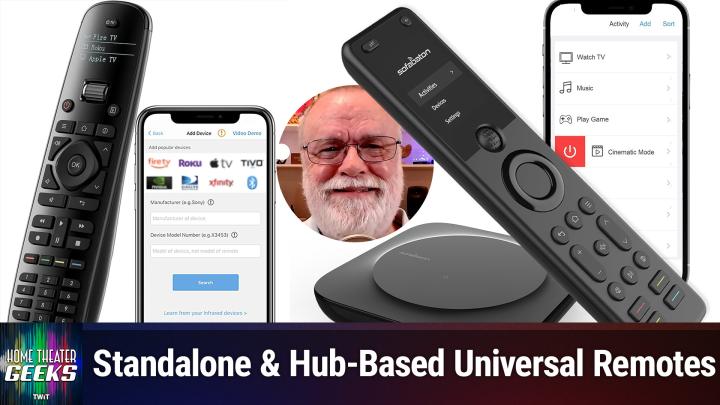
All TWiT.tv Shows (Audio)
Home Theater Geeks 469: Too Many Remotes!
00:14:31
Reducing coffee table clutter
Loading summary
Transcript10 lines
- [00:01]
Scott Wilkinson
In this episode of Home Theater Geeks, I answer a question from Ann, who's bummed about having so many remotes. Can she reduce the number? Yes, she can. Stick around.
- [00:16]
Unknown Host
Podcasts you love from people you trust. This is twit.
- [00:32]
Scott Wilkinson
Hey there, Scott Wilkinson here, the home theater geek. In this episode, I'm going to answer a question from Ann, who writes, your podcasts are great. Thanks, Ann. I know just enough now to be dangerous with a checkbook. Oh. After five or six highly educational podcasts, I bought a Yamaha AVR and a Panasonic Blu ray player. The two 20 year old speakers sound good when I watch a movie, and the old TV speaker is not bad for news programs. My issue is five remotes. My brain can't handle it. I have remotes for Roku tv, Blu Ray, avr. Then there are headphones, which is another complication. Help. I'm happy to make progress with a new TV, a Samsung S90 OLED. But if I can't get the remotes under control, one or two max, I'm gonna take this new stuff back to the store. Well, Ann, it's a very common problem. First of all, congratulations on the new gear. Yamaha makes great AVRs, Panasonic makes great Blu Ray players, and Samsung makes great OLED TVs. So you got some great stuff there. And now we have to get the control under control. Now, the most common solution to this problem is a universal remote. Now, my favorite universal remote is called the Harmony, from a company called Logitech. You know Logitech, they make keyboards and mice and you know, headphones and stuff like that. They also used to make the Harmony universal remote. Unfortunately they don't anymore, which is a true bummer. But they still do offer some support. And we're going to put a link to the URL where you can get support if you already own one from Logitech. And you can still buy some of the models on Amazon and ebay, so you know they're not completely unavailable and they really work great. Now there are two basic types. There's the standalone and the remotes that have hubs. What are called hub based. Standalone models use ir, typically infrared, just like most component remotes. And the hub based ones use IR as well. But also they use Bluetooth and WI fi to control things hidden behind doors or even in another room. So there are a number of standalone models that are still somewhat available. The 350 is probably the, the entry level one, shall we say. You can see it here. It's got number buttons, it's got transport controls. It's got a what's called a cluster, cursor cluster in the middle up, down, right, left and okay in the middle. And a mute button volume and TV and channel control, stuff like that. I think it can control eight, up to eight devices. Then there's the 650, it's kind of a step up from there and that's the next graphic. There it is with a little, a little LED display with some buttons on the side and the function of those buttons changes depending on what you're doing. There's also a665, a700, a950 which is the one seen there and it's Charger and the one called the Harmony one which is the one I actually use. I really like that one quite a bit. And it has also a display screen on it and that's a touch panel display so you can actually touch the display. And then there's the ultimate and the ultimate one and there's the ultimate one. And that those higher ones control like 15 devices. Looks to me like the ultimate.1 May very well be a hub based and I probably, I probably should have mentioned that in the hub based models anyway. The hub based models include the Elite, the Ultimate Home, the Companion and presumably the ultimate one because this picture has a Hub in it. Now the prices on Amazon range from 145 bucks for a renewed 650, that is one that probably got sold and got returned to 300 for a new 650 to nearly 500 for an elite with a Hub. So you know, they ain't cheap but they really work well. Now they, they are what are called activity based. So basically you specify different activities like watch tv, watch cable, watch a Blu Ray, play a game. All these different activities require your system to be set up in a different way. So you hit a button labeled Watch TV for example and it sends all the codes necessary to turn on the TV and the AVR switch to the right inputs and everything else that needs to happen in order to watch that. And then the controls, the volume control will control the avr. The channel control will turn the tv. If you're using cable box, it'll change the, change the channel on the volume on the cable box. Watch Blu Ray will turn on the Blu Ray player, switch the inputs as necessary. The transport controls will work the Blu Ray player.
- [06:54]
Unknown Advertiser
Like your favorite startup's growth curve, T Mobile's coverage keeps scaling because T Mobile helps keep you connected from big cities to your hometown On America's largest 5G network switch now Keep your phone and T Mobile will pay it off up to $800 per line via prepaid card. Visit your local T Mobile location or learn more@t mobile.com KeepAndSwitch up to four lines of your virtual prepaid card. Last 15 days qualifying unlock device, credit service port in 90 plus days device and eligible carrier and timely redemption Required card is no cash access and expires in six months.
- [07:24]
Customers are rushing to your store. Do you have a point of sale system you can trust? You need Shopify for retail. With Shopify you get a powerhouse selling partner that effortlessly unites your in person and online sales into one source of truth. Track every sale across your business in one place and know exactly what's in stock. Connect with customers in line and online. Shopify helps you drive store traffic with Plug and play tools built for marketing campaigns. From TikTok to Instagram and beyond, Shopify's sleek, reliable POS hardware takes every major payment method and looks fabulous at the same time. Do retail right with Shopify. Sign up for a $1 per month trial period at shopify.com lifestyle all lowercase go to shopify.com lifestyle to take your retail business to the next level today.
- [08:22]
Scott Wilkinson
Now to get this working you need to tell the remote what equipment you have and which pieces of equipment are used for which activities and what inputs they need to be set to and so on. Now this is done by connecting your remote to your computer by USB and logging on to the myharmony.com site. And you also have to run some Harmony software in your computer so that they can communicate together. And then you just tell tell the system. Here's my avr, here's my tv, here's my Blu ray player and here's what needs here's the here's what controls the volume, here's what controls the channels, and so on and it sets it all up for you. However, I have to warn you the I was doing some research for this and the My Harmony website says that the My Harmony software does not run ON Mac OS 1015 or higher 10.15 or higher, you can use it on Mac OS 10.14 and lower or Windows. They didn't specify any versions and if you're using a Hub based Harmony, you need to control it from your iOS or Android phone. So older Harmony remotes can use Harmony remote software which is compatible with Mac OS 11 and 12. So a little bit newer. Now this all sounds very complicated and it isn't trivial. I will tell you that they tried to design it to be easy to use and they succeeded to an extent, but not completely in my opinion. But it's not as bad as it sounds. The biggest problem is that these devices are no longer available except on the secondary market, like Amazon has a stock. But once they run out, I think they'll be gone, they won't have any more. And the software is in some cases, as I just said, limited to older OS versions. So you're taking a bit of a gamble there. So I wanted to mention a more current device company that sells universal remotes that a lot of people really like. It's called the company is called Sofa Baton, which I think is a great name. Now I haven't tried one myself yet, but I as I say, I've heard a lot of good things about it and I do intend to to try one. Their their URL will also be in the show notes. It's Easy. It's sofa baton.com they offer two models. The U series, which is a standalone and you can see it here, has a little bit of of a of a display near the top of the remote. And the X series, which is a hub based unit, has also some display at the top. Both can replace up to 15 device remotes or even more. Both offer IR and Bluetooth LE communication. The U series is limited to four Bluetooth devices. The X series can can also control classic Bluetooth devices like the PlayStation 4 and 5 Roku Wi Fi Roku Wi Fi. I mean Philips Hue light bulbs which are remote controllable light bulbs that are pretty cool, and the Sonos whole House audio system. Now both can control various devices by switching between them on the remote. But the X series also has an activity mode like the Harmonies. On the U series you can set up what are called macros, which do the same thing as an activity series, but it's probably not nearly as convenient as a true activity mode. Now the X Series also lets you do voice controls, so Google Assistant, Amazon Alexa, and Sofa Baton's own API Smart Home System U Series apparently does not do that. On the other hand, the U series is 65 bucks, way less than any of the harmonies. And the X1, which is still available, but it's an older model, is 140 bucks and the X1s current model is $200. That's still less than almost any Harmony remote, except for a renewed one. So with the caveat that I haven't tried the Sofa Baton remotes yet, I'd probably recommend with going with one of those because they're current and they work with current software and computer systems and in fact I look forward to trying the X1s myself. Will it replace my beloved Harmony one? I'm not sure, but I do want to get up on the latest that's available for you so that I can share you share it with you. So I hope that answers and helps your question. Like this episode. In many episodes I answer questions from listeners and all you have to do is send it along to HTGWIT tv. Now in a new development, all of our videos are now available on YouTube with ads but they're free. You can watch them anytime. Now. If you want ad free shows, all you have to do is join the club. Which you can do by going to TWiT TV club TWiT and I do hope you will consider that. Until next time, Geek Out.
- [14:38]
Unknown Host
Hey buddy, are you a geek? Are you a tech enthusiast? Then I would love to invite you to join a tech community like no other. You can gain exclusive access to our incomparable quality tech content for just $7 a month with Club Twit as a member, you'll Enjoy all Twitt TV shows ad free plus access private video feeds for insider shows like iOS today, home theater geeks and so much more. Dive into the members only Twit plus bonus feed for behind the scenes content, club discussions and special events. But here's the best perk. Join our incredible Discord community to watch live show productions, chat with hosts and participate in exclusive members only activities. It's your backstage pass to the world of twit. Whether you're a tech enthusiast or a lifelong learner, Club Twit elevates your knowledge while entertaining your interests. Get two weeks free when you sign up now for $7 a month and unlock unparalleled access at TWiT TV Club TWiT. That's TWiT TV ClubTWiT and from the bottom of my heart, thank you and welcome to.
- [15:59]
Unknown Advertiser
Like your favorite travel guide. T Mobile's network knows all the spots because T Mobile helps keep you connected from big cities to your hometown on America's largest 5G network. Switch now keep your phone and T Mobile will pay it off up to $800 per line via prepaid card. Visit your local T Mobile location or learn more@t mobile.com keepandswitch up to 4 lines of your virtual prepaid card. Allow 15 days qualifying unlock device, credit service port in 90 plus days device and eligible carrier and timely redemption. Required card has no cash access and expires in six months.
- [16:29]
Marketing is hard, but I'll tell you a little secret. It doesn't have to be. Let me point something out. You're listening to a podcast right now, and it's great. You love the host. You seek it out and download it. You listen to it while driving, working out, cooking, even going to the bathroom. Podcasts are a pretty close companion. And this is a podcast ad. Did I get your attention? You can reach great listeners like yourself with podcast advertising from Libsyn Ads. Choose from hundreds of top podcasts offering host endorsements, or run a pre produced ad like this one across thousands of shows. To reach your target audience in their favorite podcasts with Libsyn Ads, go to libsynads. Com. That's L, I B S Y N Ads. Com.
- [17:08]
Scott Wilkinson
Today.