← All TWiT.tv Shows (Audio)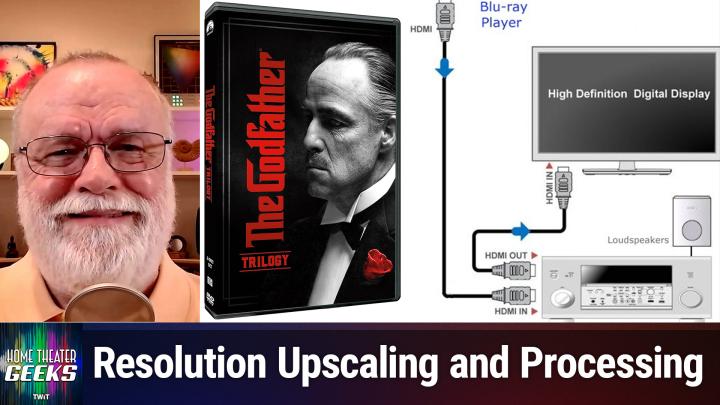
All TWiT.tv Shows (Audio)
Home Theater Geeks 470: Optimal Video Processing
00:09:19
Do components combine or conflict?
Loading summary
Transcript1 lines
- [00:00]
Scott Wilkinson
In this episode of Home Theater Geeks, I answer a question from Ryan who asks about video processing. It occurs several places in the signal chain. So what happens when they're all working together? Stay tuned to find out podcasts you love from people you trust. This is Twit. Hey there, Scott Wilkinson here, the home theater geek. In this episode, I answer a question from Ryan in Albany, New York, who writes Shopping for various components of a home theater system. It seems like each one can sport a premium price tag for video processing and upscaling. For example, Sony TVs and Panasonic Blu Ray players both excel in the processing department, right? If I were to get a Sony tv, a Sony AVR and a Panasonic Blu Ray player, which component would actually do the processing magic? Would it make more sense to get a basic Sony Blu Ray player or even an Xbox or PlayStation and assume the TV will optimize how the image looks? It seems like there could be a spectrum of results. On one hand, having the best components results in the best video experience. Or perhaps only one distinctly strong component will render a terrific image. Or perhaps the components will fight with each other, trying to do their own optimizations, resulting in a suboptimal image at the highest price point. What's your take on this? Well, Ryan, it's a great question, and you're right that virtually all video components have video processing in them and they do something in the way of upscaling lower quality, lower resolution video to higher resolutions. The trick is to determine which component does it best. So let's say you have a UHD Blu Ray player connected via HDMI to a 4k capable AVR which is then connected to a 4k TV also by HDMI. And I have one graphic in this show to show you, which is a system diagram of just that situation. So here you can see the HDMI from the Blu Ray player. It's called a Blu Ray player. Could be a UHD Blu Ray player connected to the HDMI in of an AV receiver and the HDMI out of that receiver to the HDMI in of what they're calling a high definition digital display. This is a somewhat older graphic, but it shows that you basically want to connect HDMI from the output of a player to the receiver and the output of a receiver to the input of a tv. So that's, let's say we got that. So the best way to determine which one is doing the best upscaling is to try them separately on a piece of content. You know. Well, you mentioned in follow up Emails that you have The Godfather on DVD, which is 480p. So let's use that. Start with the Blu Ray player. Make sure that it's processing. In particular, it's upscaling is turned on in its video menu. Hopefully the AVR has a setting in its video menu that lets you turn off its processing. Might be called something like bypass or pass through or direct. Then play the content and look at it on the tv. I would choose a scene that you know really well, maybe something that has some gentle slope diagonal lines because that is hard for an upscaler to do. So watch a scene like that, then disable the players upscaling. It's in the video menu somewhere and it'll be called something like direct or pure. I don't know what it'll be called. But something that keeps it from upscaling just sends what's on the disk, which in this case would be 480p. Then enable the AVR's upscaling and play the content again. How does it look? Does it look the same, better or worse than when the player was doing the upscaling? Finally, disable the players upscaling and the AVR's upscaling and send the signal at 480p all the way to the TV, which will do it. The TV can't be disabled. It's a 4K display. It's going to upscale the content to 4K. Being that it's a DVD, it might have a widescreen picture on it, or it might be four by three. With the Godfather, it's probably widescreen, so there might be hopefully black bars top and bottom. Unless it was mastered for 16 by 9. But in any event, the TV is going to upscale it and play it on and display it on its own screen. How does that look better or worse? Take some notes. Figure out which one looks best, which one looks worst, or do they all look exactly the same and then just use whichever combination looks best. That's. That's the way I do it. Now you bring up an interesting point about components fighting each other. If they're all trying to do the up processing, processing the video and upscaling in particular, generally speaking, they probably aren't going to fight each other. Once the signals upscaled to 4K, then it's going to pass through. Everything else down the line is going to say, oh, that's a 4k 4k signal. So I'm just going to let it pass. They'll most likely leave it alone. But you never know. It would be an interesting experiment to turn all the upscaling on in the player and the AVR and play a low res image like the DVD and see what happens. It would be very interesting to see if that causes a degradation in the image. You're not going to damage anything, so don't worry about that. Now here's one other thing I'm going to say. If you have a standard Blu ray player, it's going to output 1080p, not 4K. And if you have a 4K TV, that's going to need to upscale it. If the AVR doesn't do it to 4K. So if you play a DVD which is 480p and have a player, the player upscale it to 1080p, the AVR or TV will need to upscale that to 4K. So try the tests that I've described here and see which one produces the best image. Play it with the player set to just output 480p, let the AVR do the upscaling, have the player upscale to 1080p and have the AVR do the upscaling to 4K or turn it off and see what happens. Try all those different configurations and see which one looks best. It'll be a very interesting experiment. So thanks a lot for the question. I really appreciate it. If you have a question for me, you can send it right along to HTGWIT TV and I'll answer as many as I can right here on the show. In a new development here at TWiT, we are putting all of our shows on YouTube in video form that you can watch for free with ads. Now if you want to go ad free, join the club. Go to TWiT TV ClubTWiT to sign up. In addition to ad free shows, you have exclusive access to the TWIT plus bonus feed and to our Discord channel where you can join like minded twits in discussing all things geeky. So I hope you'll consider it. Until next time, geek out.