← All TWiT.tv Shows (Audio)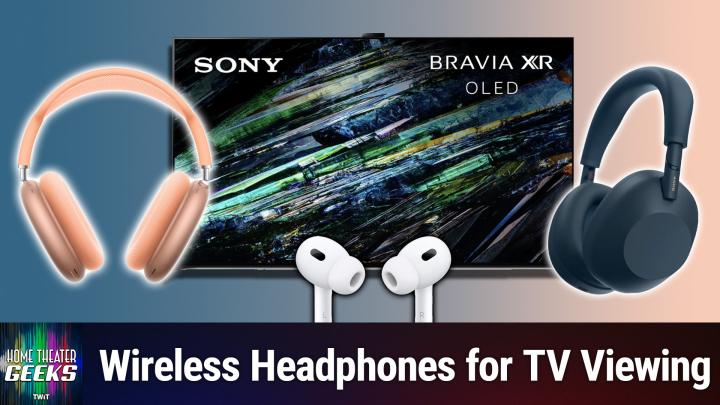
All TWiT.tv Shows (Audio)
Home Theater Geeks 487: Headphones with TV
00:10:30
Keep your home peaceful when needed!
Loading summary
Transcript19 lines
- [00:01]
Scott Wilkinson
In this episode of Home Theater Geeks, I answer a question from Ann Duran, who's shopping for a tv and at the top of her list is Headphones. Stick around.
- [00:13]
SoFi Advertiser
Today we'll attempt a feat once thought impossible, overcoming high interest credit card debt. It requires merely one thing. A SoFi personal loan. With it, you could save big on interest charges by consolidating into one low fixed rate monthly payment. Defy high interest debt with a sofa SOFI personal loan. Visit sofi.com stunt to learn more. Loans originated by Sofi Bank NA member FDIC terms and conditions apply. NMLS 696891 podcasts you love from people you trust.
- [00:49]
TWiT Network
This is TWiT.
- [01:01]
Scott Wilkinson
Hey home theater Geek fans. To let you know that I'm going to do a special show on Wednesday, June 25, right after Intelligent Machines. So if you're in the chat room for that show, stick around because I'm going to be answering questions live from the chat room. All home theater related of course, nothing else. But if you got a home theater question for me and you're in the chat room, that's the time to ask it. Because I'll be watching the chat room and answering those questions when you as best I can. So I hope you'll join us. Hey there, Scott Wilkinson here, the Home Theater geek. In this episode, I answer a question from Ann Duran who writes we're starting to look at new TVs and when making a priority list, I find headphones at the top. I'm tired of hearing football games in every corner of our small house, so the TV must connect wirelessly to some kind of headphone, ideally Apple headphones, but not crucial. What do you recommend? Immersive sound is fine for a movie we watch together, but not for football. We likely will buy, per your recommendation, a 48 inch Samsung OLED or the 55 inch Sony A95L. Well, thanks Ann for writing. Headphones are an important part of my house as well, but I'll start with your second question first. Which TV to buy? I have the Sony 77 inch A95L and I love it. I prefer it to the Samsung only because Samsung as a company does not support Dolby Vision high dynamic range, which is common in the streaming world and Sony does. Otherwise, they're both great sets. There's nothing wrong with the Samsung in terms of performance, but it doesn't support Dolby Vision, so that's why I prefer the Sony. In fact, you can see well, here's the web page for the 65 or the 55 inch A95L which is the one that I would recommend. I have the larger one and it just looks beautiful. It's gorgeous, uses qdoled and that's a superior technology in my book. Okay, now on to your question about headphones. Most modern TVs can connect with Bluetooth headphones and most headphones have Bluetooth capabilities as well. Not the audiophile ones which connect with a cable or wire, but the but most. Well certainly all wireless headphones use Bluetooth these days, modern ones and I use this feature all the time. I imagine that Apple headphones would work perfectly well as any other as long as they have Bluetooth capability. I looked on Apple's website at their headphones and they include earbud Designs including the AirPods Pro 2 and AirPods 4 with which can be gotten with and without active noise cancellation and the over the ear AirPods Max as well as a wide variety of Beats models, both earbuds and over the air. Now the AirPod Pro 2 and AirPod 4 are are all under $200 the max. The AirPod Max is $549 so that's quite a bit more expensive. On the other hand, I have to say I generally prefer over ear models especially for home use. Earbuds need to have the right ear tips for your ears to seal the ear canal and most earbuds come with small, medium and large at least ear tips and you can put on the ones that seal your ears the best. But you have to go through that process and find the ones that work best for you and they can become physically irritating after a few hours. Whereas over the years don't. Now over the ear headphones you know are bigger, bulkier, more obvious but at home who cares. All the Apple brands that I could see have Bluetooth capabilities and all the Beats models do as well. Anything that says true wireless will have Bluetooth capabilities. Now in my house I use the Sony WH1000XM3 over the year noise canceling headphones. They're somewhat older. The that model line is now up to XM6 which is sells for $450. The XM5 is still on sale for $300 and they make many Sony makes many other headphones and earbuds and they're generally very high quality. I really like Sony headphones quite a bit. They're used in professional studios all the time and they all use Bluetooth at least the wireless ones do. So that should be easy. They should match up. In fact my Sony's match up with My Sony tv, just fine. With a little caveat that I'll tell you about. At first, they often connected completely automatically, but sometimes they didn't, and that was a little frustrating. And it was probably due to the fact that the surround processor I was using at the time was not connected by hdmi. It was an older one, just temporary. Now that I have the final processor in the system, everything is hdmi. That particular processor does not send Bluetooth. It accepts Bluetooth from a phone or a tablet or some device. If you want to play music from your phone through that processor into the system, you can do it. But it doesn't send Bluetooth to headphones. So I have to do it through the tv. And there's a slight bit of a process involved. And here's what it is. You turn on the headphones, they pair and connect automatically. Once you've paired them with the TV in the first place, they connect automatically. But you have to go into the menu and switch from audio system to TV speakers. Once you do that, the audio is going to the headphones because they've been connected. When you're done with the headphones, you turn them off and you need to go back into the menu and go back to the audio system. It's a little bit of a process. I don't mind it that much, you know, and if it keeps peace in the house, as you're wanting to do, and as it does in my house as well, then well worth the few seconds it takes to do that. Now, this process is not documented anywhere that I can find in the Sony manual or anywhere else. So maybe that's an important service I'm providing here for anybody who wants to do it with that Sony tv, which I do recommend the TV itself. And if you're going to use headphones, okay, so you do this little process. It's fine. Anyway, thanks for writing in. If you have a question for me, please send it along to HTGWIT TV and I'll answer as many as I can right here on the show. And as you know, all Twitch shows, including home theater geeks, are available on YouTube for free. But they have ads. If you want to go ad free, join the club, go to Twit TV Club Twit and join up. And you'll be able to see all the Twitch shows commercial free. Until next time, geek out.
- [09:38]
TWiT Network
From Silicon Valley boardrooms to tomorrow's AI breakthroughs, if you need to keep up to date with tech, you need TWiT TV. At TWiT, we're tech experts who understand what's happening and can keep you in the loop. And we do it in a thoughtful, informed and fun way. Start your Sundays with this Week in Tech, a roundtable of tech journalists and people in the know with a rundown of the week's most important tech news. But that's not all. All week long, you can stay ahead of security threats with Steve Gibson and Security Now. Keep up on all things Apple with Mac Break Weekly. Listen to the most informed Microsoft experts in the world with Paul Thurat and Richard Campbell on Windows Weekly. Our flagship shows feature tech's most respected voices, giving you the insight you need to understand and benefit from the changing world of technology. We give you analysis you won't find anywhere else so you can make smarter business decisions and take advantage of the technologies transforming your world. Whether you're a CEO, IT professional, or simply passionate about technology, TWiT's network of shows gives you the edge you need in today's digital landscape. Don't miss a minute. Subscribe to TWiT TV today.
- [11:01]
T-Mobile Representative
Hi Zoe Saldana. Welcome to T Mobile. Here's your new iPhone 16 Pro on us.
- [11:05]
Zoe Saldana
Thanks. And here's my old phone to trade in.
- [11:07]
T-Mobile Representative
You don't need a trade in. When you switch to T Mobile, we'll give you a new iPhone 16 Pro plus we'll we'll help you pay off your old Phone up to 800 bucks and you still get to keep it.
- [11:16]
Zoe Saldana
There's always a trade end.
- [11:17]
T-Mobile Representative
Not right now. @ T Mobile.
- [11:19]
Zoe Saldana
I feel like I have to give you something in return for karma.
- [11:21]
T-Mobile Representative
That's okay.
- [11:22]
Zoe Saldana
I don't really have much in my purse. Oh, let's see. Hand sanitizer. It's lavender.
- [11:27]
T-Mobile Representative
I'm good.
- [11:27]
T-Mobile Advertiser
Seriously.
- [11:28]
Zoe Saldana
Let me check this pocket. Oh, mints.
- [11:31]
T-Mobile Representative
Really, I'm fine.
- [11:32]
Zoe Saldana
Oh, I have raisins. I'm a mom. Wait, wait one sec. I've got cupcakes in the car.
- [11:36]
T-Mobile Advertiser
It's our best iPhone offer ever. Switch to T Mobile. Get a new iPhone 16 Pro with Apple Intelligence on us. No trade in needed. Will even pay off your phone up to 800 bucks with 24 monthly bill credits. New line $100 plus a month on experience beyond finance agreement 99999 and qualifying forwarded for well qualified plus tax and $10 connection charge. Pay off via virtual prepaid card. Allow 15 days credits end and balance due if you pay off early or cancel ctmobile. Com.