← All TWiT.tv Shows (Audio)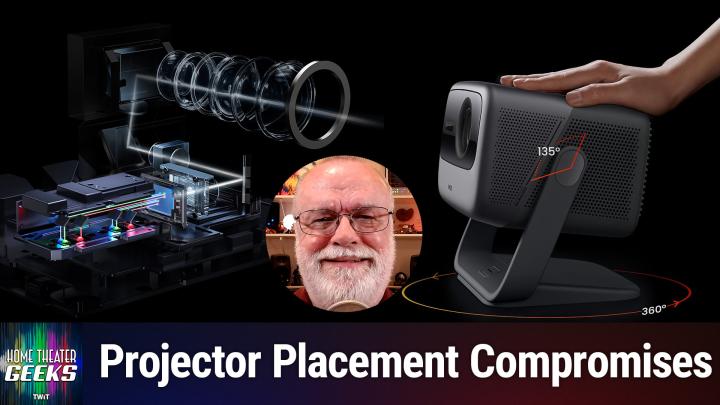
All TWiT.tv Shows (Audio)
Home Theater Geeks 492: Projector Mounting Problem
00:13:21
Working around home obstacles
Loading summary
Transcript23 lines
- [00:00]
Scott Wilkinson
In this episode of Home Theater Geeks, I answer a question from Andy, who's having a problem with where to place his projector. So stay tuned.
- [00:11]
Will
Let's map out this week's amazing destinations and travel tips.
- [00:15]
Andy
Honestly, Will, I didn't plan any trips, but I did switch to T Mobile with their new Family Freedom offer.
- [00:23]
Will
That's not the itinerary we're following.
- [00:26]
Andy
Well, I'm departing from AT&T and embarking on a new journey with T Mobile. Paid off my family's four phones up to $3200 and gave us four new phones on the house.
- [00:39]
Will
Bon voyage.
- [00:41]
T Mobile Representative
Introducing Family Freedom. Our lowest cost will switch our biggest family savings all on America's largest 5G network. Visit your local T Mobile location or learn more@t mobile.com FamilyFreedom up to $800 per line via virtual prepaid card typically takes 15 days. Free phones via 24 monthly bill credits with finance agreement eg Apple iPhone 16128 gigabyte $829.99 Eligible trade in eg iPhone 11 Pro for credits end and balance due if you pay off early or.
- [01:06]
Amazon Music Representative
Cancel contact T Mobile Ever notice how ads always pop up at the worst moments when the killer's identity is about to be revealed during that perfect meditation flow on Amazon Music we believe in keeping you in the moment. That's why we've got millions of ad free podcast episodes so you can stay completely immersed in every story, every reveal, every breath. Download the Amazon Music app and start listening to your favorite podcasts. Ad free included with prime this episode.
- [01:41]
Will
Brought to you by Red Canary. When cybersecurity threats hit fast, you need an MDR partner that moves faster. Red Canary delivers 24.7expert MDR support, total visibility, and actionable insights. Plus it helps you detect four times more threats so you can stay ahead without burning out. Red Canary clears the noise and has your back every hour, every incident. Get the backup you deserve. Visit red canary canary.com difference to learn more podcasts you love from people you trust. This is twit.
- [02:29]
Scott Wilkinson
Hey there, Scott Wilkinson here, the home theater geek. In this episode, I answer a question from Andy Zoo, who writes, I started building a theater room in the basement and I have a JM Geo N1 ultra projector mounted on the ceiling. The problem is that there's an AC duct going across the room and the projector can only be placed in front of it or behind it. If I mount the projector in front of the duct, the maximum picture size is too small for my 92 inch silver ticket screen. But if I mount the projector behind the duct, the picture is about 100 inches. If the room was bigger, I would have just gotten a hundred inch screen. But that won't fit. Do you have any suggestions on how to improve this scenario? Any tricks on getting rid of the dim light showing on the perimeter of the screen at the shorter throw distance? Or maybe I should just mount the projector on the floor. I see there is a floor mount, but I'm kind of worried the projector would be prone to getting damaged. So I was thinking maybe some sort of end table at the correct distance between the seats. But I'm not sure if the angle would be too much and floor space is kind of limited. Well, it's a great question and very often putting together a home theater means making compromises or working around obstacles such as this AC duct. So let's see if I can help you. So I wanted to start by showing everybody the JMGO N1 Ultra, which is a projector from a Chinese company. It's a three laser DLP projector and the specs look pretty good. We'll put a link to the product page in the show notes. It's a 4K DLP with RGB lasers, which is really quite good. Very often laser projectors will have a blue laser and a yellow phosphor wheel that combines to make white. But in this case you actually have red, green and blue lasers, which we can see in graphic two. They're, they're, they have this special technology called MalC. You know, that may be just marketing hype, whatever, but you know, you got red, green and blue lasers. That's a good thing. 1900 lumens, pretty bright, 1600 to 1 contrast ratio. That's probably an honest contrast ratio. HDR10 support 110% of BT 2020 color space color range, which is very, very good and only possible with lasers. It has memc, which is another word for frame interpolation which many people hate, but I'm sure you can turn it off. 3D projectors are really the only displays these days with 3D cap. Two HDMI inputs, one USB and one headphone jack which is in the next graphic. And you can see here that yeah, it's got USB 2, 2 hdmis1 with EARC. So it's a smart TV. It has an Android TV built in so audio from those apps can come out of that HDMI 2 input and back to your sound system. Also has Wi Fi 6 and Bluetooth 5 wireless capabilities. And here's something really interesting, a Dynaudio audio system. Now Dynaudio is a very high end make. I can't imagine that it's as good as an outboard audio system or even a soundbar. But it's probably pretty good for an internal projector sound system because 9Audio is really, really good and it's portable. It comes and it comes with its own carrying case. So you can take it around and go have movie night outdoors or at a friend's house, anything like that. You know, it's quite small and it's mounted on a gimbal, so it's very flexible in that way. You can see here it rotates around and can be aimed at 135 degrees one way or another. Although I'm going to talk a little bit about that a little later. Now, one of the features on the website includes something called auto screen fitting. So if the maximum screen size is too small at a throw distance in front of that AC duct should reduce the image size to 92 inches from behind the duck duct. Very common mistake there. Maybe the minimum size is too large. In that case, perhaps the duct is very wide. Now here's another problem with that. The throw ratio of the projector on the website is specified at 1.2 to 1, which means that it, it doesn't have any zoom, any optical zoom on the lens. It says it does have digital zoom so you can enlarge or reduce the picture to some degree, but apparently not optical zoom, which is unfortunate. Using digital zoom will reduce the resolution of the image and you don't want to do that if you don't have to because in addition to having lower resolution, you might then have all sorts of scaling artifacts which are not pleasant. So I recommend that you don't use that if possible. I'm guessing that the auto screen fit feature uses digital zoom.
- [08:44]
Will
Let's map out this week's amazing destinations and travel tips.
- [08:49]
Andy
Honestly, Will, I didn't plan any trips, but I did switch to T Mobile with their new Family Freedom offer.
- [08:56]
Will
That's not the itinerary we're following.
- [08:59]
Andy
Well, I'm departing from AT&T and embarking on a new journey with T Mobile. They paid off my family's four phones up to $3200 and gave us four new phones on the house.
- [09:12]
Scott Wilkinson
Bon voyage.
- [09:14]
T Mobile Representative
Introducing Family Freedom, our lowest cost to switch our biggest family savings all on America's largest 5G network. Visit your local T Mobile location or learn more@t mobile.com familyfreedom up to 800 per line via virtual prepaid card typically takes 15 days. Free phones via 24 monthly bill credits with finance agreement eg Apple iPhone16128 gigabyte 82999 eligible trade in eg iPhone11 Pro for well qualified credits end and balance due if you pay off early or cancel contact T Mobile do you worry.
- [09:41]
Scott Wilkinson
About how much someone drinks?
- [09:43]
T Mobile Representative
Do you feel angry or depressed most of the time? Do you feel neglected or unloved?
- [09:48]
Scott Wilkinson
Do you feel that if the drinker loved you, she or he would stop drinking? If you answered yes to any of these questions, you are not alone. Not everyone trapped by alcohol is an alcoholic. Families and friends are suffering too. Al Anon and Alatein can help. Call 1-866-OR visit al anon.org help ever.
- [10:11]
Amazon Music Representative
Notice how ads always pop up at the worst moments when the killer's identity is about to be revealed during that perfect meditation flow on Amazon Music, we believe in keeping you in the moment. That's why we've got millions of ad free podcast episodes so you can stay completely immersed in every story, every reveal, every every breath. Download the Amazon Music app and start listening to your favorite podcasts. Ad free included with prime.
- [10:45]
Scott Wilkinson
So the ideal placement is quite limited. With a 92 inch screen and a throw ratio of 1.2 to 1. The projector should be placed just a smidge over 8ft from the screen, which I have to presume is right in the middle of that AC duct. Now the floor stand that JMGO sells is actually quite nice. It has a small footprint and I think could could work very well. We have a picture of it. I think the next graphic can can show you what it looks like. There it is. Small footprint, nice stand. And ideally the floor stand will put the projector near the height of the center of the screen because ideally you want the projector to be aimed perpendicular to the screen plane. This model seems to have a lot of what's called keystone capability. So if it's shooting up from below or shooting down from above, there's processing that will keep the image perfectly rectangular, but that again causes reduction of resolution and potentially scaling artifacts. So you really don't want to do that if you don't have to. It's, it's really kind of ugly. Now your concern about potential damage sitting on that floor stand is very real, especially if you have kids or pets running around because they're going to knock into that thing. So putting it on a an end table or some sort of table between two chairs That's a good idea. I like that idea quite a bit. However, it's small enough that it's going to be easy to knock over, knock around, maybe not knock onto the floor, but you're going to misalign it. So once you, you aim it and align it with the screen, it's going to be very easy to, to get it off that alignment. Same is true of the, of the floor stand that they sell. So I agree ceiling mounting is the better way to do it, but I'm not sure there's a way to do that with that duct. The one thing I thought of was something custom and I don't know if you're a handy person or not. I'm not. I would hire somebody to do this, but you'd have to build a contraption that basically attaches to the ceiling in front of and behind the air conditioning duct and then comes together and then the projector mount mounts onto that in the middle. I can imagine that it would definitely be a custom job and probably not cheap, but it'd be the only way I can see to mount it on the ceiling. Now you also asked about, if you put it ahead of the duct, then you'll see, you see small dim areas on this, illuminated areas on the screen. And that's true because the image is smaller than 92 inches. And the way to solve that problem is to cut thin strips of black velvet and attach them to the screen. Don't attach them to the actual screen material, but to the frame. And you can put those on the screen or at least covering those areas of the screen where that dimly illuminated area is around the edges of the actual picture. And that will solve that problem. So if you decide to mount the projector ahead of this, of the duct and you have a smaller image than you want, you can just install these thin strips of black velvet around the screen. That, it'll be a little tricky because you have to really get them exactly the right width and align them carefully. I mean, that's going to be a whole project, but it will solve that problem. So there you go. Good luck. I've been looking into that projector a little bit lately and, and it's a nice one for, for, for a lower cost projector. It's, it seems to be quite popular and, and well regarded. So if you have a question for me, send it along to HTGWIT TV and I'll answer as many as I can right here on the show. And as you know by now, all of Twitch shows are available on YouTube for free, but with ads. If you want to go ad free, join the club. Go to Twit TV Club Twit and sign up to be able to get all of TWIT's shows without ads. Until next time, geek out.
- [15:58]
Will
From Silicon Valley boardrooms to tomorrow's AI breakthroughs if you need to keep up to date with with tech, you need TWiT TV. At TWiT, we are tech experts who understand what's happening and can keep you in the loop. And we do it in a thoughtful, informed and fun way. Start your Sundays with this Week in Tech, a roundtable of tech journalists and people in the know with a rundown of the week's most important tech news. But that's not all. All week long you can stay ahead of Security Threats with Steve Gibson and Security Now. Keep up on all things Apple with MacBreak Weekly. Listen to the most informed Microsoft experts in the world with Paul Thurat and Richard Campbell on Windows Weekly. Our flagship shows feature tech's most respected voices, giving you the insight you need to understand and benefit from the changing world of technology. We give you analysis you won't find anywhere else so you can make smarter business decisions and take advantage of the technologies transforming your world. Whether you're a CEO, IT professional, or simply passionate about technology, TWiT's network of shows gives you the edge you need in today's digital landscape. Don't miss a minute. Subscribe to TWiT TV today.
- [17:21]
SOFI Representative
Today we'll attempt a feat once thought impossible, overcoming high interest credit card debt. It requires merely one thing a SOFI Personal Loan. With it, you could save big on interest charges by consolidating into one low fixed rate monthly payment. Defy high interest debt with a SOFI personal loan. Visit sofi.com stunt to learn more. Loans originated by Sofi Bank NA member FDIC terms and conditions apply. NMLS 696891.