← All TWiT.tv Shows (Audio)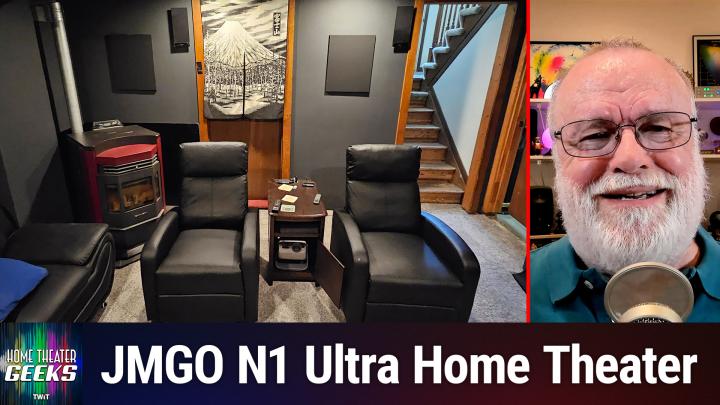
All TWiT.tv Shows (Audio)
Home Theater Geeks 507: Listener's Room Transformation
00:16:18
Home Theater of the Month
Loading summary
Transcript11 lines
- [00:00]
Progressive Insurance Announcer
Today's show is brought to you by Progressive Insurance. Do you ever find yourself playing the budgeting game? Well, with a name your price tool from Progressive, you can find options that fit your budget and potentially lower your bills. Try it@progressive.com Progressive Casualty Insurance Company and affiliates Price and coverage match limited by state law not available in all states.
- [00:26]
Mayra Amit
Emoji moment from Sadie who writes I'm not crying, you're crying. This is what I said during my first appointment with my physician at Mochi because I didn't have to convince him I needed a GLP one. He understood and I felt supported, not judged. I came for the weight loss and stayed for the empathy. Thanks Sadie. I'm Mayra Amit, founder of Mochi Health. To find your mochi moment, visit joinmochi.com.
- [00:52]
Odoo Advertiser
Sadie is a Mochi member, compensated for her story so when I ask what is Odoo? What comes to mind? Well, Odoo is a bit of everything. Odoo is a suite of business management software that some people say is like fertilizer because of the way it promotes growth. But you know, some people also say Odoo is like a magic beanstalk because it grows with your company and is also magically affordable. But then again, you could look at Odoo in terms of how its individual software programs are a lot like building blocks. I mean, whatever your business needs, manufacturing, accounting, HR programs, you can build a custom software suite that's perfect for your company. So what is Odoo? Well, I guess Odoo is a bit of everything. Odoo is a fertilizer magic beanstalk building blocks for business. Yeah, that's it. Which means that Odoo is exactly what every business needs. Learn more and sign up now@odoo.com that's o-o o.com in this episode of Home.
- [01:57]
Scott Wilkinson
Theater Geeks, I profile a home theater shared by a listener to this show. So stay tuned. Podcasts you love from people you trust.
- [02:12]
Micah Sargent
This is twit.
- [02:23]
Scott Wilkinson
Hey there, Scott Wilkinson here, the home theater geek. In this episode, I wanted to share with you a home theater that was created by a listener to this show. Normally, for Home Theater of the Month, I feature a home theater that I wrote about on AVS Forum and there were some pretty amazing ones there. However, I got a listener question some time ago, which I addressed in episode 492. Andy Z had asked about where to place his JMGO N1 Ultra Projector in a room that he was transforming into a dedicated home theater, and his placement options were Limited especially by a big H vac duct that went along the entire ceiling of the room. Now, it turns out that that Andy was completely renovating that room into a dedicated home theater. I gave him some advice, and about a month later, a couple months later, he shared me with me some pictures that he had of his new room. And I said, wow, what a great job. So I decided to feature it here on Home Theater Geeks Home Theater of the Month. And I would like to show it to you here. Now, the first picture that we have is actually the room before he got started on it. He said that this was a photograph from Zillow in, in the listing of the. Of the home that he ended up buying. And he was going to convert this room, which looks more like a living room now, into a dedicated home theater. And you can see that that duct on the ceiling, this big, wide duct that's. That's protruding down from the ceiling, which otherwise is. Looks like it's kind of a drop ceiling there. And he was going to need to avoid that wherever he placed his projector. So in the next photo, we can see that Andy took the walls down to the studs and replaced the drywall, the floor and the ceiling in the room. So this was a major project which he did essentially all the work himself. So that's pretty impressive. It's what I like to see. In the next photo, we can see that he. The. The replacing of the floor, which that's no easy feat. And you can see some of the subfloor there and some of the floor that he's. That he's installing there looks like pretty thick and well insulated. So that's a good thing. Now in the next photo, we can see that he's clearly making progress. I'm really glad to see him paint the room black, which you can see in this room in this photo right here. And you can also see the pellet stove heater that he put in that room and the projector in the lower right pointing up to the screen. So he's already got the projector near the floor pointing up to the screen. I said that wasn't really a good idea, but his options were limited, and so that was probably the best place to put it. And the JMGO N1 Ultra is designed to do that. So, you know, we'll. We'll take a look at the end result here in a minute. In fact, the next photo shows the finished room. And I think this looks very elegant, simple. I love the black paint. My room itself is painted in a very dark gray. So doing it this way I think was a great idea. I might not have used a mostly white rug right under the screen. There's a couple of suggestions I have for Andy, but we'll get to that in a minute. In the next photo we can see the screen, which is a 92 inch 16x9 screen from a company called Silver Ticket that is popular among DIY home theater folks because they're relatively inexpensive. It's not acoustically transparent. You can see the speakers around here. The front left and rights are his dad's Klipsch FS3s and he, Andy himself had a Klipsch KC23 center channel speaker which he mounted on a shelf below the screen. The next photo is kind of a dual photo. It shows the KEF T101, one of the KEF T101 surround speakers that he added, as well as an SVS PB3000 subwoofer. SVS makes very, very good products, very good subwoofers. And again, they're also fairly value oriented. So I that that was a good, good choice. Good purchase there. The next photo shows the AVR, which is a Denon AVR X4400H, which he had already. And that's a great AV receiver. I like Denon in general. And that one is a 9.2 channel. So excellent. He, Andy made a point to say that he's especially happy with the light dimmer that he found, which is in the next photo. It's the TP link dimmer. I don't, don't know the model number. Controlled with the Kasa app K A S A configured at which he also configured Gemini on his Pixel Watch 4 to raise and lower the lights by voice command. This is a popular thing to do now is to get voice commands in your home theater. And Andy did that in this case. So in the next photo we can see his two small recliners, which he said is totally fine. This is a home theater for two, just as mine is. And you can see these recliners on either side of an end table, which isn't really an end table in this case, but he got it on, on clearance. And it houses the projector on the bottom and a Sony UHD Blu Ray player on the shelf above it. And you can also see in this picture the rear speakers which are up high on the wall, those small rectangular things. And the somewhat larger rectangles are acoustic panels. And then you can see also in the corner the pellet stove heater. So this is, this is a beautiful little space, in my opinion. The next photo we have a little bit close, close up of the end table with the projector. And you can see that it's got power on the back of this end table. So that worked out pretty well, I think, and usb, I believe as well. The next photo is another shot of that. And this is what Andy asked me about. Placing the projector in such an end table close to the floor. Here you can also see a computer keyboard, which is nice. Now, I advised him against it because it would require keystone adjustments to the projector to reduce. To align the image with the screen. But keystone adjustments reduce image sharpness, so that's an unfortunate byproduct of, of having to do that. But this was really the best option for him. And sometimes you've got to make compromises and you have to fit into what you've got. And Andy did that. And you know, I have to say, okay, this projector, this particular projector was designed for very flexible placement. So it offers a very nice Keystone control system, which we can see in the next picture. It has a user interface that makes it very easy to make the keystone adjustments to the, to the screen so that you can align the image with the screen. This is not as good as placing the projector so its light axis, the direction its light is firing, is perpendicular with the screen. But the projector is designed to do this, as I said. So, you know, he did the best with what he could and I'm sure it, it looks great. Overall. I'm really impressed with what Andy did to transform that living room into a dedicated home theater for two. He did all the work himself and he estimates he spent maybe $12,000 on building material. That pellet stove, the projector, which is about $1,000, 999 to be precise. Surround speakers, recliners, and the end table. He used existing equipment where he could, which is a good thing to do if you've got good equipment, which he did.
- [12:18]
T-Mobile Announcer
Introducing family freedom from T Mobile. We'll pay off four phones up to $3200 and give you four free phones, all on America's largest 5G network. Visit t mobile.com familyfreedom up to $800 per line via virtual prepaid card typically takes 15 days. Free phone via 24 monthly bill credits with finance agreement. Example Apple iPhone 16, 128 gigs $829.99 eligible trade in. Example iPhone 11 Pro for well qualified credits end and balance due if you pay off early or Cancel Contact Us.
- [12:48]
Mitti Health Announcer
This podcast is supported by MIDI Health. Are you in midlife? Feeling dismissed, unheard or just plain tired of the old healthcare system? You're not alone. For too long, women's serious midlife health issues have been trivialized, ignored and met with a just deal with it attitude. Many of us have been made to feel ashamed or forgotten. In fact, even today, 75% of women seeking care for menopause and perimenopause issues are left entirely untreated. But here's the powerful truth. It's time for a change. It's time for miti. Mitti is not just a healthcare provider. It's a women's telehealth clinic founded and supported by world class leaders in women's health. What sets Midea apart? We are the only women's telehealth brand covered by major insurance companies, making high quality, expert care accessible and affordable for all women everywhere. Our clinicians provide one on one face to face consultations where they truly listen to your unique needs. We offer a full range of holistic, data driven solutions from hormonal therapies and weight loss protocols to lifestyle coaching and preventive health guidance. This isn't a one size fits all care. This is care uniquely tailored for you. At miti, you will join our patients who feel seen, heard and prioritized. You will find that our mission is clear to help all women thrive in midlife, giving them access to the health care they deserve. Because we believe midlife isn't the middle at all. It's just the beginning of your second act. Ready to feel your best and write your second act script? Visit joinmitty.com today to book your personalized insurance covered virtual visit. That's joinmitty.com the Care Women deserve.
- [14:34]
Odoo Advertiser
So when I ask, what is Odoo? What comes to mind? Well, Odoo is a bit of everything. Odoo is a suite of business management software that some people say is like fertilizer because of the way it promotes growth. But you know, some people also say Odoo is like a magic beanstalk because it grows with your company and is also magically affordable. But then again, you could look at Odoo in terms of how its individual software programs are a lot like building blocks. I mean, whatever your business needs, manufacturing, accounting, HR programs, you can build a custom software suite that's perfect for your company. So what does Odoo? Well, I guess Odoo is a bit of everything. Odoo is a fertilizer magic beanstalk building blocks for business. Yeah, that's it. Which means that Odoo is exactly what every business needs. Learn more and sign up now@odoo.com that's O D O O dot com.
- [15:35]
Micah Sargent
Are you ready to grow in 2026? Let me tell you why Advertising on Twitter is the way to make that happen. I'm Micah Sargent. I'm the host of Tech News Weekly and several other shows on the network. And if you've ever listened to our shows, then you know what makes what we do different? It's trust. When we introduce a new partner on the show, the audience knows we believe in what they offer because we're only taking on partners that will actually benefit our audience. And they know that when I'm waxing ecstatic about your product or service, I'm doing so with authenticity. Some other reasons why you should join the network? It's all about the numbers. 88%. That's the number of listeners who've made a purchase based on a twit ad. 90%. Those are the people who are involved in their company's tech and IT decisions. Oh, and by the way, 99% is the number of people who listen to most or all of the episode. Every host read ad we offer is authentic. It's unique, it's embedded permanently. So that means that your brand is going to get exposure even after your campaign concludes. Because yes, our nerds, our listeners, our viewers, they go back and check out the stuff we've done in the past. Every ad is simulcast across our social platforms. It's always available in both audio and video formats. So if you want your brand woven into conversations with tech experts and the world's most tech savvy audience, I mean, where else are you going to turn except right here at Twit? So let's make 2026 your most substantial reach yet. Get in touch with us. Email PartnerWIT TV or visit TWiT TV Advertise Now.
- [17:14]
Scott Wilkinson
I've got a couple minor suggestions for you, Andy. One is it looks like your front left and right speakers, those Klipsch speakers are pretty much in the corner of the room. If you have room, I would move them out from the wall like, like a foot or even two, probably more like a foot in both directions so that it's not right up against a wall. Speakers that are in that position can have their bass boosted and they can sound kind of boomy. So I would just move those speakers out to reduce that kind of thing. Now, in the photos that I saw and that I've shown you, I Couldn't see whether or not you could have surround speakers on the sides, to the sides of the chairs and a little bit behind. That's the ideal place for surround speakers. In 5.1, you have yours on the back wall. And maybe you don't have walls to the sides where you could mount those speakers. If you do, if there's a way to do that, I would, I would either move those rear speakers to those side positions or even better, I would add two more surround speakers of the same make and model on the sides and then you'd have a 7.1 system. And ideally I'd add two or four speakers overhead. I don't know if your ceiling is still a drop ceiling. That would make it pretty easy. But in any event, if you could put two or four speakers overhead, that would give you immersive sound like Dolby Atmos, which your AVR is capable of doing. It has it. It has a maximum channel output of nine channels, main channels and two subwoofers. So you could do a 7.2.2 with seven channels around, four surrounds and two overheads. Or if you wanted to keep, if you had to keep those rear speakers as your only surrounds, you could do four channels overhead. Now you've got that H vac duct in the way, which would, could be a problem. I would put them, the overhead speakers probably behind the duct because that would be a more direct path to your seats. I think you'd have to think about that. But that would be the next thing I would do. So there you go. I, I think you did a great job with a limited space and did some excellent compromising. And I'm sure the system works really well and that you're really enjoying it. And I thank you for sharing it with me so that I could share it with the rest of the audience. Now that brings me to a request. If anybody else in our listening audience has a home theater they want to share, I would love to hear about it and share it with everybody. So send me an email to HTGWIT tv, include a few photos and I would love to find more home theaters that have been created by listeners to this program to feature on the show and share with with everyone. So I hope you'll consider doing that. Now, if you have a question for me, you can also send it to HTGWIT TV and I'll answer as many as I can right here on the show. Until next time, geek out.