← All TWiT.tv Shows (Audio)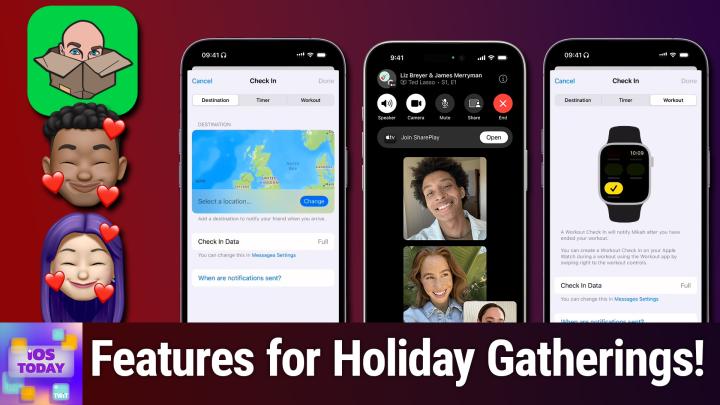
All TWiT.tv Shows (Audio)
iOS Today 729: Bringing Friends and Family Together
00:48:05
Check In, Family Sharing, Jackbox Games
Loading summary
Transcript53 lines
- [00:00]
Micah Sargent
Coming up on iOS today, Rosemary Orchard and I help you bring your friends and family together for the start of the holiday season. Stay tuned for this episode of iOS today.
- [00:12]
Leo Laporte
Today's show is brought to you by Progressive Insurance. Do you ever think about switching insurance companies to see if you could save some cash? Progressive makes it easy to see if you could save when you bundle your home and auto policies. Try it@progressive.com Progressive Casualty Insurance Company and affiliates POT Savings will vary. Not available in all states.
- [00:35]
Advertisement
Black Friday week is here and so are amazing deals at Amazon. You'll save so much on early holiday gifts for the home like vacuums, bedding and home decor. You'll have money left over for those sweet handbells you've had your eye on or those gingerbread scented candles that help with the illusion that you made the dessert. Oh, what fun it is to save. Black Friday week is here with deals up to 35% off.
- [01:05]
Micah Sargent
It's better over here.
- [01:07]
Advertisement
ATT customers switching to T Mobile has never been easier. We'll pay off your existing phone and give you a new one free. All on America's largest 5G network. Visit t mobile.com carrierfreedom to switch today.
- [01:21]
Pay off up to $650 via virtual prepaid MasterCard in 15 days. Free phone up to $830 via 24 monthly bill credits plus tax, qualifying port and trade and service on Go 5G next and credit required. Contact us before canceling entire account to continue bill credits or credit stop and balance and required finance agreement is due.
- [01:38]
Micah Sargent
Podcasts you love from people you Trust.
- [01:42]
Leo Laporte
This is TWIT.
- [01:48]
Micah Sargent
This is iOS Today episode 729 with Rosemary Orchard and me, Micah Sargent. Recorded Tuesday, November 12th, 2024 for Thursday, November 21st, 2024 bringing friends and family together. Hello and welcome to iOS Today, the show where we talk all things iOS, iPados, TVOs, WatchOS, Vision OS and all the other OSes that Apple has on offer. We love to talk about them on this show. We love to talk about the features, the apps, the gadgets and gizmos that help you make the most of your devices. I am one of your hosts. My name is Micah Sargent and I.
- [02:29]
Rosemary Orchard
Am Rosemary Orchard and always very excited. We don't have Thanksgiving over here in the UK and I know Canadian Thanksgiving was a while ago but we are coming up on the time of year where people tend to spend more time indoors. At least up here in the Northern hemisphere. I understand the Southern hemisphere. They're a big fan of barbecues at this time of year. But that's fine. I wish it was barbecue weather. But either way, you know, spending some time with your family and your friends and all of those things seems like a great idea. So why shouldn't we take make the most of that and use our tech to help help us rather than hinder us?
- [03:02]
Micah Sargent
Indeed, yes, there's the complaint of people spending too much time on their tech instead of spending time with the family. Well, sometimes we use our tech to spend time with our families, particularly for those of us who live in different places. And one way that that has become more and more possible is through technologies like FaceTime. Because during the pandemic, there was a big shift in the focus of the different companies, the different tech companies out there to help people come together, be it for work or for play or for anything in between. And so these companies strove to find ways to use their technology to make that possible. And one thing that came out of that was many an improvement to FaceTime. To give you the ability to share in content with others who are in different places. Through a feature called Share Play, you can watch movies and TV shows together. You can also play games together. You can play music together. All of these features where multiple people kind of collaborate together while either watching or listening to something, is all under the blanket that is known as Share Play. So how does one do that? And sort of, where is it possible to do that? Is this system wide? Does an app need to support it? How does it work?
- [04:41]
Rosemary Orchard
Yeah, well, to start with, people are going to need Apple devices of some kind, something that supports FaceTime, which does include the newest Apple TV as well. So that is worth knowing, because if you have the newest Apple TV, then you can actually start a FaceTime call from there. So the first thing you're going to want to do is hop on. A FaceTime call doesn't have to be video, can be audio with your family, your friends, all those people that you love and that you would like to share an experience with. Because Share Play is about sharing, okay? And so you start, you're having a chat, everyone's there. Grandma finally arrives and she figures out that it's, you know, a video call and she needs to put the phone in front of her face instead of to her ear, so you don't see the inside of her ear for the whole call. Once you've dealt with all of that, then you start by opening the Apple TV app, for example, and playing the music, or playing, sorry, not playing music, you can also do that, but you start by playing the video in the Apple TV app, and then you can share it with SharePlay. And once you've started that, everybody has control. Okay, so there's no, oh, can you pause it? Can you pause it? I mean, there might still be some of that. Especially if somebody's in the kitchen cooking, because that's where my mom always is. I swear, every time I call, call her, she's in the kitchen cooking, and she wanders away from her phone and she's not wearing her AirPods. I love her. She drives me crazy. But that's family, right? That's family. You love them even though they drive you crazy. But yes, when you start playing a video that has Share Play functionality. So not every app has this. Some services like Netflix, Disney plus Plex, they have their own way of sharing a playback session, which you'll need to go into those apps to find out how that works. But for FaceTime and SharePoint things you tap on Play, it'll pop up and say, hey, would you like to Share Play? You say, yes. And everybody can control it. They can adjust the volume individually and close captioning individually. So if you've got one person who loves subtitles and one person who hates subtitles and gets driven crazy by them, that's fine. If they're watching on different devices, they both get to have their preferences. And so everybody can watch video together in one of these shareplay sessions. And this is really nice. So if you are on an iPhone or iPad, it's very simple. If you're on an Apple tv, it does depend which generation of Apple TV you're on as to how it works. So if you're on the Apple TV 4K, second generation or later, then you start a FaceTime call in the FaceTime app on the Apple TV and you can use your iPhone or your iPad as continuity camera for that. And then you start watching a movie, a show, music video, whatever. And if you're on an Apple TV, HD or 4K first generation or earlier for the ones that support it, then you start the FaceTime call on your iPhone, your iPad, or your Mac, and then you join the shareplay session through Control Center. So, yeah, this is all documented in the on the Apple website, but it's a really fun way of, you know, watching a film together, watching a TV show together, especially if there's a classic that you will watch around the holiday season, if maybe one person can't be there or, you know, traveling is a bit much for some people this year, or it's just friends that you've not seen in a while and you'd like to catch up. But not everybody has the bandwidth to sit on a call for multiple hours. But you want to spend that time together, then it can be really nice to put on a film as something in the background to keep you entertained. And yeah, that's just one of the ways that you can use shareplay. But there's also more together Share Play. So We've talked about shareplay over FaceTime, but there is also shareplay in person. So for example, if I were visiting Micah and I went to Micah's house because he'd invited me like the lovely person he is, and he had music playing on the Apple tv, then I would be able to, if he has enabled this, join a shareplay session for on the Apple tv. Which means that I can, you know, control playback, I can add music to the up next list, and so on and so forth, which is really lovely. And it also means that a shareplay session is not going to be necessarily reflected in your music listening history. So Micah doesn't necessarily have to worry about me having Dancing Queen on repeat ruining his Apple Music recommendations forever. I'm sorry, I love abba. What can I say? I also love Queen and Freddie Mercury. And so that is something that you can do with the Share play on Apple TV. Now, this does also work with HomePod and also say, for example, you were going to go on a little road trip together, might be 20 minutes down the road, might be 20 hours across the country, depending on how big your country is. But if you're going to be driving together, then Apple Music has share play in CarPlay as well. So whoever's phone is hooked up to CarPlay is doing CarPlay. But then passengers can join SharePlay either by tapping a notification on their phone or by scanning a QR code which can pop up in the music app in the car in the now playing screen. And so people will need to have devices with iOS 17 or later and the driver, or more specifically the person whose device is connected to CarPlay needs to have an Apple Music subscription. Nobody else needs an Apple Music subscription for this to work. And everybody needs to allow their contacts to discover them when playing music in the cars. And that's under Settings Apps Music and then there's discoverable by nearby contacts. But yes, once you've done that, then that means that if I were on a road trip with Micah, then I would be able to queue up Dancing Queen and then Micah, because I'm assuming Micah would be driving, would be able to hit Skip on the driver's steering wheel controls every time it came on. But that would be okay because, you know, I would be doing it for fun, not because I desperately needed to hear the song. So that's just some of the ways that you can use Apple's media apps to share with everybody else. And that's music and tv, which music TV and film, which is really lovely. Also, if you have purchased a film through Apple TV through the Apple TV app or a TV show, I believe the SharePlay also works for those as well, which is really great. If there's something that's not available for streaming that you would like to free.
- [11:08]
Micah Sargent
Watch, I think this, these features are fantastic. It's one of the, in my opinion, best additions that Apple has made to iOS, iPadOs, et cetera in a long time. And you know, the collaborative nature that is there that was predicated on that horrible, horrible thing that we went through. I am glad that this came out of it at least. It is a great set of features that has made the difference for me as someone who all of my family lives in Missouri and so the fact that I'm able to do that is great. So those are some of the ways that you can use shareplay to interact both in person, which is cool, but also when you are in two different places. But there are some other tools as well. Rosemary is going to talk about a newer one, but I want to talk about one that's been around for a while that I am always telling people about and they don't realize is possible. It's called shareeta and it's a feature that's part of Apple Maps that is so awesome. So when you use Apple Maps, be it on your phone or in CarPlay and you are in driving mode or you're using CarPlay and therefore the phone knows that you're in driving mode, you are able to share your ETA with another person. This can be a person that uses an iPhone or has some other app that uses or rather device that uses imessage. Or it can actually be a person who just does SMS texting or RCS texting for modern devices. And when you do this, the system keeps track of your estimated time of arrival and tells the other person about that estimated time of arrival. So if they have an iOS device or an iPadOS device, if they're able to follow along with an Apple device, basically they are given a constant ETA that also shows your current location. I use this all the time when I am going, whether I'm leaving the house or I'M coming back to the house. I like to share my ETA with people, in particular my significant other, to make sure that if I was to be in an accident or something like that, they would know. What it does is it updates the person on top of just being something they can check in on and say okay, this is where they are along the route. If my route were to change because of an accident on the road or if I needed to stop and get gas or something like that, it will send a notification letting the person know, oh this person's ETA has changed and it's actually going to take X amount of time for them to get there. Now what's cool is that again this works with people outside of the Apple ecosystem as well. If you share your ETA with someone that is using a non Apple device or doesn't have an imessage account then it will update them via text message if that ETA changes and so you are able to keep them up to date on what's going on, which I think is really again such a cool feature. So sharing your ETA through that means is very simple. You'll in fact you'll see it pop up where it will just say share ETA in the Maps app, but you can also just ask Siri to do so. So while you're driving you can hit the button on your steering wheel or say the phrase out loud and say the words share ETA with and then the name of your contact Siri will confirm and then you're able to move along with that confirmation and again that's going to be the whole time that you're doing that route. So it will automatically keep them updated. You don't have to constantly text them to keep them updated. I love that feature. Leo used to use it whenever we did iOS today together to keep me updated on his location as he came in in the morning so that I didn't have anxiety about him having had an accident or something like that on his way into work. Which is mostly where my mind goes whenever it comes to people driving. So it's nice to have that ETA shared as well.
- [15:39]
Rosemary Orchard
Yes. And yeah, ETA can also be added permanently to pins. So if you have favorite locations in maps which then pop up in the car, then you can also add people to that to have them automatically notified. So for example my parents house I have set up as a pin and whenever I tap on that it automatically shares my ETA with my mom. I have discovered there is no point sending it to my dad because I get there and then I've been there for an hour and then he goes, what's this? And he hasn't seen it because he doesn't check his phone that often, but my mom does. And this way, you know, it's only a 10 minute drive but they know when I'm going to get there, which is great if I'm running a little late for lunch or similar. But sometimes you want to check in with somebody to let them know that you've arrived home okay or something else. And maps isn't necessarily the solution to that because maybe you're doing a workout and it's like whenever I finish my workout, like whenever I finish my workout or just in an hour, I want like an automatic check and sent that you know everything's okay unless you know something isn't okay. And so there is a new feature called check in which is built into messages. And so I'm just going to pop open my messages with Micah here and then I will start showing everybody. So if you tap on little plus next to messages, so over on the left hand side, this is where you can, you know, take a picture with your camera, photos send Apple Cash, do, audio send later. It's also in here which can be really nice. So if you know that, you know you're probably going to get a message from somebody at like 7:00 in the morning saying is everything okay? Then you could send a schedule message to 7:05 saying I'm not awake yet, try, try later. And then if you're already awake then you can, you can cancel that obviously. But if you scroll down a bit then there's check in. And check in is a great feature where it pops up and it says hey, check in. Okay around 1735. So that's about in an hour from now. And if I pop in and tap on the edit on this, then there are actually three options here. So I can check in when I get to a particular destination, I can check in based on a timer and this. So timer means that I will be prompted at a particular time and if I don't respond to that on my end within 15 minutes, then Micah gets a notification. Okay, this is what's commonly referred to as a dead man switch. So by something not, not happening, then the automation will continue to go ahead. Which basically means that hey, if I don't check in in 15 minutes then that means that something could be wrong and I'd like to let people know. And then there's the workout option. So the workout check will automatically notify the person after you finished your Workout, which can be really useful if you are, for example, going for a run and it's wintertime up here in the Northern hemisphere. It's dark outside, it's rainy, the streets and parks aren't necessarily super well lit. I could be very enthusiastically licked by a golden retriever if I go for a run in the park. So fortunately I live in a very safe town. But either way, if I were going for a run in the park, I would absolutely use this check in feature to let my parents know that I got home safely. You know, and if I, and if I didn't and they got this notification, then they would know to come look for me and that would be fine. But yes, so check in has these different options when you get to a particular destination with the timer or workout. But if you go into settings and then apps, messages and then scroll down, there's check in data and you can change this. So full data will send somebody, for example, the battery level of my phone and the battery level of my watch, how my phone's connected, like, do I maybe have very little signal, in which case they know that it's going to be a bit more difficult to call me, so they should probably try messaging me. But they can see I'm on WI fi, so they can try FaceTiming me and, and then they can see also my route. Okay, and don't worry, folks, this is sample data. This is not showing my home. And so here I can see the person. I can see a green pin of where they were intending to go. I can see some points on a map and I can see, oh, their phone was unlocked at this point. It shows us the little padlock that's open. And then the watch was taken off at this point. Oh, that might be not so great. And then there's also a limited one which just sort of shows where the person is on a map. And it does still show battery level and signal level of devices. But it doesn't necessarily show that, for example, the watch was removed and taken off or that your phone was last unlocked. Because if they can see that your phone was last unlocked two minutes ago, then I would hope that the person that you share the check in information with is going to try calling you first and going, is everything okay? Versus immediately jumping to the, oh my God, everything's on fire, call the police. But yes, this is a really great way of letting people know that you got home safely. I particularly like the workout one and the destination one because if I get to the place, then it just lets them know, hey, she got there, it's all good. The time one, however, can also be really good to let somebody know that, hey, they didn't check in by this time were they supposed to. I've actually used this a few times, not quite as Apple intended, I don't think. But for example, when I was meeting my parents and my uncle for lunch recently at the week weekend, I had this set up. So if I didn't like stop it by 9:30 it was going to message my mom so that then she'd be like, okay, well Rose definitely hasn't woken up. She's clearly sleeping very heavily. Maybe we should go around and knock on the door and check that she's okay. And I woke up and I had turned it off before it popped up. So that was great. But it is a nice option if you maybe need a little extra help with things like that every once in a while.
- [21:19]
Micah Sargent
Yes, when Apple added this feature, I definitely celebrated the addition of it. The fact that you can choose how much information to share and that it can be kind of a temporary thing and it's great for particularly sharing with friends. I'm not somebody who likes to share my full on location with hardly anyone. Oddly enough, one of the people who does have my location is friend of the show James Thompson. But I just don't share my location with two many people.
- [21:50]
Rosemary Orchard
Yeah, yeah. James is collecting a variety of podcast hosts. He also comes on to Clockwise, for example, which you host with Dan quite often and hosts there occasionally. But yeah, he seems to be collecting a lot of people. It's quite entertaining. When you talk to him, he's like, oh, I see that you're visiting Micah. Oh, I see you're visiting Kathy. Oh, okay, cool, thanks.
- [22:14]
Micah Sargent
So that's a way to use check in and particularly around the holidays, I think about people who gather. You know, we're planning to because we won't be near family, the friends that we have nearby will be gathering together. And so check in is a great way to do that, even if you don't want to go as far as to share your full on location at all times. Now one way to also bring family together is by making use of some of the features that Apple has introduced to make it so that family can share in different things. And as Rosemary points out around this time, this is a great opportunity while everybody is together to set up features like family sharing, which does require interaction from individuals within the family who are hoping to like join the team. I remember when I set up family sharing with my family Me is the one kind of hosting the family sharing. I had to kind of set aside some time, talk people through the process, let them know what they needed to do and it's involved. And so having someone there physically makes that process a lot easier. And then you can walk them through and talk about what they're opting into in different places in different ways. So family sharing, though, means that you and your family can gain access to app subscriptions with, you know, one person's app subscription if they have family sharing turned on. It means sharing photos. If you would like to set up a shared photo album, it means easier access to a shared calendar, shared reminders, location can kind of be built in. So there's a lot of. There are a lot of benefits to using family sharing, but I do think it's still a little complicated to get set up from a distance, at least based on my own anecdotal evidence.
- [24:20]
Rosemary Orchard
Yes, and I certainly understand why it can be a little challenging. Especially the thing that often takes a while for people to wrap their head around is that they are no longer paying for their purchases. It is that you, the person who is the head of the family, the person who set up family sharing, who will be the person that gets billed for all of the things. Now, you can work around this, and in my family we do work around this by buying a good old gift cards and we buy what was previously itunes gift cards and now our app store gift cards for any apps or purchases and subscriptions that my primarily dad once. But honestly, most of the time if my parents go to download an app, I've probably already bought it and have a subscription for it anyway because I'm the one that recommended it to them. So that works incredibly well in my family. However, there are some things that you can do with your family that don't require you setting up family sharing with all the apps and everything as well. So for example, if you don't want to share app purchases, iCloud storage, etc. You can still create shared photo albums and share them with each other. You can still create a shared calendar and shared reminders lists and share them with each other. And you can also choose to share your location or not share your location with your family members if you would like to do so through the Find My app. And also you can set this up through messages. And I will just remind folks how you can do this in messages because that is quite a nice thing. So in messages, if you tap at the top on the person's picture at the top of a message. Then you can see I've got the option to request Micah's location. That's not what I'm going to do. I'm going to share my location. And if I'm sharing my location, I get three choices for one hour until the end of the day and indefinitely. And this can be quite a nice thing to do with friends and family members. Especially if say for example, family gathering. Oh, we forgot insert super important crucial ingredient for the dinner that we're making here. Okay, I'm going to be the one that runs the store to get it because I'm not as useful in the kitchen necessarily. So I'll run off. But I will share my location with them so that they know where I am. You know, if there's like three stores I need to run to and they go, oh no, shoot, we also need this. They can check, oh, she's, she's at that store. I'll message and ask her to grab that. So the one hour or the until the end of the day. Location sharing can be extremely useful for things like that. But there are a lot of things that are available through family sharing. But you don't necessarily have to go full on with family sharing if that, that's not for you.
- [26:56]
Micah Sargent
Yes, I like that too. The fact that it doesn't need to be everything. I think we have purchase sharing turned off but everything else is enabled with some of the family members. Some don't want to share their location, which is fine. And so that's also disabled for some users. So it's you know how much you want to share or excuse me, how little you want to share and that works for people. But giving shared access to my Apple subscriptions like news and music and whatnot is also quite handy. And as I mentioned, it just makes it easier to share some of those things.
- [27:37]
Leo Laporte
Today's show is brought to you by Progressive Insurance. Do you ever think about switching insurance companies to see if you could save some cash? Progressive makes it easy to see if you could save when you bundle your home and auto policies. Try it@progressive.com Progressive Casualty Insurance Company and affiliates. Potential savings will vary. Not available in all states.
- [28:01]
Advertisement
It's better over here at&T customers. Switching to T Mobile has never been easier. We'll pay off your existing phone and give you a new one free. All on America's largest 5G network. Visit t mobile.com card carrier freedom to.
- [28:15]
Switch today pay off up to $650 via virtual prepaid MasterCard in 15 days. Free phone up to $830 via 24 monthly bill credits plus tax, qualifying port and trade and service on go 5G next and credit required. Contact us before canceling entire account to continue bill credits or credit stop and balance and required finance agreement is due.
- [28:32]
Micah Sargent
All right. The last thing of course is the fact that there are some third party apps out there that are great to bring friends and family together and there certainly that I think rises above the rest because I don't think I've ever had a gathering that was not that was. That used this app where people were not happy with the fact that we were using this app. Do you want to tell us a little bit about J.jpg?
- [29:16]
Rosemary Orchard
Yeah, sure. So jpg are jackbox party games and they make apps not just for Apple TV and Mac, but they also make them and you can purchase them on Nintendo Switch, Steam for Steam Deck and so on and so forth. They're available on a number of platforms. But for example, if we were to select jackbox party pack 7, which is one of the many apps that they have, their party packs tend to be around $30, but those ones contain multiple games. And so it pops up again or it pops up a choice of games. You select one and everybody pulls out their device. It does not have to be an iPhone. Androids are also welcome if you choose to allow such devices in your house, which personally I think you should. You can't convert people to the better way of doing things unless you let them in and show them. But either way, you pop it up, you select a game, everybody joins it pops up a code for everybody to join room so everybody types in the code and then you play the game, whatever it is. So sometimes it'll be that you get given a word or a couple of words and you have to draw a picture of it and people get points based on how well they guess what it is that you've drawn and if they get the exact right thing and so on and so forth. And honestly there's. There's a whole bunch of games which are really fun and I could probably spend hours explaining them all to you and I'm not going to because I think is worth playing yourself to find out. Now the games do go on sale on a fairly regular basis, so I recommend looking out for those sales, especially with Black Friday coming up. But the Jackbox party games are excellent and I love having the Jackbox party pack as a tool that I can just bust out at any entertainment thing for whatever games it is because yeah, their games are great and it's not like you need to teach Grandma how to use an Xbox controller or anything like that. You can just, just like set up the game and then people do the little bit and then it's basically just tap on your phone screen after you've done the first part of the game to continue playing it, which hopefully everybody can participate in. And also reminder, if not everybody's got a device or is super comfortable using it, you can play these things in pairs or little teams. So you get one person who's really good at drawing to do the drawing part and then everybody else takes in turns or something like that so everybody can join in and have fun. But yeah, I've always had a lot of fun playing the jackbox party games.
- [31:55]
Micah Sargent
Yeah, it's always great if there's LOL and you're feeling like, oh, I'm hosting and I need to make everybody excited or whatever. This is a great opportunity to do that so I really recommend them and you'll definitely get your money's worth. Not a sponsor, just a really good set of games. All right, if you have some ways that you bring your family and friends together using iOS, iPados et cetera, well, all you need to do is reach out to let us know. Iostodayatwit TV is how you can get in touch and we would love to hear about the apps and settings and features that you use for that. It is time for feedback and Rosemary's going to take it this time.
- [32:44]
Rosemary Orchard
Alrighty. Well, we have a couple of feedback questions this week and our first one comes from Mike who has written in hi there. I wasn't sure if this was more of an iOS today or a hands on tech type of question, but here goes with it. With the release of the new Mac Mini, I think I finally want to upgrade my 2009 seriously mini that I use basically as a headless server for homebridge channels, et cetera. The old Mini doesn't really update anymore and I'm falling behind on those services as well as a result. As a side note, I will say that otherwise it is still totally useful for web browsing and emails, which is a testament to Apple. Yes, I agree with that. Currently in order to actually use the Mini I have to swap around HDMI inputs on my TV and go get my keyboard and trackpad. I don't use it often and it's just inconvenient enough to be annoying. I'd like to know if there's an app I can run on the Mini that would allow me to connect using my iPad, making it my keyboard, mouse and monitor. I would like it to be persistent through restarts as this is the primary time that I need my Mini to restart various servers. Thanks for any help you can provide. Well, the good news Mike is I actually have a suggestion for you which I personally use all the time, which is Jump Desktop. So Jump Desktop, you purchase it on the iPad, it's $14.99, one time purchase. You download the free Jump Desktop, connect on the Mac Mini and set it up. And make sure to sign in on the Mac Mini as well because that will mean that it will then hopefully be persistent through restarts and then you can connect using your iPad. Now the only little tricky bit for this might be if the Mac doesn't have a screen connected to it, then it can get a little bit cranky about that and that it doesn't have a display for you to replicate. And if that is the case, then there is an alternative to this which is Luna Display. And Luna Display is, is a little dongle that you plug into the Mac Mini, pop it into one of the USB C ports and it becomes a display basically. And then you can use the Luna Display app on your iPad to connect to the Mac to as the monitor. So that would also be worth considering. There are also options on Amazon, I haven't personally tried them of dummy hdmis where basically you can just buy something that plugs into the HDMI port which tells the Mac Mini, yeah, there's a screen here totally and it's a fake screen so that when you just try to connect through remote desktop, then there's a screen there for it to replicate. So fingers crossed those options will work for you. I would probably go with Jump Desktop and just trying one of those dummy HDMI options from Amazon because Luna Display is great, but it's certainly on the pricier end of the choices. I hope that you Enjoy your new M4 mini Mac mini. It's so tiny. It's adorable. I love it. I've got my Big Mac studio here and I really love it. But yeah, if you're not really using it, logging on and doing stuff on a regular basis, then absolutely having something tiny underneath your TV is a great option. Something else I do just want to mention that might make it a little easier if you do need to connect displays is you could also look into a HDMI switch which, which is basically a little bank of HDMI ports with a button on top and sometimes even a remote control to switch the inputs for that port on your tv. So I'm assuming that you don't have enough HDMI ports on your tv, which is why you have to switch the cables. But if you grab an extra HDMI cable and then, yeah, you would have a HDMI switch, so then you can pop up the screen on the Mac Mini, which would mean that, you know, you can at least see. Ah, right. There's a security thing that I need to go through. I'll go grab the keyboard and mouse with a little less effort.
- [36:38]
Micah Sargent
Beautiful. All right. I agree about having the headless one. I think that's a great way to do it. Tell us about the feedback from Neil.
- [36:50]
Rosemary Orchard
Yeah, so Neil has a little question which he's actually asked you because I think you might have helped out with this previously on another episode of the show or previous or a different show. But yeah, he would like to know if you can help him with the Apple Podcast app. Neil says. Hi, Micah. Try as I might, I cannot reduce the size of the Apple Podcast app. I have the settings set to download last episode only, delete after played, sync library off, etc. No matter what I do, the app size remains at 10 gigabytes. The app size itself is 27.8 megabytes, but documents and data is 10.12 gigabytes. I have plenty of storage, so it's not that I need to free up space. I'm just perplexed why it's so big and why no matter what I do, it remains at 10 gigabytes. I've tried all the suggestions on discussions from Apple's websites and all the recommendations, and I've basically tried everything. I've uploaded the app and then reinstalled, hoping it would clear the storage. But after it returns to 10 gigabytes. Well, I don't know how many podcasts you're subscribed to, Neil, but a video episode of one podcast is probably going to be somewhere between 500 megabytes to a gigabyte. It could even be a gigabyte and a half if it's a 4K episode. So I would start by looking at what you're subscribed to. Now. Offloading the app is only going to uninstall, like the app part of it. It's only going to do the 27.8 megabytes. If you want to completely clear out all the storage that's used by it, you're going to need to delete the whole app, which is going to get rid of all of the subscriptions and everything as well, probably, and then reinstall it that will get rid of the 10.2 gigabytes that's being used approximately. It's not. It's more like 10.15. But yes, but that will. That will get rid of it. But yeah. I would ask how many podcasts you've subscribed to and also have you downloaded any ad hoc episodes of anything at any point? Because if you have, those don't get affected by the download last played setting, they will just stick around probably until you've played it. And so if you downloaded, I don't know, a bunch of episodes of Hands on Mac with Micah, which is a great show here on the Twitter network, then you might have those floating around even though it says download last only because you manually went in and downloaded them. So those are all options worth looking into. So yeah, I don't know if you've got any extra advice for Neil Micah.
- [39:27]
Micah Sargent
Well, I just wanted to double down on what you one thing there, just not to glance over it. A lot of people are unaware of the fact that offload app means what you have explained that it means when people hear offload app they think it's going to get rid of the data of the app on the device. And it's the opposite. It saves the data there. It just takes the app itself off of your device. The idea is that if you're not using the app, but you may at some point in the future want to use it again, then let's go ahead and get rid of the app and everything that's built in, but keep the data so that if you decide to use it again in the future, all you have to do is download the app and then it can reconnect to that data. So offloading an app again does not remove the data that's part of the app, it just removes the app itself. So if it was a photos app, then the photos that you've created with it are going to stay, but the actual creator part of the app is what goes away. So just keep that in mind that offloading does not remove it. And I think that Rosemary has hit the nail on the head in terms of you are probably going to if if it's not that you've downloaded ad hoc episodes, if for some reason it's still remaining at 10 gigs, then deleting the app itself completely, not just offloading it, is probably what's going to solve that for you. But I also recommend that after you've done so, checking your multitask. So once you've deleted it, double check that in the multitasking view the app has been killed and then force restart the device so that the cache and everything is completely wiped and that you're going in fresh. Then go in and check your settings, make sure that it's all gone from there. If it's not, then try to remove it from there, then redownload and that should kick that saved data out. If it doesn't at that point, then you probably have a corruption somewhere and plugging it into your Mac and doing a reinstall of the software, not a complete reinstall of the phone, but just to reinstall the software might solve the problem. Neil. But these are fun. I love these questions because Neil, you do point out, you're like, it's not that it's causing me any issues, I've got plenty of space. But it is, it's frustrating. You're like, why is this still here? It doesn't make any sense. And so in that way it's very helpful.
- [41:58]
Rosemary Orchard
Yeah, offload app is really mostly useful if you've got an app that itself is really big, but your personal data for it is really tiny. So for example, GarageBand is a pretty big app. And if you've only got one or two little projects and you're not going to use GarageBand for a couple of months, you could offload GarageBand, especially if you're working on managing your space and you don't have a huge amount of it. But generally offloading an app, it's not really going to free up that much storage space versus the amount of data that is being used by a lot of these apps.
- [42:28]
Micah Sargent
Indeed. Alrighty. I can hear the music. It's time for Shortcuts Corner.
- [42:43]
Leo Laporte
Today's show is brought to you by Progressive Insurance. Do you ever think about switching insurance companies to see if you could save some cash? Progressive makes it easy to see if you could save when you bundle your home and auto policies. Try it@progressive.com progressive casual insurance company and affiliates. Potential savings will vary. Not available in all states.
- [43:07]
Advertisement
It's better over here at&T customers switching to T Mobile has never been easier. We'll pay off your existing phone and give you a new one free. All on America's largest 5G network. Visit t mobile.com CarrierFreedom to switch today.
- [43:23]
Pay off up to $650 via virtual prepaid MasterCard in 15 days. Free phone up to $830 via 24 monthly bill credits plus tax. Qualifying port and trade service on Go 5G next and credit required. Contact us before canceling entire account to continue bill credits or credit stop and balance and required finance agreement is due.
- [43:37]
Micah Sargent
Welcome back to Shortcuts Corner, the part of the show where you write in with your shortcuts requests. And Rosemary Orchard, our shortcuts expert, provides a response. Our Shortcuts Corner request this week comes in from Dustin, who has happily shared a lot of a lot of pet tax. So we'll get to that in a moment, but Dustin writes. Hi, Micah and Rosemary. Living in Montana, I use a remote start in the winter to warm up my truck. The problem is it has manual climate control, so I have to remember to adjust the temperature before I leave the vehicle to what I would like the next time I remote start it. What I would love is a shortcut to run as I disconnect my iPhone from CarPlay reminding me to adjust the temperature. If this is possible, you guys would be saving me many cold mornings running to my truck with shoes not suitable for snow. And then Dustin follows up by saying, my pet tax will be paid with Cookie, who is a cat. We'll see this photo in just a second. Oh, my goodness.
- [44:35]
Rosemary Orchard
Very cute kitty cat posing for the camera.
- [44:38]
Micah Sargent
Absolutely posing. Cookie, the cat is sitting on a white. Looks like an outdoor kind of sofa deal. And is a multicolored striped kitty with an adorable little white mouth. Yeah. And then Sushi, who's also a cat. Oh, my goodness. Sushi has beautiful blue eyes and is mostly sort of like a off white color with some black patches here and.
- [45:08]
Rosemary Orchard
There and is including a little half mustache.
- [45:11]
Micah Sargent
Yeah, a little half mustache. Almost like some sesame seeds in places like a little piece of sushi. And then Fancy, who is also a cat. And wow. Fancy.
- [45:24]
Rosemary Orchard
Fancy is posing with a toy.
- [45:26]
Micah Sargent
Fancy is very fancy with a little toy lobster sitting in a bed and has a adorable little black nose. And last but not least, Ellie the dog, who must be outnumbered by these cats. And Ellie looks like a big white label.
- [45:44]
Rosemary Orchard
Looks very good natured.
- [45:46]
Micah Sargent
Yes. Posing next to obviously what must be a stick that Ellie has found. No, it's a. It's a trick tree that has been knocked over, but it kind of looks.
- [45:54]
Rosemary Orchard
Like Ellie, but Ellie still found it. And it's technically a stick. It's just a very big stick. And Ellie may struggle to take it home, but that doesn't mean that it's not something very enthusiastically being appreciated.
- [46:05]
Micah Sargent
Yeah. Ellie looks proud next to the stick. Yes. All right, Rosemary, why don't you take it away and help out Dustin?
- [46:13]
Rosemary Orchard
All right, well, I'm definitely going to help out Dustin. Because running outside in shoes not suitable for snow sounds like there could be a couple of problems there. Hopefully got fall detection enabled on your Apple watch. We did mention that in our previous episode of iOS today. That was 7:28 last week. But what we are going to need to do is create an automation in shortcuts and this is possibly going to be the shortest shortcut we have ever created on iOS today. Now, usually when you create an automation, I say make a shortcut and then run a shortcut, but in this case we're not going to do it. And there's a good reason for that. But either way, inside of shortcut we need to go to the Automation tab and tap on the plus and then scroll down and look for CarPlay and there is a trigger for CarPlay and so you can say when your device disconnects, don't forget to uncheck the connects one and then make sure that this is set to run immediately because that is going to be very important. And then we're going to create a new blank automation. Then there are two choices here. I'm going to go with the notification because I think the notification is probably going to be the simplest one for this. You could also add a reminder and set the reminder to now. But let's leave this with just the notification. Set the car's heat for tomorrow and that's it. That's literally all we're going to do. And so then when you get out of the car and it will just pop up a notification that says set the car seat for tomorrow and that'll be it. Now if you were driving somewhere and then you get out the car at that end and then you aren't going to need this, then it's still going to pop up and we could get fancy and fix that, but if you'd like that, then write back and let me know and we can get into figuring out whether or not the shortcut should run based on times of day, physical location, all sorts of things. But for the time being, thank you so much for the overload of cuteness, Dustin, because that was definitely, possibly the best pet tax we had, paid just in quantity, but also excellent quality. But yes, that was absolutely fabulous. And a single action shortcut with a trigger for the automation, which is Chef's Kiss.
- [48:35]
Micah Sargent
I love that you've overpaid. So then it gets balanced out. And so now other folks are able to do that. That is going to bring us to the end of this episode of iOS today. I want to thank you all for writing in, you can email us. Iostodayitwit TV is how you get in touch. Next Thursday for this episode that's published will be Thanksgiving, so there won't be an episode on that day, but we will see you again the following Thursday. So thank you for tuning in. If you again want to get in touch, iostodayatwit TV is how you get in touch Quick reminder about Club Twit Right now for a limited time, we're offering two weeks of Club Twit for free. Twit TV Club Twit. So if you've yet to check it out, now's the time to do so. If you would like to become a member of the club after those two weeks, it's just $7 a month and we'd love to have you join the club. You gain access to ad free versions of all of our shows access to the Club Twit Discord server, which is a fun place to go to chat with your fellow Club Twit members and those of us here at Twit, the Twit plus bonus feed that has extra content you won't find anywhere else, including behind the scenes. After the show. Before the show, special club Twitter events get published there and you also gain access to the video versions of our Club Twitch shows like this one iOS today, also my show Hands on Mac, also hands on Windows and some others. So be sure to join the club. If you are a member of the club and you would like to have free months of Club Twit. We have a Referral program now, TWiT TV ClubTWiT referral is how you check that out. So two weeks free TWiT TV Club Twitter, $7 a month after that and then referrals available to those of you who would like to invite your friends. Thank you for being a member of Club Twit if you are, and if not, thanks for considering it and checking out those two weeks. Rosemary Orchard if people want to follow you online and check out all the great work you're doing, where should they go to do that?
- [50:24]
Rosemary Orchard
Well, the best place to go would be rosemary orchard.com, which has got links to apps, books, podcasts and all of the other fabulous things that are available online. And of course you can find me in the Club Twit Discord hanging out with people during recording and after the show. Folks, where can Micah be found? Micah, tell us.
- [50:41]
Micah Sargent
I can be found ikasargent on many a social media network or you can head to Chihuahua Coffee. That's C H I H u a H u a coffee where I've got links to the places I'm most active online. Be sure to check out Tech News Weekly later this week. You can also watch on Thursdays Hands On Mac and on Sundays you can tune in for Hands on Tech. Thank you so much for being here and we will catch you again in two weeks time. Bye bye.
- [51:17]
Leo Laporte
Today's show is brought to you by Progressive Insurance. Do you ever think about switching insurance companies to see if you could save some cash? Progressive makes it easy to see if you could save when you bundle your home and auto policies. Try it@progressive.com progressive casual insurance company and affiliates. Potential savings will vary. Not available in all states.
- [51:41]
Advertisement
It's better over here now. AT T Mobile get four 5G phones on us and four lines for $25 a line per month when you switch with eligible trade ins. All on America's largest 5G network.
- [51:54]
Minimum of 4 lines for $25 per line per month with autopay discount using debit or bank account, $5 more per line without auto pay plus taxes and fees and $10 device connection charge phones via 24 monthly bill credits for well qualified customers. Contact us before canceling entire account to continue bill credits or credit stop and balance on a required finance agreement due bill credits end if you pay off devices early. Ctmobile.
- [52:10]
Micah Sargent
Com.