← All TWiT.tv Shows (Audio)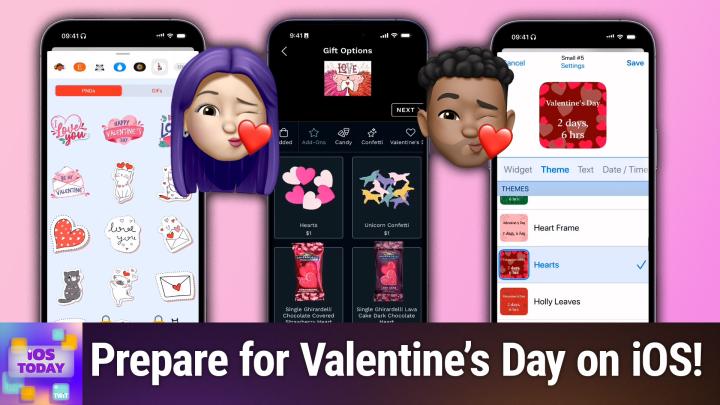
All TWiT.tv Shows (Audio)
iOS Today 739: Sharing the Love on iOS
00:40:28
Ink Cards, Felt, and Givingli
Loading summary
Transcript26 lines
- [00:01]
Micah Sargent
Coming up on iOS today, Rosemary Orchard and I, Micah Sargent, help you learn how to spread and share the love. Stay tuned for this episode of iOS Today podcasts you love from people you trust. This is Twit. This is iOS Today with Rosemary Orchard and me, Micah Sargent. Episode 739 recorded Tuesday, February 11th, 11th, 2025 for Thursday, February 13th, 2025 sharing the love on iOS hello and welcome to iOS Today, the show where we talk all things iOS, TV, OS, watch OS, HomePod, OS, iPad, OS, all the OS's is that apple has on offer. We love to talk about them here on the show to help you make the most of your Apple devices. I am one of your hosts, My name is Ma Sergeant and I am.
- [01:07]
Rosemary Orchard
Another of your hosts, Rosemary Orchard. And I'm really excited to be here today. Maika. We've got a really cute topic lined up which I think is adorable for everybody.
- [01:15]
Micah Sargent
Yes, indeed. So this episode is publishing right before Valentine's Day and so we thought we could take some time to talk about some of the things that you might be able to do. I will, I will be honest that the first couple of apps I'm going to talk about, probably by the time you're listening to this, it'll be a little too late to get a card in the mail. But you know, maybe if your valentine is patient and understanding, then they will happily accept a belated physical card. But we've also got some options on here for you if you aren't looking to send physical cards. But I thought this was the perfect time to bring up the fact that there are some apps out there that will let you send physical cards. Now interestingly, this used to be a pretty robust set of of apps that, that were out there. There were, the market was a robust market. There were maybe, I don't know, eight to 10 different apps that you could go and get custom cards made in. And over time that number has, has kind of reduced and reduced and reduced. One of my favorite apps, I believe it's was called Ink. No, no, Ink is, Ink is still around. It was called Punk Post. That's what it was. And it was a really cool app that let you be able to have hand lettered, like actually written by a human being, cards sent and they unfortunately ended up closing down. But there are some other options available out there and one of those, I might be misremembering that name again, but I think it's Punk Post. But anyway, one of that's available is an app called Felt. And Felt lets you send Cards. So here I am on the main page of Felt, and you can see that they're already promoting the Valentine's card. So let's choose that. So we'll tap on. Well, maybe we. We can kind of scroll through and see the different options that are available. So they've got classic cards, They've got a box of cards. They've got something called a felt bomb, which we'll talk about in a minute. And you are able to create a car. So we'll tap at the bottom, start a new card. There's the square card, which is simply just a little square. The pair card, which has two cards kind of connected to one another. The mini accordion, that has three. The classic accordion, which has four. And then they did end up adding what they call the classic card. This used to not be an option with Felt, and I'm glad that they finally added it because it's a card that you're familiar with. It folds over at the top. You have kind of the front page, and then you open it up, and inside is the writing. And then an envelope, of course, that it goes into. A felt bomb is where you and other people, friends or family all work together to create a card which is super cool. And then it gets sent to a specific person. And then you can also order a box of 25 or more of the same cards. So if, for example, you're doing, like, graduation announcement, something like that, or if you got a lot of Valentine's, you know, well, maybe that's a great way for you to get in touch with them. But let's go with a classic card. So first it shows you what the card looks like. So you can see it opens at the top like you would expect, and it goes into an envelope, and then it can be displayed. So I'm going to choose. Don't show again, because we know how this works at this point, we're able to start with a design so we can look at featured. We can look at encouragement, thinking of you. We can look at stationary, for example. We can let's go with all holidays, and let's go with Valentine's Day, you were my superhero. Or let's roll together, you were the icing on the cake. Or these adorable porcupines with the word love up top. So that's what we choose for the front. On the inside, we can choose another design if we'd like. We can work from our own library, which templates that you can work with. So things that you've created before, you can leave it blank. So that you could write here. We can add greetings. So again, we can do, you know, a special artwork. I'm simply tapping on this area and then I can choose handwrite, in which case I'm actually given the ability to write with my fingers. Using the tools that the app has, I can type something out if I'd like to. Let's go with type. And we will put in a message. Happy Valentine's. And of course that's not exactly precise, but I'm just moving quickly. You can choose a type face, which we'll use one that's a little bit more, it feels a little bit more handwritten. And then of course you can change how it's positioned, the color of the typeface, etc. Etc. So then we're good. And then if you want something on the back, you're also able to pop something on there as well. We'll choose next and then you get a preview of your card. Here's what the front looks like, here's what the back looks like and what it looks like on the inside, and then continue from there. This is my favorite part. You have the option to do things like adding confetti hearts, confetti, unicorns. You can add in candy like Ghirardelli chocolate covered strawberry heart, a two dollar bill, a smiley face sticker, mermaid tattoos, a little a seed paper heart, which of course means that when you, when you plant it, then seeds, different wildflowers are usually in there, smiley face bookmarks, other stickers, the golden girl sticker pack, Haribo gold bears. I mean, all sorts of stuff that you can stick in to this, a keychain. And I love that aspect of it. You can sort it between what different things are. So in this case, maybe I'd want to add in hearts for a dollar and then tap next and then choose when it's sent. It tells you the expected arrival date. So for example, this is expected to arrive on Friday, February 14th. Between Friday, February 14th and Tuesday, February 18th. If you want to, you can pay $10 with FedEx and then it will definitely arrive by Friday. If you pay FedEx overnight $45, then it will arrive by the 13th. So you do have some options as of the day that we're recording this show to get it arrive on time and then you go through the process from there. So that is, that is felt and that is one option for being able to create and send cards. But there is one more option that I'll show you as far as creating and sending cards. The other one I'll show you before we head over to Rosemary is an app called Ink. And Ink is going to be familiar to you after having just seen felt in the sense that it works pretty much the same way. Ink does have other special gifts that you can buy outside of just cards. There are calendars, for example, photo gifts, socks there, you know, coffee mugs that have things on there. But let's choose Valentine's Day and take a look at the different cards suggestions that they have available. So I see a. Oh, a cute photo card that says sending our love. And we can see the front and the back of the card. And at any time, you can change the shape of the card. So I could instead do a folding card. I could add rounded corners to the outside. And then you can, of course, add your photos there as well and be able to give it access to those. You can. You can add your Dropbox, you can add files from your folders wherever it happens to be, and then you can change that as you need to to whatever photos you want. It also makes it very easy to see what text can be personalized. So I've got three spots here that I could add text to. And then we can change the next one. We love you, for example, although I think that that was meant to be like the family and the year or whatever. And then, of course, the back, where, once again, we can add a special text message. We can add a signature very easily to the card and zoom in to see what it is exactly that we're adding. This is a little bit more simple, simplified. But once we've done that, then we're able to send off that card doing the same thing. So once again, this card would go out and you would be able to send it to anyone via your. Via USPS or what have you. So these are two options that are available to you if you're looking to send a physical card to someone. All right, Rosemary, what's first up on your list for sharing the love? Well, this Valentine's Day.
- [11:29]
Rosemary Orchard
Yeah, so first up on my list is actually a just a family thing because my grandmother's name is Valerie, and she was born on Valentine's Day. Yes, you guessed it. Hence her name. And so Valentine's Day in my family is special because it's my grandmother's birthday. So, you know, it's not just about, you know, any one particular person. It's about, you know, all the people that you love. And because of that, I thought this would be a really good opportunity to remind people about a really great app called widgetsmith. And widgetsmith is available. It's on iPhone and iPad. There's also a watchsmith for Apple Watch, which works a little differently. But widgetsmith allows you to create custom widgets which have information that is important to you. So at the moment, I'm creating a countdown to Valentine's Day. And so I will just pop Valentine's Day. Oh, I really can't spell today in there. And then I select the date and I will pick February 14th at midnight. And then I can say, hey, I'm gonna do it. A dynamic countdown. So there's two days and six hours left. I could also choose something from my calendar if I wanted to. And then I've got all of the themes available to me. So, you know, there's light, heart maybe is a little difficult to read, iridescence. That one's quite cute. There's a heart frame. There's an actual Valentine's Day one as well. But there's lots of different ones which can, you know, be really nice if you are looking forward to seeing somebody and you know, you want to count down the days or count down the days to your next trip or similar. But what you can also do is you can create photo widgets. So photos in Widget Smith, there's options to just have one particular photo, have a collection of photos, have all of the photos in an album and it'll cycle through. I picked my funny any album here, which is why I've got like screenshots of tweets and so on. The most recent in an album, a photo locket. And then there's also options to have photos with other information on top. So, for example, you can have the temperature and weather conditions and the date, fuzzy time, a countdown, custom text, etc. And so if I were to select the photo locket, then again, I can choose a theme. So I could pick, say, fairness, sky, and I could choose one particular photo or even generate something with Apple Intelligence. Um, and then I can choose. So it defaults to a little heart, which is quite typical for lockets, which are the necklaces that you have usually a pendant on that can open up. And famously, you usually find cat or dog pictures inside of them instead of people, because, you know, who doesn't love their pets. And then, yes, you, you select that. And I just think that adding custom widgets to your home screen for, you know, pictures of your favorite friends, family and loved ones or pets, whatever works for you, is really lovely. And I really love widgetsmith for this. It can do a whole bunch of other things as well. And it even has the option when it's showing you a picture to tap on it and then show you that in full screen. So I can see what is the Venn diagram between a cat and an inkjet printer. Well, they both spend a lot of time self cleaning and they demand feeding when the container is full. That sounds like both a cat and an inkjet printer to me. They also do IGN requests and they're quite moody so yeah. And unreliable. Yeah, this nailed it. And then because I've tapped on that I have the option to favorite it which favorites it in my photo album. But I can also create a widget using that photo straight from having tapped on that. So I really love doing using albums for this to, you know, just resurface pictures that maybe I don't see regularly enough. What I will also mention in widgetsmith there is a Help tab tab and the Help tab contains a whole bunch of how to videos explaining how to set it up because it is pretty complex in the fact that there are Let me see if I add a small widget. So this specifically small I've got interactive widgets and I'm just going to go through categories. Photos, Time, date, music, weather, air quality, pollen, step counts, health and activity, battery, calendar, reminders, tides and astronomy. Those are the categories of widgets and that's not even touching in on like themes and all of the options that are available for each one. Sometimes there's filters and extra things. So I would highly recommend if you haven't checked out Widget Smith in a while, then check it out again and see what custom things are there because also the most recent update added apart from Apple Intelligence, which was the previous update in December. The most recent update from this month edit widget sharing. So if you have customized a widget with widgetsmith on your home screen, is there anything better that you could do for somebody that you love than share that configuration with them so they don't have to set it up themselves? Maybe, maybe not. But I definitely think that you should check it out. Widgetsmith is a great app and it's free to download with optional in app subscription to get all the cool features.
- [16:34]
Advertiser
Attention Taxpayers the IRS is intensifying collections in 2025. If you owe $10,000 or more or have unfiled tax returns, it's time to take action. Tax Network USA's experienced lawyers have saved clients over a billion dollars. They're ready to negotiate with the IRS on your behalf. Don't risk, wage garnishment, property seizure or losing your home. Call 1-800-958-1000 today. Get the help you need at 1-800-958-10000 or visit tnusa.com like your favorite travel.
- [17:05]
Guide, T Mobile's network knows all the spots because T Mobile helps keep you connected from big cities to your hometown on America's largest 5G network. Switch now keep your phone and T Mobile will pay it off up to $800 per line via prepaid card. Visit your local T Mobile location or learn more@t mobile.com keepandswitch up to 4 lines of your virtual prepaid card. Allow 15 days qualifying unlock device, credit service report in 90 plus days device and eligible carrier and timely redemption required. Card is no cash access and expires in six months.
- [17:35]
Micah Sargent
Alrighty. So the next one on my list is if you looking to send something without it being a physical card. If you're kind of running last minute, right, and you are trying to figure something out, this is an option for you. It has become a pretty popular app and Apple has featured it a number of times in the App Store. It's an app called Givingly. That's G I V I n giving li Givingly. And Givingly is an app that lets you create and send both cards and gifts digitally, virtually. So let's choose a category of Valentine's Day and let's scroll through here to find one that works for us immediately. I'm drawn to the one with an alien. Well, two aliens. It says I love your weird brain and it's an alien kissing an alien on the forehead and it shows who it was created by. We can choose to add a message so on the inside we can have a blank page, but we can also work with different templates that are there. So there's one that's specifically tied to this. I love your weird brain and I can of course change the text. There are some AI features built in if you want to use them. So I'm obviously going to change this from Brian, because that is not my name, to Micah, which just so happens to be my name. And maybe I don't like the typical typeface here, so I want to change that to something else and then we can tap out of that. Now we can of course change those things, but we can also add stickers. So maybe I want to have, let's see, oh, some valentine stickers. We could add some hearts here. We can resize those. I'll put some hearts in the top left corner. I will look at the charms. You know what? There's an olive. Why not? Olives are cool, and I'm talking about weird brains. So why not have an olive and, oh, candy hearts? That's perfect for Valentine's Day. So we'll put a little Be mine sticker on there as well in the corner. And now this is coming together for me. I think it looks good. I could add a little template so I could add some photos in there if I wanted to change the card color, change the background. I could add voice to this message. I could paint on it. I'm gonna leave it alone. I think it looks good how it is. And we'll go to envelope now, and you can change the way the envelope looks. So let me see what it looks like with the card. I'll tap in the top middle portion to show the card in the background. And I'm happy with that. But I want to change the liner color to a green of some sort so that it kind of matches the alien vibe that we're getting. So I'll scroll through and choose something here that is a little green. That's not. You know what. But we will go with these lines because those are also feeling kind of alien sci fi. And then we choose next. Now, when we choose next, it shows you some options for gifts that you can include so you couldn't chew. You could include a Starbucks gift card or an Amazon gift card, a Target gift card, a door dash. I mean, basically, they have a lot of different options, including just a givingly gift card which will let them choose what they want. Excuse me, after the fact. But let's say we know the person really likes Taco Bell. We can add a $15 gift, and we go to checkout, and we can see. Here's our card. I love your weird brain. We can see that we've included a $15 Taco Bell gift card. There's no processing fee for.
- [21:53]
Rosemary Orchard
For.
- [21:54]
Micah Sargent
For this one. I think probably because it's one of my first cards that I've done. We could see the inside of the car, the outside of the card, and then we can send it to someone. And you can send it via the phone or via email if they're in your contacts and you can have it there. You can schedule the card. And they will get this digital card as well as that gift card for Taco Bell. So I'll quickly preview this. It'll pop open with some hearts flying around the place and have that Taco Bell gift card within. So that is one way to Send a virtual card that does have sort of a physical impact by way of the gift card option that is part of it. So that is givingly all the apps that I mentioned. Of course, you can download for free in app purchases, let you buy the postage or buy the gift cards that come along with it. Some of these services will use credits, so you need to buy credits and you use those credits to buy to pay for the postage. It all just depends on the app that you're using. All right, Rosemary, why don't you round us out with your last pick and tip here for sharing the love on iOS.
- [23:12]
Rosemary Orchard
All right. Well, you know, it wouldn't be Valentine's Day without sending people silly messages. And there are a number of ways to send people silly messages, including just by opening your phone, tapping the plus over on the left, and then looking at stickers. And of course, you have all of the emoji. If you have Apple Intelligence, you can also create stickers with Apple Intelligence. I am going to remind folks now that you can also create a sticker by dragging something out of a picture, which is always quite nice. If you have a great picture of somebody doing something a little bit funny or cute or silly, you can turn that into a sticker and use that in messages. But there is another app that I did want to offer as a suggestion as it's thematically appropriate. And this is called Valentine's Gifts and stickers or GIFs and stickers, depending on your preferred pronunciation. And so this is a free app to download, and then there's a choice of unlocking in app purchases for PNGs or gifts or both. So it's 99 cents for each of them or $1.99 for both. So. So, yeah, it's very affordable, but it gives you a whole bunch of really cute stickers, and you can see which ones are locked and which ones are free and available. So I could send Micah this really cute little cat with some little heart antenna, a little heart necklace on it. So I think I will probably use that one. And then there's also animated versions of all of these, which some people love animated. Some people don't love animated. And I think that, you know, these are are really nice to have as options. So I'm going to pop that cat in, actually. But you know what? It's not Valentine's Day yet, and sometimes you think of something and you're like, oh, yeah, this is exactly what I want to say to this person on this day. And so what you can do in messages is you can tap on that plus again, send later. And Send later is great for things like, hey, I thought of something that I wanted to send to my grandmother on her birthday, which happens to be Valentine's Day. I'm going to write that message now and I'm going to schedule it to send and then I can, you know, send that off. Now, of course, this is in my time zone and I've just sent a cat to Micah, so this will appear in the middle of the night, his time. But you know what, I think Micah's probably okay with that. So I can see it's still in Send later mode. I can close that in the messages section. And now at the bottom of the messages I have with Micah, I can see that this is going to send later on Friday at 9am and if I tap on the edit, that gives me a couple of choices. I can send the message right now, I can edit the time or I can delete the message. And this is just really useful for a whole bunch of things, especially when it comes to sending people greetings at particular times of the year because you've thought about it and you don't want to forget or accidentally oversleep and then feel maybe not as loved as they actually are because of course you love them. And no, I'm just going to to say it right now. Using Send later is not cheating because you've thought about it, you've taken the time to do the thing, you did the thing when you were able to do the thing. So I, I personally think that it is not cheating if hey, but use a senator with me. I'm very cool with that. I greatly appreciate the fact that you've actually potentially gone to more effort to put in the thought to do that. So yeah, don't forget about Send Later. You can also schedule emails to send later as well from your iPhone. And so yeah, there's, you know, all of those things and yeah, maybe take the time as well. I'm just gonna say go into photos and identify some people. Make sure that photos is like picking up the, the faces of people. And you know, if you pop into an album that say for your, one of your friends or your partner or parents or child, there's the option in there to verify additional pictures where you can then verify additional pictures of that person. So I can then, yeah, go through and actually do that, which is quite nice. So that then you actually have all those pictures so that you could use them for custom widgets on your home screen or even make a shared family photo album. Because what better way to celebrate St. Valentine's Day than to share the love with all those great pictures that you've been taking.
- [27:29]
Micah Sargent
Indubitably. All right, that is our set of picks for apps and settings that you can use to kind of share and spread the love. If you have apps that you use that you want to make sure we and the listeners know about, well, be sure to send that to us. IowaD WWIT TV is how you get in touch with us and we love to hear from you. We love to hear about you. Excuse me, your picks because sometimes there's so many apps out there that we might miss something that's really cool. Alright, with that, I think I can hear the music. It's time for Shortcuts Corner.
- [28:20]
Advertiser
Attention taxpayers. The IRS is intensifying collections in 2025. If you owe $10,000 or more or have unfiled tax returns, it's time to take action. Tax Network USA's experienced lawyers have saved clients over a billion dollars. They're ready to negotiate with the IRS on your behalf. Don't risk wage garnishment, property seizure or losing your home. Call 1-800-958-1000 today. Get the help you need at 1-800-958-10000 or visit tnusa.com like your favorite travel.
- [28:51]
Guide, T Mobile's network knows all the spots because T Mobile helps keep you connected from big cities to your hometown on America's largest 5G network switch. Now keep your phone and T Mobile will pay it off up to 800 per line via prepaid card. Visit your local T Mobile location or learn more@t mobile.com keepandswitch up to 4 lines of a virtual prepaid card left 15 days qualifying unlock device, credit service port in 90 plus days device in eligible carrier and timely redemption required Card is no cash access and expires in six months.
- [29:20]
Micah Sargent
Welcome to Shortcuts Corner, the part of the show where you write in with your shortcuts requests, and Rosemary Orchard, our shortcuts expert, provides a response. This week's Shortcuts Corner request comes in from Sandra, who writes, hi Micah and Rosemary, longtime listener and fan. Attached is the pet tax. During COVID we rescued this older mother and son duo of Yorkshire's Bella, the smaller, lighter color, and Simi, the darker red. Let's actually take a look at those photos first and then we'll come back to this.
- [29:52]
Rosemary Orchard
Oh my goodness, we have some very, very cute doggies. I'm absolutely in love. And also rescues are great pets.
- [30:00]
Micah Sargent
I Love.
- [30:00]
Rosemary Orchard
If you're looking for something to do this weekend, actually rescuing a pet or even fostering one for a little while might be a really great idea.
- [30:07]
Micah Sargent
And look at those two secretaries, their mother and son. And I think that's the most wonderful.
- [30:13]
Rosemary Orchard
Thing in the world. I love the ears as well. Just showing so much cuteness. So much cuteness.
- [30:19]
Micah Sargent
Lots of photos sent in and it's clear that Sandre loves these. Oh, they're on a boat. Loves these babies. They're so sweet. Oh, you know, it's. It's not often that I see people with the parent child situation like, because usually what ends up happening is the children end up getting given to family members or friends or what have you. And so that's kind of a unique dynamic that I don't. You don't get to see play out a lot. I see a lot of siblings and a lot of sort of adopted siblings, but it's really cool to see mother and son. Anyway, thank you for paying the pet tax. As a reminder, you don't have to pay the pet tax. We love it when you do. It's really just an opportunity to see adorable animals. And I say adorable animals, not adorable dogs and cats, because whatever pet you have, you can pay the pet tax with it. All right, Sandra writes, I have an issue I'm hoping can be resolved with a shortcut, but I have not been able to solve it. Some background. I have many Hue Lights, smart locks and other smart devices. When we go to bed, we say the phrase good night, which turns off the lights, locks the doors, and pauses music via automation in the home app. This all works fine. I also have a sleep schedule set in the Apple Health app that begins at 11:30pm and ends at 7:30am the problem I have is that we don't go to sleep at the same time every night. Yeah, this is. I feel like this is a parentheses for me because I'm very much about sleep. Hygie Sundra says, yes, I know that is not good for health. Sandra goes on to say, I would like my set schedule to be more dynamic. Ideally, I would like to have the health app sleep schedule begin when we say that phrase of good night. Another option would be to have the health app sleep schedule automatically start when I put it on the bedside charger in standby mode. Sleep mode would then go off in the morning when I take the phone off the charger. I'm not sure if it's pertinent, but I have an iPhone 16 Pro Max and an Apple Watch Ultra 2. Thanks in advance for your help, Sandre. So is this possible?
- [32:38]
Rosemary Orchard
This is a little bit of a challenge, but it's not an insurmountable challenge. So the first thing that we need to address is whether or not Sundry is using alarms as part of sleep mode on iOS, because if they are, then you, you are going to need to have the sleep schedule automatically turn on, on at some point. So in health you can edit your sleep schedule. My little hack to get there, by the way, is to go into the clock app to alarms and then tap change and then there's a button right there for editing your sleep schedule so you don't have to go digging around in the health app. Maybe it's sticking around in the clock app instead, but for me this works. So what you can do is you can edit your schedule here. You could even add an extra schedule, which is what I'm going to use for my demo. And you can have the alarm on and off and so on. But, but if you want the alarm, and specifically the wake up alarm with the, the information on the lock screen and so on, then you are going to need to use a schedule. So what you can do is you can change the bedtime time when it starts to be like the latest that you usually go to bed. That is what I would suggest. Okay, so if you rarely go to bed before 1:00am, then definitely, you know, start that time at 1:00am. If you're usually in bed by 2:00am Then you could say two. Um, but the important thing is, is you need to have, you know, your whole, you need to have a schedule here with a start and an end time so that you, you get that the, those features. Um, but once you've got that, then what we can do is we can't quite hijack the homekit command that you're running to do exactly what you want because that is going to create a little bit of an issue where you're trying to do something on a HomePod and it can't do that. And especially I noticed from some of the other pictures that you said that you live with your partner. If your HomePod gets confused, that's good. Do weird things and it doesn't quite work. So what I would recommend instead is that we create a shortcut on the iPhone which turns on a focus mode. Okay, so what we're going to do is we are going to use the set focus mode shortcut action, which is. There you go. Set focus. That's what it is. So, and then you turn on sleep and so you can turn it on and then you can just leave it until the turned off. And then the wake up alarm will do the trick. Or you can have it turn on to a particular time or when you leave or something. And then what you want to do is you want to run your HomeKit scene. And so I will just. Oop, failed to type the word home. There we go. So you use the Control home app for this and then you select your scene. I will use the 80s burst synth for this because that's just a light scene that I have. And so the two of these together will do what you want. And then you just need to give this a name which could be something like good night phone. And then what you do is when you're going to bed you say hey Apple lady, Good night phone phone or whatever the name it is that you want to give it. And then you still get all of that stuff that you set up in HomeKit which is available for your partner as well, but you also get the ability of to have sleep mode turn on. So this is the shortcut. It's two actions but you then throw in a little bonus curveball which is when you put it on the charging station by your bed. Now this is a little trickier to do because with we have, we don't actually get the information shortcuts which charger it's on or the, the standby mode is turned on. But we can do something a little different. So what you can do is you can use the automation trigger for charger when your phone is connected to a charger and you want to select run immediately and turn off notify when run. Um, and I'm going to create a blank automation here. Um, and I'm going to use use the date to start with. Okay, so I'm going to get the current date and then I'm going to say hey if. And this is where it gets really cool. Because actually no, what we need to do is we need to format the date and this is quite important. Okay, we need to format the date and specifically what we're going to do is we are going to use a custom format and I'm going to get rid of everything in here and I'm going to type HH in capital letter. This gives us 24 hour time. Okay, and we want 24 hour time because we can then say hey if formatted date and then we're actually going to say that this is a number. Yeah, because now we can say hey if formatted date is less than or Equal to. And then pick a time that you get up in the morning, say 8am and then you should be able to add another condition and then say formatted date and then again just tap on it and change the type to number and then is greater than or equal to say 23. Then you can run that other shortcut, that's a good night phone. So there we go. I will just pop in that run shortcut for good night phone and that would be it. And then all you do is when your phone goes on charge, if it's between, in this case 11pm and 8am, then it's going to run that good night phone scene which is going to turn on sleep mode and run that good night scene in your home. And that's it. Very simple. So yeah, the only other thing that you may want to do here is start by checking actually if. And get your current focus mode first. Let's. Let's run a little advanced option here. So get focus mode. And there we go. Get our current focus. Oop, that's did that. Did a weird thing. I will try that again because I think I installed the latest release yesterday and I think it's messing things up. There we go. So I'm gonna change it to name. And so if name is Sleep, there we go, then we are going to add another action and we are just going to stop this shortcut because if we're already in sleep focus mode, we don't want to do it all again. Right? That's quite important. You don't want to. Particularly if it's things where. If you're running hue scenes and they do that, the option where they slowly fade out the bulbs and the bulbs are currently off and then they go back up to 50% to fade down again. That would be quite frustrating. So yeah, if you're already in sleep focus focus, stop that shortcut and don't do anything else. But otherwise, between 11pm and 8am when it gets put on charge, then your phone will run that goodnight phone scene, which, or shortcut, which is just those two single actions, turn sleep on until it's turned off and then set the scene, which in your case would be your good night scene from HomeKit.
- [39:54]
Micah Sargent
Beautiful. Wow. That is, as always, therapy, thorough thought out and amazing. That is going to bring us to the end of this episode of iOS today. Thank you for tuning in this week. I want to remind you all out there listening to this, if you'd like to get ad free versions of this show, there's a way for you to do that. It's by joining Club Twit. When you join the club Twitter TV club TWiT$7 a month, you gain access to every single one of our shows ad free. It's just the content. You also gain access to the Twit plus bonus feed, extra stuff you won't find anywhere else behind the scenes before the show. After the show, special Club Twit events get published there and access to the members only Discord Server. A fun place to go to chat with your fellow Club Twit members and also those of us here at TWiT. It is a great time and we'd love to have you. So much so that we're actually offering for a limited time two weeks of Club Twit for free. So you can check it out and see if it is for you. I think you'll find it is. So be sure to check that out. Twit TV Club Twit. And for those of you who are members who are watching us live right now now so you're hearing this advertisement, you should head to Twitt TV Club Twit referral where you can earn months of Club Twit for free by referring your friends. Thank you for your support. We really appreciate it. Twit TV Club Twit. All right, Rosemary Orchard. If folks would like to follow you online and check out all the great work you're doing, where should they go to do so?
- [41:25]
Rosemary Orchard
Well, the best place to go is rosemarychard.com, which has got links to books, podcasts, apps and other things, including all my social media sites. But you can also find me in the clipto Discord where we are there during the show as we're recording, sometimes people give us really cool information and even if you can't be there during a live recording, which is okay, that's totally fine, then you can actually hang out in an iOS today general discussion or you can even post feedback in individual episode threads. And it's always really lovely seeing what people people have to say. Where can folks find you?
- [41:57]
Micah Sargent
Micah if you're looking to find me online, I'm ikasargent on many a social media network. Or you can head to Chihuahua Coffee that's C H I H u A H u a Coffee where we've got links to the places I'm most active online. Thank you so much for being here today. We'll be back again next week with another episode of iOS today. Bye bye.
- [42:29]
Advertiser
Like your favorite travel guide, T Mobile's network knows all the spots because T Mobile helps keep you connected from big cities to your hometown on America's largest 5G network. Switch now keep your phone and T Mobile will pay it off at the $800 per line via prepaid card. Visit your local T Mobile location or learn more@t mobile.com backslash keepinsp switch up to four lines via virtual prepaid card. Last 15 days qualifying unlock device credit service port in 90 plus days device and eligible carrier and timely redemption required Card is no cash access and expires in six months.
- [42:59]
E
Hey there Ritual. Here to give a big shout out to you for making it through the hectic holiday season. The magic of those family moments, that was you. And now there's new milestones to Prep for in 2025 this new year. Check Clean Quality Pregnancy Nutrient Support off your to do list with RET Ritual. We've done the research to create science backed pregnancy support like our prenatal multivitamin, natalcholine and fertility support. All designed to be taken alongside each other. But don't just take our word for it. They're also third party tested for microbes and heavy metals and clean label projects certified. So whether you're trying, thinking about trying or already there, we don't have to tell you that prioritizing yourself can be the hardest part. That's why we're helping you get started today with 30% off a three month supply for a limited time@ritual.com these statements have not been evaluated by the Food and Drug Administration. This product is not intended to diagnose, treat, cure or prevent any disease.