← All TWiT.tv Shows (Audio)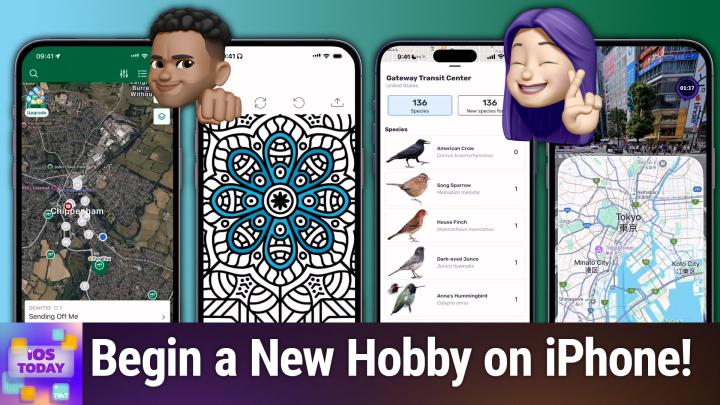
Loading summary
Transcript29 lines
- [00:00]
Micah Sargent
Coming up on iOS today, Rosemary Orchard and I, Micah Sargent, talk about some apps that can help you start a new hobby. Stay tuned. Podcasts you love from people you trust. This is twit. This is iOS Today with Rosemary Orchard and me, Micah Sargent. Episode 741 recorded Tuesday, February 18th, 2025. Thursday, February 27th, 2025 start a new hobby. Hello and welcome to iOS Today, the show. We talk all things iOS, iPad, OS, TV OS, WatchOS, HomePod OS, Vision OS, and all the OSes Apple has to offer us and the devices that we use to interact with these operating systems, as it were. I am one of your hosts. My name is Micah Sargent, and I.
- [01:01]
Rosemary Orchard
Am another one of your hosts, Rosemary Orchard. And looking forward to diving into the show as always, Micah.
- [01:06]
Micah Sargent
Indeed. Yes. Today we are taking some time to talk about how your phone, your iPad, whatever it happens to be, can help you kind of start or maintain a hobby. And there are lots of different options out there when it comes to hobbies. That's the beautiful thing about hobbies, right? It's just a thing to do with your time that you enjoy. And I thought it was great that we kick off with a hobby that I think is near and dear to the listeners of our shows because we happened to have one of these locations right outside of the old Twitch studio before we left and we would occasionally look out and see somebody going to that location and writing in the logbook. So, yeah, tell us, Rosemarie, about your pick for geocaching.
- [01:59]
Rosemary Orchard
Right? So for folks who don't know and haven't seen any of those fun videos online, because those are a thing where somebody goes and finds a geocache and explains how they found it and how to get into it. Geocaching is going and finding a little cache, a little hidden thing of something, and then you have to kind of solve a puzzle to find like a little prize thing. And then either you, you put that price back or you replace it with a different prize. And, you know, it's basically just a fun way of getting out and about without just necessarily going for a hike or something, which might seem, and I'm going to use air quotes here, aimless, like there is a point, there is a target that you are going towards with this. So there is a free app for geocaching, which I have right here on my iPhone. I've just set it up so that I can, with a new account so that I can show everybody from the beginning. And there's 3 million geocaches around the world and they're in so many countries. And so you obviously need to allow access to the geocache location to help find geocaches. But just zooming out around my hometown, I can see there's loads of little things here. And I can also see that some of these are traditional ones versus other ones and so on. And then if I wanted to go there, I tap on it and say, okay, so how difficult is it? So when I get there, how easy is this to find it and sort of solve it? How easy is the terrain and how big is it? There's a little description which is walk the plank on the fallen tree, bounce off the end, and you will see the path to the goal zone. Okay, well, that seems like a good challenge. And then I can navigate to this. So it can either help me get there in a nice straight line or I can actually, you know, share this location. I could even get driving directions if it's a bit far. But geocaches are really fun because it's not just finding the cache that is part of the puzzle. It's also figuring out how to get into it. You know, sometimes there's parts of it where if you take off the top, the top turns into a magnet and you need to use the magnet to get the next clue out, or you need to move a rope around certain pegs to tie to, sort of fold it into certain numbers based on the names of different Pokemon and things like that. You know, all of which is usually fairly self explanatory once you get there. But sometimes it can be a real challenge to figure it out. So, yeah, why not try geocaching if you're looking for a new hobby, especially as the weather improves so you can get out and about.
- [04:32]
Micah Sargent
Indeed. Yes, we are slowly starting to get into some better weather, so it could be your opportunity to do so. Although we just had snow for the first time this past week, so it's still a little bit hairy out there. But I know I'll do a little promo here coming up. You've got some other options there. When it comes to sort of like geocaching, an app that I wanted to mention is a pretty cool app. It is an app that lets you kind of learn to code, but kind of learn about computer science and technology in a way that kind of clicks, I think, with my brain called Brilliant. And I keep forgetting that I need to move my phone over to the other side because it'll look better over there. But anyway, Brilliant is an app that teaches you about thinking in code to kind of start off and then goes from there. And it's really well done in terms of, I think it reminds me a little bit of Swift Playground, which I know we're going to talk about in a future episode, just in the sense of giving you kind of very sort of metaphorical examples that help you figure out what you're trying to do. So here we want to get the car to its destination so we can have it. It's currently facing north. We could have it move forward and so we can tap. Move forward. And then here I'm trying to remember where I'm supposed to put these. Where do they go? Ah, there we go. So move forward and then turn right. And then move forward would not work right, because move forward, turn right, you know. Yeah, yeah, move forward, turn right in the move forward is going to work. So we hit play and we can see that it moves forward. It turns right and then moves forward. We'll check it and boom, we're correct. You can follow through with asking why that works, what the commands do, and it gives you information for what you need to do here. So here we can see that we want to turn right first and then move forward. Move forward. And we'll go ahead and kind of follow through that this is just building your knowledge there to kind of understand in the way that you need to think. When it comes to doing computer science, particularly with coding, what's cool here is that it's not just computer science. There's also math, like solving equations, doing real world algebra. There's always that, that complaint like why am I learning this math whenever it doesn't even apply to real life. Well, here are some examples of how you would use it in real learning about data analysis, learning about science and scientific thinking about circuits, even about quantum computing, getting into logic and understanding that technology, like large language models, little puzzles that you can do math, and even advanced math like calculus and linear algebra. So the hobby here, I think is just a general bit of learning. And that's why I wanted to mention brilliant, because you can maybe up a hobby of coding. And with the current state of things, being able to know a little bit more about AI and large language models is a great opportunity. So many of the little courses there are available to start for free and then if you want to continue in app purchase, to be able to have a full course. All right, tell us what's next on your list, Rosemary.
- [08:17]
Rosemary Orchard
Well, next on my list is something I've been looking for for a while, which is a free coloring book that doesn't have in app subscriptions, which just charge you 20 bucks a week because there's a whole lot of coloring apps out there and so many of them have got really expensive in app subscriptions and they're on a weekly basis as well, which I'm not saying they're not great. I'm not saying they don't have great artwork. They absolutely do. But if you're looking for a free alternative which is ad supported, then coloring book painting games by hobby apps is a really great option. And so I have this here and there's a whole bunch of different things that you can color in thousands of options. So there's five, six, seven, seven different sets of mandala. There's some love theme ones, there's for you ones, Lotus, flowers, garden, exotic garden, etc. So you can pick something that appeals to you. I'm going to tap into the lotus option and then you can pick one of the designs and it'll download it, which may take a moment because I probably don't have enough Internet access on this device right at this second. So I will just pop back in and open one of the ones that I already had available there. And here we go. So I have picked this mandala and I can zoom in using the two finger pinch. I should mention this is a universal app, so it works on the iPad as well. And then I can tap and hold on something and see what color it is and I can pick a color and then just sort of tap to color it in. And so I can, you know, know find the color that works for me. As I select a color, I also have the option of choosing different shades to find something that makes me happy. And I can go ahead and color these into whatever color I choose. So I could pick maybe that needs to be slightly darker there. I'm trying to do a sort of alternate pattern and I just tapped and colored in the wrong thing and there's an undo button. But this works with the Apple pencil. It's very nice. Once you're done, you have the option of sharing this so that you can send it somewhere else. And it also also saves into your gallery in the app and it's just quite nice and soothing. I should note if you have something like PI hole or some kind of network level ad blocker, you won't see the ads in this app, which can be an improvement. If that is what you would like or if you would like to support the developers of the app, then you can of course make sure that you whitelist those so that you see them and support them. But yeah, it's a free app. There's a lot of great choices for coloring apps out there, but if you're looking for something that is entirely free with no subscriptions or purchases, then coloring book painting games is my recommendation.
- [10:56]
Micah Sargent
Very, very nice. Yeah, I think I've had that one in the past and you get very you zone out and relax as it's even noting there in the screenshots. You just kind of get into it and it's a lot of fun. My next pick is again, my hobbies seem to involve a lot of maybe too much action because there's another app that I want to mention called Imprint. And Imprint is pretty cool because it is a way to kind of distill down big concepts and books into kind of bite sized understandings. And so there are different courses once again in psychology and philosophy and many of these are going to require an in app subscription, but there are free daily reads. And so if we tap into the app, we can see the science behind Andrew Huberman's morning routine. And in this case we take a look at what's going on here, which this is a podcast that they have kind of distilled down into different bite sized bits of information. So it talks about a good morning routine that sets the tone for the whole day to provide focus and energy and productivity. And this is a Stanford neuroscientist, host of the Huberman podcast and talks about how his routine is specific to kind of making that happen. So it talks about the science behind those practices, including sunlight exposure, cold exposure and delayed caffeine intake. So first view sunlight within the first hour of waking up and that there's a lot of science behind that. I could go into that as well, because sleep science. And then let me go past this because that's explaining how this works and about talking about cortisol and whether you like when you need it and what it does for the body. And then moving on, you learn about the next step, which is three times a week doing a cold water exposure for one to three minutes either in the shower or in an ice bath, which in theory and according to some studies provides more energy through the production of dopamine and adrenaline. And so that could maybe help. And then also waiting 60 to 90 minutes after waking up before imbibing a cup of coffee. And again research there to suggest that you are more alert throughout the day because the caffeine intake isn't kind of used initially to get you going in the morning, but instead provides sustained activity, act or not activity, but sustained energy throughout the day. So that is just one example. And again, I'm. I just, I love learning things. And so learning things is kind of a hobby for me in general. And I have found some of these. I've. I've actually had a subscription to this in the past. I don't currently have a subscription to it, but I will occasionally pop in and kind of go, am I back in that mode where I want to get a subscription to this? How's this? How am I feeling right now? And learning about new things, new concepts all the time. And it really works for me as a person whose attention can go from one thing to the next. This is great because again, it's very bite sized and I've pulled some great bits of information from it. So that's imprint. All right, what is next on your list, Rosemary?
- [14:49]
Rosemary Orchard
Well, next on my list is something that's a little, kind of like geocaching, but you don't have to leave the house for it. So it's great for people who can't leave the house for various reasons or struggle to get around, or if you just like geographical challenges or perhaps you have a family of people who also like solving puzzles together. Because there's a party mode for this and that is GeoGuessr. So GeoGuessr is a game where it plops you into Google Street Maps somewhere around the world, but inside of geoguessr and you can move around and you can do some zooming in and zooming and you have to try and figure out where you are. So I'm going to go to level two and I started a new account for this earlier so that I could start over. And this is single player mode. So they have dropped me into, I think this is Shibuya Crossing in Japan. This looks very much like Shibuya Crossing right there to me. So that's in Tokyo. So I know where this is. So I'm going to tap on the map, go over, and now I need to zoom in. And now my Japanese geography is massively going to mess me up here. But I'm just going to tap on Tokyo and then tap on the little pin and see if I was right. I was pretty darn close. I was four miles away, which considering the fact that my Tokyo geography is not great, I feel like that's pretty darn good. So I'm quite pleased about that. So that was single player mode and obviously you can play that and rank up and you can do all sorts of things like start recognizing what kinds of Cars, people have places. Start recognizing languages used on adverts, etc. Start recognizing, like, the types of license plates that cars have. Like it has a white license plate front and back. Oh, that means that it comes from these countries, etc. So, yeah, that's single player mode. Then there's also a multiplayer mode where you can play against somebody else either in a jewel or an infinity challenge. And then there's also a party mode where you can invite specific people to join and then play against them, which can be really good fun playing as a family. Also, if you have parents who maybe one of them slightly better at using the computer and the other they can could, you know, team up and play it as a team, which is something that can always be fun. And I just really like this. It's a fun way to see the world without having to go anywhere, necessarily, which is not necessarily something that is a big goal of mine. But I always love being able to see parts of the world which I don't get a chance to travel to just yet. And yeah, GeoGuessr is a great free way to do that. And as well as it being on iOS and iPad, it's also available as a web application and available on Android and more. So it really is a big family friendly game. Or you can play it single player, whatever you choose.
- [17:35]
Micah Sargent
All right, next on my list, I'm not going to demonstrate this app because it is best shown and demonstrated if you have a piano. But for somebody who's considering taking up piano. I've had actual friends who've made use I have actual friends. I've had actual friends who've made use of this app and have heard a lot of good things about it. It's called simply Piano. You can download it for free in app purchases for the kind of full catalog. But it helps you learn how to play piano with little bits of progress and learning. And what's cool about it is there are loads of popular songs that are included that it teaches you how to play. And a subscription can provide access to up to five family members. And you can actually use your keyboard in. It calibrates with your keyboard. So when you first launch the app and you start using it, it'll say, hey, you're going to choose a key on the keyboard and you're going to just play it over and over again. We'll listen and then we'll be able to use that to inform how you go from there. And then you kind of have your phone turned on the side and you use it to learn how to play the piano. And it's one that I have in my pocket for whenever I finally spring for purchasing a keyboard and attempt to learn piano myself. Because again, the the person that I know who used it within a year was quite advanced in comparison to starting out as brand new the year previous. So simply piano if your next hobby is learning how to play the piano. Next we will take a look at Rosemary's Pick.
- [19:28]
C
Hey prime members, Are you tired of ads interfering with your favorite podcasts? Good news with Amazon Music you have access to the largest catalog of ad free top podcasts included with your prime membership. To start listening, download the Amazon Music app for free or go to Amazon.com adfreepodcasts that's Amazon.com adfreepodcast to catch up on the latest episodes without the ads. I'm no tech genius, but I know if I want my business to crush it, I need a website. Now. Thankfully, Bluehost makes it easy. I customized, optimized and monetized everything exactly how I wanted with AI. Within minutes my site was up. I couldn't believe it. Plus, Bluehost keeps me protected 24 7. No more worrying about hackers. I just relax and focus on my customers. So whatever your hustle may be, secure your online presence in 2025 with Bluehost. Head to bluehost.com to start now.
- [20:31]
Micah Sargent
And now Rosemary, a little reminder for people I think with Apple News.
- [20:37]
Rosemary Orchard
Yeah, so it's not so much of a reminder though it is if you have an Apple News subscription which is included in Apple One and Apple Premiere and Apple Premiere Pro plus Max Exception. I've forgotten the name volunteers, but if you have an Apple New subscript, um, then inside of Apple News, if you go to News plus and then scroll the horizontal bar at the top all the way to the right, then you get to a catalog and to start with it shows you featured. Um, but that's not necessarily what you're interested in. Um, if you tap on Featured with the little down arrow next to it, then it gives you the option of seeing. You know, you can see every title of all the magazines and publications that are available. Um, but you could also look at say home and garden, business, entertainment, style and beauty, science and tech, food, hobbies. You know, cooking is a hobby, photography is a hobby. And whatever it is that you're looking for, it may well be that there's actually a subscription here of news that you are already paying for. You already have access to this. So if you are interested in boating, there is a boating Magazine, I should note, I am in the uk, so the magazines and so on available to me here in the UK will be slightly different to those in the us So I apologize if boating is not available to you in the US and you're very sad. Cruising world Digital camera. Digital photographer. You know, there's lots of options here. So if you're interested in picking up crochet or sewing, Simply crochet and simply sewing is here. Love patchwork and quilting and all sorts of things. And I just really love this as a way to go and find information and, you know, kind of get a feel for some of the options available. You know, I've tried crochet multiple times and I. I kind of struggle to find something that makes it stick. So it might just be worth me going and browsing an episod or publication a version of this magazine and just seeing. Okay, what is there? Like, oh, that's really funky. I really like that. That's a really nice design. And of course, this is available on your iPad and your iPhone as well as your Mac. There is no Apple Watch version, and this part is not available on Apple tv, but it is available on a whole bunch of devices. And it is quite nice to just be able to browse a magazine and, you know, have a look and see what's available without having to go out and buy them or end up collecting a huge pile of pieces of pa. Uh, which I've definitely done previously with magazine subscriptions over time where I've ended up collecting them and not using them.
- [23:01]
Micah Sargent
Yeah, I've got quite a few magazine subscriptions, but I will be honest in saying I didn't realize that Simply Crochet was in Apple News because I used to have a subscription to it and like, like individually. And then I thought, no, I'm not looking at this enough to justify it because I get most of my patterns from Etsy. But now that I know it's in Apple News, I have a Simply Croch subscription. And that's wonderful. See, that's why we do this show, so that I can get the things I want. No. All right, so let me take a look here. My last one on the list is for those of you who already are or who plan to become birders, the people who try to find and identify birds. Apple has just shown this app in the App Store, and I think that it's actually wreaking havoc a little bit on the apps servers because it is not currently load. Oh, there we go. It just loaded for me. But this app Lets you create and well, not create, but identify and keep track of birds that you find. And you can for free make use of a lot of the app. This is an example where someone is trying to figure out what a bird is and people believe it is a black crowned night heron. And then it shows where it is in Orangevale, California. And then a a common mergenaire which has a really cool mohawk. But you can post your own birds and then if you pay for the subscription, you can get the AI version which lets you take photos and identify birds that way. This app was created by two Birder, partnered with a developer to create a bird app, birding app that is actually, you know, what people would want. It's cool because you can discover different species. You can use location map which I'm going to pop away really quick to tap on that to see what it reveals. I had a feeling that's what it was going to show. So let me look at a nearby area and we'll see what that shows here. So so at this nearby area there are 136 Species of birds that one can expect. And it shows when people expect to see these birds. So the American crow, hardly rare at all. Song sparrow, house finch, excuse me, dark eyed junco, Anna's hummingbird. All the way up to the more rare birds like the bush tit and the glaucus Winged gull. A mal, which I didn't realize is very rare or one of my favorites. Although they are pretty messy birds. The barn swallow. I just think they look so stinking cool when they're flying through the air. You can hear their song and their call because yes, those can be different. And then if there are little tidbits about them too. The barn swallow is the national bird of Austria and Estonia. And then it shows places where people have sighted the common barn swallow. Used to be right outside my grandparents barn making a huge mess but looking so cool flitting through the air the way that they do. Maybe I'm a birder. Anyway you can get that app, it's called Birda, available for free in the app store with the in app purchase to give you access to those AI aspects. That is the end of our list of apps to help you start a new hobby. You of course probably have apps that you like to use. So do tell us about those. If you have suggestions for apps that we should check out and that we should share with our listeners. That's iostodaywit TV to get in touch with us. Moving right along a little bit of News here, which is that Apple has done something that people who have long been on Apple's platforms have wanted to happen, and that is the giving providing the ability to migrate purchases from one Apple account to another. Yes, it used to not be possible, but now it is, unless you're in the European Union, the United Kingdom or India, where it is currently not available. But it gives you the ability to move purchases from one Apple account to another Apple account. The process is, it's not super involved, but there are some things that you need to do to make sure that everything's set up correctly. And you have to understand that some things do not work. So one thing to bear in mind is that neither Apple account can be a child account that's been created through family sharing. If you're trying to migrate that way, they cannot have already been used to migrate purchases. So if you migrate, you're not able to migrate, migrate those purchases elsewhere. And the only way to migrate those purchases elsewhere is to undo a migration of those purchases. And then another thing to be aware of is that if your primary account has never been used for purchases or free downloads, well, then of course you cannot migrate purchases because that is something that you haven't done and there's a lot more to it that you need to understand. We will link the support document, but Rosemary, you also mentioned that friend of the show Stephen Hackett has a good bit of information about purchase migration as well.
- [29:09]
Rosemary Orchard
Yes, yes he does. So when this first came out, it was a little bit confusing in that it would show you the option to migrate your account even if you weren't eligible for it, and other things. And Apple have made some tweaks to, to this and yeah, so Stephen Hecket's got a good summary there. One important little thing that you need to make a note of is the, the account that you're migrating, that purchases away from, cannot have a music library. Which means, if you remember, approximately ten and a quarter years ago, Apple graciously gave everybody a copy of the U2 album Songs of Innocence. If this appears in your library on the account that you're wishing to migrate purchases away from, you are probably going to need to contact Apple support to get that removed. There was previously a tool to remove it from your account, but that tool is now defunct and does not work anymore. So yes, you probably want to keep an eye on that. And Stephen hackett over at 512 pixels.net has a nice little summary of list of things to do for the migration and everything so that you can see, you know, exactly what's changed and make sure that you are ready to go.
- [30:23]
Micah Sargent
All righty. That brings us to the end of the little bit of news segment. So let's get into feedback next. It's time to look at the feedback. Our feedback this week comes from Reid, who writes in to say hi Mike and Rosemary, a twit consumer for a number of years from sometime sunny northeast Scotland, now a satisfied club. Twitter. Thank you so much for your support. I received a disappointing email about the forthcoming demise of tripcase. Especially liked the ISO app as well as the multi platform ability. I only do occasional business trips but for family short or main holiday vacation trips I found this, a simple app that curated travel bookings all under one trip. Not sure I'd be a TripIt user, but looking for suggested alternatives, reasonable subscription options as well as free options considered. I look forward to hearing your recommendations. And Reid has paid the pet attacks with Alfie the two year old Sharpay. Oh my goodness.
- [31:25]
Rosemary Orchard
So cute. So huge.
- [31:28]
Micah Sargent
Yes, like a, like a big old beautiful loaf of bread. Just a sweet, sweet. Looks like a very soft, soft dog. And that's Alfie. Hello Alfie. Thank you, we love you. So this is a great question, Rosemary, because I feel the concern about tripit. Tripit is fantastic in doing what it does, but tripit is also very heavy on gathering a lot of information and holding on to that information. And I feel that like skepticism and concern that comes with having this one place that has, you know, all of this information and the privacy policy is very long and very involved. And, and yeah, I get it. And so there's an app that I use that you've actually talked about, Rosemary, here, called tripsy. And Tripsy has long been the sort of third party, non standard app that I use for keeping track of a trip. It has a basic free model. It does definitely work better if you get the subscription. Subscription model. Subscription version I should say. And let me see, I'm looking really quick at the cost there. So Tripsy is, let's see, I'm having trouble finding it because I've been subscribed to it in the past and so it's still showing. It is $40 a year, but you can also do 3.99 a week or 799 per month. So if you kind of just want to, when you know the vacations are starting to come around, subscribe for the month. Or when you're taking a quick trip and you just need it for a week, 3.99 per week. Those are options as well. But $40 a year is the other option there. Tripsy lets you do a lot of the things that you can do with other, other apps, like being able to add reservations via email sync to your calendar. It actually also does integrate and sync with TripIt. So if you are a TripIt user and you're kind of thinking about making a move, you can do that as well. And it lets you keep track of all of that information. So I have had a few business. I'm not, I haven't done a whole lot of travel, but I have done some work. Some I've taken work trips in the past and Tripsy was the way that I kept track of everything. And you get those notifications, you get all of that information. So yeah, I highly recommend Tripsy as your tool for keeping track of your travel. If you don't go the way of Tripit. All righty. With that, I can hear the music. It's time for Shortcuts Corner.
- [34:51]
D
This country was built on a distinctly American work ethic. But today work is in trouble. We've outsourced most of our manufacturing to other countries. And with that, we sent away good jobs and diminished our capability to make them things. American Giant is a clothing company that's pushing back against this tide. They make a variety of high quality clothing and activewear like sweatshirts, jeans, dresses, jackets, and so much more, all made right here in the USA from growing the cotton and adding the final touches. So when you buy American Giant, you create jobs for seamsters, cutters and factory workers in towns and cities across the United States. And it's about more than an income. Jobs bring pride, purpose.
- [35:30]
Micah Sargent
Purpose.
- [35:30]
D
They stitch people together. If all that sounds good to you, visit American-Giant.com and get 20% off your first order. When you use code STAPLE20 at checkout, that's 20% off your first order at American-Giant.com with promo code STAPLE20.
- [35:45]
Micah Sargent
This is Shortcuts Corner, the part of the show where you write in with your shortcuts requests and Rosemary Orchard, our shortcuts expert, provides a response. This request comes in from Rick, who recommends hi Mike and Rosemary. I am trying to create a shortcut that opens the iHeartRadio app on a specific station and then sets a timer or a sleep timer for 30 minutes. I can get it to open the app on the right station and I can get it to create a timer for 30 minutes, but I cannot set any parameters for the timer. So it just sounds an alarm instead of stopping. Iheartradio. Not quite the desired result. If I Manually create a timer. I can set it to stop playing on the when timer ends setting, but I cannot save this timer or access these controls through shortcuts. Any ideas? Okay, that is interesting. And then Rick says pet tax attached our puppy dog. Puppy dog eyed border collie called Pepper. Pepper. The border collie is so sweet inside of a box. Oh my goodness, look at those eyes. Oh, I just want to.
- [36:51]
Rosemary Orchard
So cute.
- [36:53]
Micah Sargent
All right, so Rosemary, tell us what are some options here? Because I am a little shocked that you can't get get the the timer to use that stop playing mode. Right? That seems.
- [37:05]
Rosemary Orchard
Yeah, yeah, yeah. It's really weird because I mean it's one of those things where some apps and shortcuts have much better support than others. And Notes went absolutely nuts. The notes team love them. They added so many notes actions Calendar did it Mail hasn't quite figured out that shortcuts exists yet. So there's some basic support in there, but not a huge amount. But yeah, yeah. Clock app. The Clock app's done pretty well and I'll just show folks some of the Clock app actions because there's quite a bit. So there's a whole bunch for adding alarms, stopwatches, opening a particular tab and there's even a whole bunch of things for timers where you can start a timer, resume a timer, pause a timer, get your current timer and get like the remaining time or the duration of it. But if I start a timer for say 20 minutes, that's it. That's the only thing I can do. And just to add a little bit of insult to injury, it uses what whatever the last when timer ends sound is set to. So I'm actually going to say something here, folks. Please file feedback with Apple apple.com feedback or if you're on the betas or you know, you would be on the betas. There isn't currently betas we record the show, use the Feedback app, tell them this is missing. Okay. Because it is actually the same for alarms where you can't specify like the the to tone that it uses, which is very frustrating for me and I would really like to have different tones for different kinds of alarms. Um, but that said, there is an alternative solution that I may have for you, Rick. Now, this does depend on the radio station not being an iHeartRadio exclusive because if it is not, there is a great application called broadcasts available on iOS and iPados and Mac OS and I this will allow you to subscribe to a whole bunch of of various different radio stations around the world. So I Can search for. I'm searching for my county, which may be a little too much for it. So there we go. I found a Hart Wiltshire, okay, which is from Hart Radio. And now I can add this station and I can add live or radio to radio section and then if I go to stations I can see Hart Wiltshire is there and it's playing brilliant. Now back in shortcuts. What I can do is instead of using the Timer action to pause, I can use the set Sleep Timer action and I can say, hey, do I want to sleep after 15 minutes, 30 minutes or 60 minutes? And this is probably the solution I would go with to find an alternative application. You can also do the sleep timer in iHeartRadio itself. But if, if you're wanting to do everything through a shortcut, which you could then add to say your control center, then you can actually have it play a particular station. And so I could type in the name of the station there and then sleep after X period of time. And that could just be a control center action, could be an action button action, whatever you like and then that would just do everything all in one for you. So I would highly recommend checking out broadcasts. The app, it is available in the App Store, I believe it's actually free to download from this developer, Steve Trotton Smith, who has created a whole bunch of great apps. I unfortunately can't see the price right now because I have already paid for it or yes, there we go. It is a free app to download 999 in app purchase to unlock all of the features, which adds a whole bunch of extra stuff. But give it a try for free for sure to see if you can find your radio station in it. Because if you can, I think that's probably going to be the best solution. That or looking at using another app that can and that has support for Sleep Timer either in the app itself or through shortcuts. I should note I unfortunately was not able to try the iHeartRadio app myself because it's not available here in the UK. I don't know why, it just isn't. But yeah, try maybe another app to get your same radio station and then you could have more options as well.
- [41:16]
Micah Sargent
Beautiful. There you go. That is going to bring us to the end of this episode of iOS today. We thank you for tuning in this week. If you have questions, comments, et cetera, you can email us. Iostodatetwit tv I wanna remind you about Club Twit at Twit TV. Club Twit, it's just $7 a month with a two week free trial for a limited time. So hop on board to join the club. You gain access to some pretty cool benefits when you do. Every single one of our shows is ad free for you. You also gain access to the Twit plus bonus feed that has extra content you won't find in other places and access to the Discord Server, a fun place to go to chat with your fellow Club Twit members and also those of us here at TWiT. So be sure to join the club TWiT TV club TWiT. We'd love to have you. Rosemary Orchard if folks would like to follow you online and keep up with all the great work you're doing, where should they go to do so?
- [42:12]
Rosemary Orchard
Well, the best place to go is rosemary orchard.com which has links to all of the apps, books, podcasts and social media sites where I am on the Internet and you can also find me in the Club Discord hanging out in the live channel while we are filming the show and Also in the iOS today area once the show is released. So if you've got questions, shortcuts, corner requests, feedback, just want to chat, then all of that can be done there. And yeah, I'm there too. Maika where can folks find you?
- [42:41]
Micah Sargent
Beautiful if you're looking to find me online, I'm ikasargent on many a social media network where you can head to Chihuahua Coffee, that's C H I H u A H u a Coffee where I've got links to the places I'm most active online. Thanks so much for tuning in. We'll catch you again soon for another episode of iOS today. Buh. Bye. American Giant makes great clothing. Sweatshirts, jeans and more right here in the US. Visit american-giant.com and get 20% off your.
- [43:19]
Rosemary Orchard
First order with code STAPLE20.
- [43:21]
Micah Sargent
That's 20% off your first order at american-giant.com, code STAPLE20.