← All TWiT.tv Shows (Audio)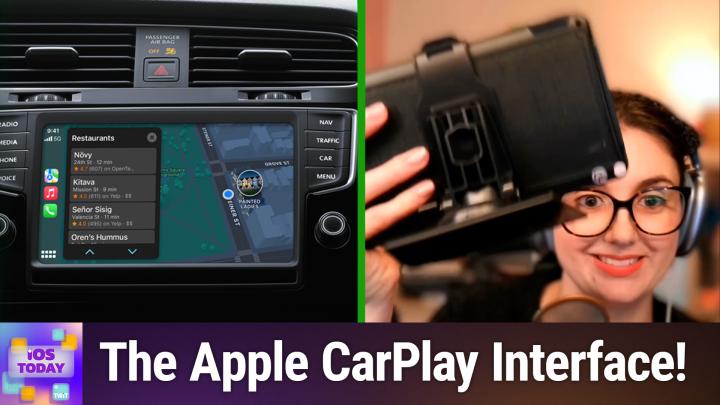
All TWiT.tv Shows (Audio)
iOS Today 744: Cultivating Your CarPlay Experience
00:32:43
A tour of CarPlay with Rosemary!
Loading summary
Transcript35 lines
- [00:00]
Micah Sargent
Coming up on iOS today we take a look at CarPlay. And by a look, we mean we're actually going to take a look at it. It's very exciting. Stay tuned.
- [00:10]
Amazon Ad
Hey prime members, are you tired of ads interfering with your favorite podcasts? Good news. With Amazon Music, you have access to the largest catalog of ad free top podcasts included with your prime membership. To start listening, download the Amazon Music app for free or go to Amazon.com ADFreePodcasts that's Amazon.com ADFreeP Podcasts to catch up on the latest episodes without the ads.
- [00:36]
Dime Beauty Ad
Ready to prioritize yourself in the new year? Your skin is a great place to start. Dime Beauty, founded by a master esthetician, is more than just a skincare company. With four skin conscious categories Skincare, Beauty, Body Care and Fragrance, DAIM offers simple, spa worthy products that will help you enter 2025 with confidence. Whether you're revitalizing your reg with nourishing products or building one from scratch, Dime makes it easy. The work system, our all in one best selling routine includes a cleanser of your choice, toner serums and moisturizers. Taking the guesswork out of skincare for your healthiest, happiest skin yet. Dime's commitment to clean ingredients and sustainable packaging ensures every product is as gentle on your skin as it is on the planet. With thousands of glowing five star reviews and a loyal community date, the results speak for themselves. Revive your skin and give yourself the routine refresh you deserve by visiting dimebeautyco.com that's dimebeauty co.com your best skin awaits.
- [01:39]
Amazon Ad
Podcasts you love from people you Trust.
- [01:43]
Micah Sargent
This is TWiT. This is iOS today. Rosemary Orchard and Me Micah Sargent Episode 744 recorded Tuesday, March 4, 2025 for Thursday, March 20, 2025 Cultivating your CarPlay experience hello and welcome to iOS today, the show where we talk all things iOS, iPad, OS, HomePod, OS, Watch OS and all the OSs that Apple has on offer including CarPlay from time to time. I am one of your hosts. My name is Micah Sargent and I.
- [02:24]
Rosemary Orchard
Am your other host Rosemary Orchard. And I would just like to note right now at the top of the show I'm in the UK which means that my carplay is flipped because we drive on the other side of the car. So for everybody who is about to send in feedback and say your CarPlay is wrong, maybe it's your CarPlay that's wrong.
- [02:43]
Micah Sargent
Yes you can send your emails to. No reply apply at Twit TV anyway so this is an episode where we thought we would talk a little bit about CarPlay because it is a technology that has been around for a long time. And as is always my way, I want to start by kind of explaining something about CarPlay is something that people get wrong quite often. It's important to understand that CarPlay is not like this software that you're, your car manufacturer puts into your car, and then when you plug in an iPhone, it activates it, and then it shows up on your dash or anything like that. No, CarPlay is actually an extension of your phone itself. Your phone has kind of a. It's almost like it's a. It's a projector or it is an HDMI connection. And when you plug in your phone, that is what's powering the CarPlay experience. Your internal dash just displays, plays what your phone is showing, and your phone is showing CarPlay. So again, the reason why I bring that up is because sometimes people are going, you know, CarPlay isn't working. And I think it's because of this, that or the other. And when we're trying to troubleshoot, it's important to understand that a lot of that troubleshooting does need to happen on the side of the phone and the connection and how that is working versus being necessarily something that your car itself is doing. Now, I say all of that with a hefty dose of caveat, because over time, as CarPlay continues to get more and more powerful, and we've been told for a while now that CarPlay is going to continue to add new features and functionality that does become more an issue of something that's happening on your car's side where the phone is trying to integrate with the firmware, so to speak, of your vehicle and read things like your. The speed of your vehicle, you know, the current battery levels, your tire pressure, that kind of thing, those may be added over time. And so then that's where we've got more of an issue on one side or the other and a little bit more troubleshooting that you'll have to do. But CarPlay comes in wired and wireless flavors and gives you the ability to control a lot of your phone and your entertainment without needing to actually look at the device. That's kind of the whole point of CarPlay. It's designed around interactions using your voice or very brief interactions with your finger or a physical option within your car. For example, my significant other has a Mazda, and there's a sort of dial that he has in his car, and so he uses that to access different parts of the functionality, whereas in mine it is a touch screen, which I find to be not as safe and therefore requires some brief interactions. But most of what you can do with tapping on the screen can also happen by way of Siri and is typically triggered by something on your steering wheel. And in fact, depending on the version of CarPlay you have, whether it's wired or wireless, it all starts with pressing that little button on your car's dash or wherever it happens to be. By dash, I actually meant to say your car's wheel or wherever it happens to be, steering wheel, because that will kind of bring into play the carplay connectivity and give your in dash system the chance to look for a phone that has CarPlay and connect to it. Again, if it's wired, sometimes that will happen automatically. If it's wireless, then of course it needs to connect. And one more important thing I'll say before I let Rosemary chat about some stuff as well, is that CarPlay on the wireless side is actually not what you would expect in that it is Bluetooth or some connectivity like that, but in fact is a dual connectivity system where it is using both Bluetooth and WI fi to send and receive commands from the device and serve up that screen, that CarPlay screen on your in dash system. I have wireless CarPlay in my vehicle and it also supports wired, but I use it wirelessly. And the way that that works is it first connects over Bluetooth and then the system recognizes, oh, this is a CarPlay phone. It turns on a local WI FI network in the dash. My phone connects to that and then it is able to pass over that information over WI Fi and then some of the connectivity, like hitting play and pause, back and forward, those commands are being sent over Bluetooth, whereas the rest is sent over WI Fi and is able to take care of that there wired. Of course, everything can kind of get transmitted through that wired connection, usually USB to provide the necessary functionality. So again, it all just depends on your vehicle. Now I'm super excited because Rosemary has made it possible for us to show you if you have a vehicle that doesn't have CarPlay or maybe you don't have a vehicle and you're just kind of curious what carplay looks like? Rosemary has cleverly made it possible for us to talk about it. Can you tell us what it is you have and maybe we could link to it even if other folks wanted to get one of these?
- [08:33]
Rosemary Orchard
Yeah. So what I have here is a screen that you can install in your car, and this supports both CarPlay and Android Auto. And so what I have is just a mini car dashboard basically inside my house. So over here you can see it's got a USB C cable that's powering it. So you need to have some kind of power for this in your car. But guess what, it comes with one of those cigarette lighter adapter whatsits so you can grab one of those to plug it in. And what I like about this is of course the fact that I can actually take advantage of this and use this inside my house to show folks what this looks like. So I just picked up something on Amazon a while ago. It was not anything like that necessarily had super fabulous reviews or anything. I've just looked again. It's got 129 reviews and 4 stars. So it's not bad. But yeah it's, it's just a 7 inch portable car stereo. Wireless CarPlay screen, Android Auto screen. Yes, you can tell that somebody has been doing word soup with this uh, to try and get all of the uh, you know, links, uh, or you know all that. Yes, exactly. But uh, yeah that, that is what this called and what is great about it is that I have CarPlay right here and I can show you what this looks like. So I'm just having a little issue with my system where the input keeps changing so I can't send people a link. But now I have done that I can take folks a Little tour of CarPlay. And so here I'm going to start by swiping all the way to the left. And again a note. This is flipped for me versus a lot of folks in the US okay so I have a map over here and I have some carplay actions here. And then on the far right I have my menu because that is closest to my steering wheel when I'm in my car. So I have some suggested destinations from my home. I have media playback controls. I have a fake garage door in HomeKit because I am at home and HomeKit understands geography so this disappears when I'm not at home. And these two top areas with the, the in this case links to various places that are pinned in maps and the media controls those will expand to be 5050 in height. And then over on the right hand side I have maps. Then I can swipe from here or I can tap this little button for me this is in the bottom right. For those of you in the US that will be in the bottom left where it, it switches between sort of a 9 squares and an open square. And this takes you to the app view, where you can swipe through, or I can swipe from that screen as well. And then we have our apps. Now, there is one app here that some of you will be going, huh, what's that? Smart screen. This gets replaced with whatever the name is of your car, probably. So in my case, that shows me a Renault app. In my guest case, that might show a Mazda, for example. Whatever app, whatever kind of car brand you have, that is what it will most likely show. And then we have our apps. And depending on what apps you have installed on your device, you may have multiple pages here, or you may not have many. But one thing that I can tell you is I don't want Zoom in my car. Like, Zoom does not belong in my car. That is not something I need in my car. Maybe you do need it, but you can control the apps that are in your car with the CarPlay settings that are in settings on your phone. So I've just switched over to my phone, and. And it's Under Settings General CarPlay. Now, if you have multiple devices, okay, like I do here, I have my Renault, which is my actual car, and smart screen, which is this little fake car that I've got here in the house, then you can control this per car. So you can turn CarPlay on and off for different cars. So say, for example, if you often get in your partner's car and you don't want to use CarPlay in their car, you can turn that off or maybe just don't pair it in the first place, but whatever. And then if you tap on the home screen icons option, then this is where you get to the good stuff. So I can get rid of Zoom. Okay. I can get rid of Toya, I can get rid of Telegram, I can get rid of Microsoft Teams. Who wants Microsoft Teams in the car? Certainly not me. And then you can actually rearrange the apps that you do want. Okay, so to go back to my fake car screen here, I can see that I have five apps across and two apps down. Now, depending on the size of your screen, and when I say size of your screen, I am talking width and height, but also aspect ratio. Okay? If you've got a really tall screen in your car, you might have, say, three apps across and four apps down, depending on the size of the screen. So you obviously need to figure that out for your car. Because when you're looking at the iPhone, if you're not in the car, because you can control these settings even when you're not in the car. So you can do it when you're sitting on comfortably on the couch watching iOS today. Then you can change this. But you need to remember how many apps are on screen. So I have 10 apps per screen, which means that I need to choose what 10 things are the most important to me on that first screen. So I'm going to move ways up because as folks maybe else tell by the little asset after the Waze name. I am running the beta of Waze, so I love to use it. Give them feedback when things are working and give them feedback when things aren't working. Um, then I also have broadcasts, which can be a great way to listen to live radio or even things like Twitter's live stream or relay or ATP or lots of places have a URL that you can pop in there. Now the smart screen I don't really want that can go right at the end. You can't get rid of that one. There are some apps you cannot remove. So you can't remove the phone, you can't remove music, Maps, messages now playing settings, or your cars app. But everything else you can rearrange and you can do whatever with. Um, and I should note that as I'm rearranging, this is updating in real time here. Okay, so if I were to move Overcast up, then that pops up and is then back here underneath broadcasts on the previous screen. Um, so if I want Waze to be. I think I want it one more over, so it's just a bit closer to me. If I'm not currently using Waze, then that's perfect. And maybe what I'll do is I'll move broadcasts down a bit, but I'll move Google Maps up. So I have a choice between Google Maps, Maps and Waze now. And yeah, this is, you know, just one of the things that you can do with CarPlay. And if you've done all of this and you're like, no, like, I accidentally removed all of the apps and I want everything back. There's a reset button right at the top. And look, everything has gone back to normal. And over on my iPhone, we have all of the apps back, back in their original order, which I should note is alphabetical, which means audible comes first, which is great if you love audiobooks, not great if you love Waze for maps. And you've got a lot of the apps here.
- [15:52]
Micah Sargent
Now, when it comes to CarPlay, as you'll. As you saw, Rosemary is able to access, I think some of the most important features and I think most important settings rather, and the settings that require a lot of focused attention from the phone without being connected to CarPlay. But there are some features that you can only interact with that are in the carplay view itself. Like, for example, changing the background wallpaper and some of the other features. Do you want to show what the Settings app looks like in. In CarPlay versus on your phone, which you can do, as you said, even if you're sitting on the sofa?
- [16:36]
Rosemary Orchard
Yes. So I will start on my phone. So settings, general carplay, and then you choose a car. So in this case, I'll choose my fake car here and then turn CarPlay on and off. Change home screen icons. Forget this car. That's it. That's all I got. But over on my fake car over here on my desk. If I had a real car on my desk, that would have been something. I could have recorded iOS today in my car, but I decided not to for various reasons. So I have the Settings app, which looks familiar. Um, you know, the icon is very similar and I'm sorry about the. The glare on the screen, folks. Um, I have done what I can to try and get rid of it, but unfortunately there's not a lot I can do. Um, so driving focus. I can say whether or not that should be activated with CarPlay. Now, it is worth noting, actually, that on your iPhone. So I'll just pop up my iPhone here under Settings, and then focus, that's do not disturb, not driving. Then you can have this turned on automatically while driving. That is a setting you can customize here. That's not under CarPlay settings, so that's under Focus modes, but that is something you can change. Um, so I have driving focus, announce messages, Announcing messages, turned on or off, and then the options. So when CarPlay starts, do I want to default to announcing new messages, silencing new messages, or remember my previous setting? I'm actually going to go with a silence messages, and I'm going to turn that off just in case I get a message that I don't want Everybody seeing during iOS today. But you can then turn on and off announcements here. And yeah, you've got those settings.
- [18:11]
Micah Sargent
I like to have that one turned off because there are often other people in my vehicle and I don't necessarily want my messages blasted to the room when we're. To the room, to the space when we're listening to music or something else. Because you just never know what you're going to get.
- [18:28]
Rosemary Orchard
No, exactly.
- [18:29]
Micah Sargent
Upsetting.
- [18:30]
Nyx Ad
Yeah.
- [18:31]
Rosemary Orchard
One of the things that I do like is if it. If it is turned on, then I can actually see there's a little icon. It's kind of hard to see on this screen folks, so I'm sorry about that. But near the battery and sometimes this will be at the top, sometimes this will be to the bottom of the screen. It depends on your car and the car screen, but there is a little icon which is next to the battery which shows a little bell with a waveform next to it. Um, and that is basically saying, hey, announce notifications is on. So I can see that when I'm in the car immediately and I know if announce notifications is on or off. And therefore I can turn it off if I get in and it's on. And I've got people with me and I don't want them to see it.
- [19:10]
Dime Beauty Ad
Ready to prioritize yourself in the new year? Your skin is a great place to start. Dime Beauty, founded by a master esthetician, is more than just a skincare company. With four skin conscious categories Skin care, Beauty, Body care and Fragrance. DAIM offers simple, spa worthy products that will help you enter 2025 with confidence. Whether you're revitalizing your regimen with nourishing products or building one from scratch, Dime makes it easy. The work system, our all in one best selling routine includes a cleanser of your choice, toners, serums and moisturizers. Taking the guesswork out of skincare for your healthiest, happiest skin yet. Dime's commitment to clean ingredients and sustainable packaging ensures every product is as gentle on your skin as it is on the planet. With thousands of glowing five star reviews and a loyal community, the results speak for themselves. Revive your skin and give yourself the routine refresh you deserve by visiting dimebeautyco.com that's dimebeauty co.com your best skin awaits.
- [20:10]
Nyx Ad
Let's be honest, most of us have a love hate relationship with wired bras. We love the lift, but hate the digging. We love the support, but hate feeling trapped. Well, Nyx just changed everything with Free Flex, a wired bra. Actually designed to work with your body, not against it. Freeflex features a revolutionary flexible wire that moves when you move, bends when you bend, and keeps everything exactly where you want it. No poking, no stabbing, no constant readjusting, just freedom to move. It also has a demi cup shape for a natural lift with a lower neckline that flatters in everything from V necks to dresses. And because it's from Nyx, it's available in sizes for every body. Experience the first wired bra you'll actually want to wear all day. Visit nyx.com for 15% off your order with Free Flex 15. That's knix.com code Free Flex 15 for.
- [21:07]
Rosemary Orchard
15% off nyx.com Next up after announce notifications is appearance. So you can have appearance be automatic, light and dark or always dark. And this is part of the problem. Sunset is hit here and so now my carplay is stuck in dark mode. In light mode it would be easier to see, but unfortunately I cannot force it into light mode because that would ruin your night vision while you were driving.
- [21:31]
Micah Sargent
Yes, and I want to quickly note.
- [21:33]
Rosemary Orchard
A bright screen blaring out in the.
- [21:35]
Micah Sargent
Car with that feature in particular. Typically it is tied to what your phone says about when night mode gets turned on or light mode gets turned on in terms of you may have it set so that at sunset, for example, that's how I have mine set. Sunset. Dark mode turns on. On my Mac it's always on. So there are different ways that you have that set up. However, if your car supports it and if you are in dash infotainment System supports it, CarPlay can actually respond to what your vehicle has as the settings for when dark mode should enable. And that typically tied again to the the car itself. So if your car's infotainment system has a built in feature where it dims as things get darker outside based on a sensor that's typically in the dash or time or whatever it happens to be, CarPlay can respond to that. And so that automatic mode will be tied to that as well versus the version which is always dark, where it doesn't need to do that. So for example, Patrick Delahanty in the chat says yes. For him, his carplay is tied to his Nissan Murano's brightness. So it will actually make adjustments to it based on that.
- [22:50]
Rosemary Orchard
Yeah, yeah, mine's connected to a whole bunch of things including my headlights actually on my car. So if I drive under a bridge or into a tunnel, then the headlights will turn on and all the in car displays will adjust automatically as well. Which is quite nice as a feature and is very good that it does time with CarPlay. But sometimes you come out from under the bridge and it takes the car like a minute to adjust. So you're sitting in traffic and you're like, I can't really read the map.
- [23:13]
Micah Sargent
I can't see what it says.
- [23:15]
Rosemary Orchard
Yeah, yeah, that as Patrick said, it switches to dark mode a little too early or a little hangs onto a bit too long in some cases, but most of the time it's a pretty great feature. Um, so next in our settings, we have wallpaper. Um, and wallpaper is something you're not going to see a lot of in the car. Um, because it's the thing that's behind all the app icons. So if I were to select this. Ooh, look, it's pretty. It's behind the app icons. You cannot choose pictures of your wife, your pets, your kids, partners, you know, planets, anything like that. You are limited to the options that are here. And there are nine of them in my case, and that's it. So it's barely worth having a scroll option for silent mode. Silent mode is basically whether you want things to ding. Do you want it to mirror your phone? Do you want CarPlay to turn on silent mode or turn off silent mode? And this, this basically will just change for announcements and so on. So that, yeah, you get dings through CarPlay. So if, for example, I have silent mode on, on my phone, basically permanently, but if I have turn off silent mode and then Micah sends me a message in the car, I will still get the ding to say that I've got a message over the speakers, but my phone won't ding. It'll just be through CarPlay. Um, so that, that's how the silent mode option works. Then we have the accessibility settings. So here we have vision filters for bold text, which makes everything perhaps a little easier to see. Or I think that that's actually making it a little blurrier for you folks. So I'm going to turn that off. And color filters. So if I turn on color filters, I can put everything into grayscale. I could do a red, green filter for people who are red, green, colorblind or green red, which is the inverse of that. There's also a blue, yellow filter. I can also reduce the intensity of colors. So I can set that to low, medium, or high, which, yeah, that's more important for things like maps and so on, where you could have a lot of color going on. Um, there's also voice control options. So it allows you to use the microphone of your iPhone to control CarPlay rather than the microphone built into your car. Some cars have got really, really terrible built in microphones. And if you're somebody that always like magnetizes your phone to a charger on your dash and so it's in a good place to hear you, you may get better results using your voice control through your iPhone. And then there's also sound recognition options, so it can listen for car horns and sirens, for example, and then it will listen to those and identify them and let you know. So, for example, if you have a hearing impairment and you're still good to drive, because I suspect most people with hearing impairments are, unless it's. They've got something else as well, then it's quite nice to be able to get a little thing that pops up and says, there's a siren. I can hear a siren. And so then, you know, and you can be looking around to see the flashing blue lights as well. Then Apple Intelligence and Siri. So suggestions in the dashboard. I'll just go to my dashboard and show folks that will include things like my patio doors here, which is part of HomeKit, but that's a Siri suggestion. It will also include things like calendar events popping up so that you can tap on those to automatically navigate to them and so on. So that's basically these controls in my case over here on the left. If you're in the US or somewhere where you drive on the other side of the road, they'll usually be on the right for you in CarPlay. So, yes, automatically sending messages. Do you want Siri to proofread messages back to you? If Siri, like, do you want that to always happen or do you want Siri to automatically send messages? I have this turned on because if Siri is pretty sure about what I've said, it just sends a message. So if Micah sends me something and I just. And then Siri says, hey, would you like to reply? And I say, yes, what would you like to say to Micah? And I say, okay, sounds good. Then Siri will just go, sent, done. That's it. So, yeah, that's great. And then show apps behind Siri. This is a new one with Apple Intelligence, and this is pretty great if you are, say, in an application. This, by the way, is Carrot Weather, which is now available on CarPlay. If Siri gets activated, then there's that rainbow halo around the outside. I can still see the map. And this for me, is really great. I can still see the directions, I can still see what's going on. I don't have to worry about not. Not making my turn because I have missed something because Siri popped over and took everything over. So I definitely really love that setting. And then our last setting is very simple, showing album art on or off. So this again, ties in with the dashboard. Would you see the album artwork when you're in the music player in the dashboard and so on, or do you not see it entirely up to you? You may find it distracting, may find it useful. I personally like to have it because then when my mom says, hey, what is that? And taps on the CarPlay screen to find out, she can. So yeah, those are all the settings in CarPlay. And also little bonus, Carrot Weather is available in CarPlay. So it can tell you what the temperature is, give you directions, and so on and so forth too.
- [28:42]
Micah Sargent
Beautiful. There's, I mean, there's a lot of automated stuff, right, that happens with CarPlay, the ability to kind of get necessary information when it's needed. And I think that's a good way for us to kind of wrap things up when it comes to CarPlay is the common question of why am I seeing perhaps a little button that lets me open or close my garage door and that disappears at times? Why is my map automatically showing me how to get home? Why am I seeing a calendar event popping up? Basically, if people are seeing these kind of glanceable bits of information and they want to make a change to that, let's give them that tutorial on how to turn that off, turn it on, make adjustments to it.
- [29:42]
Amazon Ad
Hey prime members, are you tired of ads interfering with your favorite podcasts? Good news. With Amazon Music, you have access to the largest catalog of ad free top podcasts included with your prime membership. To start listening, download the Amazon Music app for free or go to Amazon.com adfreepodcasts that's Amazon.com adfreepodcast to catch up on the latest episodes without the ads.
- [30:08]
Dime Beauty Ad
Ready to prioritize yourself in the new year? Your skin is a great place to start. Daim Beauty, founded by a master esthetician, is more than just a skincare company. With four skin conscious categories, Skincare, Beauty, Body care and Fragrance, Daim offers simple, spa worthy products that will help you enter 2025 with confidence. Whether you're revitalizing your regimen with nourishing products or building one from scratch, DIME makes it easy. The Work system Our all in one best selling routine includes a cleanser of your choice, toners, serums and moisturizers. Taking the guesswork out of skincare for your healthiest, happiest skin yet. Dime's commitment to clean ingredients and sustainable packaging ensures every product is as gentle on your skin as it is on the planet. With thousands of glowing five star reviews and a loyal community, the results speak for themselves. Revive your skin and give yourself the routine refresh you deserve by visiting dimebeautyco.com that's dimebeautyco.com your best skin awaits.
- [31:10]
Rosemary Orchard
So to turn off Siri suggestions, I'll just turn on my CarPlay screen in the settings Then you just need to find the area called Access, Apple intelligence and Siri, or this may be just called Siri on your device if you don't have Apple intelligence turned on and then you just turn off suggestions in the dashboard and that is all those Siri suggestions. And then back here you can see my patio doors are gone because I don't have serious suggestions enabled. And this gets rid of things like homekit integration, calendar integration, and so on and so forth. So up to you if you want it turned on or turned off. Personally, I find it's really helpful to have it turned on. But of course, whatever works for you.
- [31:51]
Micah Sargent
Works for you indeed. All right, as always, we'd love to hear about your interactions and use of the CarPlay functionality, so be sure to email us. Iostodaywit tv. We have one bit of feedback that we want to hit and that feedback comes in from Bill. So we'll hear that feedback next. Bill writes, what will happen within my Apple music library if I discontinue the itunes match? I've been paying for for years now. So if you do that, it will cause the entire world to collapse in on itself in a black hole. So we just ask you, Bill, that you please do not discontinue your itunes. No, I'm kidding. This has been confusing, right? Because itunes Match, of course, is the subscription feature that Apple introduced that gave you the ability to take the music that you own and match that music with the same, well, almost entirely same track available in the Apple music library. And the reason a person might want to do that is because. Because it makes it easier to kind of sync that between devices, but also give you the ability to simply play it whenever you're in a place where you know you may not otherwise have that track downloaded and you can just kind of quickly stream it. In some cases, it also meant that you were getting a higher quality version of the song. In some cases, it did mean a lower quality version of the song. But all of those were reasons to use iTunes Match. And iTunes match continues to exist in the background. But people are going, well, what happens if I get rid of itunes match? And I think it kind of depends on whether you are also an Apple music subscriber on what will happen to the music that you have that is tied to itunes match.
- [33:51]
Rosemary Orchard
Yes. Yeah, it does. So what you can do and what I would recommend that you do before you cancel it, make sure you have your music downloaded. So fire up music on the Mac, or is it music on Windows? Itunes on Windows? I don't remember if they've renamed it over there or not. But make sure you have downloaded all of your music, which will be digital rights management free and you will get the highest quality version possible by downloading it. But make sure you do that before you cancel because if you don't have Apple Music and you cancel itunes match, then you will just lose your library and all of your music has just kind of disappeared. So make sure that you have downloaded everything first. You can do this on your iPhone and so on as well. But you can sync from your Mac to an iPhone or an iPad. You cannot sync from an iPhone or an iPad back to a Mac, so you'll need to make sure that you have downloaded that first. Now, if you have Apple Music, you kind of just don't need to worry because itunes Match is part of Apple Music. It's itunes matches a sort of mini version inside of it which just goes, hey, you already own this.
- [35:03]
Nyx Ad
Cool.
- [35:04]
Rosemary Orchard
We'll just give you the option to play it like you would if you just had Apple Music for exactly those tracks that you own. And yeah, that's a nice feature to have. But yes, if you don't want it anymore, then download all of your tracks first and then you can unsubscribe after that. And, and yeah, just please, please, please make sure you have a proper, full downloaded copy before you unsubscribe because otherwise you might lose your music and I would be very, very sad if that happened to you.
- [35:36]
Micah Sargent
All righty. That folks is going to bring us to the end of this episode of iOS today. We thank you so much for tuning in. Of course you can always email us. IowaD WWIT TV is how you get in touch. If you would like to get all of our shows ad free, can I invite you to join Our Club TWiT TV Club Club TWiT is where you go to sign up for the club. We've got a two week free trial so you can give it a go. Kind of dip your toes in the water, make sure it's right for you. I think you'll find that you enjoy it. As you get every single one of our shows ad free. You gain access to the Twit plus bonus feed that has extra content you won't find anywhere else behind the scenes. Before the show, after the show, special club Twitter events get published there and access to the members only Discord Server. A fun place to go to chat with your fellow Club Twit members and also those of us here at Twitch. We would love to have you join the club and look forward to it. Twit TV Club Twit is how you sign up. Rosemary Orchard if folks want to follow you online and check out all the great work you're doing, where should they go to do so?
- [36:30]
Rosemary Orchard
Well, the best place to go is rosemaryorchard.com, which has got links to apps, books, podcasts and all the social media sites. But of course, if you're a Club Twit member, you can also find me hanging out in the Club Twit Discord, where we have an iOS today section just for us, including threads for every episode and a general discussion chat. And we hang out there during the live shows as well, which is great. Sometimes people give us really great tips during the show and yeah, we can use those, but if you can't join us live, we still love it that you're joining us. Anyway. Micah where can folks find you?
- [36:59]
Micah Sargent
If you're looking to follow me online, I'm ikasargent on many a social media network. Or you can head to Chihuahua Coffee, that's C H I H U A H U a Coffee, where I've got links to the places I'm most active online, so be sure to head there and check out my other shows including Hands on Mac and on Tech, Tech News Weekly and Clockwise. Thank you so much for tuning in and we will see you again for another episode next week. Bye.