← All TWiT.tv Shows (Audio)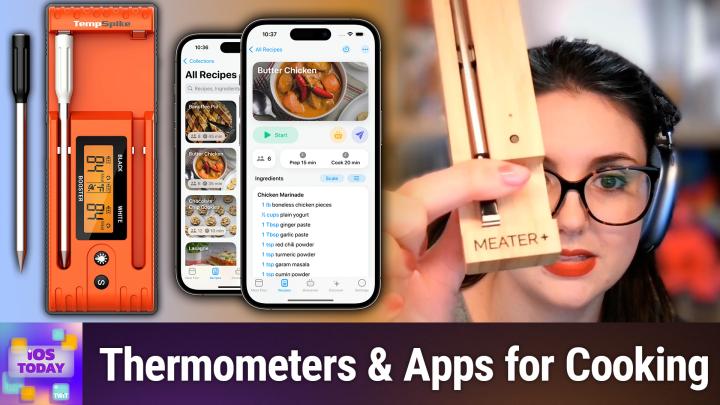
Loading summary
Transcript35 lines
- [00:00]
Micah Sargent
Coming up on iOS today, Rosemary Orchard and I talk about apps and accessories for cooking and food. Stay tuned.
- [00:10]
Rosemary Orchard
25 years ago, a small group of business and government leaders met in Washington, D.C. they envisioned the creation of an independent non profit organization with a mission to help people, businesses and government mitigate the growing threat of cyber attacks. Today, the center for Internet Security embodies that vision. For 25 years, it's worked with a global community of IT and cybersecurity experts to develop the CIS benchmarks and CIS critical security controls. These proven security best practices defend against common cyber threats and streamline compliance with industry frameworks, regulations and standards. Today, CIS provides cybersecurity services, threat intelligence and critical resources to help public and private sector organizations alike strengthen their Cyber defenses. Visit cisecurity.org today. That's the letters cisecurity.org to find out how CIS can help your organization as we create confidence in the connected world. Hey prime members, Are you tired of ads interfering with your favorite podcasts? Good news. With Amazon Music you have access to the largest catalog of ad free top podcasts included with your prime membership. To start listening, download the Amazon Music app for free or go to Amazon.com ADFreePodcasts that's Amazon.com ADFreeP Podcasts to catch up on the latest episodes without the ads.
- [01:35]
Micah Sargent
Does it ever feel like you're a marketing professional just speaking into the void? Well, with LinkedIn ads you can know you're reaching the right decision makers. You can even target buyers by job title, industry company seniority skills. Wait, did I say job title yet? Get started today and see how you can avoid the void and reach the right buyers with LinkedIn ads. We'll even give you a $100 credit on your next campaign. Get started at LinkedIn.com results terms and conditions apply. Podcasts you love from people you trust.
- [02:12]
Rosemary Orchard
This is twit.
- [02:17]
Micah Sargent
This is iOS Today episode 747 with Rosemary Orchard and me, Micah Sargent. Recorded Tuesday, April 1, 2025 for Thursday, April 10, 2025 Cooking and Food hello and welcome to iOS Today, the show where we talk all things iOS, iPados, WatchOS, Vision OS, HomePod OS and all the OSS apple has on offer. We love to talk about them here on the show to help you make the most of your devices. I am one of your hosts of this show. My name is Micah Sargent.
- [02:53]
Rosemary Orchard
And my name is Rosemary Orchid and I'm very excited to be here as always.
- [02:58]
Micah Sargent
Yes, we have an opportunity today to talk about cooking. You know we we've covered different episodes before that have ties to Thanksgiving and ties to, you know, getting the family together and sort of figuring out how you're going to make a meal. This is a little bit more, I think, hands on, which is interesting, and it's been inspired by something that Rosemary is going to tell us. But I did just want to say, you may have noticed in that title card, I said, we are recording this episode on Tuesday, April 1. Worry not. There are no April Fools in this episode. And so you can rest easy knowing that that's the case as we go in to it. So let's get underway. Rosemary, what's in your hand over there?
- [03:53]
Rosemary Orchard
Well, I mean, I've got a couple of things in my hands here, Micah. I like to cook. This may be a surprise to some of you, may not be a surprise to others, but one of the things that is really tricky, especially if you're cooking like a large joint of meat or similar, is knowing when it's done. Now, some places where you can buy things will tell you, you know, based on the exact weight and this particular cooking temperature, blah, blah, blah, this is how long you need to cook it for. Well, that works great for some things, but for other things, it's a little trickier. And so I have been experimenting and I started actually years. I got a meter plus, and this is a smart meat thermometer that you stick in whatever it is you're cooking. You open up the app and you say, hey, this is what I'm cooking. This is what I want it to be like. So, for example, it could be a joint of beef, medium rare. And it'll tell you, okay, like, you know, I'll, I'll get back to you when you know it's done. And you can do things like add timers based on, like, the estimated finishing time and so on. But recently I have been discovering that the Bluetooth range on this is not great. So I can be sitting, you know, 20ft away, if that from my kitchen where my meter base is. And it's my. My phone keeps saying it's lost its connection to it, which is not amazing. So instead, after doing some research, I found the temp spike. Now, temp spike are made by a company called Thermopro, and they make a whole range of thermometers. And I got the. The fancy black and white set. So there's two, two probes here, one black and one white. And then actually on the physical device, it's got black and it's got white. And one thing about this, which I really Appreciate is the fact that this has got a USBC port on it for charging. So I no longer have to have spare AAA batteries in my kitchen. And I can see on the actual device, I've just realized the plastic is still on there, which I probably don't need because used this a few times to. I can actually see the individual battery values for each one. I have the option of turning on a light on it or turning it off and then there are some settings options. But the way that this works is through my phone, basically. So here in the app I can see I have my temperature or my temp spike set up and so I can actually see a nice picture of the device. So I know what it is. I can see each probe, the black one and the white one. And if I remove one of them from the case, then it will actually start giving me the option to set things up and so on. So I can see I'm currently holding it in my hand. So it's 25 degrees ambient temperature around, which is based on the. The main body of the unit is 23 degrees. And you know, I can then set up things like alarms and vibrations and go through cooking profiles. So I could say I'm cooking beef, I'm cooking fish, I'm cooking ground beef or ground poultry, etc, I can also add a custom option as well, which is quite nice. So if I were to say, okay, I'm going to cook beef, then I can actually tap on that and say, okay, I would like to cook this rare or well done. And so if I want for say, well done, then it will walk me through inserting the spike which has a little mark on it, and you always have to insert it past that for safety so that it doesn't explode or anything. And then you put this at least a foot away. And this actually has magnets on the back, which is why I'm showing you the back of it. So this will like magnetize to something else in your kitchen. I happen to have one of those Ikea like weird little miniature island things which is opposite my cooker, which is in the perfect place for this. And then, yeah, it will get on with it and once the temperature starts rising, it will then calculate how long is left and let me know. And what is quite nice about this is you may have, you know, two different things that you need to cook at the same time and you know, you want to be told about each of them when they're done. And you can do that or you can cook things in sequence and you just don't have to worry so much about cleaning in between. And I just find that this is a really handy gadget to have in my kitchen that both promotes food safety, because I'm definitely not eating undercooked chicken, thank you very much. That's not one of my life goals. But yes, then, you know, I have all of the. The options for, you know, cooking things. And I really like the fact that I can just add whatever it is that I would like for the cooking.
- [08:35]
Micah Sargent
Yeah, I. This is really neat. You know, there are. There have been multiple ways. This classic way, right, of. Of using a. A quick read thermometer that requires you in almost every case to open up the heating, you know, container and check the temperature, which will immediately stop it from being as hot as it was. There are sort of probes that are kind of one purpose. The turkey probes, for example, where you pop it in and it's this little thing that what inside melts at the perfect temperature that it's supposed to be for a turkey, and then it pops out these more precise probes that can be there for the whole cooking process. That I think is what makes this uniquely valuable. And the fact that you have two of them is even better because I know I have certainly taken my quick read thermometer and popped it into one part of the meat that I'm cooking, and it's like, okay, it's at 140 or whatever. Whatever it is that I'm trying to get to, depending on the type of meat. And I'm like, okay, we're good. But then I just go, boop and pop it into another. It's like 10 degrees cooler. And I'm going, oh, no. So being able to, even if it's just, you know, if you're not cooking two things at once, if you're cooking one thing and you want to make sure that across the entire slab of meat, it's all the same temp is fantastic. So I think this is a really uniquely valuable, you know, option in that way. Now is. You said it's all Bluetooth or is it WI fi?
- [10:26]
Rosemary Orchard
Okay, yeah. So this works via Bluetooth, and that applies for both the meter. This one is the meter plus, but all the meter options and the temp spike. Temp spike. I will say a massive advantage of the temp spike stuff versus the meter stuff is their products start at around $90, and the cheapest meter starts at about 130. So that is definitely something to bear in mind if you're considering one of these smart gadgets for your kitchen. I also personally greatly appreciate the fact that the temp spike has that display built in so I can see on the display without getting out my phone or anything else what's currently going on. And they have different ones with like little displays that you can like stand up in various places as well or whatever it is that suits you. So, yeah, personally I'm really enjoying the Thermopro range of gadgets. I also got one of their instant read ones for just checking like dough and stuff as I'm proofing it to see what the temperature is.
- [11:23]
Micah Sargent
Yeah, you know, this I think again is, is, it's, it's just amazing sometimes the technology, Right. That we have received over time, that has come around over time and when it comes to precise cooking temperatures, this is certainly one of your. Now we've got the, we've got some of the accessories. Right. But when it comes time to figure out what we're making and how to make it, I know there's an app, Rosemary, that you very much enjoy. I think Paprika has gotten a lot of attention on this show and so I'm not going to talk about Paprika again. It's been the long standing app in both Leo and my app arsenal. But there is a contender that has come along and did some very clever things that I think set it apart. And so I was hoping you could tell us about that in just a moment.
- [12:33]
Rosemary Orchard
So crouton is one of my favorite applications because it does more than just recipe storage. So to start with, I'm in the main type of crouton right now and I have meal planning. So you can look at yesterday and see I had quick beef and broccoli noodles. Today I'm having baked oatmeal muffins which were breakfast, I'll admit. Tomorrow is some not so sun dried tomato sauce, which I'll probably have with pasta. Creamy garden pasta, no need. Cinnamon rolls, amazing omelette muffins. And I can add as much meal planning and sections as I want to each day. So for example, for today I could add a section for breakfast and then I can just move those baked oatmeal things into breakfast and then I can add a section for say dinner and then I can add a recipe. Now I can either choose a recipe, I could have a random recipe. Ooh, interesting. Or I can even just add a note. So I could say bananas for example, because I have bananas that need eating. So I could just remind myself of that. Now one of the things that I love About Crouton. In fact, there's a whole bunch of things is right here. I can see a sort of weather forecast in my meal planning view because that for me does affect what I want to eat. If it's going to be really, really cold, I'm going to want something like a nice stew that's going to help me feel and stay warm. And if it's really hot, I'm probably not going to want to be cooking and in a hot kitchen for a long period of time. So I'm going to lean more towards fast things, salads, stuff like that. So I have that view here. I can also tap on the three dots on any day and say, hey, add this to my grocery list and then it'll come up with absolutely everything that I need here. And I can see, okay, so I've got like flaky sea salt, some garam masala, garlic cloves, all of that. And I can add that to my list. And, you know, this is, you know, a pretty lovely part of the way that, you know, the way that crouton works. I can also clear my current week. I could generate a plan for the week now because I've already got a plan there. I don't need that. And then when it comes to recipes, I have all of these recipes that I have in imported over time. And if I were looking at something and I was like, oh, cinnamon raisin bagels. Okay, this looks a little bit off here. I can edit the recipe, but then there at the bottom there's a little re import button. So I can say, hey, can you just go back to the website and try grabbing that again? And there we go. It's grabbed it and it's updated it and it's now a little bit easier to read and it's got all the steps in their different formats. I've got nutrition information here, photos, the website. I can specify what folder this goes into so I could say, hey, this is, this is more of a breakfast thing. And I can also share things with my household, which is really nice if you would like to use the household features. Obviously there's the groceries, which I've already mentioned. And then there's also discover Now a couple of the things that Crouton has been working on recently involve AI. So AI for helping you discover recipes, create recipes, tweak recipes, and also import recipes. Because I don't know about you, Micah, but one of the things I hate the most when I'm looking for a recipe is I find something and I'm like title that sounds exactly like what I want. And you start reading. Once upon a time, in a kingdom far, far away, there lived a young prince in a shining castle. His great grandmother had an ex husband or was a widow and her husband had had a vineyard. And in the vineyard there were these ants and somebody one day had covered them with chocolate. And this is how we're going to make cinnamon bread. And you're like, hang on a minute, six years of scrolling later you finally get to the recipe and then you try to import it and it's all weirdly formatted because a lot of the people that are writing recipe sites don't necessarily know how you can make this stuff easy to read. Now one trick that you can absolutely use for a lot of those websites is to use a print button if they have one, because that gets rid of a whole bunch of junk that you don't want there. But the other trick that you can use is importing things with Crouton and you can also export a bunch of things from Crouton and share them to somebody else so they can import them. Crouton also has the option to import from Paprika or Paprika. But one of the things I really love about this is I actually have the option within Crouton to share a recipe. So there is a little share button here and I can share this as a crouton file, I can share this as a PDF, plain text or markdown. So if I wanted to send this to Mica then I can actually do that and I can export it. And what I'm actually going to do is I will just drop it into Yoink a second, which is one of my favorite little handy apps. Not necessarily great for this sort of thing generally, but really great for what I am doing here for because it's just a temporary thing to keep the file around. And as you can see, this is now a nicely formatted recipe which is great for, you know, my mum says, hey, like I want to get this recipe from this website and print it, but it wants to take 10 pages on the printer. Can you help me? And I go, sure, I'll import it into Crouton and then export it back out and it'll send all that information to her. And now it's down to two pages, which is much more readable. Now inside of Crouton I have the option to start cooking and it's got a hands free mode so I can either I can swipe and tap on the screen, but I can also wink and I can open my mouth to get more information about the ingredients and so on and so forth.
- [18:15]
Micah Sargent
I still just think that's so wonderful because especially if you are cooking with meat like we were talking about earlier.
- [18:20]
Rosemary Orchard
Yes.
- [18:21]
Micah Sargent
You got meat hands.
- [18:22]
Rosemary Orchard
Yeah, it's like, it's like, okay, dice a chicken. Wait, how much chicken was it that I needed to dice? And you open your mouth and then you can see obviously a cinnamon raisin bagels shouldn't have chicken in them. That that's something that you should hopefully not have in your cinnamon raisin bagels. But if you did, you know that it's really useful for just checking, you know, as you chop things and chuck it into a bowl on your scale, then you can see that. Speaking of scale, now there are a couple of things that you can actually connect to Crouton, which I personally think is amazing. So if you have a thermometer, so similar to the temp spike. Temp spike or the meter, if you have one for a company called Combustion, which I personally don't have any experience with, you can connect it to Crouton as. Set it up from Crouton. Similarly, if you have smart scales, so these are specifically from the brand called acaia, I think that's how you pronounce it. So if you've got the Pearl Lunar Pisces, I don't know how to pronounce that, but either way, if you've got supported scales, you can also connect that to crouton so that it can tell you like, hey, this is the right amount of this, which is pretty freaking cool. So what something else you can do is a quantity popover, scaling your ingredients. So if I said, hey, you know, this is making enough for 10 people right now, can I make enough for two and a half people? Because, you know, I'll eat some extra, then I can do that. Or I could say, hey, I want to make enough for 100 people. I'm. I'm going to need to take out a mortgage to make enough bagels for 100 people, I think, because that, that seems like a lot of ingredients there, but you know that it's quite useful. Also, if you've imported a recipe, say, for example, you're in the US and you've imported a recipe from the BBC Good Foods website. Well, you may find it's in metric, so you can convert everything to imperial. You can see everything in its original form, or you can have everything in metric or whatever it is that you prefer. I can also, personally, I really like the division of prep time. Versus cook time. Like, okay, it might say it takes like four hours to make, but three and a half hours of that or something sitting in a slow cooker or in the oven on low temperature. That's fine. I have time for that. I don't have time for 2 hours, 15 minutes of prep right now. So I'm not going to make the cinnamon raisin bagels. But yeah, it's, it's really nice. There's also a timer option in here which if you have a Vision Pro, you can grab the timer and like stick it on the individual thing that you need the timer on. So you look at it through your Vision Pro, you can be like, oh yeah, the chicken needs another 20 minutes to marinate, you know, the dough needs another 15 minutes to rise, etc. And yeah, I, I personally just think this is a really great app. It's got so many cool features in it. And yeah, it has an optional extra in app subscription of 1.99amonth for crouton plus, which is their AI things with recipe feeds importing from cookbooks. So if you've got physical cookbooks, I have one here actually, which is a bunch of ice cream recipes because you know, it's getting to that time of year. So say for example, I were to open this and go, hey, that recipe for peach ice cream, I want to put that in crouton. Therefore $1.99 extra a month. I can unlock that. And yeah, other than that, it's free to download and try out for up to five recipes or 699 a year after that.
- [22:03]
Micah Sargent
Beautiful. And that is Crouton. Well worth checking out, especially as we showed the different hands free options. I think that's such a even, even just as a cool demo that this is very clever, very clever. All right. To round things out for sort of getting your cooking and food in line, it's an opportunity to talk about one of the major use cases for the smart speakers in our lives. Many of you who have owned Echo devices have probably used them to set timers. Your home pods can do that too. So can your Apple Watch. My Apple Watch is my favorite timer right there on my wrist. But if you are busy again with meat hands, all you gotta do is speak out loud to the nearest home pod and it can keep track of your timers. And you know, people celebrated at the introduction of multiple timers tell us about getting those timers to see what's actually running.
- [23:12]
Rosemary Orchard
Yeah, so one of the things that I often wonder about, and usually this happens when I've wandered off to a different room. So I have a HomePod mini in my kitchen. I have HomePods in my living room. So I wander off to a different room, like, just to sort things out, because I know I've got like 30 minutes for this thing to cook. And then I go, hang on a minute. Did I remember to set a timer for like, in the middle to just, like rotate things and check that everything's okay and that, you know, there's nothing that needs tweaking in. In the cooking or, you know, I have six timers. Like, how long do I actually have? Like, do I have enough time to run out and take out the recycling and. And all those things? So one of the things that I do when that happens is I open the home app. Now I filtered over here on the right to speakers and TVs. You don't have to do that. I've just done that because I have quite a few devices here. Um, and then if I tap on the right hand side of my kitchen, HomePod where I can see the fact that it says HomePod not playing, not the icon, but the other side. And then I scroll up a little bit, I can see there's a passage timer with just over 10 minutes remaining. Um, and that's quite handy because now I can see that. Um, and actually I could, if I needed to, I could pause it, I can cancel it. I can say, hey, no, actually I forgot to put the passer on. And obviously I can go back and I could talk to the HomePod. But especially if you are, say, on the phone with somebody, randomly talking to your HomePod while you're on the phone can be quite confusing for them. So it is nice to be able to do this and also to just cancel your timer or create another timer. And one of the things that I really like about timers on smart home devices versus on my Apple Watch or my iPhone is it doesn't matter where my phone is or where I am or therefore my Apple Watch. If somebody else is in the kitchen and the timer goes off and it says pasta, then somebody else can figure out, oh, hey, that means we need to like, stop cooking the pasta and drain it, because it's probably done. And I, I personally feel like the smart speakers are really great. You can also add a timer here and give it a name, which is really nice. And if you would like to on your iPhone as well, using that magic voice assistant that the Apple lady that we all know and love, at least when she doesn't say, let me Google that for you. Then you can also add multiple timers. And just don't forget to set the name of the timer. And this is the trick. If you want to have multiple timers running at the same time, you need to give them names because otherwise it's just gonna say, your timer is done, your timer is done, your timer is done. Uh, but if it doesn't have a name, then when you say, hey, set a five minute timer, if there's already a ten minute timer running, it'll replace that. Um, and another thing that I found really useful is if I say, hey, Apple lady, set a 12 minute timer for pasta. And then five minutes later I come along, I say, hey, Apple lady, set a 12 minute timer for pasta. Sugar. Hey, you already have a pasta timer. Do you want to set it? Like, do you want to replace that timer? Like, update that? And I'm like, oh, yes, please. Because I didn't actually put the pasta in when I thought I did. Like, I, I set the timer. I forgot the crucial step of putting the pasta in the water or something like that. So, yeah, it is very nice to play with these timers. And yeah, actually see, you know what, what you need to do there, which is great. And so, yeah, I, I've been using timers an awful lot for all sorts of things, Micah. And it's quite useful to be able to do that. Of course, if you do it on the iPhone, then you have the live activities on your lock screen. But personally I prefer the HomePod because then it just interrupts whatever's playing in the kitchen, if anything is playing, and lets whoever is there know. And also, don't forget, if you have a timer or an alarm going off on a device in your house, it doesn't matter if it's not necessarily your device, as long as it's part of your household's devices. And it doesn't matter if you're in the, like right room. You can just say, hey, Apple lady, stop that timer. And the series will talk to each other. They will confirm, they're like, hey, would you like to stop the timer in the kitchen? Would you like to stop the alarm on, you know, Rosemary's iPhone? And you say, yes, and then it stops it. And that is quite useful to know if you are, for example, in the bathroom and you can just hear it going off and you're like, I will be there in a minute, like, the world is not going to end. May go from medium rare to medium. But, but you know what, I'm in the bathroom, there's only so much I can do right now.
- [27:42]
Micah Sargent
All right, that is a look at some options when it comes to better monitoring your cooking and making food. If you have accessories that you use with your devices or apps that you think are great, of course you can always email us IowaTodayTV with your thoughts. Up next, A little bit of news.
- [28:06]
Rosemary Orchard
25 years ago, a small group of business and government leaders met in Washington, D.C. they envisioned the creation of an independent non profit organization with a mission to help people, businesses and government mitigate the growing threat of cyber attacks. Today, the center for Internet Security embodies that vision. For 25 years, it's worked with a global community of IT and cybersecurity experts to develop the CIS benchmarks and CIS critical security controls. These proven security best practices defend against common cyber threats and streamline compliance with industry frameworks, regulations and standards. Today, CIS provides cybersecurity services, threat intelligence and critical resources to help public and private sector organizations alike strengthen their Cyber defenses. Visit cisecurity.org today. That's the letters cisecurity.org to find out how CIS can help your organization as we create confidence in the connected world. Hey prime members, Are you tired of ads interfering with your favorite podcasts? Good news. With Amazon Music, you have access to the largest catalog of ad free top podcasts included with your prime membership. To start listening, download the Amazon Music app for free or go to Amazon.com adfreepodcast that's Amazon.com adfreepods to catch up on the latest episodes without the ads.
- [29:32]
Micah Sargent
Does it ever feel like you're a marketing professional just speaking into the void? Well, with LinkedIn ads, you can know you're reaching the right decision makers. You can even target buyers by job title industry company seniority skills. Wait, did I say job title yet? Get started today and see how you can avoid the void and reach the right buyers with LinkedIn ads. We'll even give you a $100 credit on your next campaign. Get started at LinkedIn.com results terms and conditions apply. I wanted to mention that Apple has rolled out as of yesterday. We're recording this on April 1st. Yesterday, Monday, March 31st, 2025, Apple rolled out a series of updates, including iOS 18.4. If you don't have the latest update, well, now's the time to get it. There are quite a few new features for Apple intelligence users, or havers, I guess, for those who have Apple intelligence on their devices. Priority notifications have officially come to the system completely. So now you can see those notifications at the top of your notification stream. I've been using that a little bit and I hate it. Just, just putting that out. It does, it did not work well for me. But it is a feature that is available and if you basically it uses your behaviors and its own sort of AI understanding to try to present the most important notifications to you. Perhaps that's a message, perhaps it's an Amazon, you know, hey, you've got a something delivered. I will say my problem with it was when I had group chats because it determined that I had spoken to one of the people more often than I had spoken to others, then it would surface that person's notifications in the priority part but keep everybody else's responses buried beneath everything. And I can understand if it's an individual conversation with that person why you would prioritize that. But for the group chat that didn't work because I was waiting for responses from other people and was not seeing them because of the way that the priority notifications were set up. So I want to, I don't want to just complain about a thing without explaining why it didn't work for me. So that is, that is the, the way that it didn't. So I ended up disabling that. But Apple Intelligence's image playground has a new style called Sketch. And so sketch is kind of a sort of drawing sketchy style. Outside of that, if you have an app, I won't read all of these because you should go check them out. But Apple Vision Pro if you have an Apple Vision Pro, you will find a new app on your iPhone that is called the Apple Vision Pro app. It basically lets you find new stuff to check out quickly, access information about your device so you can see, oh yeah, that's what this does. And be able to kind of learn about new, what they call spatial experiences. Apple News plus this is a very important episode for this now has recipes. And so these are curated recipes that include a special catalog so you can browse and you know, look for your specific recipes that you like that you've added added with a cooking mode as well. So being able to keep track of your, you know, the, the recipe that you're making. Now to be clear, the cooking mode doesn't come anywhere near as close to any of the more powerful cooking apps. So this is definitely not a Sherlock situation. This is just an another option for you if you maybe have not downloaded a third party cooking working app. Photos also got some updates mostly around filtering and organizing photos and some updates to the sort of family system where parents have a little more control over some of the issues that have come up in the past. Like a child being able to reset an app limit by uninstalling and reinstalling an app limit app. Now that is not possible. That app limit will stay. So kids who have been using that to bypass the app limit will be disappointed to hear that that update is coming to place. And then also helping make it easier to create a child account and set up the proper settings for that child is something that's been added. Rosemary, anything that you want to. Oh, one more that I want to mention that I'm very excited about. And then Rosemary, you take it away. Finally, finally, if you have a robot vacuum cleaner that is matter. Oh no. Oh no.
- [34:45]
Rosemary Orchard
Okay, no, you can do it. You can do it.
- [34:47]
Micah Sargent
You can do it. You do it. Rosemary, tell us, tell us. It's very exciting.
- [34:50]
Rosemary Orchard
Well, if you have one of 12 or 13 robot vacuums then as of iOS 18.4, then you can add that into HomeKit. Now this is limited right now to a subset of smart vacuums whose providers have updated their vacuums. And so there are seven, I believe from Roborock including the S8, a couple of the Saros models and the Cuervo model. Cuevo model, the Curve Edge Master there. And if like me, you have an Omni Ecovacs one, then some of their Debot models, unfortunately not mine have been updated to support this as well. Mine is unfortunately apparently slightly too old. However, I am thinking that Home Assistant is going to be adding support for adding Robot vacuums into HomeKit through Home Assistant. So if you have an older model that is supported through Home Assistant, then you may be able to add it to HomeKit in the hopefully not too distant future, though not with their release that is coming as of tomorrow as when we record this. There's also a SwitchBot model which supports this and iRobot have said that the Roomba Combo 10 match max robot Vacuum and Auto Wash Dock will be adding support for this, but they haven't specified when that is coming. Now what is really cool to know is if it does have vacuum and mop support, then you'll be able to choose what you want to do through HomeKit through the Apple Home integration with it and you'll be able to do things like start it running, stop it running and things like that. However your or more fancy things like you know, defining, you know, no go areas and stuff like that, you are going to have to go back to the original app. So either The Roborock app or the Ecovacs app or whatever it is to adjust those. But hey now, if you have a leafless tree emoji in your life, and therefore you have a lot of leaf emojis littering your floor, you can use HomeKit to control your robot vacuum to go and vacuum them up.
- [36:57]
Micah Sargent
I would like to say that I have been testing an Ecovacs model that supports this. Of course, up to this point, only Google offered the matter enabled sort of home integration. And so I've been waiting for this 18.4 update to hit, and it is very cool to finally have it right there in the home app. We've been waiting for this for such a long time. It's very exciting. So yay. And then of course, if we could scroll to that part of the page, Kevin, we would be remiss if we didn't mention the new. He knew right what I was talking about. The new emoji available in iOS 18.4, including face with bags under eyes, which is very quickly going to become my favorite emoji. The root vegetable, which looks like a beet, but I guess it's just a sort of generic root vegetable.
- [37:51]
Rosemary Orchard
I feel like it's more of a radish.
- [37:53]
Micah Sargent
Oh, radish. You're right. It does look more radishy than beety, doesn't it? See, and there's why they just call it a root vegetable. Is it a radish? Is it a beet? Is it a potato? It's definitely not that. A fingerprint, A harp? A leafless tree. A splatter, which is purple. I'm curious if it'll have multiple colors or if it's always purple and a shovel.
- [38:22]
Rosemary Orchard
So do we need more colors or is purple just the best?
- [38:27]
Micah Sargent
You know what? You're right.
- [38:28]
Rosemary Orchard
It would be nice to have green, but I feel like purple splatter. Everybody's okay with purple.
- [38:32]
Micah Sargent
It was disrespectful of me to suggest otherwise, and I realize the errors of my ways now. You are absolutely right. Purple is the only color that you need. And so you heard it here, folks. I take it back. Purple is fine.
- [38:47]
Rosemary Orchard
I mean, it's okay. We can have a green slasher as well. We just don't need any other colors.
- [38:51]
Micah Sargent
Deal. There are loads of new little tiny changes and of course, security fixes and updates. Hop on that 18.4 update. I think it's a fun one, but it's also an important one. So be sure to check out the 9to5Mac article that we linked that has all of the features that have been added and of course, features for WatchOS, macOS, et cetera. That is going to bring us to the end of this episode of iOS today. If you have questions, questions, comments, concerns, you can send those to iOS today at TWiT TV. But more importantly, listen up here. Listen in. You know what? Actually, Kevin, can you play the music? The shortcut? Yeah, there it is. If you want to keep hearing that delightful music, well, then you need to send in your shortcuts corner request. Also your regular questions too. Any questions you have about iOS, your shortcut to Corner requests for Rosemary, please be sure to send those in to us so that we can answer those for you. Those all go to iostodaywit tv. If you have sent them. If you've sent in a shortcuts, corner request or a question in the past and you feel like we missed it, I give you my official permission to send that in again so that we, you know, hit it. Because things get sorted, things get filtered, so there's a chance. So, yeah, if you've asked a question and you want it answered and you feel like it hasn't been yet, we'll try to, you know, we'll make sure to look back and say, oh, no, it actually was answered here. But we want to make sure you get your questions answered. And more importantly, we love being able to answer those questions. And I love seeing the delightful and amazing shortcuts that Rosemary makes for the show as well. So Iostodaywit TV, I want to mention really quick. Club Twit. Twit TV. Club Twit. It's just $7 a month. When you join the club, you get, well, first of all, two weeks free. You can do the two week free trial to make sure it's for you. I think you'll find it is because you get every single one of our shows ad free. You get access to the Twit plus bonus feed that has extra content you won't find anywhere else. You get access to the members only Discord Server, a fun place to go to chat with your fellow club Twitters and also those of us here at Twit. And access to an unlock of that warm fuzzy feeling in your heart knowing that you're helping support the work we do here on the network. TWiT TV. Club TWiT. Check it out, Rosemary Orchard. If people would like to follow you online and check out all the great work you're doing, where should they go to do so?
- [41:42]
Rosemary Orchard
Well, the best place to go is rosemaryorcher.com which has got links to apps, books, podcasts and of course all the social media sites where you can find me. Plus you can find me hanging out in the Club Twit Discord, where there is a dedicated Iowa Today area where we post a post for every episode and also we've got a general discussion area and there's also a live chat while we're recording live. So if you happen to be around while TWIT's recording things live, then you can join in and chat with everybody else about the episode as it's made Micah work as folks find you.
- [42:12]
Micah Sargent
If you're looking for me online, I'm ikasargent on many a social media network. Or you can head to Chihuahua Coffee, that's C H I H u a H u a Coffee where I've got links to the places I'm most active online, so be sure to head there and check it out. Thank you so much for tuning in to this week's episode of iOS Today Day. We'll be back next week. Thank you.