← All TWiT.tv Shows (Audio)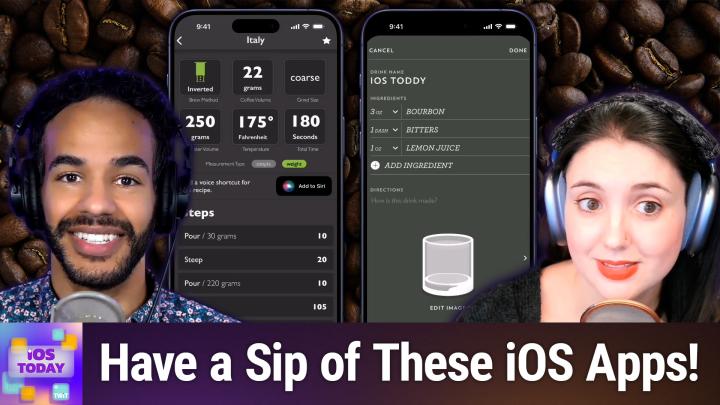
All TWiT.tv Shows (Audio)
iOS Today 750: Coffee & Cocktails
00:32:08
Highball, FourSix, Just Timers, & more
Loading summary
Transcript25 lines
- [00:00]
Micah Sargent
Coming up on iOS today, Rosemary Orchard and I, Micah Sargent, get our beverages ready and so should you. Stay tuned.
- [00:08]
Odoo Advertisement
Imagine you're a business owner relying on a dozen different software programs, each one disconnected, more expensive and more complicated than the last. It can be incredibly stressful right now. Picture Odoo Odoo brings all the tools your business needs into one simple platform. CRM accounting, inventory, manufacturing, marketing, HR and more. All seamlessly connected. Everything works together, giving you the peace of mind that your business is running smoothly from every angle. Odoo's open source applications are user friendly and designed to scale with your business, saving you time and money. Say goodbye to juggling multiple platforms and hello to efficient integrated management. Stop wasting resources on complicated systems and make the switch to odoo today. Visit odoo.com o d o o.com and discover how Odoo can simplify and streamline your business operations. Odoo Modern Management Made simple hi, I'm.
- [01:09]
Sarah Paijiu
Sarah Paijiu, the founder of Blueland. When I think about the household cleaning products I'm using around my kids, I want to know that they're safe to use on surfaces, dishes and clothes. Basically all the items that ultimately end up either in my kids mouths or on their skin. That's why I created Blueland. Every Blueland product is made to meet the highest parental environmental standards. Our products are not just clean, they're Mom Clean. In 2024, Blueland was named an EPA Safer Choice Partner of the Year. From cleaning sprays and toilet bowl cleaner, to dishwasher and laundry detergent tablets, all of our formulas are 100% plastic free, made of certified clean ingredients, free from chlorine, bleach and harsh chemicals. We believe that you shouldn't have to choose between what's safe for your family, good for the planet and proven to actually work. Get 15% off your first order by going to blueland.com clean. That's blueland.com clean to get 15% off.
- [02:04]
Bluehost Advertisement
I'm no tech genius, but I knew if I wanted my business to crush it, I needed a website. Now thankfully, bluehost made it easy. I customized, optimized and monetized everything exactly how I wanted with AI. In minutes my site was up. I couldn't believe it. The search engine tools even helped me get more site visitors. Whatever your passion project is, you can set it up with Bluehost with their 30 day money back guarantee. What do you got to lose? Head to bluehost.com that's B L U E H-O-S-T.com to start now.
- [02:37]
Micah Sargent
Podcasts you love from people you trust.
- [02:41]
Odoo Advertisement
This is twit.
- [02:46]
Micah Sargent
This is iOS Today with Rosemary Orchard and me, Micah Sargent. Episode 750 recorded Tuesday, April 15, 2025 for Thursday, May 1, 2025 Coffee and Cocktails. Hello and welcome to iOS Today, the show where we talk all things iOS, iPad, OS, WatchOS, HomePod OS. It's all the OSes that Apple has on offer and we love to talk about them here on the show. This is our opportunity to help you make the most of your devices. I am one of your hosts, My name is Maika Sargent.
- [03:27]
Rosemary Orchard
And my name is Rosemary Orchard. And I am your other host here on iOS today. I'm very excited and happy to be here as always, Micah.
- [03:35]
Micah Sargent
Yes, it's a pleasure. We thought this week it would be fun to talk about some of the apps that we use for, well, you know, for making coffee, for making tea, for making cocktails. There are lots of options out there, as there always are, but there are some purpose built apps and apps that I have used for years at this point that I really wanted to highlight. And so the first one that I want to talk about, it's available in the app store for 4.99, well worth the purchase price. It is called AeroPress Timer and AeroPress Timer is an app that is specifically, as you might imagine, for the AeroPress and gives you every kind of AeroPress timing option that you could possibly want. And by that I mean it has options that are based on recipes from all around the world, from different roasters, from different competitions and all of it comes together to kind of provide you with what you need. So as I scroll through here, you can see in the AeroPress Timer app that it starts with your recently brewed and favorite options, then standard recipes that are going to be kind of for a single cup, two cup recipes. So obviously if you're having, if you're trying to make more than one cup of coffee for you and for someone else and then what they call the championship pack, that is the, the different coffee brewing championships and the, the coffee that has won. So first place, place, third place, and then the champions of Australia, United States, Norway, United Kingdom, Japan and Italy and what they did and then the roaster pack which is for those coffee roasters. So the blue bottle option, Clive Verve, Tonks Seeds, Tim Wendel, Bow and Double Shot. And if I tap on one of these and I'm going to go with Italy, I can see the method that they used to brew the coffee from the, with with the AeroPress. So first and foremost is the brew method. So there's the standard, which is how the AeroPress was expected to be used in the first place, which is where the aeropress is placed over the cup and you put the grounds in the bottom and then you pour the the water over the top and then you plunge versus inverted where it's actually sat down, down, upside down, it's inverted and you put the the coffee and the water in that way and then you flip it to put it into the cup and plunge. I tend to like an inverted method because I don't like it dripping out earlier than whenever it's brewing. It also tells you the coffee volume in grams and so you can have it sitting there on your gram scale and get that figured out. The type of grind. So in this case it's coarse ground. How much water in total is going to be the temperature of the water and how long in total it's going to take to brew the coffee. There are two different measurement types. I have it set to weight so that I can do the gram scale. But there's also the simple, which is basically using the tools that came with the AeroPress. So 1.5 scoops of coffee, you use the scoop that came with your Aeropress and then four shots of water that's equivalent to the four on the side of the aeropress. Again, I like to do it via the gram scale measurement. And you'll notice right here in the next part it says add a voice shortcut for this recipe that gives you the ability to tell Siri that you want to brew the Italy coffee. And it can kind of automatically head in here and start doing this. I love that it also includes the source so you can tap on it to see. You can add notes if maybe you want to make adjustments. But watch what happens when I press start timer. It gives you a little bit of time to prepare to pour the coffee. And then you have 10 seconds to pour 30 grams of of water. You can see in the top right corner, it's the countdown of the full amount. Now we're on steep. You're supposed to steep it for 20 seconds. So we wait for that process to complete and then the pour and then the steep and the flip and the plunge and it all is is here to kind of go through the steps. You can always get a quick little look at what you're going to be doing. So you can kind of Prepare. You pour 30 grams of water, you let it sit for 20 seconds, you pour 220 grams of water. You let it sit for 105 seconds. It used to take five seconds to flip it and then 30 seconds to plunge. That's Italy. I'll show you one more just so you can kind of see what the standard method is the traditional of not inverted. And here you pour 40 grams of water, you stir it, you pour 210 grams of water and then you plunge. Sometimes there's no stirring. Also the coarse grinding changes. So that's Aeropress timer and I again really like that. Anything to do with the AeroPress is right there. I wanted to mention one other timer for a different type of brewing method. If you are a pour over kind of person then you might want to check out. It's available in the app store for free with an in app purchase. For the pro model it's called four six coffee timer and four six Coffee timer lets you brew on a timer your your pour over. So there's a notes section which you are required to have 46 pro for. There's a coffee section which lets you kind of keep track of what coffee you have. And then of course there's the settings option that has stuff like the, the how long it's taking for the coffee to cool and to get a notification about that as well as being able to see the next. So let's look at what it is like for the non pro version of this to do a simple 46 pour over. So it's. We can see that it requires 20 grams of coffee, 300 grams of water. If I tap on additional info I can see that we're using it's. It's a reference to the 46 technique which is using you know the, the ratio of. Of of coffee and water and also allowing things while you let the coffee brew a little bit. And so here you are pouring 60 grams. 60 grams and then after you've basically poured 40% of the water then you are pouring the remaining amount which of course is the 60. So if we hit start you can see you are going to take this period of time to pour that 60 grams of water and then you're going to get to the 120 grams, 180 grams, 240, 300 and then you're done. It does have. It says wait. I think 10 minutes is a long time to wait for a cup of coffee to cool. But that's what it says and then you can go from there again. This is the basic version. A lot of the better stuff is tied to that pro version which Is if I recall, it has a free trial and then it's just $8 a year, which is a fantastic price. 99 cents a month, $25 lifetime payment, which gives you access to being able to change the grain, the, the brew size, or excuse me, the, the coarseness and also the different adjustments to size ratio and pour. So you can check out more from that. That's four, six. Coffee timer. Rosemary, I was hoping you could tell us about your app for timers that maybe you'd use for tea or coffee or anything in between. Because you don't necessarily need to have something that is 100% purpose built when you could kind of spread it out a little bit.
- [11:52]
Rosemary Orchard
Yeah, you definitely could. And as somebody that doesn't drink hot drinks at all, I'm really sorry, folks, not even hot chocolate. But, you know, this was a little trickier for me because I, I don't like making stuff up to talk to you all about. You know, that's not who I am. But there is an application that I use all the time and that is called just Timers. Now I will say I usually use it through shortcuts and I don't necessarily have a bunch of safe timers in here, but one that I do have saved is replacing the filter on my water jug. So I need to do this about once every 28 days. And it is a process. So I have to soak it, I have to rinse the filter for a minute and then I have to soak it for it for five minutes, three times. And so I've created an interval series in just timers called water jug filter Replacement because I'm very creative. And so I'll tap on this to show folks what it looks like. And we can see that rinse is the first interval that is up. And then after that I have soak three times for five minutes each. And so if I were to go to edit intervals, it would allow me to rearrange these. Now that doesn't necessarily make sense here because they're, they're mostly kind of the same. Um, but if I tap on the triple dot in the top right, then I can see that there are, you know, a whole series of things here, including edit intervals. And edit intervals is where it gets interesting because under each interval I can specify the duration, um, and all of these will pop up, by the way, as live activities, which I really love. Um, and I can even do it as a date. I'm just going to go back to a duration of one minute. There I can choose the Specific color. So I'll make that one purple. And then I can do alerts and so I can say, hey, should this automatically go to the next interval, like without me having to press a thing? Or perhaps in this particular case, I need to take an action. Like after soak here for five minutes, I have to dump out the water, put in fresh water, and then run the next soak. So you know, that means I need to do a thing. So I don't want it automatically progressing. So I need to toggle on auto pause. I can say, hey, do I want these alerts to repeat? So keep nagging me until I do this. It's gonna nag me every 30 seconds 64 times. Okay. If I haven't done the next step after 32 minutes, well, it'll still be there on my home screen, so I'll see it. But there we go. And then for the actions, this is where this gets so nerdy. So when the interval expires. And also you can do this on safe timers or starts or stops or pauses or restarts, or you go to the next or the previous. Then you can do things like run a shortcut through a UR URL scheme or you can open a web page. And this can be really handy if you've got like a cleaning process that you need to do for your coffee maker or something like that. Because, you know, coffee makers need cleaning too. Folks, I'm sorry, I, I hate to say it, but they do. Especially if, like me, you live in a hard water area where you end up with calcium deposits and lime scale building up. That's not good for your machine. You don't want crunchy coffee. And also, no, coffee cake shouldn't be crunchy. I'm just going to clarify that right there. You don't want that. So if there's a website that has all of this, or maybe like me, you saved all your manuals to devonthink. Because I talked about that a couple of episodes ago and I love it. Devonthink has a URL scheme, can even get a URL to a specific page in a manual. Oh my gosh, yes, you could be a complete nerd. And so when it starts, you can then have it open up up the link to the page in the manual or the website or whatever to help you go through the rest of the steps so that you've got the timers there in just timers, but it gets a little nerdier. Um, and yeah, I really love this. So this is an interval style timer because it has Those four sections of it. But if I were to create another timer, I can have a counter timer where, you know, I say, hey, for two days and seven minutes this thing needs to run. And I can do that. And again, I can choose the alerts and I can customize like things like the sounds and everything. And then I can customize all those actions again. And there's also an option for a stopwatch type timer, which isn't a timer in the sense of like, okay, so after X amount of time it's going to go, you're done, but it's going to count upwards so that you know how long it's been running. Now, of course, you could use the clock app for this, but it's not going to have cool things like the URLs automatically opening different colors and all that stuff. And also you're not able to create named timers through the shortcuts app as part of this. So if you want to put a bunch of timers on your screen at once, you want to do it through shortcuts. Just Timers, which is free with an in app purchase of, I believe it's 4.99, is the way to go because it can do so many more things. It also had multiple timers before iOS have multiple timers, so plus one for that. It could also sync timers between devices, by the way, so you can have them like pop up on your iPad as well. Or if you start it on your iPad, you'll see it on your iPhone. Like 10 out of 10 for this. And it will do this for coffee or whatever you might need timers for. Including things like replacing the filter in my water jug.
- [17:22]
Odoo Advertisement
Imagine you're a business owner relying on a dozen different software programs, each one disconnected. More expensive and more complicated than the last. It can be incredibly stressful right now. Picture Odoo. Odoo brings all the tools your business needs into one simple CRM, accounting, inventory, manufacturing, marketing, HR and more. All seamlessly connected. Everything works together, giving you the peace of mind that your business is running smoothly from every angle. Odoo's open source applications are user friendly and designed to scale with your business, saving you time and money. Say goodbye to juggling multiple platforms and hello to efficient integrated management. Stop wasting resources on complicated systems and make the switch to odoo today. Visit odoo.com o d o o.com and discover how Odoo can simplify and streamline your business operations. Odoo made simple, all right.
- [18:24]
Micah Sargent
And then when you are significantly caffeinated and you are heading out perhaps for the evening, maybe it's time to go ahead and have a cocktail, a beverage of a different sort. And I want to talk about one of the long running apps on my iPhone that is delightfully made by the people at Studio Neat. It's an app called Highball. Highball is a very simple app that gives you access to some of the basic cocktails that one would expect. So margarita, old fashioned, Tom Collins, mint julep, whiskey sour, Negroni, a friend 75 Manhattan Special Holiday drinks like Irish coffee or a hot toddy, maple bourbon, a revolver Unforgettables, which are sort of International Bartenders association cocktails like the Aviation Contemporary classics, the Black Russian, a champagne cocktail. And then newer beverages that have come around like dark. Excuse me, dark and stormy. Let's choose dark and stormy. So we can add that by importing it. And it tells you in ounces and in milliliters what you need to make a beverage. So here, two ounces of dark rum, three and a three and a third ounce of ginger beer. And then you take a highball glass, you add ice to it, you add dark rum and you top with ginger beer. Garnish with a lime wedge. If you want more than one, then you can up that and be able to see what is required there. If you want only a half of one, you can do that as well. And then we'll pop that back down and then something like a mint julep, which is a little bit more complicated. You can see 2 ounces of bourbon, 8 mint leaves, 1 mint sprig and then half an ounce of simple syrup at the one to one ratio. But you can also create a new drink. And so let's say we're making an iOS today, an iOS Toddy. So this is going to have bourbon and we would go with one or what is it, three ounces of bourbon and then one dash of bitters and one ounce of lemon juice. This is sounding terrible. And then you can.
- [21:25]
Rosemary Orchard
Grenadine will cover many sins.
- [21:27]
Micah Sargent
There you go. Throw in some grenadine, mix together and warm. You get the idea. But what I love is it's so fun creating the image here. So you can choose your glass. If it goes in a Nick and Nora, if it goes in a tropical glass, an Irish glass, a flute, you can change the color of it. Wouldn't it be cool if we could get it looking this dark green color? If it has ice cubes in it, Whether there's a. Of course there's a lemon. Lemon twist. If it had A garnish or if it had something like an umbrella, and then you can. Can add the. That you can also change the background color as well. And I just find this delight to be able to create your own little recipes, but also to see kind of how these other recipes are made is quite nice. And I just like how simple the app is. It doesn't get in the way. It just works as needed. And you can, you know, kind of keep a collection of the beverages that you like without it being too complicated. That's Highball.
- [22:43]
Rosemary Orchard
Yeah. I also really love this app because once you've got your. The drinks in there or you found the drinks that you're looking for, if you're having, say, an event and have some friends recently who did this for a wedding, they had some certain, like, they customized the names of some drinks for their wedding. Like, most of them were fairly standard drinks or they added like a little twist or something to it. But they put the picture of the kind of glass that everything came in on the menu as well, which for me in particular was greatly appreciated because I usually tend to order tall drinks in larger glasses because there's more mixer in those. So I'm not drinking as much so quickly, which is better for me. So, yeah, I really appreciate that. And the fact that they actually used Highball and they took screenshots and they just took the picture of the drink from the screenshot and put it on their menu, which I thought was really lovely. And I meant to have a look and see if there was a way to, like, share the recipes out with the pictures, but I never got around to it. But I love the fact that they actually use that. And then you brought it up today.
- [23:40]
Micah Sargent
That is. Yeah. And that's very clever, clever way of using that. So that's Highball. Again, there are. I was looking through the list because I wanted to see if I had missed any. I've used aeropress timer for so long, and I wanted to see if there was anything else out there. There are lots of coffee timer apps on the App Store. There are many of them that have way too much bloat in them and are just kind of like ad grabs. So finding one that is really good and doesn't get in the way is a little difficult. And so I think some of these on the list that we included are some ways to kind of avoid that cruft that's out there. But if there is an app that you use that you love for being able to do this, do let us know. Iostodaywit TV is how you get in touch.
- [24:32]
Odoo Advertisement
Imagine you're a business owner relying on a dozen different software programs, each one disconnected. More expensive and more complicated than the last, it can be incredibly stressful right now. Picture Odoo Odoo brings all the tools your business needs into one simple CRM accounting, inventory, manufacturing, marketing, HR and more. All seamlessly connected. Everything works together, giving you the peace of mind that your business has. Running smoothly from every angle. Odoo's open source applications are user friendly and designed to scale with your business, saving you time and money. Say goodbye to juggling multiple platforms and hello to efficient integrated management. Stop wasting resources on complicated systems and make the switch to odoo today. Visit odoo.com o d o o.com and discover how Odoo can simplify and streamline your business operations. Odoo Modern Management Made simple hi, I'm.
- [25:33]
Sarah Paijiu
Sarah Paijiu, the founder of Blueland. When I think about the household cleaning products I'm using around my kids, I want to know that they're safe to use on surfaces, dishes and clothes. Basically all the items that ultimately end up either in my kids mouths or on their skin. That's why I created Blueland. Every Blueland product is made to meet the highest parental environmental standards. Our products are not just clean, they're Mom Clean. In 2024, Blueland was named an EPA Safer Choice Partner of the Year. From cleaning sprays and toilet bowl cleaner to dishwasher and laundry detergent tablets, all of our formulas are 100% plastic free, made of certified clean ingredients, free from chlorine, bleach and harsh chemicals. We believe that you shouldn't have to choose between what's safe for your family, good for the planet, and proven to actually work. Get 15% off your first order by going to blueland.comclean that's blueland.comclean to get 15% off.
- [26:29]
Bluehost Advertisement
I'm no tech genius, but I knew if I wanted my business to crush it, I needed a website. Now thankfully, bluehost made it easy. I customized, optimized and monetized everything exactly how I wanted with AI. In minutes my site was up. I couldn't believe it. The search engine tools even helped me get more site visitors. Whatever your passion project is, you can set it up with Bluehost with their 30 day money back guarantee. What have you got to lose? Head to bluehost.com that's B L U E H O S T.com to start now.
- [27:00]
Micah Sargent
All right, let's move along to the News. I want to talk about a little bit of news. Apple, of course, has a, a portion of its website that is devoted to research that the company does. And some of that research, you know, it's scientific research, is specific to machine learning. If you go to machine learning.apple.com you will come across the research, sort of machine learning research website that is devoted to what Apple is doing. And there's a recent blog post that Apple shared yesterday as we record this on the 15th, this was shared on the 14th. And it talks about Apple's work on differential privacy while being able to bring forth, better bring forth improvements to its AI. And so in one place, Apple is working to improve Genmoji. And we know Genmoji is the tool that allows you to create custom emoji. So one of this, one of the ways that this works in using differential privacy, this is what Apple has to say for users who opt in to share device analytics with Apple. We use differential, differentially private methods to identify popular prompts and prompt patterns while providing a mathematical guarantee that unique or rare prompts aren't discovered and that specific prompts cannot be linked to individual users. So what this means first and foremost is if you say, send my analytics to Apple. Apple has access to information regarding how you make use of a tool. But Apple's commitment to privacy is such that it does a lot to obscure Apple's ability to determine an individual user and individual device and the stuff that is happening on that individual device and instead is presented with, with a huge amount of data that is obscured from the original person. The idea here is that you would want it to be able to make a better result if, let's say I use Genmoji to create a chicken wing. Create, create a fried chicken wing with wings, for example. And it goes to do that and it does a terrible job. And it turns out that lots of people are also trying to create fried chicken with wings. And everybody's disappointed. Apple through these device analytics while maintaining privacy can determine, oh, here's something that is commonly asked for and we're getting the thumbs down a lot on it, that it's not working as is expected. So it uses that plus some very complicated mathematics to provide improvements without it being tied to a specific user. This is a little bit more about what Apple says. This approach works by randomly polling participating devices for whether they've seen a particular fragment. And devices respond anonymously with a noisy signal. By noisy, we mean that devices may provide the true signal of whether a fragment was seen or a randomly selected signal for an alternative fragment or no matches at all. By calibrating how often devices send randomly selected responses, we ensure that hundreds of people using the same term are needed before the word can be discoverable. So Apple only sees commonly used prompts, cannot see the signal associated with any particular device, and does not recover any unique prompts. So basically Apple can kind of determine, oh, they gave the example of dinosaur in a cowboy hat is something that people are regularly asking for. But because the devices are not just going yes, and I'm saying yes in a way that is unique to me, but that it is this noisy signal, it keeps Apple from being able to tie it to a specific device. And mind you, I want to make it very clear there's no reason that Apple has to do this. If you're choosing to opt into device analytics.
- [31:25]
Rosemary Orchard
Right?
- [31:25]
Micah Sargent
Like for many companies, saying yes, I will send my activity means that the company is just getting your direct activity and using that. Apple goes the extra mile here to, even though you have opted in to handing over your information, make sure that it's still private. The other thing that I wanted to mention is text generation using synthetic data. So we've talked before about how when it comes to large language models, that oftentimes, you know, up to this point, it has been a matter of companies getting real data from real human beings all over the Internet, wherever it happens to come from, and using that to train its large language model. Apple in no small part makes use of synthetic data, meaning data that has been created for the purpose of being able to train a model. So instead of it actually being Rosemary sending me an email, and Apple being able to pick up that email and use that to train the data, Apple itself writes an email, would you like to play tennis tomorrow at 11:30am and then uses that synthetic data to help train the model. So here's a little bit of how this works to. So let me find. Now I've lost my place. To curate a representative set of synthetic emails, we start by creating a large set of synthetic messages on a variety of topics. This is done without any knowledge of individual user emails. So to be clear, they're just randomly coming up with ideas. It is not based on actual emails that they've seen before. It's just, hey, here's what we think people might be saying. They then derive a representation that's an embedding of each synthetic message that captures some of the key dimensions of the message, like language, topic, and length. So it's kind of like a representation of what the actual email is and then they take that information and they send it out to different devices. And then those devices can kind of say, yes, this is something that comes up a lot, or no, this is not something that comes up a lot. And then they can use that to figure out how it is that people talk about stuff regularly. So if there were three emails, would you like to play tennis Tuesday at 10:30am? Would you like to play soccer tomorrow at 11:30am and would you like to take a tennis Lesson Tomorrow at 11:30am they send that out to the different devices. The devices say, no, there's nothing like this in my email. Yes, there's something like that in my email. No, no, no. Yes, yes, yes. And then the one that gets the most pings, which in the case, in this case was the soccer one, it goes through and says, yeah, would you like to play soccer tomorrow at 11:30am is something that comes up. And so then they use that to inform the model. So the synthetic data gets trimmed down to real live use based on frequency of use in actual emails. Very cool stuff. There's a lot more to it. We'll include a link in the show notes to kind of help you understand it a little bit more. But the idea is that you want to improve your AI models based on how people are actually talking and communicating and interacting, not just working towards something that a person doesn't care about. And this is a way to do that while still maintaining user privacy. And I love that app. Apple not only, you know, does this, but shares how they're going about doing it in a way that makes it clear how they're maintaining your privacy. So yeah, that's that. That is going to bring us to the end of this episode of iOS today. I do want to remind you all out there about Club Twit at Twitter TV Club Twit. That is where you can go to become a member of the club for $7 a month. You can also join us on our yearly plan. By the way, we offer a two week free trial. Just head to Twit TV Club Twit to sign up. When you sign up there, you will gain access to ad free versions of all of our shows. You'll gain access to the Twit plus bonus feed that has extra content you won't find anywhere else behind the scenes before the show. After the show, special Club Twit events get published there. Access to the members only Discord Server. A fun place to go to chat with your fellow Club Twit members and those of us here at Twitch. It is a very good time and we very much look forward to seeing you as part of the club. I know a lot of people are excited about the return of the annual plan and we were happy to be able to bring that back. So thank you for that. TWiT TV Club TWiT Rosemary Orchard if people would like to follow you online and keep up with the great work that you're doing, where is the place to do that?
- [36:33]
Rosemary Orchard
Well, rosemaryorcher.com has links to all my apps, books, podcasts and social media sites. But you can also find me in the Club Twit Discord, where we have an iOS today area forum just for iOS today. And also there's a live chat where we are watching while we're recording that we can't necessarily participate. It's always exciting to see what other people are saying and every so often somebody shares something really useful as we are recording, which is always lots of fun. Micah where can folks find you?
- [37:01]
Micah Sargent
If you're looking to follow me online, I'm ichasargent on many a social media network. Or you can head to Chihuahua Coffee, that's C H I H U A H u a Coffee, where I've got links to the places I'm most active online. Be sure to check out my other shows on the network, including Tech News Weekly, which publishes every Thursday, and Hands On Tech and Hands On Mac, which Hands On Mac publishes every Thursday. Hands On Tech publishes every Sunday. Thank you so much for being here this week. We'll catch you again next week for another episode of iOS today with the return of the App Cap segment, although we might come up with a new name for it since we won't be wearing hats, but we will be making app picks. Stay tuned for that in the future.
- [37:49]
Odoo Advertisement
Bye.