← All TWiT.tv Shows (Audio)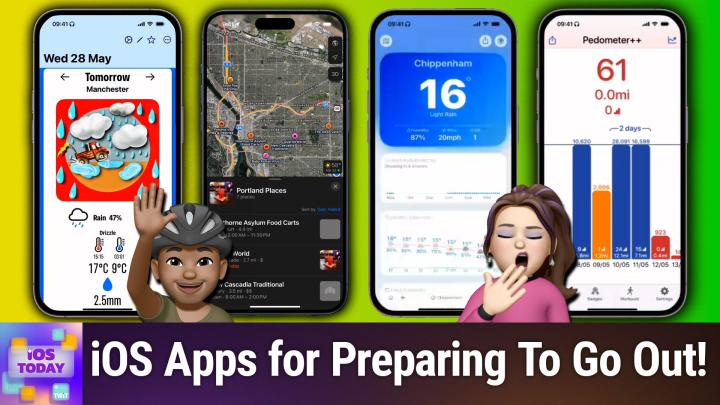
All TWiT.tv Shows (Audio)
iOS Today 755: Planning a Day Out
00:45:38
Please Don't Rain, Mercury Weather, Citymapper, & more
Loading summary
Transcript68 lines
- [00:00]
Micah Sargent
Coming up on iOS today, Rosemary Orchard and I talk about getting you out of your house to go touch grass or, you know, go see a movie. Who knows? It's Planning a Day. Coming up on iOS today.
- [00:17]
Rosemary Orchard
This episode brought to you by Red Canary. When cybersecurity threats hit fast, you need an MDR partner that moves faster. Red Canary delivers 24. 7 expert MDR support, total visibility, and actionable insights. Plus, it helps you detect four times more threats so you can stay ahead without burning out. Red Canary clears the noise and has your back every hour, every incident. Get the backup you deserve. Visit redcanary.com difference to learn more.
- [00:47]
Unknown
25 years ago, a small group of business and government leaders met in Washington, D.C. they envisioned the creation of an independent nonprofit organization with a mission to help people, businesses and government mitigate the growing threat of cyber attacks. Today, the center for Internet Security embodies that vision. For 25 years, it's worked with a global community of IT and cybersecurity experts to develop the CIS benchmarks and CIS critical security controls. These proven security best practices defend against common cyber threats and streamline compliance with industry frameworks, regulations and standards. Today, CIS provides cybersecurity services, threat intelligence and critical resources to help public and private sector organizations alike strengthen their Cyber defenses. Visit cisecurity.org today. That's the letters cisecurity.org to find out how CIS can help your organization as we create confidence in the connected world.
- [01:49]
Micah Sargent
Race the rudders. Raise the sails. Raise the sails. Captain, an unidentified ship is approaching.
- [01:55]
Unknown
Over.
- [01:55]
Micah Sargent
Roger, wait. Is that an enterprise sales solution?
- [02:00]
Unknown
Reach sales professionals, not professional sailors. With LinkedIn ads, you can target the right people by industry, job title and more. We'll even give you a $100 credit on your next campaign. Get started today at LinkedIn.com results, terms and conditions apply.
- [02:20]
Micah Sargent
Podcasts you love from people you Trust.
- [02:24]
Rosemary Orchard
This is tw.
- [02:29]
Micah Sargent
This is iOS Today, episode 755 with Rosemary Orchard and me, Micah Sargent. Recorded Tuesday, May 27, 2025 for Thursday, June 5, 2025. Planning a day out. Hello and welcome to iOS Today, the show where we talk all things iOS, iPados, HomePod, OS, WatchOS, and all the OSS apple has to offer. We love to talk about them here on iOS today because our job is to help you make the most of your Apple. And we do that by talking about the tips, tricks, settings, gadgets, gizmos, apps and everything else that can help you. As I say, make the most of those devices. I am one of your hosts. My name is Maika Sargent. It's right there.
- [03:17]
Unknown
And my name is Rosemary Orchard. And my name is also at the bottom of the screen, which is good because just off screen to the, to the top, you can't see it, but there is an umbrella because guess what, it's the uk. I plan to go and have a day out tomorrow and yeah, it's raining. Is anybody surprised? Anybody? No, no. No surprised faces that it's raining in the uk. Darn it.
- [03:40]
Micah Sargent
Well, I think the only other place on my edge of the coast, I happen, I mean, well, sort of a Seattle and Northern Oregon situation. It's always raining here as well. So we definitely have to make sure we have our umbrellas too. But yeah, in this episode, we hope to kind of talk about apps that will help you to your day as you go out into the world and make sure that everything that you need is there with you, which often means, you know, preparing for a thunderstorm or knowing if you need to layer up for the day. So I think without further ado, let's kick off with an app that is very specific to that whole water cycle situation. Rosemary, do you want to tell us about the first app on your list?
- [04:32]
Unknown
Yeah, I do. So this app was created with the idea of your planning on like going to a theme park for the day. Like, it might be one of the Disney theme parks. It could be universal, it could be one of the other many roller coastery type things. Maybe you're planning a beach day or something and you just, you want to be able to check is it going to rain, like, as you're getting closer? Certainly here in the uk, this is a very genuine concern for me in certain parts of the US that may be more of a concern than others. I hear California can get pretty dry, so maybe not so much there. But it's nice to be able to just open the app. Open an app and go, okay, on that day for that location, what's the weather going to be like? So I've opened please don't rain. And I've got it set up. I'm going on a trip to Manchester here in the UK tomorrow. And I can see that it says tomorrow Manchester, and it's, it's got a picture of what looks like a truck or a tractor, small tractor, and there's a rain cloud and lots of raindrops and there's a 47 chance of rain. Darn it. But this means that, hey, I am prepared. If I was planning on spending a lot of time outside tomorrow, then I could, you know, take my Umbrell and so on. Because, you know, what do you do if it's wet outside instead of the thing that you're planning on doing the same thing in wet weather gear probably depends on if it's going to be a monsoon. But this is pretty handy. It's, it's just opened it up. I've set it in the settings, so once you've added a place then you know, you'll have your settings appearing under the triple dot to the top right. And there is a specific area for just setting your units of measurement. So for reasons, because the UK doesn't like to just use one unit of measurement system, I have degrees Celsius. Small lengths are in millimeters, larger lengths are in miles and then speed is in miles per hour. Because, you know, why would we just use Imperial or metric when we could use both? That's less confusing. But you can reset everything to Imperial, reset everything to metric, or you can go for Chaos. Personally, I wouldn't recommend Chaos unless you're particularly familiar with the temperature in Kelvin, because that could be, you know, interesting. But on the main screen when I scroll down a bit, it shows me upcoming days as well, where I can see the percentage chance of rain and also the amount of rain that's expected. So I can see on Thursday it's going to be a pretty wet day with almost a centimeter of rain. It's also going to be warm though. And then it gives me like an overview for the whole day. So I can edit this and I can change the date and the place. You only set up one day and one place at a time. After that passes, then you, you set up your next one. But yeah, this is a pretty nice little way of being able to, you know, just check the weather for a particular location on a particular day as your trip gets closer.
- [07:20]
Micah Sargent
Lovely. Sometimes a purpose built app is the perfect thing because you can just go to it knowing exactly what to expect and make sure that it is exactly what you're looking for. And oftentimes when you do have these utility apps that are specific to one thing, they do it better than an app that's trying to be everything. But I do want to mention another app that I like to use regularly for my kind of weather planning is something that I use every single day and that is fantastical. So Fantastical is an incredible calendar app that we've talked about for a long time and it is certainly how I plan my day in terms of, of like, I wouldn't get to any appointments anywhere at any time. It wasn't for my calendar. That is the reason why I know what's going on, when it's going on, how it's going on. And one thing that Fantastical does is it will give you the forecast out about a week, a little bit more than a week. I think it's about a 10 day forecast and having that insight early on is very helpful and I especially love that it will give you that information sort of just quick glanceable. So for example, I can look at next Wednesday and see that the forecast says a high of 70 and a low of 50 and that it is supposed to be a pretty sunny day. Now this is helpful in some instances, unhelpful in others, whenever the forecast doesn't quite match up with what the weather's going to be. But I do love kind of just having that all there in one spot and being able to go, okay, we're planning for this day. Here's what the weather's looking like on that day. Let's make sure that everybody's got their umbrellas and that they are dressed appropriately for whatever the weather might be. So yeah, that's, that's another option for you as you are kind of figuring out your day, particularly if it's later on down the line. Now, yes, there are, there are multiple ways for being able to keep track of the weather and we've talked about a lot of different apps. Of course, you know, Apple has improved its own weather over time with the acquisition of Dark sky, but there are still third party weather apps that soar that are, are incredible and that are worth checking out.
- [09:54]
Unknown
Yeah, there are. And one in particular that I want to recommend which I personally am loving for travel and I am going to give a little hat tip to Jason Snell who is a friend of the show because he has recommended this and been talking about this for ages. This is Mercury weather. So mercury weather are a couple things that it can do like show you the weather. It's got a nice display, it looks quite minimal and so on. But one of the things that I am loving it for is it's like please don't rain. But it's a little bit more advanced. So in Mercury weather in the top right there is a globe. If I tap on the globe, I can see my trip. So I've got my current trip planned. So that is tomorrow and the day after to Manchester and I can see what the weather is there and I can add more trips, trips and I can add as many upcoming trips as I like, which is quite nice. If I've been doing a bunch of travel planning or I just sit down and want to stick all these in one place. Um, and then as I look at the weather for the daily forecast, I can actually see Thursday and Friday are actually not for my home location. Uh, Thursday and Friday are Wednesday and Thursday, sorry, are actually for my travel location and I can tap on the little plane, uh, to change specifically everything to that. Um, but this is really great for widgets as well because in your widget when you look at the weather, it is the weather for where you are going to be on that day, which means that you don't need to potentially have two widgets and be swiping between them and then you need to remember to update the second widget or iOS has turned on the like auto rotate of the widgets in your stack so you're looking at it going, oh my God, it's going to rain tomorrow. It's going to absolutely chuck it down here. And then it doesn't. And you realize that was because you were looking at the weather for your trip next week to the UK versus where you currently are. And I know Texas, so you know, it is quite nice just to have this and I, I personally think that this feature is really nice and Mercury Weather is a really just, it's a nice weather application. It's free to download and you know, try the basics with it or $14.99 a year for all of the features, including the travel planning. It also has a nice little share sheet option where it can share various sections so I can turn on and off, for example, the rain forecast, the current conditions, hourly forecast, daily forec. I have to leave something turned on, which I personally feel is a nice feature. So you can't try and accidentally share an empty thing which I can imagine would have caused a whole bunch of support issues. But yeah, this is just pretty nice as far as weather applications go and it's really great for planning your upcoming trips.
- [12:35]
Micah Sargent
Lovely, lovely. Now we of course are kind of thinking about the planning stages, right, of what the day out looks like. And you may have a day coming up, up that you are, are sort of preparing for. And one thing for me as someone who is very much an out of sight, out of mind kind of person, I need to have the, the reminder or the, the note or whatever it happens to be in front of me in order to keep it in my mind. And so physically I like to have things, you know, like on a cork board or a, a whiteboard or wherever. But there are Ways to make your iPhone sort of that digital manifestation of your corkboard. And I think the most powerful tool that exists to this day is made by a friend of ours and it is called Widget Smith. And we have talked about Widget Smith before on the show. You have probably heard of Widget Smith before, even outside of this show. But it can be helpful in planning your day, for sure. I think that we've seen its use as a sort of aesthetic tool to completely remake and redesign iOS almost to a certain extent. But as a tool to just help you, again, keep track of things, I think it's very valuable for that as well.
- [14:14]
Unknown
Yes, it absolutely is. One of the things I love using it for. It's just a little countdown on my home screen of when is my next event going to be. So I have a little Widget Smith widget right here. And one of the things that I really love about widgetsmith is I can add a new widget and obviously there's a whole bunch of things. So you can do photos. So if you stick everything in an album called Travel, then you could have a little, you know, travel snapshot. But I can do times and locations and what I'm specifically looking for here is the countdown. I can change the theme. So there's all sorts like Venice sky is very pretty. There's Terminal, if you are really missing the Matrix style black background with green text. There is a superhero, because everybody wants to be a superhero. There's a lovely one called Signpost, which I personally in my head is Signpost to Micah because it is a lovely shade of dark green. And then you set your text and the date and time. If you don't however want to set the date and time and the text, you can just choose from the calendar and this will pop up your calendars. I'll let you pick an event. I've got a lot of events in my calendar, so I'm not going to do that right now. And then you can also specify how you want the timer to display. So do you want it to be like a timer? Do you want it to be dynamic so it'll say something like 17 hours, 23 minutes? Or do you just want to show the number of days remaining? Because those are all great options to have. So you create a little widget it you can even change the settings for this. So if the app has got a URL scheme, I know I'm getting nerdy and Mike is going to go talking about URL schemes again. Then you could open, say, for example, a particular app that's got all your trip planning information in there. Or like drafts. Drafts is great for this, even has a little copy URL to draft option. Or you could open a website which is, you know, where all your travel planning stuff is in like notion or something. And yeah, this is a really great option to have, you know, a little countdown on your home screen or many more options and designs as well depending on the size of the widget you choose. Like they're small, medium, large, there's lock screen and also if you want there is watchsmith. So you can do the same thing as a watch complication too.
- [16:36]
Rosemary Orchard
This episode brought to you by Red Canary when cybersecurity threats hit fast, you need an MDR partner that moves faster. Red Canary delivers 24.7expert MDR support, total visibility and actionable insights. Plus it helps you detect four times more threats so you can stay ahead without burning out. Red Canary clears the noise and has your back every hour, every incident. Get the backup you deserve. Visit redcanary.com difference to learn more.
- [17:06]
Zoe Saldana
Hi Zoe Saldana, welcome to T Mobile. Here's your new iPhone 16 Pro on us.
- [17:10]
Unknown
Thanks. And here's my old phone to trade in.
- [17:12]
Zoe Saldana
You don't need a trade in. When you switch to T Mobile, we'll give you a new iPhone 16 Pro. Plus we'll help you pay off your old Phone up to 800 bucks and you still get to keep it.
- [17:21]
Unknown
There's always a trade in.
- [17:22]
Zoe Saldana
Not right now. @ T Mobile.
- [17:24]
Unknown
I feel like I have to give you something in return for karma.
- [17:26]
Zoe Saldana
That's okay.
- [17:27]
Unknown
I don't really have much in my purse. Oh, let's see. Hand sanitizer. It's lavender.
- [17:31]
Zoe Saldana
I'm good.
- [17:32]
Unknown
Seriously, Let me check this pocket. Oh, mints.
- [17:36]
Zoe Saldana
Really, I'm fine.
- [17:37]
Unknown
Oh, I have raisins. I'm a mom. Wait, wait one sec. I've got cupcakes in the car.
- [17:41]
It's our best iPhone offer ever. Switch to T Mobile. Get a new iPhone Six 16 Pro with Apple Intelligence on us, no trade in needed. We'll even pay off your phone up to 800 bucks with 24 monthly bill credits. New line 100 plus a month on experience beyond Finance Agreement 999.99 and qualifying boarded for well qualified plus tax and $10 connection charge payout via virtual prepaid card. Allow 15 days credits and balance due if you pay off earlier.
- [18:04]
Micah Sargent
Cancel CT mobile.com now. One area that to this day still sticks out to me is one of the coolest features I think that have been introduced is a feature within the Maps app that lets you create custom guides. Now, I have actually used this feature in the past. A friend. The reason why I now live in Portland is because I was visiting Portland for the first time a few years ago and. And as part of it, someone had created a. Because it was this sort of everybody gets together across all of the. It was a. It was a huge group of people. And so we had sort of all pooled money to get different Airbnbs, and then we had plans for the things that we were going to do while we were in Portland. So we needed to know where each of the Airbnbs were. We needed to know the main locations that people would be. But. But since then, I have held onto that, that guide. Now I'm not going to show that guide. I am instead going to show a guide that I have created that has some of the places that I have been in Portland that I really like or think that people would want to try. And what's cool is after you create a guide, you can share that guide with other people and they're able to view that guide as well. So you can see it. You can see the different places that are listed, but you can see it on a map. So you can. Right now I have, you know, a map of Portland pulled up, and here you can see the. The multiple places and where they kind of exist across the. The different spectrum of Portland. Now if I scroll through, I can see some of the different places here and choose one. But I can also, as I mentioned, hit that share sheet button down at the bottom, and that will allow you to share it with a friend, share it with, you know, whoever else happens to be coming. It's very easy to add new locations. So if there's another place that you would want people to check out, I'm trying to think of something off the top of my head. Then they are able to add that simply by looking for the place and hitting the plus sign next to it. Then that gets added to my Portland Places guide. You can change the image so you can. Can add a special image for it that kind of makes it feel what you're looking for. And it's just a quick and easy way to give people the ability to know where things are in. In a specific guide. So I really like to use this feature. I have a personal one that I just kind of add all of the main places. It's sort of like this, but it's, you know, thinking like pharmacy and dentist and doctor and those kinds of places all get added. Because I am very a pretty much always use my GPS even when I know where I'm going because it will alert me if there's, you know, a road closed or something like that sort of situation. And also I am horribly, directionally challenged. So both of those things kind of help. And so, you know, I know my exact way to go. But the second some small thing changes, I'm like, well, now I'm lost. I have no idea where I am. So I've always got the gps.
- [21:38]
Unknown
I also love maps, directions for like you're going to get here and it's going to be close, closed. And I'm like, okay, that, that's not great. Maybe let's not do that. Then I'll go somewhere else instead. Because yeah, in some places, if you like, if you're in like the wrong area of Portland, everything closes at like 9pm, which is not great if you are looking for somewhere to go for dinner. So you need to plan to go somewhere else. One of the things I have a love hate relationship in guides for Maps and I'm gonna mention is the fact that when you share a guide, it is a snapshot at that point in time. Time. So if I were to share this guide right now with five places to Micah, I can send it. Micah gets an invitation to the guide, Micah joins the guide, looks at it, I add another five places and Micah will still only see these original five. This is both good and bad. It's good because if you want to add more places to the same guide that are just like for you, you don't need to worry about other people seeing them. It's bad because if you don't realize this, you're going to be like, yeah, I put it in the guide and people are going to be like, I don't see it. What are you talking about? Are you sure you did it? And then you start hallucinating and wondering whether or not you actually did it. So yeah, just remember if you are sharing a link to a guide, it is a snapshot at that point in time because otherwise. Yeah, you might start wondering if you're going crazy. And the answer is possibly. But also it's probably just guides is not sharing updates. And I really wish they had an option where you could like share it like dynamically and so it would follow along with the updates. But sadly that's not really an option.
- [23:18]
Micah Sargent
Yeah, I wish that was the case too, that the guides would stay updated. Maybe that's a feature we'll see down the line as we get closer to wzoo bdc. That's the one I'd like to have. That's what I should. Anytime someone's like, what do you want them to add? Yeah, let's have guides that sort of refresh over time. Time. All right. Up next is arguably one of the most popular apps for people who need more than what a simple map is. Go Map app is going to provide. And this is where we talk about apps that are purpose built to do one thing and do one thing incredibly well. City Mapper, the transit app for everything. And I shouldn't even, I guess if we, yeah, if we loosely define transit is just getting around, then this is absolutely the app for you. It does so much with public transportation. Walking, cycling, scootering for those who are scootering around. It's awesome. And I have used it in the past because I mentioned before being sort of directionally challenged. I get nervous about using, when I would visit San Francisco using public transit options and then getting very confused very easily about when I'm supposed to get off of the public transit to make sure to get to the next place. This thing will be like, hey, you need to get off now. Or, you know, get ready to get off. It's coming up. As opposed to me looking at the thing that's, you know, scrolling by the marquee and going, is this where I get up?
- [25:04]
Unknown
Not sure. Yeah. And then they say like schedule instead of schedule and you're just totally thrown because it's a different pronunciation of the place name than you were expecting. Yeah, yeah. What I really love about City Mapper is the way that a. You can like just choose from all of the options. So you can actually, in the settings, if you are so inclined, do things like change your map dot and your city and so on. And then you can also just have preferences for the, the way that you, you travel between places. So I am just going to put in that I'm going from. Let, let me swap that around. So I'm. I'm now going to, to and from the same place. So I'm traveling from Paddington Station in London to London St Patrick's International Station, which is a journey that I have done many times. And I do know how it works. But what I really like about this is, you know, it, it tells you which entrance to use for things like the subway and so on. Because some subway stations are massive. If you have a line, it usually goes in two directions. Like it could be going north and south or east and west. And you don't just Want somebody to say you need the red line. You need somebody to say you need the red line going northbound or southbound. I also really like the fact that it recommends that you be at the back of the train versus the front of the train because that's less busy. And so if the platform is super crowded, you may not be able to get down to that end. But, you know, it gives you an idea of where is going to potentially actually have more space. And what I really like is when I put in that little overview or that little thing at the top, I can immediately see, okay, walking is going to take me 50 minutes. Taking a bike is going to take me 20 minutes. Scootering is going to take 27 minutes and a taxi is going to cost me at least £13 and take 34 minutes. And then I can see the public transport options. It's like, okay, a taxi is going to cost £13 and take 34 minutes or a bus is going to take 34 minutes and be £1 75. I, I know which one of those two I would go for. Personally, I'd actually use the Tube just because you're not going to get stuck in a traffic jam. And if you're going to Kings Cross St. St Pancras International Station, then you might be getting Eurostar to win the country and you don't want to be late for that. So, yeah, I just really like this. I like the fact that it warns you before you're going to be doing a change, if there is a change involved. And yeah, there's options at the bottom where you can specify, hey, I need to step free, which is really great for accessibility, or I need trains or maybe I, I don't need step free, but I have reduced mobility and therefore I would like to walk less, please. Or, you know, I want mixed options or I want a simple option like I'm happy to walk a bit further at each end and then just take one train in the middle, which on this particular journey isn't Turbo. It's going to sort it by fastest first, which would be bicycle. Interesting. If you have a suitcase, good luck. I hear the Dutch are very good at that. And then it also has the option to start by price, which obviously puts walking and your own bicycle first because those would be free. So, yeah, I, I really love Citymapper. I also love the fact that my little icon in it is a bee. And I get to be a busy bee going about my day as I'm buzzing around doing whatever I'm doing with City Mapper.
- [28:24]
Micah Sargent
Love City Mapper. And I think we can round things out here in our app section by talking about, you know, making sure that while you're. This happens to me a lot. I plan for a day out, right? And I'm out and about and I come to the end of the day and I am exhausted, I am worn down, I am sleepy and I'm going, you know, I didn't really do all that much. What's going on? And then I realize, A, I haven't fed myself all day and B, I look at my sort of statistics and I see that, oh, actually you have done quite a bit today. Look at how many flights of stairs you climbed, how many steps you've taken, how many calories you burned, and you didn't put anything into your body. Why do you think your body is tired, dear fool? Yeah. So is there a way, Rosemary, that I could maybe keep better track of the activity that I'm doing such that I could use that to kind of remind myself, oh, no, your body is working as designed. You just aren't doing what you need to do to let your body work as designed.
- [29:48]
Unknown
Yeah, I. I recently had this mic. I was on a little trip to Glasgow and for some reason it didn't occur to me that Glasgow, a city in Scotland, would be hilly. I don't know why it did not occur to me. I really should have been able to do A plus B equals lots of hills. So over the weekend that I was there on the first set, on the first day, the Saturday, I did 28, 091 steps. I climbed 24 flights of stairs and on average calculated, I walked 19.4 kilometers. That is a lot. And if I just pop into the settings, I can change that over to miles and I'll just scroll back in time and I can tell you I walked 12.1 miles that first day. Second day was a little bit more relaxed. 16,599 steps, 15 flight of stairs, 7.1 miles is a by surprise to note that I got home was like, I am dead from this. This because I was tired. And this is pedometer plus plus. So it for some reason my steps yesterday today have really not been tracking. So I need to check into why that is. I have a feeling I just forgot to put on my Apple watch for most of the day, which would definitely do that. But this pulls in all of the data from Apple Health. So it doesn't matter if you are wearing an URA ring or an Apple watch or, you know, any other kind of like fitness tracker. Like I've got a Xiaomi one here. I have the Visible Polo tracker, you know, whatever you're using, as long as it syncs into the health app, you can get that data here into Pedometry plus plus and then you can see your trends. If you are premium, then you can see your trends over weeks and months. But for free you can see your trends over the year. And apparently this year so far I am not doing as well on steps. However, I'd like to point out it's only the beginning of June as this episode releases. It's the end of May as we record record this. So I think, you know, I'll probably be able to catch up. I feel like I'm doing pretty well because I feel like I'm over halfway through my steps from last year already. So yeah, I really love this. There's the ability to export your data. You can do a little share. So I could share a little image with Micro if I was feeling competitive. And I'd like to point out that my step count is, you know, it's trending upwards at the moment this year, which I feel like is pretty, pretty good. I'm pretty pleased with that. But yeah, it has all the options for things and it's a free app to download and if you want to get all of those extra features, it is very affordable. As all of David Underscore Smith's options are. It is 1,99amonth and I believe it is $20 a year. It depends on what promotions and so on are available. But it's just a really great app. There's badges, all sorts of in there. So yeah, make sure that you keep an eye on Pedometer plus plus if you are out and about doing a lot of walking, if you are going to one of those theme parks for the day like Disney or Universal, don't forget comfortable shoes, plenty of water and keep an eye on your steps. You can add a widget or a watch complication to something that is right in front of your face all the time just to keep you aware of how much exercise you are really doing. And also, please don't forget your exercise.
- [33:09]
Micah Sargent
That is a very important point. So folks, that is a list of apps that we like to use for planning a day out. As always, I remind you, if you'd like to tell us about the apps that you use, IowaD WWIT TV is how you can get in touch. We would love to hear from you on the apps that you think are great that we may have missed or following up to say, hey, I also love that app and here's how I use it in a different way than maybe you thought. All of that. That is delicious. We love to hear about it. I am really excited for our next segment because I get to say, well, yes, I've been using something for a little while now to help test it out. And yeah, without further ado, let's get to the news segment.
- [33:58]
Rosemary Orchard
This episode brought to you by Red Canary when cybersecurity threats hit fast, you need an MDR partner that moves faster. Red Canary delivers 24.7expert MDR support, total visibility and actionable insights. Plus it helps you detect four times more threats so you can stay ahead without burning out. Red Canary clears the noise and has your back every hour, every incident. Get the backup you deserve. Visit redcanary.com difference to learn more.
- [34:28]
Unknown
25 years ago, a small group of business and government leaders met in Washington, D.C. they envisioned the creation of an independent, independent, non profit organization with a mission to help people, businesses and government mitigate the growing threat of cyber attacks. Today, the center for Internet Security embodies that vision. For 25 years, it's worked with a global community of IT and cybersecurity experts to develop the CIS benchmarks and CIS critical security controls. These proven security best practices defend against common cyber threats and streamline compliance with industry frameworks, regulations and standards. Today, CIS provides cybersecurity services, threat intelligence and critical resources to help public and private sector organizations alike strengthen their Cyber defenses. Visit cisecurity.org today. That's the letters cisecurity.org to find out how CIS can help your organization as we create content confidence in the connected world.
- [35:30]
Micah Sargent
Race the rudders. Race the sails. Race the sails. Captain, an unidentified ship is approaching. Over. Roger, wait, Is that an enterprise sales solution?
- [35:41]
Unknown
Reach sales professionals, not professional sailors. With LinkedIn ads, you can target the right people by industry, job title and more. We'll even give you a $100 credit on your next campaign. Campaign get started today@LinkedIn.com results. Terms and conditions apply.
- [36:01]
Micah Sargent
All right, Rosemary Orchard, you have some news to give us. Tell us. Tell us what's going on. I don't even want to give too much intro. I want you to kind of do you. Do you.
- [36:13]
Unknown
Okay, well, as this episode records, we are a little ahead of time. So the app is not yet out. But when this episode releases, there will be a new medication Tracker available on iOS, iPhone and iPad, which is called Capsule. And this is an app that I've been working on with my friends A company called Snailed it, because we nail it slowly. And that is very true with Capsule. It has been in the works for quite some time. But the idea is it's just a little medication tracker. It's designed to be easier to use than Health and have more features than the health app does. Because, for example, you can just open the app and straight away add a medication. You don't need to go dig around for the medication area of the health app. So I could add something and I need to. To see Micah every Tuesday. This is very important to me. And so I'm going to change the color of this to green because that is Micah and I'm good. You know, maybe, maybe I'll pick a person rather. There we go. Micah looks very enthusiastic there, waving his arms. And I'll just add a schedule and I'm just gonna set this to every Tuesday because I see Micah most Tuesdays. And I'll just change that back PM because that's the usual time that we record at. And there we go. I can say that this repeats indefinitely or until a specific date or just for a number of doses, which is ideal. If you get prescribed something for like 10 tablets or 20 tablets, or you just get prescribed something for a week, I can say, hey, I don't want to overdo this. Like, I love Micah. Micah's amazing. However, I probably shouldn't see my mica like more than once an hour. That. That might be a bit much. So I can set a minimum dose interval here, which I'm not going to do because I can see mica as often as I like. And I also have the ability to customize the medications for just the notifications for just this medication. So I can say, hey, do I want to be notified when my medication is due now, when my medication becomes available? So if that's got the minimum dosage interval, then that's very important. Do I want repeat notifications? For example, like Jew, when it goes, hey, did you do the thing? Did you do the thing? You can have those in capsule as well. And all of these can be customized per medication as well as globally. I can turn on whether or not I want time sensitive notifications and also whether or not I want to show the name of the medication in my notifications, which could be a really important privacy feature. For those of you who are taking medications that other people may feel sensitively about you, you shouldn't feel sensitively about them. But if you want to keep yourself safe, then that is an option for you too. So I'll just add this, and I can see that this is next due in 6 days and 23 hours. I'm going to log that I have seen Micah. Now, I can't take Micah. That would be very dodgy. But, yeah, I can add notes. Whoops. I definitely tapped the wrong thing there because that was not supposed to happen. So inside of my cat I can add notes. So I can just say hello and save that. And then these all get added to your log as timestamped notes. And this could be really useful if you're taking painkillers or for example, maybe you're not doing this for you. Maybe you're adding a tag. Maybe you're adding a tag for your dog or for your child and you're looking medication for them. Then you could specify, hey, I gave my child, you know, painkillers because their left ear was hurting versus their right ear was hurting. Or I gave my dog this because the vet recommended it at this particular time of the year because my dog apparently has allergies and the plants are trying to kill my dog as well as myself, because that could happen. I know Micah has aware of this, being the owner of two dogs, that you have to look after your pets. And so, yeah, this. This is capsule. It's got a history view so you can see everything there. You can archive your medications. And yeah, it's got the option to export all of your data, get some statistics and so on overall. And yeah, it is a medication tracker. It's free for two medications. And then if you want more than that, if you want tags, nagging notifications and so on, at the moment we have an introductory offer where it's $12.99 a year. And then after about a month, it'll be going up to 14.99 a year. So, yeah, if you would like to try the medication tracker, you can download it and give it a whirl. And yeah, if you really like it, then please subscribe.
- [40:55]
Micah Sargent
It's funny you mentioned the dog thing, because my first use of this app to test it was with some medication for one of my dogs. So they happened to sort of coincide at this. Well, they happen to coincide. And so I set up Mizzy with notification reminder for myself, and it was very handy for that. So, yes, everybody check it out. And I'm looking forward to the app making its way onto the App Store officially again, as we are recording this, it's not there yet, but will be soon. Very exciting. All righty, folks, this now is the time where we round out the show with our app caps, our app or gadget picks of the week. And I will kick things off with my app cap next. All right. My AppCap is an app I've been using for quite a while now that for some might be a little boring and I think may have been a Rosemary Orchard pick in the past, but it is, it is.
- [42:06]
Unknown
Micah. I opened the show notes and went, you stole my app. But that's okay because that just means that I've shared it with somebody else who he loves it.
- [42:14]
Micah Sargent
Yes. So this is an app called Secure Shellfish. And what Secure Shellfish does is it works as an SSH system on your on your phone or on your iPad or even on your Mac and gives you the ability to connect to servers, SSH style. Those can be cloud servers or local local servers. And so in my case, I use it locally whenever my Homebridge instance, which is the tool, the set of tools that I have to add third party non HomeKit devices to my HomeKit home. If it's ever giving me issues or it's not working as I expect, then I am able to use this to actually gain access to the home. Homebridge Raspberry PI. And so right now I've just tapped on Homebridge and I connect with it over ssh and I am here and I can do whatever I want. Which from this screen would be something like, you know, updating Homebridge. Now what's cool about it is if you have network attached storage or you have other sort of local devices or again cloud servers and you want to connect to those over ssh, you're able to do that as well. And then on top of that it also works with the Files app. It has a files app integration that gives you the ability to access the file system and essentially the directory on your server. So for Homebridge I could browse that in the files app. But more so what I use it for is I have network attached storage that I normally would have here, but I haven't opened it up in a while and so it's not here. Secure Shellfish is awesome too because it will sync across devices. It can hold on to SSH keys for you and make sure that that's all available, help you set up new SSH keys if you want to. And it's just it kind of gets out of the way. And I love an app that gets out of the way when I need it to get out of the way. It is available to try for free. The monthly subscription is 299. The annual subscription is 14.99 and you can just pay $34.99 to unlock it for the rest of your life. So one time purchase there. But I have found this to be a really easy to use tool for accessing your servers via SSH and I think it's just really nifty. So I that's the reason I'm bringing it back up again despite it having been mentioned in the past by Rosemary. So be sure to check it out because I use it relatively regularly, more so on the the files side. And that's why again, you're not seeing the the one server show showing up there. All right, that is my app cap. Rosemary, tell us about yours. Which who knows, maybe a year or two down the line will be something that I'm mentioning again because it's pretty cool.
- [45:41]
Unknown
I mean I have to say folks, full disclosure, I put this in the show notes before the show after going Micah stole my app. I was genuinely considering talking about secure shellfish today. So thanks for that Micah. Love you too. But yeah, so I put another one in and then Micah got distracted before the show started setting this up to play with it because if you ever had a Tamagotchi, you know, back in the 90s or anything similarly that there's an app called Hatchy for the iPhone, then you'll be familiar with the idea of having a little digital creature that you care for, you feed and you look after it. And there is another one in town, but this one is very oriented towards self care and, and it's called Finch. And so I've just opened the app after having not opened it for probably like three hours or so and it's giving me a little daily reminder, nourish the things that matter to you. And it's asking me how I'm feeling. So am I feeling, you know, very sad, somewhat sad, neutral, happy or very happy? I'm going to go with very happy because I'm recording iOS today and then I have one goal left today. I have completed a lot of my goals today and I just need to clean the bed sheets which actually chilly, believe it or not. Fox so proud of myself. I did this before the show. I just didn't check it off because I wanted to have something to check off. So there is for the eagle eyed of you who are watching the screen, five and a lightning bolt next to the check mark. And that means that this is going to give my Finch, who is called Daffy, short for daffodil, a 5 lots of energy. So I, I do this and tada. I have completed all of my hygiene goals. I can have a little chat with Daffy. And Daffy is very excited looking at all all the sights and I get to give Daffy two choices. Keep wling around and discover more things or the more you waddle, the stronger you'll get. So you know, do I want my my little finch to be curious or strong? And I'm going to go with curious. I could also write my own response. But yes, Daffy has gained 5 curiosity. I feel so proud of myself for guessing that that's what that was. But yes, Daffy's off to find some new things. And it looks like Daffy has found an egg, which is very exciting. So my Daffy is currently dressed as a koala because there are quests where you can collect things and you know you get points. Points mean shopping virtually for things. You can add friends. I have not added it friends. You can get micro pets. And so if I make my bed every day then I'm gonna get a little micro pet. And yeah there there's all sorts of cute little things going on. I personally think this is an adorable way to build habits. It is cute. It's fun. You can download and use the app for free. If you would like to get a little bit more out of Finch then it has a subscription offer for $40 a year. But you can use the app for free. So I would definitely recommend giving it a try, checking it out. And you never know, you may also be able to dress your finch as a purple koala because that seemed like a very sensible thing for me to do with my time over the last couple of days.
- [48:58]
Micah Sargent
I think this app is super cool and adorable and I'm looking forward to earning low points for my Finch to to improve upon it. Also my own self care. Fun fun app. Well worth checking out. Delightful even. Folks that is going to bring us to the end of this episode of iOS today. I want to remind you all out there about Club Twit, Twitter TV Club Twit. When you join the club monthly or yearly, you get access to some pretty awesome benefits. Every single one of our shows is available to you ad free. You also get gain access to the Twit plus bonus feed that has extra content you won't find anywhere else behind the scenes. Before the show. After the show, special club Twitter events get published there access to the members only Discord Server A fun place to go to chat with your fellow Club Twit members and those of us here at Twits and Access to that little special place in your heart, that warm fuzzy feeling knowing that you're helping support the stuff we do here on the network. We would love, love, love to have you in the the club. So consider Joining again. TWiT TV Club TWiT Rosemary Orchard. If people want to follow you online and check out all the great work you're doing, where should they go to do so?
- [50:14]
Unknown
Well, the best place to go is roserioshoot.com which has links to apps, books, podcasts and more, as well as all the social media sites. But you can also find me in the Club Twit Discord, where we have a special Iowa City area with threads for every single episode and a general chat one. And also sometimes people join us during the live stream as we record, which is always great fun. Micah, where can folks find you?
- [50:39]
Micah Sargent
If you're looking to follow me online, I'm ikasargent on many a social media network where you can head to Chihuahua Coffee. That's C H I H u a H u a Coffee where I've got links to the places I'm most active online. Look forward to seeing you somewhere on the interwebs and we will catch you in next time. Buh. Bye.
- [51:11]
Zoe Saldana
Hi, Zoe Saldana. Welcome to T Mobile. Here's your new iPhone 16 Pro on us.
- [51:16]
Unknown
Thanks. And here's my old phone to trade in.
- [51:18]
Zoe Saldana
You don't need a trade in. When you switch to T Mobile, we'll give you a new iPhone 16 Pro. Plus we'll help you pay off your old Phone up to 800 bucks and you still get to keep it.
- [51:27]
Unknown
There's always a trade in.
- [51:28]
Zoe Saldana
Not right now. @ T Mobile.
- [51:29]
Unknown
I feel like I have to give you something in return for karma.
- [51:32]
Zoe Saldana
That's okay.
- [51:33]
Unknown
I don't really have much in my purse. Oh, let's see. Hand sanitizer. It's lavender.
- [51:37]
Zoe Saldana
I'm good.
- [51:38]
Unknown
Seriously, Let me check this pocket. Oh, mints.
- [51:41]
Zoe Saldana
Really, I'm fine.
- [51:42]
Unknown
Oh, I have raisins. I'm a mom. Wait, wait one sec. I've got cupcakes in the car.
- [51:47]
Micah Sargent
It's our best.
- [51:47]
Unknown
Best iPhone offer ever. Switch to T Mobile, get a new iPhone 16 Pro. With Apple Intelligence on us, no trade in needed. We'll even pay off your Phone up to 800 bucks with 24 monthly bill credits. New line 100 plus a month on experience beyond Finance Agreement 999.99 and qualifying boarded for well qualified plus tax and 10 connection charge. Pay off via virtual prepaid card. Allow 15 days credits end in balance due if you pay off earlier. Cancel CT mobile.com now.
- [52:14]
Like to go hunting the greatest action.
- [52:16]
Micah Sargent
Franchise of the past decade. How do I start doing what you do? Reloads.
- [52:21]
Unknown
Looks like you already have. From the world of John Wick ballerina Richard R.