← All TWiT.tv Shows (Audio)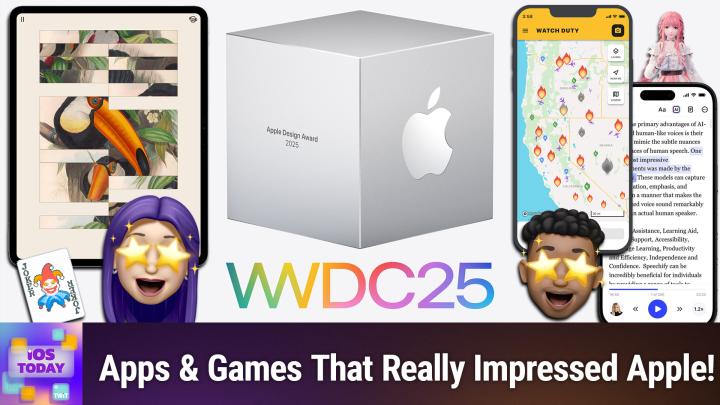
All TWiT.tv Shows (Audio)
iOS Today 757: Apple Design Awards 2025
00:36:18
CapWords, Feather, Taobao, & more!
Loading summary
Transcript53 lines
- [00:00]
Micah Sargent
Coming up on iOS today, Rosemary Orchard and I cover the Apple Design award winners of 2025. Stay tuned.
- [00:09]
Sponsor
This episode brought to you by Red Canary. When cybersecurity threats hit fast, you need an MDR partner that moves faster. Red Canary delivers 24.7expert MDR support, total visibility and actionable insights. Plus it helps you detect four times more threats so you can stay ahead with without burning out. Red Canary clears the noise and has your back every hour, every incident. Get the backup you deserve. Visit redcanary.com difference to learn more. This episode brought to you by the Electronic Frontier Foundation. In fact, if you ask me, the whole Internet's brought to you by the EFF. For 35 years, the Electronic Frontier foundation has been fighting to make sure that when you go online, your rights go with you. Eff I owe him a big debt of gratitude. They rescued our podcast and every podcast from patent trolls. They helped encrypt the web to protect your privacy. They prevail in lawsuits against government secrecy and surveillance. These are the good guys and they have a podcast, how to Fix the Internet. It's all about what happens if we win the fight and get things right online. And it's a great listen. The fight for digital rights, it's bigger and more urgent than ever. EFF is member supported. I'm a member. You should be a member. The more members they have, the stronger they can fight in statehouses, courthouses and on the streets. Season six of how to Fix the Internet started May 7th. Listen@eff.org podcast and while you're there, join the EFF. They're the good guys.
- [01:39]
Rosemary Orchard
Ryan Reynolds here from Mint Mobile. With the price of just about everything going up, we thought we'd bring our prices down.
- [01:45]
Micah Sargent
So to help us, we brought in a reverse auctioneer, which is apparently a thing Mint Mobile unlimited premium wireless 30, 30, better get 30, better get 20. 2020 better get 20, 20. Everybody get 15, 15, 15, 15. Just 15 bucks a month. Sold.
- [01:58]
Rosemary Orchard
Give it a try@mintmobile.com Switch upfront payment.
- [02:02]
Sponsor
Of $45 for a three month plan equivalent to $15 per month required new customer offer for first three months only. Speed slow after 35 gigabytes of network's busy taxes and fees extra. See mintmobile.com.
- [02:12]
Podcasts you love from people.
- [02:14]
Micah Sargent
You this is iOS Today episode seven hundred and fifty seven with Rosemary Orchard and me, Micah Sargent. Recorded Tuesday, June 10th, 2025 for Thursday, June 19th, 2025 Apple Design Awards 2025 hello and welcome to iOS Today, the show. We talk all things iOS, iPad, OS, WatchOS, HomePod OS and well, frankly, all the various OSs, all of the various platforms that Apple offers up to us. This is our opportunity to talk about the apps, the software, the settings that you out there should know about to help you make the most of those devices you are bringing around with you. I am one of your hosts. My name is Maika Sargent.
- [03:06]
Rosemary Orchard
And my name is Rosemary Orchard. And I'm really excited to look at all these winners. Maika, there's going to be so many great things to talk about today.
- [03:13]
Micah Sargent
Yes. So every year around this time, we've just done the WWDC coverage itself. And in years past at wwdc, Apple would unveil and award the winners of the Apple Design Award. This year, Apple announced it earlier than the event, which was kind of interesting. But essentially what happens is there are two kind of big events that take or two big awards that take place in regard to apps. There are the App Store Awards and there are the Apple Design Awards. The App Store Awards are often the apps that are just popular and interesting and fun and good and they have captured attention. The Apple Design Awards are specifically for apps that make use of the tools that Apple has and in some cases surprise and delight the developers who work at Apple that are making these tools available to the developers who do not work at Apple. And so these, these apps get awarded for creativity, for design, and for all aspects of kind of innovating, while also honoring Apple's design choices and developer options that are available. So this year there was one app and one game awarded across six categories. Delight and fun is one category. Innovation, interaction, inclusivity, social impact and visuals and graphics. Visuals and graphics is one category. There were 36 finalists. We will not be covering the finalists, but instead we'll be talking about the winners. And if you would like to read about the finalists, we of course will include a link in the show notes to the newsroom post that has more about that. Let's start with the Delight and fun category. So Apple describes this category thusly. Winners and finalists in this category provide memorable, engaging and satisfying experiences enhanced by Apple technologies. Again, that last part, that's the most important aspect. This is making use of the stuff that Apple has. And the people inside Apple go, ooh, yeah, what you did there, that was good. And then you end up getting an Apple Design Award. The winner is an app called CapWords by the developer Happy Plan Tech from China. And Capwords is a language learning tool that takes images of everyday objects and turns them into stickers and then you kind of learn these new words in a visual way. So where before you know, you'd kind of where typically you would be working with sentences, right? This has a little bit more kind of delight and fun and is is based less on grammar and more on kind of building out your dictionary, which I think is important when it comes to language learning. It supports nine language and lets you learn independently and kind of learn about things that you would actually run into, like a monstera plant or a bagel for example. Or I guess that's a donut, but it looked like a bagel to me. So it was delightful, it was fun and it got an award. And what I love is that you can also take photos of items around you and it will automatically turn them into stickers and then help you figure out how you would say that word. So if you can imagine you're walking around and you're trying to figure out, oh, how do I ask for a donut that looks like a bagel? I can take a photo of it, it'll recognize it as a donut and it will say, here's how you say donut in that language.
- [07:10]
Sponsor
There's a moment every parent remembers the day their child takes off on two wheels with Guardian bikes. That moment comes as early as 2 years old and with less stress and frustration. These bikes are built just for kids. Lightweight frames, low center of gravity, easy to use brakes. Everything about Guardian is designed to help kids ride confidently, often in just one day. No training wheels needed. And because Guardian bikes are designed and assembled right here in the usa, you know they're built to last with care in every detail. Their patented SureStop braking system stops both wheels with a single lever, helping your child stop safely without tripping forward or losing control. Right now, save hundreds when comparing Guardian to its competitors@guardianbikes.com and get a free lock and pump when you join their newsletter. A $50 value. Visit guardianbikes.com today to save and help your child learn an essential life skill safely. Guardian bikes built for your kid and for the memories you'll never forget.
- [08:11]
For period protection you can put on and forget about nothing beats Nyx Leak Proof Underwear North America's number one leak proof underwear brand. Let's face it, life can be unpredictable, but your leak proof underwear shouldn't be. That's why millions of people choose Nyx for periods, for light leaks, for everyday freshness. Nyx undies are super comfy, super absorbent, and made to handle whatever your day throws at you. Day two of your period covered your daily run. No problem. That big sneeze? You know the one? Yup. We've got you. And with styles like bikinis, boy shorts, thongs and high rise plus sizes from extra small to 4XL, NYX makes it easy to find your perfect fit. Say goodbye to stress and leaks and say hello to undies that work just as hard as you do no matter the leak. Find the style and level of protection you want@nyx.com and use code Flo15 for 15% off. That's K N I X.com code Flo15 for 15% off NYX for your leaks for your life.
- [09:11]
I want my kids to have a healthy relationship with food, which means avoiding junk food as much as possible and giving them things that are good for them. That's why I love giving my kids or game. It's convenient, real nutrition that checks all the boxes for me. It provides a good source of complete protein to keep my kids going strong and giving them energy to do all the things they want. It offers over 20 essential vitamins and minerals. Organ is an excellent source of vitamins B12D and zinc to support immune health. It's USDA certified organic and has 25% less sugar than the leading kids high protein nutritional shakes. One of the best things that I love about Organ is that I do not have to force my kids to drink or eat anything from Organ because the second they tried their shakes, they loved them. Jace loves the fruity cereal flavor. Jolie loves the vanilla and chocolate. So shop Organ Kids. Now available@orgain.com and selected retailers.
- [10:03]
Micah Sargent
The game winner for delight and fun. I am not at all surprised to discover that Balatro or Balatro B A L A T R O is the winner from the developer Local Funk in Canada. It's this really cool. It's sort of like poker. It's a little bit like solitaire. It's, it's definitely a deck builder like magic the gathering sort of situation. But essentially what you're trying to do is get as many points as possible. And what I love about this game, Rosemary, is that it taught me finally how to play poker because it taught me what all of the different, different things are the runs right to to know what what a royal flush is versus a flush to know what what what it means. Whenever we're saying three of a kind, turns out it just does mean three of a kind, which is great. But I was always just so intimidated by poker before and playing this game which is so much fun, it taught me what it is. This Game is available on so many platforms and I was happy to see it also get an award here on in the design awards.
- [11:23]
Rosemary Orchard
Yes. Yeah, it's very popular for a reason. A lot of people really love it. And yeah, I've spent some time playing it with it as well. But moving on to the next category which is innovation. These apps provide a state of the art experience through novel use of Apple technologies to set them apart in their genre. And the first of these apps is an app that I actually use. It's called Play. And this is definitely a slightly more developer oriented app because the whole point of it is that you can build interactive prototypes with SwiftUI frameworks. So it's great if you're there going, okay, I have an idea for an app and I just want to like play with how I would lay it out. You don't have to be a developer to use it. You can just, you know, download it, install it and have a play. Making fake apps. Why not? But yeah, I think that this is really cool. And also it syncs everything across iPhone and Mac and and so on. And that just makes it so much easier because you know, who doesn't want all of those things to be available if that's the sort of app that you're looking for? But yeah, it, it has just been really useful for me personally. So the game award winner in this category is one I've not heard of, but I have downloaded so I can have a play with it. It is PBJ the Musical. PBJ does stand for peanut butter and jelly or jam as we refer to it over here in the uk. The musical is a snack based Shakespeare, which is a game that tells the story of Romeo and Juliet, but with condiments like ketchup and mustard. With a story track. Sorry, Stories, soundtracks, clever camera work, fun dialogue. Yeah, I like somebody. I saw this and I was like, okay, well I know what I'm downloading. This is like the most random thing, but also it sounds really fun. I'm hoping that they do Othello next or something. Maybe, I don't know. The question is, is wood McBess be like mustard or not?
- [13:22]
Micah Sargent
Oh, good question.
- [13:24]
Rosemary Orchard
Like you need the blood to appear at some point, but I presume the blood would be ketchup. I don't know. We'll find out at some point. Maybe, maybe not, I don't know. I'm speculating. But yeah, I'm really looking forward to giving this one a play.
- [13:36]
Micah Sargent
And if they did Hamlet, Hamlet's dad would be marshmallow fluff because he's a ghost. So moving along to the interaction category, Apple says these apps deliver intuitive interfaces and effortless controls that are perfectly tailored for their platform. The first winner, the app winner is Taobao. Made by, and forgive me, Zhejiang Taobao Network in China, Taobao offers a convenient and engaging shopping experience on Apple Vision Pro. Providing incredible 3D models comparable to their real life counterparts. The immersive experience enhances shopping for users, taking into consideration placement, position, controls, size and function, and giving people the ability to compare items size by side from an extensive selection of products. So this is a store that sells, you know, furniture and other products and being able to pop that into your room and see how big it's going to be in the space is quite nice. What they show in the video, I guess it's, it's a very short video but you can see that they have taken the time to really design these pieces that you're able to drop in. They have really great lighting effects, they have great textures and being able, able to kind of get close and see okay, this is precisely what this thing's going to look like. Sitting next to my coffee table in my living room is quite a delight. And I, it, I think gives you one area where you may not first and foremost think of the Apple Vision Pro being used. And I think that's always a fun thing as well. The game winner for the interaction category is a game called Dredge. I've played Dredge, it's made by Black Salt Games in New Zealand. Dredge blends slow burn horror with exploration and adventure. Players take the helm of a fishing boat to navigate eerie islands, uncover strange wildlife and piece together a haunting mystery. The game offers seamless interactions and a fun world of hidden treasures across iPhone, iPad and Mac. I love that I could pick up this game from my, you know, I'm sort of my iPhone, I can move to my iPad very easily. I can pull it up on the Mac and that it can work seamlessly across those because I'm not always in the mood for looking at a little screen. My eyes are getting older and looking at that little screen can kind of wear on them. So being able to move between is fun and it, it does have a great story. It's, it's, it's quite well done and absolutely deserves an Apple Design Award, if not other awards for what is possible with this game. I think if you are at all into kind of horror, adventure, mystery, give this game a go and see if it's for you. I Think you will find that it is. It's. It's a delight. And I do have to give a shout out to a couple of the finalists. IA Writer got a. Was a finalist in this category. I use IA Writer all the time, which it is a markdown editor. And then Mela, the recipe manager, also got a. A finalists option. And it is a really nice cookbook that I have found to be delightful for its simplicity. It doesn't kind of. It doesn't try to be too much and sometimes that's fun, sometimes that's nice. So, yeah, shout out to both of those in the finalists there.
- [17:20]
Rosemary Orchard
Yeah. Yes. I do love IA writing myself. Yeah. I don't use it all that often, but whenever I need it, it's just there and it's always solid. And speaking of things that are there and doing things for you, the inclusivity category is up next. And the purpose of the apps, or the purpose of this category is to highlight apps that provide a great experience for all by reflecting a variety of backgrounds, abilities and languages. And the languages thing in particular really ties in to the app award winner in this category, which is Speechify. So Speechify basically can transform written text into audio, but it's designed based around accessibility. So the whole thing here is it's got dynamic type, it's got voiceover, and it's designed for people with dyslexia, ADHD and low vision, plus anybody who just doesn't necessarily learn well from the written word, but if it's spoken, they can absorb it and understand it and process it. Like, personally, whenever I was taking lectures at university, I couldn't just have slides or listen. I would have to listen and annotate the slides. And that's how my brain works, because that's, you know, that's what works best for me and the way I learn. So I really love this app. It offers Support for over 50 languages and it's got literally hundreds of devices, sorry, hundreds of voices you can choose from. So, you know, you can have whatever sort of voice pretty much, you know, appeals to you the most. And I. I just really like that it also has the ability to do a bunch of this stuff offline, which is great. So you're not constantly using huge amounts of data to listen to whatever it is that you need to hear.
- [19:01]
Micah Sargent
Okay, sorry, go ahead.
- [19:03]
Rosemary Orchard
No, I was going to say the game award winner in this category, though. I. I've played this. I feel like, Micah, if you haven't played this, there's a new app for you or a new game for you. It's called Art of Fauna and it's a puzzle game that blends like vintage style, Art of Wildlife and you. It's just blocks. Okay. So it's not like a traditional jigsaw puzzle with like the cutout, like, you know, the, the, the, the teeth and the, the slot and the tongue part. Tongue and groove. Maybe. I don't remember exactly what that shaping stuff is called, but either way, it's not quite like that. It's just rectangles, but you have to rearrange them. And yeah, it's haptic on iPhone, not haptic on iPad, because iPads don't vibrate. But it's so pretty and I really love it and it's got full voiceover support as well, and there's great accessibility. So, yeah, I, I really love this. It's really cute. And it's, it's made by Clemenstasse in Austria, which is where I used to live, so.
- [20:02]
Micah Sargent
Oh, that's nice. Yeah, I will definitely be getting that game. I had not heard about it and I love a puzzle game, as Rosemary very much, you know, pointed out there. The next category is Social impact. These games improve. These games and apps improve lives in a meaningful way and shine a light on crucial issues. The first one is Watch Duty by Sherwood Forestry Service. It says during devastating wildfires in Southern California, Watch Duty once again served as a lifeline, delivering up to the minute updates, evacuation information and critical resources with clarity and reliability. The way that this app works is it provides reports information like active fire perimeters and progress, wind speed and direction and evacuation orders. So it's often faster than we have seen with some of the other apps that are out there. And that I think is very, very important. In the game category, Neva, or Neva from Devolver Digital of the US It's a visually stunning and emotionally resonant game. Neva is an action adventure tale that follows a girl and her wolf companion through a beautiful world in decline. As the seasons shift, so does their relationship, offering a quiet meditation on care, connection and the cost of environmental loss. With themes of friendship and leadership, players guide the pair through breathtaking landscapes and a story that is as moving as it is timely. It's sort of like a little Red Riding Hood, but flipped on its head sort of situation. And talking about sort of humanity's impact on the world is always, I think, an important and poignant topic. All right, the final category, Rosemary, visuals and graphics.
- [21:50]
Rosemary Orchard
Yeah. To nobody's surprise, apps in this category feature stunning imagery with visuals and Graphics. Who'd have guessed? It's skillfully drawn interfaces and high quality animations with a distinctive and cohesive theme. That's quite a challenge. But we have a couple of apps that have indeed risen to that challenge. And the winner of the the app section is feather draw in 3D. And the whole point of this app is it allows users to transform 2D designs into 3D masterpieces. So it was developed with a focus on creativity and user experience and it makes it easy for people of all skill levels to build advanced 3D modeling designs on iPads. And you can use touch and you can use Apple pencil interactions to help bring your imagination to life. And I just really love of, you know, the, the things that I've seen that have been created with this. It's so pretty and I know so many people who are like, yeah, I just want like a little 3D model of this. Like, imagine you're moving house and you're just trying to visualize how your furniture might fit in a room in, in your new place. You know, you can do a little 2D model and turn it into a 3D model. And that's, that's just beautiful that you can do that. The winner of the game category, game in this category or the game winner in this category, I should say is Infinity Nikki, which is just so cute. But it has an enchanted realm of color, detail and rendering. And it's a true visual achievement according to Apple. It's a cozy open world adventure which challenges players to collect wonderful things, is packed with magical outfits, whimsical creatures and unexpected moments. I think Micah, both of us are going to be playing this game. It slightly reminds me a little bit of Zelda Breath of the Wild, Tears of the Kingdom with the screen shot that they included there. I've gone off and had a little play around in the App Store and downloaded it because I would, I'd like to spend a little bit more time playing with it, but I don't know, maybe we've got some future app caps that we can spend a bit more time playing with.
- [23:50]
Micah Sargent
Yes, I, that's what I love about this is it's a great opportunity to pull from this for, for our app cap segment. All right, so that is a look, a quick look at the Apple Design Award winners. Congratulations to all of you and to the finalists. We will, of course, as I mentioned, include a link in the show notes so that you can learn more about them. And yes, I would imagine that many of these will end up showing up in our various appcap segments if you want to learn more about them. But of course you can go and check them out too all on your own. There are links to all of these apps on that page, so be sure to check them out. Alrighty. I can hear the music. It's time For Shortcuts corner.
- [24:53]
Sponsor
25 years ago, a small group of business and government leaders met in Washington, DC. They envision the creation of an independent non profit organization with a mission to help people, businesses and government mitigate the growing threat of cyber attacks. Today, the center for Internet Security embodies that vision. For 25 years, it's worked with a global community of IT and cybersecurity experts to develop the CIS benchmarks and CIS critical security controls. These proven security best practices defend against common cyber threats and streamline compliance with industry frameworks, regulations and standards. Today, CIS provides cybersecurity services, threat intelligence and critical resources to help public and private sector organizations alike strengthen their Cyber defenses. Visit cisecurity.org today. That's the letters cisecurity.org to find out how CIS can help your organization as we create confidence in the connected world.
- [25:53]
Hi, Zoe Saldana. Welcome to T Mobile. Here's your new iPhone 16 Pro on us.
- [25:57]
Thanks. And here's my old phone to trade in.
- [25:59]
You don't need a trade in. When you switch to T Mobile. We'll give you a new iPhone 16 Pro. Plus we'll help you pay off your old Phone up to 800 bucks and you still get to keep it.
- [26:08]
Rosemary Orchard
There's always a trade in.
- [26:10]
Sponsor
Not right now. @ T Mobile.
- [26:11]
I feel like I have to give you something in return for karma.
- [26:13]
That's okay.
- [26:14]
I don't really have much.
- [26:15]
Rosemary Orchard
I'm my purse.
- [26:16]
Sponsor
Oh, let's see.
- [26:17]
Rosemary Orchard
Hand sanitizer.
- [26:18]
Sponsor
It's lavender.
- [26:19]
I'm good. Seriously.
- [26:20]
Rosemary Orchard
Let me check this pocket. Oh, mints.
- [26:23]
Sponsor
Really, I'm fine.
- [26:24]
Oh, I have raisins. I'm a mom. Wait, wait one sec. I've got cupcakes in the car.
- [26:28]
Micah Sargent
It's our best iPhone offer ever. Switch to T Mobile. Get a new iPhone 16 Pro with Apple Intelligence on us, no trade in needed. We'll even pay off your phone up to 800 bucks with 24 monthly bill credits. New lines, $100 plus a month on experience beyond finance agreement. $999.99 and qualifying forwarded for well qualified plus tax and $10 connection charge. Payout via virtual prepaid card. Allow 15 days credits and balance due if you pay off early or cancel.
- [26:52]
Sponsor
See t mobile.com There's a moment every parent remembers the day their child takes off on two wheels with Guardian bikes. That moment comes as early as 2 years old and with less stress and frustration. These bikes are built just for kids. Lightweight frames, low center of gravity, easy to use brakes. Everything about Guardian is designed to help kids ride confidently, often in just one day. No training wheels needed. And because Guardian bikes are designed and assembled right here in the usa, you know they're built to last with care in every detail. Their patented SureStop braking system stops both wheels with a single lever, helping your child stop safely without tripping forward or losing control. Right now, save hundreds when comparing Guardian to its competitors@guardianbikes.com and get a free lock and pump when you join their newsletter of $50 value. Visit guardianbikes.com today to save and help your child learn an essential life skill safely. Guardian bikes built for your kid and for the memories you'll never forget.
- [27:55]
Micah Sargent
This is Shortcuts Corner, the part of the show where you write in with your shortcuts requests and Rosemary Orchard, our shortcuts experts, provides a response. This week we're going to take a look at something cool that has to do with the new stuff Apple has announced as of wwdc.
- [28:14]
Rosemary Orchard
Yeah, so I teased this in last week's episode. At the end of Shortcuts Corner, there is a really funky new action called Use Model in Shortcuts and this allows you to use a cloud model, a local device model, or you can extend and add ChatGPT into the mix if you so choose. And Apple in the Shortcuts gallery has an entire section of sample shortcuts that you can download and use. So I am just going to pull up my iPhone here and then we can go into the gallery and have a little browse. Because I personally think that some of these are really great little ideas of things that you could use and get benefits from having a large language model and Apple intelligence at your disposal. The first one that caught my eye, and I feel like a lot of people are gonna love this, is leftover recipes. So it allows you to whip up a quick recipe with leftovers you have in the fridge. And so I'm gonna add this shortcut to my library and then I will tap on the three dots in the top right and then it's gonna do a very simple thing. It's a I've got two actions here. The first one is ask for input, which is asking for text saying hey, what do you have left in your fridge? And then it uses the cloud model.
- [29:27]
Sponsor
And it says help me with a.
- [29:28]
Rosemary Orchard
Recipe based on what I have left in my fridge colon and then it pastes in, you know, whatever it is that you've asked for. And I think this is really cool. I've seen that people have been using ChatGPT and so on to do recipe planning and menu planning for their week where they input, you know that I have this thing and it's gonna, you know, the best before date is in three days and this thing and the best before date is in a month. You know, plan a menu and try to, to make sure that it's a healthy, balanced meal every day and it can do really well with things like that, which is, you know, lovely. Some of the other options they have here are doing things like summarizing a PDF. So I'll just add this one as well and then I'll show folks how that works. So you can share a PDF into this shortcut. And then I have just put a little thing, I'm going to have to file some feedback. You if there's no input, you should really ask for a file so that you can, you know, use the PDF and then you need to get your text, text from this and then it creates key points for the text and then it shows you what, you know, shows you what the summary is. And yeah, I think that that is really useful, you know, especially if you've got a massive PDF that could be really diff. Useful or if you've got a like a 72 page instruction manual for something and you're like, okay, I want to find like the section of the PDF that talks about I don't know how to clean my washing machine filter because there's two filters that need cleaning. You could feed it the PDF and ask it to find you those areas. I have to say I, I did think it was quite funny. Is Severance Season three out is one of their example shortcuts. I feel like you could probably look in the Apple TV app and it would tell you that but you know, whatever floats your boat. But then there is also right at the bottom here, get started with large language models. So I will just add that shortcut and then I will pop in and show folks and it. This has a couple of comments in here to show you to explain what's going on and then it walks you through an example based on getting the weather and that's going to use that model to write a fun, a concise, fun summary of today's weather. And then you can, you know, sort of filter some lists and so on and so forth. So it is just showing me. There we go. So today's weather is mostly cloudy with a 22% chance of precipitation. You know, it's, it's, it's a casual way of describing it rather than specifically funny. But you know, that's linguistically you've asked for fun. It is a light hearted summary and yeah, I, I, I really like, you know, the examples that they've got here. I feel like this is a great way to learn how to play with shortcuts and also it's a really interesting way of learning what Apple Intelligence and you know, all these AI things can do for you. For example, sorting a list of things. So Apple, blueberry, pizza, strawberry and watermelon. Sort these fruits from largest to smallest and remove any items that are not fruits. One hopes that pizza disappears and watermelon goes right at the top with Blueberry at the bottom. So yeah, I really think that the new gallery entries here, like there's a meme maker share availability, you know, not all of these are using Apple Intelligence but I do think that Apple Intelligence is going to definitely, you know, be useful here. And you know, do you want to write a haiku? Do you need some help writing a haiku? Because you struggle a bit with it. Maybe you would take this and you could add it and then you can modify it and change it to a limerick instead and then it will help you write a limerick. So yeah, if you are running the beta you could download these and have a try with them and if not, maybe start thinking about things that you might want to do with Apple Intelligence on your device because you can use cloud models or on device models for these or ChatGPT to actually solve these problems or you know, give you give yourself a limerick.
- [33:37]
Micah Sargent
I love a limerick. All right, let us round out the show right quick with our app caps. These are our app or gadget picks of the week that we are using now or have used for some time that we think are really awesome and want to share with all of you. My app pick of the week is an app called Gigapixel and Gigapixel is specifically for basically taking the photos that you have in your library and upscaling them with AI. So if you took a photo and it was blurry or you took a photo photograph and it had, it was very small and you needed to make it bigger, that is what Gigapixel can do. So I have a photo here that is just a little photo of a, of a glass vial and let's say this photo is small and all I want to do is upscale it. I can choose upscale and I can use the standard model and make it 1.3 times bigger than it currently is. You can do up to four times bigger, but you need to have a. You need to have a subscription to the service in order to do that because it's going to take a long. It requires a lot of processing power. Now, there are two different AI models that you can use. The standard version and the low res version 2 model. With this, it's not a very low resolution photo in the first place, so we're not going to do that. And then it also has a face recovery mode. So depending on if there's a face in your photo, you may want to use that to help to kind of recover the detail of a face. So tapping enhance is going to add it to the queue in this case. And so I can see up here that it is working on upscaling that photo. And now let's go with a general enhance option. And you can see it's downloading some of the model to the phone as we speak. But what that will allow you to do is kind of do some AI magic on this photograph to enhance it in some way so you can choose how creative you want it to be. It says improve overall quality and recover lost detail and clarity. So making it more creative means that it's probably going to do some weird stuff to the photo the more you add. And then the recovery boost is how much you want it to again boost up the photo, meaning how much you want the recovery part of the algorithm to work. So now I've added two photos to the queue and I can see that the upscale is ready to download. So I'll tap on that and it shows you the before and the after here of the photograph. And so here on the right is the. Is it the left and the right? Yeah. And so I can kind of quickly see that with this. Again, we've got a pretty high resolution photo in the first place. So going from 9.1 to 16 megapixels is not that much of a difference. But then we could save that to the camera roll. I can easily kind of zoom in and see what it did there with the before. I keep moving the wrong side of things. And again, this is not a great example photo to show it, but let's go. Okay, so it's working on that general enhance. I want to show you that because of how much that's a little bit different from, from what the. The other option does. And so with the general enhance, again, you might get some weird photos, but this has mostly been helpful. If I have a photograph of a human being and it's an older photo and I am looking for a way to make that better, that is what I will do instead is I will take that photo with a. With a person in it and upscale it so that it is. It's easier to see. And in many cases it's because I'm trying to print out the photograph and otherwise it would kind of come out a little bit blurry because there's not enough resolution there. This photo is almost done here with the general enhance. And so let's see what the before and after looks like here. I've done the general enhance on a person before and I did not like the outcome of it. So that's something that you may not want to. To do. But it sort of gave it this dreamlike quality in the after. So you can see this is before, it's a lot sharper afterward. It has this sort of dreamlike, glowy quality to it. So probably not something that I would have for this photograph. But. But ultimately, what Gigapixel is good for is that stuff at the end, the upscale and the restore options that make it so that the photo can be a lot bigger than it is if you took it with an older camera. All right, let's round things out with Rosemary's pick of the week.
- [38:53]
Rosemary Orchard
Yeah. So my pick, I know I've talked about it on the show before, but that doesn't mean I don't still love it. If you're somebody who likes to have some sort of white noise to go to sleep or with, then yes, there is the built in Apple option. But maybe sometimes you want to layer something with a podcast or music or you want to layer multiple sounds and get nerdy with it. Well, if you want to get nerdy with background noise, then Dark Noise is the app for you. So I have currently selected Cat Purring as my background noise because that is just so soothing. Cats purr to soothe themselves as well. But I can actually, you know, know, select from a whole different bunch of things. So there's a spaceship engine you can listen to, or you could have rain, distant thunder, writing. There's a person sharing in. In the other room, which is a custom mix that I made. And yes, you can make custom mixes so you can add noises. Like, for example, I could add brown noise and heavy rain. And then I could also add maybe a lake. And I could have Brown noise be, I don't know, say about a third heavy rain be just over that and then lake be the most, you know, the highest volume of all these. And then I can do. I'll call this iOS today demo because I've already done one for iOS today previously on the show and now I can select this and I can play that. You can't hear it right now because I'm not passing through the audio but it's really nice being able to combine these things. There are some additional settings now. I'm an original user of Dark Noise so I purchased this for a one time fee. It's now, I believe it's around 4.99 or 6.99 a year but you can sync everything by icloud so you can have these sounds available on all of your devices. There's widgets, there's Siri shortcuts and then you can also adjust a few things like RA reducing the haptics, disabling icon and icon animations and you can even. I really love this Charlie. The developer is such a nice person. So if you allow Apple to share information with developers, they get some anonymous analytics. However you can actually turn it off so you can disable app usage analytics if you would like to. And I just think that that's, you know, that sort of thing is fun. Fun in the dark labs. There's where you can enable audio mixing so you can play from Dark Noise at the same time as from another app which can be really nice. And you can hide mix in the now playing widget so you know it will keep playing even when other audio is around. There's boosting volume, lowering volume, returning to the widget, and yeah, there's unnamed goose mode which has goose hogs because who doesn't want random goose honks in an F. I love it. It's whimsical, it's silly and it gets 10 out of 10 points from me because this is honestly just a solid app that I use multiple times a week and I absolutely love it.
- [42:01]
Micah Sargent
Alrighty folks, with that we have reached the end of this episode of iOS today. I want to remind you all out there about Club Twit at Twit TV Club Twit. When you join the club, you gain access to some awesome benefits. Excuse me, all of our content ad free. You also gain access to the Twit plus bonus feed that has extra stuff you won't find anywhere else behind the scenes before the show. After the show, special club Twitter events get published there, access to the Members Only Discord Server A fun place to go to chat with your fellow Club TWiT members and those of us here at TWiT, plus access to special news events like our live coverage of WWDC and the platform State of the Union yesterday. Please be sure to check out the club at TWIT TV Club Twit and join for the monthly plan or the yearly plan. We look forward to inviting you into the club and look forward to having you. So much fun having you as a member of Club Twit and we love our members. Rosemary Orchard if people would like to follow you online and check out all the great work you're doing, where should they go to do so?
- [43:00]
Rosemary Orchard
The best place to go is rosemaryorcher.com which got has got links to apps, books, podcasts, and of course all the social media sites are there as well. And the other places that you can find me include that club to a Discord that Micah mentioned where you can come and join while we record the show live. But if you can't make it live, that's fine because there is a lovely iOS today area where there's a general discussion channel. Plus there's threads for every single episode so you can post your thoughts, questions and ideas in there. Maika where can folks find you?
- [43:33]
Micah Sargent
If you're looking to find me online, I'm ikasargent on many a social media network. Or you can head to Chihuahua.com you if that's C h I h u a h u a coffee where I've got links to the places I'm most active online. Be sure to check that out. And as is always the case, it is now time to say goodbye. Thank you so much for tuning in this week. We'll be back next week with more episodes, but goodbye for now.
- [44:05]
Rosemary Orchard
Sat.