← All TWiT.tv Shows (Audio)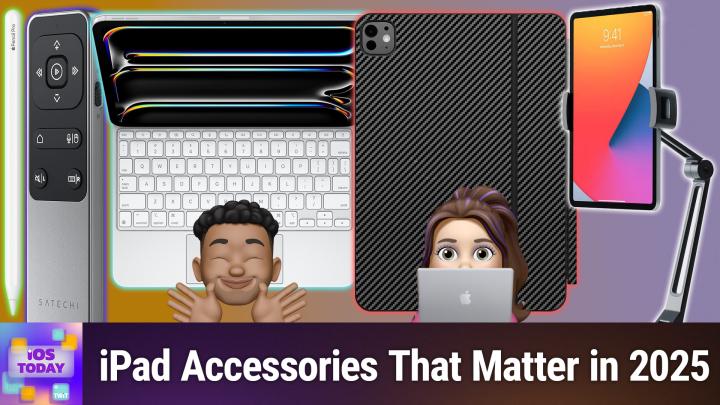
All TWiT.tv Shows (Audio)
iOS Today 759: iPad Accessories
00:45:08
From basic tablet to pro workstation!
Loading summary
Transcript37 lines
- [00:00]
Micah Sargent
Coming up on iOS today, Rosemary Orchard and I talk about some great iPad accessories. Stay tuned.
- [00:08]
Kevin
Today's show is brought to you by Progressive Insurance. Do you ever think about switching insurance companies to see if you could save some cash? Progressive makes it easy to see if you could save when you bundle your home and auto policies. Try it@progressive.com Progressive Casualty Insurance Company and affiliates. Potential savings will vary depending on not available in all states. Podcasts you love from people you Trust this is TWiT.
- [00:43]
Micah Sargent
This is iOS Today, episode 759 recorded Tuesday, June 24, 2025 for Thursday, July 3, 2025. IPad Accessories hello and welcome to iOS Today, the show where we talk all things iOS, iPados, TVs, WatchOS, HomePod, OS and all the OSes Apple has to offer, as well as the devices that Apple has to offer. We love to talk about them here on the show and help you make the most of your stuff. So I think we should get into it. By the way, my name is Micah Sargent, I am one of the hosts.
- [01:20]
Rosemary Orchard
Of this show and my name is Rosemary Richard. And I think we may have some magic lined up for the show. Micah, what do you think?
- [01:30]
Micah Sargent
Yes, indeed, I think we do have some magic lined up because magic is the key word when it comes to iPad accessories, one might say, you know, look, we have talked a lot, I think, in the past about iPhone accessories. We've talked, I'm almost primarily iPhone accessories, and I thought it would be great for us to have a little conversation about the different iPad devices, or rather the iPad gadgets and accessories that we use. And it kicks off, I think, with an obvious one, but one that really can transform the experience that you have with your iPad. And it's the magic keyboard. Now of note, adding a magic keyboard to any iPad purchase is automatically going to raise the price quite a bit. But what you get when you get an iPad, a magic keyboard for your iPad is a keyboard, a trackpad, and an extra port for charging your iPad while you use the port on the iPad itself for other things. So it's quite the device. Oh, as well as protection, of course, for the iPad as well. And I think all of those are reasons why the magic keyboard is so great. Can we show the page, Kevin, of the Magic Keyboard? So Apple has slowly but surely, I think, improved on the design of the magic keyboard over time. It comes in black and white, just those two colors, but with it you get a really nice, arguably kind of hefty, but powerful case that has all of those features and that functionality built in and now we're more than ever with ipados 26 right around the corner. And the improvement that we're seeing to the iPad, what you've got is a really powerful little touchscreen computer.
- [03:44]
Rosemary Orchard
Yes. Yeah. And I personally think that the keyboard and trackpad as well that you get with a lot of the magic keyboards or I think all of Apple's keyboards. Now there, there was one for a while that didn't have a trackpad on it, but I think they all do. It's honestly a game changing experience. You can hold down the command key inside of any app and it will tell you the shortcuts that are available in that app so that you can figure out how to make the most of it. But what I also like is it means that you have better angles for typing, which you want a relatively flat surface for at looking, which you want a more vertical surface for. And so you're not trying to put your iPad at like a weird 45ish degree angle. That is a halfway house between both. And it's not very comfortable for typing nor is it very comfortable for looking at your screen. And also your screen isn't 50% keyboard anymore. Like that. That is just a game changer right there. Especially if you're on one of the smaller iPads like the 9 inches even. Honestly, like Apple don't make a magic keyboard for the iPad mini, but there are magic keyboard alike knockoffs on Amazon. I've purchased one before and I quite liked it. But you know, having that extra space back by not having a keyboard on the screen and the ability, even if the only shortcuts that you memorize on your iPad are command space to open Spotlight, command tab to switch apps and command H to go home to your home screen. So H for home screen. If you only ever use those three, okay, maybe control C, command C, command V for copy and paste as well and command X which is the scissors for cutting. But you know, like if you just use those, you will have a massively elevated iPad experience. That is a big game changer. Like, you know, I have my dad using his iPad significantly more since I gave him a keyboard. Like his iPad usage has literally quadrupled. Like he was barely using it before, just mostly using it honestly as a digital photo frame, which seemed like a massive waste of an iPad. Now he's using it so much more because he can see as well as type and also the keys are always in the same place. And this is one of my pet peeves on the iPhone mic. I don't Know if it bugs you as well. Getting the wrong keyboard for a field or getting the keyboard that you don't expect. So it's a number field, but they've given you the number and symbol keyboard. So all the numbers are in a row across the top. Or they give you just the regular keyboard, or they don't give you the email keyboard. Like the digital keyboard, it changes depending on what it is that you're typing, where it is that you're typing, and so on. So sometimes you get the app, sometimes you get a.com button, sometimes you don't get a.com button, you get a.co.uk button, which is possibly the most useless button in the world. And I really wish it could be.com without my keyboard being American. Having a physical keyboard completely eliminates that. So especially actually, like, even if you are like just going like, okay, you sell me on a keyboard, but oh my God, 300, $350. This is expensive. Logitech, like a keys to go, something like that. I have an older model keys to go actually here on my desk. I'm just pulling it out like this came with a little iPad stand. So you can just slot your iPad in there. Like a Logitech, Bluetooth keyboard, anything like that. Any keyboard is an upgrade for your iPad if you don't have one, even if you only use it at home. Like if you can get one with a function row like this keyboard has here at the top. So it's got buttons for going home, controlling the brightness on your screen, showing and hiding the keyboard, opening spotlight, media controls, volume controls, a lock button, and things like that. You know, like, yeah, there's like a keyboard is a game changer. I definitely recommend it. And also, as Micah said, the extra charging port on the magic keyboard, I use that a lot because I like to plug like external drives in. Like, I have like 4 terabyte teeny tiny SSDs that I plug in, which. Or I plug in a Raspberry PI because I need a server because I'm that kind of weird nerd. But even if you're just plugging in like a memory card from your camera to get your pictures up so that you can see them on a much bigger screen, or you're plugging your camera in to use it as a webcam, if your battery is running low, you don't want to have to make it an either or situation. You don't have to buy a hub if you've got a magic keyboard. Admittedly, you can get like an anchor hub way cheaper. But you know, it's nice to have.
- [08:21]
Micah Sargent
Options that what you said earlier about your father using the device more. Now that it has a keyboard, that is the same experience that it was for my grand when I gave her an iPad with a keyboard, she completely replaced her laptop. And that idea of getting the keyboard out of the way and physical, I think both play into it, which makes it so great.
- [08:50]
Rosemary Orchard
Now we'll also mention if you have a keyboard and it has like this Logitech here media keys on it, especially if it's a Bluetooth keyboard, if you're traveling and you're using your iPad as your mini home cinema and you've got a Bluetooth keyboard home cinema on the desk or like just a bit further away from you, keys to control the media and the volume right in front of you so that they're within finger reach, that's a game changer. I actually have a Satechi Bluetooth remote control, which I use for that a lot of the time because that's really nice, like, especially if you're like snuggled up in a blanket on a plane. But you could use a Bluetooth keyboard for it too.
- [09:27]
Kevin
This episode brought to you by Red Canary when cybersecurity threats hit fast, you need an MDR partner that moves faster. Red Canary delivers 24.7expert MDR support, total visibility and actionable insights. Plus it helps you detect four times more threats so you can stay ahead without burning out. Red Canary clears the noise and has your back every hour, every incident. Get the backup you deserve. Visit redcanary.com difference to learn more.
- [09:58]
Micah Sargent
There you go. Now what? You know, if I'm going to spend that much money on a magic keyboard, perhaps I would want to. Oh, and also the fact that it only comes in white and black.
- [10:13]
Rosemary Orchard
If.
- [10:13]
Micah Sargent
I want to protect it a little bit more. Do you have some suggestions for what one might do in that case?
- [10:20]
Rosemary Orchard
Yes, I do. And one of the things that I personally love to do is to wrap it. So I personally have used both slick wraps and dbrands for my iPad magic keyboards before. They also do stickers for your iPad, for your iPhone, for AirPods, AirPods cases. In fact, you name it, they make stickers for it. And these are stickers. But they are really heavy duty vinyl stickers which add a layer of protection as well. So if there's like a scuff or a scratch, it's going to scuffle. Scratch the sticker, not that magic keyboard or whatever that device is underneath it. And yeah, honestly, there's Just so many great colorways for Slick Wraps. I really like they. They had a range for a while. I suspect they still do. Of like the Retro series. That's what it's called.
- [11:10]
Micah Sargent
That's what almost all my devices have.
- [11:12]
Rosemary Orchard
Yeah, the Retro series is great. I actually have a purple one, which I don't know if they still do that. But yeah, they've got glitter ones, they've got leather, they've got carbon fiber. So stone. Like Marble Effects, all sorts. And dbrands do some similar ones where there's just all sorts of options, including like a sort of glow circuit, which I don't think that's the circuits in the actual iPad, but it would be pretty cool if they were. They've got really nice marble effects. They have an X ray version. Like if you scroll down a little bit on their page, they've got so many choices. One of the things I will say I think it was the black carbon I had from dBrands. Like it actually felt like carbon fiber. Like it has like a grit to it.
- [12:00]
Micah Sargent
Nice.
- [12:01]
Rosemary Orchard
Yeah. Which some people love, some people hate. So like, if you want something that makes it just a bit grippier, like the carbon fiber, I would definitely 10 out of 10 recommend that this also fixes like some people don't like the texture of the magic keyboards. Wrap it. Stick a stick. A dbrand skin on it. Stick whatever it is on it. Like they have like a crocodile leather effect looking one as well. These are all vinyl ones, but yeah, there's. And they make like cases and stuff too. But you can get them for all sorts of things. Like you want to wrap a Nintendo switch, Steam Deck, PlayStation. I think slick Wraps even does like Steam Decks, Stream decks, which are the like devices that I have on my desktop which have got like multiple screen buttons in them. And then you can also request devices as well. But yeah, there's also. It's like if you want to wrap a GoPro, slick wraps, if you want to. Oh, I could wrap my DJI Osmo Pocket. Oh wait, that's not the Osmo Pocket 3. Darn it. But you know, like they have so many options and I just love it. Like adds a level of protection. Also means that if there's a hole row of like identical looking iPads, imagine keyboards, you can be like, yeah, mine's the purple one because you wrapped it. Which is exactly what mine is. Mine is purple.
- [13:27]
Micah Sargent
One other thing too that I like about Slick Wraps and I've actually been able to make use of this if you order from them and you apply your, your wrap and it fails for whatever reason. Like you don't, you don't get it exactly as you intended. They will send you a replacement. You pay shipping and handling, but they will send you a replacement. And that is a, that's quite nice. And some of them, even they do.
- [13:57]
Rosemary Orchard
Send their reps in like really heavy duty cardboard envelopes as well. So it's not like it's going to get bent or anything in the post. It is going to like my, my shipped internationally and they were fine.
- [14:08]
Micah Sargent
Yeah. So there you go. I think that the slickwrap stuff is awesome and I love the vintage of the retro look that's applied. Now. There is one device that stands true as I think the ultimate iPad Pro accessory because it's been sort of part of, I think, what makes the iPad a magical tablet device. In a time where Apple once suggested that there was no need for a stylus because we have a stylus at the end of our finger. Well, then the Apple Pencil came along and then the Apple Pencil Pro came along. I will continue to be honest in saying that I always have a my eyes are bigger than my stomach situation of aspirationally wanting to do more with the Apple Pencil than I ever do. But it's still so very cool. The Apple Pencil Pro has multiple features with within it, including of course the squeeze functionality that can sense whenever you're squeezing it to bring up a palette so you can switch between tools and line weights and colors. It also has barrel roll, so there's a gyroscope inside that lets you rotate the Apple Pencil Pro to kind of control special shaped pen and brush tools, haptic feedback built in so that when you squeeze or double tap, you do feel a slight pulse that confirms the action. And it also has Apple Pencil hover, which lets you kind of see where you're going to touch down on the screen so that you kind of get a better, better precision and it'll even have like a little shadow effect that comes with it. Also with Apple Pencil Pro, you can use Find my to find your Apple Pencil Pro. That of course is different from the Apple Pencil, which there are multiple models. There's the Apple Pencil USB C, the Apple Pencil second generation, and the Apple Pencil first generation. The Apple Pencil second generation is the next most expensive and it has the ability to touch on the side to be able to double tap. It does not have the rest of the Apple Pencil Pro's features like the squeeze. So that's something to bear in mind. Rosemary, do you feel like you use your Apple Pencil Pro very often. Maybe you use it more than I do.
- [17:02]
Rosemary Orchard
I go through phases of sometimes using my Apple pencil loads and sometimes not. Like, what often happens? Like, I feel like, actually, for me, having the magic keyboard, even though you just lift the iPad screen off, like, that's all you do. Like, this is one of the things I love about the magic keyboard. Like, I just magnet, like, demagnetize it, just pull it away, and then the iPad is on its own. Like, I feel like because it's in the magic keyboard, I often, like, don't reach for the pencil. However, when I want to take notes and stuff. Like, I do just pull it out of the magic keyboard, and the Apple pencil's right there, and I draw, doodle, make notes, scribble things. It's not necessarily legible to anybody but me, but that's my problem and my hieroglyphics to decipher later. But, yeah, I go through phases. I probably use it for an hour, a week or so properly, and then I'm just sort of messing with it occasionally every other day. So probably not enough to make it worth it. But at some point, it'll get handed down as a device to pass on to family members when I inevitably upgrade my iPad at some point, and they tend to use it more than I do.
- [18:11]
Micah Sargent
Yeah, I wish that I. I wish that I used it more. But again, I do go through those phases, and that part of it makes it worth it for sure. All right, I want to talk about a couple of other accessories that I think are really nifty, and I know Rosemary has at least one more that she wants to talk about. I'm going to start with Satachi. So Satachi sometimes pronounced Satechi by, but I had to check it again this morning. Their YouTube page pronounces their own company as Satachi, and that's S A T E C H I. They make an aluminum desktop stand for iPad. And this thing, look, it's kind of an egregious logo, I'll be honest with you. But this thing is hefty. It's got a great base, and it is very well fastened so that when you put an iPad on it, it will actually stay where you put it, which is quite nice. So you can slide your iPad in here in both configurations, landscape or portrait. And what's great is that it has a little. Whoops. It has a little spot at the bottom where. Let me cover my eyes so that it's up, hopefully in focus. It has a little spot at the bottom where you can actually plug in a cable. And thanks to the opening here on the base of it, you can sort of feed a cable through there and do a little bit of cable management which is quite nice as well. So I really like this Satachi desktop stand for iPad. I think at $33 this aluminum hefty thing is quite a good price especially considering it's its flexibility. So it can actually go as far as to be lying down in front of the stand and give you that ability to use an Apple pencil with it and then boop, you can pick it back up really easily. Use it as like a, a, you know, recipe sort of stand for your iPad, a cookbook stand for your iPad. And then Satachi also makes. And if we could show this on screen. I don't have this window with me, I've misplaced it in the move. But it is the aluminum stand and hub for iPad Pro. And this device from Satachi is available for $100. So a little more expensive. But that is because inside you get an entire Hub. It has 4K HDMI. It has so you it's 4K HDMI out USB A that does 5 gigabits per second, gigabytes per second, USB C charging port is on there, an audio jack and then SD card readers are all built into this hub. So you actually can use this as a full on hub for your iPad. And that I think takes this to the next level turning this into what amounts to a full on hub for especially as I've mentioned before with the updates that are coming in ipados 26 this is next level. It's going to be great for being able to control your, or rather not control your iPad but you know, work with your iPad. And so that is the again, the aluminum stand and hub for iPad Pro. Pretty nifty device that the company makes.
- [22:14]
Rosemary Orchard
Yes. One that I'm going to mention also from Satoshi because we're talking about them and I feel like it would be not rude not to but I did sort of mention it already. There are two Bluetooth multimedia remote control. I love it. It lives in my little tech bag. I don't have it here on my desk, but it lives in my tech bag for travel. And it just means that when I'm using my iPad as a personal cinema or a portable tv, I have a remote control for it. And this sounds like a really silly thing like do I need a remote control? But you know, somebody sends me a message, I hit pause on the remote control and I don't have to reach over and like touch the screen of my phone. If my hands are sticky or greasy, I can chuck this in a little food bag and I can still control everything and then I can, you know, throw away the bag later or I can just clean this instead of getting screen sticky or greasy. And honestly, this just makes a big difference. The other thing that this is amazing for, if you do presentations, it supports presentation mode for PowerPoint, Keynote, Prezi, Google Slides and PDFs. Um, and I believe it will also work in preview as well when that lands in iOS 26. Honestly, it's really great. Works in all sorts of apps, works in the YouTube app even. I found it works well with Plex for me and I've also had it work in Disney plus and Netflix. So, yeah, have to recommend that that is $44.99. Often goes on sale on Amazon and it recharges via USB C C at the bottom. So you just plug in a USB C cable, the same cable you used to charge your iPad with, and you're done. And it doesn't take very long to charge and that thing holds charge for a really long time. It also has a physical on off power switch. So if, like me, you keep it in your tech bag, it's not randomly going to be controlling your iPad from the other side room with a Bluetooth connection as like stuff gets rummaged around in your bag, for example. The next one I also don't have with me because I purchased this as a gift for my mum for Christmas. She had been using a variety of weird and wonderfully shaped neck pillows. There was the corduroy cat, for known for as a corduroy cat for no other reason than it was corduroy. And our cat used to love that cushion. And yeah, there was the leopard print neck pillow. None of which really did what she wanted. She was always just trying to like balance the iPad. And the thing that I saw is she'd often have the iPad in the magic keyboard and it would be balanced and she'd be tapping the screen with a stylus, but she tap it quite firmly so the iPad would be at an angle and she'd tap it and it would go boink and bounce up and down like a hurdle does if you hit a hurdle. And I could just see every time I was there watching, I was like, this iPad's going on the floor. Absolutely. Like today's going to be the day it didn't happen. But to prevent this, I bought her an iPad cushion because that's the kind of nerdy daughter I am. So this is a cushion. It's maple by Ugreen. There's loads of ones like this out there. I bought a couple, I have to say, for Christmas when I was looking at it. This one has a few different ridges on the front so that you can put your iPad at different angles. You can put your iPad in portrait or landscape. And yeah, it's foldable, it's washable, it's got cover that zips up so you can wash it. And it doesn't just work for iPad. You can put a Nintendo Switch on there. You could put basically any kind of screen type thing on there. You could use it for an Android tablet as Surface Go if you wanted to, whatever like it. It does all sorts of things. And yeah, it's made by Ugreen. It's really nice. I did. One of the reasons why I specifically got this is because of the washable cover. A lot of these don't have washable covers, but, you know, this one does. It's also got two little pockets on the back, which is great for things like, you know, a remote control for your iPad or a stylus or charging cables and things like that. So. So. Or sticking your phone in there. So, yeah, a nice little pillow for your iPad, which sounds like a very weird accessory, but there's loads of ones out there. And honestly, I'd really recommend it. If you often use your iPad on your lap and you find you're like looking with your head down, bent at almost a 90 degree angle, that's not good for your neck, people. You want a better posture. Having your iPad at an angle and slightly elevated can help with that. It's not hugely elevated, but it is up a little bit, which makes it better.
- [26:40]
Micah Sargent
Then finally, for me, I want to mention one other stand that I think is great. And this is the hover bar duo from 12 South. So it's called the hover bar duo because it has two bases. One that lets you stick it on the side of like a table. It's a clamp. And so you can clamp it on the side of something. And the other, which is this, again, hefty base, kind of like what I talked about before that lets you rest it on a table. And the great thing about the hover bar duo is that it comes with this clamp that is perfect for an iPad. It also will work with an iPhone. So if you stick your iPhone in here, it will work, but it's really great for an iPad. And then you kind of put that on there and you're able to move the iPad however you need to. It's 80 bucks from 12 south. And there's a second generation. I have the first generation version. The second generation version of the Hover Bar Duo has an easy removable base so that you can switch between the two modes that clamp and the desktop stand much easier than you can with the first gen, which I think is great for people who end up getting that one. But if you are watching, you'll see in the photos the ways that it can be used to sort of clamp next to, you know, a cabinet in your kitchen or if you are trying to record video, you can use it there. Somebody has it on their desk in their sort of workshop area while they're learning how to make a birdhouse. This thing is really nice. It's everything that 12South makes is really well done. And I should also mention that the desktop version of it comes with on the base this sort of little divot where your iPad's Apple pencil can rest if you want it to. So it's easier to grab while the screen is kind of up towards your eyes. You're able to grab that Apple pencil and make use of that. So I really like this. I remember when it first came out and I thought, oh, that's something I need. And I have used it ever since for all sorts of iPad related shenanigans, I guess. So that's the Hover Bar Duo.
- [29:00]
Kevin
This episode brought to you by Red Canary. When cybersecurity threats hit fast, you need an MDR partner that moves faster. Red Canary delivers 24.7expert MDR support, total visibility and actionable insights. Plus it helps you detect four times more threats so you can stay ahead without burning out. Red Canary clears the noise and has your back every hour, every incident. Get the backup you deserve. Visit redcanary.com difference to learn more.
- [29:30]
Micah Sargent
All righty. With that, it is time to move on from our app and in this case, gadget picks that we had for the iPad accessories portion of the show. There's an iPad accessory out there that you love, that you think we should be using or we should know about or we should tell people about. You can always get in touch with us iostoday Twitch tv. But I can. I can hear the music. It's time for Shortcuts Corner. This is Shortcuts Corner, the part of the show where you write in with your shortcuts requests. And Rosemary Orchard, our shortcuts expert, provides a response. The first of two Shortcuts Corner Comes in from Van, who writes Rosemary, I expect to be embarrassed once I learn the answer to this question while editing the shortcut and Van has included a screenshot. How can I, after the fact find the full path location for Sample. Txt? And how can I find the full path locations for the screenshots and test delete folders? It's easy enough to know these locations, of course, when the shortcut is created, but I want to find the paths later on. Clicking on the items seems to show the path of the last path selected, not the path for the item itself. I'm sure I'm missing something obvious. Big fan of iOS today and I'm regularly impressed with your shortcuts magic, Van.
- [31:03]
Rosemary Orchard
Well, this is a really interesting one because the save file action in Shortcuts, you know when you first have it. So I've just popped it up here on my iPhone. It, it asks you to, you know, save a file to a specific location, which, you know, that's, that's fine. And so you need a file. And so I will just actually create a little text thing that I can pop in there and then if you turn off elsewhere to save, then yeah, you have to specify the folder. So I'm just going to select the sketch folder, but it, it is going to just pop that up and it doesn't really help. So there's a few things that you can do to make this better for yourself. You can add a little comment inside of shortcuts where you put you manually type the path to the folder. That's fine, that's an option. You can totally do that. However, if you then change this folder, you need to update your comment. It's not very dynamic. And so instead I think this is a little self promotional because my company runs and maintains this application. However, it was originally created by Alex Hay, who created a whole bunch of Shortcuts apps before he passed away. But what I like to do is I like to actually create a log for this in logger. So I would use log message and this is Logger, which is a essentially console style application for shortcuts. So what you can do in Logger is you can actually pop the save file in there and then you can say file path and this is something you can get it from the output and then you could stick all these together and put them in like a notification at the end. Or you could use the reveal file action at the end of your shortcut. But if you've got like 20 files, you'd have to keep going back and it's not going to open new files windows for each one. It gets very messy very quickly. Um, so yeah, I would log in the file path and then you could also even log it with the name of the file in there. And then you can just, you know, log that and then once you've done this. So I can do this and then if I just pop over to logger, then I can see ta DA, iCloudDrive/ sketch text. And that's it. That's, that's exactly where it is. That is my log and that's what it's done. Um, so, you know, I, I, I personally think that this is the nicest, neatest solution for all of these things. There are options like the comment is a great free option, but it does require you to manually update it. But if you use the save file, you can get this information so that you can get the file path from the save file. You just have to figure out where you're going to put that or display it in a way that doesn't prevent your shortcut from continuing. Because yeah, as you noted, if you ask where to save, then it's going to pop up and interrupt it and not continue the shortcut until you've done the thing, which especially if you've got a long shortcut and you're like, okay, I'm just going to run this and I'm going to pop off and grab some coffee. Not, not such a great option. So yeah, personally I like to use logger for this.
- [34:23]
Micah Sargent
There you go. And then we had a magical dynamic shortcut moment here on the show. Do you want to tell us about Mr. Matt?
- [34:34]
Rosemary Orchard
Yeah. So in the last episode I mentioned my little shortcut in my doc, which doesn't open Safari, it opens a new tab in Safari for DuckDuckGo. Because otherwise I get distracted by the inevitable previous shiny I was looking at and this ends up usually costing me money and I don't like as a thing. And so Mr. Met said, oh, this seems really great, but I'd like it to open the new tab page. And the new tab page, it's the one with the bookmarks and your icloud tabs and all of those things. So I found a one action shortcut. Seriously, folks, one action. I'm not sharing the link to this. Your homework is to go and make this yourself because you can do it. I believe in you. And it's just the create new tab action. That's it. Just open shortcuts, create a shortcut, type create new tab and then you can save this to your doc and then when you run it, look, it's opened my new tab page in Safari. And as a little reminder, bonus tip, scroll down on that Create new tab page and then you can tap edit at the bottom and then you can choose what you want to see. So I don't want to see my suggestions. My background image is currently this purple one. But maybe I want something different. Maybe I want this lovely sort of p. Pale peach pinky, sort of like desert dunes. You know, I can change that and now I have that. So yeah, this is a really great option. Thank you for to Mr. Met for asking how to do that or saying that you wanted that. You didn't even ask me to do it. I took it upon myself. It was a challenge and I accepted it. And that is the whole thing about shortcuts corner. It doesn't matter how tiny your request is. If I can answer it, then we will do it on the show.
- [36:22]
Micah Sargent
And with that, I do want to remind you, as we put out the call in our last episode, if you have apps or hardware that you think are well worth talking about in our app cap segment, please do get in touch IowaDowwit TV with the apps or gadgets that you're loving. I wanted to mention I did have an app cap for this episode that actually came up while we were recording. Adobe has released a new app called it's currently sort of beta style. It's called Project Indigo. And Project Indigo is Adobe's introduction to a mobile photography app system that it's kind of working on. Project Indigo does computational photography. Now, many of you will be familiar with that phrase if you've ever watched an Apple Keynote, because that's something that the iPhone's camera does by default. Computational photography means taking multiple photos at once in multiple versions and exposures, etc. And combining all of that data together to make the best photo that it can. So it uses all of that to improve upon the dynamic range and reduce the noise that is in the photograph. And Adobe's new Project Indigo actually takes even more photos than are typical to attempt to improve upon the photograph. And so with this, you are able to, in theory, get a more natural look, get a better understanding of a scene, get a higher resolution photograph of a scene, and use a bunch of nifty features to make this possible. I'm going to be testing out this app a little bit and seeing what it's able to do. But I want to point you to, as Kevin has just come across the research Page all about Project Indigo that goes into depth about what the app can do. And the company plans to make this even better over time, using its knowledge of computational photography, but also its knowledge of AI, as it has made use of that in its various software. So it'll be a testing ground for features that may end up in other apps from Adobe. But I'm really looking forward to taking a few photographs with this and seeing what Project Indigo is able to to do. So that is my app cap. And I believe Rosemary has an app cap as well.
- [39:17]
Rosemary Orchard
I do. And this one, it's hardware. It ranges in price depending on exactly which model you get. Which. You know that that's starting to sound scary, but these go from like 30 to $40 or a little bit more if you want something really fancy. And you, you go all out and. But this is the MagSafe pop socket grip. So it's a grip, it's a pop socket that goes on the back of your phone. You pick up your phone, you grab your MagSafe pop socket grip, and it just MagSafes on. And if you heard that click, it's a solid click. I can like, I'm grabbing like the, the thing. This does not. My phone does not have a case on it. Okay. I'm giving this a really solid shake. My phone is going nowhere.
- [40:06]
Micah Sargent
Yeah, that is on there. That is on there.
- [40:08]
Rosemary Orchard
It's on there. But when it comes to removing comes off really easy. So this can go onto a MagSafe charger. These are amazing. I love them. So I have the purple one and then I replace the pop socket on it because they have an easy swap with this celestial combination. I previously had a rainbow on there. However, due to an ill fated incident with a case for a previous iPhone, which the MagSafe on it, I had to file an issue with them because the magsafe was too strong. They were like, no, no, it's supposed to be strong. And I said, yes, it's not supposed to be so strong. It breaks my Magsafe pop socket and my car charger for my phone. And they were very apologetic and they sent me an Amazon voucher because I was like, it's just ruined like $80 worth of stuff here because your phone case like has too strong a magnet in it. So unfortunately the rainbow is no more. But that's okay because I have this gorgeous celestial combination which also as a bo, doesn't have me constantly tweaking it to make sure it's exactly upright. So that's a good thing. But yeah, this comes the maxi Pop sockets come in a range of styles, so there's just basic black. Okay. If you want to go gold, you can go gold. If you want like a heart shaped jewel, you can get a heart shaped jewel. If you love bulbasaur, you can get a bulbasaur shaped one. And also, Micah, the magsafe parts. Green. Green. Oh, I know how much you love that. But one thing that they now have, which they did not previously have because this one, it's just a grip. They now have a kick out grip and stand where there's a little hinge at the bottom and then it's a stand so it can fold down and there's still a magsafe part on your phone. And guess what? I'm gonna be getting one of those because as much as I love my Magsafe pop sockets. Yeah. I literally have two here, folks. I have one on my ebook reader and I have one on my phone own. I'm getting the stand because my ebook reader needs a stand as well as the grip because this way I can prop it up like while I'm eating. So yeah, I'm getting one of these, like tomorrow if I can. It comes in dusk, which is a gorgeous purple. So I think that will work quite nicely with my white books. Palmer. But yeah, this is pretty awesome. So highly recommend the Magsafe pop socket range in general. Like, they. They've got wallets and all sorts. The only thing I'll say about wallets is if you're putting like a hotel key card in there and then that hotel key card mysteriously doesn't work when you get back to your room. That may be due to the magnet. Magnets in the pop socket wallet I had. That was before. And they were like, oh, you put it near your phone. I was like, in this case, I don't think the phone was the problem. I think it was the magnetic wallet that was the problem. Maybe keep your hotel key card not in a magsafe wallet. But, you know, aside from that, they're great. I've never had an issue with a bank card or anything with them. Just hotel key cards, which are notoriously flaky anyway.
- [43:04]
Micah Sargent
Absolutely. Well, with that, we've reached the end of this episode of iOS today. Thank you all so much for being here. I want to remind you about Club Twit. If you're watching this and you saw some ads, well, I've got a way for you to see it without ads by joining the Club Twit TV Club Twitter is where you go to join the club. We've got monthly and yearly plans. When you join the club, you gain access to some awesome benefits. As I mentioned, every single one of of our shows ad free, we love that. Plus access to the members only Discord Server. A fun place to go to chat with your fellow Club Twit members and also those of us here at Twit, as well as access to the Twit plus bonus feeds. We've, we've split them up into separate feeds so that you can get just the content you're after, the shows, the news events and the extra clips. So all of those are available and that's coming up on like it's definitely multiple days of content at this point that you'll have access to. So if all of that sounds good to you, plus of course that warm fuzzy feeling knowing that you're helping us to continue to do the work that we do here on the show, well then, join the Club Twit TV Club Twit Rosemary Orchard. If people would like to follow you online and check out all the great work you're doing, where should they go to do so?
- [44:17]
Rosemary Orchard
Well, the best place to go is rosemaryorchard.com which has got links to apps, books, podcasts and all the social media sites where you can find me. Plus you can find me in the Club Twit Discord, where you know we have chats during the live show. That's how Mr. Met ended up accidentally submitting their challenge today. But yes, as well as that, you also have a lovely iOS today discussion area with threads for every episode. Plus you can create your own or there's a lovely general discussion area which we're always keeping an eye on. What about you, my cat?
- [44:48]
Micah Sargent
If you're looking to follow me online, I'm ikasargent on many a social media network where you can head to Chihuahua Coffee, that's C H I H u A H u a Coffee, where I've got links to the places I'm most active online. Thank you all so much for being here. Thank you for tuning in. We will catch you again next week with another episode of iOS today. Bye bye.
- [45:10]
Kevin
From Silicon Valley boardrooms to tomorrow's AI breakthrough, if you need to keep up to date with tech, you need TWiT TV. At TWiT, we are tech experts who understand what's happening and can keep you in the loop. And we do it in a thoughtful, informed and fun way. Start your Sundays with this Week in Tech, a roundtable of tech journalists and people in the know with a rundown of the week's most important tech news. But that's not all. All week long, you can stay ahead of Security threats with Steve Gibson and Security Now. Keep up on all things Apple with MacBreak Weekly. Listen to the most informed Microsoft experts in the world with Paul Thurrod and Richard Campbell on Windows Weekly. Our flagship shows feature tech's most respected voices, giving you the insight you need to understand and benefit from the changing world of technology. We give you analysis you won't find anywhere else so you can make smarter business decisions and take advantage of the technologies transforming your world. Whether you're a CEO, IT professional, or simply passionate about technology, TWiT's network of shows gives you the edge you need in today's digital landscape. Don't miss a minute. Subscribe to TWiT TV today.