← All TWiT.tv Shows (Audio)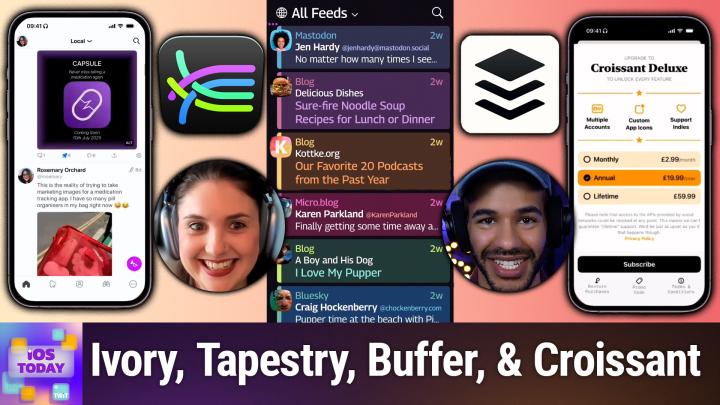
All TWiT.tv Shows (Audio)
iOS Today 760: Social Media Roundup
00:43:54
Cross-platform solutions for a scattered world
Loading summary
Transcript28 lines
- [00:00]
Micah Sargent
Coming up on iOS today, Rosemary Orchard and I, Micah Sargent, talk about social media apps and kind of how to bring things together. Why can't we all just get along? Learn more about that coming up on iOS today.
- [00:16]
Ad Sponsor
This episode brought to you by Red Canary when cybersecurity threats hit fast, you need an MDR partner that moves faster. Red Canary delivers 24.7expert MDR support, total visibility and actionable insights. Plus it helps you to detect four times more threats so you can stay ahead without burning out. Red Canary clears the noise and has your back every hour, every incident. Get the backup you deserve. Visit redcanary.com difference to learn more. Today's show is brought to you by Progressive Insurance. Do you ever think about switching insurance companies to see if you could save some cash? Progressive makes it easy to see if you could save when you bundle your home and auto policies. Try it and@progressive.com progressive casualty insurance company and affiliates. Potential savings will vary. Not available in all states.
- [01:10]
Imagine you're a business owner relying on a dozen different software programs, each one disconnected, more expensive and more complicated than the last. It can be incredibly stressful right now. Picture Odoo Odoo brings all the tools your business needs into one simple platform. CRM, accounting, inventory, manufacturing, marketing, HR and more. All seamlessly connected. Everything works together, giving you the peace of mind that your business is running smoothly from every angle. Odoo's open source applications are user friendly and designed to scale with your business, saving you time and money. Say goodbye to juggling multiple platforms and hello to efficient integrated management. Stop wasting resources on complicated systems and make the switch to odoo today. Visit odoo.com o d o o.com and discover how Odoo can simplify and streamline your business operations. Odoo Modern Management made simple.
- [02:12]
Podcasts you.
- [02:13]
Rosemary Orchard
Love from people you Trust.
- [02:16]
Micah Sargent
This is TWiT. This is iOS Today episode 700 with Rosemary Orchard and me, Micah Sargent recorded Tuesday, July 8, 2025 for Thursday, July 10, 2025 social media roundup. Hello and welcome to iOS Today, the show where we talk all things iOS, iPadOS, WatchOS, HomePod OS and all the OS's apple offers as a way to help you make the most of those devices. You have tips and tricks and apps and all sorts of stuff. That's what we cover here. I am one of the hosts of the show Sargent and I am Rosemary.
- [03:00]
Rosemary Orchard
Orchard and you know I thought Micah, I'd just give you a ping about this topic and see how you felt about it. But it turns Out Ping is nothing.
- [03:09]
Micah Sargent
Oh, can you. Oh boy. Ping. You know, Apple tried and it is, it has tried multiple times in multiple ways. It feels at this point to attempt to bring a social media app of its own to the world and did not successfully do that. And for those of you who never had the opportunity to hear about, learn about and love Ping, that was one of Apple's failed social media experiments. But we're here to talk about social media that actually exists and I think more importantly, a way to access social media in multiple ways and be able to kind of, you know, bridge the gap between this very, very disparate situation we have at this point. Seems like it used to be that many people that we know at least and sort of interacted with were posting in one place and then the name of that place changed from a multi letter word into a single letter. And at that point people really started to break away and go elsewhere. But elsewhere is one of many place people have gone and that makes things confusing. And that's where we are at this point.
- [04:33]
Rosemary Orchard
Yes. Yeah, it is so confusing, Micah. And one of the places that myself and a lot of the tech nerds that I follow ended up is Mastodon. And I say one of the places, but Mastodon is not a single place. There are multiple servers for it. So it's not like you just go to Macedon Social and log in and that's it. There are other instances like Twit Social or at Snail Social, which is one that I help host and run. And so you can sign up in multiple places and there's multiple servers and interactions can cross multiple servers. And one of the apps that I use for this is Ivory. And the reason why I use Ivory, among a bunch of other things is Tabbot have made a really good effort to make a really nice app here. So Tapot who have created Ivory, did previously create something called Tweetbot which some of you may be familiar with back in the day when there was this social network called Twitter. But yeah, they've done a lot of work with the UI and things over time. So you can actually configure the app to have whatever you would like at the bottom in your navigation menu. And you can show and hide labels as well. I quite like having the labels there as like a little prompt for what those little icons at the bottom. And I can put the post button out of the navigation. So that's a little trumpet that's now down here in the bottom right corner so that, you know, that's just always there. And it's not taking up space in my menu. And one of the things that I do like about this and also about Macedon, is you have multiple sort of lists of things that you follow. So your home is where everybody that you follow shows up. Local is the people on your same server. So in my case, that's nailed it social. So I can see other things that have gone on here. It's mostly me. And then there's also federated, which shows, you know, things going on on other servers that are currently popular. I've also got some lists. So for example, Home Assistant would be anything related to Home Assistant with people I've posted. And then there's Snail Dip, which has a bunch of things from my little app development company. It also does support multiple accounts, which is really useful. If, like me, you need to be locked into multiple accounts to try and keep an eye on all of them at the same time, then yeah, that's right there. Now, Ivory is actually free to download and use, which is great. But then there is an in app subscription, which, depending on where you want to use Ivory, costs different amounts of money. So if you would like to include the Mac app, that costs a little bit more and that is 24.99 a year. If you just want the iPhone and the iPad, it's $14.99a year or 1,99amonth. And if you just want them back, then that's $14.99 a year. So yeah, there's options there. It's not super cheap, but at the same time, I personally feel like it's worth paying for good development. And I know that tap board their heart and their soul into this and had to pivot incredibly quickly due to the actions of somebody who purchased a social media account, a social media site, then decided to completely change the rules with no warning on all the develop. And this time I'm not talking about Reddit. Rest in peace, Apollo, because that was my favorite app for it. But yeah, Apollo and Tweetbot both got axed by the companies that they were doing a nice service for. Real shame. But unfortunately it seems to happen to good apps in the social media space, doesn't it, Micah?
- [08:17]
Micah Sargent
It does. I remember the excitement surrounding the incoming Ivory at the time and how everybody was, was, you know, ready to hop on the beta train when, when TapBots was testing it. I use it on my Mac as well as my iPhone as a means of accessing Mastodon. And yes, as you point out, you have to bear in mind the way that Mastodon works with the various sort of individual social networks that are built into it that you can sort of access. And I think that they've done a very good job of navigating everything that's involved with that. And I don't envy anyone who has to figure out how to sort of navigate that particular, you know, means of accessing these different sites. We're going to talk near the end about an app that is even more mind boggling to me that, you know, shares a name with a great piece of bread. But we'll get to that soon. In the meant though, there's another app that aims to give you access to. It's almost. It's le. It's less about giving you access to social media networks and more about getting all of that out of the way and just giving you access to what's out there. And I think that's what's cool about this. This next app.
- [09:51]
Rosemary Orchard
Yeah. So the next app is Tapestry by the Icon Factory, who also funnily enough made a very popular Twitter app back in the day U. But Tapestry is designed to bring not just social media, but also your favorite blogs. And guess what? Blogs run on RSS and podcasting runs on rss. So you can even get your podcasts into Tapestry, which is really cool. And the idea is just bring everything together into a unified timeline. And because of the way that you sign into all of your social media accounts with it, you can also then interact with them as well, which is really cool. So it supports, among other things, Macedon, it also supports Tumblr, YouTube, podcasts, Blue sky and even Reddit to an extent that Reddit allows that. And yeah, they've just spent a lot of time trying to just bring everything together. And the name Tapestry comes from the fact that there are so many threads of social media and all these websites out there in the world that people want to interact with, but you don't want to open 20 different apps to do that. It's also quite frustrating when you see somebody posted something here and then you interact with it and then you see it on another thing. Go. I'm sure I responded to that. Where is that? You know it. With Tapestry it's a little easier to see all of that together. So yeah, that is Tapestry, which is a really lovely app and I highly recommend it. It's free to download or. And then 1.99amonth, $19.99 a year. Or if you're not a fan of subscriptions, you can do a one time purchase of 79.9.9 for a lifetime purchase to get absolutely everything that is included with Tapestry.
- [11:35]
Micah Sargent
Yeah, I have. I have feeds from my own personal accounts. So it's showing me not my stuff, but the stuff of others from those accounts. So Blue sky and Mastodon and Tumblr, believe it or not. But it also has. I have the NOAA weather satellite. I've got six colors RSS feed, the Onion RSS feed. And so you can very easily use Safari to sort of open a feed in Tapestry and then from that point on it'll show up in your account, which is quite nice. And when I like to the sort of setup appearance that is part of the beginning so that you are able to access it. Access a bunch of different stuff that you might be interested in. So you don't go into it kind of with a blank thing, you're able to quickly get to it. And then you can also create feeds using connectors, which is a really cool thing. So there are sort of special means of accessing different websites, including for people who need to like ping a website to make sure it doesn't go down. You can have that as part of it. You could have the USGS earthquake for people outside of the U.S. that's how we know when there's an earthquake. Or one of the ways that we know that when there's an earthquake. And it's got great things built in, like what's called muffling and muting. So if there's a type of content that you're not wanting to see in your feed, you can easily muffle it, which what that does is it. It shows it in the feed, but it shows it collapsed and then it lets you mute it, which means that it won't show up at all. So there are quite a few nice tools built into Tapestry that I think really make it pretty awesome. Now. Now that is a way to go about accessing Mastodon and with Tapestry, accessing multiple sites. But now we have to look at what is involved. Given that everybody's on different social media networks at this point. How in the world do I get to those people that are all across the Internet on their various social media networks? There are some tools you can use to sort of post to multiple places so you and your friends can get to each other there as well.
- [14:19]
Rosemary Orchard
Yeah, there are. And the first one, I have to say, I absolutely love the name for this. So I'm just gonna swap the order in our show notes. The first one is Croissant for cross posting. Get it? Yeah. There's a CRM. I mean, there's an I in Croissant that either way, it's called Croissant. It's for crosspost listing and it's great. So what you do is you download Croissant, which is free to download, and then you sign in. And this is also a really nice app for just. Even if you only use either Mastodon or Threads or Blue sky, it's a really nice way to post without opening the website because I don't know about you, Micah, but every single time I open any one of these social things to, to post something, I get sucked into that algorithm and I'd spend a bit of time scrolling and I say algorithm on Macedon, it's literally a chronological list of the posts that people have made. But yeah, it's. It's really easy to get sucked in. So you can just use it for free with just the one account as a. This is a way to post without getting distracted thing. Or you can get Croissant Deluxe, which is 2.99amonth, $19.99 a year, or 59.99 for a lifetime option. And they do occasionally do like promo codes and so on. So keep an eye out for that. But yeah, you, you sign in, you can add multiple accounts. So I've added my Mastodon account here and then you type away, uh, and you can type in whatever it is you would like. So and you can add images, including ones where you can add a little bit of alt text by tapping on it and then it will, you know, allow you to type in your alt text. Because little reminder to folks, if you are posting an image to social media, please add a description of that image and what is important in it to that image so that people can actually see it even if they can't see with their eyes. Because a lot of folks use the screen readers and similar to access their, their, their Internet and in fact their entire world. So it would be really nice to make it accessible for them instead of them having to try and put into something like ChatGPT. And it guess what is important. Like you know, yeah, so please, please add some alt text. But yeah, Croissant is a great little app for that and it just exists to do this one little thing. It does have a couple of nice settings in the app so you can change like the tint color, you can change your post icon from a paper plane to a horn or an arrow and you can also change the app icon to a variety of things. And you know, these are premium features, but you Know, if you're forget if you're going deluxe, why not go all the way, huh?
- [17:03]
Micah Sargent
I just, I mean I've got to give props. It is already incredibly difficult to figure out the API magic and nonsense of one social media platform and figure out how to make it so that you can put in alt text and that the image uploads as it's supposed to. And what do you do if you try to upload something that isn't able to be uploaded to that service, etc. Etc. Etc. To even, like to even consider in the first place that you are thinking about telling people that you are going to make an app that is going to connect to all of these services is wild to me. But then to actually do it and to continue to work on it and improve on it and make it even better and make it connect better to these services just, I mean I can't even. It's just, it's so cool. I the the idea of doing this because you have all of these social media networks that are going to have their own rules and language essentially and means of connecting and fails like ways that they fail and, and all of that is a lot to think about. So it's always a hats off to what I believe is mostly a team of two or three people at any given time. That's just miraculous to me. So I think everyone should check out Croissant. I think it's amazing.
- [18:43]
Rosemary Orchard
Yes. Yeah, it really is. And there is another option that I would like to mention if you have have requirements for more integrations and more of a business focused service. So specifically the thing of like scheduling posts to go out later. So you know you've thought of a great 4th of July post. Well guess what? 4th of July has been and it has gone. Will you remember next year on the 4th of July that great post that you were thinking about or you know you want to post something with pictures from this year year to next year. Well, with Buffer you can build a buffer of social media posts and schedule it to go out in the future. And they have integrations with a whole bunch of different services. So they support Instagram as well as Threads, Pinterest, Macedon, they do support X I believe, Blue sky, tick tock, YouTube, Facebook, LinkedIn and more. And so you can post the same thing to all the social media sites, you can post different things to different sites and so on and so forth. And yeah, it also has integrations with web services like make.com if this and that, Zapier, etc. So if you need something like that, then you can absolutely do that. So you could use Zapier or make to say, hey, when a YouTube video posts to my channel, post about it on social media. And then you don't have to, you know, have post on all the social media things things as a checklist with multiple sub checks in your checklist for whenever you post a YouTube video. You can just have the magic happen. Who doesn't love a bit of magic? So you know, personally, I love outsourcing these things to services designed for this because as great as my task management system is, Micah, I am absolutely useless at doing something at exactly X time because it's just this is what services are made for for. So why not take advantage of that? I also love, by the way, with Buffer you get a calendar which shows you all of your posts in advance so you can see if there's a day that's missing a post or something. So yeah, great.
- [20:55]
Micah Sargent
I believe this is a tool that we use here at Twit as well. Well known, well loved tool for sure. And I have also used it in the past one. You know, know, it seems like at one point in the earlier web everybody had to be their own social media manager at the same time. And I can remember scheduling some posts in Buffer for the work that I was doing at the time. Now I want to kind of round things out here with again, we talked a little bit about sort of the mindset right behind social media and the way that things are. And I think that with the way that everything is spread out now, it can be difficult to find those interactions that you're looking to have. And then it comes with this feeling, I think of maybe you're missing stuff that your friends are posting or stuff that you want to see. And at least for me, that leads to a certain level of fatigue where I'm going to. Well, since I can't, you know, find the things that people are talking about and find where everyone is, I'm just not going to pay attention to it as much. I'm not going to go there. I'm not getting what I once got out of it. These apps, I think, aim to help reclaim that feeling that you and everyone else are hanging out in an online space. And I have to give props anytime that people are able to pull that off. So great work from these apps as always. I remind you that if there is an app that you are using that fits, you know, snugly in this category that we didn't talk about, we love to hear about your app picks as well, so be sure to reach out iostodaywit tv. That's how you get in touch with us.
- [22:56]
Ad Sponsor
This episode brought to you by Red Canary when cybersecurity threats hit fast, you need an MDR partner that moves faster. Red Canary delivers 24.7expert MDR support, total visibility and actionable insights. Plus it helps you detect four times more threats so you can stay ahead without burning out. Red Canary clears the noise and has your back every hour, every incident. Get the backup you deserve. Visit redcanary.com difference to learn more.
- [23:28]
Micah Sargent
All right, let's move along to the news. Quick little update from Apple. I like to keep an eye on things in Apple Arcade land. As you may recall, Apple Arcade is is Apple's own kind of game service where you are able to pay a monthly subscription to gain access to ad free games that work online and offline and don't have those free to play mechanics that you are used to. If you play games from the App Store outside of Apple Arcade and there are some new games that are coming to the platform in August, there's a game called Play Doh World created by Scary Beasties and in this you are able to craft characters. I think this is pretty cool. It does seem aimed at a certain age group, but am I squarely in that age group because I get to make my own character and walk around with it? Perhaps I am. You get to make your own character and move around in a space inventing wild zoo animals. You can go to the Play Doh salon and make cool hair. It's essentially an open world interactive zone where you are able to just go around and play in the space. And I think this is really cool. It reminds me of when I was a kid playing a Lego game and it was funny because the cd, it was a game on a cd had a scratch on it and so I would get to a certain area of the map and every time I got to that area of the map it would crash the entire game. So I had to learn to avoid that area and play the game as much as I could outside of that. But it had that kind of feel. So I think this, despite the fact that it does seem to be aimed at a certain group, is something I might have to check out. There's also worms across worlds. Wow. This is worms, the game that you're probably used to, but instead takes place all over the place in five different dimensions. So your job is to chase the mad scientist across worlds. Of course it's a strategic turn based action game. There's going to be let's go Mighty cats. In this, a kitty cat becomes a galactic hero and your job is to It's a target defense. I mean, excuse me, a tower defense game. So you are kind of working through these different puzzles and working to restore the cosmos under the Cat Empire's adorable mighty Paul. And then last but not least, a game called Everybody Shogi, which is based on of course the Shogi strategy board game, but has some some different kind of stylings and things that you can do like unlocking unique pieces, making your own custom deck, and you can play with people across the world as well. So those four games will hit Apple Arcade in August. It's available for 6.99. Apple Arcade is available for 6.99amonth. If you have not gotten it yet, there is a one month free trial. When you purchase an iPhone, an iPad, a Mac or an Apple tv, you do get three months of Apple Arcade for free. For many of us, it just is part of our Apple One subscription which is 1995 for us. Individual person $25.95 for a family. And then there's also the $37.95 month plan as well. So that's a look at the upcoming games for Apple Arcade launching August 7th. All righty folks, I believe I can hear the music. It's time for Shortcuts. This is Shortcuts Corner, the part of the show where you write in with your shortcuts requests and Rosemary Orchard, our shortcuts expert, provides a response. This week's Shortcut Scorer request comes in from Jack, who writes hello. I work in nonprofit communications and part of my job involves taking a lot of photos and videos at events. Also, get ready to show the pet tax. At the end of any particular photo shoot, I will have a mix of about 300 photo and video files in both portrait and landscape orientation. I'm trying to find a way to sort these files by orientation so that I can easily create groups suitable for marketing. Excuse me for making portrait or landscape videos. In other words, I'd like the two sort results to be all photos and video files found in portrait orientation and all photos and video files found in landscape orientation. Oddly, I am able to see sort images by orientation using Command F and Finder on my Mac, but not videos. And Jack points out that Jack airdrops all the files over after capturing everything on iPhone. Alternatively, I can sort by kind and find just the video files, but if I add a second search parameter for orientation, it then returns Zero results. Little editorializing here, Jack. I. I finder gets on my nerves whenever I add a second search result or second search query and it just is like, actually, no, I can't find anything. So annoying. And then Jack goes on to say, any help is greatly appreciated. Ideally, this could be a shortcut that I could Both run on iOS and save as a quick action in finder on my Mac. Thanks so much. And Jack shares the pet tax of. Oh, my goodness. Lulu, who appears to be the most adorable little beagle.
- [29:43]
Rosemary Orchard
I was gonna say that's a beagle, isn't it? With those floppy ears that looks so soft and silky.
- [29:49]
Micah Sargent
Yes, soft. So soft. So for people who are listening and not watching, you're missing out. We've got a cute little beagle with, yes, big floppy ears, the most like, prim little paws, and just so adorable with the tail. I just know that tail's always wagging. And the biggest, most beautiful eyes. Just look. Oh, I'm. I'm in love. I love you, Lulu. While I think about how I can get my own Lulu. Henry, Missy, it's fine. I love you too. Rosemary, can you help Jack out?
- [30:25]
Rosemary Orchard
I absolutely can, Micah. And so, to start with, I took two photos and two videos earlier today. So I have a portrait photo, I have a landscape photo, I have a portrait video, and then I have a landscape video. And these are all very exciting videos of my keyboard here on my desk. But I did that for a good reason. So I have started preparing my shortcut. So in shortcuts, I added a select photos action. And then, very important, you need to expand this by tapping on that little arrow and then make sure the select multiple is turned on, because otherwise, Jack, you're going to have to run the shortcut for every single photo. So that's 300 times. And I'm guessing as you're looking for automation as a solution, that's not what you want to be doing. And then I've added a repeat with each. And I've just put a little text section in here with the orientation. That bit right now is not super important, but there's a reason why I've done this. So I'm going to run this shortcut. I'm going to choose those four pictures or two pictures and two videos, and look at what it gives me. It gives me right up. Okay, so that was a portrait and a landscape and then in blank, blank. So shortcuts can't get the orientation of a video either. And that's because video doesn't have an inherent Orientation property. So what I am going to do now in here's what I prepared earlier. I'm just going to add width and height into this text action so that we can see the width and the height for each of these. So I'll just run this again, select those same four pictures or two pictures, two videos. And now I can see. Right. And then I've got my width, which is 3024 pixels, and my height is 4032. And then up, which is my landscape picture is 4032 pixels wide versus 3024 pixels high. And then for my. For my audio. Audio, video is the word. I've got 1080 by 9 20, 1920 and 1920 by 1080. So using this information, I can actually add a little if action in here. So what I can say is, is I don't want the album if the width and then I can say is greater than. Okay. And so this is the width of my repeat item. And then I can just tap in here and then I can scroll across, go to my repeat item, and then I can say height. So if the width is greater than the height, then I'm just going to add a little text action in there. Okay. And that is going to be landscape. Okay, I'm just going to stick a little underscore after that. And then I will duplicate this and move that one down and change the word landscape to portrait. And now some of you may have an idea of where I'm going with this, because my thought is the best thing to do with these is just to rename them all. Okay. And so then I am going to rename the file. Okay, so I'm going to rename not the if result. That's very important. We need to rename, tap and hold on that little file section my repeat item to. And then I can use the if result followed by the repeat item's original name. Okay, so this is going to give me portrait, underscore, blah, blah, blah. Landscape, underscore, blah, blah, blah. And this way you'll just be able to sort alphabetically and it will give you all the landscape first and then all the portrait afterwards. Um, and then so I'm just going to do this to run on an iPhone so that you can do this before you send all the pictures to your Mac. And I'm just gonna add an airdrop with the repeat results right at the end. That's it. That's going to rename all of the files, both pictures and videos, to have the orientation at the beginning of the file name and that's it, that's all you do. Now, if you want to do something, something differently, depending on whether or not it is an iPhone versus a Mac, that is going to be a little bit different. So, for example, what I could do here is I can add an if action and unfortunately I am having some technical difficulties with the latest beta from yesterday. So my iPhone screen will reappear in a moment, but I will also be sharing a link to the shortcut at the bottom. So in the if action I can actually use my device details and I can use my device type. And device type is something that is just inherently available for everything. And I can say, hey, if this is a Mac, and then I could save all these files. But what you would need to do if you're doing that is probably delete the original files because otherwise you're going to have two copies of everything and then you're going to have 600 odd images to process. And I'm guessing that's not what you want, but I will add that in to the shortcut jack so that you can, you know, decide what you're going to do with all of these and, you know, have a play and maybe get back to me and give me some more details on what you would like from the Mac version. Precisely. Because, I mean, I can just get it to show you a notification for a single file that's passed through, but that feels really inefficient if you've got, you know, I'm guessing maybe a 50, 50 split of photos and videos. So it could be 150 videos. Seems not, not great. So hopefully this will give you a good place to get started and then, yeah, we will see what happens if you get back in touch. But yeah, I will make sure to share the link to the shortcut in the show. Notes for everybody.
- [36:14]
Ad Sponsor
This episode brought to you by Red Canary. When cybersecurity threats hit fast, you need an MDR partner that moves faster. Red Canary delivers 24.7expert MDR support, total visibility and actionable insights. Plus it helps you detect four times more threats so you can stay ahead without burning out. Red Canary clears the noise and has your back every hour, every incident. Get the backup you deserve. Visit redcanary.com difference to learn more.
- [36:44]
Imagine you're a business owner relying on a dozen different software programs, each one disconnected, more expensive and more complicated than the last. It can be incredibly stressful right now. Picture Odoo. Odoo brings all the tools your business needs into one simple CRM accounting, inventory, manufacturing, marketing, HR and more. All seamlessly connected. Everything works together, giving you the peace of mind that your business is running smoothly from every angle. Odoo's open source applications are user friendly and designed to scale with your business, saving you time and say goodbye to juggling multiple platforms and hello to efficient integrated management. Stop wasting resources on complicated systems and make the switch to odoo today. Visit odoo.com o d o o.com and discover how Odoo can simplify and streamline your business operations. Odoo Modern Management Made Simple, Beautiful and.
- [37:46]
Micah Sargent
Now at the end of Shortcuts Corner, it is time for us to talk about our app. These are the apps or gadgets we are using now or have used for some time that we think are awesome and want to share with all of you. I'm sharing one that I have shown a long time ago, but I recently needed it again and so I pulled it out and thought oh, I've got to talk about this. There's something about a nerd like me that feels like like knots are very important and very cool. And so there's this great app available for $5.99 that gets updates semi regularly called knots 3D and knots 3D from knots berry Farm. No is everything that you need to know about so many different knots. So there are lots of categories here. Essential knots, arborist knots, boating, camping, caving, climbing, decorative diving, fire and rescue fishing, military neckties which I love that, that's in there Rope care, scouting and theater and film. So let's go into scouting. Let's see. I've I was, I've never been a scout or anything like that, but I'm curious what they consider the standard sort of scouting knots. So what I love about this is on top of showing you the knots, it also talks about about what you need to know about the knot itself. So Backsplice A backsplice is used to is used as a semi permanent way to finish off the end of a three strand rope and prevent it from fraying. The barrel hitch is used in hoisting cargo aboard ships and it's a way to suspend a cylindrical object such as a barrel or bucket. The bowline is used to make a fixed loop in the end of a line which you can of course untie very easily. Easily. And then let's look at the common whipping which is the basic type of whipping knot which is to prevent a rope from unraveling. So we'll tap on common whipping and immediately you're presented with a beautiful 3D. That's why it's called Knots 3D animation of this whipping knot being tied on the right. You have the option to increase or decrease the speed at which the animation plays. And then it talks more about the usage. The benefit benefit of common whipping is that no tools are necessary. The rope does not need to be unlaid. Natural fiber rope is whipped with twine, for example. And of course if you're going to use artificial fiber, you want to fuse it by heat. Don't do a whip because it may not hold as well. And it talks about knots that are related to this. It talks about sort of strength and reliability of the knot. You can change which way the knot is shown. You can sort of rotate the knob knot animation in both 3D space and sort of back and forth. And you can also make it full screen to see the animation play out as well, which is lovely. So with that I am able to quickly understand how this knot is made and how it's fastened. You can share these knots out. It's a link to the app so they would need that hit heart and keep it kind of in your specific area. But I use this all the time. Recently I went to the Oregon Ren Faire and I wanted to add a few little additions to my costume and I needed some way to sort of artistically wrap some twine around and have it stay fastened. And so I was like oh, not to 3D, headed in there, found what I was looking for and it was great. Again, that's available for 5.99 in the app Store. There is an app, there's a like purpose built app for iPhone version for iPad version for Mac. So you can pull it up wherever you want. And I just think every nerd should have this app as one of their, as one of their options on their, on their phone. A nice little guy guide to tying knots. That's knots 3D. Rosemary Orchard, what's your app cap?
- [42:14]
Rosemary Orchard
Well, my app cap, I have to say it's very self promotion because as we record this episode, this app is available for pre order. As this episode releases, it'll be available for download. And I have talked about it before, we did have to postpone a little bit because app review and we found a little bug which we needed to get fixed. But there was. This is Capsule, the medication tracker. So Capsule is free to download. You can track two medications for free and if you would like more than two medications you want, more than two schedules on a medication you want tags. Maybe you have dogs, maybe you have Children, maybe you have parents for whom you are, you know, being a caregiver, then you can subscribe and it is a family sharing subscription of 12.99 a year at the the moment. Only to start with it's going to go up to $14.99 a year after that. So if you're interested, grab it while it's cheaper. But yeah, when you add any medication, you can specify whether or not something has a due date. So some things like maybe a painkiller doesn't have a due date, you just take it as needed. So you could turn off your due date but you can't say hey, you know, after I've taken this, I can't take it for another four hours. Or if something does have a due date, maybe it has a schedule so you take it at 10 to 5 every day. Or maybe I could change that to something slightly more useful like say, for example 6:30 every single day. Or I could add a second schedule so that it happens at maybe 9:45 and 6:30 every single day. Or instead of it being on schedule, maybe I take something every one day based on the date that I last took it because I'm not supposed to take it more than 24 hours or more than say every eight hours. Or maybe I just need to remember to take this thing once, you know, and these are all options. You can customize your notifications per medication. We have nagging notifications to go. Hey, did you take it yet? Did you take it yet? Don't forget to take your vitamins. Don't forget to drink some water. Don't forget to reapply sunscreen, which I didn't have set up as a nagging notification this weekend and I have a pink knows to regret that. You can specify that notifications are time sensitive to help them break through your focus modes. And you can even say, hey, so if I took something like a painkiller that I can't take again four hours, tell me when I can take it again. Just as like a little prompt to go like hey, if you need to, you could take this again. So yeah, you can customize your color and icon on for all of your medications. So you know, if you've got want something that you know stops your ears ringing, then there's a little bell. If you need your birthday cake as a medication, we've got birthday cake in here. Yeah, this is Capsule, the medication app tracker that my friends and I have been working on for five years at this point. But we're finally happy that it's ready to release, so please go ahead and pre order it and then yeah, you're welcome to download download it.
- [45:15]
Micah Sargent
I love it. I'm so excited for y'. All. Very, very exciting stuff that is going to bring us to the end of this episode of iOS today. Thank you so much for tuning in. I want to remind you all about Club Twit at Twit TV Club Twit. When you join the club you gain access to some awesome benefits. Every single one of our shows ad free, just the content. You also gain access to the Twit plus bonus feeds. Yes, we have multiple feeds that have been kind of split out to make it easier to find what you're looking, including our news events that we do in the club, our special shows that we do in the club like Micah's Crafting Corner or Camera time, the Coffee time, all those sorts of beautiful things and our kind of bits and clips that are exclusive to Club Twit members. On top of that, you also gain access to the Twit plus bonus or excuse me, to the Club Twit Discord server, which is a fun place to go to chat with your fellow Club Twit members and those of us at us here at TWiT. So be sure to join the club at TWiT TV Club TWiT because we would love, love, love to have you there for sure and get to celebrate together as you help to support the work that we do here. Rosemary Orchard if people would like to follow along with the great work you're doing and stay up to date on your wonderful apps, where should they go to do so?
- [46:46]
Rosemary Orchard
Well, the best place to go is rosemaryarcher.com which has got links to apps, books, podcasts and all the social media sites where you can find me. And speaking of social media sites, I'm probably most active on Macedon over at Snaildit Social, but you can also find me in the club Twitch Discord chatting with folks during the live show. There was a secret fact about knots which if you weren't here, you missed. But that's okay, you'll find it on Wikipedia. And yeah, there's also a lovely area for chats after the show is published where people can talk about every individual episode. Micah, where can Faults find you?
- [47:20]
Micah Sargent
If you're looking to find me online, I'm ikasargent on many a social media network where you can head to Chihuahua Coffee that's C H I H U A H u a Coffee where I've got links to the places I'm most active online. Thanks so much for tuning in. We'll catch you again for another episode of iOS today next week. Bye Bye. It.