← All TWiT.tv Shows (Audio)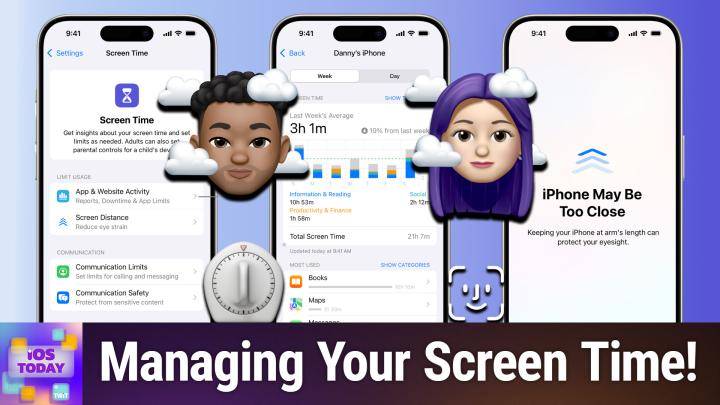
All TWiT.tv Shows (Audio)
iOS Today 761: Screen Time Controls
00:39:44
Downtime, Communication Safety, & more
Loading summary
Transcript23 lines
- [00:00]
Micah Sargent
Coming up on iOS today, Rosemary Orchard and I talk about, well, cutting back on your use of screens or just keeping track of managing your use of screens with screen time on iOS and iPados. Oh, and macOS. Stay tuned for this episode of iOS today.
- [00:19]
Sponsor
This episode is brought to you by the Electronic Frontier Foundation. I love hearing those words. For 35 years the electronic Frontier foundation has been fighting to make sure when you go online, your rights go with you. I'm a proud, proud member. You should too. I also listen to their great podcast how to Fix the Internet. I don't know how I would sum up what the EFF does. It does so much. Their lawyers protect security researchers from companies that don't want them to do the research efforts develop open source software to combat surveillance. If you use privacy badger you oughta and their activists push companies to build tools that work for you, not against you. The EFF's podcast How to Fix the Internet has some of the best guests ever. People from like minded groups including the Digital Defense Fund, the Tor Project, the Freedom of Press foundation, leading thinkers in post quantum crypto, AI neurotechnology. And with every guest they ask the question what does the world look like if we get this right? Visit eff.org podcast and listen to how to Fix the Internet. And by the way, join the eff. I'm a member. You should be too. Thank you. Effort Today's show is brought to you by Progressive Insurance. Do you ever think about switching insurance companies to see if you could save some cash? Progressive makes it easy to see if you could save when you bundled your home and auto policies. Try it@progressive.com Progressive Casualty Insurance Company and affiliates. Potential savings will vary. Not available in all states.
- [01:51]
Micah Sargent
Podcasts you love from people you trust. This is this is iOS today. Episode 761 with Rosemary Orchard and me, Micah Sargent. Recorded Tuesday, July 8, 2025 for Thursday, July 17, 2025 screen time controls hello and welcome to iOS today. This is the show where we talk all things iOS, iPadOS, WatchOS and all the other TVOs, CarPlay, all of them. Every software platform offered by Apple to help you make the most of those devices. You have your iPhone and your iPad and all of them by sharing tips and tricks and settings and apps and accessories and gizmos and gadgets that are well worth your time. I am one of the hosts of this show. My name is Maika Sargent and my.
- [02:53]
Rosemary Orchard
Name is Rosemary Orchard and I'm really happy to be here even if my iPhone does occasionally keep saying like hey Rose Move. Move your phone a bit further away from your face. That's okay. I set it up to do that.
- [03:05]
Micah Sargent
Yes. That's the most naggy thing. And as I'm getting older and my eyes maybe aren't as good as they were. And I think more importantly, as I continue to be in denial about the need for using the glasses that I have been prescribed, I find it rather annoying, but also important. What we're talking about today is the Screen time set of settings. It's a screen time feature set, so to speak, that gives you the ability to track your screen time and also kind of set limits for different parts of the operating system. Now, the cool thing about screen time, and where I want to start with this, is screen time is something that can kind of sync across your devices if you choose for it to do that. And when you choose for it to do that, it will work on all of your devices. So whatever devices you're logged into at the same Apple account will all track your screen time use. And you can get some feedback on how much you're using your screen, if you're using it more or less than you did before, if you, you know, are attempting to cut back and suddenly, oh dear, this is how much I've been using it lately. All of that is kind of provided to you so that you have that understanding of your use. And I think that, you know, you may find that you want a more involved set of features, but you can keep it simple or make it more. More robust. And so let's talk about what is involved here. So in your iPhone settings, you will see on the main page of settings a section called Screen Time. When you tap on that, there are three main categories here. Limit usage, communication and restrictions, plus an option to lock screen time settings that we'll talk about in just a moment. And last but not least, that setting that I just mentioned, Share across devices. That is the feature that says on the devices upon which this is turned on, please make sure that the settings are synced. Now, lock Screen Time Settings lets you set a passcode so that these settings can't be changed. This is typically used if you were to give a phone to someone that you're taking care of, be that a child or, you know, whomever you happen to be taking care of. And it makes it so that these settings stay locked unless you type in the passcode. I have heard of some people who have their significant other or some other trusted person set screen time passcode for them that they don't have, that the person doesn't have access to so that they can, if they have trouble sort of breaking away from whatever apps they're trying to get away from, this can help with that. So there are different reasons why you might want to set a screen time passcode. But let's talk about the different sections. Limit usage is where we start off. And this is how to kind of become more aware of and cut back on your use of different parts of the system. I am actually going to start with the bottom option before we go into app and website activity. And that is because this is a little bit easier to talk about first. So in limit usage, screen distance is a more recently added feature. And what this is about is how we will. As we get older or just by nature of the way that your eyes are shaped, you may find yourself needing to bring the phone closer to you in order to see what's on the screen. And the closer that you bring your phone to your face and the more that you read at that up close level, the more eye strain is caused. But the important thing to understand is it's kind of like a reverse. You are not making your eyes work as hard and so your eyes start to weaken because of it. And so what you want to do is keep the phone further away from you to sort of maintain that need to see at a distance. So if we tap into screen distance, what this does and you'll notice mine is off right now because I was getting very annoyed by it because I found myself bringing my phone close to my face is it will alert you if you bring your iPhone or your iPad closer to your face at a distance. That is sort of recommended. So it uses face id. You have to have a phone that has face ID to determine how far away your face is. And if you bring the phone closer to your face and you keep it there for long enough. And I don't know if it's going to activate right now because it's in this mode. But essentially what happens is it covers the whole screen with this thing that says, hey, move the phone away from you, bro. And I go, fine, I will. And then it, you, you push it back. So I, I think everyone should give this a try. It can be helpful. It can also be very annoying when you're in the middle of something and you keep kind of getting. But what I think it does is it is a good training situation where you realize you. It's an awareness thing. Oh, I've been bringing this phone close to my face quite a bit. So that is a great feature to have. And also great for reducing the risk of myopia in children because even more so, child might not realize how close they're holding it to their face. And so making it so that they can't even interact with their game or whatever it happens to be unless it's far enough away is a great kind of feature for this now. Yeah, that's.
- [09:06]
Rosemary Orchard
It can also be a good prompt to increase your text size, potentially, because if you're bringing your phone closer to your face, then you may need the accessibility setting to increase the text size in iOS and just sort of increase, you know, the size of everything a little bit as well. That could be a good solution. If you turn this on, you find it's constantly getting in your way, then maybe, maybe that's what you need or an optician's appointment or both.
- [09:28]
Micah Sargent
Yeah, I help.
- [09:29]
Rosemary Orchard
So get it checked out.
- [09:31]
Micah Sargent
Absolutely. That's a. That's a really good point. The other feature in this setting, in this section is app and website activity. Now, it's important to understand this is really involved and there's a lot that you can do with it, including getting a weekly report that has insights about your screen. That's what I talked about before, where at the end of the week it'll say, hey, your screen usage is up from what it was last week, or you've used your screen a lot less than you have before downtime, which we'll talk about. And then app limits that will let you say, I only want to use this category of app or this specific app for this amount of time you turn it on. And then from that point on it starts to track this information. So now you'll notice if we back out of this and we go back into screen time, this page is a lot more involved. Now. I have activated screen time at a much more robust level. And so now we have access to more controls and under limit usage. I've got screen distance still there at the bottom, but now I've got downtime app limits. Whoops. And always allowed here. Now we've got a communication section and we've got a restrictions section as opposed to what we had before. So let's go into downtime. With downtime, this is going to only let you access apps that you choose to be available, as well as phone calls. And so what this does is it says you are only able to access X, Y and Z that you set up. So let's set a scheduled option, I want to say, every day from 11pm until let's go. No 7's good. 7am the next morning. This is the downtime schedule that I have. And so at that point, this is what I want set up. I can have it set for every day. I could set it for Monday through Friday and it will lock it again to only the apps that I choose and, and the phone calls that, you know, I want to allow. So let's go to what is involved with that. App limits. These are the apps that I'm allowing or not allowing. Right. So we'll choose ad limit and we can choose all apps or we can choose specific apps and these apps are categorized based on how a developer has set them. You can also add websites here. Let's say that I don't want to play games. If I tap into this, I can see different games that are available to me that are games that I have played or that are on my phone. I tap next and I say, I only want to allow myself to play games for a total of an hour every day. After that, don't let me play games. So now that's my limit. No more than an hour of games every day. There's also the always allowed section. This says, here are the contacts that I will allow to get in touch with me when I have downtime turned on. Here are the apps that I allow myself to use when I have downtime turned on. And I can remove apps. I can say, actually no downtime's on. I don't want maps accessed. I don't want FaceTime access, I don't want messages accessed like I would remove FaceTime. For example, don't call me phone is always in allowed. There's nothing you can do about that. And that's for safety reasons. I think most importantly, then you can scroll through and see all the different apps that you have and add those as well. That's how you set those different limits there for apps. Let me go back to app limits one more time because I want to show if we go into creativity, maybe we just don't want this NDI app to be able to be used. And I can say, you know, individually, on a given day, this is what I am allowing or not allowing. So there are all sorts of limits that you can set and you can really, I think, get granular with it, which I think is important. Now, communication, we can set limits for calling and messaging. So during screen time, like while we have screen time activated, this is what we're allowing. So I can get in touch with everyone. I can only get in touch with communication with contact or something. In between. And then who am I able to talk to when downtime is turned on, this may be where I choose specific contacts and then I need to turn that on as well and add those. So now I've got this communication limit set and then there's Communication Safety. Now this is important. This is a new feature that Apple added. And what it does is it automatically in the background detects what it believes to be nude photos and videos. And it does so before it's sent or viewed on a child's device or a person's device who has this feature turned on. And what it does is it makes it so that that image that is going to be sent is sort of tagged with a, I believe this is nudity, sort of bit of metadata. And when it's sent to the device that has Communication Safety turned on, then it will sort of prompt before it'll show the image saying, you know, this is an image that you may not want to see, you may want to find a parent or guardian first and essentially kind of gets in the way to provide an opportunity to step away from whatever that might be. So turning this on means that it is in this case only applied to this phone because it's running a beta. But if you have this on other devices, then it can sync across the various devices. So I'll turn that off in this case. And it's important to understand the way that this is done is through many means of obfuscation to make it so that Apple doesn't have access to the actual photos or videos. And then last but not least, I want to talk about restrictions. That's the last category here. And under this we can set content and privacy restrictions. This is the stuff that I get email about because someone will have set this up and then forgotten their screen time password. Don't forget your screen time password. Write it down somewhere, put it in your password manager, do something to keep track of your screen time password, because this is how you can limit the device's ability to do some of these features. So if I turn on content and privacy restrictions, I can set restrictions in the app store. Whether this, this phone is able to install apps, if it's able to delete apps, if it's even able to make in app purchases, and then if these purchases are allowed, whether a password is required. Doing this once it's been set up, you can set it so that only certain apps are allowed or features are allowed. So I could say, for example, no, don't have wallet work on this device, or no, don't have airdrop work on this device. Different app store and media options. So whether web content is unrestricted or if it limits adult websites by default or only approved websites, it has all sorts of stuff for media content. So if music can have explicit content, if it allows for music videos at all, what types of movies are allowed, what type of apps are allowed, if it lets you use app clips, game center, if you can have friends, if you can connect with friends, if screen recording is allowed, and then with Siri, if image creation is allowed or writing tools are allowed, this is one way of disabling that as well. Whether Siri is allowed at all, if math results are allowed, I see no reason to turn that off. But just in case, maybe you've got something against math that could go off as well. I love that there's also options to turn off location services, whether you can access different content. I should back out of that just in case it shows shows contacts there. If there are certain calendars that you allow Share my location, Bluetooth sharing. All of this stuff is set up to give you more control on this device of what's able to be accessed, whether you can change the cellular data settings, if you can turn off reduce loud audio. Love that. For someone who might have a child who's going, actually, I want to blast this. No, no, no, no, no. You're going to regret that when you're older and you have tinnitus, whether you can turn off the driving focus. Love that. As well as well as background app activity. So all of this stuff, you can decide whether someone has access to these features in screen time. Screen time is incredibly powerful. And then I want to mention last but not least is this great graph, this great chart. See all app and website activity. And what that does is it shows you your activity across all of your devices so you can see where you're spending your time. If I had this turned on across all my devices, it would be like 97% audible and then 3% everything else. That's my kind of app activity. So that is a look at the various features and settings within screen time that I think are important to know about and that I just think are pretty miraculous in terms of what all you're able to do within the screen time set of settings. I know that people have complaints about screen time and some of the ways that people are able to get around screen time, but I want to commend Apple on these first steps as it is something that is pretty robust and can do a good job of locking down the phone. Rosemary, before we move on, I just wanted to ask you if you had anything else that you wanted to say about screen time.
- [20:14]
Rosemary Orchard
I mean, it's not something that you can do, but this is something I found feedback on and I feel like other people may also appreciate the idea. I would love downtime to be tied into the sleep focus mode on my phone because at the moment it is a separate schedule and my sleep varies sometimes. So if I have to be up super early, then guess what? Downtime needs to turn off. Similarly, if I'm going to bed late because, you know, maybe I'm at the airport waiting for a flight, I don't want downtime kicking in while I am there trying to scroll things on the Internet to stay awake before my late night flight. So yeah, I have filed feedback on this apple.com feedback and I would request that other people would do that too if they think think this would be a useful feature for them. Because yeah, it would be really nice if I could tie the downtime into the focus modes a lot more. And I've just Double checked on iOS 26 and there is no further integration there at the moment, which is sad because I feel like this is the perfect use case for it. Like, you know, don't you can't block X app while I'm at work because I need it for work for example, but you can block it when I've hit my limit during the rest of the time. So yeah, I feel like those, those two systems need a little bit more integration, please.
- [21:30]
Micah Sargent
I agree it boggles the mind that that's not part of it. So if you have questions about down or not downtime, but I mean as part of it, but screen time as a whole, please do get in touch with us. IOS today, Twitter TV is how you do. So it's again one of my favorite kind of fully featured sections that I think a lot of people don't make as much use of as they could be. All right with that, let us move along to feedback and if Kevin, you can get ready to display the Pet tax. So Mike writes in with the following hi Micah and Rosemary, first off, thank you both for hosting another great episode of iOS today. I always come away having learned something new. I love that Mike. I hope that continues. I've been a longtime fan of the show and an even longer fan of Leo, going all the way back to the tech TV days. I'm also a proud club twit member. Mike, thank you for your support. Rosemary, I'm hoping you can work a little of your shortcut magic to help me out with the following I ride my motorcycle to and from work as often as I can. When I get home, I'd love for my garage door to automatically open as I approach the house. I haven't done much with iOS shortcuts yet, so I'm not quite sure of the best way to set this up. I've created a few miscellaneous automations. Here is a list of the Apple devices I am working with. An Apple TV this is my main home hub with HomePods as my backup, Apple AirTags Linksys Wi Fi router as two of them and the Wi Fi reaches out to the end of the driveway which is about 25ft from the home. Three home pods running 18 5aMeross garage door opener that works with Siri and HomeKit and Mike has an automation set up to close the garage door at 10pm in case someone forgets to close it. And Mike says I know the pet tax isn't mandatory, but I couldn't resist sharing. I've attached a photo of our dog Corduroy, which first of all that is a great name. Taking in the sunrise on an early morning walk to the boat docks while we're out camping. Thanks again for everything you do. Your iOS today. Admirer Mike oh my word. I love when a dog is sunning. Corduroy is a beautiful black tan and I think a little bit of cream going on there doggo and is sort of eyes almost all the way closed just sitting on the boat feeling the breeze and the sun. Oh I love it. I love it. Yeah, dog joy. The best Joy.
- [24:03]
Rosemary Orchard
Yeah, I saw some great dogs while camping last weekend and they were just having the best time ever, including one that decided to run out into like really high speed winds and was just standing there with its long coat blowing all over around clearly having a whale of a time. I'm not sure the owners were super impressed, but you know, the dog seemed happy and it was on a long leash anyway, so I assume they wanted it to be able to run outside. So the first thing I'm going to say Mike is please tell me you live in a really nice safe area. Yeah, because if you don't live in a nice safe area and like there's anything in your garage that you want to keep, do not do this automation. Absolutely not. That would be a terrible idea. Similarly, please make sure that there's like maybe another door between the house and your garage that can be locked. And yeah, like combine those two together because Apple does not allow you to create this automation for a really good reason and that it could potentially cause a number of safety issues for folks. So I'm going to create an automation in the home app and I'm just going to start with people arrive and so I'm going to say, hey, when anyone arrives, anytime, time, and then I'm gonna scroll down and look at this. I have my door lock. And now actually in iOS 26 you can do this. This is a new thing that is available so, you know, September, you'll be able to do this. Previously this was completely unavailable and you had to do this via something else via specifically your. Via a dummy action. So you would have like a fake lock or something. Don't have a garage door, but I have a fake garage door so I can say, hey, when my patio doors or when I get home, open my patio doors. However, this is a little bit finicky because they're you arriving home. For me, this triggers while I am a good probably 300ft away, which if I'm on foot can take me quite a while. And the problem with this is this has no way of knowing are you on foot, are you in a car or on your. On your motorbike. So I would. If you do choose to go down this route and create this automation, which you can do with iOS 26, I would probably disable this automation when you are out on foot. And I know that that's a whole extra thing. Um, but that is a little bit difficult. The other option I wanted to mention because I went and bugged a couple of friends with motorbikes and this is not something that I usually talk to my friends about. So they were there going like, rosemary, what? What? Why do you want to talk to me about motorbikes? And I was like, is there such a thing as CarPlay for motorbikes? It turns out there is CarPlay for motorbikes. You can buy aftermarket CarPlay units for motorbikes and install them. Like setting it up the first time, according to one of my friends, is a little bit of work because you've got to pair your phone to Both the. The CarPlay unit for the motorbike as well as your. Your helmet for audio. But once that's done, it works just like CarPlay and in CarPlay settings you can turn on Siri suggestions. Now I would recommend you do this because A, it'll give you like one touch calendar so you can just navigate to your next calendar appointment. But B, when you are within the vicinity of your home, then you can just look down at the screen and tap the option to open your patio doors. Patio doors. Open your garage door. My garage door is called my patio doors, hence the confusion. So yeah, the other option that you can do right now is just, hey, Apple lady, open the garage door. If you have your helmet with like a headset in connected to your phone, or if you're wearing an AirPod or something like that, that would be an option. Talking to your Apple Watch again, I asked a friend, I don't ride a motorbike. Um, so I, I wasn't sure and I was like, hey, so if you're on a motorbike and you try talking to your Apple watch, will it do anything? And my friend was really excited and went out and wrote his motorbike around for a while and told me, absolutely not. Uh, Siri will just not figure it out because either you have to like, figure out how to like, press a button to activate Siri, which not safe to do. Like, need both hands to control the motorbike and so like lifting one hand up till I bring it. And also just the road noise, not gonna happen. But AirPods, if you've got AirPods connected to your device, you can do that right now. And with iOS 26, yeah, you can create a HomeKit automation to do this. I did mess around with this a little bit earlier, and because my HomePods aren't updated to iOS 26, this did not work. However, the public beta is coming pretty soon, so if you are willing to risk everything, and I would not recommend this.
- [29:05]
Micah Sargent
Risk everything.
- [29:07]
Rosemary Orchard
Well, the thing is, is to, to, to test this properly, you need to update your phone, you need to update your Apple TV, you need to update your HomePods. Like, you have to update everything to the public beta. And I would personally not recommend doing that just because, like, if something goes wrong with one of your homepods, you have to take it to the Apple Store to get it fixed. And like, that's, that's not an easy thing. Same with the Apple tv. Like, the Apple TV is a little bit easier. You could theoretically sort that out at home, but realistically, they're going to tell you to take it to an Apple Store if it gets stuck. And your battery life will absolutely be shot on your phone. And especially if you're on a motorbike, Crash detection could be something that saves your life. Like it could in any circumstance, but especially on a motorbike where you're more vulnerable. And you know, I, I really think corduroy would probably appreciate having you around, Mike. So please take care on your motorbike. Um, and yeah, but iOS26, you can just straight up unlock a door when you get home, which includes garage doors.
- [30:08]
Micah Sargent
Interesting. I think they said, all right, we're not going to keep making, we're not going to keep making decisions for people. We'll let them make that choice if they want to.
- [30:18]
Rosemary Orchard
One thing I would recommend doing, and actually I'd recommend doing this regardless, is get a HomeKit camera and stick it in your garage. Because that way when somebody comes in or out, you'll be able to see it. And what you can do right now is change the settings when people are at home versus not at home. And you'll already start getting home kit notifications for when you leave home and when you arrive home so you can see what that radius is like for your home. And that will then help you decide whether or not this is a safe decision for you to make. Because yeah, you can change the notifications from like streaming to streaming and recording or something like that. And then you'll get a notification that says, hey, this camera changed from this to this because everyone left home or because somebody arrived home, etc.
- [31:02]
Sponsor
This episode is brought to you by the Electronic Frontier Foundation. I love hearing those words. For 35 years, the Electronic Frontier foundation has been fighting to make sure when you go online, your rights go with you. I'm a proud member. You should too. I also listen to their great podcast how to Fix the Internet. I don't know how I would sum up what the EFF does. It does so much. Their lawyers protect security researchers from companies that don't want them to do the research. EFS technologists develop open source software to combat surveillance. If you use privacy badger, you oughta and their activists push companies to build tools that work for you, not against you. The EFF's podcast How to Fix the Internet has some of the best guests ever. People from like minded groups including the Digital Defense Fund, the Tor Project, the Freedom of Press foundation, leading thinkers in post quantum crypto, AI neurotechnology. And with every guest they ask the question, what does the world look like if we get this right? Visit eff.org podcast and listen to how to Fix the Internet. And by the way, join the eff. I'm a member. You should be too. Thank you eff.
- [32:08]
Micah Sargent
All right, before we say goodbye, we get to tell you about our app caps, our app or gadget picks of the week that we think are awesome and want to share with all of you. My app cap this week is an app that actually received an award from Apple in the past. And. And I think it's just delightful. It's called Daily Art, and Daily Art kind of sounds, kind of does what it sounds like on the tin. It is an app that gives you a piece of art each day and tells you about it. So today is, I'm guessing it's like Yael and Sisera, maybe jail, but I think it's Yael that sounds. Sounds more accurate. But I don't speak Italian, so I'm not sure about the pronunciation of Js in Italian. In any case, here's a little bit about this piece that is, I think, kind of harrowing. We have a woman with some sort of hammer and nail and about to just hammer that nail into the head of this person who is lying down. And this is what it says. It's oil on canvas, by the way. On this day in 1593, our Artemisia Gentileschi, one of the best Italian baroque painters, was born. At a time when women had limited access to artistic education and professional opportunities. Gentileschi broke barriers as the first woman admitted to the Academia dell' Arte del Desenio in Florence, and she attracted an international clientele. Her paintings depicted women drawn from mythology, allegory, and the Bible, portraying them as victims, warriors, and figures of resilience and tragedy. And then, really quick, here's what this one's about. The subject of today's work is drawn from the book of Judges in the Bible. It illustrates the dramatic moment when Yael, a Kenite woman, prepares to kill Sisera, Canaanite general whom the Israelites have defeated after his loss. Sisera escapes to a nearby encampment, where Yael offers him shelter, promising to provide food and concealment. But once he falls asleep, she drives a tent peg through his temple, an act celebrated in the text for its boldness and decisive courage. Every single day, a new piece of artwork, a new story. Wonderful stuff. There's also the discover section that has, like, different collections, fruits and art, specific artists, specific masterpieces that we have decided are masterpieces over time, genre city guides, collections. And you'll notice there is a little ad down here at the bottom. You can subscribe to get rid of the ad if you would like. And so there's a premium version that I think is, let's see, 4.99amonth, $30 a year if you want to become a patron, which gives you even more, then you also can pay 100, $120 a year or 10 bucks a month. Essentially. So that is one other option for you if you don't like the ads and want to be able to gain access to all of that delicious, delicious art. I think this app is fantastic. And I should also mention that it has a widget, which is fun because then I can just pull open my phone, see the latest art and have fun there as well. So. So be sure to check out Daily art on the App Store. All right. Rosemary, you've got a gadget this week, don't you?
- [35:52]
Rosemary Orchard
Yeah, I do. It's not even mine. I stole it. Thank you, Anthony, who actually works at TWiT. But as we mentioned before, you are welcome to submit your own ab caps to the show. And Anthony recommended this little gadgety what set? This is an 8bitdo micro and. And first of all, it's absolutely adorable. I got mine in this lovely powder blue and it's a teeny tiny little game controller essentially, which Bluetooth connects to almost anything, like Nintendo Switch, iPhone, iPad, Apple TV, Kobo, you name it. And on the bottom it has a little slider. And that slider has a number of different options. But what's really cool about this is you can reprogram the button buttons. So Anthony said that his wife uses this with Procreate as basically like a hot button palette, which is absolutely fascinating. And so I've tried this out. I've played some games with it. I've done all sorts. What I've ended up doing is I've connected this to my Kobo, so I actually have it connected to my Kobo so I can stand it up. I have this little moft mag safe stand. Well, it's not mag safe. It comes with a little, little sticker so that you can magnetize the stand on and off and move it around. And I could just prop my phone up on a little table somewhere or and, you know, navigate through pages with this little remote in my hand. But the fact that you can reprogram this and use it in multiple ways makes this a really awesome tool. It recharges via usbc. So that is the same charger that most of us are going to be having for a lot of our devices. Now. It is a really nice little game controller for various things. Like if you want to play like games and stuff through Apple Arcade, most of them will support some kind of game controller like this, which, you know, you can use it on Apple TV too, is great. And at the moment, as of the time of recording, it's only $20, which is really nice. So if you Want a really fun like controller that you can use as a like hot button thing for apps like Procreate and others, or even just a miniature games console. It comes in blue. This, that's this one here. It also comes in Micah's favorite color, green. And yeah, it's got 16 buttons. It's easy to recharge. You can remap the buttons to do whatever you want. And that's through an app that is available for your iPhone. So yeah, maybe give it a try. I bought one. I've been really pleasantly surprised and yeah, I really enjoy it. So there you go.
- [38:37]
Micah Sargent
All right. I think it's really, really cool. And it's so little that is going to bring us to the end of this episode of iOS today. I want to remind you before you go though, have you heard about Club Twit? That's with that TV Club Twit. When you join the club, we've got monthly and yearly subscriptions available. You gain access to some awesome Club Twit benefits. First and foremost, you gain access to our ad free content. It's all of our shows without any ads. Yes, it's just the content because you in effect are like the sponsor, right? You are, are being a member and therefore you get to just have the good stuff we make here. On top of that, you gain access to our Twit plus feeds. There's our Twit News events feed that has the news events we cover in Club Twit. You also have access to the feeds that has our shows. So Mike is crafting Corner, that's me, as well as coffee time and book club and all of that good stuff and then our kind of clips and bits stuff that also gets published there. So I think Patrick was saying we've got almost like two weeks of, of runtime or something like that. It's. It's quite a bit. So when you join the club, you're going to get access to a back catalog of great stuff that other people do not have access to. So that's always great fun. And access to the members only Discord Server. A fun place to go to chat with your fellow Club Twit members and those of us here at Twit. If that sounds good to you, as it does to me, well, be sure to join the club. Twitter, TV Club Twit, Rosemary Orchard. Now is the time where I ask you where in the world can people find you and keep up to date with the great stuff you are doing.
- [40:28]
Rosemary Orchard
Well, the best place to go, Micah, is rosemary orchard.com, which has got links to apps, books, podcasts and more, including links to all the social media sites with the exception of Discord. Because you can find me on Discord in the club Twit Discord, where there's an iOS today discussion section. There's a live chat where people chat during the show about all the things that we're talking about. And then of course there's threads for every single episode so you can give us feedback. Micah, where can folks find you?
- [40:55]
Micah Sargent
If you're looking to find me online, I'm ikasargent on many a social media network. Or you can head to Chihuahua Coffee, that's C H I H u a h u a Coffee where I've got links links to the places I'm most active online. Be sure to head there and follow along. Thank you so much for being here this week. You can always get in touch with us. IowaD WWIT TV is how you do so and we will catch you again soon for another episode of iOS today. Bye bye.
- [41:24]
Sponsor
Get your tech news exactly how you want it with Twitt TV Tech News Weekly. Weekly with Micah Sargent delivers quick hit coverage at exclusive journalist interviews, giving you the inside scoop on breaking tech stories in under an hour. Now for deeper dives, I hope you'll join me, Leo Laporte and a great panel of tech industry experts. That's every Sunday with this Week in Tech. We'll break down everything from AI breakthroughs to privacy concerns to cybersecurity alerts in the tech world's longest running and most trusted tech news roundtable. So efficient or in depth, the choice is yours. Subscribe to both shows wherever you get your podcasts and head on over to our website TWiT TV for even more independent tech journalism.