← All TWiT.tv Shows (Audio)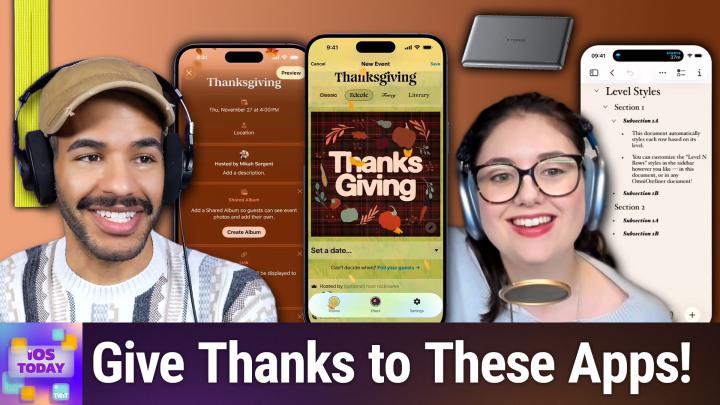
Loading summary
Transcript51 lines
- [00:01]
A
Resilience isn't just about bouncing back, it's about being ready. It's how you show up every single day. Because every name in your system is a person who trusts you, and every password is a door you're responsible for locking. And when the threat comes, and it always comes, you hold back the chaos. Learn more at cohesity.com/resilience Introducing Family Freedom from T Mobile we'll pay off four phones up to three 200 and give you four free phones, all on America's largest 5G network. Visit t mobile.com familyfreedom up to 800 per line via virtual prepaid card typically takes 15 days. Free phone via 24 monthly bill credits with finance agreement example Apple iPhone 16128 gigs $829.99 Eligible trade in example iPhone 11 Pro for well qualified credits end in balance due if you pay off early or cancel Contact Us.
- [01:00]
B
Looking for a screen free way to spark your child's imagination? The Story Dream Machine is a magical storytelling device with simple, kid friendly controls. It projects words while a narrator reads aloud, helping build early reading skills and word recognition. With colorful lights and sound effects, each story unfolds like a dream and when it's time to wind down, it doubles as a white noise nightlight. Available at Amazon, Target, Costco, Walmart and LittleTikes.com bring story time to life with.
- [01:29]
A
The Story Dream Machine coming up on iOS today. The holidays are upon us. Oh my goodness. And so it is time to talk about holiday planning on this episode of iOS today. Stay tuned.
- [01:45]
C
Podcasts you love from people you Trust.
- [01:49]
A
This is TWIT. This is iOS Today, episode 779 with Rosemary Orchard and me, Micah Sargent. Recorded Tuesday, November 11, 2025 for Thursday, November 20, 2025 Holiday Planning hello and welcome to iOS Today, the show where we talk all things iOS, iPad, OS, Watch OS, HomePod OS and all the OSes that Apple offers to us, as well as the apps, gadgets, gizmos, settings, et cetera that you should consider for yourself to help make those experiences even more grand. I am one of your hosts. My name just so happens to be Micah Sargent.
- [02:35]
C
And my name is Rosemary Orchard. And I I'm very happy to be here today and maybe to help people outline things, plan things, remind themselves. Because I hear, and being a Brit, I'm not entirely convinced about this that you folks have a holiday coming up. Like we don't have this. So I, I maybe it's a hallucination, I don't know.
- [02:55]
A
Well, today as we Record this show. It's actually a holiday as well because it's one of my dog's birthday. Henry is 12 years old today, so that's its own holiday. But the holiday that we have coming up is Thanksgiving. It just so happens to be my favorite holiday. Growing up was always my favorite holiday. I think being a young kid, very sensitive to everyone's emotions. Christmas was always so filled with stress and Thanksgiving was like everybody gets together and we just have a fun time time and it's less stressful. And I try to kind of maintain that now as an adult. And I think that this is what we're talking about here. What can we do? Oh, I should also mention, yes, today is Veterans Day. Thank you, Scooter X. Not just Henry's birthday, but also Veterans Day here in the United States also happens to be, I think the day that Washington, the state was added to the country. I'm not exactly sure. But anyway, so back to what I was saying. I trying to find that kind of lower stress opportunity to bring people together. And that is what we're aiming to do here today with lots of different apps and suggestions for you. And I thought I'd kick things off by talking about a new app that Apple has introduced just recently and that is the Apple Invites app. Now you may be thinking the Invites app, don't you know who's coming over for Thanksgiving? Yeah, yeah, we know who's coming over for Thanksgiving. But the great thing about having one spot for making sure you know who's on the list and making sure that you can communicate with all of them. And here's the big one. This is the one that I think so important. Making sure that everyone has the same times on their calendars is very handy. Let me show you a little bit about the Apple Invites app and then I'm also going to talk about a third party app that a lot of people are using these days that may be helpful as well. So let's say we're going to plan for Thanksgiving, which this year I believe falls on the 20th, which is. No, the 27th. Excuse me.
- [05:14]
C
Yeah, this episode releases on the 20th a whole week before just to help everyone get planned.
- [05:20]
A
Excellent. And so when you create an event, the first thing that you can do is add a background and you can choose from emoji backgrounds. So look, there's this fun fall theme. You can also choose photographic backgrounds as well, colors. And so I'm just gonna choose this fun fall theme here and we'll call it Thanksgiving and we can change the typeface I'm going to give it that one. We choose a date and time. So again, this is going to be the fun final Thursday of the month. And we'll gather around 4pm and, and around 10pm let's say create that location. I'm not going to pop in because then it'll show my location, but you can also put that in as well. And then here's the great part is that you can cr. This is, this is the thing that makes this unique and would make it potentially something that you want to use even if in the past you've not, you know, had this sort of group invite experience. If I choose Create Album, what happens here is everyone who joins this invite is able to then add photos to this group album. So instead of trying to get everybody to remember after they've taken photos at the gathering, to upload them to get them in here as they need to, it's just a spot that already is there and available for shared photos to be experienced together. You can also add links. So if you were doing, let's say this was a wedding invite, right, you might pop in here with the guests or the gift registry, for example. And then super cool too, especially when it comes to having people over. You can create a group playlist. And so people will be able to add music to this playlist that then you play at the party. So you feel kind of like a great host doing your role of making sure that everybody, everybody's music is heard, everything is listened to that they might want to. And then there's at the very end this option to add a tile. And what this does is it is just kind of an additional little feature within the, the, the event that you can see and the invite that you can see. So when someone gets an invite, they can choose. They're going, they're not going, or maybe. And there are some options as well for saying, you know, here is what people can do, what they can'. So, for example, I can choose to approve guests. So before they're actually allowed to be part of it, I can say, well, no, we need to approve. Also shows right now that guests cannot bring additional guests, but you can change that. So you could add a plus one, a plus two. And then you also have some other options for removing the background preview. So if, for example, you're using a photo of people, an actual photo of people, you can say, until this person becomes a true guest, don't show that background image. Also, accessibility, we've got the background image description right there. So you can define or describe it whenever this invite goes out. And then you can go from there to duplicate the events, cancel the event, et cetera. So again, what this does though, is that after everybody's joined it, it becomes very easy to then send everybody updates and keep everybody posted on when the event is going on. And as I said, it makes it much simpler for people to be able to share photos from the event in this location. The other app that I wanted to mention is an app called partyful. And some of you will have heard about this app before because it is a very popular, a very popular invite app. And honestly, I'm very much of the opinion you meet people where they are, right? As much as you can. And so among my group of local friends, they're not Apple Invites people. They've never, you know, used it before. And then it came out and they already were using partyful. So then I'm going to meet them where they are, I'll download the Partyful app, I'll use that. And so that is the experience that we have. And what's great about partyful is that you can do much of the same that you're able to do with, with the Invites app, although I would argue it's a little bit more Gen Z, it's, it's got a lot more fancy stuff that you can do. And I'll show you here. This, for example, look at the leaves blowing across the screen. Look at the options for the, the text that you can do when you're setting a date. You can also create a poll right in this. So you can try to determine a date together. You can add. Now this is a recent thing that they did, the ability to have people. So if you were, for example, going to an event together that cost, you're all paying for a hotel room or something, you can have that right in the app. And I believe it uses Venmo, I think is the integration. So that's pretty cool as well. And lots of other stuff too. A playlist, a registry, a dress code, what the food's going to be like, parking, all sorts of stuff. And something that I know people really like is that you can, I don't know why this is such a popular feature, but you can customize the emoji that appears above the go and not going and maybe option. So there you go. That's it as well. That is a look at some of the invite apps. Oh, and then I should also mention, sorry briefly, that when you set up your partyful, you can also do the same in terms of letting everyone know what's going on. So you can send out message blasts and it sends them via SMS to people and so then it appears available, it appears for them locally and they can see, okay, here's what's changed or here's what's not changed. So again, you know, I didn't, we didn't need to use this growing up. We just all were getting together and knew we were all getting together and you talk on the phone or whatever and figure out what date it's going to be, what time. But I, the thing that I like about this is it's an updating and, you know, regularly addressable and reviewable place for everybody to be on the same page and know what you're going to be doing. So I think that that can be helpful when it comes to holiday planning, particularly if you've got multiple events going on with friends, in some cases with family and others with chosen family, whatever it happens to be. So those are two kind of event planning and invite apps that you can check out. Both available for free in the App Store. This episode is brought to you by CleanMyMac. You know how not everything in life deserves eternal storage? Well, that goes for our files too. We all hang on to way too many things. Old downloads, duplicate photos, giant files from projects we don't even remember anymore. And before you know it, your Mac and your cloud storage are stuffed. That's where CleanMyMac comes in. Specifically their brand new cloud cleanup feature. This tool connects to your icloud, Google Drive or OneDrive and spots the space wasters you probably forgot you were carrying around. And here's the cool part. All the scanning happens right on your Mac, so your data stays private and secure. You can choose whether to remove files completely or just clear them out of your cloud storage to instantly, instantly free up space. If you change your mind, no problem, you can restore them. It's like hitting the reset button on your storage without losing control. And cloud cleanup is just one part of CleanMyMac. You also get tools like SmartCare, which keeps your Mac optimized in the background space lens, which actually maps your storage so you can see what's hogging space. And even an anti malware engine to make sure your Mac stays safe. Honestly, paying attention to your cloud storage isn't just good for your Mac, it's good for your mental health and your wallet. No more paying extra for space you don't even need. So if your Mac or your brain feels cluttered, give it some love with CleanMyMac. Get tidy today. Try it free for 7 days and use my code today for 20% off. This episode is brought to you by Red Canary. When it comes to the security of your business, it's not enough to feel safe, you need to prove it. With Red Canary, you get the data, visibility and expert partnership that make your impact unmistakable. Their MDR detects four times more threats than the competition, giving you the clarity and confidence to show leadership the real value of your investment. Behind every alert, there's a Red Canary expert ready to respond day or night. That's non stop protection, measurable performance and a calmer, more focused team. Turn protection into proof. Visit redcanary.com difference to learn more.
- [14:05]
B
If you have young kids, you know how important it is to find screen free activities that actually hold their attention. The Story Dream Machine does just that with simple kid friendly controls and a magical way of bringing stories to life. It projects more words while a narrator reads aloud, helping your child develop early reading skills and word recognition. The colorful lights and sound effects make every story feel like an adventure. Kids can follow along, recognize sight words and build confidence with every tale. Parents love how easy it is to swap stories and customize the experience for different ages. And when the story's over, it transforms into a white noise night light. To help your child drift off to sleep, you can collect a growing library of stories, including many you loved as a kid. It's a bedtime game changer and a daytime learning tool all in one. Find the Story Dream Machine at Amazon, Target, Costco, Walmart and LittleTikes.com bring story time to life with the Story Dream Machine.
- [15:05]
A
Are you ready to grow in 2026? Let me tell you why advertising on Twit is the way to make that happen. I'm Micah Sargent. I'm the host of Tech News Weekly and several other shows on the network. And if you've ever listened to our shows, then you know what makes what we do different? It's trust. When we introduce a new partner on the show, the audience knows we believe in what they offer because we're only taking on partners that will actually benefit our audience. And they know that when I'm waxing ecstatic about your product or service, I'm doing so with authenticity. Some other reasons why you should join the network? It's all about the numbers. 88% that's the number of listeners who've made a purchase based on a twit ad. 90% those are the people who are involved in their company's tech and IT decisions. Oh, and by the way 99% is the number of people who listen to most or all of the episode. Every host red ad we offer is authentic. It's unique, it's embedded permanently. So that means that your brand is going to get exposure even after your campaign concludes. Because, yes, our nerds, our listeners, our viewers, they go back and check out the stuff we've done in the past. Every ad is simulcast across our social platforms. It's always available in both audio and video formats. So if you want your brand woven into conversations with tech experts and the world's most tech savvy audience, I mean, where else are you going to turn except right here at TWIT? So let's make 2026 your most substantial reach yet. Get in touch with us, email PartnerWIT TV or visit TWiT TV Advertise all right, Rosemary, let's assume now that you have the guest list ready and it's time to start doing the actual planning. Where do we start?
- [16:58]
C
Well, this really depends on what kind of planner you are. And to borrow something from the now very defunct NaNoWriMo, are you a planner or are you a parent? Answer. Are you just gonna kind of plan it and figure everything out in advance and have an immaculate timeline of exactly what needs to be done when? And do you need to, you know, like buy things on certain days and put things in the oven and get things out of the freezer to defrost and get things out the fridge to warm up and things like that? Or do you kind of just fly along and you want a list to remind you of the things that sort of occur to you as you go? So for me, obviously I don't actually celebrate Thanksgiving because I'm over here in the uk. I don't get a day off work or any like that, but I do use reminders for planning big holiday things. And so I actually have a reminders list here of Christmas presents that I'm planning to buy. And for those three people who I know I will be buying Christmas presents for, who will be watching the show either live or in post. You are not on here, so stop spying on my present list because otherwise they will be there going, wait, what are. Are you not buying me presents? I am buying you presents. You're just not on the list. You're elsewhere right now. But what I've done here is I've actually util a feature that was inspired by Apple's shopping list function, which is in reminders where what you can do is you can actually have sections inside of your Reminders. So I can say, manage sections, and I can add a new section and I can add a new section called mica. For example, I can't spell mica, but that's okay. Autocorrect gets me. And now I have a section here for mica. And then I could say, I don't know, something green and fabulous. That's a great thing to get, Micah. I don't know, maybe Mike would also like curly straws, which are on the list of things to get for Ted. But, you know, you can put things in here. Now, this works really well for just being like, oh, yeah, I've got this idea of this thing that I need to do. But it also works very well for planning for holidays. Now, obviously, Reminders has all these great functions of, hey, remind me on this date about this. Remind me at this location about this thing. Which is great for the six things that you're going to the grocery store for. You get reminders when you get to the grocery store about those six things and they pop up on your home screen. So you can get super focused on those and not worry about, you know, everything else that you're getting distracted by because, whoa, everything else is on sale there, including some things you probably don't need to bring to Thanksgiving dinner. You know, like a bluey T shirt that maybe not on the list, but hey, you saw it when you were in the store and got distracted and then you forgot the turkey. That could be a problem. Not so much with reminders, but you can also share things with people. So if you have a shared reminders list, then you can assign things to a particular person, which is great because then you can focus on exactly what it is that you're doing. You can add tags, you can add subtasks, you can flag things. You can change priorities. You can also add images and things like that and notes and URL. So I personally find this. This is really great for all sorts of planning. Now, for me, where this slightly falls down is, you can see my mum wanted a foaming face wash. Don't worry, folks, she explicitly asked for this. Is it a weird present for somebody to explicitly ask for for Christmas? Maybe, but she's my mom. I'm going to listen to her. So I bought it and I've checked it off. Now, those of you with eagle eyes will see at the top of the screen underneath the title of Reminders where it says Christmas Presents, it says, two completed. Clear. I don't want to clear these things. I've bought them, but I want the reminder there that I have actually purchased them. And just because I purchased them doesn't mean that they're wrapped or they're delivered or anything else. So for that, I am actually looking at using a completely different application. And this one seems a little bit crazy potentially to use because. Is it designed for this sort of thing? Yes and no. Omni Outliner actually has Omni Outliner 6 in TestFly at the moment, which is great because folks can download it and test it and try out all of the great features in it. But omniautliner has the option of not just building an outline of text with all of the indented levels. I'm just going to pick an example here to show folks. So you have your titles and everything. Like, say, for example, you're trying to write a paper. Which this is absolutely great for folks who want to write a paper or a longer article or a book or anything like that, who need to figure out an outline. But what you can also do in Omni Outliner is you can build something like a book list, and this is a table. So then I can have all of my presence, and then I can assign them with a little dropdown to a particular person. I can show what status they're in. Is it an idea, is it purchased, is it repped, is it delivered, et cetera. I can calculate, I can input the amounts and everything. I can do almost anything I like with this. And you can even select multiple rows and make edits to them and things like that. Omni Outliner, it seems like overkill, perhaps, but this is also great for planning things like cooking a really big meal. Okay, you've got a bunch of things. They all need to go in the oven at a particular time. You need to figure out, you know, like, okay, so we want to eat it this time. The tricky needs to rest for however long. It needs to rest for when it comes out of the oven, at which point the temperature can go up and then I can cook the potatoes or whatever it is. You can figure out all of that with Omniautliner. You could also use numbers, you could use any tool. But I would definitely recommend sitting down and having a little play with these, especially Omni Outliner, because it is so powerful. They've added a huge number of features into Omni Outliner 6, including automatic light and dark dark themes for the notes or the documents themselves, so that your document can automatically change between light and dark. Plus if you had something explicitly set to a light mode theme before, it didn't automatically get upgraded on purpose so that your stuff doesn't get changed. But yeah, I really, really love this and I have so many ideas of things that I am going to be planning and plotting with Omni Outliner now that that version 6 is there with Omni Automation and stuff as well. There's some really cool examples using AI, so you can automatically say, hey, can you give me a list of the things that I need to plan for a Thanksgiving meal or for a Christmas meal or things that I need to plan for Christmas? And then it will just give you back a whole list and you can turn it into an outline and add all of the details and things that you want and tweak it to make it appropriate for you so you're not starting from scratch. Because using AI for this sort of thing to get you started, especially if maybe you're cooking your first Thanksgiving meal ever, that is definitely a good place to start so that you don't get completely overwhelmed with all the things you need to do.
- [23:59]
A
I love that idea of sort of the, you know, what are the things that I need to plan, what are the things that I need to prepare? And then kind of going from there, stepping out from there is really handy for sure. Of course, then when it comes time for you to do your actual. I'm thinking about it already with Thanksgiving coming up. The things that I plan to make. I made last year the New York Times recipe for the turkey and it was very involved. I had a lot of timers, but it was great fun at the same time to be able to make and, and it was an absolute hit. So I'm looking forward to that again. And of course that means then you need a recipe app. There are two recipe apps that Rosemary and I always recommend on the show. One is the app that I've used for a long time and it's kind of why I continue to use it, which is Paprika, just because of having it on multiple devices and being able to import recipes very easily. But a lot of times these apps are all very similar in terms of their feature set. The app that Rose Rosemary usually recommends sets itself apart with some very cool and unique features. Crouton being the app that kind of thinks about the way that people cook and then gives them tools to kind of improve upon that, like hands free switching to new parts of a recipe. It's a really, really cool app that I think can kind of make all the difference for you. Now, I believe Crouton and Paprika, both available for free in the App Store with in app purchases to to to improve upon them. But many of those other features of being able to again import from sites and kind of cut back on all of the nonsense that gets added to recipes at times the, you know, nine, nine hundred thousand word stories before you actually get to the recipe all kind of get cut out, which is very handy. Anything you want to say about those Quickly before we round things out with our final little picks here, I just.
- [26:17]
C
Want to say make sure to actually remember what the purpose of your current celebration is. Is it seeing your friends and family? If things go wrong with the with whatever food it is you're cooking, don't stress too much. Somebody out there on the Internet will have had the same problem and will have a suggestion for you and worst case scenario, have a frozen pizza in the freezer just in case.
- [26:39]
A
That is a really, really good bit of advice. I 100% agree. Yeah, don't let it spoil the fun. If something goes wrong, make it part of the fun for sure. The last thing that we'll mention for this section is with holiday planning there's usually people celebrating gift giving holidays at the end of the and Rosemary, you introduced me to Elfster. I've used different Secret Santa apps as they're often called in the past and for me none have been as good and as kind of the thing that I think makes it unique is it knows what you need when it comes to a Secret Santa app and tries to present all of those features. So being able to say for example, here's the list of people that are going to participate. These people can't choose these other people. And you also need to have some other kind of rules behind the scenes that take place. And so again, among my local group of friends there are two couples of which you know, I am one. And so when we're doing our Secret Santa, I'm not able to choose my significant other, they're not able to choose me and then same for the other couple which then is something that makes it a little bit more fun because obviously we'll, we'll be getting things for each other. So I love that. And I believe you use it every year, right?
- [28:18]
C
Yeah, I do. I use it to organize my work holiday Secret Santa, which is optional to participate in. I really like the fact that you can also like publicly set a budget. You can send notes to everybody instead of having to go out of it and find of chat thread in messages or WhatsApp or an email thread and make sure you're including all the right people. You can just Send messages out through LSTR to people and also within lstr. For example, if Micah and I were participating in a twit holiday Secret Santa style gift exchange and Micah hadn't put anything on his wish list and I really needed to know something about Micah, I could send a anonymous message through Elster. Obviously lstr, the platform knows exactly who has sent it and so on and so forth. So you know there is tracking and security and you don't need to worry about inappropriate messages there. But I can send a secret message going hey, so can you fill out your wish list please? Or oh, what T shirt size do you wear? Personally, I would also say if you are participating in Secret Santa through something like this, send a couple of red herring messages. Like for example, if you're planning on buying them a Christmas tree ornament, ask them what T shirt size they wear, things like that just because then they will have absolutely no idea what's going on and think that everything's gone completely crazy. And also maybe like get somebody that's not participating in it to do the wrapping. If your rapping style is super obvious and people recognize it from a previous year or something like that, exchange Christmas paper with some other people or something like that. Or just wrapping paper with other people just to, yeah, throw things off. So get a little creative and have some fun with it. These things are intended to be fun, so keep that in mind.
- [30:05]
A
I love it. I love it. Very, very good. So that is some of the apps that we suggest that you might check out to help when it comes to planning your holidays. Of course, we wish you all the best of luck and happy, happy, happy holidays as they kick off here in the US and around the world. Mo moving right along. It is time for the news. The news is next.
- [30:35]
B
If you have young kids, you know how important it is to find screen free activities that actually hold their attention. The Story Dream Machine does just that with simple kid friendly controls and a magical way of bringing stories to life. It projects words while a narrator reads aloud, helping your child develop early reading skills and word recognition. The colorful lights and sound effects make every story feel like an adventure. Kids can follow along, recognize sight words and build confidence with every tale. Parents love how easy it is to swap stories and customize the experience for different ages. And when the story's over, it transforms into a white noise nightlight to help your child drift off to sleep. You can collect a growing library of stories, including many you loved as a kid. It's a bedtime game changer and a daytime learning tool all in one. Find the Story Dream Machine at Amazon, Target, Costco, Walmart and LittleTikes.com bring story time to life with the Story Dream Machine.
- [31:35]
A
Every story begins somewhere for your child. It could begin with a Guardian bike built right here in the usa, engineered for safety and designed for confidence. Kids of all ages are learning to ride in just one day. No tears, no frustration. It's why Guardian is America's favorite kids bike and the New York Times and Wirecutter's top pick three years in a row. This holiday season, give the gift that's safer, smarter and built to last. Visit guardianbikes.com to save up to 40% on all bikes plus a free accessory bundle worth over $100.
- [32:05]
C
The wait is over. The Knicks Black Friday sale is on now@knix.com shop early and save up to.
- [32:13]
A
60% off site wise plus all kinds.
- [32:16]
C
Of limited time daily deals from the number one leak proof brand in North America. Don't miss your chance to save big.
- [32:23]
A
On innovative intimates like leak proof underwear.
- [32:26]
C
Wireless bras, shapewear and more.
- [32:28]
A
Everything is on sale.
- [32:30]
C
Millions have made the switch to NYX's revolutionary period underwear and there's never been a better time for you to try them too.
- [32:37]
A
During the Black Friday sale, save up.
- [32:39]
C
To 60% on super comfy machine, washable.
- [32:42]
A
And stylish leak proof undies.
- [32:44]
C
Plus shop the best deals of the year on NYX's best selling assortment of wireless bras. Don't miss this chance to stock up on your NYX favorites or try something.
- [32:54]
A
New during the NYX Black Friday event.
- [32:56]
C
That's knix.com the sale ends December 2nd.
- [33:00]
A
And sizes will sell out. Go to nyx.com that's knix.com if you enjoyed this. Well, there's something else you might like. If you want the big picture on what's happening in tech, subscribe to this Week in Tech. Leo laporte and the panel bring you the story shaping the industry every Sunday. Okay, so Apple look when we look at it as a throwback sort of situation, things seem to align a little bit more when we look at it just in a vacuum and by itself, things feel a little odd. What am I talking about? Well, Apple has as of Today on Tuesday, November 11, revealed a new that is called iPhone Pocket. This is a tube sock with a slit in the side of it to place your iPhone inside. It is a, as Apple calls it, a singular 3D knitted construction that comes in multiple bright colors. That's that's very nice and you, you slip your iPhone down inside of it and sort of like shove it. It down in until it's all the way in there. And then you put this sling around your arm and you carry it at your side. It sort of looks like, like leg warmers. Sort of looks like. I don't know, like, it looks like.
- [34:26]
C
One of those, like, sleeveless gloves type.
- [34:28]
A
Yeah, like the fingerless gloves.
- [34:30]
C
It's like a sleeve with like a thumb hole in it. Yeah, I. I like the colors that it comes in. I'm. I'm gonna go out on Lim Micah and say, I hate the price tag. Tag. This is not. I dislike the price tag. I hate the price tag. It is a hundred and fifty dollars or $149.95 for the short strap design and a $230 for the long strap crossbody design.
- [34:55]
A
I don't understand. Why is it so much money?
- [35:00]
C
So one of the things that may give folks a clue as to why this is so expensive. This has been featured in Vogue. Okay, folks. Vogue. Okay. This is not just a. It's Apple making this product. This is a designer thing. And so it's sort of like their, their partnership with Hermes for the Apple watches. But yeah, so It's. I also 3D knitted. Are they worth knitting? It's indeed a 3D thing. Like, knitting is too.
- [35:35]
A
Yeah, right. That bothers me so much. I'm like, that's not a unique thing yet. No, it's all. And maybe they mean something different. But explain what you actually mean, because, yes, knitting is not. It does not happen in the second dimension. It happens in our third dimension.
- [35:52]
C
Yeah.
- [35:53]
A
I love to. One of the headlines is a piece of cloth. Yes, it is a piece of cloth. Look this. I'm sure that what this is for me is that I just don't understand. I was telling Rosemary this morning, I think I just don't understand fashion because this is very high fashion.
- [36:13]
C
I follow fashion. I don't necessarily dress like I follow fashion, but I follow fashion. And to me, this is just a. Huh. Thing. Like, it's. It's one of the things that, like, you might see on a Runway, but it has no actual place in your real everyday life. To borrow from the Devil Wears Prada, it's on the Runway. And then six years, everybody's wearing. Six years later, everyone's wearing something similar. The problem with this is we already have iPhone lanyards. You can get them for less than 10 bucks, and they exist. And you can use your phone while it's attached to a lanyard or a wristlet if it, you're using that. If you put your phone in this pocket, you have to get it back out to use it. I also feel like the likelihood of you trying to put your phone through the slot into the pocket and then just missing the pocket entirely and dropping your phone onto the floor on the other side is way too high.
- [36:59]
A
Yeah.
- [37:01]
C
Just because of the way it's designed. And there isn't a way around that to be clear. Like that is just how this sort of thing works. It, it's, I'm glad it exists for the people that want to buy this designer piece. I feel like it's going to be bought by about five people. It's available to buy, you know, when this episode releases will have been out for about eight days or six days or something at that point. The purple is a gorgeous shade of purple. I will grant them that, that. But yeah, I don't know. I don't really see a need for this when lanyards already exist and the lanyard is significantly safer because you can use your phone while it's attached to the lanyard.
- [37:44]
A
Yeah, I, I, I have a, I have the, the little, now I forget what, what it's called, but the, the crossbody strap. Yeah, the crossbody strap. And I have not used it very much. I would love it if it had sort of a quick detach feature. Of course that's where people would go, well, why would you want it to quickly detach? Then it's going to fall off. But at the same time, the way that it is right now, I don't like it constantly on my phone and I, you know, those little dangly things on the bottom. But what I have ended up doing with my case is I have put a smaller lanyard on there and that works for me. It's a little wrist lanyard. And this used to be for a pair of AirPods Pro. Like Incase made this for the AirPods Pro and the AirPods Pro got the lanyard connection and now I have that on my phone. And it's perfect because my phone goes in my pocket, the little lanyard is on the outside and I can just sort of yoink the lanyard and my phone comes out with it and it's just kind of like a little bit of added visual and physical connection so that I'm able to see and grab the device wherever it happens to be. So I quite like that. I think that, you know, again, as you said, for whomever this, this is made, I, I Would love to hear about your experience with it. For sure. It is not for me. All right, one more bit of news, which is that since we last recorded, I believe, or since our last episode, the new iPad Pro that Apple announced, the new 14 inch MacBook Pro, and of course the Apple Vision Pro that has been upgraded with the M5 chip are available for purchase. So you can make those purchases therein. You can read all about them on Apple's website. It's essentially in every case just a matter of improved performance, save for the Apple Vision Pro. That along with it we saw the introduction of the dual knit band where Apple is attempting to improve upon the. The strap design that is already there, the band design that is already there to make it better fit more ergonomically. Certainly it is something I would like to try to see if it improves the experience for me because as I mentioned during my review of the product and lots afterward, it was such an uncomfortable experience for me. It hurt my head so much to be in that I was dreading reviewing the product because I thought, oh no, I have to put this back on my head. And I keep getting migraines from it. Tension migraines. So if this helps to kind of reduce that tension, that might be something that makes all the difference. So yeah, that's a little bit about the news this week. And now it is time for us to share our app caps. Our app caps are up next. All right, when it comes to app caps, these are the apps and gadgets that we are using now or have used for some time or have used in the past or whatever it happens to me that we think are awesome and therefore we want to share with all of you. We want to tell you about them. So Rosemary, would you like to tell us about your app or gadget pick this week?
- [41:35]
C
Yes. So this one I've had for a while, but a bunch of people have upgraded devices recently potentially and it seemed like a good idea to tell folks about the alternative to the Apple MagSafe battery, which is only compatible with the iPhone. Air in MagSafe mode. Mode. And yeah, this is the Taurus Ultra. Well, they call it the Mini Mag Power Bank. It is ultra Slim. It's 5,000 milliamp hours and it just magnetizes onto the back of your iPhone and charges it. That. That's it. That's what it does. It comes in a bunch of different colors and I really like this. This is for me a great device to just keep in my bag or my pocket or, or throw in the car if I'm, you know, going out for the day and things like that because that way, you know, I then have a battery with me that I can charge and. Or I can recharge my phone with. It also does have a USB C on the bottom, so that's how it recharges. And so I can theoretically plug another device into it by USB C if I need to charge something else that isn't MagSafe compatible from it. Now, it is only 5,000 milliamp hours, but it's also so thin that if my clothing has actual pockets and I don't need an Apple Pocket, I can keep the battery pack in my pocket. When I say actual pockets, I mean like pockets for clothing designed for women, which as anybody that's ever worn these things will know. Not great at actually holding items, you know, like, you might struggle to fit a lip balm in there sometimes. I can pretty much always fit that battery pack in there. So, yeah, that's what I recommend. It is about $40 online. It's available on Amazon and probably from a few other retailers as well. But it's a little tricky for me finding the retailers in the US because it keeps telling me if I look at it on Amazon, like, oh, hey, I. This isn't available to you because I'm in a different country. So yeah, it's fine. But yes, I. I highly recommend the Taurus Mini Mag. I've had mine for a while and I actually liked it so much I ordered a second one one because my mom stole my first one for a while and eventually gave it back when I bought her her own one. So there was no three floating around in my family.
- [43:50]
A
Nice. The my pick this week is an app called Locket Widget. It is an app that's been around for a while and in fact I believe won was it an App Store award? Certainly won an award from Apple in the past. Let me just double check what that award it was a cultural impact winner and it's been an Editor's Choice award as well. Editor's Choice pick as well. But Locket is an app that lets you recently got some more attention and it's why I ended up redownloading it. Because this app lets you basically share photos with your friends. It's sort of a private social network that you create with your friends. So the idea is you add a widget to your phone, you know, your home screen or the little screen that you can see whenever you swipe over and you have this little spot where your friends can take photos and then send them over to you and they appear right there on your phone. So whereas normally, you know, you'd think of like Instagram where these posts are posted and you go and you find them, this is a little different because it lets you actively send a photo to your friend and then when they're kind of looking through their phone they see, oh, look at this cute photo that the, that my friend posted today. And then recently, locket updated to add what is called a photo dump. Many of you have likely seen this by now. It is just a sort of social media option where you share multiple photos over the course of a month or what, ha. Whatever it happens to be. And so now every Sunday it will prompt you to do what locket calls a roll call, where you and your friends can add a bunch of photos and then you can all kind of experience them together. So it's just nice to have this private social media network of sharing photos with friends that only appears again for you and your friends. It is available for free in the App Store. It does have in app purchases as well to add more options like the photo dump feature that again is called roll call. So that's locket widget on the App Store. And with that, we've reached the end of this episode of iOS today. Of course, if you have questions, if you have shortcuts, corner requests, if you have some apps that you think we should be talking about, email us. Iostodaywit TV is how you get in touch, of course, course. Please remember Club Twit, Twit tv, Club Twit. That's where you go to sign up to become a member of the club. $10 a month, $120 a year. When you become a member of the club, you gain access to some awesome features. Every single one of our shows ad free, just the content, none of the ads. You also gain access to our Club Twit feeds that include behind the scenes, before the show, after the show, special club Twitter events get published there. You will see our news coverage as well. So whenever we do live commentary that gets published there and access to the members only Discord. A fun place to go to chat with your fellow club Twitters and those of us here at Twit coming up as well. We've got in just under a week, we've got the hopefully the second half of our DND Club Twit adventure. So it's only available to members of the club. If you want to check that out, head to Twit TV Club Twit and I look forward to seeing you there. Rosemary Orchard. If people would like to follow you online, where should they go to do so?
- [47:35]
C
Well, the best place to go is rosemaryorchard.com which has got links to apps, books and podcasts and all things where you can find me. Plus you can find me all the links to my social media there. And you can find me in the aforementioned club to a discord where people are hanging out during the show talking about how people forgot to send cards for the 24th anniversary of the ipod. Honestly folks, I'm disappointed in you. I was expecting a daily lose with these and it just didn't happen. Scooter X. You need to maybe pay some pet tax or something. Send me a cute penguin picture. I don't know.
- [48:07]
A
Get it together.
- [48:07]
C
Micah. Yeah, Micah. Where can folks find you if you're.
- [48:11]
A
Looking to follow me online? I'm at Micah Sergeant on many a social media network where you can head to Chihuahua Coffee, that's C H I H E where I've got links to the places I'm most active online. We will see you again next week for another episode of iOS today. Bye bye.