← All TWiT.tv Shows (Audio)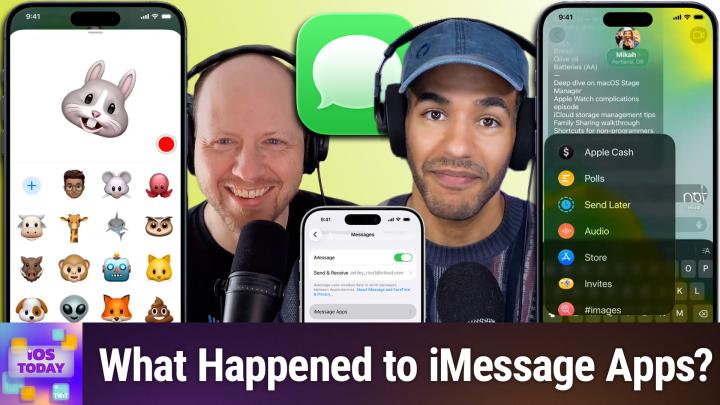
All TWiT.tv Shows (Audio)
iOS Today 804: iMessage Apps
00:38:53
Navigating the Junk Drawer of iOS Features
Loading summary
Transcript63 lines
- [00:00]
A
Coming up on iOS today, Rosemary Orchard is out. But don't worry, Dan Moran joins us to talk about imessage apps and other features. Stay tuned for iOS today podcasts you love from people you trust. This is twit. This is iOS Today episode 804 with Dan Morin and me, Micah Sargent. Recorded Tuesday, May 26, 2026 for May 28, 2026 iMessage apps. Hello and welcome to iOS Today. This is the show where we Talk all things iOS, iPadOS, WatchOS, HomePod, OS and of course all the other OSes Apple has to offer us. And well today I am once again Micah Sargent, if you can believe it. But joined not by Rosemary Orchard this week, instead joined by by Six Colors own, Dan Moran. Welcome back to the show, Dan.
- [01:04]
B
Good as always to be here, Micah. My favorite OS is Cheery os.
- [01:10]
A
No, that's got lots of fiber.
- [01:13]
B
Your heart is good for the oats. You know, I like myself, I like to have some oats. Yeah, that's all I got.
- [01:19]
A
I got happy, happy oats.
- [01:22]
B
Well, let's look at the mess that is my office. It's great, Everything's great. We're good, we're good.
- [01:30]
A
You know a thing or two about
- [01:31]
B
not things, pay no attention to them.
- [01:36]
A
So this of course is the. Well in this case it's an episode where we want to talk about. Look, imessage has shifted and changed I think a lot over time as one third party messaging apps have become more even call them platforms have become more powerful and Apple to some extent I think with imessage has, has continued to try to have feature parody or excuse me, as close as possible to that, but while maintaining kind of a built in and easy to understand and quick to use set, you know, set of, set of features. And so I think that that kind of sometimes plays a role in how imessage as a concept is something that you can just. Okay, I know this is where I type and I know that I can hit the send button but there's so much more that's involved and that is something I don't know about you Dan, but for me has shifted over time because I remember when the imessage, the, what was it called? The app Store for imessage launched for the first time and I downloaded a bunch of different little utility and yeah, lots of different apps for those. And over time have you also seen kind of apps sort of taking away their message portions or, or yeah, like your use. Has it waned?
- [03:05]
B
Yeah, sure. I mean look, Apple, Apple has never met a platform it couldn't appify in some way. For better or for worse. There was an era where the solution to everything was apps, and that included, hey, imessage, we should, could we add a bunch of features or should we just let people make apps? And the answer was let's make people make apps for it. Which was a little strange. I think it had that burst of initial popularity like you said, but over time it's less of a thing that people are looking to develop for. And some of that I've heard is that it is also a pain to develop for in some ways, because if you're selling an app and you want to make an imessage app, that's a whole separate challenge. And also, I think people, you know, are limited in terms of what things they really want to do in, in an app, in messages. It introduces its own complexities and stuff. So I think we'll talk about some of the, the things that are there and some of the things that work well and some of the things that maybe don't work as well.
- [04:02]
A
Yeah, that's, that's a great idea. So let's actually kind of take a peek. I, I have the imessage app here and this is, you know, again, we can tap on imessage and we could, we could to start to type a message, but it's that plus icon that has the different apps in it. And by default you should see in this, this sort of modal dialog that pops up camera, photos, stickers, cache from Apple polls, send later audio. You should see Store as well, and then some of the kind of individual apps that you can get into. So I want to start by tapping on store because that will take us to the app Store for imessage and we'll show you some of what's still here. A lot of times it is those sticker packs, very necessary emoji, Water Llama's own set of stickers. And there are a few games in here. I know I've played a few of the sort of. Oh, it's, it's a, it's a like pool and there's a battleship and different games like that. But this has word searches and honestly, I just don't recall the last time the game pigeon is the one that I was thinking of. I don't recall the last time that I went through here and even looked at, well, apps.
- [05:32]
B
It's a weird thing, right? Because you know, you can play games with people in a game app and a lot of those games have built in, you know, play with people somewhere else. And you maybe don't think to yourself, I should go to messages and start a game.
- [05:45]
A
Exactly. And there's also sort of a. Almost a contrived aspect of it, where part of the message app, especially with game pigeon, you are sort of volleying a message back and forth. One person takes a turn, and then it sort of like sends it to the other person.
- [06:05]
B
Right.
- [06:06]
A
And then that person opens it and then ascends. And that is a. That's been a fascinating thing where in a way, at first it felt pretty clever and kind of different, but now is like, why do. Why does it even need to be like that? What's the point of that? And then also with stickers, a lot of the time, the stickers I know that I'm sharing with other people or using with any regularity are stickers that I have created myself. And so I think for me, the sticker app has kind of fallen by the wayside, too. It's.
- [06:45]
B
And there's some weirdness, too, I think, with some of the other things that are in there, in part because I think it's hard to differentiate what is a feature versus was an app. Right. I mean, you. You pointed out there's like the send later app.
- [07:00]
A
Exactly. It's an app, but it's really not.
- [07:02]
B
It's really an app. It's a feature. I mean, I thought that was always a little weird that it's in there. And it's a little strange because I. Every time I go looking for that feature, I can't remember where it is. Like, oh, do I long press on the arrow button and then it pops up? Nope. Those are a message. Is it somewhere else in here? Do I have to select some text? Nope, that's not there. No, it's under apps.
- [07:21]
A
Of course. Yeah. And then different things used to be in different places as well. Sending a location. You used to tap on the. Well, one of the ways that you could do it was tapping on the name of the person at the top. And then there was just sort of a blue button. Well, blue text button that said send location. So, yes, tapping that plus sign. Let's kind of talk about here. What are apps? What are features? First is camera. This will launch a camera. It's different importantly from the base camera app in that it is sort of an extension of the messages app. So something especially in earlier iPhones, that would be a bit of an issue if people were using this version of the camera. If messages was running in the background and you had maybe like, A gif or two that were auto playing those could kind of slow things down. The photo might not take as quickly. And so advice early on was don't use the camera app within the messages app. Use the actual camera app. Photos will of course allow you to. It will bring up a photo gallery from which you can select photos. And then stickers of course is going to have the various stickers that are available to you. The Apple Cash is the way for sending and receiving cash polls. Very exciting when that was added. Something that I have definitely used before. In fact just recently, a group message thread. Two friends have birthdays close together and so we were all helping them decide on the theme for their birthday. So everybody kind of chose the different options. And I will tell you that one of them was everyone and I quote, everyone dresses as Bob Dylan for some reason unquote was one of the themes as well as a lot of options. Yes, as well as Cabaret. And I don't remember what the third one was, but I definitely chose Cabaret
- [09:29]
B
dresses as David Bowie for some reason. Nice variable.
- [09:33]
A
Yeah. Then send later as we were talking about, which is that feature that lets you essentially schedule a text message to go out later. Now we've talked about this feature in the past. The cool thing about send later is that when you schedule a message to send later, it is scheduled on the server side, which means that if you shut down your phone, if you're outside of range, if any of that is happening, doesn't matter because that message will still send at the time that you have given. I quite like the send later functionality. And of course then you can go in and edit the message before you send it if you decide something should change. Audio is the way to send audio memos. But you can also use the microphone that is part of the imessage to. Oh wait, that one's for dictation. I thought there were two. Now I'm forgetting there.
- [10:36]
B
No, they. One does dictation in the bottom right and then the audio one sends like an audio clip, see?
- [10:43]
A
But now I'm typing, I'm tapping the one that's in the. In the message part and it's also doing dictation. And that's. I thought that. What you thought.
- [10:50]
B
No, that's the audio one, isn't it? Oh no, we're. We're wrong, right?
- [10:53]
A
We're both wrong because I keep hitting it and look what it's doing. It is choosing to dictate and then if I hit the one at the bottom too, it is also dictation. But I swear on my phone that top one is not for dictation. It is for sending a little audio message. So I don't know what's going on.
- [11:13]
B
Anyway, mine sends an audio message. Yours is broken.
- [11:15]
A
Mine's broken. This is. This is the secondary phone. So that's probably why it's like the work phone that has my work account logged in. So the settings are probably different somewhere and I just don't recall which one it is. There's also invites. Now this of course is part of Apple's invites functionality. So you need to make an invite first in order to have it show up. This suddenly becomes more of the imessage apps that we're expecting. And then one of my favorite apps, I think it doesn't get enough credit. That's here is the hashtag images app. There are other ways of getting all sorts of animated images and. And you know, being able to send little memes. But I don't know where Apple's pulling these from. But I found that the accuracy of what precisely I'm looking for is easier to find using images than it is for. For using Jiffy at times. So. Or excuse me, they call it giphy. That. Yeah, that's quite nice. We've also seen. I'm going to come back to check in because I want to talk to you actually about that one. But digital touch, which people may infamously remember most often from the Apple watch. The sort of. I can tap on your wrist it said you sub little message that way. Or in this case where you are drawing and it sort of sends. And then it's. I don't. It's silly. Location. Not ever.
- [12:55]
B
Once.
- [12:56]
A
Yeah, not. Not once. Not ever. Except to test it. Location of course will send your current location memoji is that. I don't know if people are really using these anymore, but it's a little personal emoji that you can move your head and it'll talk.
- [13:13]
B
Animoji, right? That they. Wasn't that. That they used to call Animoji.
- [13:17]
A
Yes, Animoji.
- [13:19]
B
I had to find this recently. I'll. If I may briefly sidebar. I my. At Easter we wanted to. My. My son wanted to call the Easter Bunny and I suddenly remembered this feature existed and that there was a rabbit. We used it. You know, my wife FaceTimed me upstairs and I pretended to be the Easter Bunny, which I think delighted him. Although it took some work because I had to change like my contact in her phone to read Easter Bunny, which apparently now it still says several months later. But I spent so long trying. I was like, I remember this feature existed. Where did it go? I should have checked the plus. The plus button which is the, the junk drawer of junk drawer.
- [14:04]
A
It is. It absolutely is. Here's the bu. And you can also use this with FaceTime. So if you as. As Dan was talking about, you are able to show up as the Easter Bunny. And that, excuse me last is music, which lets you share music, of course. Now check in is an interesting feature because it is designed to give someone the ability to sort of know your location, but in a, in a temporary way and I think in a privacy protecting way. So where location sharing is something that you might do with, you know, your close friends or family members or whomever. Check in says, hey, I'm about to go somewhere and you know, I'm expected to make it by this time. If for some reason my locations, my location seems off or my path seems off or it's taking me too long to get to where I'm trying to get, then it will let people who you've sent a check in to know and they are able to sort of take action to, to help out to see if something's gone wrong, to see what's up. I really like this additional safety feature that's been added. I have my location shared with the people who would otherwise be, I think the check ins and so I have not had an opportunity to use this. But I wondered if you've ever received one, if you've ever sent one outside of again testing.
- [15:45]
B
No, never once. I, I mean part of this. Maybe I can just say I don't, I don't, I don't go places. I mean I don't have a lot of need for this. This feature in particular, I have certainly tested it and I've told other people about it who might, you know, find some utility from it. But it is just not something that comes up for me personally in, in my everyday life. I'm glad it's there. I would be fascinated to hear if there are people who use it more on the regular because it does feel like one of those things that people, you know, appreciate and that, that people might have been asking for. But yeah, I, I imagine there's probably a lot of people who also forget that it's there. Although Apple does one of those things where they will prompt you sometimes. Yeah, every once in a while if they detect like, oh, hey, you're going to a place or it's, you know, do you want to check in like with somebody? So I don't know. I'll take from that what you will indeed.
- [16:40]
A
One other thing I'll mention here is a little quick tip. If you get annoyed that you've got to hit that plus icon and then tap on photos to get to the photos that you want to send. Obviously when that is one of the main features that people use when they are having conversations with others is sending photos. If you tap and hold on the plus icon to the left of the text field, just tap and hold, it will automatically launch photos down where the keyboard is. And so it just takes one little one, you know, one one touch less, which is, you know, kind of nice to save time.
- [17:20]
B
You can also tell, I want to point out there, if you hit that app but button again, you can tell the difference, I believe, between apps, the features and apps in that if you look at the invites, it's like a little pill oblong rather than a circle. So I guess the circle are the features and the oblong ones are like apps that can be removed or deleted.
- [17:41]
A
Get out of here invites. Nobody wants you here. Tapping and holding also allows you to rearrange the apps as you need them as well. So good, so good, so good. Everything you want for summer is at
- [17:56]
B
Nordstrom Rack stores now and up to 60% off. Stock up and save on the brands you love like Vince, Sam, Edelman Frame and Free people. Join the NordicLub to unlock exclusive discounts. Shop new arrivals first and more. Plus buy online and pick up at your favorite Rack store for free.
- [18:13]
A
Great brands, great prices.
- [18:15]
B
That's why you wreck.
- [18:19]
A
So that is a look at the messages that are built in or in the case of invites because it was on my phone that showed up. Are there any imessage apps that you have any love for?
- [18:35]
B
Yeah, you know what, I will put this out here because I'm not sure if it currently is out or not, but I'll plug it because I've been using it. My good pal Lex Friedman, with whom I co host the Rebound Tech podcast and I've worked with for many years, has put out an app in the last couple weeks called Gnome, which is a GIF manager not unlike that built in Images app. And he is working on an imessage app component which lets you do very similar to what Apple's does, but also lets you access your own local GIF library if you are somebody who has a big folder of GIFs that you like to use. And so he's integrating that into the imessage app so that you can send your own gifts right from iMessage and I have been testing this and using it and it's very cool and I highly recommend that as an app for managing your gift collection as well as doing gift searches if you'd like to. And yeah, I mean it was the first time in quite some time that I've added an imessage app and even more an imessage app that I actually used.
- [19:41]
A
Yeah, I, I don't blame you. I was looking through just to make sure that it is still indeed true. And I don't use. I have on mine, my on my phone Bitmoji, I have invites, I've got Fly Delta, I've got Adobe Acrobat, I've got giphy, I've got Polls, not Apple's Polls, but a third party polls app. I've got Game Pigeon and I've got Very Necessary. I can't remember what it's called. Very Necessary something Reactions. Maybe I use none of them. Yeah, I will occasionally, as I mentioned, hop into Giphy but most of the GIFs that I get come from the hashtag images feature.
- [20:28]
B
Right.
- [20:28]
A
That is part of the messages section
- [20:31]
B
feature, not a bug.
- [20:31]
A
It's a feature, not a burg. So that, believe it or not, is a look at imessage apps. You can of course go into the App Store for imessages or excuse me, the App Store for imessage to get your own. But yeah, I just increasingly find that Apple has sort of added the functionality necessary for most of what imessage apps can provide and therefore slowly but surely there feels very little reason to have a third party message app when I can do most of everything I need to do with what's built in by default. If there are apps that you use regularly that you'd like to let us know about. Hey, you forgot this one. I use this one all the time. Iostodayut TV is how you get in touch. We'd love to hear from you. All right, moving along to the news, I did want to mention this has been some time ago now, but since recording our last episodes of the show, this happened Apple before wwdc every year will or has announced in honor of I think it's world. Is it world or is it Global?
- [21:54]
B
Global Accessibility Day, I think.
- [21:57]
A
Yeah. Yes. And so as part that Apple will kind of explain and and feature some of the upcoming changes that will be in Apple's platforms in terms of accessibility features. One of the big things that we've seen is voiceover and magnifier getting better. Well, we hope better features for kind of exploring and understanding things that in front of it. So the example that they give is a bill that has a whole bunch of information on it. It's got, you know, graphs and charts and tables. And you, you, you have this new ask button and. Or you have this ask button you could tap and then say, how much is this bill for? And it will tell you. The total amount due on the bill is $83.89. Of course it does say please verify, but that is powered by Apple intelligence and it is something that's supposed to be across the board. Something else that I think is really cool. Voice control becoming more natural language. Up to this point, folks have kind of had to learn the language of iOS in order to, well, I should say any of the oss in order to use and navigate iPhone and iPad by voice. And so you would need to know kind of what a specific button was called or how, you know, what now you can just sort of. Or what they hope is that you'll be able to say what you see. So saying, you know, tap the guide about best restaurants or tap the purple folder instead of needing to be more specific and more reliant on what a developer does to label it. Dan, one of the things that worries me perhaps about this is, is developers perhaps going, okay, well, now there are tools that, that, that my users can use and I don't need to label things anymore. But that's not true. You should still do it because you
- [24:16]
B
can't rely on the. Yes. Yeah, I mean, you can't rely on Apple's system to always work. And the better, you know, the more you cue it as a developer, the more you spend time on making sure that it sort of fits the best conventions, the better it will work with these features. So it really does, I think, still benefit developers, even though, you know, there's at least then a base level. And this very much like, you know, using AI to look at images and generate alt text is a good example. It's like, look, it's better than nothing, but it's not better than, you know, people writing their own or being more specific about it.
- [24:50]
A
Absolutely. Another feature, Accessibility Reader, it now works better with what they call complex source material. So thinking of like scientific articles and being able to adjust them therein. The. The idea with Accessibility Reader is that you can kind of customize the way something appears for things like dyslexia, low vision. And so knowing that you are able to interact with text that has multiple columns and make it a little bit easier to read and understand is great. And then something that I've said this before. I wish that I had subtitles for real life because I use them so much when the subtitles are always or should say captions are always on on my television and I do wish that I had them elsewhere now generated subtitles for kind of everything across the swath of the platform. So clips recorded on iPhone, clips received from friends and family, clips streamed online using on device speech recognition. These subtitles are generated and appear automatically whenever you've got uncaptioned videos on not just the iPhone and the iPad, but also the Mac, the Apple TV and the Apple Vision Pro.
- [26:16]
B
This one's big, big for me. I mean I have two parents who are especially my dad who is exceptionally hard of hearing and you know, being able to send like we post like clips of my kid on you know, a shared photo stream but none of those have captions right. So having the ability to have those automatically captioned for him is great. So this is a real awesome.
- [26:40]
A
And then also I wanted to mention this one I think seems to be getting a lot of the attention. But Apple has added functionality for certain drive systems of wheelchairs, of powered wheelchairs that allow a person with an Apple Vision Pro to use eye tracking to control the drive system on their wheelchair. So importantly, Apple is not making a wheelchair. Apple is not releasing a wheelchair. That is not what's going on here. Instead of it has added functionality to its existing product, the Apple Vision Pro to allow for people to use that high quality eye tracking system in order to control their mobility device. And interestingly I was reading into the systems that are already in use and a lot of them require far more frequent calibration than what we have seen is necessary for the Vision Pro. And so that could be one of the steps. One of the positives of of this, of course one of the negatives I would think is that very uncomfortable, very heavy thing being strapped to your face most of the time. But I don't know. That's just me. Me. I don't think it is just me. A lot of people say that about the Vision Pro. Some other changes they very popular. I think more popular than Apple realized. Hikawa Grip and stand sold out and it is now back in stock, back and available. It's available in more places as well. And a few updates including adding vehicle motion cues to Vision os. The thought of someone using a Vision OS in a moving vehicle, even the thought of it is starting to turn my stomach. I can't imagine I use vehicle motion cues. I Don't want to go into the huge explanation of them, but essentially if your eyes see something moving on the screen that mimics the speed and direction that the car is moving, it is in theory going to help relieve motion sickness and a vehicle. So if you can imagine that in vision os, that could arguably be more important. Although again the thought of oh man, I hope it works, I hope it works. And I think that's, that's pretty much it. As far as the, the big features, there's. We'll include a link in the show notes to that accessibility page. Now, Dan, it has been the case in the past that sometimes you can get a hint of perhaps other features
- [29:53]
B
or read between the lines.
- [29:54]
A
Yeah, read between the lines, yeah. About what we can expect at WWDC and of course in future, just future features of Apple's devices in general. I didn't really see anything that stuck out to me for now.
- [30:10]
B
Yeah. Certainly the integration of Apple and Tel intelligent stuff within Magnifier, I think and you know, is an indication that that's going to be even more widely spread throughout the operating system. We've seen the visual intelligence tool that they introduced and have played around with in a couple ways, both in the screenshot form as well as in the camera and some of the iPhone models. I think what we're seeing is that might be more broadly able to access parts of your screen or experience and let you make queries about it. It. That's, that's one of my main sort of guess from this. I'm not sure there's, you know, too much surprise in there. We certainly know Apple's been working on AI stuff for a while.
- [30:51]
A
Absolutely. Yeah, that's a, that's actually a good point.
- [30:56]
B
Ready to soundtrack your summer with Red Bull Summer All Day Play. You choose a playlist that fits your summer vibe the best. Are you a festival fanatic, a deep end dj, a road dial or a trail mixer? Just add a song to your chosen playlist and put your summer on track. Red Bull Summer All Day Play. Red Bull gives you wings. Visit Red Bull.com BrightSummerAhead to learn more. See you this summer.
- [31:22]
A
All right, that's the news. It's time to move on to our app caps. These are the apps or gadgets we've been using for some time or perhaps we just came across, but think they're great and want to share with all of you. So Dan, tell us about your app or gadget pick of the week.
- [31:40]
B
Yes, well, I'm going to the well again for Something that I spent a lot of time beta testing but which is now available in the wild. And that is Indigo, which is a really cool social media app by Aaron Vay and Ben McCarthy. It's a tool for cross posting and cross reading of social media networks. So if you're somebody who say is both on Mastodon and on, on Blue sky, which is the two networks currently supported by this app, then you can read both of those social media profiles in a single timeline. That means if you're like, you don't have to have a separate app open for Blue sky and a separate app open for Mastodon. It not only lets you like just sort of scroll through your, your lists all meshed, but also lets you, you know, see stuff where it's like, oh, this got posted to multiple different places. It gets sort of de duped. You don't have to see the same post multiple times on both Blue sky and on Mastodon. Like it doesn't like show you multiple copies of that. You can reply to things, you can see features, you know, replies, you know, if you like stuff, it works as like a fully functional client. It's really, it's really great. I've been using it for quite some time to do manage both my social media stuff and so it's, it's very, very, very handy. I like it a lot.
- [33:05]
A
Nice. I will actually, I'll have to check that one out because I have. I've tried different sort of social media joining apps and a lot of them seem overwhelming. The my app pick is one that I've talked about on the show before and one I think that I've even talked to you about before, dan, which is Wiper 2. It is a content filtering app and the reason why I'm bringing it up as my app cap is because wiper2 just added a new feature. Now, first and foremost, it is a Safari extension that up to this point has helped you to filter out content that you may not want. It can be ads, it can be trackers, it can be all sorts of stuff. But I've always liked that it just works in the background and doesn't. It doesn't do a whole. It's not, it's not about the polish, the polish, the gloss. It is not about kind of trying to be flashy. It just gets out of the way. And I love that about it. And it works on Mac OS, it works on iPadOS, iOS and for a while now has been the content filter that I have used after I stopped using one blocker due to Its origins Now, as of the last time I launched it, I discovered that it has a new feature called Filter and also without the E. And Filter is an in app URL filtering tool. What does that mean? It means that basically it's taking the content blocking functionality that it can do on the web and making it possible in your various apps. So if you have apps that serve up lots of ads or other content that you may not want, this can be especially an issue when there is some sort of, sort of concerted effort to get people to click on things. I've a number of times gone to like a recipe app within a. Oops, let me try this again. I've gone to a recipe website within a recipe app. So the sort of built in browser and then had a little pop up, pop up that says something like, you know, this page is needed to be reloaded due to a problem and then you tap okay and then it takes you somewhere else and then it turns out out that you know, it's trying to get you to download and do all this horrible stuff that is a result of ad systems being hijacked with bad ads that are malicious. And so that's something else that can be blocked by way of this. What is notable about this though, and it had me going into the developer section, the developer documentation for the longest time, anytime I would install because one blocker also had this feature that I think it was one blocker that did it. But there was another app that would do in app blocking of content and that always would show up in the VPN section. So when you turned it on, VPN would appear in your sort of status bar at the top. And then also in the VPN and device management page it would show that this was, you know, one of the VPN configurations that you had installed. But this feature, when I turned it on, I didn't see the little VPN icon pop up. And I thought, okay, something's going on here. This is weird. And I'm kind of, I was a little bothered by it because I thought now I'm not going to know if it's running and I want to know if it's running right. It's very specifically in the VPN and device management section. It's in a feature called URL Filter. So I love that what Wiper did, what the developer of Wiper did was sort of set that limitation that is this is exactly what this is. This is exactly what it does. It doesn't need to do more and it is just a URL filter and so then you can sort of enable it or disable it as you want to. So really cool. Added functionality for Wiper and a content filtering tool that I use across my entire, my entire platform. All, all of the, all of my devices have Wiper 2 running. So check that out. Especially if you've got apps that keep serving you ads that you don't want or other content that you'd rather not see. All right, that folks, is going to bring us to the end of this episode of iOS today. I want to remind you all about our wonderful club offering Club TWiT. TWiT TV Club TWiT is where you go to sign up $10 a month, $120 a year. Joining the club gets you some pretty awesome benefits. Every single one of our shows ad free. Just the content. You also get access to our special feeds. Our one feed that has sort of behind the scenes moment for the show after the show. We've got a feed that has our live coverage of tech news events like the recent Google I O, the upcoming wwdc and a feed that has our club shows, my crafting corner, Stacy's Book Club, my upcoming media club. All of that is available to you as a feed and you also gain access to the members only Discord Server. A fun place to go to chat with your fellow Club Twitt members and those of us here at Twit if that sounds good to you. Well, join the Club club. Use that QR code in the top corner there or Twitter TV Club Twits to sign up. All right, Dan, if people would like to follow you online and check out all the great work you're doing, where should they go to do so?
- [38:56]
B
Well, I'm on most social media platforms in one form another as de morin so you can always search me there. And my personal website is dmorn.com where you can find links to all of my podcasts, including Clockwise, which I do with Micah every Wednesday over at Relay, and also all mine science fiction and fantasy novels. Find links in there. Buy them at all your favorite bookstores. Go, be off with you.
- [39:19]
A
Go do it. If you're looking for me online, I'm icasargent on many a social media network where you can do Chihuahua coffee, that's C h I H u A h u a coffee where I've got links to the places I'm most active online. Thank you so much for tuning in for this episode of iOS today. We'll catch you again next week. Bye bye bye. Did you know if your windows are bare. Indoor temperatures can go up 20 degrees. Turn the temperature down with blinds.com and get up to 50% off custom window treatments like solar roller shades and more during the Memorial Day Mega Sale. Whether you want to DIY it or have a pro handle everything, everything, we've got you free samples, real design experts and zero pressure. Just help when you need it. This is your last chance to shop up to 50% off site wide during the Memorial Day mega sale@blinds.com rules and restrictions apply.