← All TWiT.tv Shows (Audio)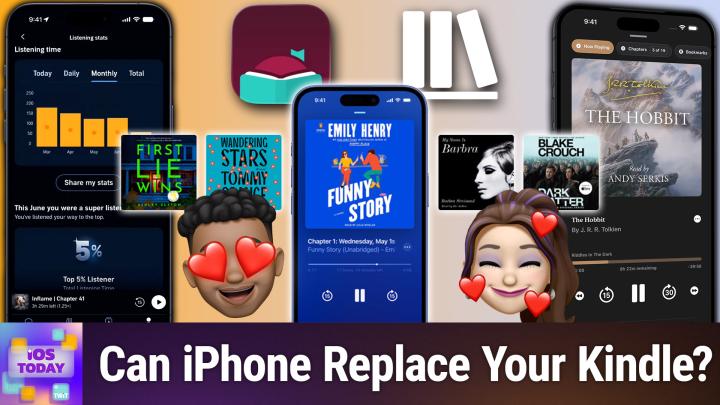
All TWiT.tv Shows (Audio)
iOS Today 813: Reading on Your iPhone
00:35:36
Tracking, Sharing, & Leveling Up the Digital Literature
Loading summary
Transcript46 lines
- [00:01]
Accenture Sponsor
This episode is brought to you by Accenture. When your advertising operations fall out of sync, everything else follows. Spotify and Accenture are working together to reinvent the rhythm of ad sales using automation, analytics and smarter workflows to simplify campaign delivery and access better data across the business. The result? Less time spent on operations, more time connecting brands with the moments and fandoms that matter most. Learn more@accenture.com Spotify
- [00:31]
State Farm Sponsor
this episode is brought to you by State Farm. Listening to this podcast instead of doom scrolling Smart move. Another smart move getting help from one of State Farm's 19,000 local agents when you choose to bundle home and auto bundling. Just another way to save with the personal price plan. Prices are based on rating plans that vary by state. Coverage options are selected by the customer. Availability, amount of discounts and savings and eligibility vary by state.
- [00:57]
Ryan Reynolds (Mint Mobile Sponsor)
Hi, Ryan Reynolds here for Mint Mobile. Are you looking for a beach read this summer? May I suggest your big wireless bill? It's got suspense, mystery, a slightly flat emotional arc, and a shocking twist where you realize you've been overpaying the entire time. Fortunately though, Mint's story is better. Every plan $15 a month, even unlimited. That's it. Happy ending, zero tears. Give it a try@mintmobile.com Switch upfront payment
- [01:19]
1-800-Contacts Sponsor
of $45 for three months, $90 for six months or $180 for a 12 month plan required $15 per month equivalent taxes and fees. Extra initial plan term only greater than 50 gigabytes may slow when network is busy.
- [01:26]
Micah Sargent
See terms coming up on iOS today. Rosemary Orchard and I'm Micah Sargent talk about apps you can use for reading on your devices. Stay tuned.
- [01:40]
State Farm Sponsor
Podcasts you love from people you trust.
- [01:44]
Micah Sargent
This is twit. This is iOS today. Episode 813 with Rosemary Orchard and me. Micah Sargent recorded Tuesday, July 14, 202026 for Thursday, July 30, 2026 reading on your iPhone hello and welcome to iOS today. This is the show where we talk all things iOS, iPadOS, WatchOS, HomePod. It's not technically HomePod OS these days but you know it's the various platforms that Apple has and well we are here to help you make the most of your devices and the most of that software that Apple provides. I am one of your hosts of this. My name is Micah Sargent and my
- [02:34]
Rosemary Orchard
name is Rose Ranchet. You know I figured this is a great time for everyone to just keep going up the color grade. I don't know if you all you folks also have color grading on books over there in The US the same as we do over here. I know you had Reading Rainbow, so
- [02:49]
Micah Sargent
you know we did have Reading Rainbow. Yes, indeed, we, yeah, there are lots of different sort of book reading competitions sort of things. But then of course Reading Rainbow making it so, so fun to explore and read. And that's what we're trying to do here is talk about ways to read on your devices. Because look, we've, I think Rosemary, you have shown a few different third party devices that you can use to read. There are now, it seems to be very popular. Lots of people, not me yet have the small little ebook readers that you can attach to your phone and people of course rocking larger E reader Kindles and Kobos and all sorts of stuff. But you know, if you only have one device, don't feel bad if you can't, you know, you're not able to add another device to your portfolio. You can't pick up a Kindle or one of these other devices. It's okay because your phone is capable of doing a lot of great stuff on its own. And that starts with the Apple Books app. This of course is the first party app from Apple that includes a bookstore. It has a library of the content that you have purchased and also has audiobooks as part of the library. And I'll show you on my phone what this looks like. So here on my phone I can see on the sort of home screen some different bestsellers that are available for purchase. There are also different books that you know that when there are sales. But then also this is under the books you'd like to read next section. These are the things that I added that I want to read. Turns out very much a fan of the various user guides from Apple all the way back to iOS 15.5 here. But also I've got some Dresden Files books in here that I believe are the, the graphic novels from the Dresden Files. And what's cool as well is that there is a reading goal feature within the app so you can kind of keep track of a how much reading you're doing, but also how much time you spend reading. And apparently I have a five minute goal to read and I don't, I'll be honest, I don't use the Apple Books app for the reading that I do. So it doesn't know that I've already spent probably, oh probably like 15 minutes of reading so far today before the show got started. And then I also have access to my library. This first book here is not actually a book. It was a little project that I was Creating to try out some of the features in the Books app and with pages that lets you publish your own books. But you'll notice friend of the show, Shelley Brisbane, who covers accessibility. I have Shelley Brisbane's iOS access for all book that is an accessibility guide. I also have the regular Expressions cookbook In here from O'Reilly, the Raspberry PI cookbook, the Java cookbook, the Python cookbook. You can tell I've got different cookbooks, right? Also the Unity look. This is an ADHD library because I'd convinced myself I was going to be learning Unity game development.
- [06:37]
Rosemary Orchard
I feel like you've got a couple of humble bundles in there, Micah. It looks like you bought a couple of those for the programming ones. Yeah.
- [06:44]
1-800-Contacts Sponsor
Oh, you.
- [06:45]
Micah Sargent
You nailed it.
- [06:46]
Rosemary Orchard
I am also in this picture. I am this picture. We are both this picture.
- [06:52]
Micah Sargent
I love that. I love that.
- [06:54]
Rosemary Orchard
Yeah. Honestly, I. I do love iOS for non fiction reading specifically. So, you know, I don't blame you.
- [07:01]
Micah Sargent
Yeah. So let's Pull open the iOS access for all book here so that I can show you what reading looks like on the Apple Books app. It used to be called Ibooks and that's what my brain keeps wanting to call it. But you are presented with text that is really, well, sort of justified. I think the readability is great. If you tap on the screen anywhere in the bottom right hand corner you will see the kind of menu and there are different options here so I can look at the contents, the chapters, bookmark, bookmarks that I've added, highlights that I've added. I'm also able to search through the book. I can use the share sheet to share to people. I have a rotation lock option. I also have a different mode that's called a line guide so that you can more closely follow text. I had a friend in high school who would carry around a. Now I've forgotten how to turn it off. There we go. Nope, that's not how you turn it off. Oh, there it is. Turn off line guide. So down in the bottom, once you've turned on line Guide, you can turn off there. But I had a friend in high school who would carry around a playing card and use a playing card to move along with the text. And I always thought that was a great idea for her being able to stay where she needed to stay on the screen. I sometimes find my eyes darting around to other places as well. And so that is a nice feature to be able to have that. I do have to give a quick shout out as we're recording this show. Because I love a pun and I mentioned that the text was justified on screen. Wadfan in the Discord said, literacy needs no justification. Very funny and also true. Last but not least, themes and settings. So this is one of my favorite places to be. It's just fun. You could change the size of the text, but you can also change the screen brightness. And what's great is that you can set up themes. So original has sort of a white background with black text. There's a paper option that makes the text a little bit more kind of, well, papery color, I guess. It's sort of a grayish tan. It also increases the size of the text. There's a quiet option that's a little bit darker, a calm option. There's a focus option and a bold option. You can customize each of these so setting it up exactly how you want, including different fonts that are available. So if you know, you like Georgia or I love Georgia, I love to read with Georgia personally. You can also bolden the text, change line spacing character. I mean, you have all of the stuff that you need to get things set up exactly as you want them and make the reading experience quite nice. I also like that the Books app has great support for PDFs, so that if you want to add PDFs to the library, then you can view those there as well. The bookstore again has. It's a lot like any other digital bookstore that's out there. I'm going to be very careful about my wording there because I don't want to get involved in a lawsuit with Amazon, Apple and price fixing. But we'll just say that this is like other bookstores that you can purchase books from digital books. And then of course, the audiobooks section. Yes. I don't know if you knew this, but the Apple Books app does also support audiobooks. That other app that we'll talk about in a minute is not the only one that does audiobooks, so you can purchase them here as well. It looks a lot like the Podcasts app in terms of the functionality that you have whenever you play an audiobook. But yeah, that is a. Oh, check this out. 2 minutes and 52 seconds. Because I was reading at this moment, iOS access for all the iOS 16 edition. So I've almost reached my 5 minute a day goal here in the app. Fun, easy to use, and arguably
- [11:13]
Rosemary Orchard
all
- [11:14]
Micah Sargent
of the basic features that you need whenever it comes to a book app. All right, let's take a quick break from the show so I can tell you about our Sponsor of This episode of iOS today, it's Sierra Sync. Here is a fix for anyone who manages the iPhones and Macs at their company. You know how your personal contacts app is dialed in everyone you know right there with names and photos looking great. But then your work contacts are a mess. Well, you go to call a coworker with your new phone, only to bounce to their inbox, which of course is conveniently full. It's so frustrating. The new hire misses training because no one has their number. You decline an unknown number, thinking it's spam, only to check at the end of the day. And well, it was your boss and they needed you for an urgent update. That's because your company directory lives in Microsoft 365 and iOS has no idea it exists. Sara Sync fixes that, and it's the kind of set at once fix this show is all about because it pushes your whole company directory, contacts and shared calendars straight into the native contacts app on every iPhone and Mac in the organization automatically. The best part, it stays current on its own even as people join, as people transfer departments, or as people leave the company. So go to sarasync.comios and book your free demo. The Syrisync team walks you through how convenient and hassle free it is and can even help you get set up on the call so you can roll it out across your whole organization. That's sirasync.comios to sync every iPhone contact in the office automatically. All right, thank you Xerasync. Let's head back to the show. Anything that you would like to say, Rosemary, about the Apple Books app?
- [13:09]
Rosemary Orchard
Yeah, definitely worth checking it out for purchasing audiobooks in particular. I was looking for a very old TV series here in the UK called Willow the Wisp. Willow does not have a W at the end and I found that you can get the top audiobooks for $2.99 as a set in Apple Books app. So I may or may not have that on my to purchase list because I've been reading the books to a certain child recently because I have four of the original books and they seem pretty interested. So I think. You know what, I think I might throw £2.99 at it just to get some more of those to listen to in the car.
- [13:49]
Micah Sargent
I love that. I really love that. That's fantastic. So that is the Apple Books app now. So let's go to my favorite app, probably in existence. And it's not because of the app, honestly. I mean the app is fine, but it's about the content that I consume most often, which for me is audiobooks. I use the Audible app. Audible has long been a sponsor on the network, so just getting that out there. I've used Audible for years. I'm not going to get into the credit system and all that jazz. We'll just talk about the app itself. It is a an audiobook manager and purchaser and it works how you would expect. So here I'll just kind of show the the main screen. We've got your. Your home. I've got, you know, it tells you how many credits you have. You can use credits to buy books. It has lots of great suggestions on the main page. One of my favorite features that it or suggestion options that it has is finish your series. And so it'll show you like what's next in your series of whatever it is that you're reading. The library, of course, includes of your books. Continue listening. You can set up lists. You can see that for 36 weeks in a row, since November 10th of 2025, I've listened at least one day for 36 weeks. I listen every day to audiobooks all the time. In fact, I'm kind of afraid to tap on your listening stats, but I'm going to. Let's see what it says. I have listened to 573 hours and 20 minutes of science, fict and fantasy. I have listened to 129 hours and 58 minutes of literature and fiction. I have 587 titles in my library. Not to brag and I cannot believe this, but I oh no, this is maybe bad. Apparently I'm a top five listener, so I'm in the top 5% of all of the people listening. That's kind of scary. Anyway, I really like audiobooks. I think that the big thing is that I fall asleep to audiobooks. And so that's where probably a lot of the listening is happening. And I'm having to then go back in the morning and go, okay, where was I? But super cool, super fun to find new audiobooks and find new series this way. And if you out there, I just want to say this is kind of as an aside, if you out there are a person who has any sort of internal guilt about audiobook listening as opposed to I reading, let that go. Because your reading is just as valid as anyone else's. And I think that it's more important to, you know, participate in these experiences, however you go about it, than it is to shame yourself over one means or another. This is more, more Recent because a friend of mine was talking about how they felt like they couldn't do audiobooks because they felt like they were cheating. So if you feel like you're cheating, I don't know if you need to hear this, but you're not not. It's fine. Anyway, so that's a look at Apple Books and the Audible app. Of course you will need to purchase the content within. You can buy Audible books directly as opposed to through credits. And now because of the eu, shout out eu, you are able to make a purchase by tapping on a book in the app and have it pop open in a browser and now on its own instead of you having to do it manually and buy the book. So fantastic that it's much easier to purchase whether you do that via credits or actual exchange of, you know, direct money. Do you want to tell us about what's next on the list here, Rosemary?
- [18:06]
Rosemary Orchard
Yes, I would love to. And I am going to keep this brief because it's a pretty niche application. If you are somebody who has a Plex media server in your home. So for example, you've bought DVDs and you've ripped them for television shows and movies, films and you bought CDs of audiobooks and music and you've used this to create your own at home version of Netflix. Then you can use this app called Prologue to connect to your audiobooks. I love this. It's got a CarPlay app which I'm, if I'm being perfectly honest, CarPlay is the way that I listen to the most audiobooks. Like I've got a quite a long drive coming up over the next couple of weeks. I've got a couple of them and I'm there going, okay, what audiobooks am I going to download? It's the Hitchhiker's Guide to the Galaxy read by Stephen Fry, followed by the dramatized radio version. But you know, it's just lovely to have these books downloaded and be able to access them. And so I use Prologue for this. It does let me download things offline. It's got various views. So I can see here, you know, I've got Perfect Spy by John Ler that I can listen to. I can create collections, I can manage all that in Plex, obviously. And then, yeah, I can just download things and have them offline. If I tap on the downloads at the top, I can see which books I've got downloaded, how big they are and swipe to delete them. So if I think that the Princess and the Pea is a little large at 7.7 megabytes, then I can get rid of them. Now, obviously, I've got a large selection of children's audiobooks here because there will be a child and. Or a dog with me for most of these trips that I'll be doing. But it's just nice to have these books that I especially. I have bought lots of audiobooks on CD over the years. I used to use them when I was a teacher and now I still have them and they're just really nice to have for all sorts of things. So, yeah, I will be downloading, you know, even more of these or downloading the ones that I have purchased and added to Plex is what I should say there. So, yeah, that's prologue.
- [20:12]
Micah Sargent
Nice. We should also mention that Spotify has. Yes, has audiobooks as well. Spotify quickly becoming the Audio Everything app. And so you can find books there. Sometimes there are books there that you can't find in other places. Same thing with Audible. You'll find books there that you can't find in other places. They're like Audible exclusives and Audible originals. And so that is something worth checking out. Now, what if I want to kind of keep track of the reading that I'm doing? And also if I want to maybe share that with other people, I'm really. I'm really introing this app, aren't I? Tell us about storygraph.
- [21:02]
Rosemary Orchard
All right, well, storygraph is on my list because they recently announced a partnership with. With Kobo. So for folks who aren't aware, Kobo is the Canadian company of very friendly people trying to make awesome ebook readers. They do make excellent ebook readers. They have awesome days in the office with, like, a bunch of drag queens coming in and things like that. They're very supportive of a massive community and they have excellent integration with things like Overdrive and Libby for borrowing books from your local library. And they recently announced an integration with storygraph for tracking your reading. Now, tracking your reading is not something that I personally have ever found particularly useful for me. Some people love to count how many books they've read in a year. Personally, I just know that if I pick up a book, I'm probably going to be reading for a good couple of months. Not that one book. Multiple books. I tend to, like, get sucked into the reading rabbit hole for a period of time and they'll surface and suddenly replace it with diamond painting or something. Is there ADHD in this house? Definitely, yes. And it's all right here in the room with us. Yes. But storygraph is great. I want to say that it is a female black owned business as well. I know that there's something that Kobo partnering with that is that at the moment and maybe storygraph. But yeah, it, it allows you to go, hey, so recently I have been reading the Ring Fire by Beth Fleabag and the Ring Fire by Beth Webb. So I can tap that and it's currently on my To Read or I can add it to my To Read and then I can say I'm currently reading this. And so you can do this entirely manually. You don't have to hook this up to any app at all so that it's not necessarily automatically tracking data. Particularly useful if you do have say for example a Kobo or a Kindle and it is shared with other family members. As you can see, my Kindle has potentially got a little problem right now. It needs some charging. But yeah, it is a nice way to be able to track your data and you can hook it up and automate all those things or you can just track it independently. And storygraph is a really pretty nice way to do that. And yeah, the folks behind it seem lovely.
- [23:26]
Micah Sargent
All right. And then we should also, of course, Libby is very, very, I mean, this is an app that I hear people mention almost as much as they mention Audible or one of the other big ones. Libby is the app for accessing your local library. You can get audiobooks, ebooks, magazines from your local library. You borrow these books, they then go back, so to speak. You basically lose access to them after you're done. You just need a library card and then the Libby app and then you tie those two together and you are able to see all sorts of books. You can also download these titles for offline reading, which is nice. It lets you use CarPlay to listen to audiobooks. So. So if you are looking to read and explore and learn and grow and you don't have the ability or desire or wish to purchase a bunch of books, then you gotta check out Libby. There's so much there. And I think also something that my friend Dan Moran mentioned with Libby is that something that's kind of nice about it is it does give you a little bit of an exercise in patience because there's a sort of built in scarcity for some of the popular titles. The idea is that, you know, the library only has so many copies of a book and so if someone else has it borrowed then you're not able to read it. And so you can kind of put it on your list and wait for it to be available and and in that way, it is a little practice in patience and delayed gratification, which of course can result in an even better experience in the end if you can kind of let that build up. So I think that Libby is something that everybody with a library card should absolutely be downloading and using.
- [25:49]
Welch's Fruit Snacks Sponsor
This episode is brought to you by Welch's Fruit Snacks Back to school season can be tough on parents, but choosing a snack you and your kids can both get behind doesn't have to be. Stock up on Welch's Fruit Snacks, made with whole fruit and now made with no artificial dyes. It's a snack kids already love and one you can feel good about giving them. Go back to school with Welch's Fruit Snacks, now made with no artificial dyes.
- [26:18]
eBay Live Sponsor
This episode is brought to you by eBayLive. First you're just watching ebay live. Then a Fendi baguette goes for an absolute steal, a 90s NASCAR jacket comes up and you have to bid that winning feeling. It's such a rush because you know everyone else wanted it too. Meanwhile, on Ebay Live, you don't just watch the action, you're in it. Download the ebay app to stream and shop Live ebay Live Things People love
- [26:47]
State Farm Sponsor
chronic migraine 15 or more headache days a month, each lasting four hours or more can make me feel like like a spectator in my own life. Botox Anabachulinum Toxin a prevents headaches in adults with chronic migraine. It's not for those with 14 or fewer headache days a month. It's the number one prescribed branded chronic
- [27:03]
Botox Sponsor
migraine preventive treatment prescription Botox is injected by your doctor. Effects of Botox may spread hours to weeks after injection causing serious symptoms. Alert your doctor right away as difficulty swallowing, speaking, breathing, eye problems or muscle weakness can be signs of a life threatening condition. Patients with these conditions before injection are at highest risk. Side effects may include allergic reactions, neck and injection site pain, fatigue and headache. Allergic reactions can include rash, welts, asthma symptoms and dizziness. Don't receive Botox if there's a skin infection. Tell your doctor your medical history, muscle or nerve conditions including als, Lou Gehrig's disease, Myasthenia gravis or Lambert Eaton syndrome and medications including botulinum toxins as these may increase the risk of serious side effects.
- [27:41]
State Farm Sponsor
Why wait? Ask your doctor. Visit botoxchronicmigraine.com or call 1-800-44-BOTOX to learn more.
- [27:49]
Micah Sargent
I think that does it for yes, our apps this week. These are some of the apps that you can use for reading on your various devices. Of course, if there's an app that you're using that we didn't mention on the show today that you're going, who now, hold on. This is my favorite app. Why didn't you. We'd love to hear about it. You can email us. IowaD WWIT TV is how you get in touch. I also want to mention that last week we talked about the public betas being available to you. If you are thinking about hopping on the beta train, you should check out my show, Hands on Apple, where each year I cover how to join the public beta, if that's something that you wish to do, and cover some of the process involved with providing feedback to the developers and learning how to give good feedback to the developers. So if you want to help,
- [28:50]
Rosemary Orchard
if
- [28:50]
Micah Sargent
you want to help sort of shape the way that the next versions of Apple's platforms are actually released into the world, that is part of the fun of being in the public beta. It's an opportunity to share your thoughts, but it's also an opportunity to break things so that then Apple can learn that those things are broken and fix them. And then that way when the people in your life wait until the fall to get their app, you can think within yourself. You know what? I'm part of the reason that when you installed that app on your phone, it didn't immediately. Or that that that version of iOS on your phone, it didn't immediately crash the second you opened an app. Which is kind of a cool feeling. All right. I also want to remind you out there, if you have shortcuts requests, don't forget we love to answer your Shortcuts corner or your shortcuts requests on the show. You can email us iostodaywit tv. It's best if you put like Shortcuts in the subject or Shortcuts Corner in the subject or hey, Rosemary in the subject. Something like that would be great so that we can make sure that we see your feedback request. And of course, Rosemary invited folks to, when the next version of iOS is here, use the sort of automatic shortcut creator. And that gives us the ability to kind of compare the amazing bespoke shortcuts that Rosemary creates with those created by the robot in your phone. So consider that as well. Before we say goodbye, we of course have our app caps segment. These are the apps and gadgets we're using now, have been using for some time that we want to share with all of you. Rosemary, is it just me this week? That's totally okay.
- [30:45]
Rosemary Orchard
It is just you, Micah. I have so many things on my desk, but unfortunately the things that I'm most excited to talk about are in a testing program where I'm not allowed to talk about them yet. So don't worry, folks, I've got plenty of ab caps coming for you. I'm just not allowed to talk about them right now.
- [31:00]
Micah Sargent
I've got one of those too that I can't talk about. And I'm going, I can't wait. But I will talk about. I mentioned this, I think it's been a couple of episodes ago now, an app that or not an app, but an object. A product that I purchased called Macroscope, that was a keychain microscope. And I said that once I got it I would tell you all about it. And so I am, first and foremost, it comes in a little metal tin, like not Android, an Altoid tin for those of you who have have had Altoids, which I love. It's already cool. But even better, it comes with a bunch. I thought it was just going to be a little microscope because I'd forgotten about what all was included. This, by the way, is the microscope. And it's just a little sort of rubberized material that has a lens popped into it. And what you do is you put, you know, whatever you're trying to view onto underneath the lens. And I'm going to show you in a minute what that looks like. But I got to show you what all is in here because I was deeply, deeply impressed at all of the stuff that comes in the package. So first and foremost, you get a couple of pipettes so that you can prepare and produce your own slides. It comes with cute little tweezers. It comes with two little Q tips so that you can kind of clean up your slides after you've prepared them. My favorite part, it comes with those little, if you've ever taken like a chemistry class, these little pointy ended vials, which I'm sure have a name, my chemistry professor would be very upset with me for calling them pointy ended vials. In fact, he might even call it vile. It comes with an extra lens as well, so that if the lens that you have gets scratched, you can replace it. And a cute little blue chain that you can use to hook the microscope to your keychain. But my favorite part is that along with slides that are empty so that you can prepare them yourself, it comes with pre prepared slides, including an ant. It also has frog blood and it has the epidermis of an onion. So I'm Going to show you how this works. What I will do is first and foremost, I will take the, the lens. And this is for the front facing camera on the phone. And so you take the lens and you put it onto the front of the device. One sec. Let's just focus effortlessly. Yeah, that's what I thought. Okay, so you take the lens and you put it. Oh, I should turn on my phone here. All right, so I have the camera turned on. I've got the front facing camera going and I'm going to take the lens and I'm going to put it over the top of the front facing camera and let me make sure that that's lined up perfectly. And then I can take the ant and put that over the top and you can start to see. Oh, look. Whoops. Let me bring it back in focus.
- [34:47]
Rosemary Orchard
There.
- [34:48]
Micah Sargent
There is the head of the ant. I recommend doing this underneath a source of light if you can help it. It will make easier for you to see the different things that you do. And of course, pressing down, because it's like a silicone material, pressing down is how you can kind of adjust focus. So there you can kind of see that ant head. But I really liked the frog blood because you can see the individual red blood cells from this frog. And honestly, I am not, not doing this thing perfect justice because again, it works so much better when you've got a light source up above. But the point is that this does work as a little microscope right there on your phone. That is, it was like 20 bucks, I think was the cost. And that was the whole point. This, this guy that made this, he said, I wanted to give people the opportunity to use a microscope. There we go. You can kind of see those little red blood cells, which is really neat. I wanted to give people the ability to use a microscope on their phone without it costing so much money. Because if you look up phone microscopes, they are pretty pricey. And so this just a little piece of, of silicone or rubber or something with a, you know, specialized lens built into it. Very clever, very clever stuff. So that is the microscope available on Amazon. From time to time you can also look up microscope. Sometimes the website will offer it, but last time I was on the website, it was only available in bulk purchasing. So that's why I waited for Amazon. You can use the Notify Me feature that is in iOS27 to be able to keep an eye on when it's available again. But that is the pick that I have this week, folks, that is going to bring us to the end of this episode of iOS today, I want to remind you all again. IOSTODAYTV is how you get in touch. And of course you should join our club. Twit TV Club Twit. Or you can use the QR code there in the top right corner to get to the club page. $10 a month, $120 a year. When you join the club. Excuse me. You will gain access to some pretty awesome benefits. Every single one of our shows ad free, just the content. You also gain access to our to special feeds. So we have a feed that has our live coverage of tech news events. We have a feed that has our sort of behind the scenes stuff before the show, after the show and a feed that has our special club Twitch shows. So my crafting corner, upcoming media club, we've got Stacy's Book Club, the AI user group, so much more all there in the club. And access to the members only Discord Server and Chapter Markers. That's right. If you've been hoping for chapter markers, you can have them. Yay. Just join the club. Twitter, TV Club, Twit, Rosemary Orchard. If people would like to follow you online and check out all the great work you're doing, where should they go to do so?
- [38:10]
Rosemary Orchard
The best place to go is rosemaryortrad.com, which has got links to apps, books, podcasts and so that I am or have been involved in. And of course there's links to my socials there as well, with the exception of the club to it Discord, because you will find me there hanging out in the live show while we record. And also the iOS today forum after the show. Micah, where can folks find you?
- [38:32]
Micah Sargent
If you're looking to find me online, I'm ikasargent on many a social media network where you can do Chihuahua coffee that's C H I H U A H U a coffee where I've got links to the places I'm most active online. Thank you so much for being here this week for another episode of iOS today. We'll catch you again very soon. Bye bye.
- [39:02]
Rosemary Orchard
Close your eyes.
- [39:04]
1-800-Contacts Sponsor
Exhale.
- [39:05]
Micah Sargent
Feel your body relax and let go of whatever, whatever you're carrying today.
- [39:10]
1-800-Contacts Sponsor
Well, I'm letting go of the worry that I wouldn't get my new contacts in time for this class. I got them delivered free from 1-800-contacts. Oh my gosh, they're so fast.
- [39:18]
Micah Sargent
And breathe.
- [39:19]
1-800-Contacts Sponsor
Oh, sorry. I almost couldn't breathe when I saw the discount they gave me on my first order. Oh, sorry. Namaste.
- [39:27]
Rosemary Orchard
Visit 1-800-contacts com today to save on
- [39:30]
Micah Sargent
your first order 1-800-contacts.