← All TWiT.tv Shows (Audio)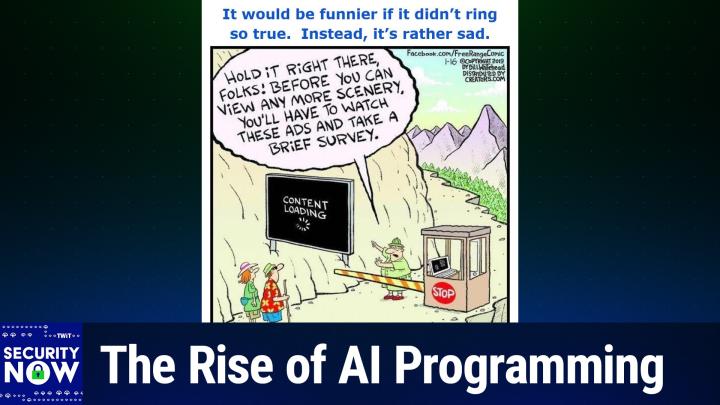
Loading summary
Transcript227 lines
- [00:00]
Steve Gibson
It's time for Security Now. Steve Gibson is here. We're going to take a look at code signing crazy. We're going to find out whatabad Idaho has going for it. Steve's going to talk about these three day code signing certificates and I'm going to give you a little demo of Claude code. I've been using it to write applications. All of that coming up next on Security Now.
- [00:26]
Leo Laporte
Podcasts you love from people you trust.
- [00:30]
Steve Gibson
This is Twit. This is Security now with Steve Gibson. Episode 1060 recorded Tuesday, January 13, 2026. Three day certificates. It's time for Security now, the show where we cover the latest in security news. We attempt to protect you and your loved ones from bad guys in the outside world. We even talk a little bit about TV shows, books and vitamins with this guy. It's whatever Steve's into, frankly. Mr. Steve Gibson, hello from GRC.com great.
- [01:09]
Leo Laporte
To be with you again for. Well, I'm not superstitious so the fact that this is the 13th is just fine with me. It's not a Friday Tuesday.
- [01:18]
Steve Gibson
That would be worse. Yeah, that's not a bad. I, I did have bad luck yesterday. Did you hear me talking about this on Mac Break Weekly? I got fished yesterday.
- [01:26]
Leo Laporte
No, and it's funny because I forgot to mention it. It's not in the show notes but I saw a, I got a phishing text which said that. What was it? The Amazon. It was supposedly from Amazon saying that the quality of something that I'd ordered did not meet their standards and so they were giving me a refund to click here and, and it was a plus 91 something something, you know, phone number. So I was like what? It's not. But I mean again I was like, I, they kind of had me almost.
- [02:03]
Steve Gibson
Well, I got had and the, and, and, and I got some insight from it. So it was, wasn't a complete waste of three credit cards. I got a text from T Mobile saying your points are about to expire. If you'd like to use them, click this link. What? I really didn't pay attention because for two reasons. One, I'm a T Mobile customer and I get a lot of promotional texts from them. And this is. Companies got to knock this off because they're setting their users up. Oh yeah, I see this all the time.
- [02:36]
Leo Laporte
Oh, you mean the legitimate companies need to stop this behavior.
- [02:39]
Steve Gibson
Mobile should not be texting me with promotional stuff legitimately because it sets me up for phishing. That looks exactly the same. Now if I noticed the link was To L U O S A dot CC T mobile dot L U O S A C C I probably would have been smart enough not to click on it. I clicked on it, it said, hey, look, you got, boy, you got a lot of points. You could get an iPad, you could get some headphones. What would you like? I said, well, I don't really need any of this, but these headphones I could do give as a, as a gift. Clicked the link. All looked very legitimate. It said, well, okay, we need your credit card. It's free, but there's 99 cent shipping charge. So we need your credit card for that. That should have been. Then I clicked the link and it took a long time. That was the real giveaway. So I'm waiting, put in my credit card information and said, okay, they're going to send you a text. Got the text, Took a long time because there's a man in the middle, right, Waiting. But that text, so that they can get the credit card number in the text and authenticate it. And what they did, which is really interesting, the text said to add this credit card to your Apple wallet, enter the number. And I should, I mean, there was so many red flags again.
- [03:55]
Leo Laporte
I mean, I'm sure everybody listening understands that, you know, our guard is down briefly. Maybe you're distracted.
- [04:03]
Steve Gibson
It was, it was early morning, I wasn't paying attention and there was urgency. Right. These are going to expire.
- [04:09]
Leo Laporte
Yep.
- [04:10]
Steve Gibson
And it was a nice, you know, nice set of Sony headphones. I thought, well, that's pretty good. So I entered the first credit card. I said, no, this one didn't work. Oh, and in the second credit card, no, this didn't work.
- [04:20]
Leo Laporte
And they'll just suck them out until you finally.
- [04:22]
Steve Gibson
Three credit cards before I went, wait a minute, hold on there, buddy. Fortunately, the first credit card was an Apple credit card, which Apple. It's great. You go in and you say, make that number no good, give me a new one. And that's it, it's done. The other two, I had to say the bank, I need a new credit card. I had to say to American Express, I need a new credit card. That'd be a little pain in between reconnecting stuff, which I deserve fully. And in fact, shortly after, you know, as soon as I realized.
- [04:57]
Leo Laporte
But you're indemnified from any charges.
- [04:59]
Steve Gibson
Well, yeah. And as soon as I realized it, I immediately stopped all those credit cards so I was not going to get bit. They don't. They're quick. So that was the interesting thing. I thought it was Smart of them to put it into a wallet. So they put it into a Apple wallet because that's anonymous. You can then use it anonymously at a store and the store doesn't know who you are. And Lisa called down to me about an hour later saying, did you just charge some 500 bucks worth of stuff at Lowe's? I said, no. She said, well, America's bless blocked it. I said, well, good. And so I haven't seen any others because they're all blocked. Yeah, they. Less than an hour for them to get the credit card numbers, authenticate it, add it to a phony Apple wallet, which they own.
- [05:43]
Leo Laporte
And Leo, just imagine how many people are being caught. I mean, you're as aware, you're as aware as could be. But still. And, and, and again, even I like, I looked at that text and I thought, huh, that's interesting. You know, and, but I mean it, it, whereas normally nothing would have happened. And, and I just, I look at the phone numbers plus 9:1. I thought, I don't know where that is, but it's not Amazon, so I feel so dumb. Well, I had, I've told the story before. I had a, my main credit card I could not buy, I could not purchase gas. It was so frustrating because, and it would stop, it would kill the card it, if it approached a gas tank, a, a gas pump. Because it turns out that's what they.
- [06:35]
Steve Gibson
Use to validate it.
- [06:36]
Leo Laporte
Yeah, exactly. When, when they get hold of a card. Yep.
- [06:42]
Steve Gibson
Anyway, I, I, I, I, you know, I'm tempted to never tell anybody that this happened, but I think on this show especially, I think it's important to say this because we're all vulnerable.
- [06:52]
Leo Laporte
These are not hypothetical issues that we face. I mean, and, and this actually will be what you and I at our presentation at Threat Locker at the beginning of March is. I titled our talk the call is coming from inside the house.
- [07:11]
Steve Gibson
That's true.
- [07:12]
Leo Laporte
Because that is the threat now. And it is the messiest, least easy to deal with. Most pushback from your own employees and staff are all the things you have to keep them from doing in order to protect themselves, protect your organization from, you know, inside. So anyway, we have a great podcast today. Maybe it is the 13th. This didn't happen this morning, did it?
- [07:45]
Steve Gibson
No, it was yesterday. Fortunately it was on a day off, so I had time to fix everything.
- [07:50]
Leo Laporte
So we've got security now. Episode number 1060, which I titled three day certificates after which was inspired by a blog post that my continuing poking around in the code signing world led me to that I'm going to share. So we're going to take a look at Microsoft's Azure cloud code signing a topic we opened last week. Boy, turns out Leo bunch of our listeners are in enterprises where they need to be signing code and so last week's topic had extremely high resonance and relevance for them. We're going to talk about that some more. Also California's implementation of drop to provide global data broker opt out is interesting. I've got some details about that actually. I did it also. I don't know, don't know if you have. I did also where's the town? What a bod. Idaho. We're going to look into that also I discovered What a bod. IOS's built in map app worked itself out of a job for me. I'm going to explain the backstory there. We've got a. I found a 30 minute tutorial for non coders about how to get into how to get started in AI coding. Like how to ask the questions. Right. Which I want to share with our listeners. Also the fact that Claude Code appears to be winning over the AI coding world. I'm going to share share two pieces of information about that and then have you tell us about your own recent experiences which I, which I have a. I got some sense for. We've got a bunch of listener musings on code signing, a little bit of magnesium feedback and then we're we're going to take a look at what use could there possibly be to three day certificates. I mean it's like it barely gets off the ground and it's landed. So yeah. And of course we've got a great picture of the week for everyone so I think another great podcast.
- [10:01]
Steve Gibson
Love it for this. Well second of the before we get to the picture of the week because I have it already all queued up here, maybe I can tell you about our sponsor for this segment on Security now and it's kind of, kind of appropriate. This episode of Security now is brought to you by Material, the cloud workspace security platform built for lean security teams and man I wish I didn't. This, this, this text came over my Apple messages, not my Google mail. If it had, I wouldn't have had to worry. Managing security in the cloud workspace as you know is tricky. We are a Google Workspace company. A lot of you use workspace, maybe use Microsoft 365 but it's hard to do security in those clouds. Phishing is not the only way in by the way, what I got but Today's email security basically stops at the perimeter. New attacks are hard to detect with siloed email data and identity security tools, but that's why you need material. Material protects the email, protects the files, protects all the accounts that live in your Google workspace or Microsoft 365. Honestly, effective email security today needs to do more than just block phishing and other inbound attacks. It needs to provide visibility and defense across the entire workspace. Threat Surface Material ingests your settings, your contents, your logs, churns them up and provides holistic visibility single pane that looks into the threats and risks across the workspace. It also gives you the tools when you see something to automatically remediate it. Material delivers comprehensive workplace security by correlating signals and driving automated remediations across the entire environment. You get phishing protection, you get email security. It combines advanced AI detections with threat research so you know you've got a lot of data points. You also have user report automation so your users can say hey, something happened. You also get detection and protection of sensitive data. This is really important across inboxes and shared files. You know in a soon you're going to be mailing your tax info out to your accountant. That's sensitive data, isn't it? There's all sorts of stuff going through the over the transom into the inbox. Account threat detection and response with comprehensive control over access and authentication of people and third party apps. You get all this with material. Material. It empowers organizations to rapidly mature their ability to detect and stop breaches with step up authentication for sensitive content, blast radius visualization for accounts and the ability to detect and respond to threats and risk across the cloud. Workspace Material enables organizations to scale their security without scaling their team. Material drives operational efficiency with its simple API based implementation and flexible automated and one click remediations for email file and account issues. So you don't have to spend a lot of time fixing stuff, you just go fix it. This includes an AI agent that automates user report triaging and response. It's such a big help. Material protects the entire workspace for just the cost of email security with a simple and transparent pricing model. But it's so much more than just email security. Secure your inbox and your entire cloud workspace without adding more toil to your day or costs to your balance sheet. See Material Security to learn more or book a demo. That's Material dot Security. What a great solution. You need to check this out. Material dot Security. We thank them so much for our Their support of security now and Mr. G. Okay, let me, let me tee up the picture of the week.
- [13:56]
Leo Laporte
I gave the. This picture of the week the caption. It would be funnier if it didn't ring so true.
- [14:03]
Steve Gibson
Oh dear.
- [14:04]
Leo Laporte
Instead, it's rather sad.
- [14:06]
Steve Gibson
Yes. Okay, this is a free range comic. I'm looking at it right now. Let me show it full screen so you can read the entire caption.
- [14:20]
Leo Laporte
So, so we, so we have a, a neat looking couple of hikers. She's got her little fanny pack and he's got a walking stick. And they're on a path, clearly in some park. And they've come to a arranger who's stepped out of his booth. The, the arm is down on the gate preventing them from moving through. And he's holding up his hand saying, hold on, stop. Pointing to a kind of a billboard sized screen which is off to the side of the path. And on the screen we say we, we see it says content loading with the little spinning thing. Right? And he is seen to be saying, hold it right there, folks. Before you can view any more scenery, you'll have to watch these ads and take a brief survey. So as I said, yes, it would be funnier if it's true. Didn't ring so true. The, you know, even nature is being commercialized and you're needing to, you know, be made into the product yourself if you're wanting to do any communing. No.
- [15:34]
Steve Gibson
No communing allowed.
- [15:35]
Leo Laporte
No communing here. Okay. So based upon the feedback I've received, as I said over the past week, we appear to have hit it out of the park with our first podcast last week of 2026. I received a bunch of feedback about each of the major topics we covered. And no one complained about my spending time sharing what I learned firsthand about magnesium. In fact, many of our listeners want more. So from time to time, you know, again, this is not going to be the nutrition podcast, but again, we're all together. All what, 100 or 100,000 plus of US aging as a group. And we've been at this for 21 years, so we're getting there. I was gratified to find a great deal of unity over what's going on in our industry regarding the shortening of certificate lifetimes, coupled with the concomitant rising costs of code signing since last week's three hour podcast, which, you know, couldn't have handled any more content. I stumbled upon a terrific blog post that was so on point that I want to begin with it. This week. Much as I began with the this same topic last week by looking at in this case an a different aspect of code signing. The guy's name is Rick Straw. His post was this past Summer on July 20th and he made a he he he tweeted a few days before that. I'll share that in a second. But He he posted July 20, 2025 from Hood River, Oregon. He gave his posting fighting through setting up Microsoft Trusted Signing. And while I share what Rick wrote, please keep in mind that no matter how much this guy may sound like me and may be echoing my recently expressed sentiments, this is really his own original writing. So you know, he's further evidence, I guess that, you know, I and our many listeners who have expressed an opinion are not alone and are not off base in raising an extremely skeptical eyebrow at the recent changes that have been occurring and which will be adversely affecting everyone who wishes to author code going forward. So here's what Rick wrote He said so it's that time of year, actually the time of several years to renew my code signing certificate. I always dread this because it's a manual process and invariably if you're not intimately familiar with the complexities of public key cryptography, the terminology is enough to drive you batty. It's gotten easier since I made some decent notes the last few times I went through this, but all that's out the window this time around because the code signing rules have changed drastically. It actually happened a few years ago, but I was lucky and got my local still exportable certificate just before the rules changed. So I was able to freeload for at least nearly three years on the old certificate plan. The new rules don't allow for locally stored exportable certificates. Instead certificates have to be served from one of a few certified online authorities or the certs must be stored in a FIPS142 Level 2 compliant hardware security module. The keys cannot be exportable so they effectively cannot be copied and stored or used elsewhere. So you got the option of a server provided keys or hardware keys. The idea behind this is to stop keys getting jacked and being used by the non originating organization so the new keys are one time generated and non exportable so that they are much more restricted. Online services issue certificates that are good for only a few days when you can use them to sign with and then automatically roll over to a new certificate. What all this means the complexity of getting a certificate has gotten exponentially worse and along with that prices have gone up significantly. Base non EV certs run in the 350 to 500 range with fully verified EV certificates starting around $500 per year. What used to cost me $180 for three years the same provider now wants nearly $1,000 for, he says. Yikes. It all seems like a huge grift. Okay, now in his posting Rick, as I mentioned, then posts he quotes a separate tweet which he had posted two days prior to this blog posting. On July 18, Rick posted to X he said as it is the whole code signing thing has turned into another scam of X and shidification of a captured audience. If you're publishing software or even packages on Nouget now you pretty much have to have a code signing certificate. Certificates that used to be 100 to 150 or less for multi year certs per year a few years ago now cost 300 to 400. For basic certs the EV cert start at 500 and go up from there. The validation rules for businesses have not changed and you would think most of the expense is all in that. But this isn't about security, it's about gatekeeping and just one more hurdle for a small business to have to jump over. So that was his his tweet then he continues turning his attention to Microsoft's Azure Cloud Signing solution. He writes, Microsoft is in the game too. Microsoft, who requires these code signing rules in the first place for Windows Smart Screen validation and also for other things like NuGet packages, is also providing an Azure service called Trusted Signing to provide code signing services. So they're on both sides of that transaction. Create the problem, provide the solution. To their credit, their pricing is much better than what most traditional SSL cert providers are now charging. Azure Trusted Code Signing is still in preview, but then again it's been in preview for well over two years. But it looks like what you see and what and what can sign up for now is in the final stages before going to a proper release as a service. One reason to look at Microsoft Solution despite the potential pain and suffering he writes, is that the pricing is quite good as of the time of this post. So and then he has a little chart. The base price monthly is $9.99. The premium as opposed to basic per month is 99.99. The quota as in maximum number of signatures per month for the basic 9.99 cents is 5,000 signatures per month. Then an over quota is half a cent per signature. So $0.005, you know, half a penny per signature. Once you've gone over 5,000 per month for the premium plan, which is that, that the hundred basically $100 99.99. You get 100,000 signatures per month and then the same half a penny for each of the signatures over that. So he said these are non EV base certificates. Oh, so that means the, the basic, the, the difference between basic and premium is not signature quality. Which makes sense, right? Because we know you don't get any benefit anymore for EV from Microsoft, so why charge more for it? But it's, it's quantity of signatures. So for 5,000 signatures, for $10 a month, basically for 10 times that fee, a hundred dollars a month, you get 20 times the maximum number of signatures before you start having to pay per signature, you get a hundred thousand signatures. So he says these are non EV base certificates that only do basic vetting. For fully vetted EV certificates you'll need to look elsewhere. This pricing, which ends up at a hundred and about $120 per year for the single cert, is cheap compared to most of the SSL vendors. Most, most of which start at around $300 for certificates with mailed hardware keys, meaning they, you know, postal mail, they send the key to you, then you plug it in and you're good to go. He says. So you got to give Microsoft credit here for keeping costs down and providing reasonable pricing. The certificates issued by Microsoft are very short lived with expirations that last only three days to aggressively thwart invalid signing attacks in case a certificate certificate is compromised. Thus the title of today's podcast, three day Certificates. We're going to look at the mechanisms behind that, he says, doing a bit of research. Out of all the bad options out there, Microsoft's trusted signing seems like the least bad solution that's also cheaper than traditional certs from various SSL vendors. The good news is that it works and pricing is reasonable. The bad news, I wasted nearly an entire day trying to get it to work. Hopefully this post will help you. Reading will help you reading this not to wait will help. So he means those of you reading this not to waste quite so much time. And he then his next section he titled Navigating the Azure Jungle. I'm not going to go through it all, but I'm going to touch on the beginning of this. He said if you end up going the Azure trusted signing route, plan on having to wade through the Azure dependency jungle of setting up several resources and trying to understand what all the mumbo jumbo Azure jargon amounts to. If you're doing Azure all day, then much of this infrastructure Dance will be familiar to you. But as someone me, he wrote, who only occasionally jumps in for some very specific services like trusted signing, it's incredibly painful to deal with Azure security and the resource dependencies and the endless nesting of services with badly defined and overlapping naming boundaries. For trusted signing, finding documentation via search engines was hit or miss. The docs for this are buried behind deeply nested links, perhaps because it's still in or just out of preview, he says. Parens even that's hard to tell since some prompts show preview. None of the headlines do, he said, and also because previous releases of this technology used a completely different publishing pipeline through the Azure key vault, he says there's official documentation, although it took me a bit to discover it, and he put a link in the blog posting and I copied that link into the show notes, so that's there, he says. This has everything you need, but the instructions require some interpretation. The tools are terrible and the docs don't make working with them a lot easier by making you figure out where to find files and dependencies and how to install tools. Don't believe you're lying AIs, he wrote. In this day and age of AI assistants and chatbots, you would think that that things like Azure configuration instructions for setting up an Azure task would be readily available. Heck, there's even an Azure specific copilot model that you can use from the VS Code Copilot integration. But that actually yielded surprisingly bad results and did not work well with Trusted Signing either for setup or for the signing part. Part of this might be because Trusted Signing is still in preview or because the documentation for this is almost non discoverable and because things have changed so much with the tooling. Long story short, after a very pissed off day of going down many wrong paths, I managed to get Trusted Signing to work for my projects and I'll try my best to provide the details how I have this set up, hopefully sparing a few of you all the pain I ran into. Okay, and that at this point I'm going to stop almost, he said. So so this is about the first 10% of Rick's entire blog posting. Throughout the next 90% of his posting, he painstakingly and charitably details the the entire process of setting up Microsoft Azure Cloud Code signing. I've got a link to his detailed instructional posting in the show notes and I also gave it a GRC shortcut just to make it easy for everybody to find GRC SC Code sign all one word GRC SC code sign will bounce you over to this blog posting of Rick's where you'll see the first 10% is what I just shared and the other 90 are like how he solved the problem. He finally wraps up this terrific setup walkthrough with a summary that's also worth sharing here. As you'll hear, Some of this assumes that by now, by the time you've gotten to here, you've managed to slog through everything that he wrote which preceded it. So he sums it up by saying the process to set up trusted signing was way harder than it should have been. In fact, the entire process took me the better part of an entire workday. The server process is complicated primarily because the nomenclature is so crazy confusing and the dependency management on Azure is such a pain in the ass. The missing rights from the account to create an identity is particularly maddening, and how you fix it is even more so. But it wouldn't be Azure if you weren't cursing the thing every step of the way. The signing process is also a pain in the ass with three different tool chains required. The fact that an Azure Trusted Signing command line interface add in exists but doesn't actually support signing is just ridiculous. With all the resources that are thrown in Azure, it seems petty to not support the one feature that everybody is going to need without having to jump through hoops of managing several tool installation instructions. But somewhat grudgingly, I have to say that at the end of the day, the process works, warts and all. Microsoft's comparatively lower pricing for the service compared to others maybe makes it worth it. And frankly, the fact that I have my cert running as a service that hopefully doesn't ever need to be updated unless I quit the service is enticing. Yeah, it costs more than it did last time around. I'm now paying almost as much every year as I used to pay for three years. But given the circumstances and and the insidification that now surrounds the entire code signing process, this is the best we can do for now. I'm hoping writing this up is helpful to some, and that these instructions won't be obsolete in a few short months because Microsoft changed their designs again, as is so often the case. Despite that I finally got it to form, one would hope that they fix its performance. Maybe he meant to perform one. Oh yeah, despite that I finally got it to perform, one would hope they fix its performance. He and he said five to eight seconds per file to sign with no parallelism for multiple submissions is bad.
- [33:57]
Steve Gibson
That's pain.
- [33:58]
Leo Laporte
And could we yes, like you just sit here waiting for eight seconds for this thing to sign a file and apparently lots of companies are signing. They have like heavy signing burdens, he said, with no parallelism for multiple submissions. And could we please have self contained tooling for signing, for heaven's sake, he wrote. Provide one tool that can handle the signing process in one pass without having to install 50 other things. Or better yet, have it built in to the Azure command line interface with the trusted signing add in that's already there. One could hope some of this is due to the relative newness of Azure Trusted signing, but we shall see. So Rick's blog system supports reader comments, and that posting back in July generated a bunch of feedback. I'll share just the first one of many, which followed up and posted I'd just like to say that I've been reading your blog for probably 12 years now and I also went through this. I've learned to parse Microsoft documentation as if I were a machine and it's nice to know that someone else is turning in to the cranky old man of developers. I feel like something has been lost. From the time we were excited, it all worked. Meaning, you know, computing. This guy wrote the days where you could slow down the Genie effect on Mac with the shift key just to stare at it when when connecting to a system seemed like magic. Now we deal with artificial gatekeeping, auditing, roadblocks, deprecations for seemingly no productive reason. What happened to the joy of being excited that it all worked? He finished Keep on trucking but also get off my lawn. So yeah, it's not just me and many of our listeners who have sensed that what's happening here is not for the benefit of the world, but for the enrichment of a very few large gatekeeping bureaucracies. Yeah. Now I should say that after last week's podcast, I did some additional scouting around and I found that the fast SSL brand offers a standard like Microsoft non EV code signing certificate if you buy three years for 129 per year. So and now we're talking hardware. So since it's still possible before March 1st to obtain a three year plus three month remember, 39 month certificate. That's what I plan to do. Fast SSL certificates are available from the site from from the site cheapsslsecurity.com c h e a p SSL s e c U R I T O I you know, no hyphens or anything. Cheap SSL Security.com As I said, that's what I'm going to do. There's no longer any apparent benefit from obtaining and wielding extended validation certific certification. Microsoft doesn't even offer it because they, they, they don't care. And since obtaining it means paying a lot more, that is EV paying a lot more. After first being subjected to, to basically a full body cavity search in order to qualify for ev, My next code signing certificate will be the bottom of the barrel fast SSL brand. You know that, that one will take me from when I get it, which will be late next month, late February of 2026 through to late May of 2029. And at that point, and that means, you know, installed in my little hardware USB dongle so I can sign as much as I want to. Actually my server will be signing as. Everybody who buys a GRC product has code signing on the fly of their own executable. That's stuff I all got worked out when I talked about it a couple years ago. So three years from now, May 2029, we don't know what shape the world's going to be in. We don't know what else will have changed. They may have further shortened certificate lifetimes. There may be more pressure in the cloud. Maybe some competition will have stepped up to offer a better deal. We don't know. So anyway, I've got a link to, for anyone who cares, the FAST SSL code signing certificate. It's $387 for the three years. So 129 per year you get to, you get to install it into, you know, an, an, an existing dongle you probably already have if, if you've already been doing code signing for the last two and a half years because it was all already dongle. And that's what I know. Leo.
- [39:21]
Steve Gibson
Unbelievable. I actually, it's funny because we're going to talk about it in a little bit later, but as you know, over the weekend I wrote some of my own code and I just moved it over onto this machine so I can show you and the Apple operating system. So you can't open that. It's not signed.
- [39:42]
Leo Laporte
Yeah, it is, it is. I mean it really, it's astonishing essentially. I mean, you can understand what they're trying to do, right?
- [39:55]
Steve Gibson
Oh yeah.
- [39:58]
Leo Laporte
Except that bad guys are signing their bad code because they're able to pretend. I mean, we're hiring North Koreans. We obviously aren't good at figuring out who people are.
- [40:12]
Steve Gibson
It's an imperfect system, so why enforce it is what you're saying.
- [40:16]
Leo Laporte
Yes, and, and that's, you know, that's what I'm I'm beginning, and I guess this is the old man, get off my lawn thing. I'm, I'm seeing more and more examples of where trying to, to fix the last 5% is creating 95% overhead. You know, again, it's like we need to protect some endangered, some endangered rodent somewhere in Sacramento. So we can't run light rail through the, you know, through that area without all kinds of environmental exceptions and permits and things. And as a consequence, we don't have, you know, any good transportation in California. It's, again, I get the, I get the intent, but sometimes you end up. It's like case of being your own worst enemy. And, and in this effort to, to, to squeeze, to try to use technology to go all the way to a hundred percent, no malware, first of all, you're gonna fail. You know, even goodware has bugs. As the point that I made. The fact that it's signed doesn't mean that it's not. That does, doesn't have remote code execution vulnerabilities. It just means, you know, who made it. Well, you pretty much know anyway. Oh.
- [41:39]
Steve Gibson
It'S very.
- [41:39]
Leo Laporte
Okay, I need to, I need to take a breath. Have some coffee. Then we will talk. We'll share some optimistic news about California.
- [41:49]
Steve Gibson
Good. And while Steve is rehydrating and rejuvenating, let me talk about our sponsor for this segment of Security Now, Zscaler. This episode of Security now brought to you by Zscaler. It's the world's largest cloud security platform. You know, the potential rewards of AI are obviously too great to ignore, especially for businesses. But business also has to recognize there are risks also too great to ignore.
- [42:19]
Leo Laporte
Right?
- [42:19]
Steve Gibson
Loss of sensitive data, attacks against enterprise managed AI, generative AI increases opportunities for threat actors. It lets them quickly create very realistic phishing lures, as I know well. Write malicious code, automate data extraction. I mean, there's script kiddies out there now who have the best skills of all because they are able to use AI. And then there's also this issue of legitimate users of AI in your business accidentally exfiltrating vital information, proprietary information. There are. There were 1.3 million instances, for example, of Social Security Numbers leaked to AI applications last year. 1.3 million. ChatGPT and Microsoft Copilot, they saw nearly 3.2 million data violations. 3.2 million. It's time to rethink your organization's safe use of public and private AI. Chad Pallet, who's the acting CISO at BioIVT, says Zscaler helped BioIVT reduce their cyber premiums by 50% and at the same time doubling their coverage and improving their controls. Take a look. Chad's got this to say with Zscaler.
- [43:40]
Leo Laporte
As long as you've got Internet, you're good to go. A big part of the reason that we moved to a consolidated solution away from sd, WAN and VPN is to eliminate that lateral opportunity that people had and that opportunity for misdirection or open access to the network. It also was an opportunity for us to maintain and provide our remote users with a cafe style environment.
- [44:04]
Steve Gibson
With Zscaler Zero Trust plus AI, you can safely adopt generative AI and private AI to boost productivity across the business. Their Zero Trust architecture plus AI helps you reduce the risks of AI related data loss and protects against AI attacks to guarantee greater productivity and compliance. Learn more@zscaler.com security that's zscaler.com security thank him so much for supporting the important work, the good work Steve's doing here at Security Now. Now back to the crazy world we all live in.
- [44:41]
Leo Laporte
Some good news and a nice acronym. The acronym is drop, which stands for Delete, Request and Opt out platform. Ars Technica's headline was the Nation's Strictest Privacy Law Just took Effect to data brokers chagrin with the subhead Californians can now submit demands requiring 500 brokers I don't know where 5 where Dan got 500, I got 170, but still 170 to delete their data. So this was written by Dan Guden, Ars Technica's security guy and and technical guy. He wrote, californians are getting a new supercharged way to stop data brokers from hoarding and selling their personal information. As a recently enacted law that's among the strictest in the nation took effect at the beginning of the year, according to the California Privacy Protection Agency, which is short as Cal Privacy, more than 500 companies actively scour all sorts of sources for scraps of information about individuals, then package and store it to sell to marketers, private investigators and others. The non profit consumer watchdog said that in 2024, brokers trawl automakers, tech companies, junk food restaurants, device makers and others for financial info purchases, family situations, eating, exercising, travel, entertainment habits, and just about any other imaginable information belonging to millions of people. So the interesting takeaway for for, for me so far and for us is to appreciate that this is not passive eavesdropping, right? I mean the these guys are proactively assembling portfolios on individuals. I mean the more data they get on us by person, the more valuable it is, they are turning it into a cash flow. So Dan said. Two years ago, California's Delete act took effect. It required data brokers to provide residents with a means to to obtain a copy of all data pertaining to them and to demand that such information be deleted. Unfortunately, Consumer Watchdog found that only 1% of of Californians exercised these rights in the first 12 months after the law went into effect, a chief reason? Residents were required to file a separate demand for each broker. Yeah, okay, what 500 I or even 170 that I'm aware of. So wow. With hundreds, he writes of companies selling data, the burden was too onerous for most residents to take on on January 1st, meaning 2026. A couple of weeks ago, a new law known as Drop Delete request and Opt out platform took effect. Drop allows California residents to register a single demand for their data to be deleted and no longer collected in the future. CAL Privacy then forwards it to all brokers starting in August, meaning this coming August, brokers will have 45 days after receiving the notice to report the status of each deletion request. So it's not just going out into the blue and you never hear anything back. It's got to be a proactive report of what action they took, dan said. If any of the broker's records match the information in the demand, all associated data, including inferences, must be deleted unless legal exemptions such as information provided during one to one interactions between the individual and the broker apply. To use Drop, individuals must first prove they're a California resident, Dan wrote. I used the Drop website and found the flow flawless and the interface intuitive. And I'll I'll just add here I did too and I'll report on that in a second, he said. After I provided proof of residency, the site prompted me to enter personal information, such as any names and email addresses I use, and specific information such as vintage, you know, vehicle information, numbers and advertising IDs from phones, TVs and other devices. It required about 15 minutes to complete the form, but most of that time was spent pulling that data from disparate locations, many buried in system settings. He says it initially felt counterintuitive to provide such a wealth of personal information to ensure that data is no longer tracked. As I thought about it more, I realized that all that data is already compromised as it sits in online databases, which are often easily hacked and of course, readily available for sale. What's more, Cal Privacy promises to use the data solely for data deletion under the circumstances, enrolling was a no brainer. It's unfortunate that the law is binding only in California. As the scourge of data broker information hoarding and hacks on their databases continues, it would not be surprising to see other states follow California's lead. Okay, so I thought that I ought to take this out for a spin also. Why not? As Dan wrote, and as Leo and I both discovered, it's all out there already anyway. And trusting one more entity who is only asking for from my information for the purpose of preventing its warehousing and resale. Well, that makes sense to me. So I went over to the new drop site at consumer drop privacy ca.gov Again consumer privacy sorry, Consumer Drop Privacy Cavalry. They appear to be behind Cloudflare Since I first encountered that increasingly familiar let's verify your human intercept page with the little spinning icon doing whatever it's doing. After a few seconds it finished and I was taken to the delete request and opt out platform Perens drop site, which identified itself with that webpage title. One of the first things I noted was a drop status menu item. Clicking that out of curiosity, I was taking to I was taken to a short page that said Enter your drop ID to check the status of your drop deletion request. Your ID contains 8 to 10 characters, letters and numbers. Okay, so that seems sort of cool. You receive a drop ID which you can use to check back at any time in the future. So, you know, I'm thinking that I'll store that in bit warden safe and also alongside my credit bureau credit freeze info. You know, just as a collection of stuff I want to hold on to. Since this was serious business, I decided that I ought to actually read the terms of use fine print. And I'm glad I did.
- [52:48]
Steve Gibson
I just skipped over them completely.
- [52:52]
Leo Laporte
I don't blame you, but you find it explains that everything I provide will be forwarded to data brokers and the more I provide, the better job they'll be able to do of scrubbing me from their systems.
- [53:08]
Steve Gibson
That's nervous in making I know you.
- [53:10]
Leo Laporte
Know and it does make you know it. You know you it gives you a big gulp. But anyway, so so the relevant parts here it says by using the delete request and opt out platform drop, you agree to the following terms of use Terms provided by the California Privacy Protection Agency Cal Privacy referred to herein as we us an hour. They said use of drop. By submitting a deletion request through drop you consent to to disclosure of your personal information to data brokers for purposes of processing your deletion request pursuant to Civil Code Section Blah Blah blah. Unless or until you cancel your deletion request. Additionally, you acknowledge that data brokers receiving your deletion request will delete any non exempt personal information as defined in another Civil Code which pertains to you and was collected from third parties or from you in a non first party capacity. In other words, through an interaction where you did not intend or expect to interact with that data broker. Before submitting a deletion request, you'll be required to verify your California resident as defined in Section Blah Blah of the California Code of Regulations. As that section read, blah blah. Verification is made with assistance from state contracted third party vendors including Socure and Login.gov through the California Identity Gateway. If you're unable to confirm your California residency through these verification service providers, you may request review of your residency classification pursuant to Section Blah of the California Code of Regulations. You may contact CAL Privacy by visiting this webpage and there's a link in the Show Notes for anyone who doesn't want to find it in the Terms and Conditions. In addition, you will be prompted to provide personal information such as name, date of birth, and email address. Certain information is required to verify your residency. Otherwise the type of information and how much you provide is up to you. However, you must only provide true and and accurate information about yourself through drop. Adding personal information about multiple people in the same request is prohibited. It probably screws things up at the other end too. Information received will be used and disclosed to facilitate your request to delete and opt out of the sale Sharing of your personal information maintained by data brokers registered with CAL Privacy. The more personal information you provide, the greater the likelihood of registered data brokers finding the personal information they maintain about you and deleting that information. Yikes. Okay. But you know, it makes sense if if I choose to volunteer the size of my underwear. On the one hand, everyone whose business it is to collect and resell such information will have that authoritatively directly from me. You know, the juiciest and 100% verified information directly from the source that they could ever hope to have. But because this disclosure came through CAL Privacy, its very existence means that disclose or sell it, they must not, and that in fact they must use it so that information solely for the purpose of identifying me and having done so, delete it and everything else they may have previously aggregated over time about me. The Terms of Use continues. Data brokers are required to process deletion requests at least once every 45 days beginning August 1, 2026. Your submission of personal information through Drop is governed by CAL Privacy's Privacy Policy, which is incorporated into these terms by reference and so under Prohibited Uses. They say while using Drop, you agree you will not use Drop for any fraudulent, unlawful or prohibited purpose, impersonate any person or entity or misrepresent your affiliation with any person or entity, interfere with or disrupt the operation of Drop or the servers or networks used to make Drop available, including threatening the integrity or security of Drop, restrict, Disrupt, interfere or inhibit any other person from using Drop and finally reproduce, duplicate, copy, sell, resell, or otherwise exploit for any commercial purposes any portion of, use of or or access to Drop. Violating these Terms may, on a case by case basis, result in restriction of your ability to access and use Drop. And then they did add aiding another person with their request, which you know could be necessary. They said you are only permitted to aid another consumer with their deletion request if that person has authorized you to do so and you meet the requirements described in some section. In addition, the consumer must first have their residency verified as described in the Use of Drop section above. When aiding a consumer with their request, you or the consumer must disclose your full name, email address, and business name, if applicable, through Drop. When prompted in submitting info because you are asked is this for you or for someone else that you're doing it on their behalf? In submitting information on behalf of another person, you certify that you have authorization to do so and that the information you provide is true and correct. Adding personal information about a person who has not authorized you to submit a deletion request on their behalf is prohibited. And then finally anyway, there's a little bit more but we've got enough of this. Everyone has a sense for that. They do talk about third party vendors involvement and and they're disclaiming their liability or over third party conduct which is not very comforting. But you know that's what you get anytime attorneys are asked to review and revise you know, anything like this. So the term ends with something titled Notice at Collection of Personal information which says your data when you use Drop, the California Privacy Protection Agency collects personal information you enter such as names, emails, phone numbers, dates of birth, zip codes, mobile advertising IDs, connected TVs, vehicle information numbers. We also collect usage time, device ID and IP address. We use the data to provide your deletion request to registered data brokers, enhance the product, respond to questions, and ensure safety. Providing information and using the service as voluntary. Do not provide Unrequested personal information and. And finally, your rights. You may access records with your personal information collection is subject to the Information Practices act and state, private and state policy. If you have any questions or concerns about this policy, contact us. Blah, blah, blah. Okay, so I did what Dan did and it did take about 15 minutes. I chose to use login.gov since I already have an account set up there. I don't recall why, but the email address they have.
- [61:08]
Steve Gibson
Global Entry.
- [61:09]
Leo Laporte
Yeah. Oh, that. That could be easy.
- [61:11]
Steve Gibson
That's what Global Entry uses. Yeah.
- [61:14]
Leo Laporte
Although for me, the email. The email address they have for me is the one that I was using in 2018. So it may have been set up for my Social Security stuff in advance of my turning or.
- [61:28]
Steve Gibson
Social Security. That's right. Yeah.
- [61:30]
Leo Laporte
Yeah. So in any event, after providing my phone number to login.gov, the site used SMS to send my phone a link. Clicking that link took me to a page which requested access to my camera so that it could manage capturing the front and back of my California driver's license. It did that with a cool Arnold Schwarzenegger Terminator green grid overlay kind of thing. And for each of the two.
- [62:04]
Steve Gibson
Yeah, exactly.
- [62:06]
Leo Laporte
And for each of the two captures, it asked my permission to send it for verification, which took a few seconds each time. After that, I was returned to the drop page where I provided both Steve and Steven as my first names. I. I avoided Leo, adding the Tiberius as my middle name.
- [62:28]
Steve Gibson
Probably a good idea.
- [62:30]
Leo Laporte
I didn't want to get.
- [62:31]
Steve Gibson
I didn't.
- [62:31]
Leo Laporte
Yeah, I didn't want to confuse anything. Then I provided.
- [62:35]
Steve Gibson
There's a lot of verification going on here. I got a round tripping a bunch of times.
- [62:40]
Leo Laporte
Yes. Yeah.
- [62:41]
Steve Gibson
And you have to verify your email and.
- [62:43]
Leo Laporte
Right, right. I gave him my last name, my date of birth, my Social Security number, my residence address, my. My vehicle identification number. There were places to add a mobile advertising identification number and a smart TV ID until Apple refreshes their Apple TV hardware, which I'm just holding my breath for. I'm using Roku. And while Roku does have an advertising identifier, that number is not user displayable, which without side loading a Roku channel for displaying such internal stuff. And that was more than I was interested in doing. And I also.
- [63:25]
Steve Gibson
Most people wouldn't know that kind of thing at all.
- [63:28]
Leo Laporte
Exactly. And I. I do have app tracking turned off in my iPhone, so there was nothing to share there either. Once that was all complete, I was taken to the deletion request submitted success page and there I received my promised 8K. Well, I was gonna say eight character, but it's actually two sets of four characters hyphenated, so I guess that's nine characters. That's that drop ID, which I can then use to check back on my drop status at any time in the future. Although nothing's going to happen until late August. Or actually, I guess maybe even early September.
- [64:11]
Steve Gibson
Seriously, so much easier to get a delete me account. I'll be honest with you.
- [64:15]
Leo Laporte
Okay, it did occur to me that. That. Yes, but then delete me must be asking the same things, right? Anybody who's going to be at.
- [64:23]
Steve Gibson
Is wanting more, you give them the better data. That's right. Yeah.
- [64:26]
Leo Laporte
Yeah. Anyway, so one cool thing is that having done this, the drop pages menu, the main menu on the drop page added two new page links. One was for my data profile, which was that form that I filled out, which was all then viewable with a whole bunch of asterisks. You know, blanking out most of the information but letting me know, like, what the last four digits of things were. And the other was the data broker list pages.
- [64:58]
Steve Gibson
Delete me is a sponsor, I should mention. Benito's saying you got to disclose. Okay.
- [65:05]
Leo Laporte
So the my data profile page shows a ring chart which is, you know, like a pie chart but with the. With the center hollowed out, where we are informed that a total of 170 named individual data brokers are registered with the state of California and are thus subject to this new law, which. Which, as I said, went into effect on January 1st with an 8 monon grace period. But what's most cool is that once this happens, the ring chart has categories, you know, that'll be like a pie chart for deleted, opted out, exempted, record not found, and pending. So I'm going to be very. Going to have. We have to all wait, you know, eight months. But I'll be very interested in seeing both the deleted and the record not found counts. Currently, all of this stuff is 0,/170, you know, 0 out of 170. So what will they be in September? It's going to be interesting to see how that goes. The data bro. The data broker list, that second new page actually displays the. The current status of each of those 170 individual data brokers. At the moment, they're all currently shown as N A. And the filter option, which is a column in the table, contains the same itemizations as the ring chart. Deleted, opted out, exempted, record not found and pending. So you'll be able to select by Those or sort by those, which again I think will be very interesting to see. And I'll just say, and we've sort of touched on this several times already, but looking at all of this, I was reminded of what Dan wrote. You know, he said it initially felt counterintuitive to provide such a wealth of personal information to ensure that data is no longer tracked. As I thought about it more, I realized that all that data is already compromised as it sits in online databases which are often easily hacked and of course readily available for sale. So again, yes, it's somewhat creepy to be volunteering all that information, you know, providing it to the, you know, like, like indirectly to the trackers who have been doing all of this. Whose business is it, you know, it is to do this. But we can presume that only a tiny fraction of Californians are actually going to even know about this or take the time. It would be nice if it were, you know, a big ground swell, but I doubt that's going to happen. And, and as we said, Leo, you know, even using our sponsor delete me, you got to tell them all this in order for them to tell the bad guys what they have to delete.
- [68:07]
Steve Gibson
Right.
- [68:08]
Leo Laporte
So.
- [68:08]
Steve Gibson
Exactly. Yeah. So you saw how many data brokers. Because I'm only seeing 89.
- [68:14]
Leo Laporte
Oh, I got 170.
- [68:16]
Steve Gibson
Well, you are a lucky man.
- [68:18]
Leo Laporte
I don't know why. Yeah, sure enough.
- [68:23]
Steve Gibson
Isn't that weird?
- [68:24]
Leo Laporte
Yeah. I wonder. Let me go, let me go click on mine.
- [68:28]
Steve Gibson
Maybe they're gonna add more over time. We know there are more than 500 in the real world. So I, you know, I, I just feel like, I don't know, I feel like it's not going to happen for till August.
- [68:46]
Leo Laporte
Yeah.
- [68:47]
Steve Gibson
Not the data brokers.
- [68:48]
Leo Laporte
Lots of time on August 1st, the 45 day timer starts. Yes.
- [68:55]
Steve Gibson
Which gives the data brokers a lot of time to lobby our state legislators to change their mind.
- [69:01]
Leo Laporte
I clicked on, I accepted it made me scroll down to the bottom of terms of service. Even though, even though I already said, oh, now I gotta log in. Okay. I'm not, I'm not, I think carefully.
- [69:13]
Steve Gibson
Engineered to discourage the maximum number of users. To be honest, I, I, I feel like, see this, there's, this is the first state to ever do this. And we certainly have no federal law doing this. And I feel like that the reason is law enforcement doesn't want it. They love this information marketers have big.
- [69:32]
Leo Laporte
Checkbooks to write to and it's what runs the Internet. Unfortunately. It's what finances the Internet. Yes.
- [69:41]
Steve Gibson
You Know, the FCC just said, hey, by the way, Verizon, you don't have to unlock phones. You can leave them locked. This. We live in a world now where the people with the pocketbooks dictate the laws, not the consumers. So I just. I feel like go through this is probably worth it. We'll see. I'll watch with interest, but I don't have high hopes. Why do you have 159 data brokers and I only get 89?
- [70:07]
Leo Laporte
Yeah, I got 170. Yeah. In fact you. You can see in the show notes that is a picture of my status screen on 100 1020.
- [70:17]
Steve Gibson
I got robbed. Do you think it did it? It was 189 right out of the box. Huh?
- [70:23]
Leo Laporte
No, it's 170 or 170 right out of the box. It was what you see there at the top of page 10 of the show notes.
- [70:30]
Steve Gibson
Yeah.
- [70:30]
Leo Laporte
And. And we compare it and sure enough, maybe Southern California has got him extra crawling around. I don't know.
- [70:40]
Steve Gibson
The whole thing feels a little. I don't know, suspect. We'll see. We'll get back to you in August.
- [70:48]
Leo Laporte
Yes, September actually, because August, the one. The 45 day timer starts. So it won't be until a little past the. The middle of September that we're going to actually get some. They have 40. Well, it could be sooner. They. They have a maximum of 45 days. So this all lands on them.
- [71:06]
Steve Gibson
You think they're gonna rush to do this? It's gonna happen on day 44. 23 hours, 59 minutes and 59 seconds. And right up to that very second, they're gonna sell it like crazy.
- [71:20]
Leo Laporte
And it does feel like, you know, it's like there are those of us who have set our browsers to say do not track. And. And my. My global privacy. My. It is my global privacy control. You know, it. It. It's saying. No. Every so often I come to a site that. That says, oh, we're going to honor your global privacy control wishes. And I'm thinking, oh yeah, well that's good. Thank you.
- [71:45]
Steve Gibson
You're the one.
- [71:48]
Leo Laporte
Okay, break time and then we're going to find out. Leo, where is what?
- [71:56]
Steve Gibson
Not Whataburger. No, because I know where that is. It's just down the street.
- [72:01]
Leo Laporte
It's in Idaho. It's two words. W H A T A and then. And then what about word is bod. B O D. What? A bod.
- [72:09]
Steve Gibson
What? A bod.
- [72:10]
Leo Laporte
What about what A bod.
- [72:12]
Steve Gibson
That's what Lisa says whenever Reacher's on But that's another story entirely. Our show.
- [72:19]
Leo Laporte
And boy, he does like to take his shirt off.
- [72:21]
Steve Gibson
He's got. Yes. Every episode. Yeah. You know, This one, I. I really think I needed to take this training. This episode of Security now is brought to you by Hawks Hunt. If you're running a company, you get paid to protect your company as a security leader, right? Against cyber attacks. It's not easy, is it? It's getting harder with more cyber attacks than ever. And the phishing emails are better than ever generated with AI. They look exactly like those T mobile texts. Legacy one size fits all awareness programs, which by the way, I was forced to take at iHeartradio and obviously that didn't sink in. They don't stand a chance. They Send at most 4 generic trainings per year. Most employees ignore them. And then, you know, and they did this at iheart all the time. They send out those fake phishing things and when somebody actually clicks on them, oh, then you're forced into an embarrassing training program that really feels more like punishment. Like, you dummy. That's not the way to teach your team not to click on phishing links. That's why more and more organizations are trying HOX Hunt. H O X H U N T Hawkshunt goes beyond security awareness and changes behaviors. And they do it the way you know your favorite iPhone game does, by rewarding good clicks and coaching away the bad. They gamify it. They make it fun. Whenever an employee suspects an email might be a scam, Hox Hunt will tell them instantly with a gold star and yay, you found it. It's not a punishment, it's a reward. They get a dopamine rush. This gets your people to click it also, and we know this from research, gets them to learn. You can only learn when you're positively reinforced, not negatively reinforced. It also ultimately protects your company. And you're going to love it if you're administering this. Because Hockcent makes it easy to automatically deliver phishing simulations across email, across slack, across teams. It uses AI to mimic the latest real world attacks. Simulations are personalized to each employee based on department location and more. All while instant micro training solidify understanding and drive lasting, safe behaviors. You as the administrator can trigger gamified security awareness training that awards employees with stars and badges. It boosts the completion rate. It ensures compliance. And you know what? It's fun. Your employees will love it. You could choose from a huge library of customizable training packages or. Or use the AI to generate your own that are just as Brilliantly persuasive as the ones the bad guys are doing. Hoxhound has everything you need to run effective security training. It's all in one platform, meaning it's easy to measurably reduce your human cyber risk at scale. And you gotta do that. Don't take my word for it. Over 3,000 user reviews on G2 make Hox Hunt the top rated security training platform for the enterprise. Easiest to use, best results. It's also recognized as customers choice by Gartner and thousands of companies like Qualcomm, AES and Nokia use it to train millions of employees all over the globe. You need this. I need this. Visit hoxhunt.comsecurity now today to learn why modern secure companies are making the switch to hawks hunt. That's hawkshunt.com security now. We thank him so much for supporting the good work Steve's doing here at Security. Now I'm just gonna, you can spank me. Just, I'll give you a paddle. Just, just whack me.
- [76:13]
Leo Laporte
It's, you know, the, we are the weakest link in the chain and when all the lower hanging fruit has been plucked with all of the, you know, obvious ways of, of compromising networks and systems and have been, you know, technology has, has squeezed we.
- [76:32]
Steve Gibson
That's the truth of it. Right? That's how it works, you know, and that's why your num. Your biggest issue right now is, and we're going to talk about this at Zero Trust World is your users the human factor. The human factor, Yep.
- [76:48]
Leo Laporte
Okay, so I wanted to share a wonderful bit of AI hallucination news from this past weekend. The US National Weather Service has withdrawn a wind forecast from its social media platforms after its new AI powered system generated a map of Idaho which included two fictitious town names.
- [77:13]
Steve Gibson
Oh my God.
- [77:14]
Leo Laporte
Orange O Tilled and what a Bodie. Oh my God. The wind weather forecast map, which was initially shared on social media by the weather office in Missoula, Montana on Saturday, depicted those two non existent towns occupying Idaho's Camas Prairie region. The forecast posting helpfully encouraged residents to quote, hold on to your hats indicating that Orange o tilled at least a 10% chance of high winds, while whatabad to the south would experience calmer conditions.
- [77:58]
Steve Gibson
Well, hold on to your bod.
- [78:01]
Leo Laporte
Hold on to your bod. That's right. Beyond. Beyond the gratuitous synthesis of those two prominently featured towns, the National Weather Services map also contained multiple spelling errors and geographical inaccuracies. The weather Service was quick to blame these mistakes on the use of generative AI technology. That's right. Blame the AI.
- [78:23]
Steve Gibson
And nobody checked this? Looked at it?
- [78:28]
Leo Laporte
No, no, no, Leo, because we, you know, they've all been, they've all been let go.
- [78:33]
Steve Gibson
Well, that's the thing. That's what happens when you fire everybody. Yeah.
- [78:38]
Leo Laporte
I have an interesting adventure to share. Several months ago I began noticing that my beloved email, my EM client email client that I've talked about, that I discovered and talked about on on the show, had stopped notifying me of incoming email in a timely fashion. Someone would say, you know, that they just sent something, but you know, after waiting a reasonable length of time, nothing arrived. I discovered that by completely closing and then restarting EM client, then it would again for a while be reliably notifying me of newly arriving mail. I haven't mentioned this until now because I hadn't been able to affirmatively verify that EM client was the problem, though it certainly seemed to be. And I mean I was upset. This has been going on for months. But then a few weeks ago, something, I don't remember now what it was, but something caused me to look at the logs of GRC's H mail server. What I discovered was that the server had been crashing and restarting, leaving a trail of mini dump crash log dumps behind. And before the server would crash, it would log the source of its pain. It appeared to be something about IMAP and the retrieval of large file attachments and they were the IPs of my two locations, so that made sense too. So I spent a few hours having a heart to heart with chat GPT to see what it might have absorbed and chasing down the various leads that it was generating. For me, there really didn't appear to be any reason to suspect that EM client was behind the trouble. And the H mail server discussion boards, you know, they were not of any help. They were filled with a typical threads of people commenting without actually knowing what they were talking about. So okay, look elsewhere for a solution. What I did realize was that if EM client, or for that matter any email IMAP agent that, you know, main that by nature of the way IMAP works maintains an open TCP IMAP connection where it was expecting to be proactively notified of newly arriving email, which is one of the things that IMAP is able to do, you're able to put a connection into an idle status when the other end of that connection would crash and restart as the server was that TCP connection would be left hanging. So EM client would never receive the news of new email. Nor would it know that the connection had gone down if it wasn't like, you know, proactively pinging for like some life at the other end. So my Environment contains both EM client and a collection of iOS devices, iPhones and iPads. And as I was correlating the times of the server crashes with my own actions, it appeared to be more connected to iOS than to my use of EM client, which I have on on desktops. Some googling revealed that to my surprise, iOS has historically had a surprising degree of trouble getting the IMAP protocol correct. And this has been a source of great annoyance to those tending IMAP servers before me. The moment I deleted the troublesome account from all my iOS devices, all server crashing stopped. This was about a week ago, and the server has never crashed since. And I even checked LEO just during our last break. My EM client on the desktop has resumed its previous perfect behavior of immediately notifying me of any new incoming email. So the reason for my having dragged everyone through this sordid tale is that my strong, in fact overriding proclivity is to live off the land, right wherever possible. You know, since every One of my iOS devices came with a built in iOS email client, the last thing I would ever consider doing would be installing a second redundant email client. But yes, indeed, things had come to that. I remembered that the EM Client folks offered their mobile clients at no charge, so I thought, okay, let's give it a try. I downloaded EM Client from the Apple App Store. Naturally, although I specified exactly the client name I wanted, EM Client was not first in line. No, it was preceded by sponsored apps that were paying to have my search results contaminated for their benefit. Like many others, I'm beginning to feel that the shine is fading from the Apple, which is truly sad. Nevertheless, I was able to find, download and run EM Client. The first thing it asked upon running was whether I would like to import my existing world from a desktop instance. I thought, what? Yes please. So it told me to open any already configured desktop instance of EM client in its menu under Tools I would discover QR Export. Sure enough, my Windows desktop EM client displayed a massive QR code which my mobile instance saw, and it was immediately set up with all my accounts, logins, passwords, tweaks, preferences, everything. So it's now been about seven days since I made that switch across all five of my iOS devices. You know, I'm still, I'm still not accustomed to how much better the mobile version of EM Client is compared to Apple's built in, but uninspired mail client. EM client even runs on my oldest iPad, which I now have to keep plugged in. It's so old that chat GPT's client refuses to install, scolding me that I need to Update to an iOS version from sometime this century. But I'm running the latest one that will run on that hardware, so I don't. I just use. I use Chat GPT from the browser when I'm on that little iPad. And I am also. Not only am I waiting for new Apple TV hardware, I'm dying for and hoping for an oled, you know, new iPad hardware.
- [86:06]
Steve Gibson
Yeah, me too. Although that's going to be end of this year. You're going to be waiting a while, or maybe.
- [86:11]
Leo Laporte
Okay, in that case, I'm going to, I'm going to have to make the. I'm going have to, you know, I can't wait.
- [86:16]
Steve Gibson
The bullet. You know, when I bought that, I, because I didn't want to wait either. And I'm very happy with it. The new Lenovo. Well, this isn't the new one, actually. This is January's Lenovo X1 carbon with an OLED screen. And it's. Yes, it's super light. It's really great. I just, I'm madly in love with it.
- [86:35]
Leo Laporte
I, I get it now. I did something different. I bought a Lenovo little, you know, the, the small form factor block because.
- [86:45]
Steve Gibson
Oh, we talked about this. That's right. You bought the desktop.
- [86:48]
Leo Laporte
Yeah, yeah, I bought the desktop because it can drive three screens.
- [86:51]
Steve Gibson
Right.
- [86:51]
Leo Laporte
But, and then I, I remember hearing you talk about your laptop, looking at it, thinking, you know, that's gorgeous and everything. I was almost gonna pull the trigger when I swear. Wait a minute. No, I don't ever go anywhere.
- [87:08]
Steve Gibson
You don't need a laptop.
- [87:09]
Leo Laporte
I, Well, I want to be able to be downstairs, you know, and be socializing with, with Lori, not hiding up in my cave for, like in the evening.
- [87:19]
Steve Gibson
That's why I have a laptop. I don't go anywhere either, but I move around the house.
- [87:22]
Leo Laporte
I spent $400. I bought the cheapest terminal. Yes, it is. It's the largest screen, dumbest Windows laptop available.
- [87:36]
Steve Gibson
Terminal.
- [87:37]
Leo Laporte
It is. Well, because remote desktop. I, I remote desktop to GRC servers. I can remote desktop up exactly. To my machine.
- [87:47]
Steve Gibson
Yeah.
- [87:47]
Leo Laporte
So I get all the speed and performance. I don't have to worry about synchronizing everything and, and all that. I just, I have a mouse screen and keyboard that I can have out on the patio, you know, in the family room, wherever I am talking to the computer that I left running upstairs. So I think that was, for me, it was the right solution because, again, I don't. I, you know, if I travel, I just take a pad with me and I'm fine because I'm not actually doing any work.
- [88:14]
Steve Gibson
Right. Yeah, actually. And then I did buy this, and at CES, they announced the next generation, 14th generation, which has some major improvements, but the OLED is very nice. That's the thing I really wanted was the OLED. And I think you're right to wait for the MacBook, but it's going to be a wait, so maybe as long as a year Wait.
- [88:35]
Leo Laporte
Not MacBook. IPad.
- [88:38]
Steve Gibson
Oh, you want an iPad? Oh, they have an OLED iPad. Yeah, the iPad Pro is fantastic. I have the OLED iPad Pro.
- [88:44]
Leo Laporte
No, I'm sorry. I want a Mini. I like the Mini. It's the right form factor for me.
- [88:48]
Steve Gibson
I mean, well, you can have any OLED screen you want with a mini. The Mini's great. I love the Mini.
- [88:54]
Leo Laporte
None. No mini is oled.
- [88:56]
Steve Gibson
Oh, you're talking about imac. Imac has a screen. The Mini has no screen. It's just a nuc.
- [89:02]
Leo Laporte
I'm sorry, I'm talking about the iPad mini. Oh, the iPad mini.
- [89:08]
Steve Gibson
But who's on first? That's what I want to know. Oh, the iPad mini. No, they don't have an OLED that's going to come out, but that'll come out sooner than that. Yeah. Oh, that maybe.
- [89:17]
Leo Laporte
I was thinking.
- [89:18]
Steve Gibson
Yeah, that'll probably be out this spring. Yeah, I.
- [89:20]
Leo Laporte
Okay.
- [89:21]
Steve Gibson
Yeah, they try to get those out for the school year, so certainly.
- [89:24]
Leo Laporte
Bye.
- [89:25]
Steve Gibson
Yeah.
- [89:25]
Leo Laporte
Okay. So I just wanted to say that EM client for the. The IS. If it's free, GRC's server never crashed. Not that everybody else is going to have that problem, but I was. And I just wanted to give everyone a heads up that whether or not you are running em client on your desktop, the 100% free em client for iOS or Android is truly lovely. And if you are one of our many listeners who switched to the desktop EM client after my discovery of it, or if you're one of our other listeners who wrote to me rhetorically asking what took me so long to find the EM client for the desktop, both groups will get the additional joy of instantaneous account setup by cloning via a QR code from your desktop to your mobile device. Anyway, before I close the topic, I do want to acknowledge that I know, and someone's going to write to me. There's no excuse for anything. Some remote email client might do to cause the email server that I'm running to crash. I'm 100% in alignment with that sentiment. But I love H Mail server. It is everything I want in a Windows hosted open source email server. In addition to many great features that I use, it publishes a comm interface that's allowed me to automate parts of its operation to integrate it into GRC's email system. Because it's open source, you know, I was able to engineer its operation to get it to do exactly what I needed, but since I'm not in the position to spend lordly knows how long it would take to fix its actual problem. I am treating the symptoms. Yes, in this case that worked to my advantage since it allowed me to stumble upon EM client which, you know, doesn't induce those crashes because it's not iOS, which does. And then it turned out to be a much more pleasant user experience than Apple's own native mail app, which I would otherwise have never discovered. I would I'd be using Apple until the end. So now I'm glad I am not I have two pieces that I want to share next and then Leo, I want, as I mentioned you to share a little bit of your recent Claude code revelations.
- [92:00]
Steve Gibson
Certainly.
- [92:02]
Leo Laporte
One of the AI newsletters that I keep an eye on is called the Batch. It's published by DeepLearning AI and last Friday an issue of the Batch arrived that caught my eye because I was pretty certain it would appeal to many of the non coders who follow this podcast. The issue of the newsletter opened with Dear friends, we just launched a course that shows people who have never coded before in less than 30 minutes how to describe an idea for an app.
- [92:39]
Steve Gibson
Wow.
- [92:40]
Leo Laporte
And build it using AI, they wrote. It's now time for everyone marketers, product professionals, operations specialists, analysts, students to build software applications with AI. And I know, Leo, that this is singing from from from from your hymn book. They they said I've often spoken about why everyone should learn to code. I'm seeing a rapidly growing productivity gap between people who know how to code and those who don't. For many job roles I hire for, I now require at least basic coding knowledge. Many times after I speak with a non technical audience about the importance of building software using AI, people ask me how to get started. In the past, I didn't have a great answer that motivated the DeepLearning AI team to build to to create quote build with Andrew. It's the best way for someone who wants to try Vibe coding to get started. This course requires no prior knowledge of AI or coding, and it's vendor agnostic. Specifically, learners can use these techniques with whatever tool they're most comfortable with, like Chat GPT, Gemini, Claude, or the chatbot built into the DeepLearning AI platform. Okay, so the Andrew cited here is Andrew Ng, the founder of DeepLearning AI. Yes, Leo, the website that's hosting this free course. For those who don't know, Andrew also co founded Google Brain and Coursera yeah, and led AI at Baidu. He's an adjunct professor at Stanford University, former Associate professor and director of Stanford's AI lab sale. So Andrew is certainly not some random YouTube influencer trying to get likes to help everyone find this free 30 minute course, I've created a GRC shortcut using Andrew's first name. So GRC SC Andrew so just to be clear, I cannot vouch for this myself since I did not take the time to explore it, but Andrew is obviously the real deal and it would certainly seem worthwhile for anyone who might have been wondering how to take the first step toward AI driven coding. So GRC SC Andrew and that bounces you over to build with Andrew under courses eeeplearning AI and the second piece I wanted to share is from a listener, Al Liebel, who said hi Steve, I've listened to the podcast for years and have thoroughly enjoyed it. I currently work in cloud security and find your content informative. Keep up the great work. I'm writing to you because of an open source project I've been working on. I should tell you I'm a terrible programmer. I'm 54, wear progressive glasses, hunt and peck, and likely have mild add. And he has a little grin there in his note. Having said that, I've been around computers since my dad built a Heath Kit H89 in our basement and I learned to use it. And as an adult I've worked for software and security companies in various roles. So I know what looks like. I know what looks like. And with my current role in cloud security, I understand what gets attacked and how. I've grown tired of the lack of security, privacy and trust online and decided to start Vet id. I've spent a bunch of time creating the design and then tried to figure out how to find people to help me get it built. That failed spectacularly. So I dusted myself off and decided to go with Plan B AI. A few months ago in my free time, he says I work full time. I went through some online classes for using AI for coding. They were helpful in teaching me the basics and I started using Chat GPT. It worked kinda. I I could prompt for what I wanted and Chat GPT would spit out the code and I would have to paste it into VS code and do the things build, commit, push, deploy, etc. In this situation I was still the clumsy bottleneck. So I did a quick search and found Claude code and it has been life changing exclamation point he says. I pointed it at my repo and the rest is history. I trained Claude code on my design and and refined it. I had Claude code develop a plan to implement it leveraging multiple Claude Code instances one for iOS development, one for Android development, the main instance as the back end, front end lead and a Raspberry PI as a tester. The plans were broken into issues assigned to each repo and the different instances could communicate via issues for troubleshooting. Working part time over the last few months I'm close to having the first version done. All the best Al. So what occurred to me was when I read that and also that this really cool, you know, Build it by Andrew is that Leo. You had just been saying something similar in in the pre show on Sunday so I thought I would, you know, give our listeners a chance to get caught up with what you have found.
- [98:44]
Steve Gibson
Apparently get ready because you're good. It's not just going to be me you're going to be hearing from or Andrew or anybody else. This is I think going to be a drumbeat. I really feel like that we have turned a corner in AI in general but a lot what people mostly experience is ChatGPT, you know, a chat interface and that kind of thing or maybe image generation. The people who are really in my mind Most impressed with AI at this point are coders who are using AIs to doing code and I think the we've universally coalesced. There've been a lot of choices for a while. Chat GPT's Codex was the best one out there. You know there there are coding models from China as well, QN and others. In fact Deep Seeks got a new coding model coming out sometime soon that people say this thing is amazing but I think most of us have kind of, at least for the time being centered on Claude code Anthropics Claude they did a big update November 24th with Opus 4.5 and they've been adding a lot of features since. But they've also been really focused on code and making Claude code be better and better and the thing that's really accelerated the development is Lately they've been using Claude code to improve Claude code. And I've seen a number of people who work at Anthropic say, yeah, most of the stuff we've released has been written by Claude itself, not by us. And that's a big change. So I, you know, I, I've been using Claude code with the $20. I have $20 subscriptions. You're the cheap ones for everybody. Perplexity, open AI everybody, including Grok, because I get it for free, because Elon's given me an unconsensual blue check. So I've, I've tried them all. But I was, when I got this, this new ThinkPad, I started, I set up Linux and I started configuring it using Claude code. And instead of me looking up, oh, what's the syntax for this? Because the, I'm using Sway, which is a very text based, you could probably use Nix or other things, very text based configuration as opposed to a GUI configuration. And Claude was great. It knew everything. So, yeah, let me, I said, can I put an icon up there? Can I make that wider? Can I? And it was doing all that. I thought, this is pretty good. I used it so much, I would start getting to the point where I would say, okay, well you've used all your credits. You have to wait for a couple of hours now. And it's usually just a, kind of like you have to wait till 2. It's usually just a couple hours. But I thought, all right, I'm going to bite the bullet. There's a $200 plan and there's a $250 plan. The $250 plan is 20 times the number of tokens. The context window is huge as 200,000k. The bigger the context window, the more it can hold in its head. 200,000 tokens is about 150,000 pages of stuff that it can hold in its head while it's doing stuff. The bigger the context window, I don't want to say more effective because it can maybe be less effective, but the more it can know about at the same time, it's kind of like our own brains, right? In fact, that's one of the problems I had with coding always, even when I was younger, my brain was more adept is the complexity got rapidly got out of my context window, got too big. So, and this is how coders handle it, you know, this is you divide it into smaller pieces that you can readily solve and then they become black boxes. And so you reduce the complexity and you add to it.
- [102:13]
Leo Laporte
Modularity.
- [102:14]
Steve Gibson
Yeah, modularity builds a complex system. Anyway, I, I spent some money and then I thought well, now that I've spent the money on cloud code, maybe I should do something with it. So one I was trying to think what do I need? And I'm on just to do something simple. I wrote an RSS reader, a text based RSS reader. And this is by the way, the discussion I had during the show. I said I can't run this. And then it said oh, that's because of Gatekeeper. So I've removed the quarantine attribute from your RSS reader binary. Now you can run it without macOS blocking it. Wow, thank you, Claude Code it Also I found some little other issues. For instance, I didn't realize this, but on Linux the configuration file, which is a TOML file, is kept in a different directory on the, on the Mac. So I said what's going on? So it did. This is its debugging. It went through a whole debugging process. It wrote a debugger, it said what, what's the error message you're getting? I pasted it in and said oh doy. I've fixed the configs location issue. I've added your API keys to the correct config location on the Mac. It's in an application support folder. I should have known that eventually this is the point. I would have probably figured that out, but I didn't have to.
- [103:35]
Leo Laporte
And that has been exactly my experience. Leo. It is really an accelerant. Yes, I mean it, it allows an expert to just run much more quickly by, by, you know, I don't have.
- [103:48]
Steve Gibson
To go through manuals, I don't have.
- [103:49]
Leo Laporte
To and, and do Google searching and dig through a bunch of nonsense links of people guessing what the problem is. It's like, no, okay, let's try.
- [103:57]
Steve Gibson
So this is the GitHub and I, it's public on GitHub if you want to look at it. My GitHub handle is Leo Laporte and it's the RSS reader. But the point is this is not for the general public. I didn't write a general program. I wrote a program that's specifically for what I wanted. It's terminal based, it's very fast, it does AI article summaries, it bookmarks it to Raindrop IO. It does a lot of things. That's just what I wanted. Now it built it in Rust. It said, you want Python or Rust? I said, oh well, if you can do it in Rust, go ahead. This is all the Rust code. There's quite a bit of code. It built this in a morning with very little interaction. I interacted with it a little bit, but not a whole lot of interaction. I did some, you know, there was some back and forth. There's some things that I didn't like. It didn't work. So I said, can you do this? As it built it, it used GitHub Actions to create binaries that work on Linux and Mac, intel and Apple Silicon. I didn't even ask it to do that, but it did. It has. It added a help. It's got a help feature. It's got a bunch of single key strokes it automatically made. I said, hey, is there a way that I could automatically update these RSS feeds every hour? I said, sure, let me just set that up for you. So let me show you the, the app because it's, it's, it's. First of all, I'll exit out of it. In fact, let me make my. Well, I'll do the screen bigger in a second. So this is it. It's RSS reader. It's loaded in a series of RSS oops. Didn't want to print RSS things that I had make it bigger so you can, you can see it. Which is not the best UI because as you can see now the headlines go off the side of the page. But so I am on this is stories. If I, if I say no, I never want to have actually that one I won't delete. I don't need this in my, you know, any of our shows. So I'm going to delete it. Delete this. Going to delete this. Governor CLEARS PATH ROBO TAXIS IN NEW YORK so let me hit enter and it's going to generate. It goes out to Claude and generates an AI summary. If I want to, I can just hit oh and it will open it in the browser so I can, I can read it in the browser. It added that all by itself. I didn't even ask it for that. The navigation is single key VIM style navigation. I can refresh the feed once I look at a fee. A summary. Oops, I forgot to hit enter. Once I. Oh, and you see it. I said, hey, I don't know what's going on. When you're generating. Could you put a little. So I said, let me put a little hourglass there. Then you'll know this is the AI generated. Now this is the thing that was specific to me. I save all the articles I want to use to raindrop. So capital S saves it to raindrop. It says, what's the tag? I'm going to say, that's for twit. And I am. And hit return. And now it's bookmarked on a raindrop. See, it even put a little raindrop at the bottom. So these are the. So this makes me a very. What I wanted was a very quick way to scan through hundreds of stories. I do this every single day, look at the headline and then say, yeah, tell me more about that. Yeah, bookmark that. No, delete that. It wrote it, it's done. And, and it's easy for me to. To fix it so that I, you know, if I add. Want a new feature, I can easily do that. In fact, I'll show you. We'll go, go back to Claude code and I could say, can you add a key for, I don't know, emailing the story? By the way, it's pretty good on misspellings. And so this is what Claude code looks like. Let me get rid of the lower third here so you can see it. Because it's kind of. It uses a lot of fun verbs. It says fermenting. You can go into. And then it will ask you questions. You can go into plan mode or coding mode. So how would you like to send it? Do you want to open the email app? Default email app you want to send by smtp. Do you want to use an email? I think I'm just going to have it open the app. So I'm going to hit one and it will do that. Oh, I'm not here. Okay, and then what content should be included? Oops, I'm sorry, too many buttons. I need Claude to help me switch the show. Don't worry, Benito, your job is safe, trust me. What do I want? I want article title, ua, AI summary, full article, content. I think I just want. I did it again, sorry. And just want one here. So we'll just hit one. Oh, I guess I can check. Oh, it's check boxes. Oh, that's. Yeah, let's do it all. Okay. Wow. Submit. Thank you. How would you like to send emails? What content? Okay, now submit those answers. So it did a little back and.
- [109:02]
Leo Laporte
Forth thing and it's crafting right now.
- [109:06]
Steve Gibson
It's doing it in Rust, by the way, which I don't know. And I've wanted to write Rust now. It could probably do assembly language. It could certainly do common lisp. It knows a variety of languages. It's probably best at Python, I would imagine. Python seems to be the native language of a lot of AI But I thought well let's try it with Rust because it'll be memory safe type. Type safe. Anyway we don't have to go on but you see it's coding right now. It's doing the actual work of implementing email functionality which I didn't have built in. So now I, now I will.
- [109:45]
Leo Laporte
So something turned a corner and yes as a consequence that, I mean this suddenly got Claude code got very real and we have build with Andrew from you know, GRC SC Andrew, which is a 30 minute YouTube video basically from an, from an AI founder who is explaining how to talk to AI, how to explain what you, what you're. What you want from an application that you want it want the AI to write for you. So I would also suggest interesting gap bridging.
- [110:23]
Steve Gibson
You can, you can do quite a bit with the free plan. The 20 buck plan will be enough for almost everybody. Play with it is the best way because one of the things that I've noticed is this stuff is moving so fast that stuff gets out of date right away. I'm sure Andrew's is not out of date. It's brand new. So you know, stick with stuff that's brand new. And, and, but, but I think experimenting is often the best thing. There's something else Darren was telling me about that I was not aware of. Google also has something called Opal which is designed to use Gemini to do mini AI apps for people who are not tech technical. It's a no code version of doing this and this is free. So there's other ways to get into this even if you're not a coder. I think it's probably the case that even as good as Claude is, it's good if you know a little bit about technology. Oh by the way, it's done. The email will include the summary if you've generated other. Just the title. Okay, try it out. So that's how fast it did it. And now if I run RSS reader it'll have a new capability. See at the bottom it says E for email. And I'll just. Let's, let's generate a summary for this. The summary is a little slow. I could probably use a different model that would be a little bit faster. I'm using the most, the heaviest model right now, Opus. But let's email that. Let's see if email works. Should it. Yeah, there you go. And I'll just mail this to you Steve. How about that? How about that? And that's not his address, that's an old address. So how about that. Pretty cool, huh? Very. I just, I just added a massive feature that I could never have added in five minutes. Yep.
- [112:18]
Leo Laporte
And oh, look at that. I just got your email.
- [112:21]
Steve Gibson
Isn't that wild?
- [112:22]
Leo Laporte
Because em client is now working.
- [112:25]
Steve Gibson
Yes. Now I think there's still going to be lots of room for hand coded stuff like you do or even stuff like em client. But I think what's changing is a lot of the little stuff, you know that great Jonathan Colton song Code Monkey, going to write a login. A lot of the stuff that's just kind of wrote, you don't need a code monkey for anymore. You just have Claude do it and then you get the higher level thinking, the overall planning, the architecting and maybe if you want some fine tuning or refinement, you do that. So there's still a human in the loop. But I think increasingly bullet boilerplate code will be written by AI. It's just too easy. And by the way, it writes pretty good code. I mean everything I've looked at the code is pretty good.
- [113:13]
Leo Laporte
Yeah, very cool.
- [113:14]
Steve Gibson
Thanks for asking. I've been wanting to tell somebody about this.
- [113:18]
Leo Laporte
Well, and now you've let our listeners know that. Well, and I love it because it works pretty perfectly with this build by Andrew to get started and then this sense that something like it's really getting better. It's doing a much better job.
- [113:33]
Steve Gibson
It's massively better. And that's the other thing is so many people are now into this. There is a lot of resources. There's a wonderful GitHub page called awesome Claude that has hundreds of resources for using Claude skill. Because Claude uses skills, it uses a lot of extra tools. There's a tool called Ralph Wiggum that's a hysterical. I know. That's a Simpsons character. It's a hysterical tool that you turn on and you say what the parameter is like, don't come back until there's no more errors. And then you also, if you want optionally can say, but only try 20 times. You can limit the iterations but it will keep iterating until it reaches the goal that you set it. So it can, it will, it can. You don't. Instead of you interacting with it, it'll just, you just set it off and it goes. And a lot of people are doing that Now. They're running 20 different versions of Claude code all at the same time and.
- [114:35]
Leo Laporte
Okay, time for a break.
- [114:36]
Steve Gibson
Yeah, sorry, Burke. Burke says your point. Leo, you could tell you've been wanting to talk about this. I apologize. You can edit this out if you want, you're watching Security now with Steve Gibson. We're so glad you're here. And the best special thanks to our club members that make this possible. If you're not a club member, we'd love to have you Twitter TV Club Twit ad free versions of all the shows, access to the discord where Burke yells at me. You can also get a special programming including our great AI user group. We talk about a lot of stuff like this Twit TV Club Twit New.
- [115:13]
Leo Laporte
Year same extra value meals at McDonald's. So now get two snack wraps plus fries and a medium soft drink for just $8 for a limited time only.
- [115:23]
Steve Gibson
Prices and participation may vary. Prices may be higher in Hawaii, Alaska and California. And for delivery. Let's continue on with Security now.
- [115:31]
Leo Laporte
Steve so we have listener feedback, although I already shared some little bits that have dribbled in over the last week already. But TJ Asher wrote Steve, I'm all too familiar with the current state of the move to pure revenue generation by certificate authorities around code signing. We were first hit by this with the change to HSM storage, meaning got a stored in hardware right two and a half years ago, he said. Our corporate policies prohibit allowing multiple users to access a computer under a common id, which makes sense then because one of our development environments installs some aspects per user under the HKEY Current User tree of the registry. Our current licensing of certain add ons would require an additional license for every possible user on that computer, so we're unable to implement an HSM solution to hold our code signing cert. As a result, we have no option but to store the key in the cloud. Mississippi Azure has an option to allow this, but I was informed by our IT group that this costs a minimum of $30,000 to set up. Yes, that's the number we were told. Okay, now I'll just interrupt TJ's note to mention that Rick Strahl's detailed you know how to set up Ms. Azure code signing blog posting which we shared at the top of the show might be something that that that TJ would like to show his IT group. They may have some other situation that imposes a $30,000 cost, but it's difficult to imagine what that might be. Maybe there's a way around that. In any event, TJ's note continues writing the other option is for our certificate authority to host it, but then we need to pay for each and every signature that happens. We have dozens and dozens of files that need to be signed frequently because we release updates every month. This quickly adds up and you have to prepay for the signatures in blocks of a thousand. That fee just went up and is now 26.4 cents per signature. So $264 per 1,000 and no refunds bought. Too many. Too bad. So sad. We go through enough signatures that we now buy in blocks of 5,000. Okay, so let me just pause here to remind everyone just how absolutely and utterly insane this has all become. TJ's enterprise that needs to be performing lots of code signing is stuck paying for the privilege of signing its own code on a per file basis. It should all be a non issue. They should be able to sign their code to just as readily as they compile the code to be signed. But no, by making it increasingly difficult to sign code for no good reason other than because they can and by shortening certificate lifetimes. Again, because the cabal of certificate authorities vote their own self interests, the industry's certificate authorities are able to to force everyone into a cloud based service model where our use of our own signing key will be monitored and we will be charged essentially a fee per signing. TJ finishes the certificate authority group has the entire software industry over a barrel and there is not we can do about it. Woe help you if you have a problem like we're experiencing now. Need good support buy a business account. It's no wonder this change to yearly expiration is happening because they're going to lose out to free TLS certificates from let's encrypt. They need to recoup that revenue somewhere. I can't imagine being a small or solo developer. Regards TJ Asher and then Jay Thompson wrote are you interested in starting a service to issue certs? I put grcccerts.com and grccodeserts.com on hold just in case. Sign Jay so first of all Jay, I very much appreciate your consideration. There are many considerations but addressing the name of such a service first if and it's not going to happen. But if I were to start a certificate authority, I wouldn't tie it to GRC in any way. It would need to have some sort of long lived neutral name, you know like DigiCert or Identrust or VeriSign. You know those are good names for a certificate issuing authority. And I said first of all because you know there's more. You know the saying everyone has their own version of hell. In my case, having anything whatsoever to do with running or in any way managing a certificate authority would definitely be right. Up there near the top of the most hellacious ways I can imagine me spending the remainder of my life. So thank you, but no thank you. I know that I bitch and moan and carry on about the annoying cabal that has been allowed to form, but at the same time I deeply appreciate that there are people who are able to do what is completely beyond me. In the early days of grc, I ran a larger organization because I thought I was supposed to. And while my employees may have been happy, I was mostly miserable. You know, thanks to one rough Monday morning of firings during which I reduced the company size in half, followed by a great deal of welcome attrition. I wound up with sue to deal with operational stuff and Greg to run interference for me with tech support, which leaves me mostly completely free to sit in a quiet corner by myself with elevator music, a PC, mouse, screens and keyboard. That's my bliss. But Jay's note brings up the interesting question of the contemporary creation of a new certificate authority. It's not a simple thing, and it would require a concerted effort, but that said, I would imagine that the apparent greediness that is overtaking parts of the certificate authority business might be creating an opening for a well financed newcomer. The first problem any newcomer would encounter would be the establishment of their own root certificates into the heart of every single system where their signed certificates would need to be trusted. You know, this might seem like a classic chicken and egg problem since you cannot sell any certificate whose signature will not be trusted. Not not even one. And it'll be difficult to convince the various root store programs to accept any new and unproven and currently unnecessary root certificate without good cause. Let's Encrypt solve this chicken and egg problem by borrowing the trust relationship which IDENTRUST had already long established at let's Encrypt Launch, which was 11 which was now 11 years ago in 2015, its own root certificate was not present in a single trust store. So in order to bootstrap trust, let's Encrypt certificates were cross signed by by identrust's well trusted root certificate. The way this worked was slick. Let's Encrypt first created its own new intermediate certificate. This intermediate certificate is what was used to sign all of let's Encrypt TLS web certificates which it was issuing. But the signatures made by this intermediate certificate needed to be trusted by all of the world's web clients. To make that happen, let's Encrypt's new intermediate certificate was co Signed Technically it's the term is cross signed by let's Encrypts newly minted and not yet trusted root certificate and also by identity well trusted root certificate. So two different root certificates trusted, you know, they signed and therefore demonstrated their trust of the intermediate certificate which let's Encrypt was then able to use to sign the end certificates, the TLS web certificates. The use of ident trust root certificate to anchor the certificate chain meant that the signatures let's Encrypts intermediate certificate was placing on TLS certificates would be trusted from day one by all web clients. Since those TLS web certificates chained up through let's Encrypts intermediate certificate to a root certificate everyone Already trusted for three years from 2015 to 2018, let's encrypt certificate trust chain relied solely upon identity root cross signing. And then finally after three years in 2018, which I suppose finally after let's Encrypt had demonstrated the success of their concept, their own operational integrity and the feasibility of their new Acme automation technology. And I imagine the existing CAs were not happy. But their own root certificate which was named ISRG root x1 was added to all of the major trust root stores. And then finally in 2021, three years after let's Encrypts root have been added to everyone's root stores, the root certificate that identrust had originally used to cross sign let's encrypt's intermediate certificate itself expired, ending the cross sign phase and leaving all modern systems trusting let's Encrypt's own route and the intermediate certificate it had signed. So a lesson taught by this bit of history is that creating a new trusted certificate issuing authority is neither quick nor easy, nor should it be. It would require an entity to first demonstrate both their strict commitment to rule following and their ability to rigorously follow the rules that they set. They need to demonstrate that imbuing their their signatures with widespread global trust would not in any way endanger the current status quo. If someone really wished to do so, they could arrange to bootstrap themselves into business the same way let's Encrypt did. And I doubt that the members of the CA browser forum could prevent that from happening. Much as they might not wish to have a powerful new, lower price, easy to use certificate authority, undercutting their well established cash printing business. And taking the opposite view for a moment, we should all definitely require any upstart newcomer to prove themselves worthy of our trust. There's big money to be made in the certificate issuing business. The bigger the big guys get, the more deadweight overhead they accrue and need to carry, and the costlier their certificates become, the more tantalizing will be the opportunity for newcomers to attempt to get in for a piece of that action. Anyone should have the ability to become a certificate authority in good standing. But as we've often noted, along with the right to print money comes the burden of being very careful whose certificates are signed and thus trusted. So interesting question Jay. Being a CA is not for me. I like the way my life is right now, but I really, I can see, you know, let's encrypt manage to start and they were, you know, that was 11 years ago. So I could see an entity deciding that they want in and and see an opportunity. Because I think the the flip side of all the grumbling and grousing we're doing is demonstrating that there's some opportunity here for somebody who is, you know, serious about it in the long term. But it's not something that you do easily or quickly. Scott wrote Steve, I've listened to you for years for your comments and sage advice about security matters and general comments about it. Do I want he said, do want to say I appreciate your thoughts on oh, I'm on vitamins and after the last podcast have increased my intake of magnesium. Please continue to include the occasional thoughts about how vitamins might prolong our lives. Definitely not a bad diversion from the usual themes. Thanks Scott. And I just wanted to mention I put that in here as a placeholder to say that I as I had said earlier, I I I received similar sentiments from our listeners and a couple young listeners. One in particular said, hey, supplementary nutrition is not just for older folks. So I appreciate that and I will share what I find from time to time. To that end, I wanted to update a little bit of the news from last week. Steve Penfold said, hi Steve, thank you for the info on magnesium. Last week I found your previous leads on vitamin 3 and now K2 as well, plus the ketogenic way of eating. But I wasn't aware of any of the magnesium stuff. He said. Your book recommendation caused me to take a look at it on Amazon's site. Here in the uk. It seems that there have been two updates to any housing quotes, the Magnesium Miracle book by Carolyn Dean that you said you read in 2009. A quick summary of these updates, he said. First of all, in 2009 the version you read must have been the original 2003 version. I think that's probably likely. He said there was an updated version released in 2017 with the same title. And he said additionally there is a now even newer book from 2023, billed as, quote, an up to date summary that includes the advances in clinical magnesium research and therapy from the past five years. He said, this is the version that I bought in Kindle format for only 3.92 pounds. He says equates to just over $5. Note that he, he said, note that the word miracle has been dropped from the title. And he remembers me grumbling. You know, it's like, it's not a miracle. Stop saying that. Yeah, this book is just titled Magnesium the Missing Link to Total Health.
- [131:51]
Steve Gibson
So anyway, I'm taking my gram of magnesium now. I gotta say. Good, it's working. It's working.
- [131:59]
Leo Laporte
Good, good, good, good.
- [132:01]
Steve Gibson
My sleep's been better too, which is nice.
- [132:02]
Leo Laporte
Yeah, it does that. And be aware that after some length of time.
- [132:07]
Steve Gibson
No, it's already. That's already happened. Yeah. Okay. That's. I was looking for that actually, because. Yep, it's helpful.
- [132:15]
Leo Laporte
Yes, it is. Exactly. It is. Yeah. Lori and I both love it.
- [132:18]
Steve Gibson
I'll back off a little bit if I need to, but so far, so good.
- [132:21]
Leo Laporte
Nice. So anyway, that was Steve Penfold, Spinride owner and club Twit member Joey Albert said, thank you, Steve. You started me on the Lazarus Project series yesterday and it is outstanding. He said, rotten tomatoes meter is 100 fresh. Just bummed it's leaving Netflix this month, the 27th. I have to binge now. Signed Joey. And Mr. Ron said, thanks for the tip about the Lazarus Project. I had never heard of it. I just finished attentively binging it, which really is the only way to follow the plot. It's the most outstanding time travel story I've ever seen. So I just wanted to mention that Joey and Mr. Ron's opinion was widely echoed among those who wrote one Lister reminded me of Apple TVs for all mankind, saying that he thought it was fabulous. For those who don't know, it's an interesting speculative fiction that extrapolates an alternative history where Russia wins the early stages of the space race by beating the US to the moon. I didn't watch the entire series, so I'm unable to offer my own opinion. Lori and I watched, I think like maybe the first four or five episodes until we had. Until we had caught up, but it seemed to kind of just be lumbering along and not really much. So I don't really recall it being amazing, but maybe I didn't give it a chance. It does rate at 8.1 on IMDb, which is a good score. But I've also seen like, you know, anime things rate highly, so it's a matter of who's rating them, right? And that's not me. So Philip said hi Steve, Many thanks for the valuable lowdown on reduction in the lifetime of code signing certs. Does this mean that eventually all software will need to be updated every two years? What does that mean for software for which I've bought a perpetual license or freeware? What if it's no longer maintained and I guess that you and I probably the last two users are probably the last two users of Paint Shop Pro.
- [134:38]
Steve Gibson
Might yeah, no, Paul Thurat loves it too.
- [134:42]
Leo Laporte
Okay, good. He says it might have to find something else at last. Best regards, Philip okay, so Philip's quandary about this was echoed by a number of our listeners, many of whom wrote wondering how shorter certificate code signing certificates would affect the long term verifiable legitimacy of the code those certificates were used to sign. And right on cue, Bleeping Computer posted a story last Wednesday with The headline Logitech Options+G Hub Mac OS Apps Break After Certificate Expires yeah, Whoops. So Bleeping Computer.
- [135:29]
Steve Gibson
They fix that, by the way?
- [135:30]
Leo Laporte
Way yes. Sleeping Computer began their coverage by writing Logitech's Options plus and G Hub apps on Mac OS stopped working after their code signing certificate expired, leaving users unable to launch them on Apple systems. Options plus is Logitech's input device configuration app, while G Hub is a similar app focused on customizing compatible Logitech G gaming peripherals. Both allow setting app profiles, button remapping, lighting options, scroll wheel, and sensor sensitivity. Multiple users reported that Logitech apps on macOS did not load, making custom gestures, mapping scroll settings unavailable, and forcing them oh the horror. To use basic input functions. Impacted users expressed their frustration with the sudden loss of productivity enhancing customizations, while many wasted time reinstalling the Logitech apps, trying out Safe mode, or wiping their configuration files. Eventually, Logitech published a statement on its support portal admitting that the issue was caused by a certificate that had expired. Okay, at the same time, I signed GRC's Never 10 Windows executable program on Sunday, April 21, 2019, and the code signing certificate I used to do that then expired on April 4, 2022. Yet a check on the validity of Never 10's code signing certificate today reals reveals that it remains valid. So what's going on? This brings us to this Week's topic, an examination of code signing, certificate expiration and the answer to the question how could Microsoft be issuing three day code signing certs?
- [137:41]
Steve Gibson
I do not know.
- [137:43]
Leo Laporte
And I'm going to have a cup of coffee or.
- [137:44]
Steve Gibson
I just want to say one thing. I'm very proud. While you were talking, I just submitted two pull requests and did a rebuild on GitHub. Version 0.2.2 of the RSS reader is now out including email functionality. And I sped up the AI summaries by switching models plus better error messages. So thank you very much, you have.
- [138:06]
Leo Laporte
Had a productive day coding. Leo.
- [138:08]
Steve Gibson
I feel like a real developer while.
- [138:11]
Leo Laporte
Co hosting a Security Security now podcast.
- [138:15]
Steve Gibson
It's pretty amazing. I have. I mean it even uses GitHub Actions to build the software to put the binaries up there so people can download it. I think open source software is going to really see a revolution. And what's even more interesting to me is that this means you people can write their own custom personal stuff. This was always kind of the goal. Right.
- [138:35]
Leo Laporte
And, and Apple was. Well, what was the card deck thing that Apple had?
- [138:41]
Steve Gibson
That was the idea. People have been trying to do this for decades.
- [138:45]
Leo Laporte
Yes.
- [138:46]
Steve Gibson
In fact, I remember John C. Dvorak telling me what was the, was his name Morris? The guy who. Morrow. George Morrow, who did little. Remember the Morrow computers that were a little bit like the, the Osbornes. They were suitcase computers. George Moro told Dvorak, he said, you know, everybody should be writing their own software. Nobody should be using off the shelf software. Which was hysterical at the time because, you know, not everybody's listening to.
- [139:11]
Leo Laporte
It was impossible.
- [139:12]
Steve Gibson
It was impossible. But I mean, look, you're not going to write your own word processor, a video editor, but you might write a lot of little tools. I have been that make your life better.
- [139:23]
Leo Laporte
Everybody's needs are different.
- [139:25]
Steve Gibson
I mean, and they could specifically be your needs. Yeah.
- [139:28]
Leo Laporte
And the brilliance of Bricklin's spreadsheet was that it was a programming language. It was, you know, Visicalc allowed you to, to put numbers in and do with them what you wanted. And you know, so it was a type of programming language. And you know, and there are some databases that have been like that through, through the years where they, they were really, they really helped you get the job done.
- [139:57]
Steve Gibson
Yeah, well, and the other thing that has always been the holy grail is natural language interfaces to computers, you know, and this was, you know, hello, computer, use the keyboard.
- [140:08]
Leo Laporte
Keyboard.
- [140:08]
Steve Gibson
How quaint. We've known that this is really the natural way to interact with a computer. Let it do the computer stuff, you do the human stuff. But we haven't had that capability.
- [140:19]
Leo Laporte
Well, and imagine Leo, when we can put the AI loose on co on existing repositories and have that find the bugs. Yeah, well, I think we already find.
- [140:31]
Steve Gibson
You mentioned this a couple of weeks ago. There's already tools to do that. I think that's going to be a revolution as well. And as we were saying, I mean, yeah, there's security issues that come up, but you can pretty much be sure that CLAUDE is not going to use STR copy instead of STRN copy when it's writing. You're not going to see buffer overflows as much because it's not, it's, it's smart. It's, it knows that's a bad idea. Humans forget. Yeah.
- [140:56]
Leo Laporte
And I said last week I even had chat GPT. When I asked it what was the port number for the MongoDB, it gave it to me and said, and by the way, you should not expose that to the public Internet isn't that great.
- [141:11]
Steve Gibson
I think we're in a brave new world. It's certainly an interesting world. There's no question about that.
- [141:16]
Sponsor/Advertisement Voice
Experience a membership that backs what you're building with American Express Business platinum unlock over $3,500 in business and travel value annually with statement credits on select purchases from brands like Dell, Hilton and Adobe and other benefits. American Express Business Platinum there's nothing like it. Based on total potential value of statement credits on select purchases and other benefits, enrollments required monthly and other limits and terms apply. Learn more at@americanexpress.com Business Platinum whether you bond over streaming, binge worthy videos, watching sports recaps, video gaming, or by unplugging altogether, the 2026 Lincoln Nautilus Hybrid helps keep you connected throughout your journey. Learn more@lincoln.com available. Connectivity, features and functionality vary by model, package pricing, trials and term lengths vary by model. Video streaming and games are only available while parked.
- [142:12]
Steve Gibson
It's a historically hideous season. It's our 100th ugly house. And if these walls could talk.
- [142:19]
Leo Laporte
Do you cry a lot? I do. Ugliest house in America all new Wednesday.
- [142:24]
Steve Gibson
At 8 on HGTV. You're watching security now. This is Steve Gibson. We're so glad you're here. Thanks for watching and let's go on with the show. Steve.
- [142:35]
Leo Laporte
Okay, so the title for today's podcast was inspired by the sentence that Rick Strahl casually dropped into his blog posting. In passing, he noted, quote, the certificates issued by Microsoft are very short lived with expirations that last only three days to aggressively thwart invalid signing attacks in case a certificate is compromised. Okay, now this raises the obvious question, how can it possibly be that Microsoft would be using code signing certificates that only last for three days before they expire? The answer to that question brings us to a fundamental difference between the traditional web server authentication TLS certificates, which we're all by now intimately familiar with, and code signing certificates, which we spent considerably less time exploring in the past. So exactly what are the differences between these two in the case of a web server's TLS certificate? Our goal, the purpose, is to validate and authenticate the identity of a remote web server during a real time transaction. Right now we need to be assured that the remote server we have just this moment connected to using its DNS provided IP address is in fact the server we expect. DNS could have been compromised to lead us astray, or our Internet packet traffic could have been intercepted and diverted to a malicious web server. So to do this, we need to verify that the certificate we've just received over the connection we've just established matches the domain we intend to connect to, and that the certificate is valid, not expired, in good standing, not revoked, and was signed by a certificate authority whose signatures we trust. If all of those things are true, we would have very we would have every reason to believe that we're connecting to a web server serving the domain we intend. So now look, it's code signing. What about code signing? The assurances we seek from signed code are obviously very different from the application of TLS web certificates. We want to ascertain two things from the signature of any signed code. We want to determine the verifiable identity of the entity that signed the code. And we want to verify that not a single bit of the code that was signed has been altered since its signing. And that's it. That's the entire purpose of signed code, who signed it, and nothing has changed since. We understand the general reason why certificates have expiration dates. While I complain a lot about certificate lifetimes being so short that their renewal becomes burdensome, at the same time, it would be somewhat unnerving to be issued a trusted certificate that never expired. Yikes. If that certificate were to ever get loose at any time, ever, bad guys could abuse its trust, potentially forever. GRC has a code signing certificate stored as they must all be now in a SafeNet 5110 USBE token. And it's actually sort of comforting to know that it comes with a drop Dead date, after which it will become useless to anyone. If it didn't have that, I would need to wipe its contents and then probably still smash it into tiny bits to make absolutely sure that it could never be reused. Or once I was finally finished with ever needing it again, you know, I mean, it has to be completely destroyed. But what about the code that it was used to sign? Let's take the never 10 for Windows executable I mentioned before. If you're curious, you can go to GRC and download that executable right now, never 10exe to see for yourself. I signed that executable on Sunday, April 2nd or April 21st, 2019, using a code signing certificate that still had very nearly three years of life left on it, since it would expire on April 4, 2022. Signed on April 21, 2019. Certificate with a certificate that's expiring on April 4, 2022 that did expire. Had to, on April 4, 2022. At the time I signed that code, the certificate was in good standing. It was issued by my company, Gibson Research Corporation. I'm sorry. Issued to my company, Gibson Research Corporation, by DigiCert. The signing process meant that. The signing process meant that an unspoofable cryptographic hash was taken of the code, the Never ten code, whereupon the private key I was in possession of, because at this time and still today, I own my own code signing private key, it would be used to sign the hash. And GRC's certificate that was issued by DigiCert containing the matching public key was affixed to the end of the code. From that moment on, anyone who obtained that never 10 code could check its certificate to see that the certificate was validly issued by DigiCert, a certificate authority that has carefully earned everyone's trust. The signature of the code's original hash could be verified using the public key contained in GRC's certificate. And that validly signed hash could be compared with a fresh hash of the code taken right then to verify that not a single bit of the original code had been changed after it was signed. Remember the two assertions that are made through code signing? The identity of the certificate that performed the signing, in this case, Gibson Research Corporation, and that since the time of the signing, not a single bit has changed. Okay, now jump forward to 2026. There's still a never 10 executable program that can be downloaded from GRC and not a single bit of that code has been changed since the day it was signed in April of 2019. Yes, the certificate that was used to perform the signing expired three years after the signing, which is almost four years ago in April of 2022. But do we care? The signature accompanying the code. The signature accompanying the code remains valid. The certificate that's attached still contains a public key that can be used to verify that not a single bit has changed since the moment it was originally signed. And Gibson Research Corporation's name is carried in the attached certificate, all of which was signed by DigiCert. Here's what's common between TLS and code signing certificates. In both cases, the only requirement is that the certificate is valid at the time of its use. So in the case of tls, that means it must be valid and remain valid every time a web browser initiates a new connection and that certificate is offered up as proof of the remote server's identity. Connecting to the server is the time of the certificate's use. But in the case of code signing, the only requirement is that the certificate used to sign the code be valid at the time the code is signed. Since the only thing code signing is asserting is the identity of the signer and that nothing has changed since, requiring that the certificate be valid at the instant of the signing is sufficient. And now we can see why and how. Microsoft's Azure code signing uses certificates having a very short life of three days. Technically it could be as short as an hour. But creating certificates is not without overhead. So I imagine they probably cash any certificates they've created for a couple of days in case the same signer returns with more signatures that they need signed or more code they need need signatures signed for. But there's an exploit we haven't addressed. What's to keep a bad guy who manages to get their mitts on someone else's expired code signing certificate from using that certificate to sign their malicious code? The signing certificate may have expired, but what's the enforcement mechanism for its expiration? We might suggest that the PC used to perform the signing would examine the certificate and see that it had expired. Okay, the bad guys know that their stolen certificate has expired, so they simply turn back the clock on the signing PC that they're using to a point where their certificate is valid. Now, the PC believes that the certificate is valid and in good standing. It has no way of knowing what day it is. The obvious answer to this dilemma is for anyone who might be relying upon that certificate to examine for themselves the signing certificates, expiration date and time, just as they would for a real time TLS certificate, and refuse to trust anything signed by any certificate of that has expired. Okay, but then we have a new problem. As we've seen, what we really intend for code signing is for any code that's signed by a certificate that is valid at the time of the signing to forever hence be judged as validly signed. So how do we accomplish that? Introducing the tsa. A different kind of tsa. This is the time stamp authority. A timestamp authority is a trusted third party. It's typically a certificate authority and is often but not necessarily the same CA who provided the signing certificate in the first place. It is a service that CAs offer during the code signing process. Once the code has been signed, the signature the the the after it's been signed, that signed signature is itself hashed and forwarded to a timestamp authority. The hash is forwarded and it's bundled with a UTC format timestamp and that package is signed with the timestamp authorities private key. They then returned this signature along with their own TSA certificate containing their public key. The result is a counter signature containing a verifiable timestamp. The result of all these machinations is that the final signed code actually contains two certificates. The code signer's own certificate indicating their identity and the validity time window of their certificate and a signing timestamp that can be verified using the timestamp authority certificate which is also attached. So now we have exactly what we want. The signing certificates validity window from the not valid before to the not valid after times is enforced by an unspoofable timestamp provided in real time on the fly at the moment of signing by a third party time stamping service whose certificate whose own certificate, their public certificate is also attached to allow their timestamp to be verified. It's because GRC has always signed its code with the aid of a time stamping service that the validity of our apps never expires. Even long after the certificate that was used to sign them is long gone. So what happened with Logitech? The truth is we don't know because we can't tell from what they've said. They said that a certificate expired, but we don't definitively know what certificate expired. Adding a timestamp to executable code and to libraries and whatever you need code signed is now so routine that I'm a little skeptical that they could have actually somehow failed to do that. I mean it's built in timestamping. Everything ought to be just, I mean like completely in the core of whatever signed their executable code. I suspect it's more likely that they have some sort Logitech being who they are, some sort of their own installer or patcher or updater or or who knows what where they were using their own certificates internally in some fancy system of their own design and they tripped over their own tail. To me, that seems more likely. It's important to appreciate that it's only commercial certificate authorities who arbitrarily enforce short expiration policies. When you're creating your own certificates for your own internal purposes, you can set whatever expiration date you like. So someone may have Someone at Logitech may have created a 25 year certificate back in 2001, figuring that the system they're using it for, you know, would be replaced long before that certificate could expire. But we all know how that goes, right? So after a few years everyone completely forgot about it and never thought about it again until whoopsie, 25 years had flown past and that long lived certificate surprised everyone by reaching its end of life date and expiring. To me, that seems the most plausible explanation, but again, until more is known from logitech, there's no way to tell. In any event, now everyone knows exactly what goes on with code signing certificates and how the static assertions they're designed to make differ from the real time assertions made by TLS web certificates. And it should be clear how Microsoft's Azure Cloud code signing service is able to sign with three day lifetime certificates. Those signatures are immediately time stamped while that short lived code signing certificate is valid. After that, the certificate's expiration doesn't matter. It can expire and no one cares.
- [160:10]
Steve Gibson
Security now.
- [160:18]
Leo Laporte
Hablas Espanol spries to deoich.
- [160:20]
Sponsor/Advertisement Voice
Com de Nosk if you used Babbel, you would Babbel's Conversation based techniques teaches you useful words and phrases to get you speaking quickly about the things you actually talk about in the real world. With lessons handcrafted by over 200 language experts and voiced by real native speakers, Babbel is like having a private tutor in your pocket. Start speaking with Babbel today. Get up to 55% off your Babbel subscription right now. Now at Babbel.com Spotify spelled B A B-B-E-L.com Spotify rules and restrictions may apply. This podcast is brought to you by Carvana. Selling your car shouldn't feel like a second job. It should feel easy. With Carvana it is. Just visit Carvana.com, enter your license plate or VIN, answer a few quick questions and get an offer in minutes. Like what you see. We'll pick it up right from your door and hand you your check. No haggling, no hassle, no problem. Car selling made easy on Carvana. Pickup fees may apply.