← All TWiT.tv Shows (Audio)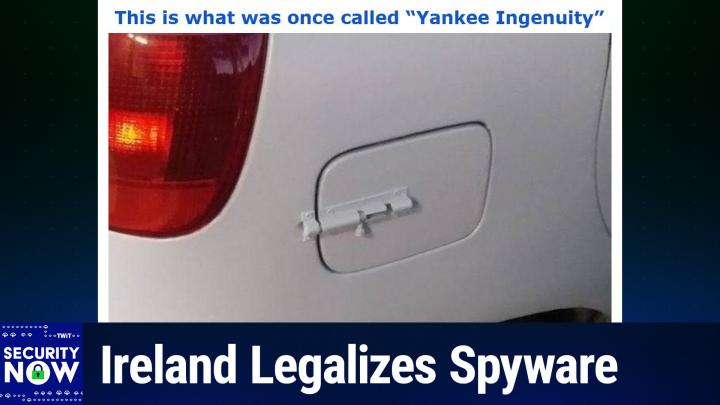
Loading summary
Transcript175 lines
- [00:00]
A
It's time for Security Now. Steve Gibson is here. He's worried. He's worried about the future of CISA in the United States. He's worried about Ireland's new lawful interception law that makes spyware legal. He's worried about AI generated malware. Yes, it's here. All that and more coming up next on Security Now. Podcasts you love from people you trust. This is twit. This is Security now with Steve Gibson. Episode 1062 recorded Tuesday, January 27, 2026. Voidlink AI generated malware. It's time for Security now the show we cover the latest security news. This computer information that you need to know with this guy right here, the king of the hill when it comes to security, Mr. Steve Gibson. Hi, Steve.
- [01:01]
B
Leo, great to be with you again for another Tuesday, the last one of January. So say goodbye to January everybody. I don't know what where it went.
- [01:09]
A
But be happy to let it go.
- [01:11]
B
I'm not gonna say many, many people. It was a bad January and from many perspectives and certainly cold also. I guess the weather has just gone crazy too.
- [01:22]
A
Yeah, really freezing cold. Well it's only 52 degrees here in California. It's just terrible.
- [01:28]
B
I don't know what to do.
- [01:31]
A
All right, what are we covering on the show today?
- [01:33]
B
Enough for volley our Checkpoint Research, I think they call themselves Checkpoint Research. Checkpoint is how we know them did a took a close look at what they recently discovered as a. The first very impressive and very concerning purely AI generated malware because the developer made the mistake so not a rocket scientist here or a security guy, kind of an anti security guy actually of leaving a directory exposed. His like what one of his servers directories was exposed. They were able to get an literally an inside look at the production of an AI generated malware. And there's some important takeaways from that which we're going to get to. But first we're going to look at unfortunately that sisa's uncertain future which I kind of thought it had been resolved. But no, our old friend Rand Paul has stuck his finger in this and is gonna maybe cause some trouble. We'll see. We've got a worrisome new law which has been passed in Ireland which we need to take a look at because for a while I actually had a working title for the podcast Leo was the State versus Encryption. And we're going to end up with a couple stories that are that which is why the podcast carried that working title until I saw that I really we need to talk about malware and AI. There is a group in the eu, the Digital Rights Group Organization, pushing back on some of what seems to be happening. So we're going to take a look at that. I, I never had a chance to hear what you guys and Alex Stamos on Sunday were talking about relative to Microsoft's acknowledgment that it has turned over some encryption keys to the FBI. We're going to discuss that. And I have, again, I didn't hear what happened on Sunday, but I have maybe a surprising takeaway for our listeners relative to Microsoft. I try to be very fair. I know I'm very hard on them. Like, most of the time, in this case, I take a different position.
- [04:17]
A
Yeah, I think you and Alex may actually be on the same page. I'll let you know what he thought about it when we get to it.
- [04:22]
B
Also, our old friend Alex Niehaus had some really useful and insightful feedback about AI enterprise usage and the how it's fraught with some dangers. I want to share that with our listeners. Another listener, Gavin, confesses that he deliberately put a database on the Internet and explains why. Oh, and there are some worries, Leo, about the need to rewind podcasts and how there may be a massive backlog that is growing, which we need to deal with. And then we're going to take a look at the emergence of. Remember our DVD rewinder from last week? Oh, that's right.
- [05:11]
A
You know, people have been leaving this show at the end and not rewinding it. I, I think this is a massive problem.
- [05:18]
B
It's. It's really. You're not thinking about the next person. Right. You're just saying, thank you very much, I took the last napkin and F you, I don't care.
- [05:29]
A
So I always do that. Or Lisa yells at me because I'll leave this much milk in the carton, you know, put it back in the fridge. And it's very disappointing to her.
- [05:39]
B
And Leo, let's not even get into being married. And toilet rolls. Oh, yeah.
- [05:44]
A
Oh, yeah. Good. Oh, yeah.
- [05:45]
B
And does it come off the front or off the back? But anyway, that's a whole other topic. We do have a picture of the week, which we may get to someday. Do we have four ads? I didn't. Or five? I didn't.
- [05:55]
A
We have, I believe, three, which is, for this show, a dearth opacity of ads. But we will, we will. I will pause. And sometimes people might have noticed this. An ad will sneak in after the fact.
- [06:09]
B
You are a cunning linguist. That's all I have to say.
- [06:13]
A
So as far as I know, I will be reading three ads. Others may be inserted against your.
- [06:19]
B
Okay, so we're going to do our five pauses.
- [06:21]
A
Yes, as always.
- [06:22]
B
Pause that refreshes my. My whistle.
- [06:26]
A
Always want to keep that whistle wetted. I will pause now to tell you about a sponsor that you probably everybody should know about because this is exactly right up your alley, Steve. In fact, it's part of your presentation when we go to Florida for Zero Trust World. The problem being if you are a company, that your vulnerability sits right there in that seat right there at the desk. Our show today, brought to you by HOX Hunt. As a security leader, you know your job is you get paid to protect your company against cyber attacks, right? But that is getting harder and harder. Not only are there more cyber attacks than ever, but these phishing texts and emails and messages that are generated with AI are really good. Very deceptive. I got, as I mentioned, I got fished a couple of weeks ago. Here's the, here's the problem. You might be using one of those legacy one size fits all awareness programs. They really don't stand a chance in today's modern world. They send at most 4 generic trainings a year. Most employees ignore them. And you know, in some ways worse, when somebody actually clicks, you know, the fake phishing email, then they're forced into embarrassing training programs that feel like punishment. And we know that's no way to learn. If you are hating the training, you're not going to learn anything. That's why more and more organizations are trying HOX Hunt. This sounds strange, but Hox Hunt makes it fun. Hox Hunt goes beyond security. Awareness actually changes behaviors. And they do it in the simplest of ways by rewarding good clicks and coaching away the bad. Whenever an employee suspects an email might be a scam, HOX Hunt will tell them instantly, providing a dopamine rush. It gets your people to click, learn and protect your company. Like gold star stickers. Confetti as an admin hawkshunt makes it easy to automatically deliver phishing simulations as often as you want in every form. You want email, slack teams, whatever. And you can use AI to mimic the latest real world attacks to make your simulations as good as the real phishing emails. Simulations can even be personalized to an employee based on department location and more. And these instant micro trainings are so much better than the kind of like two hour flash thing that you've had to sit through. These micro trainings are quick. They solidify understanding. They drive lasting, safe behaviors. You can trigger gamified Security awareness training that awards employees with stars and badges, boosting completion rates and ensuring compliance. Because it's fun, you'll choose from a huge library of customizable training packages or you can even generate your own with AI Hawkshunt. They've got everything you need to run effective security training on one platform. Meaning it's easy to measurably reduce your human cyber risk at scale. But you don't have to take my word for it. Over 3,000 user reviews on G2 make hocks hunt the top rated security training platform for the enterprise including easiest to use best results also recognized as customers choice by Gartner. Thousands of companies love it. Qualcomm, AES, Nokia all use Hoxhlund to train millions of employees all over the globe. Visit hoxhunt.com securitynow today to learn why modern secure companies are making the switch to HoxHunt. That's Hox Hunt.com Security Now Hox Hunt like Fox Hunt but with an H. So it's H O X h u n t.com security now instead of hunting the fox, you're hunting the wily hacker. Hoxhunt.com Security now we thank them so much for their support of Steve and the efforts he makes every Tuesday for us. So I've got a picture of the week and we.
- [10:29]
B
It's another popular one. It generated a lot of feedback as these have been recently. I gave this in the title. This is what was once called Yankee Ingenuity.
- [10:39]
A
Okay, let me put it up on the big screen and we can look at it together here. I'm going to scroll up. Yankee Ingenuity. Okay, you want to describe that.
- [10:55]
B
So we don't really know what the backstory is, what's going on here, but when we were growing up, we probably encountered like garden gates where you, you had a. It was a. It was a slider that slid into a mating capture retainer.
- [11:17]
A
I'm sure there's a name if you go to the hardware store. It's some sort of slide bolt or something.
- [11:22]
B
Yeah. And, and so you would, you would, you would lift that the arm up, slide it over them, then put it back down and it would. Gravity would keep it rotated so that it would stay either locked open or locked closed. Anyway, you know, I mean, it's meant for some barn, right? A barn door kind of thing. Well, apparently somebody's having some sort of problem with their gas cap cover of their car.
- [11:48]
A
It's been popping open.
- [11:49]
B
And what really impresses me, Leo, is they did not leave it looking like, you know, silver chrome. Oh no, it's been body painted to be to match the car perfectly. So you, unless you were, I mean if you were walking by it, you might miss the fact that they'd added a barn door closing lock to the outside of of their gas cap cover. So one of our insightful listeners who received it, I got the email out actually early this week. They went out Sunday evening although Microsoft took it upon themselves to decide that GRC was not trustworthy. So 1547 of the piece of the 9 of the nearly 20,000 is 19800 and something 1547 were all blocked at. They went if they went to outlook.com or hotmail.com when I saw that that had happened I was able to collect them and they went out with no trouble at all last night. So it's like okay, Microsoft, I guess maybe Sunday freaked you out. I don't know because normally I do on Monday or Tuesday anyway. No, I mean it just that's some AI you know, had a spasm and.
- [13:08]
A
So it's never going to stop, Steve. There'll always be a little bit of this here or there, I'm sure. I'm convinced. It's just, you know.
- [13:14]
B
Yeah, well the, it's, there's. The spammers are trying to look legitimate and so there, there's a value judgment that's having to be made. So any, in any event, this listener said well, you know what that is? I thought no, that's two factor authentication. You've got the in inside. You have to pull the trigger to release the cap and then you have to come around outside and use the second factor to slide the bolt over in order to open the cap. I suspect what most of our listeners do that the automatic cap closer holder broke and so you know, the COVID was flapping in the breeze and they said hey, you know, we got it. We used to have a barn but we don't have it. But we do have the lock that used to keep.
- [14:01]
A
They're probably closed patting themselves on the back because initially they used duct tape to hold it closed and then they decided to really upgrade it with the.
- [14:09]
B
Slide which would explain the need to repaint the car in the same color. Yes, that would make sense. Okay. So I've said for years that I have been pleasantly surprised by the success and effectiveness of cisa. You know, it's been an amazing success. The Cyber Security and Infrastructure Security Agency awkwardly named but boy are they doing a great job. Since its creation 11 years ago 2015, it's been a. CISA has been a huge win for our nation's cybersecurity. You know, my, my default belief is that government has a difficult time getting out of its own way way more often than not. So CISA was a welcome and actually well needed exception to that. As this podcast has covered since its inception, they've been able to mandate that government agencies pay needed attention to many specific critical security problems that would otherwise have fallen through the cracks. You know, the government agencies have better things to do than oh well, why we really don't want to do an update. They'll have to have our network down for, you know, blah blah, blah, whatever. And, and besides, nothing's happened yet. Right? You know, and CIS has also been empowered to set deadlines which had to be honored. Their creation of Kev Kev, the Known Exploited Vulnerabilities catalog was a brilliant means of focusing those always limited and readily, you know, distracted bureaucratic resources where they were needed. And yeah, it's true 125 security things happen on the second Tuesday of the month. But it turns out that two of those are really critical. And CIS has been been instrumental in saying get to the other things when you can, but do these now because these really matter. So that's all been good news. The bad news is that CISA was not created to be a permanent entity. Sadly, the Constitution of the United States is completely silent regarding the need for a permanent cybersecurity watchdog agency within the federal government. I guess our forefathers were unable to foresee that. This means that politicians created CISA and politicians are required to keep CISA funded and and authorized. Last week the record updated us on the state of CISA's continuation writing congressional leaders on Tuesday. Meaning last Tuesday released a compromise government funding bill that would once again temporarily, temporarily extend the life of two key cybersecurity laws. The bipartisan legislation would reauthorize the 2015 Cybersecurity and Infrastructure Security Act, CISA or agency and the state and local cybersecurity grant program pushing it through the end of September. The extension in the $1.2 trillion, that's the entire funding bill. $1.2 trillion is the latest short term solution in a months long saga for CISA 2015 which provides liability. We've talked about this just last week li crucial liability protections to encourage private companies to share digital threat information with the federal government. And as we've said, it's like they're not going to do it unless they have liability protection. It was the the the C Suite executives made that very clear. The record says both statutes received widespread support from the cybersecurity community and the Trump administration prior to their expiration last year. They received temporary reprieves in the continuing resolution that reopened the government in November. The House did approve a bill to extend the grants effort, but there's been no action on the Senate side. Meanwhile, several proposals have been introduced to reauthorize the the 2015 CISA long term. Please let let that happen. We like why let's not make this another football that we keep kicking this we need and not having it has already like stalled the like there's now a gap that needs to be filled because industry went silent as soon as they lost their liability protections anyway, the record wrote the House Homeland Security Committee last year passed legislation to renew it for a decade. Thank you. With minor updates, but it hasn't been scheduled for a floor vote. A bipartisan Senate duo introduced a bill that would extend the law for 10 years. Yes. And provide retroactive protect retroactive protections for companies that shared cyber threat data even after the law lapsed. But as I mentioned, the record writes Senator Rand Paul, chair of the Senate Homeland Security Committee, has drafted a bill that would trash the legal protection outlined in the original statute. Well, thanks. They wrote. House leaders plan to hold a vote later in the week on the spending deal which boosts defense funding to over 839 billion with a B dollars. Lawmakers have 10 days to clear the package for President Donald Trump's signature before federal funding is set to lapse for the programs it covers. With a Senate in recess this week, meaning last week, the upper chamber will need to approve the legislation when they return next week, meaning this week if Congress is going to head off another funding lapse and a partial government shutdown. And as a total aside, there's a lot of conversation now that looks like we may be going into another shutdown over the dsh, DHS and the the reauthorization and increase in other aspects of the budget. So we'll see. And I don't know what's up with Senator Rand Paul. He's always something of a wild card and pretty much a pain in everyone's butt. But after first being elected to the Senate in 2010, he's been reelected twice since, every six years. So he seems to be what his state of Kentucky wants in a senator. Of course he shares that position with Mitch McConnell, but in this case it will be very bad if he gets his way. As again, as we noted last week, the Executives of the nation's private infrastructure agencies consider that their vulnerability and breach disclosure protections to be critical and a crucial feature of this legislation. So much so that it. In this, in, in the, the. The bills that are being talked about, protections are being made retroactive because they've said we need to have that. You asked us to keep talking to you after CISA lapsed, and we did, some of us, so you need to protect us from that anyway. No one can make these executives disclose information which is privately held if they choose not to. So if the government wants to know what's going on, as it should, then protecting those who are voluntarily disclosing is the entire point of this aspect of the reauthorization. You know, we should know in another week or two whether the politicians have now screwed up what had been a surprisingly well designed and well working system. As I said, when, you know, we Talked about this 10 years ago on the podcast, when it happened, it's like, oh, great, you know, another Homeland Security Agency. Well, then we got surprised because it just, it was so effective and so useful. Of course, at the time, it was really well managed. It was Chris Krebs who was, Was he the original. I don't remember.
- [22:56]
A
No, he was the one who was fired because he said the election was secure.
- [23:02]
B
Right. They looked very closely at the 2020 election. Yeah.
- [23:05]
A
Yeah.
- [23:06]
B
So I would imagine he was, because if that was 2020 and the. It was created in 2015, then it would have only been five years old at that point.
- [23:14]
A
Yeah, we talked. Okay, so Alex Stamus is a partner, of course, for a long time. Was Chris Grimes. Yeah.
- [23:19]
B
Right. Okay. So one of the reasons that I was the, the working title of the podcast until I got to the news about AI and malware was the State versus Encryption Is Ireland's new lawful. I just love this word. There's this phrase, lawful interception law. Right. They can make whatever laws they want. So the first half of this next piece is the new. Is the news that Ireland has just passed a new lawful interception law, granting the government significant new powers. The short blurb that carried that news, it. The, the short blurb just said. This is all I first saw. It said, the Irish government has passed a new lawful interception law. The new legislation grants law enforcement and intelligence agencies the power to surveil any type of modern communications channel. It also grants the agencies the right to use covert software for their operations, such as spyware. The new law, huh? It's not. It's not. You don't have to be ashamed or bashful or shy or pretend you're not doing it anymore. Now it's a law. Now it's legal. The new law, it's this little blurb said will also require communication service providers to work closely and aid any government operation. Okay, so add this to the other recent news of pending and enacted legislation. You know, we, we are clearly witnessing. Remember we talked last week about Germany. Basically we can't pronounce the name of the agency because it's got 25 letters in his name but. And mostly consonants, but they're doing the same thing. So we're seeing, we're witnessing an accelerating trend in governments legislating themselves, sweeping rights to intercept, monitor and, and eavesdrop upon pretty much anything they wish. Okay, so this week we have similar legislation to what we discuss we talked about in Germany last week, which has passed. It was pending in Germany. Ireland passed this. So I scanned last Tuesday's press release from the Irish government from which I'm going to excerpt two pieces, just two notable pieces. The first point talks about the clear need for an update to their very old law. I don't think anybody would agree with, would argue with that because that was the original law that's being updated by this legislation is from 1993 and you know, need to update. That's non controversial. But point number two says that the new law includes, quote, a clear statement of the general legal principle that lawful interception powers needed to address serious crime and security threats are applicable to all forms of communications. So to call this sweeping, you know, I don't know. I mean, that's the right word for it, right? They, they specifically write, the Minister proposes, and the language here is proposes, but this law passed. Just to be clear, the Minister proposes an updated legal framework which is flexible and includes comprehensive principles, policies and definitions to allow for lawful interception powers to be applied to any digital devices or services which can send or receive a communications message, for example, the Internet of Things and email and digital messaging devices and services. The legislation will provide for a clear statement, which is to say the legislation does provide a clear statement of general principle that lawful interception powers apply to all forms of communications, whether encrypted or not, and can be used to obtain either content data, they say, the substance of a communication or related metadata data that provide information about a communication, but not its content, such as phone call or email, time, date, sender, receiver of a communication, the geolocation of an electronic service or source and destination IP addresses. But they're specifically also saying and the content. And it says the legislation will also apply to parcel delivery services. The Minister's view, they write, is that effective lawful interception powers can be accompanied by the necessary privacy, encryption and digital security safeguards. Right. Because. Because they're expert in this, leo. The. These legislators, they know their crypto. It says. In June 2025, the EU Commission published a quote roadmap for lawful and effective access to data for law enforcement, unquote, which stated that terrorism, organized crime, online fraud, drug trafficking, child sexual abuse, we knew we were going to get to the kids online. Sexual extortion, ransomware and many other crimes all leave digital traces. Around 85% of criminal investigations now rely on electronic evidence. Requests for data addressed to service providers tripled between 2017 and 2022, and the need for these data is constantly increasing. I love the fact that they're. That they treat the word data as plural. I always do that. Right. I know, it's just. It's so nice. It's refreshing to see it and. But it always surprises me because I don't remember to do it. They said the com. The Commission paper includes proposals to deliver a technology roadmap on encryption issues with expert input and emphasis. Emphasizes the need to reconcile technology. Reconcile technology and lawful access concerns. Oh, gee, you think? Through industry standardization activities, this EU initiative complements the Minister's proposed approach to reforming the law on interception in Ireland. And it will inform the development of the general scheme. And that's capital G, capital S. So the general scheme is something that they're going to inform and develop. So. Okay. I have of course, much to say about this, but I want to first share the pre release's fourth point regarding, quote, the inclusion of a new legal basis for. For the use of COVID surveillance software as an alternative means of lawful interception to gain access to electronic devices and networks for the investigation of serious crime and threats to the security of the state, they write. The Minister also proposes to provide a legal basis for the use of COVID surveillance software as an alternative means for lawful interception to gain access to electronic devices and networks for the investigation of serious crime and threats to the security of the state. This is used legally in other jurisdictions for a variety of purposes when necessary, such as gaining access to some or all of the data on an electronic device or network, covert recording of communications made using a device, or disrupting the functioning of a personal or shared IT network being used for unlawful purposes. The Minister proposes to take into account a 2024 report from the European Commission for Democracy through Law to the Council of Europe, the Venice Commission on this subject, which Was titled quote, report on a rule of law and human rights compliant regulation of spyware. So in other words, conduct that has historically been denied by governments which were doing it anyway and which no state agency would admit to using or doing is now being ratified into law and made explicitly legal. I believe that any objective observer who's witnessed the earlier saber rattling and more recently both the pending and enacted legislation that governments are, are, you know, seem determined to, to pursue would have to conclude that we are currently in an environment of slowly eroding privacy protections. Encryption happened, right? I mean the math happened. And along with everyone else who appreciated knowing that their communications were private, you know, which, you know, it was just kind of like okay, thanks, that's nice to have. Bad guys started using it and they soon discovered that it protected them from law enforcement. While encryption was not created by any means to protect criminals, the privacy it affords everyone, you know, the privacy it affords doesn't know or care whether you're doing good or breaking the law. It's your, your communications is encrypted. So when bad guys began hiding behind the same encryption that everyone else was using because it was there, law enforcement quite reasonably asked providers for the contents of the bad guys encrypted messages. And they were told that the system had been deliberately designed to provide absolute communications content privacy for all of its users, regardless of their use. And that we, the providers of this technology were, were unable to comply with lawful court orders to turn over their users data. They said they did not have that data and they had no means of obtaining it. Now that stumped the world's governments for a few cycles until someone had the bright idea to simply require the world to work differently. They said, we all agree that citizens have fundamental rights to privacy except in cases where that privacy is being abused and is not in the public interest. So we've decided that we will determine when and where people should have privacy. And since we're a nation of laws, we're going to make it legal to do whatever we need to in order to obtain the privacy violating access to our citizens communications that we've determined we need to have. Always of course, in support of the greater good. And besides, think of the children. You know, that same objective observer that I talked about before would see that we're currently in a period of transition. The truth of encryption caught the world's governments off guard. They've all seen the same movies that we have. Those movies, think about it, uniformly depict both hackers and intelligence services cracking the encryption. Whether you Know, like. Like whenever they were asked to, whenever it was really necessary to do so. So everyone knows that really good encryption just takes somewhat longer to crack. Right? That's what the movies all showed us. The politicians just assumed that was true. Why wouldn't they? They believed that was the way encryption really worked right up until they encountered the truth of today's encryption. They didn't really understand that modern encryption is absolutely unbreakable. That's what the industry created, period. So what we've seen is that it took them several rounds of stumbling and failed legislation and, and trying to figure out how to ask for what they wanted to finally figure out that what's actually needed is for them to outlaw any encryption that no one can break. They want the encryption we have in the movies, and they're going to keep writing and rewriting legislation until they get it. So the formal legislation of the use of spyware is just the next step along that path. Now they're saying we're going to make our use of spyware legal. That will be lawful if we decide that we need to deploy it in order to obtain access to encrypted communications. Another step down that path. So we're not yet where we're going to end up. But again, our objective observer of the last several years would have to conclude that the world's governments, their law enforcement and intelligence agencies will not be satisfied until it's possible to obtain access to the communications, probably of anyone they desire.
- [37:30]
A
It strikes me this is a pretty savvy move on the part of the Irish government because I think what they're recognizing is, well, we can't demand clear text from Signal, WhatsApp and all these companies. So the next step is, and we've talked about this before, to go pre encryption, to go where the messages are in plain text, that is on your device, pre encryption. And to do that, they need the spyware. So I think this is the next stage. And this is saying, all right, I get it, Signal is going to withdraw from Ireland if we make it illegal to have strong encryption. So, oh, I got it. We'll just get on everybody's phone. This is the next step. After this is what Russia and China do, which is mandate that you put a special app on the phone so that we can see everything that's going on. Yeah, but. But that's. Now the interesting thing is they may have to go to that point, because I think they may be. Here's where they're technically less literate. They may overestimate the ability of Spyware to do this. Right. But these kinds of exploits are not easy to get. No, they're generally one time use because you know Apple will patch it the minute they figure it out.
- [38:52]
B
Exactly. As soon as anyone finds it, they're able to say whoops, you know, so.
- [38:58]
A
They may have a, this may be where they're, you know, they, before they thought oh we can break encryption. Now maybe they're starting to realize we can't. Oh, but spyware. But maybe they don't really understand that it's not as trivial as you might think. I mean I guess the NSA had its tools out. What we learned from Edward Snow.
- [39:15]
B
And you're right, it, it may be that where we end up where, where they for example the EU ends up is requiring an app on everyone's phone.
- [39:24]
A
I think it's the only. It's the ultimate. Right?
- [39:27]
B
Yep.
- [39:28]
A
Everybody has to run this app and then they can see everything. And it's all pre encryption. So signal. You can still use signal.
- [39:36]
B
Well, yes, it's bad PI. We, we, we, we. You know pre Internet encryption was a great thing once.
- [39:43]
A
Now pre Internet decryption, it's pin.
- [39:45]
B
Yeah, yeah.
- [39:50]
A
But the other, the other good side of this is as you say, the math happened and it's all, it's easy. It's well known how to do encryption now. So it's.
- [40:00]
B
So the counter argument is when it's illegal, only the criminals will use it.
- [40:05]
A
Right. Or people who are motivated and, and or smart enough to figure out how to do it without.
- [40:11]
B
Well, it again, it. I mean they're going to outlaw, they're in. They're going to outlaw their inability to spy.
- [40:19]
A
Right.
- [40:20]
B
In which case you will be a criminal even if you're just encrypting to talk to your mom. If they want to see what you said to mom and you're unwilling to give them the keys, then you're guilty of that.
- [40:32]
A
You know, I said this in an interview 25, maybe no 30 years ago, that ultimately hackers might be the freedom fighters of the 21st century. That the people who understand how to get around these things may actually be the people who are fighting for our freedom. Yeah. Neo. Neo, yeah, right. Neo, The Matrix. All right, I'll let. Do you want to, do you want to refresh? Do you want to hydrate? Okay, he's nodding folks. You can't hear it, but his head is vigorously bobbing up and down and he has a gigantic mug of Joe in his hand. Our show today, actually, brand new sponsor. I want to tell you about. I'm very excited to welcome Trusted Tech to Security. Now, this is something you may need. If you're using Microsoft 365, there's a pretty good chance you're paying for licenses you don't need. Or it can go the other way. You might be missing ones you do. And let's not forget that coming in July, Microsoft is going to implement a significant price increase for M365. And with it there'll be a lot of nuance, a lot of subtleties. Trusted Tech helps businesses of all sizes get the most out of their Microsoft investment by ensuring that their M365 environment is well supported and aligned with how the business actually operates. So you're not spending too little, you're not spending too much. It's just right. But that's something it's nice to have some help with. Microsoft licensing is very complicated. The options can vary widely. But trusted tech, they're the experts. Their team helps organizations understand what they have, what they need, and how to get the most out of what they're paying for. If you want to make sure you're getting M365 done right, trusted tech can help you right now. You can go there and get a free Microsoft 365 licensing consultation. It's very straightforward, won't take much time. They're really good at this. These are the pros. Visit TrustedTech Team and don't forget this part. SecurityNow365 that's TrustedTech Team SecurityNow365 where you get a clear data backed view of your current licenses, optimization opportunities and next step. You know, if you're wondering, Kevin Turner, former Microsoft coo, has very good things to say about trusted tech. He vouches for him. He says, quote, trusted tech has an incredible customer reputation and you have to earn that every single day. The relentless focus you guys have on taking care of customers gives them the value and differentiates you in the marketplace. That's high praise from a guy who knows Trusted Tech also can elevate the Microsoft support experience with its certified support services. You can ask them about that. And by the way, some of the biggest and best use trusted tech for their certified support services. Enterprises like NASA, Netflix, Neuralink, Apple, Intel, Google and Lockheed Martin. Okay, you couldn't get a better list of Clientele and they're saving 32 to 52% compared to the average Microsoft Unified support agreement. Great support for less. Whether you're looking to fine tune your Microsoft365 licensing or improve the way Your organization receives proactive Microsoft support or both. Trusted Tech offers free consultations to help you understand your options. This is a name you need to know. Go to trustedtech team/securitynow 365. You could submit a form to get in contact with Trusted Tech's Microsoft licensing engineers. The guys who know trustedtech team/securitynow365 use that address. Make sure you do, because that way they'll know you saw it here. Trustedtech.team Security Now 365 and we thank them for believing in us and supporting the the mission of Steve Gibson and Security Now. Thank you Trusted Tech. Back to you, Steve.
- [44:46]
B
So the day after Ireland proudly enumerated the various features of its newly passed expansive legislation, EDRi, the European Digital Rights Organization, perhaps in response to Ireland's announcement posted under the headline EDRi launches new resource to Document Abuses and Support a full ban on Spyware in Europe. And you know, okay, good luck. It seems that the European Union has their own equivalent of the EFF and its edri. Their posted piece begins by stating the context Europe's spyware crisis remains unresolved. And they write, spyware remains one of the most serious threats to fundamental rights, democracy and civic space in Europe. And of course, Leo, as you just pointed out, spyware is where Europe wants to go because they want the access that they can't get. EDRI said. Over the past years, repeated investigations have shown that at least 14 EU member states have deployed spyware against journalists, human rights defenders, lawyers, activists, public political opponents and others. Notice, we're not, we're not saying criminals, we're saying people we don't like for one reason or another. We're going to just spy on them. So who imagines that that won't accelerate hugely if spyware is made legal anyway? That's me, edri said. These cases have revealed the reality of an opaque, dangerous market that thrives on exploiting vulnerabilities and endangering us and the state's reluctance to provide any accountability or justice for victims. Right, so they're going to legalize. They're going to legalize what they've been doing. Despite the findings of the European Parliament's PEGA inquiry committee in 2023 and the push from human rights organizations, the European Commission has so far refused to follow binding legislation to prohibit spyware. Not only that, it has done nothing. Right now, no EU wide red lines exist against the use of Spyware. Well, right, 14 states have done it and they want to be able to keep doing it. So they wrote. This means that victims lack effective remedies, authorities face no scrutiny, and commercial spyware vendors continue to operate with near total impunity, enriching themselves by violating human rights and even benefiting from European public funding because after all, this is taxpayer dollars that are, you know, and these spywares not cheap. At the same time, they said, this political inaction is increasingly being challenged. Investigative journalists, researchers and civil society organizations have continued to expose spyware's human impacts and the opaque markets behind its development and deployment. A broad coalition of civil society and journalism organizations has openly called on EU institutions to end their inaction and to adopt a full ban on commercial spyware. Adding to this push, EDI has also adopted a comprehensive position paper calling for a full ban on spyware in the European Union as the only possible path forward from a human rights perspective. So, you know, basically the, the battle is escalating and, and it's being made more visible and more public. We got EU states wanting to legalize their use of spyware and the human rights privacy protecting organization saying, let's make it very clear that this is not legal. They said our collective refusal to accept the normalization of the use of spyware is also visible inside the European Parliament. On 21 January this year in Strasbourg, an informal interest group against spyware was launched, bringing together MEPs from across political groups with the aim of maintaining scrutiny and challenging the Commission's inaction. While this does not replace legislative action, it signals that political pressure is growing instead of fading. Right. Like I said, it's becoming more and more public, so we'll see what happens. The this spyware document pool that this posting introduces is a really terrific piece of work. I'm only going to share a tiny piece of it, but I've dropped a link to the entire pool into the show notes. It's the the end of the URL is Spyware document pool and it's at the top of page six in the show notes. The piece I wanted to share from it addressed the nature and the size of the commercial spyware market. They wrote, the commercial spyware market has grown rapidly over the past decade. This market is now worth billions of euros, driven by the sale of these tools to governments, law enforcement agencies, and sometimes private actors. Its growth is fueled by an ecosystem that combines technological sophistication with near total opacity, allowing companies to operate across borders and evading accountability. This makes spyware a highly profitable yet extremely dangerous sector where abuses remain hidden until uncovered by researchers or investigative journalists. The global Spyware industry is estimated to be worth on the order of 12 billion euros per year.
- [51:10]
A
It's illicit though, right?
- [51:11]
B
I mean, that's absolutely. It is not legal anywhere. Right.
- [51:15]
A
That's amazing.
- [51:17]
B
12 billion euros companies are, are paying, you know, like Maduro in Venezuela is like, you know, he would be a typical customer because he's got lots of money and he would like to spy on anybody who opposes him publicly.
- [51:34]
A
Well, now they're going to get the Irish government as a customer. So that's good, right?
- [51:40]
B
More than 880 governments have contracted for commercial spyware, according to the UK's Cybersecurity Agency.
- [51:50]
A
Well, that's like half. That's like Everybody.
- [51:52]
B
Yeah. In 2023, there were at least 49 distinct vendors, along with dozens of subsidiaries, partners, suppliers, holding companies and hundreds of investors. Across the supply chain. 56 of the 74 governments identified by the Carnegie Endowment procured commercial spyware from firms either based or connected to Israel. The Israeli firm Paragon was acquired in 2024 by an investment firm in a deal worth up to 900 million euros. And this is the market that Ireland, as we have been saying, has just taken out of the shadows and made legal for their own use, for what they're calling lawful interception. Wow. The other piece of data that I thought our listeners would find interesting was about the market for the vulnerabilities that enabled the creation and deployment of this spyware. They write, the buying and selling of zero day vulnerabilities is closely linked to the spyware market. As these flaws allow spyware to bypass security protections and operate undetected. The vulnerabilities market is dangerous because it magnifies risk. A single zero day can compromise millions of devices. Once a vulnerability is found, the risk is any. The risk is that anyone can exploit it. So, and they're saying, for example, by comparison, if you, if a good guy finds a zero day, they report it, probably receive a bounty and it's removed from the ecosystem, it's removed from the device. However, spy were using a zero day never wants to disclose it. They want to use it as long as they can so that zero day remains present until it's somehow discovered. So thus magnifying risk. Also, it drives innovation in spyware. Spyware vendors continuously adapt their tools to exploit newly discovered vulnerabilities. Of course, as we know, it also drives Apple to keep revising their chips. In this ongoing cat and mouse battle against what the spy was able to do, it lacks accountability. Vulnerabilities are traded secretly with minimal regulation, creating an ecosystem with no rules, that poses a risk to all of us. Concentration multiplies risk. Many people are using only two OS, Android and iOS. And some apps are globally used. WhatsApp, Gmail, and so forth. Once someone breaks into one of these systems, they can have access to hundreds of millions of devices. And Leo, this is the point you often make about our monoculture. You know, the fact that there's basically either Android or iOS, there are not 20 different OSs, each struggling to maintain their own security. So this makes the point that because we have such a very vertical and narrow selection of platforms, you find a problem, you get access to a huge chunk of the world. They wrote a zero day vulnerability costs via brokers between first. Okay, so this is what the payout is for. Zero day vulnerabilities today, five to seven million dollars for exploits targeting an iPhone. That is you find a zero day for an iPhone today and through a broker you can obtain between 5 and 7 million dollars. Android phones get up to 5 million. Chrome and Safari, 0 days are between 3 and 3.5 million dollars. WhatsApp and iMessage pull between 3 million for WhatsApp, 5 million for iMessage.
- [56:07]
A
But this proves my point. They wouldn't be worth that much if they were so easy to use and you could use them in a widespread fashion. These are very targeted, very specific attacks.
- [56:18]
B
Yes. And the reason they're getting that much money is of course the spyware vendors then turn around and charge that much money per customer to the nation states. Yeah, yes, exactly. Which ultimately the taxpayers finance.
- [56:35]
A
Yeah. Oh, that's nice.
- [56:36]
B
You know, governments don't generate their own cash. In 2024, the Google Threat Analysis Group reported that 20 out of the. Okay, 20 out of the 25 vulnerabilities found on their products, which this is Google's tag group, so that's Android and Gmail. In 2023, 20 out of 25 were used by spyware vendors to perform their attacks. As of June 2025, more than 21, 500 new vulnerabilities had already been published. So we're seeing a rate of 133new vulnerabilities per day across. You know, not all high quality zero days in iOS obviously, but broad spectrum. 133 vulnerabilities are being found of all types, everywhere per day. They finish or I'm finishing quoting this piece of it by right. Even though at least 14 EU countries are reported to have used commercial spyware, regulation in Europe remains entirely absent. So Germany is saying we want to do this. Ireland is saying, now we can do this. And the European Union is for whatever reason making noises like, oh, this is bad, but they're not actually taking any action. So to say that the future of encryption currently exists in a state of tension and uncertainty I think would be no overstatement given the reality of the overwhelming power of the world's governments and the necessity for vendors to abide by their laws. Right. I mean, as, as we know, all signal can do is say, well, we're leaving. They, they just can't ignore the laws in the prevailing regions where they want to operate. As much as I wish it were not the case, I do not see the interests of the EFF and the EDRI ultimately winning out here. Governments are never going to be satisfied until and unless they're able to intercept and monitor the communications of specific groups of individuals under the order of their courts. At a minimum, that's clearly the path that we're on. And as for the absolute or the legal use of absolute encryption, I would say enjoy it while it lasts. Eventually only criminals will be able to use unbreakable encryption. You know, its use will have been criminalized so that those who do use it, as I said earlier, will be guilty of at least that. And I think that's, I think that's where we're headed, Leo. I, I mean, governments do not do that. They're just going to object. And it's, it's unfortunate too, because, you know, while pre Internet, when law enforcement had to use more analog means, you know, wiretaps and, and physical searches, everything wasn't binary either. Like, yes, encryption, you have encryption or you don't. I mean, in the analog world there's, you know, hiding stuff in a mattress. I mean, it was a different world. Now it's either, it is absolute. I mean, it would almost be better if encryption actually worked the way it did in the movies, but was also very, very, very hard to break where if you really, really, really, really needed something, you could get it. Unfortunately, what's going to happen is governments are going to legislate themselves the ability to flip a switch and, and have it all. They're, they're going to say if, you know, a phone operating in, in within the European Union must have our software on it and oh, it'll have some benefits. It'll, it'll be, you can use it to take the train and, and fly and you know, it'll be, you know, stand in for, for, for you and, and be a digital ID and other things. And it'll also Be there, able probably to capture what they want to, when they want to.
- [61:09]
A
It's. I mean, I. You could absolutely have a program on a phone that would see all plain text, you know, everything that was typed in or dictated in.
- [61:21]
B
Yep.
- [61:21]
A
Before it went into an encrypted.
- [61:23]
B
Yep.
- [61:24]
A
That wouldn't be hard to do. You'd have to violate maybe some of Apple's rules. But if you're the government, you say, oh, Apple, you don't have to approve this app. We're just going to put it on every iPhone.
- [61:35]
B
Yeah.
- [61:36]
A
You can see everything.
- [61:37]
B
Any macro program that we're used to is able to watch what you do, capture those actions and then store them. Well, it could also be capturing the keyboard.
- [61:48]
A
This argues very strongly for an open source operating system. I wish I had a phone that I could really use with an open source operating system. And now with Vibe coding, I could probably, before this show's over, seriously code up a. You know, I say use NaCl or some well known crypto library that's reliable. And I would like you to write me a encryption and decryption program and I'm going to send my friend Steve the decryption program. And you know, I think that would be. So it's going to be very difficult to control this. This is like a print your own gun thing.
- [62:27]
B
I mean, but yes, it is difficult to control. But that encryption decryption program that you just mentioned, hypothetically, it uses os APIs.
- [62:39]
A
Right.
- [62:39]
B
So I mean, it doesn't actually have. There's no action access to the, the XY coordinates that the user's touching on the screen. That service is provided by the os, so that can always be tapped at that level.
- [62:56]
A
Yeah. I mean, you could capture scan codes from a keyboard, so there's nothing to keep the OS from seeing those as well.
- [63:02]
B
Yeah. You need to send me the leophone.
- [63:06]
A
Right.
- [63:06]
B
And, and leophone is open source and.
- [63:09]
A
We have open source hardware and open source software and make sure no government intrusion on either.
- [63:16]
B
Yeah.
- [63:17]
A
Well, you know that there are people who will be strongly enough incentive to do that, to do that. And that, ironically, is the people the government wants to catch. The normal people who aren't doing that. Yeah, we're sitting ducks.
- [63:34]
B
Yeah. Which brings us to Microsoft and BitLocker.
- [63:41]
A
Oh, yeah.
- [63:42]
B
After this next break.
- [63:43]
A
Okay. And we'll talk about this. This is a news story this week which we talked about on Twitter and Alex Stamos, who is a very well respected security guru who did have his thoughts. I want to hear what you have to say.
- [63:53]
B
About it.
- [63:54]
A
And I'll give you Alex's thoughts as well.
- [63:55]
B
Perfect.
- [63:56]
A
Coming up on Security now, our show today, brought to you by Zscaler, the world's largest cloud security platform. You know, we talk about AI and if you're a business, I think it's just generally accepted that if you're not using AI, that would be kind of the equivalent to a business saying, well, we don't really need a telephone either. We'll just take orders by carrier pigeon, I guess. So the rewards of AI cannot be ignored. But there are risks and those should not be ignored. Right? And the risks aren't just bad guys. The risk is also loss of sensitive data through the use of AIs, both local and, and SAS. And then of course there's the attacks against enterprise managed AI, the prompt injection. And bad guys are also using generative AI and that's really increasing their capabilities. They can rapidly create phishing lures that are pitch perfect. They can write malicious code, they can automate data extraction. We're going to talk about writing malicious code in just a little bit. It's happening now. So there's all these issues. There were 1.3 million instances of Social Security numbers leaked to AI applications by businesses using AI applications. Right? Not intentionally. ChatGPT and Microsoft Copilot together saw nearly 3.2 million data violations last year. There is a solution. It's time for a modern approach. Zscalers Zero Trust plus AI zero Test removes your attack surface. It secures your data everywhere. It safeguards your use of public and private AI. Yeah, Zscaler can do that. They can even protect you against ransomware and AI powered phishing attacks. Check out what Siva, the director of security and Infrastructure at Zora says about using Zscaler. Watch. This AI provides tremendous opportunities, but it also brings tremendous security concern when it comes to data privacy and data security. The benefit of Zscaler with ZIA rolled out for us right now is giving us the insights of how our employees are using various gen AI tools. So ability to monitor the activity, make sure that what we consider confidential and sensitive information according to, you know, companies, data classification does not get fed into the public LLM models, et cetera. With Zero Trust plus AI you can thrive in the AI era. You can stay ahead of the competition and, and you can remain resilient even as threats and risks evolve. Learn more@zscaler.com Security that's Zscaler.com Security we thank him so much for supporting Security now and Steve Gibson. All right, let's talk about this BitLocker thing.
- [66:45]
B
Okay, so on the heels of Microsoft news and eDri's pushback comes Microsoft's admission that they provided BitLocker keys to the FBI. When asked, the headline of Thomas Brewster's piece in Forbes, which set off this firestorm of discussion and controversy, was quote, Microsoft gave FBI keys to unlock encrypted data, exposing major privacy flaw with the tagline. The tech giant said it receives around 20 requests for BitLocker keys a year and will provide them to governments in response to valid court orders. But companies like Apple and Meta set up their systems, so such a privacy violation is not possible. Okay, so here's what we know from Forbes reporting, Thomas wrote. Early last year, the FBI served Microsoft with a search warrant, asking it to provide recovery keys to unlock encrypted data stored on three laptops. Federal investigators in Guam believed the devices held evidence that would help prove individuals handling the island's Covid unemployment assistance program were part of a plot to steal funds. The data was protected with BitLocker, the software that's automatically enabled on many modern Windows PCs. To safeguard all the data on the computer's hard drive. BitLocker scrambles the data so that only those with a key can decode it. It's possible for users to store those keys on a device they own, but Microsoft also recommends BitLocker users to store their keys on its servers for convenience. While that means someone can access their data if they forget their password, or if repeated failed attempts to log in lock the device, it also makes them vulnerable to law enforcement subpoenas and warrants. In the Guam case, Microsoft handed over the encryption keys to investigators. Microsoft confirmed to Forbes that it does provide BitLocker recovery keys if it receives a valid legal order. Microsoft spokesperson Charles Chamberlain said while key recovery offers convenience, it also carries a risk of unwanted access. So Microsoft believes customers are in the best position to decide how to manage their keys. He said the company receives around 20 requests for BitLocker keys per year, and in many cases, the user has not stored their key in the cloud, making it impossible for Microsoft to assist. The Guam case is the first known instance where Microsoft has provided an encryption key to law enforcement. Back in 2013, a Microsoft engineer claimed he had been approached by government officials to install backdoors in BitLocker but had turned the requests down. Senator Ron Wyden said in a statement to Forbes, quote, it is simply irresponsible for tech companies to ship products in a way that allows them to secretly turn over users encryption keys, allowing ice or other Trump goons to secretly obtain a user's encryption keys is giving them access to to the entirety of a person's digital life and risks the personal safety and security of users and their families, unquote. Ron Wyden, of course, a Democrat the Law Enforcement Law enforcement regularly asks tech giants to provide encryption keys, implement backdoor access, or weaken their security in other ways, but other companies have refused. Apple, in particular, has repeatedly been asked for access to encrypted data in its cloud or on its devices. In a highly publicized showdown with the government in 2016, Apple fought an FBI order to help open phones belonging to terrorists who shot and killed 14 in San Bernardino, California. Ultimately, the FBI found a contractor to hack into the iPhones. Privacy and encryption experts told Forbes the onus should be on Microsoft to provide stronger protection for consumers, personal devices and data. Apple, with its comparable file vault and Passwords system and Meta's WhatsApp messaging app also allow users to backup data on their apps and store a key in the cloud. However, both also allow the user to put the key in an encrypted file in the cloud, making law enforcement requests for it useless. Neither Apple nor Meta are reported to have turned over encryption keys of any kind in the past. Matthew Green, cryptography expert and associate professor at the Johns Hopkins University Information Security Institute, said, quote, this is a this is private data on a private computer, and they made the architectural choice to hold and retain access to that data. They absolutely should be treating it like something that belongs to the user. If Apple can do it, if Google can do it, then Microsoft can do it. Microsoft is the only company that's not doing this, he added. It's a little weird. The lesson here is that if you, meaning Microsoft, have access to its user's keys, eventually law enforcement is going to come for them. Jennifer Granick, the ACLU's surveillance and cybersecurity Council, raised concerns about the breadth of information the FBI could obtain if agents were to access gain access to data protected by BitLocker. And that's really a good point, too. It's like, you know, they're not getting selective access to just what they want. They've got your drive, she said, quote, the keys give the government access to information well beyond the time frame of most crimes, everything on the hard drive. Then we have to trust that the agents only look for information relevant to the authorized investigation and do not take advantage of the windfall to rummage around. In the Guam case, the court dockets show the warrant was successfully executed. The lawyer for Defendant Chesa Torio, who pleaded not guilty, said the information provided to her by the case's prosecutors included information from her client's computer that it included references to BitLocker keys that Microsoft had provided the FBI. The case is ongoing. Both Matthew Green and Jennifer Granik said Microsoft could have users install a key on a piece of hardware like a thumb drive, which would act as a backup or recovery key. Microsoft does allow for that option, but it's not the default setting for BitLocker on Windows PCs. Without the encryption keys from Microsoft, the FBI would have struggled to get any useful data from the computers. BitLocker's encryption algorithms have proven impenetrable to prior law enforcement attempts to break in, according to a Forbes review of historical cases. In early 2025, a forensic expert with ICE's Homeland Security Investigations Unit wrote in a court document that his agency did, quote, not possess the forensic tools required to break into devices encrypted with Microsoft BitLocker or or any other style of encryption, unquote. In one previous case, federal investigators obtained keys by discovering that a subject had stored them on unencrypted drives. Now that the FBI and other agencies know Microsoft will comply with warrants similar to the Guam case, they'll likely make more demands for encryption keys, Green said. My experience is once the US Government gets used to having a capability, it's very hard to get rid of it. Okay, so the first takeaway from this is obvious, and it doesn't involve any sort of moral or ethical judgment either way. It's just the facts. Because encryption is absolute and unforgiving, it can be super useful to have a backup plan of some kind, right? You know, someone who will never forget someone to hold on to one's emergency encryption backup keys. There's no doubt about that. Only if you are willing to take sober and full responsibility for not never forgetting how to log in, would it make sense to have no backup whatsoever anywhere. That said, one option is to allow Microsoft to be the entity to hold on to your keys in the event of an emergency. They're certainly the default. Easy choice. The only downside to that is, and again, without any judgment here, is that they will also turn your keys over to law enforcement after a judge approves their request. And you know, that may not be a bad thing if you're certain that this would never become an issue for you. But if that's a concern, it's a good thing that you're now aware that Microsoft cannot be a trusted guardian of your privacy. They will capitulate and now all global law enforcement and intelligence services know that. So it might be better to entrust those secrets to a close friend who law enforcement would never think to ask. But as I said, that's the first takeaway. There's another, and it's much more subtle, but I very much want to point it out to our listeners. This Forbes article reminded me of that previous instance 13 years ago, back in 2013, when a Microsoft engineer claimed he'd been approached by government officials to install backdoors in BitLocker. My recollection was that it was more than a claim and that it was also more than once. For one thing, there were multiple people involved, so it wasn't just hearsay from one guy, you know and you know. So the FBI asked. I don't have a problem with them asking, as the saying goes. Well, you can ask. Okay, so to set this up for our listeners, I needed to share the I want to share the first portion of Mashable's coverage of this incident from 2013. Mashable's coverage of the story was introduced with the leading question headline did the FBI lean on Microsoft for access to its encryption software? They wrote, the NSA is not the only government agency asking tech companies for help in cracking technology to access user data. Sources say the FBI has a history of requesting digital backdoors, which are generally understood as a hidden vulnerability in a program that would in theory let the agency peek into suspects computers and communications. In 2005, when Microsoft was about to launch BitLocker, its Windows software to encrypt and lock hard drives, the company approached the nsa, its British counterpart, the gchq, and the FBI, among other government and law enforcement agencies. That is a Microsoft approached them, saying, we're about to add encryption to Windows.
- [79:33]
A
They wrote.
- [79:34]
B
Microsoft's goal was twofold get feedback from the agencies and sell BitLocker to them. However, the FBI, writes Mashable, concerned about its ability to fight crime, specifically child pornography, apparently repeatedly asked Microsoft to put a backdoor into the software. And then they tell their less technical audience a backdoor or trapdoor is a secret vulnerability that can be exploited to break or circumvent supposedly secure systems. For its part, the FBI categorically denies asking for such access, telling Mashable that the bureau does not ask for back doors and that it only serves companies lawful court orders when it needs to access users data. And legally, it would still need a warrant even if a back door did exist. Peter Biddle, the head of the engineering team working on bitlocker, at the time revealed to Mashable the exchanges he had with various government agencies. Biddle told Mashable, quote, I was asked multiple times, confirming that a government agency had inquired about back doors. Though he couldn't remember which one. He said, quote, and at least once the question was more like, if we were to officially ask you, what would you say? According to two former Microsoft engineers, FBI officials complained that BitLocker would make their jobs harder. An FBI agent reportedly said, quote, it's going to be really, really hard for us to do our jobs. If every single person could have this technology, how do we break it? The story of how the FBI reportedly asked Microsoft to backdoor BitLocker to avoid, quote, going dark. The FBI's term for a potential scenario where encryption makes it impossible to intercept criminals communications or break into a suspect's computer provides a snapshot into how US government agencies try to persuade tech companies to. To weaken their security products or even poke a hidden hole to make them wiretap friendly. Last week, and this was written back in 2023, so 13 years ago, the New York Times, ProPublica, and the Guardian Mashable rights revealed that one of the ways the NSA circumvents Internet cryptography is to ask companies to put backdoors into their products. The FBI is reportedly doing the same in the name of fighting crime, and its persuasion techniques appear to be very similar. According to reports, both the NSA and the FBI are subtle in their requests, which are never formal, never written, but are usually uttered during casual conversations. Almost jokingly.
- [82:48]
A
Nico said, Plausible deniability, right?
- [82:51]
B
Exactly. Nico Cell, the former I'm sorry, the founder of the privacy enhancing app Wicker, was approached by an FBI agent after speaking at the RSA security conference at the end of February, again 13 years ago, as first reported by CNET. According to Nico, the agent asked, so are you going to give us a backdoor? She declined, no, and after pressing, the agent asked him to explain if he had a written request and to reveal his boss. The agent backed down.
- [83:29]
A
Yeah.
- [83:29]
B
Cryptography and security expert Bruce Schneier said he's heard of these same types of tactics from others the government has. The government has approached seeking technological backdoors. Bruce told Mashable. It's never an explicit ask. It's an informal, oblique mention, joking conversation where you're. You're felt out as to whether you might be amenable to it. If you're amenable to the. Then the conversation continues. If you're not, well, it's like it never happened. Despite the requests being informal, Schneier and other surveillance experts are concerned. A request is a request, and despite not being legal, Bruce said, it's in the case of Microsoft. According to the engineers, the requests came in the course of multiple meetings with the FBI. These kinds of meetings were standard at Microsoft, according to both Biddle and another former Microsoft engineer who worked on the BitLocker team, who wanted to remain anonymous due to the sensitivity of the matter. Biddle said, quote, I had more meetings with more agencies than I can remember or count. He said the meetings were so frequent and with so many different agencies. He doesn't specifically remember if it was the FBI that asked for a backdoor. But the anonymous Microsoft engineer we, meaning Mashable, spoke with confirmed that it was in fact the FBI. During a meeting, according to Biddle and the Microsoft engineer who were both present at the meeting, an agent complained about bitlocker and expressed his frustration, saying, quote, you guys are giving us the shaft, unquote. Though Biddle insisted he didn't remember which agency he spoke with, he said he did recall this particular exchange and Biddle wasn't intimidated. He replied, no, we're not giving you the shaft. We're merely commoditizing the shaft, unquote. Biddle, a believer in what he refers to as neutral technology, never agreed to put a backdoor in BitLocker and other Microsoft engineers. When rumors spread that there was one, later denied that was ever a possibility. Niels Ferguson, Microsoft cryptographer and principal software development engineer, wrote, quote, the suggestion is that we are working with governments to create a back door so that they can always access BitLocker encrypted data that will happen over my dead body, unquote. For Biddle, this, I mean, these guys were serious. And, and if you take a look at Biddle has a, has a Wikipedia entry, you get a sense for him, I, I, you know, those are the good old days of Microsoft. Mashable writes. For Biddle, this was proof of a fundamental paradox facing government agencies and security software. How do you get secure software you can rely on while also retaining the ability to break into it if people use it to commit or cover up their crimes? Biddle said, I realized that we were in this really interesting spot, sort of stuck in the middle between wanting to do a much better job at protecting our users information and at the same time realizing that this was starting to make government employees unhappy. Despite Microsoft's refusals to backdoor its product, the engineers kept working with the FBI to teach them about BitLocker and how it was possible to retrieve data in case an agent needed to get into an encrypted hard drive. At one point, the BitLocker team suggested the agency target the backup keys that the software creates. In some instances, BitLocker prompts users to print out a piece of paper with the key needed to unlock the hard drive to prevent loss of data if the user forgets his or her key. The anonymous Microsoft engineer said, quote, as soon as we said that, the mood in the room changed dramatically. They got really excited, unquote. In that instance, law enforcement agents wouldn't need a back door at all, as the engineer suggested. All they would need was a warrant to access a suspect's documents and retrieve the document that would unlock his or her hard drive. Okay, and this finally brings me to the point I wanted to make Mashable Quotes Christopher Segoyan Writing for Christopher Segoyan, a privacy and security expert at the ACLU, whether or not BitLocker has a backdoor or not isn't even that relevant again 13 years ago, since it's a feature that very few Windows users employ or even have access to. It's not included in most Windows versions and it's not a default setting, something that Segoyan said, quote, is not an accident, unquote. He told Mashable, quote, the impact is minimal because so few people use BitLocker, but it does speak to a friendly relationship between the companies and the government. He said, if you want to keep your data out of the US Government's hands, Microsoft is not your friend. Microsoft is unwilling to really make the government go dark. They're never really willing to protect their customers from the government. They're willing to take some steps, but they don't want to go too far, unquote.
- [89:40]
A
This is from an era when we were still using TrueCrypt. Yes, that was the choice for people who really cared about privacy.
- [89:47]
B
Right? So what I wanted to share about that last bit was I think it's wrong. Okay, so first of all, this is a reminder about the way the world has changed during the intervening 13 years. At the time Christopher Chigoyan was quoted, he correctly noted that bitlocker was a non issue since it was so infrequently used. Right. The FBI probably wouldn't actually encounter it in the field. I doubt he would feel the same way about bitlocker today. It will not be enabled on machines that have been upgraded to Windows 11 if earlier Windows was not using it. But most modern PCs that ship with Windows 11 pre installed, even the Home Edition with its simpler drive encryption, which is a bitlocker without as much UI and options will have their hard drives encrypted out of the box if they're using a Microsoft account. To me, this seems entirely pro consumer. Microsoft doesn't have to push BitLocker encryption. It certainly causes some pain and annoyance for both them and their Windows users. But it's extremely good for the privacy of their users that someone cannot remove their machine's drive and mount it on another machine to dump its entire contents. Those days are over. Might this mean that the FBI needs to obtain a court order to compel Microsoft to disclose the encryption keys of someone whom they have convinced a judge may have evidence crucial to a crime which they're working to solve? Yes, that might be necessary. But all of that is only necessary because Microsoft is pushing everyone to encrypt their drives in the first place. And there's no way any law enforcement agency anywhere is happy about that. If Microsoft were not defaulting to using BitLocker, things would still be the way they were 13 years ago when Christopher Segoyan said who cares anyway? No one uses BitLocker today, most new systems do. And most Windows users obtain the huge benefit of having their drives data much more securely protected from non casual non government attack than if it were not encrypted. I don't disagree that Microsoft might be able to do more and that they may be shortchanging their users privacy when push comes to shove. If they can provide unlocking keys to their users in an emergency, and that's the point right of their escrowing, then they can also provide them to law enforcement when under order to do so by a court. On balance, I would venture that many, many, many more Windows users data have been saved by this policy than have been compromised by a law enforcement subpoena. I'm sure that Microsoft would always require a court order before disclosing. That's a given. It's not as if anyone can just ask for someone else's decryption keys and get them? So the data does have the same protection as does our other personal property and possessions. The protection is not absolute, no. And yes, if users were capable of taking full responsibility for the decryption of their data, that is for backing up their keys, then it could be absolute. But at least in the United States, the protection is in line with what US citizens enjoy in the other areas of our lives. So anyone who objects to turning their keys over to Microsoft has now been forewarned that their keys, if this a Concern may be disclosed to law enforcement upon legal demand. If that's a concern. Windows Pro and Enterprise and Education Edition allow users to disable Microsoft's default key escrowing by setting two policies. There are two policies in the registry. Do not allow BitLocker recovery information to be stored in Azure AD and do not allow BitLocker recovery information to be stored in Microsoft account. After doing that, their BitLocker recovery keys can be rotated so that Microsoft never obtains the updated keys. BitLocker was designed correctly the way all modern crypto is, so that there's a, like a full volume master encryption key which never leaves the device. Then there is a, another key that encrypts that key and it's that secondary key which Microsoft gets a copy of. It's also written into the TPM protected by a pin. And it's also, it's the thing that you're able to back up to your usb. It's the, it's the master key encryption key. So it is, it is possible with two simple commands in, in Windows to rotate that key basically to discard while, while bitlocker is unlocked so that, that, that the, the, the volume, the, the, the full volume master key is decrypted to rotate the key that encrypts it after you've disabled sharing this with Microsoft. And if Microsoft has a key, it's no longer of any value. Remember though, there's no one to come crying to if you're unable to log into your computer or there's any sort of problem. So you. I would absolutely print this on paper. You know, a USB drive, a USB thumb drive is not high fidelity storage. I wouldn't trust anything that I care about to a USB drive printed on paper because it's too important not to. But my feeling is again, Microsoft doesn't have to be encrypting everyone's drive, right? And if everyone's drive was not encrypted by default, most would not be and the FBI would have no problem. The fact that they have chosen to switch to default encryption on to me, that's 100% in the service of their customers. That's a good thing and for everybody's sanity because encryption is absolute. Using an online account, which we all know they don't make easy not to use these days, if you can even find a way around it, they're backing up those keys. And again, they're not doing it to be a friend to the FBI. They're doing it because people are going to and have forgotten how to log onto their computer. And if you can't do that, you can't access your hard drive ever. So again, I think it's exactly the right set of, of trade offs Leo. It's. Everybody's drive is encrypted. There is a get out of jail free card stored up in Redmond's servers and you're able to turn that off if you're knowledgeable about how to do so and wish to do so. So what did Alex think?
- [98:05]
A
I think it essentially agreed with you that it wasn't hair on fire. It's very good for people to understand that this can happen so that you can make a choice depending on your, you know, your tolerance of risk and your threat model and.
- [98:23]
B
Yeah, and some people may just not want Microsoft to have that ability. I get it. Actually, I wouldn't because, I mean, I don't want to have an online account. I don't want Microsoft in my business.
- [98:33]
A
There's a lot of reasons not to use an MSA account to log into Windows. It's a shame Microsoft makes that harder and harder and harder. I think that's where maybe Microsoft is a little bit at fault. But you're right. I don't think they're doing it to make it easy for law enforcement to get the data. They're doing it because people lose their keys and they just want to protect them. Yeah. He pointed out though that Apple has found a way to do all of this without having access to the keys in a way that they could give this to law enforcement. Apple by default encrypts the hard drives on your Macintosh with File Vault. They do have a way of saying, I forgot, but they're using some sort of key escrow system so that they don't actually have access to the key. And as you pointed out, Google also does this. In fact, all phones do this without a backdoor. Remember, FBI was trying to get Apple to give up the keys in the San Bernardino case and Apple said, yeah, no, and that hurt, probably hurt their reputation with some people considerably and definitely buffed it up with some people like me. So I think it's good that we know this. It's good that there are alternatives. It is interesting. Microsoft doesn't do what Apple does. They could, they could take that extra t escrow step and make it possible to, you know, do it all.
- [100:06]
B
I'll have to look into that because I don't understand what it is that they're doing. If you. Maybe it's because you have access to the physical hardware, but I mean if the user doesn't have to remember anything.
- [100:20]
A
Well, no, the TPM stores it. I think that when you log in, I know when you log in it unlocks it. So it's not, you know, on my Linux box where I use Lux, I have to unencrypt the drive before I can log in. I mean that's a two step process. Apple's not like that. You log in, then there is a long process, fairly long process of unencrypting the drive and then you're in and I'm not sure.
- [100:49]
B
So if it's that your device contains the key and they're able to get it from the device and it is device bound, I think that's what it is. Okay, and that makes sense. But then what happens if the user loses their device? They have a backup and that's what, that's when they want to use the backup to restore it onto a different device. But that new device won't have that secret. So again I've, I've not looked at this for so long and things change, but it would be interesting to know.
- [101:20]
A
It generates a recovery key which you could print out and, and that you can use.
- [101:27]
B
Okay.
- [101:28]
A
And that Apple doesn't have access to that.
- [101:30]
B
In that case it's, it's exactly like what we would do with BitLocker except that Microsoft defaults to also having a copy of that recovery key. Apple does not default to having a copy of the recovery key.
- [101:44]
A
Yeah, you, you have, you can allow my iCloud account to unlock my disk, which is the BitLocker solution. But Apple's explicit by the way, when you set this up about how to do this.
- [101:56]
B
Unlike why I've chosen them to be the backbone for my, you know, from my stuff is I trust them more than anybody else.
- [102:04]
A
I mean look, we automatically, on mobile devices it's all encrypted automatically. And you know, we talked about this the other day when I was setting up this Linux laptop. I just think it's better to encrypt it because that way you don't have to worry about erasing it. And the issues of is some of this going to be, you know, accidentally stored on an SSD and all of that stuff. It's just, it's gobbledygook without the password.
- [102:30]
B
Without the master key.
- [102:31]
A
Yeah, I like that. I think that's the right way to go. So that's, I'm comfortable with that. And yeah, I have to enter my password twice on my Linux box. Well, I enter it once and I use a fingerprint the second time. I don't find that to be too onerous.
- [102:44]
B
No, I think biometrics is going to be the way, the way things are going. We're having to authenticate more and more often to say that we're sitting in front of our computer. And so just having a fingerprint reader in a keyboard or a mouse makes a lot of sense.
- [102:59]
A
It's a great solution. Yeah.
- [103:00]
B
So we heard from me and we heard from Alex Stamos. We're next going to hear from Alex.
- [103:04]
A
Niehaus after a break, our longtime friend, one of the, in fact, the very first advertiser Estaro, by the way, Chris Segoyan, for those who are wondering, is Sal Segoyan's brother. Sal, of course, very well known Apple guy for a long time. His brother's a very well known security guy. So that is the same Segoyan. That's the Segoyan family. You're watching security now with Mr. Steve Gibson and I'm Leo Laporte. We're glad you're here. We encourage you to join the club, support the show if you believe in what we're doing. Yeah, the advertisers support it, but that's not enough to keep us on the air. We need your support, too. A quarter of our operating expenses are paid for by Club Twit members. It's going to be more this year as advertising support dwindles a little bit. That's partly our fault. Lisa did all the ad sales for a long time. My wife and our CEO, she decided to, I guess semi retire. She didn't want to do that anymore. So we've outsourced the ad sales. But it's taken a while to get up to speed and right now we're a little bit underwater. So this becomes even more important. If you want to support the programming you hear on Twitter, join the club. It's very simple. Twit tv, Club Twit, lots of benefits, including ad free versions of all the shows, access to the Club Twit discord, all the special programming we do just for club members. But the main reason to do it, to keep these shows going. Twit tv, Club Twit. Now on we go with more security.
- [104:35]
B
Now, Steve friend Alex shares, I think some tremendous business centric perspective on what the application of AI will mean to the enterprise and what pitfalls it's more than likely to offer. So he writes, gents, Security now has spent a lot of time over the last couple of months on AI and how its first Most natural application is software development. After a recent experience with packaging up a hobby script as a public open source PowerShell module, I could not agree more that the development tool set is rapidly changing. But there's always a but. I worry about mechanically produced code, particularly in enterprise systems that deal with financial and personal information at scale. Think a brokerage or a multi state healthcare system. If we look at the historical waves of management thinking about the development costs of crucial enterprise systems, we see an analyst push to reduce those costs. That's inevitably led to declines in quality, reliability and most of all, security. In the early days of enterprise development, engineers worked in house. I started as a developer at Mass General hospital in the 1980s when outsourcing was not yet in the lexicon. Yet MGH developed mumps in house, which today is the core database environment of the largest electronic medical records vendor in the usa. Outsourcing became all the cost cutting rage among enterprises, followed on quickly by the offshoring of enterprise development. Executives based on then current business consulting doctrine decided that it wasn't their core business. They thought their businesses just made widgets or sold products or provided a service. It was orthogonal to their core function. History shows what a strategic mistake that thinking was. It led directly to the situation we find ourselves in today. A race to the bottom to procure development resources that cost a fraction of in house resources. Security now regularly documents the results breaches, botnets, system failures, and worse. Over time, enterprises discovered their IT systems are the business you can't make a widget, sell it, or service it without an enterprise system. Unfortunately, many businesses continue to dismantle their core capabilities with a massive mistaken Shoemaker's children syndrome. AI's rapid development means yet another giant epoch in computing technology is just starting. We're about to live through another turn of the wheel of technological progress. Having used AI in a simple Vibe coding project, it's clear to me that AI cannot replace developers. But that's how it's being pitched to the same enterprises that previously committed the not our core function mistake. Amazon and Microsoft are both insisting that replacement is the primary benefit. Enterprises now completely beholding to these hyperscalers take their cues from them. I use AWS and Azure Cloud products every day in real client situations, I can tell you quality isn't their North Star. Anyone who's ever struggled with Microsoft's automated API documentation can tell you it isn't worth the electrons used to display it. In other words, we should not repeat the mistaken business assumptions that drove the outsourcing debacle. Instead we can upscale developers skills while still retaining the focus on human development. Imagine the benefits. We could we if imagine the benefits if we used AI not to replace those 25$ per hour outsourced developers who produce the worst code we've ever seen, but instead train them to use AI to write tests, to check the level of every included NPM or PYPI package against the CVSS database before recompiling or to fuzz their functions. That last is the hallmark of outsourced code vulnerabilities. It works, but only on the happy path. We're still in the early hype cycle days of AI, but the hype sometimes becomes at least the partial reality. Thinking about AI only as replacement for developers makes the same mistake we made with outsourcing, only magnified many times. You both know how much I love the show and your tenacity in producing compelling podcasts week after week, decade after decade. Thanks for that. Security Now's number one fan Alex so I wanted to share Alex's perspective because I think it is super valuable and exactly correct. It also makes such complete sense. My own perspective tends to get wrapped up in the technology. So, you know, the effect AI will be having on internal enterprise development isn't the sort of thing I tend to focus on. So thank you, Alex. I imagine this may give many of our enterprise centric listeners something to think about and perhaps discuss with their peers and managers. And Leo, you can. You could see his point, right?
- [110:38]
A
Oh, he's absolutely right.
- [110:39]
B
Yeah. It's absolutely being sold as think of all the people you can fire.
- [110:43]
A
Right. Well, and we talked about this last week. I mean, and I've been thinking about it since you posed the question. The skills that you have as a coder are not thrown away. When you're doing vibe coding, you very much need similar skills. It's almost as if you're a team leader working with junior coders and instructing them. The sad thing, and I think the real problem we're going to have is that a lot of companies are using AI coding tools to replace the junior programmers, which means there's no longer a pipeline for people to become senior programmers because they don't get to do it. So I hope companies will continue to hire entry level coders to work with these tools. What's interesting is you're going to get a lot more applicants who are very skilled with these tools. That's what kids are doing in college right now in computer science classes. They're learning how to use these tools. And maybe, let's face it. Maybe that's the future of coding. I wouldn't be surprised you. It's just another kind of high level language. It's just.
- [111:49]
B
I do think it's the future. I agree with you completely. I think it's very clear that that AI has such a profound ability to code that getting, you know, that, that learning how to get AI to give you the answer that you want is part of the.
- [112:06]
A
Yeah, part of the learning.
- [112:08]
B
Yeah.
- [112:08]
A
Yeah. But Alex is right. We, we can't treat it as a panacea. We have to think about the consequences and, and how we're going to keep that pipeline going and how we're going to go forward instead of throwing everything out and starting over. Because that's not going to work either.
- [112:23]
B
Well, I think we're going to go through a period of pain, Leo. We know that while, while the C suite executives realize, whoops, we did throw out the baby.
- [112:32]
A
Whoops.
- [112:35]
B
Gavin has a confession to make. Another listener of ours, he said, hi Steve. And he says right up, I have a confession to make. I have knowingly opened up public database access in production systems. He said. Here's how this came about. A few years ago, I became the sole software developer at a small UK isp. Following the departure of several senior team members, the company had a plethora of legacy systems scattered among various cloud service providers. Following COVID 19, sales plummeted. With many customers shutting up shop and very few businesses investing in connectivity products, we had to start cutting costs or risk going under ourselves. One of our biggest costs was managed database instances. My predecessors had spun up individual database servers, many SQL and PostGri for each of our many applications across different clouds. AWS, DigitalOcean, etc. And multiple different accounts within each. In terms of application isolation, it was a great approach, but it was costing a small fortune. My task was to consolidate as many of these databases as possible, which would bring our costs down quickly, amounting to thousands of pounds per month. There were three possible ways of accomplishing this. After first migrating all application databases to a central instance, first move all of the applications from the various cloud accounts into a single account and VPC so they could all, you know, virtual PC so they could all access the new database instances privately, or give each of Our applications static IPs and set up security rules in front of the new database instances to limit their access or open up full public access to make the pat and make the passwords as strong as possible. Now remember this. Gavin is a listener, so he knows what he's saying. He wrote, the problem with moving all of our applications is that it would take a very long time, and many of them relied on cloud provider specific utilities and network configurations for which we would need to find alternatives and rewrite large swaths of legacy code. In other words, there was a lot of lock in and actually moving them would have meant, you know, would have been a huge burden or the second question, he says the problem with the static IP solution is that they became quite expensive, meaning static IPs, and some of our platforms, Digital Ocean apps, for example, at the time didn't offer them at all. So static IPs were out, you couldn't use static IPs and firewall rules. So, he writes reluctantly, the third option was chosen and management were happy to take on the additional risk. Right, right up, up until there's a major breach, they're happy, he says. But he said management were happy to take on the additional risk, which I explained to them, especially in light of the immediate expected cost savings, he says. And so for about four years we were running with our main databases publicly exposed to the Internet. But now, today, after a lot of work, all of our apps are in private subnets and linked VPCs and thankfully our databases are no longer exposed. I know that my company was not alone in doing this sort of thing, having spoken with other devs in the industry. So here it is, a real world example of how this can happen. And not through negligence, rather through unfortunate resource pressures. Luckily, we were never compromised to our knowledge. Good for you, Gavin, for acknowledging that. And we just about managed to bounce back as a business and I'm making sure this sort of thing won't happen again. All the best, Gavin. Listening since 2018. So, first of all, Gavin, confession is always good for the soul. Second, I have no problem whatsoever with what you needed to do, because none of it was done blindly or without thought and a clear understanding and balancing the costs and the potential consequences. So I would judge that to be, while of course not maximally safe, at least entirely responsible, you were not irresponsible. And given the constraints you were operating under, the interim solution you adopted was the best you could achieve. No one should fault you for that, John David Hickin. His subject was on ISPs selling your DNS data, he wrote. Can't you just set up the ISP's modem router as an edge router? He says, turning off WI fi as well, and connect another router or more behind that, he says, an old solution of yours repurposed. Cheers, John. Okay, so I received other similar questions and he's talking about ISP spying. So I wanted to take a minute to examine the ISP's advantage. What we need to consider is that our ISPs, minus Cox cable, knows exactly who we are by household name, address and payment information. And they're in the very special and privacy sensitive position of having direct access to our individual Internet traffic. We've invested endless podcasts examining cookies and fingerprinting and tracking beacons and all manner of privacy breaching and privacy protecting solutions and technologies. And there among it all sits our ISPs through which every bit, byte, kilobyte, megabyte and gigabyte of our traffic flows. No one else on the entire planet enjoys such direct access to exactly what those in our household are doing from moment to moment now. Before the era of let's encrypt and their great encrypt the Internet TTLs revolution, our ISPs were often privy to the detailed content of everything we did. In retrospect, it was quite bracing. Today, with everything encrypted, ISPs are unable to see into our connections, but they can still see where we're connecting. And if we're not encrypting our DNS, they can also track every domain name anyone in our household and any of our home's IoT devices looks up. Tracking the remote IP we're connecting to is much less useful today than it was years ago due to the massively widespread use of multi domain hosting. Cloudflare has a large pool of IP addresses which provide services to their large pool of customer websites. Among those, there's a many to many relationship, so having an ISP only able to see a customer's traffic destination is far less useful today than it was 20 years ago. However, there's still a problem, and that's that sni, the server name indication that's carried in the TLS client hello handshake is only encrypted when both ends support and negotiate. TLS version 1.3 TLS 1.3 introduced ECH encrypted client hello for the express purpose of preventing anyone who might be examining Internet traffic like an ISP from picking up the destination domain of any new connection. At this point in time, at the start of 2026, more than half of all Internet traffic is now using TLS version 1.3, but less than half and at least a third is still not. But yet the privacy leakage that has continued to occur during the TLS handshake is slowly draining away over time and eventually we'll all get to 1.3 after destination IP and TLS handshake leakage DNS is the remaining potential privacy leak. Firefox users are now being automatically protected thanks to an agreement between Mozilla and Cloudflare to use Firefox's built in DNS over HTTPs with Cloudflare's DNS resolvers by default. So Firefox users default protection, but the Chromium browser family by default will upgrade to DOH if and only if the DNS provider the user has manually configured for unencrypted DNS also supports DoH. This is called opportunistic DoH, but since most users have not manually reconfigured their DNS and just run with whatever DNS their ISP has provided, that will be unencrypted DNS over udp. So only people using Firefox today will have their DNS lookups masked from DNS snooping. And I don't know why, but that's the way it is. One increasingly popular solution is to use or obtain a home router that can perform its own remote DOH lookups and configure it to use one of the major free CDN DNS solutions offered by, you know, Cloudflare, Google, Open DNS, NextDNS, or whatever service you choose. After that, all of the internal networks DHCP configured devices, meaning typically all of your computers and mobile devices and IoT devices which would all be using DHCP to get their LAN IPs will be using standard DNS to the router. But then all queries for domain names will be encrypted and handled by the router. ISPCs nothing. So with everything using TLS now and TLS Moving to version 1.3 with encrypted client hello to mask the target domain and your browser or router using DoH, the only remaining privacy concern is an ISP able to observe the destination of your traffic. I don't see that ever going away. As I noted, thanks to the increasing use of CDNs and cloud hosting, which aggregate many domains among IP addresses, that's far less, you know, certain than it once was that an ISP can't absolutely know where you're going. But for anyone desiring absolute privacy from ISP snooping, the final step would be to use some form of traffic tunneling. So that means Tor or a VPN using one of those means that the ISP is able to determine nothing beyond the fact that you're using Tor or a VPN that they can see, but nothing else. So, circling back around to John's question, it should be clear that as long as an ISP is the carrier of a subscriber's traffic, nothing else the user might do inside their network, like a router within a router, would change the nature of the traffic which emerges from their LAN to pass under the ISPs watchful and perhaps curious traffic logging and monitoring. I if they're doing that, don't know one way or the other on any specific issue. And finally, Troy. Wow, Shahumian. I hope I said that right. Troy, he said Steve omg. I just realized how many podcast files I have that probably need rewinding. Can you recommend a program? Can you recommend a program to do this? Okay, so Troy, first of all, I feel your pain and I can only imagine the size of the podcast rewinding backlog you might be facing. Now. I know that many of our listeners also listen to other podcasts, so your burden might be even larger. But just taking security now, since this is podcast 1062, if you've been listening from the start, or if you started late, then went back to catch up from the beginning, and if God help you, you have not previously rewound any of those before now. Well, it's not. It's not going to be pretty. I don't envy the corner that you've painted yourself into. Okay, now what you really need is some sort of and this is what you're asking for, right? Some sort of mass gang parallel podcast rewinder. And I was thinking about this. Once I finish reworking GRC's E Commerce facility and Lori and I get moved to our new place that'll be a project in the spring. Here I plan to readdress GRC's Validrive freeware and although I don't have it on my roadmap, I may see whether I might be able to sneak in some sort of mass podcast rewinding facility, sort of as a side feature. So you could copy the podcast onto a, onto a thumb drive or, you know, USB attachable storage. And then I would have validrive just rewind them all for you.
- [128:03]
A
So I have already started the vibe coding to help me rewrite a podcast rewinding program. Claude says I'll be happy to help you build a podcast rewinding program. I need to understand more of what you're looking for. Do you want a command line? A desktop gui? A web app? A mobile app?
- [128:23]
B
Can we get all the above, Leo?
- [128:24]
A
Because we could let's do it in Python.
- [128:28]
B
This is why we have AI and data centers. Is that so we can rewind people's podcasts? It's. It's an un. Unappreciated problem.
- [128:37]
A
So we want basic playback controls, which would include. Include rewind, variable speed playback, podcast feed management, progress tracking. Yes, let's do it all. Okay, we.
- [128:49]
B
Deb. Well, we definitely need pod progress tracking because with 1062 podcasts to be rewound after you finish listening, you're gonna have to see how far along you've gotten. Not clear to me. Well, we don't really know yet, Dewey, how quickly a podcast can be re. Rewound.
- [129:11]
A
That's a good question. And that's probably why I probably shouldn't have chose Python. But something. Maybe I should have written this in c. Something a little.
- [129:18]
B
You got to use a compiled language. Yeah, you don't want to. You know, maybe, you know, people. People did buy.
- [129:29]
A
Whoa, I'm sorry. I clicked a button and it erased us both. Here we go. People did what you were seeing.
- [129:36]
B
People did buy, like, a little standalone PC in order to run Spin, right? Oh, if it turns out that rewinding podcasts does take some time per podcast, then maybe it would make sense to get a little, you know, auxiliary PC so you're just, you know, so you're not locked out of getting any work done while your podcasts are being rewound, especially if you've got a large backlog.
- [130:00]
A
We need asynchronous podcast rewinding for sure.
- [130:04]
B
Yeah, definitely. Parallel multitasking.
- [130:07]
A
Multitask concurrency. Yes. That means I'm going to have to use a. Probably rust to be good for.
- [130:12]
B
For that, fire up a thousand threads and give each one a podcast.
- [130:15]
A
Yeah. Patrick Delahanty said you wouldn't believe how much time Twitch spends rewinding podcasts because listeners didn't do it themselves.
- [130:25]
B
So really, it was that sticker. The sticker on Blockbuster said, be kind, rewind. Be kind, rewind.
- [130:33]
A
It's for us. All we're doing.
- [130:34]
B
Just don't think of yourself when you're done watching a podcast, just leave it there. Leave it hanging.
- [130:40]
A
Oh, no, I've made a mistake. I've made a horrible mistake. Claude Code says user declined to answer questions. So it's given up. It's given up.
- [130:51]
B
Laughs.
- [130:54]
A
I'll start over.
- [130:56]
B
We're going to take our final break, Leo, and then we are going to look at my take on what this means. That AI has now been found generating malware.
- [131:10]
A
Yeah, well, we knew it was just a matter of time.
- [131:14]
B
But it's worse than we thought.
- [131:15]
A
Oh yeah, because it's probably pretty good. It has access to all the malware ever written before, so it can really refine the concept. That's coming up. You're watching Security now with Steve Gibson. We're glad you're here. Keep watching. We back we do the show every Tuesday. So we'll be back in February with the first show of the month, Tuesdays next week. Next week. AKA that's right. Steve always boils it down to the essentials. AKA next week. We do the show every Tuesday right after Mac break Weekly. That's about 1:30 Pacific. I'm sorry, I keep breaking my pledge. I want to do this in 24 hour time. From now on. I'm getting rid of the O', clocks, the AMS and the PMS. 1330 Pacific, that's 1630 East Coast Time, that's 2130 UTC. You can watch us live on YouTube, X Twitch, Facebook, LinkedIn and Kik, of course, in the Club Twit Discord as well. Or download episodes from Steve's site or Twitter TV sn. I'll explain all that at the end of the show. Meanwhile, let's get back. He's hydrated to security now.
- [132:33]
B
Okay, what we've been expecting has happened and it's every bit as bad as we worried it would be. Last Tuesday, Checkpoint Research published their analysis of a newly discovered malware which they named Void Link. Their research was titled Void Link. Evidence that the era of advanced AI generated malware has begun. What we all knew had come or was coming has arrived. Checkpoint summarized this news with five key points. They wrote, checkpoint Research believes a new era of AI generated malware has begun. Voidlink stands as the first evidently documented case of this era as a truly advanced malware framework authored almost entirely by artificial intelligence, likely under the direction of a single individual. Second, until now, solid evidence of AI generated malware has primarily been linked to inexperienced threat actors, as in the case of Funk Sec, or to malware that largely mirrored the functionality of existing open source malware tools. Void Link is the first evidence based case that shows how dangerous AI can become in the hands of more capable malware developers. Third, operational security OPSEC failures by the Void Link developer exposed development artifacts. These materials provided clear evidence that the malware was produced predominantly through AI driven development, reaching a first functional implant in under one week. Fourth, this case highlights the dangers of how AI could enable a single actor to plan, build and iterate complex systems at a pace that previously required coordinated teams, ultimately normalizing high complexity attacks that previously would only originate from high resource threat actors. And finally, from a methodology perspective, the actor used the model beyond coding, adopting an approach called Spec Driven Development SDD first tasking it to generate a structured multi team development plan with Sprint schedules, specifications and deliverables. That documentation was then repurposed and as the execution blueprint, which the model likely followed to implement, iterate and test the malware end to end. Okay, so we've been rejoicing over the surprising jump in Claude code's ability to operate. For example, it has, you know, has made it. Claude has made enabling endtoend creation of applications possible. You know, as they say, everybody's doing it. Unfortunately, we've known that everyone would eventually include malware authors. That's now happened and it's as bad as we worried it would be. I'm not going to examine this particular instance in depth because what's the point? There will be another one tomorrow and the day after or, you know, an hour from now. This is clearly the beginning of an entirely new problem domain. Nevertheless, Checkpoint's introduction is worth sharing, they wrote. When we first encountered voidlink, we were struck by its level of maturity, high functionality, efficient architecture and flexible dynamic operating model employing technologies like EBPF and LKM rootkits and dedicated modules for cloud enumeration and post exploitation in container environments. This unusual piece of malware seemed to be a larger development effort by an advanced actor. As we continued tracing it and tracking it, we watched it evolve in near real time, rapidly transforming from what appeared to be a functional development build into a comprehensive modular framework. Over time, additional components were introduced, command and control infrastructure was established, and the project accelerated toward a full fledged operational platform. In parallel, we monitored the actors supporting infrastructure and identified multiple operational security failures. These missteps exposed substantial portions of Void Link's internal materials, including documentation, source code and project components. The leaks also contain detailed planning artifacts, Sprints design ideas and timelines for three distinct internal teams they have in quotes because it was all AI teams spanning more than 30 weeks of of planned development. At face value, this level of structure suggested a well resourced organization investing heavily in engineering and operationalization. However, the Sprint timeline did not align with our observations. We had directly witnessed the malware's capabilities expanding far faster than the documentation suggested. Deeper investigation revealed clear artifacts in indicating that the development plan itself was generated and orchestrated by an AI model and that it was likely used as the blueprint to build, execute and test the framework. Because AI produced documentation is Typically, I'm sorry, but because AI produced documentation is typically thorough, many of these artifacts were were timestamped and unusually revealing. They show how in less than a week, a single individual likely drove Void Link from concept to a working, evolving reality. As this narrative comes into focus, it turns long discussed concerns about AI enabled malware from theory into practice. Voidlink, implemented to a notably high engineering standard, demonstrates how rapidly sophisticated offensive capability can be produced and how dangerous AI becomes when placed in the wrong hands. The general approach to developing Void Link can be described as spec driven development sdd. In this workflow, a developer begins by specifying what they're building, then creates a plan, breaks that plan into tasks, and only then allows an agent to begin implementing it. Artifacts from Void Link's development environment suggest that the developer followed a similar pattern, first defining the project based on general guidelines and an existing code base, then having the AI translate those guidelines into an architecture and build a plan across three separate teams paired with strict coding guidelines and constraints, and only afterward running the agent to execute the implementation. Void Link's development likely began in late November 2025. And remember, we're in the end of January when its developer turned to Trey T R A E Solo, an AI assistant embedded in Trey, an AI centric ide. While we do not have access to the full conversation history, Trey again T R A E if anyone wants to Google it automatically produces helper files that preserve key portions of the original guidance provided to the model. Those tray generated files appear to have been copied alongside the source code and into the Threat Actors server and later surfaced due to an exposed open directory. This leakage gave us unusually direct visibility into the project's earliest directives. In this case, Trey generated a Chinese language instruction document. These directives offer a rare window into voidlink's early stage planning and the baseline requirements that set the project in motion. Okay, so Trey spelled T R A E is a creation of ByteDance, the famous Beijing based creator of TikTok. It's been around since last February, so it's relatively new and it's been maturing rapidly. What makes Trey appealing is that it's an ide, an integrated Development Environment centric solution. Trey's documentation explains writing Trey Ide is your powerful AI powered code editor from ByteDance, featuring Claude 3.5 and GPT4 and Deep Seq integration. By the way, that's back in February. It's updated now. It's designed to be your coding companion, offering AI assisted features like code completion, intelligent suggestions, and agent based programming capabilities. Capabilities when developing with Trey ide, you can collaborate with AI to boost your productivity. Tray IDE provides essential IDE functionality including code editing, project management, extension management, version control, and more. It supports seamless migration from VS Code and Cursor by importing your existing configurations during coding. You can engage in real time conversations with the AI Assistant for help, including code explanations, documentation generation, and error repair. The interface is fully optimized for both English and Chinese users. The AI Assistant understands your code context and provides intelligent code suggestions in real time within the editor. Simply describe your requirements to the AI Assistant in natural language and it will generate appropriate code snippets or autonomously write project level code and cross file code. Tell the assistant what kind of program you want to develop and it will provide relevant code or automatically create necessary files based on your description. With support for multiple programming languages and a rich plugin ecosystem, Tray IDE helps you build complete projects efficiently. So I want to give everyone a sense for for what's happening in this segment of the world, so here's an independent review posting made last May, three months after Trey's released to the world. The guy wrote Meet Trey AI, a free AI coding agent with model context protocol mcp.
- [144:25]
A
He wrote.
- [144:26]
B
AI code assistants are flooding the market, but most still feel like chatbots taped to an editor. Tray IDE takes a different route. It ships an integrated development environment with a built in agent framework that parses your entire code base, talks to outside tools through the model context protocol, and crucially cost nothing to install if you're still paying for a $20 monthly subscription. Trey AI is an AI coding agent that offers local first setup and a zero dollar price tag, making it worth a test drive. So what is Trey? Trey AI is a free AI coding agent with model context protocol that offers itself as a collaborative partner for software engineers. It's designed to fit into a developer's existing coding environment not as a replacement but as an intelligent AI assistant. Trey provides budget relief. The main editor and completion model are free, removing the time item or the line item that has kept many finance and ops leaders from greenlighting. AI pair programming pilots Agentic workflow Instead of a single do everything helper, Trey lets you spin up specialist agents one for refactoring, another for writing tests, a third for documentation, with each AI agent getting its own prompt tools and guardrails. Enterprise style data rules without enterprise pricing code stays on your machine. Any any files briefly sent for indexing are wiped after embeddings are created. Regional hosting us, Singapore, Malaysia, etc keeps government Teams calm about residency what does Trey II bring to the table? Working Together Trey's development environment is built to work with existing developer setups. The goal is to improve how developers and AI can cooperate for better outcomes and faster project creation. Direct AI Communication Developers can talk to Trey using straightforward language and simple instructions, and they can delegate work, facilitating a more interactive relationship between humans and AI. Custom AI Assistants Trey offers a flexible system for setting up specialized AI agents. It comes with a standard agent called Builder for everyday tasks. Past that, developers can create their own group of AI helpers, each with specific tools, skills, and ways of working, so the AI can be adjusted to fit precise project requirements. Connecting to other tools Trey can link up with different external applications. Currently, it uses a system known as Model Context Protocol, which allows its AI agents to gather information from outside resources to better complete the tasks they're given. Understanding project Details Trey gains a good grasp of a project's specifics by looking at code repositories, information from online searches, and documents provided by users. Developers can also set up custom rules to fine tune the AI's behavior, making sure it handles tasks exactly as intended and smart code suggestions as developers type. Trey offers intelligent code completions as it can anticipate what the developer is trying to write and automatically fill in code segments, helping speed up the writing process. The idea is to make the interaction feel natural, allowing developers to assign tasks or ask for help using simple commands. This approach could fundamentally change team dynamics, making AI less of a tool and more of a team member. And so, in conclusion, he adds, the arrival of free, capable AI coding agents like Trey AI isn't just another tech trend. It shows a maturing of AI into a practical aid for a highly skilled and often costly workforce. Its mix of free pricing, configurable agents, and tight privacy controls offers a low risk way to explore agentic coding without rewriting procurement rules. For CTOs and engineering managers, the math is straightforward. Swap a paid copilot for a free locally hosted agent system and redirect budget to GPU credits or headcount. While AI won't be replacing entire development teams anytime soon, tools that augment their abilities, especially free ones, are certainly are certainly worth trying if your roadmap includes AI assistant development, but your finance team keeps asking for ROI Proof Trey may be the simplest yes, you can give for the entire quarter. Okay, so I don't mean to suggest that this Trey IDE centric AI coding system is in any way, you know, super special. Quite the contrary. In fact. I'm sure the world is already being flooded with similar and similarly powerful AI based solutions. I just wanted to share a sample of the tool that happened to be picked by the chain, the Chinese language speaker who created this particular void link malware. As is always the case for these sorts of things, my interest in sharing this on the pad on the podcast is, you know, giving this event, you know, the news that this event brings some context and as I said at the top of the show, unfortunately today I truly fear that the worst, that the news is worse than bad and I am unable to find a silver lining here. We're all familiar with the notion of asymmetric warfare, sometimes referred to as guerrilla war. The use of malware to any malware to penetrate, infect, exfiltrate and encrypt an enterprise's resources is inherently asymmetric. One loneliness malicious hacker hiding somewhere, anywhere on the Internet, perhaps literally in his mother's basement, is able to single handedly attack and significantly negatively impact the national economy of the United Kingdom in one well placed attack on Jaguar Land Rover. It's the very definition of asymmetry. The problem with this emergence of AI and its expected application to the empowerment of all forms of coding is that I believe history and the evidence suggests that the bad guys will be gaining a far greater advantage from their malicious application of AI to create malware. Then the good guys will be gaining through their use of it to do what it's not at all clear what the good guys can do that isn't already being done. In other words, I cannot see how the benefit from the application of AI to both sides is in any way even close to being symmetric. I believe that AI's value is extremely asymmetric here and that the asymmetric battle that's being waged for the past decade, that's been waged for the past decade is about to become far more asymmetric. In years past we've observed that hacker talent encompasses a wide range from the so called script kiddies at the low end to the elite hackers at the high end. And we know that this also takes a pyramid shape with a great many lower end wannabe hackers at the bottom and a much more rarefied few at the top of the pile. Recently we've seen that the followers of this podcast have already been been employing AI to create successful solutions that they would never have been able to create otherwise. And you, Leo, as a lifelong coder, could have written your news feed reader from scratch the old fashioned way.
- [153:36]
A
Yeah, so for you still be working.
- [153:37]
B
On it yeah, Claw, exactly. Claude's AI served as a powerful accelerant Y. But we know from the testimony of our listeners that for many of them who were coding adjacent but not coders, AI has now bridged that gap to allow them to create their own functioning tools that never existed before. So what AI has already done is completely eliminate coder wannabe script kitties from the low end by empowering them to author their own powerful malicious code. They no longer need to follow somebody else's script. Any mischief they can think of to get up to an AI will happily manifest in code just for them. Consequently, we are almost certainly facing a forthcoming explosion in the volume and variety of malicious attacking code. I would like to be able to imagine some form of silver lining for the defenders in this asymmetric war, but as I said, I have been unable to come up with any. What we see is an epidemic of misconfiguration and lazy configuration communication failures and finger pointing, lingering old designs and practices and systems that remain online despite not having received any attention for years. AI is not going to fix any of that. We also see employees in positions of trust on internal enterprise networks being tricked into clicking malicious links and inviting malware inside the house. No form of fancy AI coding is going to fix any of those things. Every single one of those is a human factors failure. We already know how to fix every one of those things, but we haven't cared enough to do so. And there's reason to believe, I think, that we're about to pay the piper even more fully than we have been. A great many of the world's enterprises are sitting ducks, and entire new generations of would be hunters who have been using slingshots have all just been up armed with advanced cyber rifles.
- [156:24]
A
Kind of makes me want to sit down and try my hand at some malware myself.
- [156:30]
B
Got a three hour. Wow. Yeah, I mean, I. I don't think it's even. I think that. That the bad guys are going to jump on this. Oh yeah, it's going to spread that they'll be sharing tips and tools and tricks, you know, within their communities. It's going to be a mess. And again, we, we know, I mean, yes, there are flaws in software, that's a problem, but those are not the stories that we're covering anymore. Largely it's big mistakes being made by enterprises, their employees and their IT people that are just not. They're not fixing the things we already know how to fix. They're not patching servers for which there have been patches for years. And AI isn't going to help there, but AI is going to help the malware.
- [157:28]
A
It's, it's job security for us and we. That's the good news. Yeah, very interesting, very interesting.
- [157:36]
B
You know Leo, when I made the jump from three digits to four digits in my software to be able to handle this podcast, maybe it's glad that now we can go to 9999.
- [157:47]
A
We might have to at this rate. Fortunately, by then it'll be our AIs doing the shows, not us. We'll, we'll be resting somewhere. Steve Gibson. He hangs his hat@grc.com the Gibson Research Corporation. That's where you'll find, of course, all of the great work that Steve does. Most of it give away free stuff like Shields Up. But there are two paid programs there, his bread and butter. One is spinrite, the world's best mass storage maintenance, recovery and performance enhancing utility, which everyone who has mass storage needs. The other is A brand new is DNS Benchmark Pro, both of them@grc.com he also of course has the podcast there. He's got several unique versions. A 16 kilobit audio version for the bandwidth impaired, a 64 kilobit audio version for people whose ears are good enough. And he also has transcripts written by an actual human, not AI, Elaine Ferris. That's increasingly going to be a selling point, by the way. Oh yeah, human did this one, which makes it extra special. He also has the show notes there, which are really great. I mean, every week he puts a lot of work into this. It's 21 pages, I don't know how many thousands of words. But this is more than the weekly column used to write for InfoWorld, right?
- [159:09]
B
Yeah, actually that was one page and it was an L shape that fit around an ad.
- [159:17]
A
Probably you felt constrained by the number of words you were allowed. So now, no constraints. He does the news as much as it needs, no more, no less. If you want to get that email to you, you can also do that. Go to GRC.com Email the main purpose of that page is just to whitelist your email address so you can email him with pictures of the week or comments or suggestions. But there's also two checkboxes below it. One for the weekly newsletter, the Security now show Notes. The other for a very infrequent email he'll send out when he has new products to tell you about. He's only sent it out once in his whole life, so don't count on a lot of email from Steve. I'm just saying. There's also lots of articles, lots of great stuff. It's the kind of site you spend, you know, an hour browsing and, and the time just whizzes by and you forget where you've been and oh, my goodness. And there's another thing. And another thing. GRC.com we have copies of the show at our website, Twitt TV. SN for security now. There's a YouTube channel dedicated to Security Now. There's also, of course, the easiest way to get it. Subscribe in your favorite podcast client. You'll get it automatically as soon as we're done. There's audio and video. We have the video version, so you could subscribe to one or the other or both. Leave us a five star review, if you will. Let the world know about Security Now. We'll be back here next Tuesday, as I said, round about 1330 Pacific Time, 1630 East Coast Time, 2130 UTC. You can watch us live. We'll be looking for you then. Have a great week, Steve and I'll see you next time on Security Now.
- [160:58]
B
Thanks, buddy. Till then, February.
- [161:01]
A
Hey, everybody, it's Leo Laporte. It's the last week to take our annual survey. This is so important for us to get to know you better. We thank everybody who's already taken the survey and if you're one of the few who has not, you have a few days left. Visit our website, TWiT TV Survey 26 and fill it out before January 31st. And thank you so much. We appreciate it. Security Now.